
You are using an out of date browser. It may not display this or other websites correctly.
You should upgrade or use an alternative browser.
You should upgrade or use an alternative browser.
Solved How to remove the history folder path in windows explorer address bar
- Thread starter Phenom
- Start date


Ccleaner will clean it up every time you run it. I do not know of a way to completely disable it though.
CCleaner - Optimization and Cleaning - Free Download
CCleaner - Optimization and Cleaning - Free Download
My Computer
At a glance
Windows 7 x64Intel i7 2600kG.skill Ripjaw 16gigs @ 1866Nvidia gtx580 (evga)
- Computer Manufacturer/Model Number
- Insane hobo technologies. ;-)
- OS
- Windows 7 x64
- CPU
- Intel i7 2600k
- Motherboard
- Asrock z68 extreme 4 gen 3
- Memory
- G.skill Ripjaw 16gigs @ 1866
- Graphics Card(s)
- Nvidia gtx580 (evga)
- Sound Card
- Integrated HD audio + hdmi
- Monitor(s) Displays
- 24" ASUS widescreen + 42" insignia
- Screen Resolution
- 1080p (1920x1080)
- Hard Drives
- 128 Samsung 830
256 Samsung 840
3 x 1tb storage drive (various)
1 western digital 1tb (eSATA)
1 Seagate 1tb (eSATA)
- PSU
- 1 kilowatt SLI/Crossfire rated Silverstone modular
- Case
- NZXT Phantom + additional 220 fan
- Cooling
- Zalmann
- Keyboard
- Microsoft wireless 3000 (v2)
- Mouse
- MS - wireless 5000 (bluetrack)
- Internet Speed
- depends on if you ask me or my provider.
- Other Info
- The above information is provided as is, and the author assumes no responsibility for issues it may cause with your sanity or fanboyism.
Thanks, I was trying to find a way to disable it in windows.
I found a way to remove them from registry, this should be much better then a 3rd party software
Windows 7: HKEY_CURRENT_USER\Software\Microsoft\Windows\CurrentVersion\Explorer\TypedPaths (Tested and worked)
Vista:
1- HKEY_CURRENT_USER\Software\Microsoft\Internet Explorer\TypedPaths
or
2-
HKEY_CURRENT_USER\Software\Microsoft\Internet Explorer\TypedUrls
(Not Tested, cause do not have Vista running)
this way we can remove a particular path history (that is nice)
but I like to find a way to Disable this feature I hope if anybody knows try to share it with me.
Thanks in advance.
I found a way to remove them from registry, this should be much better then a 3rd party software
Windows 7: HKEY_CURRENT_USER\Software\Microsoft\Windows\CurrentVersion\Explorer\TypedPaths (Tested and worked)
Vista:
1- HKEY_CURRENT_USER\Software\Microsoft\Internet Explorer\TypedPaths
or
2-
HKEY_CURRENT_USER\Software\Microsoft\Internet Explorer\TypedUrls
(Not Tested, cause do not have Vista running)
this way we can remove a particular path history (that is nice)
but I like to find a way to Disable this feature I hope if anybody knows try to share it with me.
Thanks in advance.
My Computer
At a glance
windows 7
- OS
- windows 7

Hello Phenom,
You could use the tutorial below to turn off "auto suggest" in Windows Explorer if you like.
http://www.sevenforums.com/tutorials/130778-windows-explorer-auto-suggest-turn-off.html
Hope this helps,
Shawn
You could use the tutorial below to turn off "auto suggest" in Windows Explorer if you like.
http://www.sevenforums.com/tutorials/130778-windows-explorer-auto-suggest-turn-off.html
Hope this helps,
Shawn
Last edited:
My Computer
At a glance
64-bit Windows 11 Pro for WorkstationsIntel i7-8700K OC'd to 5 GHz64 GB (4x16GB) G.SKILL TridentZ RGB DDR4 3600...ASUS ROG-STRIX-GTX1080TI-O11G-GAMING
- Computer type
- PC/Desktop
- Computer Manufacturer/Model Number
- Self built custom
- OS
- 64-bit Windows 11 Pro for Workstations
- CPU
- Intel i7-8700K OC'd to 5 GHz
- Motherboard
- ASUS ROG Maximus XI Formula Z390
- Memory
- 64 GB (4x16GB) G.SKILL TridentZ RGB DDR4 3600 MHz
- Graphics Card(s)
- ASUS ROG-STRIX-GTX1080TI-O11G-GAMING
- Sound Card
- Integrated
- Monitor(s) Displays
- 2 x Samsung Odyssey G7 27"
- Screen Resolution
- 2560x1440
- Hard Drives
- 1TB Samsung 990 PRO M.2,
4TB Samsung 990 PRO PRO M.2,
TerraMaster F8 SSD Plus NAS
- PSU
- Seasonic Prime Titanium 850W
- Case
- Thermaltake Core P3
- Cooling
- Corsair Hydro H115i
- Keyboard
- Logitech wireless K800
- Mouse
- Logitech MX Master 4
- Internet Speed
- 2 Gb/s Download and 100 Mb/s Upload
- Antivirus
- Malwarebyte Anti-Malware Premium
- Browser
- Google Chrome
- Other Info
- Logitech Z625 speaker system,
Logitech BRIO 4K Pro webcam,
HP Color LaserJet Pro MFP M477fdn,
APC SMART-UPS RT 1000 XL - SURT1000XLI,
Galaxy S23 Plus phone
see above, my man brink here is the master of tutorials. I'm sure he knows what he's talking about.
My Computer
At a glance
Windows 7 x64Intel i7 2600kG.skill Ripjaw 16gigs @ 1866Nvidia gtx580 (evga)
- Computer Manufacturer/Model Number
- Insane hobo technologies. ;-)
- OS
- Windows 7 x64
- CPU
- Intel i7 2600k
- Motherboard
- Asrock z68 extreme 4 gen 3
- Memory
- G.skill Ripjaw 16gigs @ 1866
- Graphics Card(s)
- Nvidia gtx580 (evga)
- Sound Card
- Integrated HD audio + hdmi
- Monitor(s) Displays
- 24" ASUS widescreen + 42" insignia
- Screen Resolution
- 1080p (1920x1080)
- Hard Drives
- 128 Samsung 830
256 Samsung 840
3 x 1tb storage drive (various)
1 western digital 1tb (eSATA)
1 Seagate 1tb (eSATA)
- PSU
- 1 kilowatt SLI/Crossfire rated Silverstone modular
- Case
- NZXT Phantom + additional 220 fan
- Cooling
- Zalmann
- Keyboard
- Microsoft wireless 3000 (v2)
- Mouse
- MS - wireless 5000 (bluetrack)
- Internet Speed
- depends on if you ask me or my provider.
- Other Info
- The above information is provided as is, and the author assumes no responsibility for issues it may cause with your sanity or fanboyism.
Hello Phenom,
You could use the tutorial below to turn off "auto suggest" in Windows Explorer if you like.
http://www.sevenforums.com/tutorials/130778-windows-explorer-auto-suggest-turn-off.html
Hope this helps,
Shawn
Thank you a lot, this is what i was after.
 its registry again.
by the way what is the purpose of below line in the both on and off .reg files:
[HKEY_LOCAL_MACHINE\SOFTWARE\Microsoft\Windows\CurrentVersion\Explorer\AutoComplete]
"AutoSuggest"=-
Thanks debugged, this is related to the task bar history and I already un-ticked itOr simply untick recent items:
Start > Properties > Start Menu tab: untick "Store and display recently opened items...". Click Apply.

and thank you all who contribute and shared there information with me.
Best Regards
Last edited by a moderator:
My Computer
At a glance
windows 7
- OS
- windows 7
You're most welcome Phenom.
The HKEY_CURRENT_USER entry for this only applies to the user the REG file was merged in.
The HKEY_LOCAL_MACHINE entry for this applies to all users on the computer. I added that line to remove that entry since it would override the HCU one. This way each user could specify how they wanted it set. That's all.
The HKEY_CURRENT_USER entry for this only applies to the user the REG file was merged in.
The HKEY_LOCAL_MACHINE entry for this applies to all users on the computer. I added that line to remove that entry since it would override the HCU one. This way each user could specify how they wanted it set. That's all.
Last edited:
My Computer
At a glance
64-bit Windows 11 Pro for WorkstationsIntel i7-8700K OC'd to 5 GHz64 GB (4x16GB) G.SKILL TridentZ RGB DDR4 3600...ASUS ROG-STRIX-GTX1080TI-O11G-GAMING
- Computer type
- PC/Desktop
- Computer Manufacturer/Model Number
- Self built custom
- OS
- 64-bit Windows 11 Pro for Workstations
- CPU
- Intel i7-8700K OC'd to 5 GHz
- Motherboard
- ASUS ROG Maximus XI Formula Z390
- Memory
- 64 GB (4x16GB) G.SKILL TridentZ RGB DDR4 3600 MHz
- Graphics Card(s)
- ASUS ROG-STRIX-GTX1080TI-O11G-GAMING
- Sound Card
- Integrated
- Monitor(s) Displays
- 2 x Samsung Odyssey G7 27"
- Screen Resolution
- 2560x1440
- Hard Drives
- 1TB Samsung 990 PRO M.2,
4TB Samsung 990 PRO PRO M.2,
TerraMaster F8 SSD Plus NAS
- PSU
- Seasonic Prime Titanium 850W
- Case
- Thermaltake Core P3
- Cooling
- Corsair Hydro H115i
- Keyboard
- Logitech wireless K800
- Mouse
- Logitech MX Master 4
- Internet Speed
- 2 Gb/s Download and 100 Mb/s Upload
- Antivirus
- Malwarebyte Anti-Malware Premium
- Browser
- Google Chrome
- Other Info
- Logitech Z625 speaker system,
Logitech BRIO 4K Pro webcam,
HP Color LaserJet Pro MFP M477fdn,
APC SMART-UPS RT 1000 XL - SURT1000XLI,
Galaxy S23 Plus phone

You're welcome.
My Computer
At a glance
64-bit Windows 11 Pro for WorkstationsIntel i7-8700K OC'd to 5 GHz64 GB (4x16GB) G.SKILL TridentZ RGB DDR4 3600...ASUS ROG-STRIX-GTX1080TI-O11G-GAMING
- Computer type
- PC/Desktop
- Computer Manufacturer/Model Number
- Self built custom
- OS
- 64-bit Windows 11 Pro for Workstations
- CPU
- Intel i7-8700K OC'd to 5 GHz
- Motherboard
- ASUS ROG Maximus XI Formula Z390
- Memory
- 64 GB (4x16GB) G.SKILL TridentZ RGB DDR4 3600 MHz
- Graphics Card(s)
- ASUS ROG-STRIX-GTX1080TI-O11G-GAMING
- Sound Card
- Integrated
- Monitor(s) Displays
- 2 x Samsung Odyssey G7 27"
- Screen Resolution
- 2560x1440
- Hard Drives
- 1TB Samsung 990 PRO M.2,
4TB Samsung 990 PRO PRO M.2,
TerraMaster F8 SSD Plus NAS
- PSU
- Seasonic Prime Titanium 850W
- Case
- Thermaltake Core P3
- Cooling
- Corsair Hydro H115i
- Keyboard
- Logitech wireless K800
- Mouse
- Logitech MX Master 4
- Internet Speed
- 2 Gb/s Download and 100 Mb/s Upload
- Antivirus
- Malwarebyte Anti-Malware Premium
- Browser
- Google Chrome
- Other Info
- Logitech Z625 speaker system,
Logitech BRIO 4K Pro webcam,
HP Color LaserJet Pro MFP M477fdn,
APC SMART-UPS RT 1000 XL - SURT1000XLI,
Galaxy S23 Plus phone

My Computer
At a glance
64-bit Windows 11 Pro for WorkstationsIntel i7-8700K OC'd to 5 GHz64 GB (4x16GB) G.SKILL TridentZ RGB DDR4 3600...ASUS ROG-STRIX-GTX1080TI-O11G-GAMING
- Computer type
- PC/Desktop
- Computer Manufacturer/Model Number
- Self built custom
- OS
- 64-bit Windows 11 Pro for Workstations
- CPU
- Intel i7-8700K OC'd to 5 GHz
- Motherboard
- ASUS ROG Maximus XI Formula Z390
- Memory
- 64 GB (4x16GB) G.SKILL TridentZ RGB DDR4 3600 MHz
- Graphics Card(s)
- ASUS ROG-STRIX-GTX1080TI-O11G-GAMING
- Sound Card
- Integrated
- Monitor(s) Displays
- 2 x Samsung Odyssey G7 27"
- Screen Resolution
- 2560x1440
- Hard Drives
- 1TB Samsung 990 PRO M.2,
4TB Samsung 990 PRO PRO M.2,
TerraMaster F8 SSD Plus NAS
- PSU
- Seasonic Prime Titanium 850W
- Case
- Thermaltake Core P3
- Cooling
- Corsair Hydro H115i
- Keyboard
- Logitech wireless K800
- Mouse
- Logitech MX Master 4
- Internet Speed
- 2 Gb/s Download and 100 Mb/s Upload
- Antivirus
- Malwarebyte Anti-Malware Premium
- Browser
- Google Chrome
- Other Info
- Logitech Z625 speaker system,
Logitech BRIO 4K Pro webcam,
HP Color LaserJet Pro MFP M477fdn,
APC SMART-UPS RT 1000 XL - SURT1000XLI,
Galaxy S23 Plus phone
You're welcome.
My Computer
At a glance
64-bit Windows 11 Pro for WorkstationsIntel i7-8700K OC'd to 5 GHz64 GB (4x16GB) G.SKILL TridentZ RGB DDR4 3600...ASUS ROG-STRIX-GTX1080TI-O11G-GAMING
- Computer type
- PC/Desktop
- Computer Manufacturer/Model Number
- Self built custom
- OS
- 64-bit Windows 11 Pro for Workstations
- CPU
- Intel i7-8700K OC'd to 5 GHz
- Motherboard
- ASUS ROG Maximus XI Formula Z390
- Memory
- 64 GB (4x16GB) G.SKILL TridentZ RGB DDR4 3600 MHz
- Graphics Card(s)
- ASUS ROG-STRIX-GTX1080TI-O11G-GAMING
- Sound Card
- Integrated
- Monitor(s) Displays
- 2 x Samsung Odyssey G7 27"
- Screen Resolution
- 2560x1440
- Hard Drives
- 1TB Samsung 990 PRO M.2,
4TB Samsung 990 PRO PRO M.2,
TerraMaster F8 SSD Plus NAS
- PSU
- Seasonic Prime Titanium 850W
- Case
- Thermaltake Core P3
- Cooling
- Corsair Hydro H115i
- Keyboard
- Logitech wireless K800
- Mouse
- Logitech MX Master 4
- Internet Speed
- 2 Gb/s Download and 100 Mb/s Upload
- Antivirus
- Malwarebyte Anti-Malware Premium
- Browser
- Google Chrome
- Other Info
- Logitech Z625 speaker system,
Logitech BRIO 4K Pro webcam,
HP Color LaserJet Pro MFP M477fdn,
APC SMART-UPS RT 1000 XL - SURT1000XLI,
Galaxy S23 Plus phone
My mistake - I meant to type "Store and display recently opened programs..." - if you already have this ticked, when you untick it the address bar history gets deleted. I thought your screenshot was the address history (TypedPaths list) and you wanted to get rid of it. You can also quickly delete it with a right click on an empty space on the address bar and select "Delete history".Thanks debugged, this is related to the task bar history and I already un-ticked it
It's quite hard to completely disable the address bar history. This is a separate issue from disabling AutoSuggest. The closest I have come is by removing all permissions from the HKEY_CURRENT_USER\Software\Microsoft\Windows\CurrentVersion\Explorer\TypedPaths key (but, importantly, retaining ownership so they can be restored when needed!). In this case the TypedPaths key is not used and the list is cleared when all Explorer windows are closed, but when you keep Explorer windows open and type addresses, the list is built up and stored somewhere else. I wonder where?
Browsing this topic, I found some suggest getting rid of the "Breadcrumbs" address bar with separate utilities, or by using Classic theme replacements. These will do it, but losing the other advantages of the Win7 address bar is too great a loss, imo.
Last edited:
My Computer
At a glance
Windows 7
- OS
- Windows 7
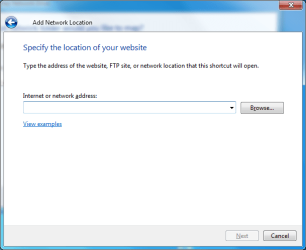
Hi there, I have a quick question. I went to map a network drive using the following dialogue box (attached image).
Explorer, Computer, Map Network Drive, Connect to a Web site that you can use to store your documents and pictures, Next, Next and then I get to the following dialogue (attached image 2).
In this box I entered an address and pressed next and then realised that it wouldn't work however the address is now in the drop down and I cannot find a way to get rid of it. I have tried CCleaner with no luck. So I was just wondering if you knew a way to clear the recently entered in that following dialogue box. thanks.
Explorer, Computer, Map Network Drive, Connect to a Web site that you can use to store your documents and pictures, Next, Next and then I get to the following dialogue (attached image 2).
In this box I entered an address and pressed next and then realised that it wouldn't work however the address is now in the drop down and I cannot find a way to get rid of it. I have tried CCleaner with no luck. So I was just wondering if you knew a way to clear the recently entered in that following dialogue box. thanks.
Attachments

My Computer
At a glance
Windows 7 Ultimate x64
- Computer type
- PC/Desktop
- OS
- Windows 7 Ultimate x64
Similar threads
- Replies
- 8
- Views
- 4K
- Replies
- 2
- Views
- 6K

- Replies
- 13
- Views
- 39K

- Replies
- 1
- Views
- 9K
