Solved HDD running very slowly

me12

New member
Local time
11:12 PM
Messages
8
Since the beginning my laptop HDD has always been too slow. I get an average of 15MB/s when copying files inside the hard disk.
My specs:
Intel i3, 2100M, 2.1GHz Sandybridge
2GB DDR3 RAM 1333MHz
500GB Seagate SATA HDD 5400RPM
Windows 7 ultimate 32bit

This is the HDD spec from Speccy(similar to cpu-z):
Hard Drives
ST9500325AS ATA Device
Manufacturer Seagate
Form Factor 2.5"
Heads 16
Cylinders 16383
SATA type SATA-II 3.0Gb/s
Device type Fixed
ATA Standard ATA8-ACS
48-bit LBA Supported
Serial Number 6VESF4PH
Interface SATA
Capacity 488GB
Real size 500,107,862,016 bytes
RAID Type None
S.M.A.R.T
01 Read Error Rate 112 (099 worst) Data 0002EBA872
03 Spin-Up Time 098 (098) Data 0000000000
04 Start/Stop Count 100 (100) Data 000000015D
05 Reallocated Sectors Count 100 (100) Data 0000000000
07 Seek Error Rate 074 (060) Data 00018EB0BD
09 Power-On Hours (POH) 099 (099) Data 00000003B2
0A Spin Retry Count 100 (100) Data 0000000000
0C Device Power Cycle Count 100 (100) Data 000000015D
B8 100 (100) Data 0000000000
BB 100 (100) Data 0000000000
BC 100 (099) Data 0000000003
BD High Fly Writes (WDC) 100 (100) Data 0000000000
BE Temperature Difference from 100 069 (052) Data 001F1E001F
BF G-sense error rate 100 (100) Data 0000000003
C0 Power-off Retract Count 100 (100) Data 0000000004
C1 Load/Unload Cycle Count 100 (100) Data 00000003E8
C2 Temperature 031 (048) Data 000000001F
C3 Hardware ECC Recovered 054 (050) Data 0002EBA872
C5 Current Pending Sector Count 100 (100) Data 0000000000
C6 Uncorrectable Sector Count 100 (100) Data 0000000000
C7 UltraDMA CRC Error Count 200 (200) Data 0000000000
FE Free Fall Protection 100 (100) Data 0000000000
Temperature 32 °C
Temperature Range ok (less than 50 °C)
Status Good
Partition 0
Partition ID Disk #0, Partition #0
Size 992 KB
Partition 1
Partition ID Disk #0, Partition #1
Size 100 MB
Partition 2
Partition ID Disk #0, Partition #2
Disk Letter C:
File System NTFS
Volume Serial Number 287106E3
Size 39.0GB
Used Space 21.3GB (55%)
Free Space 17.6GB (45%)
Partition 3
Partition ID Disk #0, Partition #3
Disk Letter D:
File System NTFS
Volume Serial Number DA2D9397
Size 230GB
Used Space 127GB (56%)
Free Space 103GB (44%)
Disk Letter E:
File System NTFS
Volume Serial Number B20669C5
Size 96GB
Used Space 24.9GB (26%)
Free Space 71GB (74%)
Disk Letter F:
File System NTFS
Volume Serial Number 10405BD3
Size 101GB
Used Space 95GB (95%)
Free Space 5.49GB (5%)

I get an average write speed of 15MB/s which i think is too slow. I've seen 5400RPM HDDs write at 50+MB/s. Is 15MB/s what i should get or can i change some settings to get more speed? Another thing, speccy shows my ram speed to be 665MHz but I've a 1333MHz RAM. I read somewhere 1333MHz is shown as 665MHz in the OS is this true?
 

My Computer My Computer

Computer Manufacturer/Model Number
Asus K43SJ
OS
Windows 7 Ultimate x86
CPU
Intel Core i3-2310M CPU @ 2.10GHz
Motherboard
Intel Sandybridge HM65
Memory
2GB DDR3 1333MHz
Graphics Card(s)
NVIDIA GeForce GT 520M 1GB DDR5
Hard Drives
Seagate 2.5" 500GB SATA 5400RPM
Right clik the HDD in Device Manger and select Properties...
Make sure it has not dropped into PIO mode...if it has you should run chkdsk /r on it from a Command prompt and re-boot.
Then re-set it to "UDMA if available"...
 

My Computer My Computer

Computer Manufacturer/Model Number
Self-Built
OS
Vista Ultimate X64/ Windows 7 Dual-boot
CPU
Q6600
Motherboard
ASUS P5K
Memory
4G OCZ PC2 8500 Platinum
Graphics Card(s)
EVGA 8800GTS Vid Card
Hard Drives
500G Seagate SATA
200G Seagate SATA
100G WD Caviar SATA
80G WD Caviar IDE
PSU
OCZ Elite 800W PSU
Case
RaidMax Smilodon Case
Right clik the HDD in Device Manger and select Properties...
Make sure it has not dropped into PIO mode...if it has you should run chkdsk /r on it from a Command prompt and re-boot.
Then re-set it to "UDMA if available"...
In device manager, I've two options, one is disk drives and other is ide/ata controllers.
Diskdrive doesn't give any such options but ide/ata controllers did. Inside ide/ata controllers, i checked ata channel 0 and ata channel 2
channel 0: device type: ata disk mode: ultra dma mode6
channel 2: device type: atapi cdrom mode: ultra dma mode 5

Third option is intel 6 series/c200 series chipset family 6 port sata ahci controller - 1c03
I ran chkdsk but without the /r parameter. It didn't show any errors, so i guess i don't need to do that step?
 

My Computer My Computer

Computer Manufacturer/Model Number
Asus K43SJ
OS
Windows 7 Ultimate x86
CPU
Intel Core i3-2310M CPU @ 2.10GHz
Motherboard
Intel Sandybridge HM65
Memory
2GB DDR3 1333MHz
Graphics Card(s)
NVIDIA GeForce GT 520M 1GB DDR5
Hard Drives
Seagate 2.5" 500GB SATA 5400RPM
Since the beginning my laptop HDD has always been too slow. I get an average of 15MB/s when copying files inside the hard disk.

That's to be expected - you're copying files within your HD so you're causing it to have to read a chunk, write it somewhere else, go back, read the next chunk, and so on. So you're reading and writing at the same time plus the heads will have to move a lot. It gets even slower if you copy many small files rather than a few large ones.

There's nothing wrong with your HD at all. You can get much faster reads or writes in the range of 50MB/s, but that's only if you're exclusively reading from or writing to the drive.

A simple benchmark such as HDTune will demonstrate this. If you want to try for yourself, download the free version here: HD Tune website

Your only ways of getting faster speeds are a 7200rpm drive (only marginally faster) or an SSD (massive gains).
 

My Computer My Computer

Computer type
PC/Desktop
Computer Manufacturer/Model Number
Custom-built
OS
Windows 7 Professional SP1 32-bit
CPU
Intel Core 2 Duo E6600 2.4GHz
Motherboard
Asus PL5D2
Memory
4GB DDR2-667 (4x1GB in dual-channel config)
Graphics Card(s)
nVidia GeForce 9800 GT
Sound Card
Creative X-Fi XtremeMusic
Monitor(s) Displays
Acer P236H
Screen Resolution
1920x1200 (DVI)
Hard Drives
OCZ SSD Vertex Plus 60GB SATA (Firmware 3.55), 64MB cache
Hitachi HD321KJ SATA, 320GB, 7200rpm, 16MB cache
PSU
Antec TruePower 2.0
Case
Cooler Master Centurion
Cooling
Too many fans
Keyboard
Standard
Mouse
Microsoft wireless optical mouse
Internet Speed
AT&T U-verse (18mbit/sec)
Antivirus
Microsoft Security Essentials
Browser
Firefox
Other Info
Other devices:
Compaq CQ-60 laptop
Google Nexus 7 (2012) tablet
Nvidia SHIELD tablet (US/LTE)
Hardkernel ODROID-XU single-board computer (Samsung Exynos 5420)
Since the beginning my laptop HDD has always been too slow. I get an average of 15MB/s when copying files inside the hard disk.

That's to be expected - you're copying files within your HD so you're causing it to have to read a chunk, write it somewhere else, go back, read the next chunk, and so on. So you're reading and writing at the same time plus the heads will have to move a lot. It gets even slower if you copy many small files rather than a few large ones.

There's nothing wrong with your HD at all. You can get much faster reads or writes in the range of 50MB/s, but that's only if you're exclusively reading from or writing to the drive.

A simple benchmark such as HDTune will demonstrate this. If you want to try for yourself, download the free version here: HD Tune website

Your only ways of getting faster speeds are a 7200rpm drive (only marginally faster) or an SSD (massive gains).
I just did a test with hdtune. I got an lowest of 17MB/s and average of 56 MB/s. The graph shows my speed to go own with time (Please check the attachment). Is this to be expected? When I copy files from usb drives to my hdd, i see around 15MB/s too, they usually start at 35 MB/s and go down pretty fast and stay constant only at around 15MB/s. I used usb2.0 (both the drive and the port) but they were usually huge folders with many files around 5GB. I use kaspersky internet security suite. Does it slow down my speeds? HDTune shows around 50MB/s, so let's say I want to see that speed at work, what type of files and how big files should i use for the test, let's say I'll copy files from hdd to a pendrive using usb2.0.
 

Attachments

  • hdtune.JPG
    hdtune.JPG
    58.2 KB · Views: 197

My Computer My Computer

Computer Manufacturer/Model Number
Asus K43SJ
OS
Windows 7 Ultimate x86
CPU
Intel Core i3-2310M CPU @ 2.10GHz
Motherboard
Intel Sandybridge HM65
Memory
2GB DDR3 1333MHz
Graphics Card(s)
NVIDIA GeForce GT 520M 1GB DDR5
Hard Drives
Seagate 2.5" 500GB SATA 5400RPM
Again, nothing wrong with your HD Tune numbers. Those nums are to be expected from such a slow disk. And when you copy from a stick, it is the stick that determines the speed. Run your stick thru HD Tune and you will see.
 

My Computer My Computer

Computer Manufacturer/Model Number
HP, Dell, Gateway, Toshiba - 4 laptops and 2 desktops
OS
Vista, Windows7, Mint Mate, Zorin, Windows 8
CPU
from 1.6GHz Duo to i7
Monitor(s) Displays
2x HP w2207
Hard Drives
5x HDD, 7x SSD, 12x Externals
Keyboard
with trackball - no mices
Mouse
Trackball mice
Internet Speed
DSL 6000
Again, nothing wrong with your HD Tune numbers. Those nums are to be expected from such a slow disk. And when you copy from a stick, it is the stick that determines the speed. Run your stick thru HD Tune and you will see.

I just did hdtune test on the flashdrive and got an average of 23MB/s, then I tried moving a 5GB file from the flash drive to my HDD and the speed windows showed was 19MB/s. So, I guess it's alright. I always thought 2.0 flash drives have the same speed as the 2.0usb which is 60MB/s.

HD tune says 'UDMA Mode 5(Ultra ATA/100) is active on my HDD but UDMA mode 6(ultra ata/133) is supported (Please see the screenshot). Shouldn't the active mode be the one that is supported. Should I be concerned about that?
So, copying files to an external hdd should give me around 50MB/s on usb2.0?
And what 'd be the HDtune results for a 7200rpm hdd?

Thankyou
 

Attachments

  • udmamode.JPG
    udmamode.JPG
    51.5 KB · Views: 143

My Computer My Computer

Computer Manufacturer/Model Number
Asus K43SJ
OS
Windows 7 Ultimate x86
CPU
Intel Core i3-2310M CPU @ 2.10GHz
Motherboard
Intel Sandybridge HM65
Memory
2GB DDR3 1333MHz
Graphics Card(s)
NVIDIA GeForce GT 520M 1GB DDR5
Hard Drives
Seagate 2.5" 500GB SATA 5400RPM
You'll actually be limited by the USB2.0 port itself, not the speed of an external HD. In this case, you can expect maximum transfer rates around 30-35MB/sec.

The downward curve you observed in HDTune is due to the geometry of spinning HDs:
While the platter spins with a constant angular velocity, the read/write heads start at the edge of the platter where they achieve the fastest linear velocity and thus transfer rate. This goes down gradually as the heads move further inward toward the center of the platter.

(CDs and DVDs work the opposite way for some curious reason: they start at the inner edge and get faster as the optical lens moves toward the outer edge of the disc. At slower speeds, some drives may still use CLV or constant linear velocity, which makes the disc spin slower the further out the lens moves, so the reading speed remains somewhat constant. This isn't common with today's highspeed drives however)
 
Last edited:

My Computer My Computer

Computer type
PC/Desktop
Computer Manufacturer/Model Number
Custom-built
OS
Windows 7 Professional SP1 32-bit
CPU
Intel Core 2 Duo E6600 2.4GHz
Motherboard
Asus PL5D2
Memory
4GB DDR2-667 (4x1GB in dual-channel config)
Graphics Card(s)
nVidia GeForce 9800 GT
Sound Card
Creative X-Fi XtremeMusic
Monitor(s) Displays
Acer P236H
Screen Resolution
1920x1200 (DVI)
Hard Drives
OCZ SSD Vertex Plus 60GB SATA (Firmware 3.55), 64MB cache
Hitachi HD321KJ SATA, 320GB, 7200rpm, 16MB cache
PSU
Antec TruePower 2.0
Case
Cooler Master Centurion
Cooling
Too many fans
Keyboard
Standard
Mouse
Microsoft wireless optical mouse
Internet Speed
AT&T U-verse (18mbit/sec)
Antivirus
Microsoft Security Essentials
Browser
Firefox
Other Info
Other devices:
Compaq CQ-60 laptop
Google Nexus 7 (2012) tablet
Nvidia SHIELD tablet (US/LTE)
Hardkernel ODROID-XU single-board computer (Samsung Exynos 5420)
And what 'd be the HDtune results for a 7200rpm hdd?

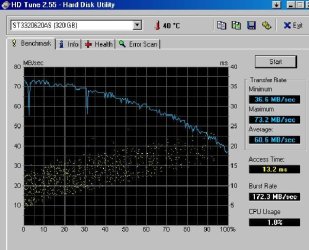
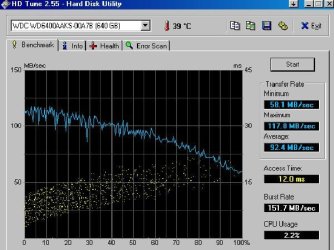
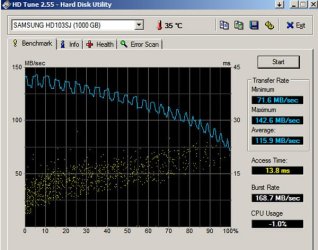
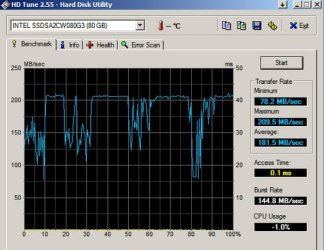
Here are several examples of 7200 rpm drives for your comparison:

A Seagate 320, maybe 5 years old.

A Western Digital Caviar Black 640, about 3 years old

A Samsung 1 TB, about 3 months old.

The last one is an Intel SSD, about 6 months old
 

Attachments

  • HD Tune test Seagate 320 gig 41608.jpg
    HD Tune test Seagate 320 gig 41608.jpg
    50.1 KB · Views: 227
  • HD Tune test WD 640 gig 41608.jpg
    HD Tune test WD 640 gig 41608.jpg
    45.5 KB · Views: 216
  • Samsung 103SJ 1TB HD Tune 62311.jpg
    Samsung 103SJ 1TB HD Tune 62311.jpg
    68.8 KB · Views: 216
  • HD Tune 062311.jpg
    HD Tune 062311.jpg
    66.5 KB · Views: 221

My Computer My Computer

Computer type
PC/Desktop
Computer Manufacturer/Model Number
Ignatz Special; 4 speed manual gearbox; factory air conditioning; one of one
OS
Windows 7 Home Premium SP1, 64-bit
CPU
Intel Skylake i5-6600K, not overclocked
Motherboard
AsRock Z170M Extreme 4, micro ATX
Memory
8 GB HyperX DDR4-2666 (2 x 4 GB)
Graphics Card(s)
none; graphics are integrated on CPU
Sound Card
onboard: Realtek ALC1150; external: USB Behringer UF0-202
Monitor(s) Displays
Dell S2340M 23 inch IPS
Screen Resolution
1600 x 900
Hard Drives
System: Crucial MX100 series SSD, 128 GB;
Data: Samsung Spinpoint 103SJ, 1 TB;
Backup: WD Caviar Green WD30EZRX-00D8PB0, 3 TB
PSU
Rosewill SilentNight 500 watt fanless, semi-modular
Case
Antec Solo II
Cooling
Noctua NH-U12S; Noctua F12 intake, Noctua S12A exhaust
Keyboard
Microsoft 200 6JH-00001 USB
Mouse
Dell or Microsoft optical wired; USB
Antivirus
Microsoft Security Essentials and Malwarebytes Premium
Browser
Pale Moon
Other Info
All fans PWM; speeds at idle: CPU circa 500 rpm; intake circa 600 rpm; exhaust circa 600 rpm; CPU temps 27 idle and 47 C load in a warm room (27 C/81 F) when running Intel Extreme Tuning Utility stress test.
Thankyou everyone for helping me out solve this problem. :)
 

My Computer My Computer

Computer Manufacturer/Model Number
Asus K43SJ
OS
Windows 7 Ultimate x86
CPU
Intel Core i3-2310M CPU @ 2.10GHz
Motherboard
Intel Sandybridge HM65
Memory
2GB DDR3 1333MHz
Graphics Card(s)
NVIDIA GeForce GT 520M 1GB DDR5
Hard Drives
Seagate 2.5" 500GB SATA 5400RPM
Back
Top