Solved Dual Graphic Card

Jetson

New member
Local time
11:55 PM
Messages
16
Hi,
I currently have a HD3870 and everything's working well. I know, it's not new, but it suits my needs.
For the moment, I'm using my PS3 and PS3 Media Server to play HD movies in the living room (via Gigabit Ethernet) but I can't have DTS-MA or TrueHD to the receiver.
I don't want to pay a fortune in a new GPU since I don't need more than my HD3870 because I'm not playing new games anyway.
My idea was to get a low-end HD5xxx (probably HD5450 for around 30$) but my concern was how to manage those cards as I want to leave the HD3870 in because it's stronger, but have the HD5xxx for movies via HDMI (to get HD-Audio bitstream).
I'm using MPC-HC as my media player with CoreAVC and FFDShow (which is compatible with bistreaming over HD5xxx).
How Windows and driver manage both GPU since they are not the same generation (HD3xxx and HD5xxx)? Crossfire?
Is there a way, in MPC-HC, to tell it where to feed audio and video? I can't try it as I don't have a second GPU yet.

I'm not sure if it's clear enough but feel free if you have questions.

Thanks!
 

My Computer My Computer

OS
Windows 7 Pro x64
CPU
Athlon64 X2 6000+ Brisbane 65 nm 3.1 GHz
Motherboard
ASUS M2N-E SLI
Memory
Kingston HyperX DDR2-800 2X2GB KHX6400D2K2/4G + 2X1GB = 6 GB
Graphics Card(s)
Diamond HD3870 512 MB GDDR4
Sound Card
Sound Blaster Live! Value for analog + Onboard for SPDIF
Monitor(s) Displays
SyncMaster 226BW
Screen Resolution
1680 X 1050
Hard Drives
Seagate Barracuda 250 GB
Hitachi Desktar 1 TB
PSU
Apevia 600W
Case
Thermaltake Tsunami Dream
Keyboard
HP Multimedia
Mouse
IntelliMouse Optical USB 5 buttons
Internet Speed
7.5MB Down 820 KB Up
Other Info
Altec Lansing ADA885 Speakers
First the 3870 is not stronger.
Unless you meant 4870 then it has more kick.
The truth is the newer cards have such a massive number of stream processors compared to the older cards a mid range will completely out do a super performance model from just a few years ago now.

In my case 1 5850 = superior to 2x 8800gtx in sli.

Anyhow I would suggest going with a 6 series card as the money is about the same and you get a little more core clock speed.

Mixing the two cards on one system is more dependent on your motherbaord chipset than anything else. If you board is dated from the time of that graphics card, unless it specifically states it is a crossfire board, you are kind of out of luck on that front.

...anyhow here's my low profile/ low cost suggestion.
Newegg.com - XFX HD-645X-ZQH2 Radeon HD 6450 1GB 64-bit DDR3 PCI Express 2.1 x16 HDCP Ready Low Profile Ready Video Card
it has vga/hdmi/dvi outputs so should eliminate the need for any adapters at least.
 

My Computer My Computer

Computer Manufacturer/Model Number
Insane hobo technologies. ;-)
OS
Windows 7 x64
CPU
Intel i7 2600k
Motherboard
Asrock z68 extreme 4 gen 3
Memory
G.skill Ripjaw 16gigs @ 1866
Graphics Card(s)
Nvidia gtx580 (evga)
Sound Card
Integrated HD audio + hdmi
Monitor(s) Displays
24" ASUS widescreen + 42" insignia
Screen Resolution
1080p (1920x1080)
Hard Drives
128 Samsung 830
256 Samsung 840
3 x 1tb storage drive (various)
1 western digital 1tb (eSATA)
1 Seagate 1tb (eSATA)
PSU
1 kilowatt SLI/Crossfire rated Silverstone modular
Case
NZXT Phantom + additional 220 fan
Cooling
Zalmann
Keyboard
Microsoft wireless 3000 (v2)
Mouse
MS - wireless 5000 (bluetrack)
Internet Speed
depends on if you ask me or my provider.
Other Info
The above information is provided as is, and the author assumes no responsibility for issues it may cause with your sanity or fanboyism.

My Computer My Computer

OS
Windows 7 Pro x64
CPU
Athlon64 X2 6000+ Brisbane 65 nm 3.1 GHz
Motherboard
ASUS M2N-E SLI
Memory
Kingston HyperX DDR2-800 2X2GB KHX6400D2K2/4G + 2X1GB = 6 GB
Graphics Card(s)
Diamond HD3870 512 MB GDDR4
Sound Card
Sound Blaster Live! Value for analog + Onboard for SPDIF
Monitor(s) Displays
SyncMaster 226BW
Screen Resolution
1680 X 1050
Hard Drives
Seagate Barracuda 250 GB
Hitachi Desktar 1 TB
PSU
Apevia 600W
Case
Thermaltake Tsunami Dream
Keyboard
HP Multimedia
Mouse
IntelliMouse Optical USB 5 buttons
Internet Speed
7.5MB Down 820 KB Up
Other Info
Altec Lansing ADA885 Speakers
oh I must have missed something on that mark, yeah you'd need another 58xx/68xx to really beat it out.
The problem is a 30 dollar budget, on less than 100 I could easily improve it.
a 5750 would completely blow it away, lower power and higher numbers, but it's a roughly 90 dollar card.
 

My Computer My Computer

Computer Manufacturer/Model Number
Insane hobo technologies. ;-)
OS
Windows 7 x64
CPU
Intel i7 2600k
Motherboard
Asrock z68 extreme 4 gen 3
Memory
G.skill Ripjaw 16gigs @ 1866
Graphics Card(s)
Nvidia gtx580 (evga)
Sound Card
Integrated HD audio + hdmi
Monitor(s) Displays
24" ASUS widescreen + 42" insignia
Screen Resolution
1080p (1920x1080)
Hard Drives
128 Samsung 830
256 Samsung 840
3 x 1tb storage drive (various)
1 western digital 1tb (eSATA)
1 Seagate 1tb (eSATA)
PSU
1 kilowatt SLI/Crossfire rated Silverstone modular
Case
NZXT Phantom + additional 220 fan
Cooling
Zalmann
Keyboard
Microsoft wireless 3000 (v2)
Mouse
MS - wireless 5000 (bluetrack)
Internet Speed
depends on if you ask me or my provider.
Other Info
The above information is provided as is, and the author assumes no responsibility for issues it may cause with your sanity or fanboyism.
The reason I don't want to put 100$ on another GPU is the fact that my PC only has an Athlon64 X2 6100+
with 6Gb DDR2.

And putting a HD5750 or over would be overkill.

That's the reasonwhy I asked if putting a low-level HD5xxx or HD6xxx would work as I want: Be able to choose within MPC-HC the card to output Audio/Video.

Thanks a lot Maguscreed!
 

My Computer My Computer

OS
Windows 7 Pro x64
CPU
Athlon64 X2 6000+ Brisbane 65 nm 3.1 GHz
Motherboard
ASUS M2N-E SLI
Memory
Kingston HyperX DDR2-800 2X2GB KHX6400D2K2/4G + 2X1GB = 6 GB
Graphics Card(s)
Diamond HD3870 512 MB GDDR4
Sound Card
Sound Blaster Live! Value for analog + Onboard for SPDIF
Monitor(s) Displays
SyncMaster 226BW
Screen Resolution
1680 X 1050
Hard Drives
Seagate Barracuda 250 GB
Hitachi Desktar 1 TB
PSU
Apevia 600W
Case
Thermaltake Tsunami Dream
Keyboard
HP Multimedia
Mouse
IntelliMouse Optical USB 5 buttons
Internet Speed
7.5MB Down 820 KB Up
Other Info
Altec Lansing ADA885 Speakers
Yes it will work, and no Crossfire isn't needed (it wouldn't work with those two anyway). Also you don't make the selection in the program as to which card is used, that is determined by which monitor it is opened on and which card that monitor is connected too. In your case you would open MPC-HC on the monitor connected to the HD 5xxx/6xxx.
 

My Computer My Computer

Computer type
PC/Desktop
Computer Manufacturer/Model Number
Me
OS
Win 7 Ultimate x64
CPU
FX-8350 @ 4.6 GHz so far
Motherboard
Asus M5A97 EVO
Memory
ADATA XPG V1 Series Black 8GB DDR3 1600
Graphics Card(s)
Sapphire R9 270x Dual-X
Sound Card
Xonar DGX w/ Corsair Vengence 1300
Monitor(s) Displays
Acer S232HL Abid
Screen Resolution
1920x1080
Hard Drives
120 GB OCZ Vertex 3
500 GB Seagate 7200.12
PSU
Antec Earthwatts 650W Green
Case
Antec Three Hundred
Cooling
Cooler Master 212 EVO
Keyboard
Logitech G510
Mouse
Logitech G500s
Internet Speed
35000/3000
So, if I understand, only putting the MPC-HC window on the HD5xxx/6xxx, the HD-Audio bistreaming will automatically (with proper configuration) work? That would be exactly what I want since the HDMI would be connected to AV receiver in the living.
Thanks a lot, I'll give it a try!
 

My Computer My Computer

OS
Windows 7 Pro x64
CPU
Athlon64 X2 6000+ Brisbane 65 nm 3.1 GHz
Motherboard
ASUS M2N-E SLI
Memory
Kingston HyperX DDR2-800 2X2GB KHX6400D2K2/4G + 2X1GB = 6 GB
Graphics Card(s)
Diamond HD3870 512 MB GDDR4
Sound Card
Sound Blaster Live! Value for analog + Onboard for SPDIF
Monitor(s) Displays
SyncMaster 226BW
Screen Resolution
1680 X 1050
Hard Drives
Seagate Barracuda 250 GB
Hitachi Desktar 1 TB
PSU
Apevia 600W
Case
Thermaltake Tsunami Dream
Keyboard
HP Multimedia
Mouse
IntelliMouse Optical USB 5 buttons
Internet Speed
7.5MB Down 820 KB Up
Other Info
Altec Lansing ADA885 Speakers
The audio you would have to set in the program if it allows it, but for the video yes just open it (or drag it) to the monitor/card you want it to run on. As far as I know MPC-HC does, but if it doesn't (or any other you may use) then you will also have to set the HDMI audio for the second card as the Windows default audio device.
 

My Computer My Computer

Computer type
PC/Desktop
Computer Manufacturer/Model Number
Me
OS
Win 7 Ultimate x64
CPU
FX-8350 @ 4.6 GHz so far
Motherboard
Asus M5A97 EVO
Memory
ADATA XPG V1 Series Black 8GB DDR3 1600
Graphics Card(s)
Sapphire R9 270x Dual-X
Sound Card
Xonar DGX w/ Corsair Vengence 1300
Monitor(s) Displays
Acer S232HL Abid
Screen Resolution
1920x1080
Hard Drives
120 GB OCZ Vertex 3
500 GB Seagate 7200.12
PSU
Antec Earthwatts 650W Green
Case
Antec Three Hundred
Cooling
Cooler Master 212 EVO
Keyboard
Logitech G510
Mouse
Logitech G500s
Internet Speed
35000/3000
Yes, MPC-HC has the ability to choose the audio output internally.
 

My Computer My Computer

OS
Windows 7 Pro x64
CPU
Athlon64 X2 6000+ Brisbane 65 nm 3.1 GHz
Motherboard
ASUS M2N-E SLI
Memory
Kingston HyperX DDR2-800 2X2GB KHX6400D2K2/4G + 2X1GB = 6 GB
Graphics Card(s)
Diamond HD3870 512 MB GDDR4
Sound Card
Sound Blaster Live! Value for analog + Onboard for SPDIF
Monitor(s) Displays
SyncMaster 226BW
Screen Resolution
1680 X 1050
Hard Drives
Seagate Barracuda 250 GB
Hitachi Desktar 1 TB
PSU
Apevia 600W
Case
Thermaltake Tsunami Dream
Keyboard
HP Multimedia
Mouse
IntelliMouse Optical USB 5 buttons
Internet Speed
7.5MB Down 820 KB Up
Other Info
Altec Lansing ADA885 Speakers
Just out of interest, does anyone know if there are any reasonable quality graphic cards still available with dual VGA outputs? I need VGA because although both my monitors have HDMI inputs, they're already in use with a separate Apple Mac. I'm thinking of buying myself a PC but it would need to use the VGA inputs on both monitors. I don't want to be constantly swapping leads around all the time. :eek:
 

My Computer My Computer

Computer Manufacturer/Model Number
Mac Mini
OS
Windows 7
Memory
4GB
I think a lot if not all graphics card with DVI are able to output to VGA with a simple DVI to VGA adapter. So you only need a card with 2 DVI output (and of course 2 adapters).
 

My Computer My Computer

OS
Windows 7 Pro x64
CPU
Athlon64 X2 6000+ Brisbane 65 nm 3.1 GHz
Motherboard
ASUS M2N-E SLI
Memory
Kingston HyperX DDR2-800 2X2GB KHX6400D2K2/4G + 2X1GB = 6 GB
Graphics Card(s)
Diamond HD3870 512 MB GDDR4
Sound Card
Sound Blaster Live! Value for analog + Onboard for SPDIF
Monitor(s) Displays
SyncMaster 226BW
Screen Resolution
1680 X 1050
Hard Drives
Seagate Barracuda 250 GB
Hitachi Desktar 1 TB
PSU
Apevia 600W
Case
Thermaltake Tsunami Dream
Keyboard
HP Multimedia
Mouse
IntelliMouse Optical USB 5 buttons
Internet Speed
7.5MB Down 820 KB Up
Other Info
Altec Lansing ADA885 Speakers
I think a lot if not all graphics card with DVI are able to output to VGA with a simple DVI to VGA adapter. So you only need a card with 2 DVI output (and of course 2 adapters).

You are correct sir.
 

My Computer My Computer

Computer Manufacturer/Model Number
Insane hobo technologies. ;-)
OS
Windows 7 x64
CPU
Intel i7 2600k
Motherboard
Asrock z68 extreme 4 gen 3
Memory
G.skill Ripjaw 16gigs @ 1866
Graphics Card(s)
Nvidia gtx580 (evga)
Sound Card
Integrated HD audio + hdmi
Monitor(s) Displays
24" ASUS widescreen + 42" insignia
Screen Resolution
1080p (1920x1080)
Hard Drives
128 Samsung 830
256 Samsung 840
3 x 1tb storage drive (various)
1 western digital 1tb (eSATA)
1 Seagate 1tb (eSATA)
PSU
1 kilowatt SLI/Crossfire rated Silverstone modular
Case
NZXT Phantom + additional 220 fan
Cooling
Zalmann
Keyboard
Microsoft wireless 3000 (v2)
Mouse
MS - wireless 5000 (bluetrack)
Internet Speed
depends on if you ask me or my provider.
Other Info
The above information is provided as is, and the author assumes no responsibility for issues it may cause with your sanity or fanboyism.
I think a lot if not all graphics card with DVI are able to output to VGA with a simple DVI to VGA adapter. So you only need a card with 2 DVI output (and of course 2 adapters).

I wouldn't be too quick to go looking at dual VGA via adapter on dual DVI as most of the cards today with dual DVI ports only support VGA from one of them,

http://www.sevenforums.com/hardware-devices/194389-dual-monitor-not-recognized.html

http://www.sevenforums.com/graphic-cards/197222-eah-hd6870-multiple-display-problem.html

It is possible that the few cards out now that have both a VGA and DVI port on them might support VGA via adapter on the DVI port, but I would be contacting the card manufacturer first to confirm if it does or not.
 

My Computer My Computer

Computer type
PC/Desktop
Computer Manufacturer/Model Number
Me
OS
Win 7 Ultimate x64
CPU
FX-8350 @ 4.6 GHz so far
Motherboard
Asus M5A97 EVO
Memory
ADATA XPG V1 Series Black 8GB DDR3 1600
Graphics Card(s)
Sapphire R9 270x Dual-X
Sound Card
Xonar DGX w/ Corsair Vengence 1300
Monitor(s) Displays
Acer S232HL Abid
Screen Resolution
1920x1080
Hard Drives
120 GB OCZ Vertex 3
500 GB Seagate 7200.12
PSU
Antec Earthwatts 650W Green
Case
Antec Three Hundred
Cooling
Cooler Master 212 EVO
Keyboard
Logitech G510
Mouse
Logitech G500s
Internet Speed
35000/3000
That's exactly why I never said I was 100% sure (both DVI to VGA).
 

My Computer My Computer

OS
Windows 7 Pro x64
CPU
Athlon64 X2 6000+ Brisbane 65 nm 3.1 GHz
Motherboard
ASUS M2N-E SLI
Memory
Kingston HyperX DDR2-800 2X2GB KHX6400D2K2/4G + 2X1GB = 6 GB
Graphics Card(s)
Diamond HD3870 512 MB GDDR4
Sound Card
Sound Blaster Live! Value for analog + Onboard for SPDIF
Monitor(s) Displays
SyncMaster 226BW
Screen Resolution
1680 X 1050
Hard Drives
Seagate Barracuda 250 GB
Hitachi Desktar 1 TB
PSU
Apevia 600W
Case
Thermaltake Tsunami Dream
Keyboard
HP Multimedia
Mouse
IntelliMouse Optical USB 5 buttons
Internet Speed
7.5MB Down 820 KB Up
Other Info
Altec Lansing ADA885 Speakers
I can attest to xfx doing it. Newer cards that support eye finity also will automatically detect an adapter in use and make the required changes. ...that's for ati of course. I haven't owned a new nvidia card in several years now so I don't know how they are handling that.
 

My Computer My Computer

Computer Manufacturer/Model Number
Insane hobo technologies. ;-)
OS
Windows 7 x64
CPU
Intel i7 2600k
Motherboard
Asrock z68 extreme 4 gen 3
Memory
G.skill Ripjaw 16gigs @ 1866
Graphics Card(s)
Nvidia gtx580 (evga)
Sound Card
Integrated HD audio + hdmi
Monitor(s) Displays
24" ASUS widescreen + 42" insignia
Screen Resolution
1080p (1920x1080)
Hard Drives
128 Samsung 830
256 Samsung 840
3 x 1tb storage drive (various)
1 western digital 1tb (eSATA)
1 Seagate 1tb (eSATA)
PSU
1 kilowatt SLI/Crossfire rated Silverstone modular
Case
NZXT Phantom + additional 220 fan
Cooling
Zalmann
Keyboard
Microsoft wireless 3000 (v2)
Mouse
MS - wireless 5000 (bluetrack)
Internet Speed
depends on if you ask me or my provider.
Other Info
The above information is provided as is, and the author assumes no responsibility for issues it may cause with your sanity or fanboyism.
I can attest to xfx doing it.

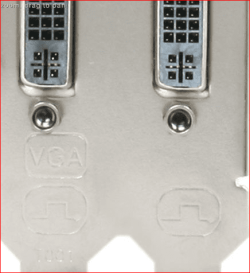
Not on their current AMD line up. This is from one of their cards (HD 6950),

backplate.PNG

VGA via adapter from only one of the DVI ports, the other will not work with the adapter. Can't say anything about Nvidia cards from XFX as all they have are the low end Fermi based cards, most of which come with a native VGA port,

Newegg.com - Computer Hardware, Video Cards & Video Devices, Desktop Graphics / Video Cards, XFX, NVIDIA, GeForce G/GT series

I would be contacting XFX before assuming that the cards support VGA from the DVI port.
 

My Computer My Computer

Computer type
PC/Desktop
Computer Manufacturer/Model Number
Me
OS
Win 7 Ultimate x64
CPU
FX-8350 @ 4.6 GHz so far
Motherboard
Asus M5A97 EVO
Memory
ADATA XPG V1 Series Black 8GB DDR3 1600
Graphics Card(s)
Sapphire R9 270x Dual-X
Sound Card
Xonar DGX w/ Corsair Vengence 1300
Monitor(s) Displays
Acer S232HL Abid
Screen Resolution
1920x1080
Hard Drives
120 GB OCZ Vertex 3
500 GB Seagate 7200.12
PSU
Antec Earthwatts 650W Green
Case
Antec Three Hundred
Cooling
Cooler Master 212 EVO
Keyboard
Logitech G510
Mouse
Logitech G500s
Internet Speed
35000/3000
One thing I have noticed is many people that I find complaining of vga not working for them are trying to run 1080p resolutions through the vga adapter.
This will not work properly.
 

My Computer My Computer

Computer Manufacturer/Model Number
Insane hobo technologies. ;-)
OS
Windows 7 x64
CPU
Intel i7 2600k
Motherboard
Asrock z68 extreme 4 gen 3
Memory
G.skill Ripjaw 16gigs @ 1866
Graphics Card(s)
Nvidia gtx580 (evga)
Sound Card
Integrated HD audio + hdmi
Monitor(s) Displays
24" ASUS widescreen + 42" insignia
Screen Resolution
1080p (1920x1080)
Hard Drives
128 Samsung 830
256 Samsung 840
3 x 1tb storage drive (various)
1 western digital 1tb (eSATA)
1 Seagate 1tb (eSATA)
PSU
1 kilowatt SLI/Crossfire rated Silverstone modular
Case
NZXT Phantom + additional 220 fan
Cooling
Zalmann
Keyboard
Microsoft wireless 3000 (v2)
Mouse
MS - wireless 5000 (bluetrack)
Internet Speed
depends on if you ask me or my provider.
Other Info
The above information is provided as is, and the author assumes no responsibility for issues it may cause with your sanity or fanboyism.
Finally, cost me 16$ for a HD5450. Put it as second GPU (primary is HD3870) and everything works like a charm including HD-Audio bitstream.

Thanks to everyone!
 

My Computer My Computer

OS
Windows 7 Pro x64
CPU
Athlon64 X2 6000+ Brisbane 65 nm 3.1 GHz
Motherboard
ASUS M2N-E SLI
Memory
Kingston HyperX DDR2-800 2X2GB KHX6400D2K2/4G + 2X1GB = 6 GB
Graphics Card(s)
Diamond HD3870 512 MB GDDR4
Sound Card
Sound Blaster Live! Value for analog + Onboard for SPDIF
Monitor(s) Displays
SyncMaster 226BW
Screen Resolution
1680 X 1050
Hard Drives
Seagate Barracuda 250 GB
Hitachi Desktar 1 TB
PSU
Apevia 600W
Case
Thermaltake Tsunami Dream
Keyboard
HP Multimedia
Mouse
IntelliMouse Optical USB 5 buttons
Internet Speed
7.5MB Down 820 KB Up
Other Info
Altec Lansing ADA885 Speakers
johne53 most graphics card come with adapters for dvi-vga, the ones with a vga port already on them generally don't but they are easy to pickup for a very low cost. around £5 less if you look around obviously.

both of my last 2 sapphire ati cards came with 1 x dvi-vga and 1 x dvi-hdmi.

the shop i work in sells the adapters as well so they are fairly easy to come by.
 

My Computer My Computer

Computer Manufacturer/Model Number
.
OS
.
CPU
.
Motherboard
.
Memory
.
Graphics Card(s)
.
Monitor(s) Displays
.
Screen Resolution
.
Hard Drives
.
PSU
.
Case
.
Cooling
.
Keyboard
.
Mouse
.
Internet Speed
.
Other Info
.
Thanks Gazz and everyone else who's been providing suggestions. However I think there's some confusion creeping in here. VGA is an analogue format. DVI / HDMI etc are digital formats. You'd need an external box to convert between the two. You can't do it with an adapter lead. Unless.... the card is fitted with a dual HDMI / VGA socket. As others have pointed out here, there are several cards on the market where the main HDMI socket reserves a few pins for providing a complementary VGA output. In that case, you can either obtain HDMI or (with a suitable cable) VGA from the same socket. Unfortunately, this feature tends to be only available from the primary output. Digital cards with two outputs don't normally provide that feature on the second output. The second output is digital only as you've noticed yourself. Therefore it can't be directly connected to an analogue monitor. A converter box isn't out of the question but ideally, I'd prefer not to have one. It's just something else that I'd need to buy batteries for.... :cry:
 

My Computer My Computer

Computer Manufacturer/Model Number
Mac Mini
OS
Windows 7
Memory
4GB
Back
Top