Help me please! About graphic card

arinbmw

New member
Local time
9:56 PM
Messages
22
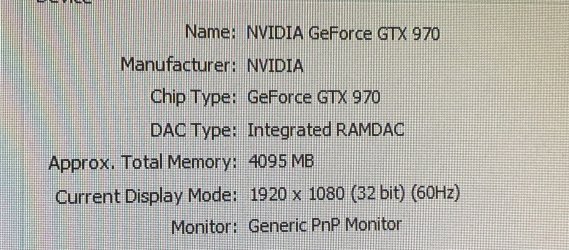
Hi everyone, can i put second GTX 970 on my motherboard? Or it is better i put 1080? If it is possible!?
 

Attachments

  • 83C619D3-3D81-47FE-A163-0B16A35394E6.jpeg
    83C619D3-3D81-47FE-A163-0B16A35394E6.jpeg
    874.1 KB · Views: 1
  • 3443E351-EC97-4BD0-8534-CCFCB9D897E8.jpeg
    3443E351-EC97-4BD0-8534-CCFCB9D897E8.jpeg
    1.2 MB · Views: 2

My Computer

Computer type
PC/Desktop
Computer Manufacturer/Model Number
Sony Vaio
OS
Windows 7 64 Bit
CPU
Intel(R) Core(TM) i5-2430M CPU @ 2.40GHz
Motherboard
Sony Corporation VAIO
Memory
4.00 GB
Graphics Card(s)
(1) Intel(R) HD Graphics 3000 (2) AMD Radeon(TM) HD 6470M
Sound Card
(1) Intel(R) Display Audio (2) Realtek High Definition Aud
Hard Drives
TOSHIBA MK5059GSXP
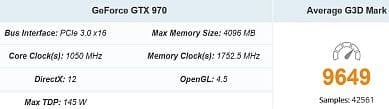
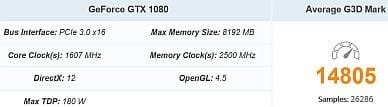
Your 1080 will undoubtedly be a lot faster than the 970. So just the 1080 is all that is needed without complication. However, you could add the 970 just for Physx processing.To use PhysX GPU acceleration
 

My Computer

Computer type
PC/Desktop
OS
Windows 7 Ultimate x64
Thanks! You mean i can just buy 1080 and install on my motherboard?
 

My Computer

Computer type
PC/Desktop
Computer Manufacturer/Model Number
Sony Vaio
OS
Windows 7 64 Bit
CPU
Intel(R) Core(TM) i5-2430M CPU @ 2.40GHz
Motherboard
Sony Corporation VAIO
Memory
4.00 GB
Graphics Card(s)
(1) Intel(R) HD Graphics 3000 (2) AMD Radeon(TM) HD 6470M
Sound Card
(1) Intel(R) Display Audio (2) Realtek High Definition Aud
Hard Drives
TOSHIBA MK5059GSXP
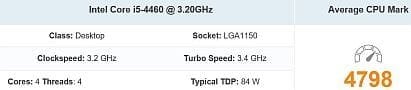
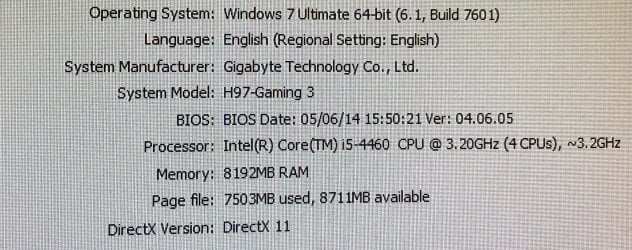
The full potential of the 970 is already being handicapped by the low performance of the processor, so I don't see the point of upgrading to the much more powerful 1080.

On top of that, there is only 8 GB of RAM in that computer.

Personally, I would leave the current graphics card installed and add another 8 GB of RAM.
 

Attachments

  • cpu.JPG
    cpu.JPG
    14.2 KB · Views: 10
  • gpu1.JPG
    gpu1.JPG
    16.3 KB · Views: 10
  • gpu2.JPG
    gpu2.JPG
    16.5 KB · Views: 10

My Computer

Computer type
PC/Desktop
Computer Manufacturer/Model Number
Dell OptiPlex 9020
OS
Windows 7 Professional SP1 64-bit
CPU
Intel Core i7-4790 3.60 GHz
Memory
32 GB DDR3-1600 MHz
Graphics Card(s)
Integrated Intel HD Graphics 4600
Monitor(s) Displays
Viewsonic 32" LCD
Hard Drives
Kingston SATA 3 240 GB SSD
Internet Speed
Spectrum Internet 1000 Mbps
Thanks! You mean i can just buy 1080 and install on my motherboard?

Not necessarily. You would have to have a PSU that supports the wattage needed for the new GPU if your current PSU doesn't support the wattage needed.

In other words... If your current PSU doesn't support the wattage needed for the GPU (1080), you'll need a new PSU that delivers enough wattage.

The point about the CPU to GPU bottleneck may be true.


What is the primary reason for a GPU upgrade?
 

My Computer

Computer type
PC/Desktop
OS
Windows 7 Ultimate x64
The full potential of the 970 is already being handicapped by the low performance of the processor, so I don't see the point of upgrading to the much more powerful 1080.

On top of that, there is only 8 GB of RAM in that computer.

Personally, I would leave the current graphics card installed and add another 8 GB of RAM.

Thanks! What is the best ram that i can buy for it? I heard that the ram should be same brand and samething! But i will buy 2x Ram! Is it ok?
 

My Computer

Computer type
PC/Desktop
Computer Manufacturer/Model Number
Sony Vaio
OS
Windows 7 64 Bit
CPU
Intel(R) Core(TM) i5-2430M CPU @ 2.40GHz
Motherboard
Sony Corporation VAIO
Memory
4.00 GB
Graphics Card(s)
(1) Intel(R) HD Graphics 3000 (2) AMD Radeon(TM) HD 6470M
Sound Card
(1) Intel(R) Display Audio (2) Realtek High Definition Aud
Hard Drives
TOSHIBA MK5059GSXP
Assuming your computer actually has a MSI H97 GAMING 3 motherboard, its specifications section shows it as having 4 DIMM slots and supporting up to 32 GB(8 GB x 4) of RAM.

It supports the use of 240-pin, 1.5 volt, Unbuffered, Non-ECC, DDR3-1600 modules.

Does it currently have one 8 GB module or two 4 GB modules?

Can you submit an image of the information on the module(s) sticker?
 

My Computer

Computer type
PC/Desktop
Computer Manufacturer/Model Number
Dell OptiPlex 9020
OS
Windows 7 Professional SP1 64-bit
CPU
Intel Core i7-4790 3.60 GHz
Memory
32 GB DDR3-1600 MHz
Graphics Card(s)
Integrated Intel HD Graphics 4600
Monitor(s) Displays
Viewsonic 32" LCD
Hard Drives
Kingston SATA 3 240 GB SSD
Internet Speed
Spectrum Internet 1000 Mbps
Assuming your computer actually has a MSI H97 GAMING 3 motherboard, its specifications section shows it as having 4 DIMM slots and supporting up to 32 GB(8 GB x 4) of RAM.

It supports the use of 240-pin, 1.5 volt, Unbuffered, Non-ECC, DDR3-1600 modules.

Does it currently have one 8 GB module or two 4 GB modules?

Can you submit an image of the information on the module(s) sticker?


Bro it is 1600 mhz 8-8-8-24 1.35v ddr 3 may i add same 2 4gb ram but another brand?
 

My Computer

Computer type
PC/Desktop
Computer Manufacturer/Model Number
Sony Vaio
OS
Windows 7 64 Bit
CPU
Intel(R) Core(TM) i5-2430M CPU @ 2.40GHz
Motherboard
Sony Corporation VAIO
Memory
4.00 GB
Graphics Card(s)
(1) Intel(R) HD Graphics 3000 (2) AMD Radeon(TM) HD 6470M
Sound Card
(1) Intel(R) Display Audio (2) Realtek High Definition Aud
Hard Drives
TOSHIBA MK5059GSXP
Back
Top