Word 2007 - Links within a document? Hide/Show sections of a document?

Calab

New member
Local time
2:36 AM
Messages
21
I have two questions regarding documents created in Word 2007...

1) Can links be created within a Word document? For example, can I click on and item my table of contents and have the document jump to that particular section of the document?

2) Also, is there a way to make sections of the document hidden until the user clicks a specific word or graphic in the document?

I'd like to specify a particular instruction and include a "Show example" link that would make a detailed example appear for those who needed the extra help.

Thanks everyone!
 

My Computer My Computer

At a glance

Windows 7 Pro 64bitAMD FX 6350 Six core CPU @ 3.9Ghz24GBnVidia GeForce GTX 660
Computer type
PC/Desktop
Computer Manufacturer/Model Number
Custom build
OS
Windows 7 Pro 64bit
CPU
AMD FX 6350 Six core CPU @ 3.9Ghz
Motherboard
Asus m5a88-m
Memory
24GB
Graphics Card(s)
nVidia GeForce GTX 660
Sound Card
Onboard
Monitor(s) Displays
Vizio 32" TV + 24" Asus
Screen Resolution
1980x1200 (x2)
Hard Drives
240Gb OCZ Agility 3 (C:)
1TB Western Digital (D:)
120Gb OCZ Agility 3 (E:)
PSU
Corsair
Case
Centurion
Keyboard
Microsoft Wireless 3000 v2
Mouse
Microsoft Wireless 3000
Antivirus
MSE
If you created table of contents through References - Table of Contents, you can hold Ctrl and click on the item in that table, word will take you there. This feature is standard.

Also, to navigate inside document you can use bookmark option.
Insert bookmarks. Word 2010 Bookmarks
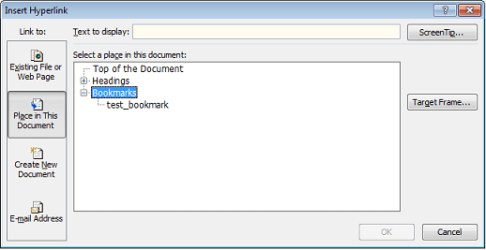
Then insert Hyperlink - in the window select second tab "Place in This Document" and choose your bookmark.

As for hiding parts of document, I do not think that is possible.
You can create that in HTML document with javascript, but not in Word document.
 

Attachments

  • bookmark.png
    bookmark.png
    11.4 KB · Views: 12

My Computer My Computer

At a glance

Windows 8.1 ; Windows 7 x86 (Dec2008-Jan2013)
Computer type
PC/Desktop
OS
Windows 8.1 ; Windows 7 x86 (Dec2008-Jan2013)
Other Info
"The scale icon at the top right of a post or tutorial is how you can give rep to the member."
Great information Neutron16. Rep + to you.
 

My Computer My Computer

At a glance

Vista 64 bit and 32 bit (SP2)Intel(R) Core(TM)2 Duo Processor T9400 (2.53 GHz4GB DDR2 System Memory (2 Dimm)512 MB NVIDIA GeForce 9600M GT
Computer Manufacturer/Model Number
HP Pavillion dv5t (generation 1)
OS
Vista 64 bit and 32 bit (SP2)
CPU
Intel(R) Core(TM)2 Duo Processor T9400 (2.53 GHz
Memory
4GB DDR2 System Memory (2 Dimm)
Graphics Card(s)
512 MB NVIDIA GeForce 9600M GT
Monitor(s) Displays
15.4" diagonal WSXGA+ High-Definition HP BrightView Widescre
Screen Resolution
1680 x 1050
Hard Drives
320GB 5400RPM SATA Hard Drive with HP ProtectSmart Hard Drive Protection
Keyboard
Built-in HP
Mouse
Built in - Synaptics TouchPad V6.5 on PS/2 Port
Internet Speed
Max
Other Info
~ Intel Next-Gen Wireless-N Mini-card w/Bluetooth ~ Blu-Ray ROM DVD+/-R/RW ~ Integ. HDTV Hybrid Tuner ~ 12 Cell Battery ~ MS Office (Home Premium) 2007 ~

My Computer My Computer

At a glance

Windows 7 Home Premium 64bitIntel(R) Core(TM) i3-2120 CPU @ 3.30GHz3.00 GB(1) Intel(R) HD Graphics (2) VNC Mirror Driver
Computer type
PC/Desktop
Computer Manufacturer/Model Number
Packard Bell
OS
Windows 7 Home Premium 64bit
CPU
Intel(R) Core(TM) i3-2120 CPU @ 3.30GHz
Motherboard
Packard Bell IPISB-AG
Memory
3.00 GB
Graphics Card(s)
(1) Intel(R) HD Graphics (2) VNC Mirror Driver
Sound Card
Realtek High Definition Audio
Monitor(s) Displays
AIO LCD
Screen Resolution
1920 x 1080
Hard Drives
WDC WD10EADX-22TDHB0 ATA Device
Fixed hard disk media
4 partitions
931.51 GB
Keyboard
Wireless
Mouse
Wireless
Antivirus
Microsoft Security Essentials
Browser
IE; Firefox
Other Info
Also:
Samsung N220 Plus Netbook - Windows 7 Home
HP laptop
iPad 5
Back
Top