Can't leave Homegroup. i've tried it all with no succses...

doros

New member
Local time
12:10 PM
Messages
10
Hello everybody!
So here is the deal: i had two computers connected to the same homegroup. The computer which i started the homegroup on got formatted and reinstalled.
Now i cant leave the old homegroup with the other computer, and the formated one cant join the old homegroup because i don't remember the homegroup password.

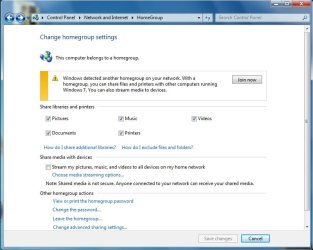
When i go to the Homegroup screen it shows me this:
Homegroup.jpg

How do i leave the homegroup so i could connect to the new one?

Thank you!
 
Last edited:

My Computer My Computer

At a glance

windows 7 32bit
OS
windows 7 32bit
Hello Doros, and welcome to Seven Forums.

Sorry, but your screenshot was broken. Could you upload a new one?

Are you able to change the password for the homegroup on the other computer, then join the homegroup from the formatted one?
 

My Computer My Computer

At a glance

64-bit Windows 11 Pro for WorkstationsIntel i7-8700K OC'd to 5 GHz64 GB (4x16GB) G.SKILL TridentZ RGB DDR4 3600...ASUS ROG-STRIX-GTX1080TI-O11G-GAMING
Computer type
PC/Desktop
Computer Manufacturer/Model Number
Self built custom
OS
64-bit Windows 11 Pro for Workstations
CPU
Intel i7-8700K OC'd to 5 GHz
Motherboard
ASUS ROG Maximus XI Formula Z390
Memory
64 GB (4x16GB) G.SKILL TridentZ RGB DDR4 3600 MHz
Graphics Card(s)
ASUS ROG-STRIX-GTX1080TI-O11G-GAMING
Sound Card
Integrated
Monitor(s) Displays
2 x Samsung Odyssey G7 27"
Screen Resolution
2560x1440
Hard Drives
1TB Samsung 990 PRO M.2,
4TB Samsung 990 PRO PRO M.2,
TerraMaster F8 SSD Plus NAS
PSU
Seasonic Prime Titanium 850W
Case
Thermaltake Core P3
Cooling
Corsair Hydro H115i
Keyboard
Logitech wireless K800
Mouse
Logitech MX Master 4
Internet Speed
2 Gb/s Download and 100 Mb/s Upload
Antivirus
Malwarebyte Anti-Malware Premium
Browser
Google Chrome
Other Info
Logitech Z625 speaker system,
Logitech BRIO 4K Pro webcam,
HP Color LaserJet Pro MFP M477fdn,
APC SMART-UPS RT 1000 XL - SURT1000XLI,
Galaxy S23 Plus phone
Hey there Brink,
Sorry for the broken image...
I cannot change the password whatsoever, windows does not give me any options; I can't leave the homegroup or change any settings, I'm stuck in the middle.
Thank you for the reply and guidance.
BTW I'm sorry for my English, haven’t practice it for a while.
 

My Computer My Computer

At a glance

windows 7 32bit
OS
windows 7 32bit
What happens when you click on the link in the message to start the HomeGroup troubleshooter? The troubleshooter may be able to help.
 

My Computer My Computer

At a glance

64-bit Windows 11 Pro for WorkstationsIntel i7-8700K OC'd to 5 GHz64 GB (4x16GB) G.SKILL TridentZ RGB DDR4 3600...ASUS ROG-STRIX-GTX1080TI-O11G-GAMING
Computer type
PC/Desktop
Computer Manufacturer/Model Number
Self built custom
OS
64-bit Windows 11 Pro for Workstations
CPU
Intel i7-8700K OC'd to 5 GHz
Motherboard
ASUS ROG Maximus XI Formula Z390
Memory
64 GB (4x16GB) G.SKILL TridentZ RGB DDR4 3600 MHz
Graphics Card(s)
ASUS ROG-STRIX-GTX1080TI-O11G-GAMING
Sound Card
Integrated
Monitor(s) Displays
2 x Samsung Odyssey G7 27"
Screen Resolution
2560x1440
Hard Drives
1TB Samsung 990 PRO M.2,
4TB Samsung 990 PRO PRO M.2,
TerraMaster F8 SSD Plus NAS
PSU
Seasonic Prime Titanium 850W
Case
Thermaltake Core P3
Cooling
Corsair Hydro H115i
Keyboard
Logitech wireless K800
Mouse
Logitech MX Master 4
Internet Speed
2 Gb/s Download and 100 Mb/s Upload
Antivirus
Malwarebyte Anti-Malware Premium
Browser
Google Chrome
Other Info
Logitech Z625 speaker system,
Logitech BRIO 4K Pro webcam,
HP Color LaserJet Pro MFP M477fdn,
APC SMART-UPS RT 1000 XL - SURT1000XLI,
Galaxy S23 Plus phone
When I hit the troubleshooter it suggest some network fixing issues, but does not really fix the problem. I really need the homegroup, and I don't want to format the computer, but seems to me the only solution:(
 

My Computer My Computer

At a glance

windows 7 32bit
OS
windows 7 32bit
Have you tried turning off the firewall on the two machines you are trying to connect?

Edit: It appears to me that your computer is trying to find a new Homegroup and has already left the old one. If you disable the firewall on both machines, the machine that is unable to find the Homegroup at this time may pick up the other computer's Homegroup to join.
 

My Computer My Computer

At a glance

Windows 7 Home Premium 64 BitIntel(R) Core(TM)2 Quad CPU Q9550 @ 2.83GHz6.00 GB Hundai HMT125U6BFR8C-H9ATI Radeon HD 4850
Computer Manufacturer/Model Number
HP Pavilion e9110t
OS
Windows 7 Home Premium 64 Bit
CPU
Intel(R) Core(TM)2 Quad CPU Q9550 @ 2.83GHz
Motherboard
Pegatron IPIEL-LA3
Memory
6.00 GB Hundai HMT125U6BFR8C-H9
Graphics Card(s)
ATI Radeon HD 4850
Sound Card
Realtek High Definition Audio/ATI High Definition Audio
Monitor(s) Displays
Acer AL2216W
Screen Resolution
1680x1050
Hard Drives
Hitachi HDP725050GLA360 ATA Device 500 GB
PSU
Unknown/installed by HP
Case
HP generic case
Cooling
Intel Stock Cooling
Keyboard
HP Keyboard
Mouse
HP Mouse
Internet Speed
Download: 19.15 Mbps Upload: 1.67 Mbps
Other Info
Network Adapter Realtek RTL8168D/8111D Family PCI-E Gigabit Ethernet NIC (NDIS 6.20)
Network Adapter 802.11n Wireless PCI Express Card LAN Adapter
Ive tried it no with no success.
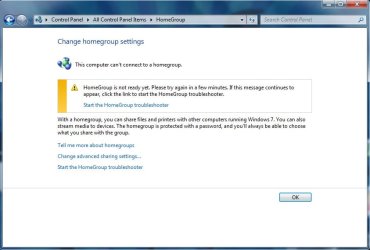
The computer is still in a homegroup. The formatted computer shows me this:
homegroup.jpg
so the other computer still connected to the old homegroup, but i cant leave it.
How can I leave the homegroup? Ive tried deleting C:\Windows\ServiceProfiles\LocalService\AppData\Roaming\PeerNetworking
 

My Computer My Computer

At a glance

windows 7 32bit
OS
windows 7 32bit
Doros,

As a test, stop and disable the HomeGroup Listner and HomeGroup Provider services on the computer that you do not want to be part of a homegroup. Afterwards, see if you may be able to create a new homegroup on the formatted computer. If so, create it, then start and set the services back to Automatic on the other computer to see if you may be able to now join the homegroup created on the formatted computer.
 

My Computer My Computer

At a glance

64-bit Windows 11 Pro for WorkstationsIntel i7-8700K OC'd to 5 GHz64 GB (4x16GB) G.SKILL TridentZ RGB DDR4 3600...ASUS ROG-STRIX-GTX1080TI-O11G-GAMING
Computer type
PC/Desktop
Computer Manufacturer/Model Number
Self built custom
OS
64-bit Windows 11 Pro for Workstations
CPU
Intel i7-8700K OC'd to 5 GHz
Motherboard
ASUS ROG Maximus XI Formula Z390
Memory
64 GB (4x16GB) G.SKILL TridentZ RGB DDR4 3600 MHz
Graphics Card(s)
ASUS ROG-STRIX-GTX1080TI-O11G-GAMING
Sound Card
Integrated
Monitor(s) Displays
2 x Samsung Odyssey G7 27"
Screen Resolution
2560x1440
Hard Drives
1TB Samsung 990 PRO M.2,
4TB Samsung 990 PRO PRO M.2,
TerraMaster F8 SSD Plus NAS
PSU
Seasonic Prime Titanium 850W
Case
Thermaltake Core P3
Cooling
Corsair Hydro H115i
Keyboard
Logitech wireless K800
Mouse
Logitech MX Master 4
Internet Speed
2 Gb/s Download and 100 Mb/s Upload
Antivirus
Malwarebyte Anti-Malware Premium
Browser
Google Chrome
Other Info
Logitech Z625 speaker system,
Logitech BRIO 4K Pro webcam,
HP Color LaserJet Pro MFP M477fdn,
APC SMART-UPS RT 1000 XL - SURT1000XLI,
Galaxy S23 Plus phone
When I disable these services I still cannot create a new homegroup on the formatted computer, but when the other computer is off I can create a new homegroup.
After I turn the the other computer on, the formatted one shows me this in homegroup menu:
home1.jpg
While the other still shows the note in my first post.
 

My Computer My Computer

At a glance

windows 7 32bit
OS
windows 7 32bit
Alright, I'm a little confused. The first picture you posted, is that of the old computer that still belongs to the old homegroup that no longer has the host computer? The second picture is of the newly formatted computer that has yet to join a homegroup? The third picture is of the newly formatted computer that has yet to join a homegroup with the services off?
 

My Computer My Computer

At a glance

Windows 7 Home Premium 64 BitIntel(R) Core(TM)2 Quad CPU Q9550 @ 2.83GHz6.00 GB Hundai HMT125U6BFR8C-H9ATI Radeon HD 4850
Computer Manufacturer/Model Number
HP Pavilion e9110t
OS
Windows 7 Home Premium 64 Bit
CPU
Intel(R) Core(TM)2 Quad CPU Q9550 @ 2.83GHz
Motherboard
Pegatron IPIEL-LA3
Memory
6.00 GB Hundai HMT125U6BFR8C-H9
Graphics Card(s)
ATI Radeon HD 4850
Sound Card
Realtek High Definition Audio/ATI High Definition Audio
Monitor(s) Displays
Acer AL2216W
Screen Resolution
1680x1050
Hard Drives
Hitachi HDP725050GLA360 ATA Device 500 GB
PSU
Unknown/installed by HP
Case
HP generic case
Cooling
Intel Stock Cooling
Keyboard
HP Keyboard
Mouse
HP Mouse
Internet Speed
Download: 19.15 Mbps Upload: 1.67 Mbps
Other Info
Network Adapter Realtek RTL8168D/8111D Family PCI-E Gigabit Ethernet NIC (NDIS 6.20)
Network Adapter 802.11n Wireless PCI Express Card LAN Adapter

My Computer My Computer

At a glance

Windows 7 Home Premium 64 BitIntel(R) Core(TM)2 Quad CPU Q9550 @ 2.83GHz6.00 GB Hundai HMT125U6BFR8C-H9ATI Radeon HD 4850
Computer Manufacturer/Model Number
HP Pavilion e9110t
OS
Windows 7 Home Premium 64 Bit
CPU
Intel(R) Core(TM)2 Quad CPU Q9550 @ 2.83GHz
Motherboard
Pegatron IPIEL-LA3
Memory
6.00 GB Hundai HMT125U6BFR8C-H9
Graphics Card(s)
ATI Radeon HD 4850
Sound Card
Realtek High Definition Audio/ATI High Definition Audio
Monitor(s) Displays
Acer AL2216W
Screen Resolution
1680x1050
Hard Drives
Hitachi HDP725050GLA360 ATA Device 500 GB
PSU
Unknown/installed by HP
Case
HP generic case
Cooling
Intel Stock Cooling
Keyboard
HP Keyboard
Mouse
HP Mouse
Internet Speed
Download: 19.15 Mbps Upload: 1.67 Mbps
Other Info
Network Adapter Realtek RTL8168D/8111D Family PCI-E Gigabit Ethernet NIC (NDIS 6.20)
Network Adapter 802.11n Wireless PCI Express Card LAN Adapter
Alright, I'm a little confused. The first picture you posted, is that of the old computer that still belongs to the old homegroup that no longer has the host computer? (yes) The second picture is of the newly formatted computer that has yet to join a homegroup? (yes) The third picture is of the newly formatted computer that has yet to join a homegroup with the services off? (No, the third picture is of the newly formatted computer after creating a new homegroup. I'm able to create a new homegroup when the old homegroup computer is off.)
I'm sorry about the mess. Thank you very much for the patience:) you rock guys
 

My Computer My Computer

At a glance

windows 7 32bit
OS
windows 7 32bit
Alright, I'm a little confused. The first picture you posted, is that of the old computer that still belongs to the old homegroup that no longer has the host computer? (yes) The second picture is of the newly formatted computer that has yet to join a homegroup? (yes) The third picture is of the newly formatted computer that has yet to join a homegroup with the services off? (No, the third picture is of the newly formatted computer after creating a new homegroup. I'm able to create a new homegroup when the old homegroup computer is off.)
I'm sorry about the mess. Thank you very much for the patience:) you rock guys

Okay, that makes sense. Try my above post and see if it fixes your problem. I did some research and found some people in similar situations that were directed to the link I provided.

My research: http://answers.microsoft.com/en-us/...indows-7/9a3ad1b5-74a9-4059-9c1f-2ea70c0c89b0

http://answers.microsoft.com/en-us/...omegroup/565d2961-bd08-40b2-8962-34cde3d39168
 

My Computer My Computer

At a glance

Windows 7 Home Premium 64 BitIntel(R) Core(TM)2 Quad CPU Q9550 @ 2.83GHz6.00 GB Hundai HMT125U6BFR8C-H9ATI Radeon HD 4850
Computer Manufacturer/Model Number
HP Pavilion e9110t
OS
Windows 7 Home Premium 64 Bit
CPU
Intel(R) Core(TM)2 Quad CPU Q9550 @ 2.83GHz
Motherboard
Pegatron IPIEL-LA3
Memory
6.00 GB Hundai HMT125U6BFR8C-H9
Graphics Card(s)
ATI Radeon HD 4850
Sound Card
Realtek High Definition Audio/ATI High Definition Audio
Monitor(s) Displays
Acer AL2216W
Screen Resolution
1680x1050
Hard Drives
Hitachi HDP725050GLA360 ATA Device 500 GB
PSU
Unknown/installed by HP
Case
HP generic case
Cooling
Intel Stock Cooling
Keyboard
HP Keyboard
Mouse
HP Mouse
Internet Speed
Download: 19.15 Mbps Upload: 1.67 Mbps
Other Info
Network Adapter Realtek RTL8168D/8111D Family PCI-E Gigabit Ethernet NIC (NDIS 6.20)
Network Adapter 802.11n Wireless PCI Express Card LAN Adapter
Tried it right now. It does the same thing as the troubleshooter in the homegroup menu, it does not diagnose the problem, and therefore cannot fix it.
 

My Computer My Computer

At a glance

windows 7 32bit
OS
windows 7 32bit
Alright, I'm looking into how to remove it for you manually. Give me a few minutes.
 

My Computer My Computer

At a glance

Windows 7 Home Premium 64 BitIntel(R) Core(TM)2 Quad CPU Q9550 @ 2.83GHz6.00 GB Hundai HMT125U6BFR8C-H9ATI Radeon HD 4850
Computer Manufacturer/Model Number
HP Pavilion e9110t
OS
Windows 7 Home Premium 64 Bit
CPU
Intel(R) Core(TM)2 Quad CPU Q9550 @ 2.83GHz
Motherboard
Pegatron IPIEL-LA3
Memory
6.00 GB Hundai HMT125U6BFR8C-H9
Graphics Card(s)
ATI Radeon HD 4850
Sound Card
Realtek High Definition Audio/ATI High Definition Audio
Monitor(s) Displays
Acer AL2216W
Screen Resolution
1680x1050
Hard Drives
Hitachi HDP725050GLA360 ATA Device 500 GB
PSU
Unknown/installed by HP
Case
HP generic case
Cooling
Intel Stock Cooling
Keyboard
HP Keyboard
Mouse
HP Mouse
Internet Speed
Download: 19.15 Mbps Upload: 1.67 Mbps
Other Info
Network Adapter Realtek RTL8168D/8111D Family PCI-E Gigabit Ethernet NIC (NDIS 6.20)
Network Adapter 802.11n Wireless PCI Express Card LAN Adapter
Thank you!
 

My Computer My Computer

At a glance

windows 7 32bit
OS
windows 7 32bit
Just to make sure I am not missing any steps in troubleshooting your problem, is your network on that computer still set up as a home network and not a public network? Actually...I have an idea.

1. Click Start Menu
2. Click Control Panel
3. Click Network and Internet
4. Click Network and Sharing Center
5. Click Home Network
6. Change to Public Network
7. Click Homegroup in the bottom left corner
8. See if you can now leave the homegroup.
 

My Computer My Computer

At a glance

Windows 7 Home Premium 64 BitIntel(R) Core(TM)2 Quad CPU Q9550 @ 2.83GHz6.00 GB Hundai HMT125U6BFR8C-H9ATI Radeon HD 4850
Computer Manufacturer/Model Number
HP Pavilion e9110t
OS
Windows 7 Home Premium 64 Bit
CPU
Intel(R) Core(TM)2 Quad CPU Q9550 @ 2.83GHz
Motherboard
Pegatron IPIEL-LA3
Memory
6.00 GB Hundai HMT125U6BFR8C-H9
Graphics Card(s)
ATI Radeon HD 4850
Sound Card
Realtek High Definition Audio/ATI High Definition Audio
Monitor(s) Displays
Acer AL2216W
Screen Resolution
1680x1050
Hard Drives
Hitachi HDP725050GLA360 ATA Device 500 GB
PSU
Unknown/installed by HP
Case
HP generic case
Cooling
Intel Stock Cooling
Keyboard
HP Keyboard
Mouse
HP Mouse
Internet Speed
Download: 19.15 Mbps Upload: 1.67 Mbps
Other Info
Network Adapter Realtek RTL8168D/8111D Family PCI-E Gigabit Ethernet NIC (NDIS 6.20)
Network Adapter 802.11n Wireless PCI Express Card LAN Adapter
If the above does not work, you can access the passkey by:
1. Click Start Menu
2. Click All Programs
3. Click Accessories
4. Right Click Command Prompt
5. Click Run As Administrator
6. Type "%SystemRoot%\system32\control.exe /name Microsoft.Homegroup /page passkey" (without quotes) into the command prompt and press enter

Also, if you would prefer to get rid of the homegroup rather than find its password, try http://www.sevenforums.com/tutorial...ation-conflicts-performing-clean-startup.html and see if that allows you to remove the homegroup.
 

My Computer My Computer

At a glance

Windows 7 Home Premium 64 BitIntel(R) Core(TM)2 Quad CPU Q9550 @ 2.83GHz6.00 GB Hundai HMT125U6BFR8C-H9ATI Radeon HD 4850
Computer Manufacturer/Model Number
HP Pavilion e9110t
OS
Windows 7 Home Premium 64 Bit
CPU
Intel(R) Core(TM)2 Quad CPU Q9550 @ 2.83GHz
Motherboard
Pegatron IPIEL-LA3
Memory
6.00 GB Hundai HMT125U6BFR8C-H9
Graphics Card(s)
ATI Radeon HD 4850
Sound Card
Realtek High Definition Audio/ATI High Definition Audio
Monitor(s) Displays
Acer AL2216W
Screen Resolution
1680x1050
Hard Drives
Hitachi HDP725050GLA360 ATA Device 500 GB
PSU
Unknown/installed by HP
Case
HP generic case
Cooling
Intel Stock Cooling
Keyboard
HP Keyboard
Mouse
HP Mouse
Internet Speed
Download: 19.15 Mbps Upload: 1.67 Mbps
Other Info
Network Adapter Realtek RTL8168D/8111D Family PCI-E Gigabit Ethernet NIC (NDIS 6.20)
Network Adapter 802.11n Wireless PCI Express Card LAN Adapter
Just to make sure I am not missing any steps in troubleshooting your problem, is your network on that computer still set up as a home network and not a public network? Actually...I have an idea.

1. Click Start Menu
2. Click Control Panel
3. Click Network and Internet
4. Click Network and Sharing Center
5. Click Home Network
6. Change to Public Network
7. Click Homegroup in the bottom left corner
8. See if you can now leave the homegroup.
Still Does not give me the option to leave the homegroup.


If the above does not work, you can access the passkey by:
1. Click Start Menu
2. Click All Programs
3. Click Accessories
4. Right Click Command Prompt
5. Click Run As Administrator
6. Type "%SystemRoot%\system32\control.exe /name Microsoft.Homegroup /page passkey" (without quotes) into the command prompt and press enter

Also, if you would prefer to get rid of the homegroup rather than find its password, try http://www.sevenforums.com/tutorial...ation-conflicts-performing-clean-startup.html and see if that allows you to remove the homegroup.
I have achieved the homegroup password with the command prompt, but when I insert it on the other computer it tells me "HomeGroup encounter an error". When I go through the troubleshooter it still does not help.

I've also tried the clean start up, but I still don't have the option to leave the homegroup.
 

My Computer My Computer

At a glance

windows 7 32bit
OS
windows 7 32bit
Just to make sure I am not missing any steps in troubleshooting your problem, is your network on that computer still set up as a home network and not a public network? Actually...I have an idea.

1. Click Start Menu
2. Click Control Panel
3. Click Network and Internet
4. Click Network and Sharing Center
5. Click Home Network
6. Change to Public Network
7. Click Homegroup in the bottom left corner
8. See if you can now leave the homegroup.
Still Does not give me the option to leave the homegroup.


If the above does not work, you can access the passkey by:
1. Click Start Menu
2. Click All Programs
3. Click Accessories
4. Right Click Command Prompt
5. Click Run As Administrator
6. Type "%SystemRoot%\system32\control.exe /name Microsoft.Homegroup /page passkey" (without quotes) into the command prompt and press enter

Also, if you would prefer to get rid of the homegroup rather than find its password, try http://www.sevenforums.com/tutorial...ation-conflicts-performing-clean-startup.html and see if that allows you to remove the homegroup.
I have achieved the homegroup password with the command prompt, but when I insert it on the other computer it tells me "HomeGroup encounter an error". When I go through the troubleshooter it still does not help.

I've also tried the clean start up, but I still don't have the option to leave the homegroup.

I am still trying to find a way to leave manually. I found one, but I do not have the permissions to make the change even as an administrator. I may have to try in Safe Mode and get back to you.
 

My Computer My Computer

At a glance

Windows 7 Home Premium 64 BitIntel(R) Core(TM)2 Quad CPU Q9550 @ 2.83GHz6.00 GB Hundai HMT125U6BFR8C-H9ATI Radeon HD 4850
Computer Manufacturer/Model Number
HP Pavilion e9110t
OS
Windows 7 Home Premium 64 Bit
CPU
Intel(R) Core(TM)2 Quad CPU Q9550 @ 2.83GHz
Motherboard
Pegatron IPIEL-LA3
Memory
6.00 GB Hundai HMT125U6BFR8C-H9
Graphics Card(s)
ATI Radeon HD 4850
Sound Card
Realtek High Definition Audio/ATI High Definition Audio
Monitor(s) Displays
Acer AL2216W
Screen Resolution
1680x1050
Hard Drives
Hitachi HDP725050GLA360 ATA Device 500 GB
PSU
Unknown/installed by HP
Case
HP generic case
Cooling
Intel Stock Cooling
Keyboard
HP Keyboard
Mouse
HP Mouse
Internet Speed
Download: 19.15 Mbps Upload: 1.67 Mbps
Other Info
Network Adapter Realtek RTL8168D/8111D Family PCI-E Gigabit Ethernet NIC (NDIS 6.20)
Network Adapter 802.11n Wireless PCI Express Card LAN Adapter
Back
Top