Can't Leave Homegroup...

Jaxel

New member
Local time
11:25 PM
Messages
22
I can't figure out how to leave my homegroup... both homegroup services are running...
 

My Computer

Computer Manufacturer/Model Number
Userbuilt
OS
Windows 7 Home Premium
CPU
Intel Core i7-2600K Sandy Bridge 3.4GHz
Motherboard
ASUS P8P67M-Pro REV3
Memory
G.SKILL Ripjaws X Series 16GB (4 x 4GB) DDR3 SDRAM
Graphics Card(s)
HIS IceQ X Turbo Radeon HD 6950 2GB 256-bit GDDR
Sound Card
Onboard Realtek HD Audio
Monitor(s) Displays
NEC MultiSync EA231WMi-B
Screen Resolution
1920 x 1080
Hard Drives
SAMSUNG 840 Pro Series 256GB SATA III MLC SSD
PSU
Thermaltake Black Widow 850W ATX
Case
LIAN LI PC-V354B Black MicroATX Mini Tower
Cooling
CORSAIR Hydro Series H80
Keyboard
Microsoft Natural Wireless Ergonomic Keyboard 7000
Mouse
Microsoft Natural Wireless Laser Mouse 7000
Internet Speed
http://www.speedtest.net/result/470816226.png
Welcome to Sevenforuns Jaxel.

Type homegroup on search and look for: leave the homegroup...
 

My Computer

OS
Windows7 Enterprise SP1 x64 (Technet)
All the threads I found said all I needed to do was start the HomeGroup Listener and HomeGroup Provider services running. I got them running and it still wouldn't let me leave.

I enabled the following services which I previously had disabled...

Base Filtering Engine
DNS Client
Function Discovery Provider Host
Function Discovery Resource Publication
HomeGroup Listener
HomeGroup Provider
Server
SSDP Discovery
UPnP Device Host
Windows Firewall
 
Last edited:

My Computer

Computer Manufacturer/Model Number
Userbuilt
OS
Windows 7 Home Premium
CPU
Intel Core i7-2600K Sandy Bridge 3.4GHz
Motherboard
ASUS P8P67M-Pro REV3
Memory
G.SKILL Ripjaws X Series 16GB (4 x 4GB) DDR3 SDRAM
Graphics Card(s)
HIS IceQ X Turbo Radeon HD 6950 2GB 256-bit GDDR
Sound Card
Onboard Realtek HD Audio
Monitor(s) Displays
NEC MultiSync EA231WMi-B
Screen Resolution
1920 x 1080
Hard Drives
SAMSUNG 840 Pro Series 256GB SATA III MLC SSD
PSU
Thermaltake Black Widow 850W ATX
Case
LIAN LI PC-V354B Black MicroATX Mini Tower
Cooling
CORSAIR Hydro Series H80
Keyboard
Microsoft Natural Wireless Ergonomic Keyboard 7000
Mouse
Microsoft Natural Wireless Laser Mouse 7000
Internet Speed
http://www.speedtest.net/result/470816226.png
It seems like I have no control over my homegroup...

I can't change the password either, it just says "Windows cannot setup homegroup on this computer".

I can't change the settings either, the setting changes are just ignored. Can't turn on network discovery or anything.

*EDIT* I can turn on Network Discovery after enabling SSDP Discovery, but I still can't leave the homegroup or change the password.
 

My Computer

Computer Manufacturer/Model Number
Userbuilt
OS
Windows 7 Home Premium
CPU
Intel Core i7-2600K Sandy Bridge 3.4GHz
Motherboard
ASUS P8P67M-Pro REV3
Memory
G.SKILL Ripjaws X Series 16GB (4 x 4GB) DDR3 SDRAM
Graphics Card(s)
HIS IceQ X Turbo Radeon HD 6950 2GB 256-bit GDDR
Sound Card
Onboard Realtek HD Audio
Monitor(s) Displays
NEC MultiSync EA231WMi-B
Screen Resolution
1920 x 1080
Hard Drives
SAMSUNG 840 Pro Series 256GB SATA III MLC SSD
PSU
Thermaltake Black Widow 850W ATX
Case
LIAN LI PC-V354B Black MicroATX Mini Tower
Cooling
CORSAIR Hydro Series H80
Keyboard
Microsoft Natural Wireless Ergonomic Keyboard 7000
Mouse
Microsoft Natural Wireless Laser Mouse 7000
Internet Speed
http://www.speedtest.net/result/470816226.png

My Computer

Computer Manufacturer/Model Number
Home-Built and has been slowly upgraded since 1999
OS
Windows 7 RC (Build 7100)
CPU
AMD Athlon XP 2400+
Motherboard
ECS L7S7A2
Memory
1.25 GB
Graphics Card(s)
ATI Radeon
Sound Card
SoundBlaster Live! Platinum (w/ Live! Drive)
Monitor(s) Displays
ViewSonic 19" LCD
Screen Resolution
1440x900
Hard Drives
320GB PATA
250GB external USB Backup
PSU
500W
Case
Generic Beige Box
Cooling
A bunch of Fans
Keyboard
Old one with the keys pried off that I don't use
Mouse
Microsoft Optical Mouse I found at Unclaimed baggage for $10
Internet Speed
Knology Cable Internet (~6-7Mbps)
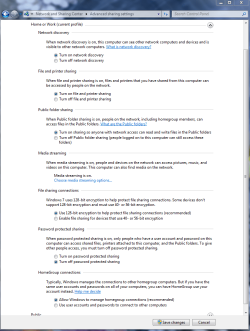
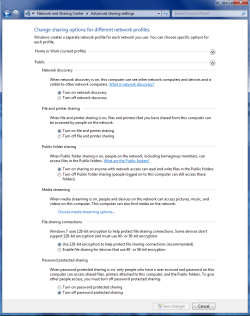
Try This

Go into homegroup and choose change advanced settings then scroll down to the bottom and check Use user accounts and passwords to connect to other computers. Follow on screen prompts then you should be able to join or create a Homegroup. Hope it helps.
 

My Computer

OS
7

Attachments

  • Home or work homegroup enable.PNG
    Home or work homegroup enable.PNG
    45 KB · Views: 9,592
  • public sharing enabled all.PNG
    public sharing enabled all.PNG
    39.7 KB · Views: 7,034

My Computer

Computer type
PC/Desktop
Computer Manufacturer/Model Number
Home built
OS
Windows 7 Ult, Windows 8.1 Pro,
CPU
Q9650-4.275GHz, E8600 4.5GHz, E6750-3.8GHz
Motherboard
Evga 780i FTW
Memory
G.Skill PC2 9600 1200Mhz 5 5 5 15 2T
Graphics Card(s)
GTX480
Sound Card
Asus Xonar D2
Monitor(s) Displays
HannsG
Screen Resolution
1680X1050
Hard Drives
GSkill Phoenix Pro 120GB SSD
PSU
ThermalTake Toughpower 1000Watt modular
Case
ThermalTake XaserV
Cooling
Xigmatek S1283
Keyboard
Logitech G15
Mouse
Logitech G9
Internet Speed
T1
Problem Solved!

Hi, I'm sure this will help many of you as I was getting exactly the same problems as a lot of you.

Firstly, I decided to address the problem when my computer was constantly resetting itself and the problem seemed to be getting more frequent.

So, I checked my event log (Computer(rightclick) > Manage > Event Viewer > Windows Logs > System). It showed me a whole bunch of errors containing two services. Either Peer Networking Grouping or Peer Name Resolution Protocol. I checked out Services (type services in the search bar on start) and found that I could not start these two services manually either. I disabled them which stopped my computer restarting itself and cleared the event log of any errors I was receiving before.

I now, however, couldn't see any other computers in my Homegroup and couldn't leave it, change what I was sharing or view the password, which are many of the symptoms you guys were receiving.

How I fixed the problem

Go to C:\Windows\ServiceProfiles\LocalService\AppData\Roaming\PeerNetworking and delete all of the files in this folder. Now restart the computer.

Go to Services again and you should be able to start 'Peer Networking Grouping' and 'Peer Name Resolution Protocol'. Restart the computer again.

When you log on this time, check the event log again, to ensure no errors concerning the two services are present and also check Services to ensure the two services concerned are running.

You should now have full functionality restored to your homegroup.

I hope this helps, let me know if it works.

Nick
 

My Computer

OS
Windows 7 x64
Hi Sonick26
Thanks for posting.
I had the same problem and what you said fixed my homegroup issues.
I just wanted to thank you
 

My Computer

OS
Windows 7
Hi Sonick26
Thanks for posting.
I had the same problem and what you said fixed my homegroup issues.
I just wanted to thank you

Thanks for reporting in AALA, this is a well known work around that has been out for quite a while now.

http://www.sevenforums.com/network-sharing/55781-cannot-leave-homegroup.html


You may need to go back into services and enable Peernetworking again after the fix. Don't forget to restart all machines after the fix.

Source, original Technet fix for this problem was well before the RTM.
http://social.answers.microsoft.com/...4-266bdfaddd37

http://social.technet.microsoft.com/...c-e9a2c1469bd7
 
Last edited:

My Computer

Computer type
PC/Desktop
Computer Manufacturer/Model Number
Home built
OS
Windows 7 Ult, Windows 8.1 Pro,
CPU
Q9650-4.275GHz, E8600 4.5GHz, E6750-3.8GHz
Motherboard
Evga 780i FTW
Memory
G.Skill PC2 9600 1200Mhz 5 5 5 15 2T
Graphics Card(s)
GTX480
Sound Card
Asus Xonar D2
Monitor(s) Displays
HannsG
Screen Resolution
1680X1050
Hard Drives
GSkill Phoenix Pro 120GB SSD
PSU
ThermalTake Toughpower 1000Watt modular
Case
ThermalTake XaserV
Cooling
Xigmatek S1283
Keyboard
Logitech G15
Mouse
Logitech G9
Internet Speed
T1
The solution is as go to the folder which you wan to share and right click then select share and then select everyone from the drop down menu. Now open the home group in your other computer and the folder( on PC A) will open. I was having the problem as as you guys as i was not able to leave the home group nor access it via my (PC B).
 

My Computer

OS
windows 7 home premium 32 bit
Fixed!

I have tried it all under this forum. Stick with me here, until I completely ran through the troubleshooter, by repeatedly using the 'explore additional options' option (and after deleting idstore.sst), the troubleshooter fixed a random Homegroup error ( but I don't remember what it was!). I believe it took about 3 clicks on the "explore additional options" button to fix the unknown Homegroup error (it wasnt related to the peernetworking grouping or peernetworking identity manager). AFTER this unknown fix occurred, I went back to manually start the 'peernetworking grouping' under 'Services', restarted my computer and it worked!

Best of luck to everyone!
 

My Computer

OS
Windows 7 Home Premium 64bit
Back
Top