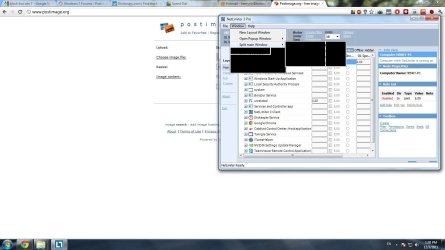
Black shades in all menu clicked

Brlala

New member
Local time
7:15 PM
Messages
5
Hi. I'm having this problem where I have black shades over all the menu bars I click, may I know how to fix this? Thanks :D
 

Attachments

  • Clipboard01.jpg
    Clipboard01.jpg
    111 KB · Views: 37
Last edited:

My Computer My Computer

OS
Win7
Start by reinstalling your Display driver. In Device Manager under Display driver, choose Driver tab, then Uninstall. Restart computer which will reinstall it.

Next check optional Windows Updates for newer Display driver, then the Support Downloads webpage for the computer or display device model.

If you have a video card, next physically reinstall it. If you can default for awhile to onboard video chip, see if the problem replicates.

Now run a full scan for infection with Malwarebytes . You have no AV showing in System tray. Install and run a full scan with Microsoft Security Essentials

There is also a red flag in the system tray's Action Center. Resolve it now.

Check for damaged System files by running SFC -SCANNOW Command

 
Thanks Greg. Seems like the problem is with the display driver. I uninstalled it and reinstall my graphic driver. Now the problem is solved :)
 

My Computer My Computer

OS
Win7
Glad to help.

Did you also resolve the issue in the Action Center in System Tray, and install an Anti-Virus? You really can't survive without one today.
 
Soon as I just uninstalled Kaspersky, it seems to be hogging up system resources too much ;) Trying Bitdefender for the meantime. Thanks!
 

My Computer My Computer

OS
Win7
I'll go for Microsoft Security Essentials as it seems more convincing and light weight as well. Thank you :)
 

My Computer My Computer

OS
Win7
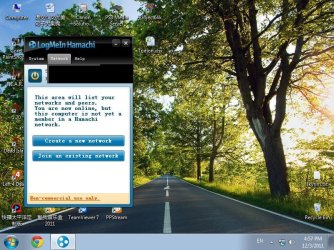
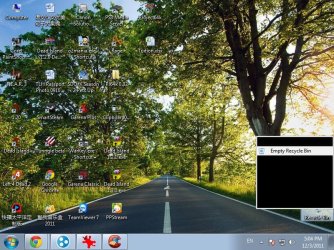
Hi seems like the problem reoccur after installing this program "LogMeIn Hamachi". If I didn't remember it wrongly, the black shade problem happened last time after installing this program. I've tried uninstalling my graphic driver but the problem is still there. Any solution besides avoiding this program? Cause I need this program very much for my work. Thanks.
 

Attachments

  • Clipboard01.jpg
    Clipboard01.jpg
    131.6 KB · Views: 2
  • Clipboard02.jpg
    Clipboard02.jpg
    146.4 KB · Views: 2

My Computer My Computer

OS
Win7
Have you worked through all of these steps?

Was the problem definitely gone before you installed the log-in program?

I'd look for the display driver update first:

Start by reinstalling your Display driver. In Device Manager under Display driver, choose Driver tab, then Uninstall. Restart computer which will reinstall it.

Next check optional Windows Updates for newer Display driver, then the Support Downloads webpage for the computer or display device model.

If you have a video card, next physically reinstall it. If you can default for awhile to onboard video chip, see if the problem replicates.

Now run a full scan for infection with Malwarebytes . You have no AV showing in System tray. Install and run a full scan with Microsoft Security Essentials

There is also a red flag in the system tray's Action Center. Resolve it now.

Check for damaged System files by running SFC -SCANNOW Command
 
Back
Top