Boot F9/F12 (recovery environment or boot menu)

JimLewandowski

New member
Guru
Local time
9:33 PM
Messages
450
Location
Raleigh, NC
Boot F9/F12 (recovery environment or boot menu) - black/dead screen

If I hit F9 or F12 in early BIOS, I get a black screen with an underline cursor in upper left.

In the middle of the screen is a green block and the letter n with a tilde ~ over it.

How long should I wait? It sat there for 15 seconds and no movement. No keyboard or mouse actions can do anything.

I've never tried booting into the RE or Boot menu. But, on occasion when a boot would hang, I would get the DOS-like boot screen that asks if you want to start Widows normally, try safe mode, (all those options), etc.

Booting off DVD into Recovery environment works as expected.

Does this mean my System Reserved partition is whacked?
 

My Computer My Computer

At a glance

Windows 7AMD Phenom II X2 (dual-core)4Gintegrated ATI HD 4200
Computer type
PC/Desktop
Computer Manufacturer/Model Number
Custom
OS
Windows 7
CPU
AMD Phenom II X2 (dual-core)
Motherboard
GA-MA785GM-US2H
Memory
4G
Graphics Card(s)
integrated ATI HD 4200
Sound Card
integrated
Monitor(s) Displays
Samsung 24"
Screen Resolution
1920x1080
Hard Drives
1 SSD - Samsung 840 - 500 GB - OS and DATA partitions
1 SSD - Intel 320 - 120 GB (used for backups) - Misc/BACKUP
1 SATA HD - WD, 500 GB - BACKUP
PSU
Ultra X4 500W
Case
Ultra X-blaster
Keyboard
Microsoft Digital Media Pro
Mouse
Logitech WIRED!
Internet Speed
15 Mbps FIOS
Your spec's say Custom built.
How did you setup your Recovery Partition on the Custom built rig?
 

My Computer My Computer

At a glance

ME/XP/Vista/Win7
OS
ME/XP/Vista/Win7
Your spec's say Custom built.
How did you setup your Recovery Partition on the Custom built rig?

Custom-built by CompUsa.

However, I did completely reinstall Win7 within the week that I got the new PC (can't recall why). What are the options for setting the Recovery partition other than size???
 

My Computer My Computer

At a glance

Windows 7AMD Phenom II X2 (dual-core)4Gintegrated ATI HD 4200
Computer type
PC/Desktop
Computer Manufacturer/Model Number
Custom
OS
Windows 7
CPU
AMD Phenom II X2 (dual-core)
Motherboard
GA-MA785GM-US2H
Memory
4G
Graphics Card(s)
integrated ATI HD 4200
Sound Card
integrated
Monitor(s) Displays
Samsung 24"
Screen Resolution
1920x1080
Hard Drives
1 SSD - Samsung 840 - 500 GB - OS and DATA partitions
1 SSD - Intel 320 - 120 GB (used for backups) - Misc/BACKUP
1 SATA HD - WD, 500 GB - BACKUP
PSU
Ultra X4 500W
Case
Ultra X-blaster
Keyboard
Microsoft Digital Media Pro
Mouse
Logitech WIRED!
Internet Speed
15 Mbps FIOS
The Recovery Partition would have been set by CompUsa.
Try the F8 key.
 

My Computer My Computer

At a glance

ME/XP/Vista/Win7
OS
ME/XP/Vista/Win7
The Recovery Partition would have been set by CompUsa.
Try the F8 key.

Can you explain further? I haven't done a Win7 install for the last 2 years.

If I do a complete Win7 install from CD, is there anything in there to set up the System Reserved partition? Ah, I read that the Sys Res partition only gets created if NO partitions exist on the HD. I assume that if one were to completely wipe and repartition during fresh install, then the fresh install would ask for options re: Sys Res partition configuration?

I didn't try F8 as BIOS showed only F9 and F12 (Gigabyte MA-785GM-US2H MB).
 

My Computer My Computer

At a glance

Windows 7AMD Phenom II X2 (dual-core)4Gintegrated ATI HD 4200
Computer type
PC/Desktop
Computer Manufacturer/Model Number
Custom
OS
Windows 7
CPU
AMD Phenom II X2 (dual-core)
Motherboard
GA-MA785GM-US2H
Memory
4G
Graphics Card(s)
integrated ATI HD 4200
Sound Card
integrated
Monitor(s) Displays
Samsung 24"
Screen Resolution
1920x1080
Hard Drives
1 SSD - Samsung 840 - 500 GB - OS and DATA partitions
1 SSD - Intel 320 - 120 GB (used for backups) - Misc/BACKUP
1 SATA HD - WD, 500 GB - BACKUP
PSU
Ultra X4 500W
Case
Ultra X-blaster
Keyboard
Microsoft Digital Media Pro
Mouse
Logitech WIRED!
Internet Speed
15 Mbps FIOS

My Computer My Computer

At a glance

Windows 7AMD Phenom II X2 (dual-core)4Gintegrated ATI HD 4200
Computer type
PC/Desktop
Computer Manufacturer/Model Number
Custom
OS
Windows 7
CPU
AMD Phenom II X2 (dual-core)
Motherboard
GA-MA785GM-US2H
Memory
4G
Graphics Card(s)
integrated ATI HD 4200
Sound Card
integrated
Monitor(s) Displays
Samsung 24"
Screen Resolution
1920x1080
Hard Drives
1 SSD - Samsung 840 - 500 GB - OS and DATA partitions
1 SSD - Intel 320 - 120 GB (used for backups) - Misc/BACKUP
1 SATA HD - WD, 500 GB - BACKUP
PSU
Ultra X4 500W
Case
Ultra X-blaster
Keyboard
Microsoft Digital Media Pro
Mouse
Logitech WIRED!
Internet Speed
15 Mbps FIOS
Recovery can be installed if not already there.
You need
1. "winre.wim" in \Windows\System32\winre.wim - if not there search whole disk, all partitions for it.
if not found get "boot.wim" from installation DVD and copy it to path mentioned and rename to winre.wim.
2. On elevated command prompt:
ReagentC /enable

Hope this helps.
 

My Computer My Computer

At a glance

Win 8 RP, Win 7, XPIntel
Computer Manufacturer/Model Number
Acer Notebook
OS
Win 8 RP, Win 7, XP
CPU
Intel
Having thought more about this, it then would imply that F8 is NOT a BIOS option but a post-BIOS, pre-Win startup option that is really being recognized by Windows?

Also, the Gigabyte manual says F9 is for some driver disk hard drive backup thing (sounds like Gigabyte proprietary).

The F12 is to be able to set which device to boot from without entering the Full BIOS menu.

Either way, you'd think F12 would work.

Here is something quite similar:

http://forums.techarena.in/motherboard-processor-ram/1424937.htm
 

My Computer My Computer

At a glance

Windows 7AMD Phenom II X2 (dual-core)4Gintegrated ATI HD 4200
Computer type
PC/Desktop
Computer Manufacturer/Model Number
Custom
OS
Windows 7
CPU
AMD Phenom II X2 (dual-core)
Motherboard
GA-MA785GM-US2H
Memory
4G
Graphics Card(s)
integrated ATI HD 4200
Sound Card
integrated
Monitor(s) Displays
Samsung 24"
Screen Resolution
1920x1080
Hard Drives
1 SSD - Samsung 840 - 500 GB - OS and DATA partitions
1 SSD - Intel 320 - 120 GB (used for backups) - Misc/BACKUP
1 SATA HD - WD, 500 GB - BACKUP
PSU
Ultra X4 500W
Case
Ultra X-blaster
Keyboard
Microsoft Digital Media Pro
Mouse
Logitech WIRED!
Internet Speed
15 Mbps FIOS
There are keys recognized by BIOS -
1. for entering BIOS setup, and
2. for choosing temporary (one time) boot device.

F8 is standard for advanced recovery options (recognized by bootmgr).

You can set any key as a shortcut to a loader - this is called "bootstrap custom action". This is handled again by bootmgr using data from BCD (boot config data) store.
If interested visit Visual BCD Editor - Windows 7/Vista - look for CustomActions.
 

My Computer My Computer

At a glance

Win 8 RP, Win 7, XPIntel
Computer Manufacturer/Model Number
Acer Notebook
OS
Win 8 RP, Win 7, XP
CPU
Intel

My Computer My Computer

At a glance

ME/XP/Vista/Win7
OS
ME/XP/Vista/Win7

My Computer My Computer

At a glance

Windows 7AMD Phenom II X2 (dual-core)4Gintegrated ATI HD 4200
Computer type
PC/Desktop
Computer Manufacturer/Model Number
Custom
OS
Windows 7
CPU
AMD Phenom II X2 (dual-core)
Motherboard
GA-MA785GM-US2H
Memory
4G
Graphics Card(s)
integrated ATI HD 4200
Sound Card
integrated
Monitor(s) Displays
Samsung 24"
Screen Resolution
1920x1080
Hard Drives
1 SSD - Samsung 840 - 500 GB - OS and DATA partitions
1 SSD - Intel 320 - 120 GB (used for backups) - Misc/BACKUP
1 SATA HD - WD, 500 GB - BACKUP
PSU
Ultra X4 500W
Case
Ultra X-blaster
Keyboard
Microsoft Digital Media Pro
Mouse
Logitech WIRED!
Internet Speed
15 Mbps FIOS
Well, well, well...

Hitting F8 as soon as the first BIOS screen comes up, gives the same underline cursor, upper lefthand corner, a green rectangle in middle of screen with n w/ ~ next to it.

I then rebooted and waited to hit F8 until the 2nd bios screen (DMI pool data) showing all the devices/IRQs? Then Recovery Environment came up no problem.

I then restarted and waited until the second screen again and hit F12 and got the Windows boot screen (pick Win 7 or Mem test were the only options).

So, what gives? I did read that some MBRs do NOT disable interrupts (missing CLI instruction). Possible?
 

My Computer My Computer

At a glance

Windows 7AMD Phenom II X2 (dual-core)4Gintegrated ATI HD 4200
Computer type
PC/Desktop
Computer Manufacturer/Model Number
Custom
OS
Windows 7
CPU
AMD Phenom II X2 (dual-core)
Motherboard
GA-MA785GM-US2H
Memory
4G
Graphics Card(s)
integrated ATI HD 4200
Sound Card
integrated
Monitor(s) Displays
Samsung 24"
Screen Resolution
1920x1080
Hard Drives
1 SSD - Samsung 840 - 500 GB - OS and DATA partitions
1 SSD - Intel 320 - 120 GB (used for backups) - Misc/BACKUP
1 SATA HD - WD, 500 GB - BACKUP
PSU
Ultra X4 500W
Case
Ultra X-blaster
Keyboard
Microsoft Digital Media Pro
Mouse
Logitech WIRED!
Internet Speed
15 Mbps FIOS
I have a ACER laptop computer that belongs to my cusin and I'm getting a message saying "INSTALL WINDOWS" "COULD NOT COMPLETE THE INSTALLATION. TO INSTALL WINDOWS ON THIS COMPUTER RESTART THE INSTALLATION" and she never made a back up/reboot disk and I am trying to fix it for her, can anyone help me out, without have to buy a new windows 7 dvd. The computer came with windows 7 installed and no back up cd/dvd
 

My Computer My Computer

At a glance

XP
OS
XP
I have a ACER laptop computer that belongs to my cusin and I'm getting a message saying "INSTALL WINDOWS" "COULD NOT COMPLETE THE INSTALLATION. TO INSTALL WINDOWS ON THIS COMPUTER RESTART THE INSTALLATION" and she never made a back up/reboot disk and I am trying to fix it for her, can anyone help me out, without have to buy a new windows 7 dvd. The computer came with windows 7 installed and no back up cd/dvd


I would Check the hard drive with the manufacturer's diagnostic tools.
Hard Drive Diagnostics Tools and Utilities (Storage) - TACKtech Corp.
HD Diagnostic

   Information
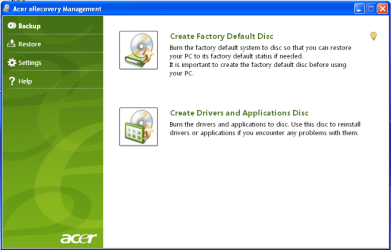
We always assume you have made your Recovery Disks using the OEM manufacturer's Recovery Media Creator app the first day you had your new PC.
& made the Startup Repair CD.
startup repair disc-create


Did you make the OEM manufacturer's Recovery Disks?

Acer001.PNG

You can Order Acer recovery disks from here:
https://secure.tx.acer.com/RCDB/Main.aspx?brand=acer
 

My Computer My Computer

At a glance

ME/XP/Vista/Win7
OS
ME/XP/Vista/Win7
I have ran the windows memory test tool, and that is all that I can do. Everytime that I restart it goes to the screen saying "windows is starting" and after a little bit it will give me a message saying "could not complete the installation. To install windows on this computer, restart the installation". And my cusin did not make a copy of the back up/reistall disk. It just goes in a loop.
 

My Computer My Computer

At a glance

XP
OS
XP
I have ran the windows memory test tool, and that is all that I can do. Everytime that I restart it goes to the screen saying "windows is starting" and after a little bit it will give me a message saying "could not complete the installation. To install windows on this computer, restart the installation". And my cusin did not make a copy of the back up/reistall disk. It just goes in a loop.

I would Check the hard drive with the manufacturer's diagnostic tools.
http://www.tacktech.com/display.cfm?ttid=287
HD Diagnostic
 

My Computer My Computer

At a glance

ME/XP/Vista/Win7
OS
ME/XP/Vista/Win7
I can not get on line and I do not have a adapter to use on that hart drive. But i will buy one to check it out, thanks
 

My Computer My Computer

At a glance

XP
OS
XP
Back
Top