Home Network & Homegroup Trouble

Dobes

New member
Local time
10:35 PM
Messages
30
Location
Sydney, Australia
I have a Desktop running Windows 7 Home Premium 32-bit, & a laptop running Windows 7 Home Premium 64-bit. I have them networked via a Belkin N300 Wireless router. Both can access the internet without any problems, both wired & wireless for the laptop.

However, neither computer can see each other on the network. When I look at the full network map they can see each other, but in the network window there is only the computer I am using at the time. This is also causing problems with the Homegroup, as every time I create one on the Desktop I am unable to join it on the laptop as there are no other computers on the network.

I "think" I know why this is. The network that the desktop is connected to is called 'Network 2'. However, the network the Laptop is connected to is called 'DB Network 2'. DB Network is the name of my wireless network.

I recently got the Belkin Router after the D-Link one I was using had 2 network ports fail, however I could access a Homegroup wirelessly using the D-Link.

I have a wired network printer that both computers can see & use with no problems at all.

I have run the Homegroup troubleshooter on both computers, & googled everything I can think of to sort it out, but nothing has worked. Is the solution as simple as renaming the network connections so there is only 1 network name? If so, how can I do that?
 

My Computer My Computer

OS
Windows 7 Home Premium 32bit
CPU
Core i5 2300
Motherboard
Asus P8P67LE
Memory
4GB DDR3 1333

My Computer My Computer

Computer Manufacturer/Model Number
HP Pavilion Elite 495UK
OS
Windows 7 Ultimate SP1 64-Bit
CPU
Intel Core i7 870 @ 2.93GHz
Motherboard
MSI 2A9C (CPU1)
Memory
8Gb Dual-Channel DDR3 @ 664MHz
Graphics Card(s)
nVidia GeForce GTX 460 1024MB dedicated RAM
Sound Card
Realtek HD Audio
Monitor(s) Displays
HP2310i
Screen Resolution
1920 x 1080
Hard Drives
1x1954GB Hitachi HDS22020ALA 330 (RAID), 1x1954GB Hitachi External for backup and storage
PSU
460W
Case
HP Elite
Cooling
Air cooled
Keyboard
Logitech K750 solar-powered keyboard
Mouse
Logitech Wireless M180 mouse
Internet Speed
2Mb
Other Info
Pure Avanti Flow Internet Radio with iPod Dock, 64Gb iPod, HP USB Speakers, Sony MDR-V500 Headphones, Sony Vaio F-Series Laptop

My Computer My Computer

OS
Windows 7 Home Premium 32bit
CPU
Core i5 2300
Motherboard
Asus P8P67LE
Memory
4GB DDR3 1333
Have you checked your router settings as it seems strange that the D-link router worked, but the Belkin one doesn't.

Probably a very silly question, but you did get a wireless router?
 

My Computer My Computer

Computer Manufacturer/Model Number
HP Pavilion Elite 495UK
OS
Windows 7 Ultimate SP1 64-Bit
CPU
Intel Core i7 870 @ 2.93GHz
Motherboard
MSI 2A9C (CPU1)
Memory
8Gb Dual-Channel DDR3 @ 664MHz
Graphics Card(s)
nVidia GeForce GTX 460 1024MB dedicated RAM
Sound Card
Realtek HD Audio
Monitor(s) Displays
HP2310i
Screen Resolution
1920 x 1080
Hard Drives
1x1954GB Hitachi HDS22020ALA 330 (RAID), 1x1954GB Hitachi External for backup and storage
PSU
460W
Case
HP Elite
Cooling
Air cooled
Keyboard
Logitech K750 solar-powered keyboard
Mouse
Logitech Wireless M180 mouse
Internet Speed
2Mb
Other Info
Pure Avanti Flow Internet Radio with iPod Dock, 64Gb iPod, HP USB Speakers, Sony MDR-V500 Headphones, Sony Vaio F-Series Laptop
Have you checked your router settings as it seems strange that the D-link router worked, but the Belkin one doesn't.

Probably a very silly question, but you did get a wireless router?

As far as I can tell, the settings on the new router are the same as the old one. It's definitely a wireless router as I can connect phones & other wireless devices to it as well as the laptop with no problems. The only problem I have is that the 2 computers can't see each other on the same network, so can't access a Homegroup, despite them both showing up on each other's network map.
 

My Computer My Computer

OS
Windows 7 Home Premium 32bit
CPU
Core i5 2300
Motherboard
Asus P8P67LE
Memory
4GB DDR3 1333
Hi,

Just out of curiosity is each machine running the relevant Service Pack 1?

I had the same issue with my Desktop & Laptop machines until I realised I hadn't installed SP1 on my Laptop :o
 

My Computer My Computer

Computer Manufacturer/Model Number
Compaq Desktop
OS
Windows 7 Ultimate x64
CPU
AMD Sempron Dual Core
Memory
3GB
Graphics Card(s)
NVIDIA GeForce 6150SE nForce 430
Screen Resolution
1024x768
Hard Drives
150GB Sata
Hi,

Just out of curiosity is each machine running the relevant Service Pack 1?

I had the same issue with my Desktop & Laptop machines until I realised I hadn't installed SP1 on my Laptop :o

Both of them have SP1 installed & all Updates are installed too. Have only had laptop 2 weeks, so it came with SP1 already installed, desktop has been in current configuration for over 6 months I think.
 

My Computer My Computer

OS
Windows 7 Home Premium 32bit
CPU
Core i5 2300
Motherboard
Asus P8P67LE
Memory
4GB DDR3 1333
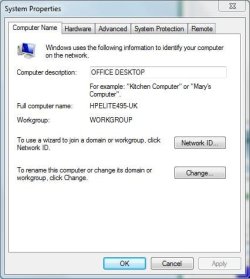
How about if you dispense with the Homegroup altogether and try using a Workgroup instead?

WG.JPG
 

My Computer My Computer

Computer Manufacturer/Model Number
HP Pavilion Elite 495UK
OS
Windows 7 Ultimate SP1 64-Bit
CPU
Intel Core i7 870 @ 2.93GHz
Motherboard
MSI 2A9C (CPU1)
Memory
8Gb Dual-Channel DDR3 @ 664MHz
Graphics Card(s)
nVidia GeForce GTX 460 1024MB dedicated RAM
Sound Card
Realtek HD Audio
Monitor(s) Displays
HP2310i
Screen Resolution
1920 x 1080
Hard Drives
1x1954GB Hitachi HDS22020ALA 330 (RAID), 1x1954GB Hitachi External for backup and storage
PSU
460W
Case
HP Elite
Cooling
Air cooled
Keyboard
Logitech K750 solar-powered keyboard
Mouse
Logitech Wireless M180 mouse
Internet Speed
2Mb
Other Info
Pure Avanti Flow Internet Radio with iPod Dock, 64Gb iPod, HP USB Speakers, Sony MDR-V500 Headphones, Sony Vaio F-Series Laptop
How about if you dispense with the Homegroup altogether and try using a Workgroup instead?

View attachment 187768

I'd consider trying that, but wouldn't I still have the same problem as the computers still can't see each other on the network. On both computers the Workgroups have the same name, so as far as I am aware it should be working as a workgroup, but it's not. Are there any settings I need to change to get a workgroup happening?
 

My Computer My Computer

OS
Windows 7 Home Premium 32bit
CPU
Core i5 2300
Motherboard
Asus P8P67LE
Memory
4GB DDR3 1333

My Computer My Computer

Computer Manufacturer/Model Number
HP Pavilion Elite 495UK
OS
Windows 7 Ultimate SP1 64-Bit
CPU
Intel Core i7 870 @ 2.93GHz
Motherboard
MSI 2A9C (CPU1)
Memory
8Gb Dual-Channel DDR3 @ 664MHz
Graphics Card(s)
nVidia GeForce GTX 460 1024MB dedicated RAM
Sound Card
Realtek HD Audio
Monitor(s) Displays
HP2310i
Screen Resolution
1920 x 1080
Hard Drives
1x1954GB Hitachi HDS22020ALA 330 (RAID), 1x1954GB Hitachi External for backup and storage
PSU
460W
Case
HP Elite
Cooling
Air cooled
Keyboard
Logitech K750 solar-powered keyboard
Mouse
Logitech Wireless M180 mouse
Internet Speed
2Mb
Other Info
Pure Avanti Flow Internet Radio with iPod Dock, 64Gb iPod, HP USB Speakers, Sony MDR-V500 Headphones, Sony Vaio F-Series Laptop
Although this relates to Windows XP/Vista with 7 it does show you how to set up a workgroup.

Networking home computers running different versions of Windows

I've followed that as best I could, but still no change. I've turned off the Firewall on the router & have made sure my software firewall (ESET Smart Security) is set up to allow Homegroups too.

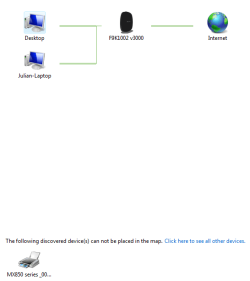
I'm confused as to why the network map shows both computers connected to the router, but the network window only shows the individual computer I'm on at the time. I've attached a snip of the network map from the desktop.

network map.PNG
 

My Computer My Computer

OS
Windows 7 Home Premium 32bit
CPU
Core i5 2300
Motherboard
Asus P8P67LE
Memory
4GB DDR3 1333
I've renamed the Workgroup, & now the computers can see each other as being on the same network, however this is only when the laptop is running the wired connection, ie it doesn't work through wireless.

However, I still can't join a homegroup using either computer. I've also tried doing it the old fashioned way, but neither computer has access to the other, despite there being only one account on each computer, with identical user names.

I'd prefer having a homegroup, especially one that can be connected to wirelessly, but if that's not possible I can live with just a network. I just need to be able to transfer large files & folders from one computer to the other without having to use USB sticks &/or USB drives.
 

My Computer My Computer

OS
Windows 7 Home Premium 32bit
CPU
Core i5 2300
Motherboard
Asus P8P67LE
Memory
4GB DDR3 1333
I've partially solved the problem. I changed the sharing permissions on the folders I want to share & can now access them across the workgroup.

This is not completely satisfactory, as I would like to be able to access each computer wirelessly in the future. In order to get it to work I also had to allow sharing to everyone, which is not completely secure & not my preferred way to do things.

I'm thinking of disabling & deleteing all connections on the laptop & then rebooting it & letting it detect everything again from scratch. Would this be an advisable course of action or am I just as likely to run into the same troubles again?
 

My Computer My Computer

OS
Windows 7 Home Premium 32bit
CPU
Core i5 2300
Motherboard
Asus P8P67LE
Memory
4GB DDR3 1333

My Computer My Computer

OS
Windows 7 Ultimate 32 bit
CPU
AMD Phenom 8450 Triple Core 2.1GHz
Motherboard
MSI MS-7388
Memory
Corsair 4GB
Graphics Card(s)
ATI Radeon HD3650 1GB
Sound Card
Onboard 7.1
Monitor(s) Displays
Samsung 24" LCD - Philips 42" LCD
Screen Resolution
1600 x 900 32bit @60Hz
Hard Drives
Maxtor 120GB IDE - Hitachi 1TB SATA
PSU
650w
You're very welcome Tyenot.

Dobes, if you have non-Windows 7 computers in your network then you can't use a Homegroup, but as you haven't it doesn't apply to you.

Starting from scratch may be the best option for you.

In the meantime I'll do a bit more research.

You could try uninstalling your wireless networks, restart your computer, and then configure a new network.

Are these of any help?

http://www.sevenforums.com/tutorials/43972-homegroup-add-computer-join.html

http://www.howtogeek.com/howto/9524/learning-windows-7-create-a-homegroup-join-a-new-computer-to-it/

http://windows.microsoft.com/en-US/windows7/Setting-up-a-wireless-network

http://www.microsoft.com/athome/organization/wirelesssetup.aspx
 

My Computer My Computer

Computer Manufacturer/Model Number
HP Pavilion Elite 495UK
OS
Windows 7 Ultimate SP1 64-Bit
CPU
Intel Core i7 870 @ 2.93GHz
Motherboard
MSI 2A9C (CPU1)
Memory
8Gb Dual-Channel DDR3 @ 664MHz
Graphics Card(s)
nVidia GeForce GTX 460 1024MB dedicated RAM
Sound Card
Realtek HD Audio
Monitor(s) Displays
HP2310i
Screen Resolution
1920 x 1080
Hard Drives
1x1954GB Hitachi HDS22020ALA 330 (RAID), 1x1954GB Hitachi External for backup and storage
PSU
460W
Case
HP Elite
Cooling
Air cooled
Keyboard
Logitech K750 solar-powered keyboard
Mouse
Logitech Wireless M180 mouse
Internet Speed
2Mb
Other Info
Pure Avanti Flow Internet Radio with iPod Dock, 64Gb iPod, HP USB Speakers, Sony MDR-V500 Headphones, Sony Vaio F-Series Laptop
Back
Top