Solved Trying to enlarge my partition containing my Windows 7 Home 64-bit OS

MSwhip

New member
Member
VIP
Local time
6:06 PM
Messages
101
I am trying to enlarge my partition containing my Windows 7 Home 64-bit OS.
I have unallocated space to use for my purposes. The SystemReserve 100 MB self created by the OS during installation, is in between the partition with the OS and the unallocated space. I know that to be able to resize the unallocated has to be contiguouis to the partition to be resized. How can I change so they become contiguous?

I had trouble using the Mini Partition Wizard.
So I emailed them caise their Video Tiutorial in their site was not working when I tried to Resize the OS partition on a Intel SSD.
They answered saying that their software was having isssues with SSD's and they will launch in brief a new software for SSD fo fix those issues.
Is that the one your tutorial was based on?

I would appreciate your comments.

Thank you kindly
 
Last edited by a moderator:

My Computer My Computer

At a glance

Windows 7 Home Premium 64 bitAMD A10-7870K + onboard Radeon HD Graphics16 GB in 2 slots: 2 x 8GB Kingston Hyper Blu ...Nvidia GT 740 GT SC 4 GB GDRR5 + onboard Rade...
Computer type
PC/Desktop
Computer Manufacturer/Model Number
Custom Built
OS
Windows 7 Home Premium 64 bit
CPU
AMD A10-7870K + onboard Radeon HD Graphics
Motherboard
ASUS A88XM-E
Memory
16 GB in 2 slots: 2 x 8GB Kingston Hyper Blu DDR3 1600Mhz
Graphics Card(s)
Nvidia GT 740 GT SC 4 GB GDRR5 + onboard Radeon HD Graphics
Sound Card
Realtek
Monitor(s) Displays
Dell W2309 16:9 Aspect ratio
Hard Drives
Drive 0: Intel 320 Series 160GB
Drive 1: WD Caviar Black 2TB Sata 2 (no OS installed on it))

External Enclosure USB 2.0 or eSata Interfaces linked to the Desktop PC contain 4 mechanical HDDs for total storage cap
PSU
Corsair RM 550 Modular
Case
Antec P70
Cooling
N/A
Internet Speed
1000 (*UP TO) Mbps Download 50 Mbps Upload (*UP TO)
Antivirus
Active online AVG and Avira -
Browser
Most current Firefox and/or Waterfox alternatively
Other Info
Periodic Scans of the 2 hardware Drives with Malwarebytes, SuperMalwarebytes and Spybot and Destroy
MSwhip:


Are you using Partition Wizard 4.2.2 from a boot disc? It's generally preferable to Partition Wizard from Windows.

Could you post a pic of your Disk Management screen.
 
Last edited by a moderator:

My Computer My Computer

At a glance

Windows 7 Home Premium SP1, 64-bitIntel Skylake i5-6600K, not overclocked8 GB HyperX DDR4-2666 (2 x 4 GB)none; graphics are integrated on CPU
Computer type
PC/Desktop
Computer Manufacturer/Model Number
Ignatz Special; 4 speed manual gearbox; factory air conditioning; one of one
OS
Windows 7 Home Premium SP1, 64-bit
CPU
Intel Skylake i5-6600K, not overclocked
Motherboard
AsRock Z170M Extreme 4, micro ATX
Memory
8 GB HyperX DDR4-2666 (2 x 4 GB)
Graphics Card(s)
none; graphics are integrated on CPU
Sound Card
onboard: Realtek ALC1150; external: USB Behringer UF0-202
Monitor(s) Displays
Dell S2340M 23 inch IPS
Screen Resolution
1600 x 900
Hard Drives
System: Crucial MX100 series SSD, 128 GB;
Data: Samsung Spinpoint 103SJ, 1 TB;
Backup: WD Caviar Green WD30EZRX-00D8PB0, 3 TB
PSU
Rosewill SilentNight 500 watt fanless, semi-modular
Case
Antec Solo II
Cooling
Noctua NH-U12S; Noctua F12 intake, Noctua S12A exhaust
Keyboard
Microsoft 200 6JH-00001 USB
Mouse
Dell or Microsoft optical wired; USB
Antivirus
Microsoft Security Essentials and Malwarebytes Premium
Browser
Pale Moon
Other Info
All fans PWM; speeds at idle: CPU circa 500 rpm; intake circa 600 rpm; exhaust circa 600 rpm; CPU temps 27 idle and 47 C load in a warm room (27 C/81 F) when running Intel Extreme Tuning Utility stress test.
Use the Snipping Tool in Start Menu, capture a Rectangular snip of the maximized Disk mgmt drive map with listings, attach using paper clip in Reply box.

Would you like to remove the System Reserved partition first so you can do what you want more easily? We can help you do that, copy it into first partition space or slide it to the far right of the HD which will likely require the same Repairs as for eliminating it.

Let us know which you prefer and we will give you the steps.
 
to greg

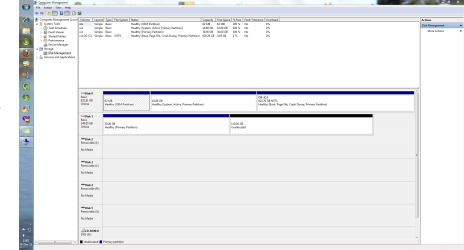
This is the best I was able to achieve, a thumbnail. Looked larger when i saved it.
I hope you can read it.


I tried to enlarge with Mini Partition Wizard version 7 software, did not work they say their software is having issues with SSDs.

Tried with Windows Disk management Utility. Hopeless too.

Whatever I do with this now, saving the data is of paramount importance.
So at this point -as you can see from the attached snippet- I could go either way.
Your choice of 'repairs' method.


Thank you

Please note:

Given the lack of space on the OS partition and the fact I could not control where the software I needed to load was installing and therefore would 'eat up' the scant 5 GB left on the said partition, I have temporarily swapped them and now the 1 TB HDD is in the Disk 0 spot (and is the boot disk)
 

Attachments

  • Capture.PNG
    Capture.PNG
    11.1 KB · Views: 73
Last edited:

My Computer My Computer

At a glance

Windows 7 Home Premium 64 bitAMD A10-7870K + onboard Radeon HD Graphics16 GB in 2 slots: 2 x 8GB Kingston Hyper Blu ...Nvidia GT 740 GT SC 4 GB GDRR5 + onboard Rade...
Computer type
PC/Desktop
Computer Manufacturer/Model Number
Custom Built
OS
Windows 7 Home Premium 64 bit
CPU
AMD A10-7870K + onboard Radeon HD Graphics
Motherboard
ASUS A88XM-E
Memory
16 GB in 2 slots: 2 x 8GB Kingston Hyper Blu DDR3 1600Mhz
Graphics Card(s)
Nvidia GT 740 GT SC 4 GB GDRR5 + onboard Radeon HD Graphics
Sound Card
Realtek
Monitor(s) Displays
Dell W2309 16:9 Aspect ratio
Hard Drives
Drive 0: Intel 320 Series 160GB
Drive 1: WD Caviar Black 2TB Sata 2 (no OS installed on it))

External Enclosure USB 2.0 or eSata Interfaces linked to the Desktop PC contain 4 mechanical HDDs for total storage cap
PSU
Corsair RM 550 Modular
Case
Antec P70
Cooling
N/A
Internet Speed
1000 (*UP TO) Mbps Download 50 Mbps Upload (*UP TO)
Antivirus
Active online AVG and Avira -
Browser
Most current Firefox and/or Waterfox alternatively
Other Info
Periodic Scans of the 2 hardware Drives with Malwarebytes, SuperMalwarebytes and Spybot and Destroy
I can't even begin to guess how you ended up with all those partitions and a system volume of W. Maybe I'm a bit obsessive complusive, but that would drive me crazy.

Before doing anything, you'll want to back up your data. Let us know how you want your drives to look when finished, and we can go from there.

If it was my system, I'd start over, creating the SSD as my bootable C drive, and the 1 TB as my D drive to store my user data.
 

My Computer My Computer

At a glance

Windows 7 Ultimate x64 SP1Intel Core i7-260012 GB Patriot Extreme DDR3-1333Nvidia GTX 470
OS
Windows 7 Ultimate x64 SP1
CPU
Intel Core i7-2600
Motherboard
Gigabyte GA-P67A-UD3P-B3
Memory
12 GB Patriot Extreme DDR3-1333
Graphics Card(s)
Nvidia GTX 470
Monitor(s) Displays
Dell UltraSharp 2209WA
Hard Drives
OCZ Agility3 240 GB, WD5001AALS, WD7501AALS
PSU
OCZ ModStream 700W
Case
CoolerMaster HAF 912 Advanced
Cooling
CoolerMaster Hyper 212 Plus
The OS on the ssd will probably have o/s registry drive letter C ( unless he deliberately set it up differently during install).

I have different o/s registry drive letters for all my installed o/s - but that is pretty unusual.

For the partitioning question - you are right to wait for the new Partition Wizard, or use another partitioner which already supports ssd.
 

My Computers My Computers

  • At a glance

    7 X64i5 84002x8gb 3200mhz
    Computer type
    PC/Desktop
    OS
    7 X64
    CPU
    i5 8400
    Motherboard
    gigabyte b365m ds3h
    Memory
    2x8gb 3200mhz
    Hard Drives
    various
    PSU
    pure power 11 400w cm
    Case
    Coolermaster
    Cooling
    cryorig m9i
  • At a glance

    7x64g54008gb ddr4 2400
    Computer type
    PC/Desktop
    OS
    7x64
    CPU
    g5400
    Motherboard
    ga b365m ds3h
    Memory
    8gb ddr4 2400
    PSU
    xfx pro 450w
When you are booted into the OS on SSD, it's letter should be C. If not then you must have run the installer from C which locked out that letter. It also placed the System files for W on C which is why all other HD's should be unplugged during install.

What is the Programs partition on the SSD? Programs should be installed on the OS partition as they write Registry keys which integrate themselves into the OS so should remain together for imaging purposes.

I agree with Deacon that you should boot into the Win7 DVD (the only way an install should be done) to use Custom install Drive Options to delete all partitions on the SSD, reinstall to one partition. Unplug the HD first. Here's how to get a perfect reinstall: Reinstalling Windows 7

Otherwise you can unplug HD, swap its cable to SSD or set SSD to boot first in BIOS setup, boot free Partition Wizard bootable CD, rightclick C to Modify>Convert to Primary, click OK, then rightclick C again to Modify>Set to Active, OK, then click on SSD to highlight it, from Disk tab select Rebuild MBR, Apply all steps. This may preclude the need to run Startup Repair 3 Separate Times from the Win7 DVD Repair console or System Repair Disk to write the System boot files to Active partition.

After Win7 starts you can delete SysReserved partition to extend C using Disk Mgmt.
Partition or Volume - Delete
Partition or Volume - Extend

Afterwards plug back in HD, boot it using one-time BIOS Boot Menu key.
 
Last edited:
About what was said

For Deacon,
I agree. that is what I was trying to achieve. Install the OS on the SSD. and 'maybe' the most important Software programs too.
I had SSD as Disk 0 and no other drive connected to the Desktop.
For that I had created a partition of 25GB, thinking that it would be enough and that the rest of the Software i would be able to install on the HDD after I was done installing the OS and a couple other Software Programs like LastPass, Firefox, Avira Antivir and the Windows Media Center. At that junction I decided to resize the OS partition and enlarge it to 30GB, and was unable to do it as I explained on the initial post which started this thread.
Now having read Greg saying that ALL SOFWARE PROGRAMS should also be installed in the SSD I will resize it (whenever I am able) to 40GB.
I rather reserve letter "D" for the CD/DVD ROM drive, and I have another 4 HDD in an external 4 Bay enclosure connected to the Mainboard via an eSata port in the back of the tower. That is why I designated the 'W' for the 1TB HDD inside the PC (I have just 2 bays) and now -of late- the new SSD addition.

Greg asked me why had I "cut the listings". I thought I was keeping things simpler, cause at this point what I left out was all the information about the other 4 HDD which seemed inmaterial and unrelated to the issue that made me ask for help. The isssue is mostly with the SDD... and the inclusion of the one HDD had to do with the fact that data will be going to be stored in there (as well as in the other 4 HDD)
As to Greg's instructions after re-reading them a few times I find a couple of terms that confuse me:
QUOTE
Otherwise you can unplug HD, swap its cable to SSD or set SSD to boot first in BIOS setup, mark Win7 on SSD Active, then run Startup Repair - Run 3 Separate Times to write the system boot files to Win7 until it starts on its own and holds the System Active flags. Then delete System Reserved to extend Win7 into its space.
Partition - Mark as Active
Partition or Volume - Delete
Partition or Volume - Extend
UNQUOTE
- 'mark Win7 on SSD Active" does it mean to tap-tap the F8 key as Windows boots up, then highlight the SSD line and then within the boot menu hit the System Repair once... when it is done exit and reboot the PC...and do the same another couple times?
- how will I know when Win 7 starts on its own? by trying until it does? what does 'holds the System Active flags" mean?
- Last 3 short lines in blue: is that 2 steps in there? a. highlight the System Reserved partition and delete it? and b. resize the OS partition from the 25 now to the 40GB when im done?

Lastly you said 'Afterwards plug back in HD, boot it using one-time BIOS Boot Menu key'; please excuse my ignorance but what does one-time BIOS Boot Menu mean? This time around tap tap the F12 key without setting the BIOS permanently to boot from the HDD?

Thanks again for sharing knowledge, being helpful and exercising patience with me.
 

My Computer My Computer

At a glance

Windows 7 Home Premium 64 bitAMD A10-7870K + onboard Radeon HD Graphics16 GB in 2 slots: 2 x 8GB Kingston Hyper Blu ...Nvidia GT 740 GT SC 4 GB GDRR5 + onboard Rade...
Computer type
PC/Desktop
Computer Manufacturer/Model Number
Custom Built
OS
Windows 7 Home Premium 64 bit
CPU
AMD A10-7870K + onboard Radeon HD Graphics
Motherboard
ASUS A88XM-E
Memory
16 GB in 2 slots: 2 x 8GB Kingston Hyper Blu DDR3 1600Mhz
Graphics Card(s)
Nvidia GT 740 GT SC 4 GB GDRR5 + onboard Radeon HD Graphics
Sound Card
Realtek
Monitor(s) Displays
Dell W2309 16:9 Aspect ratio
Hard Drives
Drive 0: Intel 320 Series 160GB
Drive 1: WD Caviar Black 2TB Sata 2 (no OS installed on it))

External Enclosure USB 2.0 or eSata Interfaces linked to the Desktop PC contain 4 mechanical HDDs for total storage cap
PSU
Corsair RM 550 Modular
Case
Antec P70
Cooling
N/A
Internet Speed
1000 (*UP TO) Mbps Download 50 Mbps Upload (*UP TO)
Antivirus
Active online AVG and Avira -
Browser
Most current Firefox and/or Waterfox alternatively
Other Info
Periodic Scans of the 2 hardware Drives with Malwarebytes, SuperMalwarebytes and Spybot and Destroy
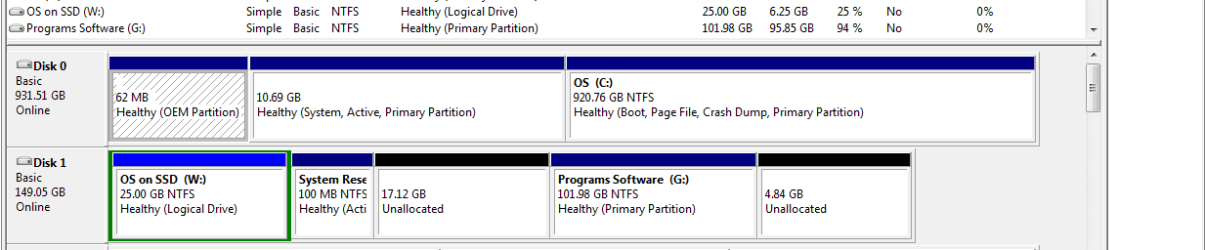
I changed the steps to use Partition Wizard bootable CD to mark Active since you first need to convert C from Logical to Primary partition which PW CD can do. It also has a feature on it's Disk tab where it will Rebuild the System MBR on the highlighted HD once marked Active so you may not need to run Startup Repair 3 times to do this.

You then want to check Win7 partition on SSD to make sure it holds the System Active flags which are the listings on each partition, which we needed to see for all drives to check they are correct. You want no Active partitions except the OS. Logical partitions cannot be marked Active until converted to Primary.

Startup Repair needs to be run from Win7 DVD or System Repair CD System Recovery Options.

Yes since SSD will be set first to boot when you plug back in the HD, you'd tap the F12 key to boot the HD when needed. If this isn't to your liking, you can install EasyBCD 2.02 to Win7 on SSD to add the other OS on SSD.
 
This is the best I was able to achieve, a thumbnail. Looked larger when i saved it.
I hope you can read it.


I tried to enlarge with Mini Partition Wizard version 7 software, did not work they say their software is having issues with SSDs.

Tried with Windows Disk management Utility. Hopeless too.

Whatever I do with this now, saving the data is of paramount importance.
So at this point -as you can see from the attached snippet- I could go either way.
Your choice of 'repairs' method.


Thank you

Please note:
Given the lack of space on the OS partition and the fact I could not control where the software I needed to load was installing and therefore would 'eat up' the scant 5 GB left on the said partition, I have temporarily swapped them and now the 1 TB HDD is in the Disk 0 spot (and is the boot disk)
Please tell exact what's on each volume. "system reserved" is active now so it's most like your startup volume. Your running windows is on C: now. Correct?
Tell what is purpose of other volumes
 

My Computer My Computer

At a glance

Microsoft Windows 7 Home Premium 64-bits 7601...Intel(R) Core(TM) i3 CPU M 370 @ 2.40GHz4,00 GBATI Mobility Radeon HD 5400 Series
Computer type
Laptop
Computer Manufacturer/Model Number
ACER ASPIRE 5742G
OS
Microsoft Windows 7 Home Premium 64-bits 7601 Multiprocessor Free Service Pack 1
CPU
Intel(R) Core(TM) i3 CPU M 370 @ 2.40GHz
Motherboard
Acer Aspire 5742G
Memory
4,00 GB
Graphics Card(s)
ATI Mobility Radeon HD 5400 Series
Sound Card
(1) AMD High Definition Audio Device (2) Realtek High Defi
Screen Resolution
1366 x 768 x 32 bits (4294967296 colors) @ 60 Hz
Hard Drives
WDC WD5000BEVT-22ZAT0
Have you tried Acronis Disk Director Suite for partitioning. I think you can achieve your objective in a jiffy if you use it.

I would have first merged the unallocated space with the 100 mb SystemReserve Rartition and then taken space equal to the unallocated space from the front of this merged partition to merge with the partition containing Windows 7.

All of this could have been done in a single operation with the Disk Director Suite Boot CD which incidentally also has Acronis True Image on it.


I am trying to enlarge my partition containing my Windows 7 Home 64-bit OS.
I have unallocated space to use for my purposes. The SystemReserve 100 MB self created by the OS during installation, is in between the partition with the OS and the unallocated space. I know that to be able to resize the unallocated has to be contiguouis to the partition to be resized. How can I change so they become contiguous?

I had trouble using the Mini Partition Wizard.
So I emailed them caise their Video Tiutorial in their site was not working when I tried to Resize the OS partition on a Intel SSD.
They answered saying that their software was having isssues with SSD's and they will launch in brief a new software for SSD fo fix those issues.
Is that the one your tutorial was based on?

I would appreciate your comments.

Thank you kindly
 

My Computer My Computer

At a glance

Windows 7 Pro with SP1 32bit2 gigs of RAMIntel(R) 82845G/GL/GE/PE/GV Graphics Controller
Computer Manufacturer/Model Number
Custom Built
OS
Windows 7 Pro with SP1 32bit
Motherboard
Intel D845GVS1 X86-based PC
Memory
2 gigs of RAM
Graphics Card(s)
Intel(R) 82845G/GL/GE/PE/GV Graphics Controller
Sound Card
Realtek AC'97 Audio
Monitor(s) Displays
Samsung SyncMaster 931BF Black 19" LCD Monitor
Screen Resolution
1280X960
Hard Drives
1. SAMSUNG SP0822N ATA Device ~ 80 GigaBytes

2. Seagate FreeAgent Go USB Device ~ 500 GigaBytes
Keyboard
COMPAQ Standard PS/2 Keyboard
Mouse
iBall Laser Precise Speedster
Internet Speed
4 mb/sec
wanchoo:
I would have first merged the unallocated space with the 100 mb SystemReserve Rartition and then taken space equal to the unallocated space from the front of this merged partition to merge with the partition containing Windows 7.
If you merge win7 partition with "system reserved" I don't know what happens. both partition have files like bootmgr and \boot\bcd

His C-partition is on another disk btw so merging isn't possible anyway
 

My Computer My Computer

At a glance

Microsoft Windows 7 Home Premium 64-bits 7601...Intel(R) Core(TM) i3 CPU M 370 @ 2.40GHz4,00 GBATI Mobility Radeon HD 5400 Series
Computer type
Laptop
Computer Manufacturer/Model Number
ACER ASPIRE 5742G
OS
Microsoft Windows 7 Home Premium 64-bits 7601 Multiprocessor Free Service Pack 1
CPU
Intel(R) Core(TM) i3 CPU M 370 @ 2.40GHz
Motherboard
Acer Aspire 5742G
Memory
4,00 GB
Graphics Card(s)
ATI Mobility Radeon HD 5400 Series
Sound Card
(1) AMD High Definition Audio Device (2) Realtek High Defi
Screen Resolution
1366 x 768 x 32 bits (4294967296 colors) @ 60 Hz
Hard Drives
WDC WD5000BEVT-22ZAT0
What I am saying is as follows.

Step 1. Merge Unallocated space (a) + System Reserve (b)

System Reserve Partition is now a+b=b

Step 2. Take out from the front of System Reserve (a+b) space equal to a and merge it with Windows 7 Partition (c).

System Reserve Partition is now back to its original size b (a+b-a) and the Windows 7 Partition gets resized to c+a=c

The hard disk that was earlier c+b+a is now c (c+a)+b and the unallocated space a has got merged with Windows 7 Partition c

With Disk Director the two steps can be carried out together.

Quite Easily Done (QED)


wanchoo:
I would have first merged the unallocated space with the 100 mb SystemReserve Rartition and then taken space equal to the unallocated space from the front of this merged partition to merge with the partition containing Windows 7.
If you merge win7 partition with "system reserved" I don't know what happens. both partition have files like bootmgr and \boot\bcd

His C-partition is on another disk btw so merging isn't possible anyway
 

My Computer My Computer

At a glance

Windows 7 Pro with SP1 32bit2 gigs of RAMIntel(R) 82845G/GL/GE/PE/GV Graphics Controller
Computer Manufacturer/Model Number
Custom Built
OS
Windows 7 Pro with SP1 32bit
Motherboard
Intel D845GVS1 X86-based PC
Memory
2 gigs of RAM
Graphics Card(s)
Intel(R) 82845G/GL/GE/PE/GV Graphics Controller
Sound Card
Realtek AC'97 Audio
Monitor(s) Displays
Samsung SyncMaster 931BF Black 19" LCD Monitor
Screen Resolution
1280X960
Hard Drives
1. SAMSUNG SP0822N ATA Device ~ 80 GigaBytes

2. Seagate FreeAgent Go USB Device ~ 500 GigaBytes
Keyboard
COMPAQ Standard PS/2 Keyboard
Mouse
iBall Laser Precise Speedster
Internet Speed
4 mb/sec
What I am saying is as follows.

Step 1. Merge Unallocated space (a) + System Reserve (b)

System Reserve Partition is now a+b=b

Step 2. Take out from the front of System Reserve (a+b) space equal to a and merge it with Windows 7 Partition (c).

System Reserve Partition is now back to its original size b (a+b-a) and the Windows 7 Partition gets resized to c+a=c

The hard disk that was earlier c+b+a is now c (c+a)+b and the unallocated space a has got merged with Windows 7 Partition c

With Disk Director the two steps can be carried out together.

Quite Easily Done (QED)
Simply said: place system reserved to end of unallocated space. After that enlarge other partition.

Did you read his "system reserved" partition is on another physical disk as his C-partition!? C is his active system drive. So it's a very strange config anyway
 

My Computer My Computer

At a glance

Microsoft Windows 7 Home Premium 64-bits 7601...Intel(R) Core(TM) i3 CPU M 370 @ 2.40GHz4,00 GBATI Mobility Radeon HD 5400 Series
Computer type
Laptop
Computer Manufacturer/Model Number
ACER ASPIRE 5742G
OS
Microsoft Windows 7 Home Premium 64-bits 7601 Multiprocessor Free Service Pack 1
CPU
Intel(R) Core(TM) i3 CPU M 370 @ 2.40GHz
Motherboard
Acer Aspire 5742G
Memory
4,00 GB
Graphics Card(s)
ATI Mobility Radeon HD 5400 Series
Sound Card
(1) AMD High Definition Audio Device (2) Realtek High Defi
Screen Resolution
1366 x 768 x 32 bits (4294967296 colors) @ 60 Hz
Hard Drives
WDC WD5000BEVT-22ZAT0
I gave you the steps to resolve your issue. Please post back any questions.
 
If the System Reserve Partition is on another disk then where is the problem.

As I understood the System Reserve Partition was in between Windows 7 Partition and Unallocated Space. May be I understood wrong.


[/QUOTE]
Simply said: place system reserved to end of unallocated space. After that enlarge other partition.

Did you read his "system reserved" partition is on another physical disk as his C-partition!? C is his active system drive. So it's a very strange config anyway[/QUOTE]
 

My Computer My Computer

At a glance

Windows 7 Pro with SP1 32bit2 gigs of RAMIntel(R) 82845G/GL/GE/PE/GV Graphics Controller
Computer Manufacturer/Model Number
Custom Built
OS
Windows 7 Pro with SP1 32bit
Motherboard
Intel D845GVS1 X86-based PC
Memory
2 gigs of RAM
Graphics Card(s)
Intel(R) 82845G/GL/GE/PE/GV Graphics Controller
Sound Card
Realtek AC'97 Audio
Monitor(s) Displays
Samsung SyncMaster 931BF Black 19" LCD Monitor
Screen Resolution
1280X960
Hard Drives
1. SAMSUNG SP0822N ATA Device ~ 80 GigaBytes

2. Seagate FreeAgent Go USB Device ~ 500 GigaBytes
Keyboard
COMPAQ Standard PS/2 Keyboard
Mouse
iBall Laser Precise Speedster
Internet Speed
4 mb/sec
He is trying to add to W drive , I think.

If that is the case - he would need to add to an extended partition, or convert it to Primary first.

I can't think of any free apps. that will do that. ( Apart from Partition Wizard - but the developer has advised not to use it ).

Paragon apps. will do it - but you would probably need one of the paid versions.

There is a free version of Paragon partition manager, but it is very basic.

EDIT :

I just checked - Paragon free can do it. Paragon Partition Manager Free Edition - Free Download

You have to use the main interface and know what you are doing - the express wizards are not much use for this.
 

My Computers My Computers

  • At a glance

    7 X64i5 84002x8gb 3200mhz
    Computer type
    PC/Desktop
    OS
    7 X64
    CPU
    i5 8400
    Motherboard
    gigabyte b365m ds3h
    Memory
    2x8gb 3200mhz
    Hard Drives
    various
    PSU
    pure power 11 400w cm
    Case
    Coolermaster
    Cooling
    cryorig m9i
  • At a glance

    7x64g54008gb ddr4 2400
    Computer type
    PC/Desktop
    OS
    7x64
    CPU
    g5400
    Motherboard
    ga b365m ds3h
    Memory
    8gb ddr4 2400
    PSU
    xfx pro 450w
Now going in a totally different direction

Thanks for all the help.
Seeing that i was not progressing with the issue, i decided to go the radical route.

I wrote zeros over the SSD and have it now clean, i did create a 30GB partition out of the 160GB total.
Attached pls find the view of the Disk management screen. I was able to make one partition that as you may see reads.. 30GB Healthy Primary Partition, all the rest is unallocated space.

1. Does anyone know how to Migrate just the OS from the C drive without losing any data from that D drive?

This is Dell computer so the Windows 7 Home 64-bit was loaded by them on the HDD that shows as C sand i do not have a CD with the full OS from where to load it to the SSD.

I would appreciate if you could guide me with point black 1. 2. ..3.steps on how to migrate(make a copy or clone it) the OS from the HDD to the SSD with both disks on this PD as they are now.

Thank you.
 

Attachments

  • Capture.PNG
    Capture.PNG
    69 KB · Views: 20

My Computer My Computer

At a glance

Windows 7 Home Premium 64 bitAMD A10-7870K + onboard Radeon HD Graphics16 GB in 2 slots: 2 x 8GB Kingston Hyper Blu ...Nvidia GT 740 GT SC 4 GB GDRR5 + onboard Rade...
Computer type
PC/Desktop
Computer Manufacturer/Model Number
Custom Built
OS
Windows 7 Home Premium 64 bit
CPU
AMD A10-7870K + onboard Radeon HD Graphics
Motherboard
ASUS A88XM-E
Memory
16 GB in 2 slots: 2 x 8GB Kingston Hyper Blu DDR3 1600Mhz
Graphics Card(s)
Nvidia GT 740 GT SC 4 GB GDRR5 + onboard Radeon HD Graphics
Sound Card
Realtek
Monitor(s) Displays
Dell W2309 16:9 Aspect ratio
Hard Drives
Drive 0: Intel 320 Series 160GB
Drive 1: WD Caviar Black 2TB Sata 2 (no OS installed on it))

External Enclosure USB 2.0 or eSata Interfaces linked to the Desktop PC contain 4 mechanical HDDs for total storage cap
PSU
Corsair RM 550 Modular
Case
Antec P70
Cooling
N/A
Internet Speed
1000 (*UP TO) Mbps Download 50 Mbps Upload (*UP TO)
Antivirus
Active online AVG and Avira -
Browser
Most current Firefox and/or Waterfox alternatively
Other Info
Periodic Scans of the 2 hardware Drives with Malwarebytes, SuperMalwarebytes and Spybot and Destroy
You mention a D drive. I don't see a D drive. Am I missing something?

You have a C occupying over 900 GB. Your new partition on the SSD is 30 GB. C as it now exists obviously won't fit within the 30 GB partition.

Before you worry about cloning or imaging, you first have to get C to a much smaller state.

That leaves aside the question of why such a small partition on the SSD when you could use most or all of the SSD for a new C---rather than just 30 GB.
 

My Computer My Computer

At a glance

Windows 7 Home Premium SP1, 64-bitIntel Skylake i5-6600K, not overclocked8 GB HyperX DDR4-2666 (2 x 4 GB)none; graphics are integrated on CPU
Computer type
PC/Desktop
Computer Manufacturer/Model Number
Ignatz Special; 4 speed manual gearbox; factory air conditioning; one of one
OS
Windows 7 Home Premium SP1, 64-bit
CPU
Intel Skylake i5-6600K, not overclocked
Motherboard
AsRock Z170M Extreme 4, micro ATX
Memory
8 GB HyperX DDR4-2666 (2 x 4 GB)
Graphics Card(s)
none; graphics are integrated on CPU
Sound Card
onboard: Realtek ALC1150; external: USB Behringer UF0-202
Monitor(s) Displays
Dell S2340M 23 inch IPS
Screen Resolution
1600 x 900
Hard Drives
System: Crucial MX100 series SSD, 128 GB;
Data: Samsung Spinpoint 103SJ, 1 TB;
Backup: WD Caviar Green WD30EZRX-00D8PB0, 3 TB
PSU
Rosewill SilentNight 500 watt fanless, semi-modular
Case
Antec Solo II
Cooling
Noctua NH-U12S; Noctua F12 intake, Noctua S12A exhaust
Keyboard
Microsoft 200 6JH-00001 USB
Mouse
Dell or Microsoft optical wired; USB
Antivirus
Microsoft Security Essentials and Malwarebytes Premium
Browser
Pale Moon
Other Info
All fans PWM; speeds at idle: CPU circa 500 rpm; intake circa 600 rpm; exhaust circa 600 rpm; CPU temps 27 idle and 47 C load in a warm room (27 C/81 F) when running Intel Extreme Tuning Utility stress test.
Sorry about the mention of a "D" drive it was a typo and there is no way to Edit once you posted it.

I an mot interested in migrating anything EXCEPT the OS which at the most would fill 18GB. That is the halp i need with. Can you tell me how to find JUST the OS files? I want to install the OS on the SSD also.. the SSD is 160GB big and the 30GB is the partition i hope to in stall the OS in.

Thank you ignatzatsonic for responding
 

My Computer My Computer

At a glance

Windows 7 Home Premium 64 bitAMD A10-7870K + onboard Radeon HD Graphics16 GB in 2 slots: 2 x 8GB Kingston Hyper Blu ...Nvidia GT 740 GT SC 4 GB GDRR5 + onboard Rade...
Computer type
PC/Desktop
Computer Manufacturer/Model Number
Custom Built
OS
Windows 7 Home Premium 64 bit
CPU
AMD A10-7870K + onboard Radeon HD Graphics
Motherboard
ASUS A88XM-E
Memory
16 GB in 2 slots: 2 x 8GB Kingston Hyper Blu DDR3 1600Mhz
Graphics Card(s)
Nvidia GT 740 GT SC 4 GB GDRR5 + onboard Radeon HD Graphics
Sound Card
Realtek
Monitor(s) Displays
Dell W2309 16:9 Aspect ratio
Hard Drives
Drive 0: Intel 320 Series 160GB
Drive 1: WD Caviar Black 2TB Sata 2 (no OS installed on it))

External Enclosure USB 2.0 or eSata Interfaces linked to the Desktop PC contain 4 mechanical HDDs for total storage cap
PSU
Corsair RM 550 Modular
Case
Antec P70
Cooling
N/A
Internet Speed
1000 (*UP TO) Mbps Download 50 Mbps Upload (*UP TO)
Antivirus
Active online AVG and Avira -
Browser
Most current Firefox and/or Waterfox alternatively
Other Info
Periodic Scans of the 2 hardware Drives with Malwarebytes, SuperMalwarebytes and Spybot and Destroy
Back
Top