Is there anything better than DVD Flick?

Gums

New member
Power User
Local time
1:04 AM
Messages
106
Like to burn my own DVDs and the only thing I've tried so far is the free open sourced DVD Flick program. It's encoding as I type this. It's very slow. Start to finish took close to three hours for a two hour DVD. Haven't even burned my first DVD yet. Is there anything better? By that, I mean better encoding times, better menu choices?
 

My Computer My Computer

At a glance

Windows 7 64 bit
OS
Windows 7 64 bit
Have you tried the inbuilt Windows 7 DVD Maker? I've used it to make slideshows & can't fault it. I know it is in windows pro x64. Start menu.
 

My Computer My Computer

At a glance

Windows 7 Pro x64 -- PCLinuxOS KDE4 FullMonty...i7-875k @ Turbo - 7,6,5,5 - 3.6ghzCorsair CMD8GX3M4A1600C8 8gbAsus EAH5850 DirectCU/2DIS/1GD5
Computer Manufacturer/Model Number
Custom
OS
Windows 7 Pro x64 -- PCLinuxOS KDE4 FullMonty 2011
CPU
i7-875k @ Turbo - 7,6,5,5 - 3.6ghz
Motherboard
Asus P7P55D-E Deluxe
Memory
Corsair CMD8GX3M4A1600C8 8gb
Graphics Card(s)
Asus EAH5850 DirectCU/2DIS/1GD5
Sound Card
On Board
Monitor(s) Displays
Samsung SyncMaster T220 - Panasonic VT30a 50"
Screen Resolution
1680x1050 -
Hard Drives
Corsair Force 3 SSD 120GB x 2 ::
WD VelociRaptor 150GB WD1500HLFS x 2
PSU
Corsair HX-850 Power Supply
Case
Coolmaster HAF 932
Cooling
Corsair H50
Keyboard
Logitech Wireless MK700
Mouse
Logitech Wireless MX620
Internet Speed
Good enough for now
Other Info
Voip. Insanely cheap phone calls.
Yeah, I used the Windows 7 DVD maker and it worked great too. Probably will use it again. Just wished it had a few more options. Thought I'd take a look at some freeware dvd software. I wouldn't rule out purchasing software either such as Nero. I didn't even know Nero had some freeware. When I look at the Nero product page I'm overwhelmed by the number of choices there are. Nero 11, Platinum 11, Kwik Media, Video 11 and Burning Rom 11. If anyone with any Nero experience would chime in, I'd greatly appreciate any help in sorting out all these choices.
 

My Computer My Computer

At a glance

Windows 7 64 bit
OS
Windows 7 64 bit
  • Like
Reactions: JMH
Like to burn my own DVDs and the only thing I've tried so far is the free open sourced DVD Flick program. It's encoding as I type this. It's very slow. Start to finish took close to three hours for a two hour DVD. Haven't even burned my first DVD yet. Is there anything better? By that, I mean better encoding times, better menu choices?
SO! you've tried the rest, now try the best IMHO View attachment DVDStyler Portable.pdf
 

My Computer My Computer

At a glance

Win7 H.Prem. 32bit+SP1
Computer Manufacturer/Model Number
Look in my Signature.
OS
Win7 H.Prem. 32bit+SP1
  • Like
Reactions: JMH
Well, I take back my comments about the Windows 7 DVD maker. One, the format was burned to 4:3 and not 16:9. The original source is 16:9 and worst of all, NO SOUND! Dammit! I guess the biggest kick in the pants is the amount of time one invests in such an endeavor only to find that they've made a mistake somewhere along the way! Sucks big time because it really appeared to be so simple to use.
 

My Computer My Computer

At a glance

Windows 7 64 bit
OS
Windows 7 64 bit
I've been using Nero and there is a free copy to do basic burning of discs.
Here's the link Nero - Burning, ripping and copying - Nero BurnLite is Nero Kwik Burn!

Paul

Free? What I downloaded said free for 30 days the $4.99 for the DVD software which I guess isn't so bad. Anyway, I uninstalled it because it kept saying my files were too large. I don't know how this could be as the file size is 4.1GB and Nero insists they're 5.26GB. I'm really mixed up now.
 

My Computer My Computer

At a glance

Windows 7 64 bit
OS
Windows 7 64 bit
Like to burn my own DVDs and the only thing I've tried so far is the free open sourced DVD Flick program. It's encoding as I type this. It's very slow. Start to finish took close to three hours for a two hour DVD. Haven't even burned my first DVD yet. Is there anything better? By that, I mean better encoding times, better menu choices?
SO! you've tried the rest, now try the best IMHO View attachment 189701

Downloaded the program. Now, how do you create a Start Menu? i.e. "Play", "Chapters" on the Main Menu and a chapter Menu with screens for each chapter and a return to Main Menu button? Hard to get started. Seems pretty complex Roderunner!
 
Last edited:

My Computer My Computer

At a glance

Windows 7 64 bit
OS
Windows 7 64 bit
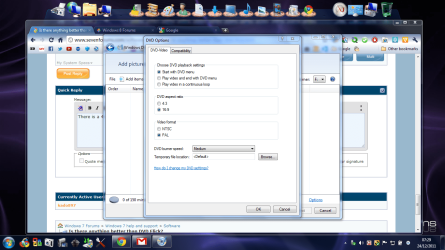
There is a 4:3/16:9 option in DVDMaker

screenshot89_2011-12-24.png
 

My Computer My Computer

At a glance

Microsoft Windows 7 Home Premium 64-bit Servi...Intel(R) Core(TM) i3 CPU M 330 @ 2.13GHz8 GB DDR3Intel(R) HD Graphics
Computer type
Laptop
Computer Manufacturer/Model Number
Hewlett-Packard/G62-107SA Notebook
OS
Microsoft Windows 7 Home Premium 64-bit Service Pack 1
CPU
Intel(R) Core(TM) i3 CPU M 330 @ 2.13GHz
Motherboard
Hewlett-Packard 1425
Memory
8 GB DDR3
Graphics Card(s)
Intel(R) HD Graphics
Sound Card
Realtek High Definition Audio
Monitor(s) Displays
Builtin
Screen Resolution
1366 x 768 x 32 bits (4294967296 colors) @ 60 Hz
Hard Drives
250 GB SATA Hard Disk Drive 7200 rpm
2TB Seagate GoFlex USB 2 Drive
1TB Iomega Prestige USB 2 Drive
1.5TB Iomega Prestige USB 2 Drive (Samsung)
2TB WD MyBook Live NAS.
Mouse
Logitech Anywhere MX
Internet Speed
152 Mbs download 10 Mbs upload
Antivirus
Norton 360
Browser
Chrome

My Computer My Computer

At a glance

Windows 7 Pro x64 -- PCLinuxOS KDE4 FullMonty...i7-875k @ Turbo - 7,6,5,5 - 3.6ghzCorsair CMD8GX3M4A1600C8 8gbAsus EAH5850 DirectCU/2DIS/1GD5
Computer Manufacturer/Model Number
Custom
OS
Windows 7 Pro x64 -- PCLinuxOS KDE4 FullMonty 2011
CPU
i7-875k @ Turbo - 7,6,5,5 - 3.6ghz
Motherboard
Asus P7P55D-E Deluxe
Memory
Corsair CMD8GX3M4A1600C8 8gb
Graphics Card(s)
Asus EAH5850 DirectCU/2DIS/1GD5
Sound Card
On Board
Monitor(s) Displays
Samsung SyncMaster T220 - Panasonic VT30a 50"
Screen Resolution
1680x1050 -
Hard Drives
Corsair Force 3 SSD 120GB x 2 ::
WD VelociRaptor 150GB WD1500HLFS x 2
PSU
Corsair HX-850 Power Supply
Case
Coolmaster HAF 932
Cooling
Corsair H50
Keyboard
Logitech Wireless MK700
Mouse
Logitech Wireless MX620
Internet Speed
Good enough for now
Other Info
Voip. Insanely cheap phone calls.
Gums - I still use Nero 8 to make DVDs. I guess the modern equivalent is the lower priced Nero 11 (£50 UK) ie not Platinum.

Its very fast - I can convert avi, mp4 etc to DVD files in 15-25 minutes on my 2600k. I usually make simple no menu DVDs, but Nero does menus, chapters + a bunch of other stuff.
 

My Computer My Computer

At a glance

Windows 7 pro x64 SP1Intel i7-2600k o/c to 4.6GHz8GB Mushkin 1866MHzNvidia GTX 750 Ti 2GB
Computer type
PC/Desktop
Computer Manufacturer/Model Number
self build
OS
Windows 7 pro x64 SP1
CPU
Intel i7-2600k o/c to 4.6GHz
Motherboard
MSI Z68-GD80
Memory
8GB Mushkin 1866MHz
Graphics Card(s)
Nvidia GTX 750 Ti 2GB
Sound Card
integrated
Monitor(s) Displays
Liyama ProLite 27"
Screen Resolution
1920*1080 px
Hard Drives
Seagate 2TB
PSU
Coolermaster GX 750W
Case
Antec 300 case + 5 fans
Cooling
Dark Rock Pro
Internet Speed
62Mbit down 18Mbit up
Antivirus
MSE
Browser
Firefox
Other Info
Blackgold BGT3650 Quad HD TV card. Also have various 3770 + 4770K render boxes.
Downloaded the program. Now, how do you create a Start Menu? i.e. "Play", "Chapters" on the Main Menu and a chapter Menu with screens for each chapter and a return to Main Menu button? Hard to get started. Seems pretty complex Roderunner!
Once you use DVDStyler, you'll see it is a lot easier then at first glance using my method. Here's the makers guide, it's too complicated for me. Hope you have better luck.View attachment DVDStyler.zip
 

My Computer My Computer

At a glance

Win7 H.Prem. 32bit+SP1
Computer Manufacturer/Model Number
Look in my Signature.
OS
Win7 H.Prem. 32bit+SP1

My Computer My Computer

At a glance

Windows 7 64 bit
OS
Windows 7 64 bit
There is a 4:3/16:9 option in DVDMaker

View attachment 189729

I am very much aware of that fact. However, it STILL comes out 4:3. This happened to me twice. A complete waste of eight hours of my time. Very frustrating!

Strange. I haven't used it for some time but when I have, if the source aspect ratio was 16:9, then the if you set the option to 16:9 that would be the output. I have to admit that at the time I think I only used wmv files produces by windows live movie maker. Maybe it understands the wmv format better than others.
 

My Computer My Computer

At a glance

Microsoft Windows 7 Home Premium 64-bit Servi...Intel(R) Core(TM) i3 CPU M 330 @ 2.13GHz8 GB DDR3Intel(R) HD Graphics
Computer type
Laptop
Computer Manufacturer/Model Number
Hewlett-Packard/G62-107SA Notebook
OS
Microsoft Windows 7 Home Premium 64-bit Service Pack 1
CPU
Intel(R) Core(TM) i3 CPU M 330 @ 2.13GHz
Motherboard
Hewlett-Packard 1425
Memory
8 GB DDR3
Graphics Card(s)
Intel(R) HD Graphics
Sound Card
Realtek High Definition Audio
Monitor(s) Displays
Builtin
Screen Resolution
1366 x 768 x 32 bits (4294967296 colors) @ 60 Hz
Hard Drives
250 GB SATA Hard Disk Drive 7200 rpm
2TB Seagate GoFlex USB 2 Drive
1TB Iomega Prestige USB 2 Drive
1.5TB Iomega Prestige USB 2 Drive (Samsung)
2TB WD MyBook Live NAS.
Mouse
Logitech Anywhere MX
Internet Speed
152 Mbs download 10 Mbs upload
Antivirus
Norton 360
Browser
Chrome
This thread has brought up some old memories. Sorry for even talking about DVD Maker.

http://www.sevenforums.com/software/102703-dvd-maker-giving-grief.html

Yeah, this is the first time I've ventured off into the world of DVD burning. Doesn't even begin to compare itself to cd burning! What a nightmare this has become. I made an ISO image using DVD Flick (I think) and now ImgBurn (now there's a real PITA!) can't seem to find it anywhere even though I can locate it with Explorer. Good gravy, there's got to be a way to "dumb down" DVD burning! I might give DVD Flick a try again as I didn't select burn as I was encoding my video files. (Didn't see that option at first.) The Windows DVD Maker looked so promising in theory. The preview looked great. Main menu and chapter menus ran flawlessly. Had footage running in a loop and even added some of my own music. But after an all night burn session, this morning I discovered no sound and the image was in 4:3. The two menus worked flawlessly however. God this sucks!
 

My Computer My Computer

At a glance

Windows 7 64 bit
OS
Windows 7 64 bit

My Computer My Computer

At a glance

Microsoft Windows 7 Home Premium 64-bit Servi...Intel(R) Core(TM) i3 CPU M 330 @ 2.13GHz8 GB DDR3Intel(R) HD Graphics
Computer type
Laptop
Computer Manufacturer/Model Number
Hewlett-Packard/G62-107SA Notebook
OS
Microsoft Windows 7 Home Premium 64-bit Service Pack 1
CPU
Intel(R) Core(TM) i3 CPU M 330 @ 2.13GHz
Motherboard
Hewlett-Packard 1425
Memory
8 GB DDR3
Graphics Card(s)
Intel(R) HD Graphics
Sound Card
Realtek High Definition Audio
Monitor(s) Displays
Builtin
Screen Resolution
1366 x 768 x 32 bits (4294967296 colors) @ 60 Hz
Hard Drives
250 GB SATA Hard Disk Drive 7200 rpm
2TB Seagate GoFlex USB 2 Drive
1TB Iomega Prestige USB 2 Drive
1.5TB Iomega Prestige USB 2 Drive (Samsung)
2TB WD MyBook Live NAS.
Mouse
Logitech Anywhere MX
Internet Speed
152 Mbs download 10 Mbs upload
Antivirus
Norton 360
Browser
Chrome
I rarely burn DVDs anymore. Most TVs & other things can play a few files extensions without having to re-encode them. I mainly just copy the file to a usb, plug it in & away it goes.
 

My Computer My Computer

At a glance

Windows 7 Pro x64 -- PCLinuxOS KDE4 FullMonty...i7-875k @ Turbo - 7,6,5,5 - 3.6ghzCorsair CMD8GX3M4A1600C8 8gbAsus EAH5850 DirectCU/2DIS/1GD5
Computer Manufacturer/Model Number
Custom
OS
Windows 7 Pro x64 -- PCLinuxOS KDE4 FullMonty 2011
CPU
i7-875k @ Turbo - 7,6,5,5 - 3.6ghz
Motherboard
Asus P7P55D-E Deluxe
Memory
Corsair CMD8GX3M4A1600C8 8gb
Graphics Card(s)
Asus EAH5850 DirectCU/2DIS/1GD5
Sound Card
On Board
Monitor(s) Displays
Samsung SyncMaster T220 - Panasonic VT30a 50"
Screen Resolution
1680x1050 -
Hard Drives
Corsair Force 3 SSD 120GB x 2 ::
WD VelociRaptor 150GB WD1500HLFS x 2
PSU
Corsair HX-850 Power Supply
Case
Coolmaster HAF 932
Cooling
Corsair H50
Keyboard
Logitech Wireless MK700
Mouse
Logitech Wireless MX620
Internet Speed
Good enough for now
Other Info
Voip. Insanely cheap phone calls.

My Computer My Computer

At a glance

Win7 H.Prem. 32bit+SP1
Computer Manufacturer/Model Number
Look in my Signature.
OS
Win7 H.Prem. 32bit+SP1
Just a thought. I use Freemake Video converter for most conversion tasks now. I haven't used it for DVD burning but it does have such a function. It may be worth trying. Freemake | Best Freeware Alternatives To Paid Video Software
This is only a file converter, minus the function to create correct type for burning to a DVD.

No. It has a DVD burning function.If you chose the 2to DVD" function you can burn to DVD, to a folder or to an ISO. I have just tried it and it works fine.
 

My Computer My Computer

At a glance

Microsoft Windows 7 Home Premium 64-bit Servi...Intel(R) Core(TM) i3 CPU M 330 @ 2.13GHz8 GB DDR3Intel(R) HD Graphics
Computer type
Laptop
Computer Manufacturer/Model Number
Hewlett-Packard/G62-107SA Notebook
OS
Microsoft Windows 7 Home Premium 64-bit Service Pack 1
CPU
Intel(R) Core(TM) i3 CPU M 330 @ 2.13GHz
Motherboard
Hewlett-Packard 1425
Memory
8 GB DDR3
Graphics Card(s)
Intel(R) HD Graphics
Sound Card
Realtek High Definition Audio
Monitor(s) Displays
Builtin
Screen Resolution
1366 x 768 x 32 bits (4294967296 colors) @ 60 Hz
Hard Drives
250 GB SATA Hard Disk Drive 7200 rpm
2TB Seagate GoFlex USB 2 Drive
1TB Iomega Prestige USB 2 Drive
1.5TB Iomega Prestige USB 2 Drive (Samsung)
2TB WD MyBook Live NAS.
Mouse
Logitech Anywhere MX
Internet Speed
152 Mbs download 10 Mbs upload
Antivirus
Norton 360
Browser
Chrome
Back
Top