THANKS to all you good folks for trying to help this old geezer. Happy New Year to ALL of you. I got stuck (again) trying boot from that DVD to went to "Plan B" instead. Went to
Free Partition Magic alternative. Best Free Partition Manager Freeware for Windows 2000/XP/Vista/7 32 bit & 64 bit - EaseUS Partition Master Home Edition. and downloaded the free tool there; had the whole problem solved in a few seconds.
Let's be entirely fair here... Partition Wizard should not be thought of as a "culprit" here, as to why you couldn't get its standalone bootable CD to work and therefore had to try an alternative 3rd-party product which DID work in just a few seconds to solve your problem.
I'm not the developer of Partition Wizard, but honestly it does work exactly as we've described. Yes, EaseUS can do similar things, but Partition Wizard can also do those things.
Now Partition Wizard itself actually also has BOTH (1) "normal" version which gets installed into Win7 (just like EaseUS and millions of other programs), and (b) "standalone boot CD" version for those particular situations where you cannot complete the requested operations while Windows is up and running because you're actually manipulating the C-partition.
Your current story is one of the situations which could have been SOLVED IN A FEW SECONDS using EITHER VERSION OF PARTITION WIZARD, since it did NOT involve touching the C-partition. Rather, it only involved changing the boundary on another partition which was NOT the C-partition.
Unfortunately, an early response to your original question suggested only using the "standalone boot CD" version of Partition Wizard, and made no mention of the entirely acceptable alternative "installed" version... which for your needs would have been 100% entirely acceptable.
This oversight in suggesting that the alternative and easy-to-install-and-use "installed version" would also work is what then led to an extended discussion about how to download the burnable ISO image for that bootable CD, how to burn it, and trying to help you actually boot from that CD now that you finally got it burned. Nobody ever mentioned that PW actually also has its own "installed" version which you could also have downloaded and installed and used for your needs, and that's unfortunate.
Now if I understand your justification for "plan B" correctly, apparently you STILL cannot boot from that PW bootable CD for some reason, and that really should be resolved. Don't overlook that issue as a new second "problem".
Can you boot from ANY bootable CD/DVD? The Win7 installation DVD? A Win7 repair CD? Anything?
Believe us all, that PW standalone bootable CD ISO really DOES WORK PERFECTLY.
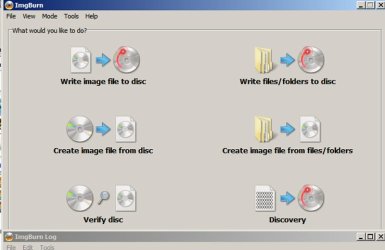
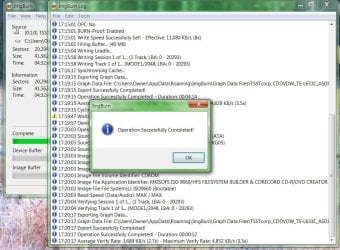
If you used IMGBURN to create it from the ISO, and tried to boot from it but can't (i.e. you're not getting something like "press any key to boot from CD" for a few seconds during the boot process when that CD is inserted in the drive at boot time) then you've got a different problem with your machine or setup that needs to be understood and corrected. You wouldn't be able to use the Win7 installation DVD to reinstall Win7 if you had to.
You obviously MUST be able to boot from a bootable CD/DVD! So the inability to boot from the burned PW standalone boot CD is now another mystery on its own, which really should be pursued.
As far as Partition Wizard vs. EaseUS, well... as I said above, Partition Wizard has its own simple-to-use directly usable under Win7 version which would have worked just fine for you to solve your current issue.
Or, the standalone bootable CD would also have worked.
Either one WOULD HAVE and SHOULD HAVE worked fine. You didn't need to fall back to "plan B" and go to another product's "installed version" without asking about the equivalent "installed version" of Partition Wizard.
I'm just sayin'...
I don't understand why Windows does not make this job EASIER and "DO-able."
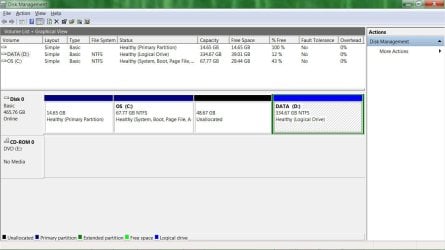
What you said wanted to do (which involved extending the left-boundary of your existing D-partition to the left, thus simultaneously expanding the boundary and size of the existing "extended partition" which implicitly surrounds all consecutive "logical" partitions so that you could then resize D inside of it so that you could then allocate another "logical partition" within the now-enlarged extended partition) is something that I don't believe Win7's DISKMGMT.MSC can do. I may be wrong, but I don't think it can be done with DISKMGMT.MSC.
But certainly that's why there are 3rd-party products like Partition Wizard and EaseUS developed, to give users ADDITIONAL OR IMPROVED OR EASIER-TO-USE FUNCTIONALITY that they can't get with fundamental Windows-provided programs or services. You had a "relatively complex" desire for doing something on your hard drive, and basic Windows capabilities did not support that request.
So you go a 3rd-party program (like either Partition Wizard or EaseUS) and you get the job done quickly and directly. Not a surprise. Also, the fact that there are multiple capable 3rd-party products for you to choose from which support that functionality is also not a surprise. Even for this particular type of 3rd-party product the fact that there is a standalone boot CD version (just as there is a Win7 "repair disc" for certain issues that must be resolved using standalone means) is also not a surprise.
P.S. - just a few days ago, an almost identical thread (
subject: "Create Extended Partition") about creating a partition went on in this very forum! Almost identical thread discussion... similar D partition with unallocated space to its left, and the desire to create a new partition using that unallocated space.
In that other thread's discussion, after the problem was actually resolved by the OP actually successfully using this very same standalone boot CD which has been the center of the problem and discussion here, the OP further asked out of his own curiosity about this very question I'm discussing now... namely "could I have solved my partitioning needs using the other installed version of PW as well, or did I have to use only the standalone boot CD version?".
Well, in that other thread
I posted a reply similar to what I'm saying here now, namely confirming his own suspicion that in this case (as in your case, which is essentially identical to his) that EITHER (a) standalone bootable CD or (b) installed version, would have worked just fine.
Furthermore,
as I described in my reply on that other thread, Partition Wizard even understands that you might START a serious of partitioning operation requests while using the "installed" version, but not actually be able to complete them while Windows is still up and running. This would normally not be an issue if you were using the standalone boot CD version, but in this case you unwittingly started using the installed version.
Ok... if you then push the APPLY button Partition Wizard will recognize the situation, and ask you for permission to re-boot the machine to complete the queued operations (to which you will reply OK). At boot time, that same standalone version of Partition Wizard will kick in before Windows is actually booted, to complete the queued operations. This is really identical to booting to the standalone bootable CD to queue and APPLY the operations, but instead is auto-initiated from the "installed" version of Partition Wizard where you had started.
Once the queued operations are completed, Partition Wizard will terminate normally and allow the rest of the normal Windows boot process to proceed. When you then arrive at the Windows desktop all of your previously queued operations (using the installed PW, from that previously running instance of Windows) will have been completed. You didn't actually use the standalone bootable CD version of PW, but you effectively just did.
Honestly, you didn't have to go to the installed version of EaseUS. You could have gone to the installed version of Partition Wizard as well.
I'm just sayin'... (in defense of Partition Wizard).