Add "Unallocated" partition to my "D" drive?

StickMaker

New member
Local time
11:02 AM
Messages
82
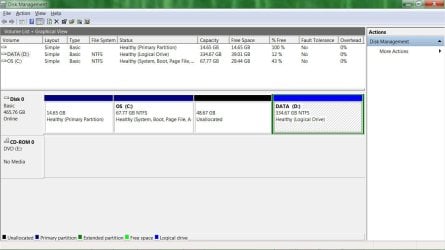
Windows 7: Have all my data on D and OS etc on C. LOTS of space on C but not enough on D so I "shrunk" the C drive. That put in an additional partition, "Unallocated" between C and D. Not what I want; I want to add the "Unallocated" space to D.
 

Attachments

  • parts.jpg
    parts.jpg
    84.4 KB · Views: 191

My Computer My Computer

At a glance

Windows 7
OS
Windows 7

My Computer My Computer

At a glance

Windows 7 Home Premium SP1, 64-bitIntel Skylake i5-6600K, not overclocked8 GB HyperX DDR4-2666 (2 x 4 GB)none; graphics are integrated on CPU
Computer type
PC/Desktop
Computer Manufacturer/Model Number
Ignatz Special; 4 speed manual gearbox; factory air conditioning; one of one
OS
Windows 7 Home Premium SP1, 64-bit
CPU
Intel Skylake i5-6600K, not overclocked
Motherboard
AsRock Z170M Extreme 4, micro ATX
Memory
8 GB HyperX DDR4-2666 (2 x 4 GB)
Graphics Card(s)
none; graphics are integrated on CPU
Sound Card
onboard: Realtek ALC1150; external: USB Behringer UF0-202
Monitor(s) Displays
Dell S2340M 23 inch IPS
Screen Resolution
1600 x 900
Hard Drives
System: Crucial MX100 series SSD, 128 GB;
Data: Samsung Spinpoint 103SJ, 1 TB;
Backup: WD Caviar Green WD30EZRX-00D8PB0, 3 TB
PSU
Rosewill SilentNight 500 watt fanless, semi-modular
Case
Antec Solo II
Cooling
Noctua NH-U12S; Noctua F12 intake, Noctua S12A exhaust
Keyboard
Microsoft 200 6JH-00001 USB
Mouse
Dell or Microsoft optical wired; USB
Antivirus
Microsoft Security Essentials and Malwarebytes Premium
Browser
Pale Moon
Other Info
All fans PWM; speeds at idle: CPU circa 500 rpm; intake circa 600 rpm; exhaust circa 600 rpm; CPU temps 27 idle and 47 C load in a warm room (27 C/81 F) when running Intel Extreme Tuning Utility stress test.
There is a help button in the PW. That explains it nicely.

Essentially you have to highlight the partition you want to extend, then click the Move/Resize icon on the top. A little window comes up where you can move the partition boundary into the freespace on the left - all the way. Then do not forget to click on Apply on the bottom left of the PW window (IMPORTANT). That will take a little while depending on the speed of the disk and the amount of data it has to move.
 

My Computer My Computer

At a glance

Vista, Windows7, Mint Mate, Zorin, Windows 8from 1.6GHz Duo to i7
Computer Manufacturer/Model Number
HP, Dell, Gateway, Toshiba - 4 laptops and 2 desktops
OS
Vista, Windows7, Mint Mate, Zorin, Windows 8
CPU
from 1.6GHz Duo to i7
Monitor(s) Displays
2x HP w2207
Hard Drives
5x HDD, 7x SSD, 12x Externals
Keyboard
with trackball - no mices
Mouse
Trackball mice
Internet Speed
DSL 6000
Just to check:

If the OP wanted to add the unallocated space to C: could he right-click the C: area in the window and select "Extend Partition" or "Extend Volume"? Are there any disadvantages of doing it that way?
 

My Computer My Computer

At a glance

Windows Home Premium (64)Intel Core i7 8608GB (4x2GB) Corsair TwinX XMS31GB Gainward 9500 GT
Computer type
PC/Desktop
Computer Manufacturer/Model Number
Scan 3XS P55 liteDAW
OS
Windows Home Premium (64)
CPU
Intel Core i7 860
Motherboard
Gigabyte GA-P55A-UD4
Memory
8GB (4x2GB) Corsair TwinX XMS3
Graphics Card(s)
1GB Gainward 9500 GT
Sound Card
M-Audio Delta 66
Monitor(s) Displays
Acer v223wBBd
Screen Resolution
1680 x 1050
Hard Drives
1 x 500 GB WD Barracuda (OS+Docs)
2 x 1TB Samsung Spinpoint F3 (Data)
PSU
Enermax EMD625AWT II - 625W Enermax Modu82+ II
Case
Fractal Design Define R2 Black
Cooling
Prolima Megahalems Super 6 Heatpipe Tower Cooler
Keyboard
Microsoft Digital Media Pro
Mouse
Belkin Optical Ergo
Internet Speed
8 Mbps nominal (14.9 achieved !)
Other Info
Digital Audio Workstation
Just to check:

If the OP wanted to add the unallocated space to C: could he right-click the C: area in the window and select "Extend Volume"? Are there any disadvantages of doing it that way?

Yeah, he should be able to do that----but in this case, he wants to add the space to D. and you cannot do that in Disk Management in this case.

Why?

Disk Management will allow an "extend" only if the "unallocated space" is IMMEDIATELY to the right of the partition to be extended. In this case, the unallocated space is to the left of D, not the right.
 

My Computer My Computer

At a glance

Windows 7 Home Premium SP1, 64-bitIntel Skylake i5-6600K, not overclocked8 GB HyperX DDR4-2666 (2 x 4 GB)none; graphics are integrated on CPU
Computer type
PC/Desktop
Computer Manufacturer/Model Number
Ignatz Special; 4 speed manual gearbox; factory air conditioning; one of one
OS
Windows 7 Home Premium SP1, 64-bit
CPU
Intel Skylake i5-6600K, not overclocked
Motherboard
AsRock Z170M Extreme 4, micro ATX
Memory
8 GB HyperX DDR4-2666 (2 x 4 GB)
Graphics Card(s)
none; graphics are integrated on CPU
Sound Card
onboard: Realtek ALC1150; external: USB Behringer UF0-202
Monitor(s) Displays
Dell S2340M 23 inch IPS
Screen Resolution
1600 x 900
Hard Drives
System: Crucial MX100 series SSD, 128 GB;
Data: Samsung Spinpoint 103SJ, 1 TB;
Backup: WD Caviar Green WD30EZRX-00D8PB0, 3 TB
PSU
Rosewill SilentNight 500 watt fanless, semi-modular
Case
Antec Solo II
Cooling
Noctua NH-U12S; Noctua F12 intake, Noctua S12A exhaust
Keyboard
Microsoft 200 6JH-00001 USB
Mouse
Dell or Microsoft optical wired; USB
Antivirus
Microsoft Security Essentials and Malwarebytes Premium
Browser
Pale Moon
Other Info
All fans PWM; speeds at idle: CPU circa 500 rpm; intake circa 600 rpm; exhaust circa 600 rpm; CPU temps 27 idle and 47 C load in a warm room (27 C/81 F) when running Intel Extreme Tuning Utility stress test.
Wow; super group of helpful people here; THANKS. OK, I have "pwhe7.iso" on my Desktop. Shall I right-click it and choose "Send to" and then "DVD RW Drive (E)" and put in a DVD-R? I'm just about out of CD-R disks and have lots of these DVD-R disks. (burned an ISO looooong ago and that was different) If I do this, it asks "How do you want to use this disc?" The first option is "Like a USB flash drive."
 

My Computer My Computer

At a glance

Windows 7
OS
Windows 7
If I do this, it asks "How do you want to use this disc?" The first option is "Like a USB flash drive."

I'm not an ISO wiz and don't know about your burning application, but try that.

If it fails, try another choice. All it will cost you is another DVD.

You'll know it "worked" if you can take the disk and boot from it and get into Partition Wizard.
 

My Computer My Computer

At a glance

Windows 7 Home Premium SP1, 64-bitIntel Skylake i5-6600K, not overclocked8 GB HyperX DDR4-2666 (2 x 4 GB)none; graphics are integrated on CPU
Computer type
PC/Desktop
Computer Manufacturer/Model Number
Ignatz Special; 4 speed manual gearbox; factory air conditioning; one of one
OS
Windows 7 Home Premium SP1, 64-bit
CPU
Intel Skylake i5-6600K, not overclocked
Motherboard
AsRock Z170M Extreme 4, micro ATX
Memory
8 GB HyperX DDR4-2666 (2 x 4 GB)
Graphics Card(s)
none; graphics are integrated on CPU
Sound Card
onboard: Realtek ALC1150; external: USB Behringer UF0-202
Monitor(s) Displays
Dell S2340M 23 inch IPS
Screen Resolution
1600 x 900
Hard Drives
System: Crucial MX100 series SSD, 128 GB;
Data: Samsung Spinpoint 103SJ, 1 TB;
Backup: WD Caviar Green WD30EZRX-00D8PB0, 3 TB
PSU
Rosewill SilentNight 500 watt fanless, semi-modular
Case
Antec Solo II
Cooling
Noctua NH-U12S; Noctua F12 intake, Noctua S12A exhaust
Keyboard
Microsoft 200 6JH-00001 USB
Mouse
Dell or Microsoft optical wired; USB
Antivirus
Microsoft Security Essentials and Malwarebytes Premium
Browser
Pale Moon
Other Info
All fans PWM; speeds at idle: CPU circa 500 rpm; intake circa 600 rpm; exhaust circa 600 rpm; CPU temps 27 idle and 47 C load in a warm room (27 C/81 F) when running Intel Extreme Tuning Utility stress test.
hmmm; tried that but all it did was COPY the iso file to the DVD.............. That's no good, is it?
 

My Computer My Computer

At a glance

Windows 7
OS
Windows 7
Wow; super group of helpful people here; THANKS. OK, I have "pwhe7.iso" on my Desktop. Shall I right-click it and choose "Send to" and then "DVD RW Drive (E)" and put in a DVD-R? I'm just about out of CD-R disks and have lots of these DVD-R disks. (burned an ISO looooong ago and that was different) If I do this, it asks "How do you want to use this disc?" The first option is "Like a USB flash drive."
You can also download and install the highly regarded and very useful (and free) product Imgburn, which will do just what you want and produce the CD from that input ISO file you've downloaded.
 

My Computer My Computer

At a glance

Windows 7 Pro x64 (1), Win7 Pro X64 (2)i5-3350p 3.1Ghz/6MB-cache (1); E8400 3.0Ghz/6...8GB PC3-12800 DDR3 (1); 4GB PC3-10600 DDR3 (2)ATI HD7750 (1), (see TV cards); ATI R7 250 (2)
Computer type
PC/Desktop
Computer Manufacturer/Model Number
Home-built, two systems (1) and (2)
OS
Windows 7 Pro x64 (1), Win7 Pro X64 (2)
CPU
i5-3350p 3.1Ghz/6MB-cache (1); E8400 3.0Ghz/6MB-cache (2)
Motherboard
ASUS P8Z77-V Pro (1); ASUS P5Q3 (2)
Memory
8GB PC3-12800 DDR3 (1); 4GB PC3-10600 DDR3 (2)
Graphics Card(s)
ATI HD7750 (1), (see TV cards); ATI R7 250 (2)
Sound Card
Realtek ALC892 HD Audio (1); Realtek ALC1200 HD Audio (2)
Monitor(s) Displays
Eizo HD2441W LCD, Eizo S2433W (1); Eizo 24" S2433W (2)
Screen Resolution
1920x1200, 1920x1200 (1); 1920x1200 (2)
Hard Drives
(1) 1TB SATA-II (7200RPM), 2x2TB SATA-III (7200RPM), 250GB SATA-III (10000RPM) for OS; 2x2TB external USB 3.0

(2) 320GB SATA-II (7200RPM), 750GB SATA-II (7200RPM), 150GB SATA-II (10000RPM) for OS; 2TB external USB 3.0
PSU
Nesteq ECS-6001 600W (1); Nesteq ECS-5001 500W (2)
Case
Acousti-Case 360 (1) and (2)
Cooling
Noctua NH-U12P SE2 for CPU, 2x120mm case fans (1) and (2)
Keyboard
IBM PS/2 (1) and (2)
Mouse
Logitech MX Revolution wireless (1); Microsoft wired (2)
Internet Speed
100mbps down / 10mbps up
Antivirus
Microsoft Security Essentials; Malwarebyte Anti-Malware Pro
Browser
Firefox
Other Info
Ceton InfiniTV 4-tuner cablecard-enabled TV card as well as Hauppauge HVR-2250 OTA/ATSC 2-tuner TV card in (1), running under Win7 WMC
Before I do that, dsperber, I'd like to continue on the path I'm on 'cause I'm on it now..........

I did manage to burn a DVD from the iso file; it has a "BOOT" folder and a file "desktop.ini" on it. Now I'm stuck; I restarted the computer but that did nothing.
 

My Computer My Computer

At a glance

Windows 7
OS
Windows 7
Before I do that, dsperber, I'd like to continue on the path I'm on 'cause I'm on it now..........

I did manage to burn a DVD from the iso file;
How? What did you use?

A "bootable CD/DVD" must be written correctly, so that it actually is bootable. That is implied by the ISO contents, but the burn to CD/DVD must be performed so as to write the correct boot files correctly. Same as how a hard drive partition becomes usable as the "active" partition by correctly writing the MBR and boot manager files.

Just use IMGBURN on that ISO file to burn your CD/DVD for standalone bootable Partition Wizard, and you'll be home free.


it has a "BOOT" folder and a file "desktop.ini" on it. Now I'm stuck; I restarted the computer but that did nothing.
It needs to be burned correctly from the ISO to make it "bootable". However you've written that DVD does not seem to have written the equivalent of the "MBR" for a hard drive.

Again... just use IMGBURN with that ISO, it will produce a usable and bootable CD/DVD, and the case is closed.
 

My Computer My Computer

At a glance

Windows 7 Pro x64 (1), Win7 Pro X64 (2)i5-3350p 3.1Ghz/6MB-cache (1); E8400 3.0Ghz/6...8GB PC3-12800 DDR3 (1); 4GB PC3-10600 DDR3 (2)ATI HD7750 (1), (see TV cards); ATI R7 250 (2)
Computer type
PC/Desktop
Computer Manufacturer/Model Number
Home-built, two systems (1) and (2)
OS
Windows 7 Pro x64 (1), Win7 Pro X64 (2)
CPU
i5-3350p 3.1Ghz/6MB-cache (1); E8400 3.0Ghz/6MB-cache (2)
Motherboard
ASUS P8Z77-V Pro (1); ASUS P5Q3 (2)
Memory
8GB PC3-12800 DDR3 (1); 4GB PC3-10600 DDR3 (2)
Graphics Card(s)
ATI HD7750 (1), (see TV cards); ATI R7 250 (2)
Sound Card
Realtek ALC892 HD Audio (1); Realtek ALC1200 HD Audio (2)
Monitor(s) Displays
Eizo HD2441W LCD, Eizo S2433W (1); Eizo 24" S2433W (2)
Screen Resolution
1920x1200, 1920x1200 (1); 1920x1200 (2)
Hard Drives
(1) 1TB SATA-II (7200RPM), 2x2TB SATA-III (7200RPM), 250GB SATA-III (10000RPM) for OS; 2x2TB external USB 3.0

(2) 320GB SATA-II (7200RPM), 750GB SATA-II (7200RPM), 150GB SATA-II (10000RPM) for OS; 2TB external USB 3.0
PSU
Nesteq ECS-6001 600W (1); Nesteq ECS-5001 500W (2)
Case
Acousti-Case 360 (1) and (2)
Cooling
Noctua NH-U12P SE2 for CPU, 2x120mm case fans (1) and (2)
Keyboard
IBM PS/2 (1) and (2)
Mouse
Logitech MX Revolution wireless (1); Microsoft wired (2)
Internet Speed
100mbps down / 10mbps up
Antivirus
Microsoft Security Essentials; Malwarebyte Anti-Malware Pro
Browser
Firefox
Other Info
Ceton InfiniTV 4-tuner cablecard-enabled TV card as well as Hauppauge HVR-2250 OTA/ATSC 2-tuner TV card in (1), running under Win7 WMC
Here are steps that work with IMGBURN.

You may be able to adapt them to your burning app; or download IMGBURN and follow these steps directly:

Switch to 'Write' from mode menu or do that via the 'Write image file to disc' button on the 'Ez-Mode Picker' screen.

Insert blank CD/DVD/BD (depending on image size!)

Select a file to write by clicking on the 'Browse for file' button. Navigate to the ISO file. Locate the file and open it.

Click the big 'Write' button.
 

My Computer My Computer

At a glance

Windows 7 Home Premium SP1, 64-bitIntel Skylake i5-6600K, not overclocked8 GB HyperX DDR4-2666 (2 x 4 GB)none; graphics are integrated on CPU
Computer type
PC/Desktop
Computer Manufacturer/Model Number
Ignatz Special; 4 speed manual gearbox; factory air conditioning; one of one
OS
Windows 7 Home Premium SP1, 64-bit
CPU
Intel Skylake i5-6600K, not overclocked
Motherboard
AsRock Z170M Extreme 4, micro ATX
Memory
8 GB HyperX DDR4-2666 (2 x 4 GB)
Graphics Card(s)
none; graphics are integrated on CPU
Sound Card
onboard: Realtek ALC1150; external: USB Behringer UF0-202
Monitor(s) Displays
Dell S2340M 23 inch IPS
Screen Resolution
1600 x 900
Hard Drives
System: Crucial MX100 series SSD, 128 GB;
Data: Samsung Spinpoint 103SJ, 1 TB;
Backup: WD Caviar Green WD30EZRX-00D8PB0, 3 TB
PSU
Rosewill SilentNight 500 watt fanless, semi-modular
Case
Antec Solo II
Cooling
Noctua NH-U12S; Noctua F12 intake, Noctua S12A exhaust
Keyboard
Microsoft 200 6JH-00001 USB
Mouse
Dell or Microsoft optical wired; USB
Antivirus
Microsoft Security Essentials and Malwarebytes Premium
Browser
Pale Moon
Other Info
All fans PWM; speeds at idle: CPU circa 500 rpm; intake circa 600 rpm; exhaust circa 600 rpm; CPU temps 27 idle and 47 C load in a warm room (27 C/81 F) when running Intel Extreme Tuning Utility stress test.
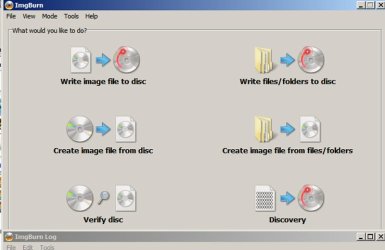
ignatzatsonic, I got ImgBurn and ran it; it has 6 options:
Write image file to disc
Write files/folders to disc
Create image file from disc
Create image file from files/folders
Verify dis
Discovery

I don't see the "Write" mode etc to which you refer.............. I know, I'm a dummy............. sorry.
 

My Computer My Computer

At a glance

Windows 7
OS
Windows 7
ignatzatsonic, I got ImgBurn and ran it; it has 6 options:
Write image file to disc
Write files/folders to disc
Create image file from disc
Create image file from files/folders
Verify dis
Discovery

I don't see the "Write" mode etc to which you refer.............. I know, I'm a dummy............. sorry.

My instructions said "Switch to 'Write' from mode menu or do that via the 'Write image file to disc' button on the 'Ez-Mode Picker' screen".

You state you see "write image file to disc". Sounds like what I said.

Is this what you see?
 

Attachments

  • Untitled-1.jpg
    Untitled-1.jpg
    47.5 KB · Views: 2

My Computer My Computer

At a glance

Windows 7 Home Premium SP1, 64-bitIntel Skylake i5-6600K, not overclocked8 GB HyperX DDR4-2666 (2 x 4 GB)none; graphics are integrated on CPU
Computer type
PC/Desktop
Computer Manufacturer/Model Number
Ignatz Special; 4 speed manual gearbox; factory air conditioning; one of one
OS
Windows 7 Home Premium SP1, 64-bit
CPU
Intel Skylake i5-6600K, not overclocked
Motherboard
AsRock Z170M Extreme 4, micro ATX
Memory
8 GB HyperX DDR4-2666 (2 x 4 GB)
Graphics Card(s)
none; graphics are integrated on CPU
Sound Card
onboard: Realtek ALC1150; external: USB Behringer UF0-202
Monitor(s) Displays
Dell S2340M 23 inch IPS
Screen Resolution
1600 x 900
Hard Drives
System: Crucial MX100 series SSD, 128 GB;
Data: Samsung Spinpoint 103SJ, 1 TB;
Backup: WD Caviar Green WD30EZRX-00D8PB0, 3 TB
PSU
Rosewill SilentNight 500 watt fanless, semi-modular
Case
Antec Solo II
Cooling
Noctua NH-U12S; Noctua F12 intake, Noctua S12A exhaust
Keyboard
Microsoft 200 6JH-00001 USB
Mouse
Dell or Microsoft optical wired; USB
Antivirus
Microsoft Security Essentials and Malwarebytes Premium
Browser
Pale Moon
Other Info
All fans PWM; speeds at idle: CPU circa 500 rpm; intake circa 600 rpm; exhaust circa 600 rpm; CPU temps 27 idle and 47 C load in a warm room (27 C/81 F) when running Intel Extreme Tuning Utility stress test.
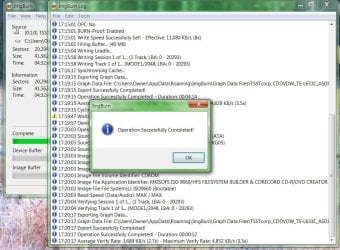
Yes, that is what I saw so I chose "Write image file to disc" and it worked............ I think; here is a pic:

Then I left the DVD in and did a cold boot. Seems like the resulting DVD is identical to one I burned a bit earlier.

Now do I have to run one of the files on that DVD?
 

Attachments

  • parts1.jpg
    parts1.jpg
    136.5 KB · Views: 2

My Computer My Computer

At a glance

Windows 7
OS
Windows 7
You have to boot FROM that disk you just made in ImgBurn.

Can you boot from it or not?????

If it will boot at all, you should land in Partition Wizard.

I assume you know how to attempt to boot from a disk in your DVD drive?

If you cannot boot from it, then the download was bad or the burn was bad--try again.
 

My Computer My Computer

At a glance

Windows 7 Home Premium SP1, 64-bitIntel Skylake i5-6600K, not overclocked8 GB HyperX DDR4-2666 (2 x 4 GB)none; graphics are integrated on CPU
Computer type
PC/Desktop
Computer Manufacturer/Model Number
Ignatz Special; 4 speed manual gearbox; factory air conditioning; one of one
OS
Windows 7 Home Premium SP1, 64-bit
CPU
Intel Skylake i5-6600K, not overclocked
Motherboard
AsRock Z170M Extreme 4, micro ATX
Memory
8 GB HyperX DDR4-2666 (2 x 4 GB)
Graphics Card(s)
none; graphics are integrated on CPU
Sound Card
onboard: Realtek ALC1150; external: USB Behringer UF0-202
Monitor(s) Displays
Dell S2340M 23 inch IPS
Screen Resolution
1600 x 900
Hard Drives
System: Crucial MX100 series SSD, 128 GB;
Data: Samsung Spinpoint 103SJ, 1 TB;
Backup: WD Caviar Green WD30EZRX-00D8PB0, 3 TB
PSU
Rosewill SilentNight 500 watt fanless, semi-modular
Case
Antec Solo II
Cooling
Noctua NH-U12S; Noctua F12 intake, Noctua S12A exhaust
Keyboard
Microsoft 200 6JH-00001 USB
Mouse
Dell or Microsoft optical wired; USB
Antivirus
Microsoft Security Essentials and Malwarebytes Premium
Browser
Pale Moon
Other Info
All fans PWM; speeds at idle: CPU circa 500 rpm; intake circa 600 rpm; exhaust circa 600 rpm; CPU temps 27 idle and 47 C load in a warm room (27 C/81 F) when running Intel Extreme Tuning Utility stress test.
Yes, that is what I saw so I chose "Write image file to disc" and it worked............ I think; here is a pic:
Yes, simply clicking on that "write image file to disc" will kick off the wizard to guide you, which from what you say has now been completed successfully.


Then I left the DVD in and did a cold boot. Seems like the resulting DVD is identical to one I burned a bit earlier.

Now do I have to run one of the files on that DVD?
No. As ignatzatsonic mentioned, you are wanting to BOOT to this DVD... just like you booted to the Win7 installation DVD when you inserted it.

Presumably your machine's BIOS has your CD/DVD drive listed earlier in the 'boot sequence" of devices than your hard drive. Your boot sequence list might show a floppy disk drive, USB device, CD/DVD device, and then hard drive. When you boot the machine the presence of bootable media is looked for in each of these classes of device, in that defined sequence. Whichever one is found first that's the one that is used to continue the boot process... from the bootable media in that device.

So, it sound as though you correctly built that standalone bootable CD/DVD for PW using IMGBURN (and perhaps also had been successful previously as well, fro what you say since the discs are apparently identical). But when you actually re-boot your machine that bootable CD/DVD is NOT being used! Very strange indeed, unless it's a boot device sequence issue in your machine's BIOS.

That downloaded ISO from the PW web site is truly a usable, bootable CD image I assure you. Works perfectly.

I wonder if it needs to be a CD, and not a DVD??
 

My Computer My Computer

At a glance

Windows 7 Pro x64 (1), Win7 Pro X64 (2)i5-3350p 3.1Ghz/6MB-cache (1); E8400 3.0Ghz/6...8GB PC3-12800 DDR3 (1); 4GB PC3-10600 DDR3 (2)ATI HD7750 (1), (see TV cards); ATI R7 250 (2)
Computer type
PC/Desktop
Computer Manufacturer/Model Number
Home-built, two systems (1) and (2)
OS
Windows 7 Pro x64 (1), Win7 Pro X64 (2)
CPU
i5-3350p 3.1Ghz/6MB-cache (1); E8400 3.0Ghz/6MB-cache (2)
Motherboard
ASUS P8Z77-V Pro (1); ASUS P5Q3 (2)
Memory
8GB PC3-12800 DDR3 (1); 4GB PC3-10600 DDR3 (2)
Graphics Card(s)
ATI HD7750 (1), (see TV cards); ATI R7 250 (2)
Sound Card
Realtek ALC892 HD Audio (1); Realtek ALC1200 HD Audio (2)
Monitor(s) Displays
Eizo HD2441W LCD, Eizo S2433W (1); Eizo 24" S2433W (2)
Screen Resolution
1920x1200, 1920x1200 (1); 1920x1200 (2)
Hard Drives
(1) 1TB SATA-II (7200RPM), 2x2TB SATA-III (7200RPM), 250GB SATA-III (10000RPM) for OS; 2x2TB external USB 3.0

(2) 320GB SATA-II (7200RPM), 750GB SATA-II (7200RPM), 150GB SATA-II (10000RPM) for OS; 2TB external USB 3.0
PSU
Nesteq ECS-6001 600W (1); Nesteq ECS-5001 500W (2)
Case
Acousti-Case 360 (1) and (2)
Cooling
Noctua NH-U12P SE2 for CPU, 2x120mm case fans (1) and (2)
Keyboard
IBM PS/2 (1) and (2)
Mouse
Logitech MX Revolution wireless (1); Microsoft wired (2)
Internet Speed
100mbps down / 10mbps up
Antivirus
Microsoft Security Essentials; Malwarebyte Anti-Malware Pro
Browser
Firefox
Other Info
Ceton InfiniTV 4-tuner cablecard-enabled TV card as well as Hauppauge HVR-2250 OTA/ATSC 2-tuner TV card in (1), running under Win7 WMC

My Computer My Computer

At a glance

Windows 7
OS
Windows 7
THANKS to all you good folks for trying to help this old geezer. Happy New Year to ALL of you. I got stuck (again) trying boot from that DVD to went to "Plan B" instead. Went to Free Partition Magic alternative. Best Free Partition Manager Freeware for Windows 2000/XP/Vista/7 32 bit & 64 bit - EaseUS Partition Master Home Edition. and downloaded the free tool there; had the whole problem solved in a few seconds.
Let's be entirely fair here... Partition Wizard should not be thought of as a "culprit" here, as to why you couldn't get its standalone bootable CD to work and therefore had to try an alternative 3rd-party product which DID work in just a few seconds to solve your problem.

I'm not the developer of Partition Wizard, but honestly it does work exactly as we've described. Yes, EaseUS can do similar things, but Partition Wizard can also do those things.

Now Partition Wizard itself actually also has BOTH (1) "normal" version which gets installed into Win7 (just like EaseUS and millions of other programs), and (b) "standalone boot CD" version for those particular situations where you cannot complete the requested operations while Windows is up and running because you're actually manipulating the C-partition.

Your current story is one of the situations which could have been SOLVED IN A FEW SECONDS using EITHER VERSION OF PARTITION WIZARD, since it did NOT involve touching the C-partition. Rather, it only involved changing the boundary on another partition which was NOT the C-partition.

Unfortunately, an early response to your original question suggested only using the "standalone boot CD" version of Partition Wizard, and made no mention of the entirely acceptable alternative "installed" version... which for your needs would have been 100% entirely acceptable.

This oversight in suggesting that the alternative and easy-to-install-and-use "installed version" would also work is what then led to an extended discussion about how to download the burnable ISO image for that bootable CD, how to burn it, and trying to help you actually boot from that CD now that you finally got it burned. Nobody ever mentioned that PW actually also has its own "installed" version which you could also have downloaded and installed and used for your needs, and that's unfortunate.

Now if I understand your justification for "plan B" correctly, apparently you STILL cannot boot from that PW bootable CD for some reason, and that really should be resolved. Don't overlook that issue as a new second "problem".

Can you boot from ANY bootable CD/DVD? The Win7 installation DVD? A Win7 repair CD? Anything?

Believe us all, that PW standalone bootable CD ISO really DOES WORK PERFECTLY.

If you used IMGBURN to create it from the ISO, and tried to boot from it but can't (i.e. you're not getting something like "press any key to boot from CD" for a few seconds during the boot process when that CD is inserted in the drive at boot time) then you've got a different problem with your machine or setup that needs to be understood and corrected. You wouldn't be able to use the Win7 installation DVD to reinstall Win7 if you had to.

You obviously MUST be able to boot from a bootable CD/DVD! So the inability to boot from the burned PW standalone boot CD is now another mystery on its own, which really should be pursued.


As far as Partition Wizard vs. EaseUS, well... as I said above, Partition Wizard has its own simple-to-use directly usable under Win7 version which would have worked just fine for you to solve your current issue.

Or, the standalone bootable CD would also have worked.

Either one WOULD HAVE and SHOULD HAVE worked fine. You didn't need to fall back to "plan B" and go to another product's "installed version" without asking about the equivalent "installed version" of Partition Wizard.

I'm just sayin'...


I don't understand why Windows does not make this job EASIER and "DO-able."
What you said wanted to do (which involved extending the left-boundary of your existing D-partition to the left, thus simultaneously expanding the boundary and size of the existing "extended partition" which implicitly surrounds all consecutive "logical" partitions so that you could then resize D inside of it so that you could then allocate another "logical partition" within the now-enlarged extended partition) is something that I don't believe Win7's DISKMGMT.MSC can do. I may be wrong, but I don't think it can be done with DISKMGMT.MSC.

But certainly that's why there are 3rd-party products like Partition Wizard and EaseUS developed, to give users ADDITIONAL OR IMPROVED OR EASIER-TO-USE FUNCTIONALITY that they can't get with fundamental Windows-provided programs or services. You had a "relatively complex" desire for doing something on your hard drive, and basic Windows capabilities did not support that request.

So you go a 3rd-party program (like either Partition Wizard or EaseUS) and you get the job done quickly and directly. Not a surprise. Also, the fact that there are multiple capable 3rd-party products for you to choose from which support that functionality is also not a surprise. Even for this particular type of 3rd-party product the fact that there is a standalone boot CD version (just as there is a Win7 "repair disc" for certain issues that must be resolved using standalone means) is also not a surprise.


P.S. - just a few days ago, an almost identical thread (subject: "Create Extended Partition") about creating a partition went on in this very forum! Almost identical thread discussion... similar D partition with unallocated space to its left, and the desire to create a new partition using that unallocated space.

In that other thread's discussion, after the problem was actually resolved by the OP actually successfully using this very same standalone boot CD which has been the center of the problem and discussion here, the OP further asked out of his own curiosity about this very question I'm discussing now... namely "could I have solved my partitioning needs using the other installed version of PW as well, or did I have to use only the standalone boot CD version?".

Well, in that other thread I posted a reply similar to what I'm saying here now, namely confirming his own suspicion that in this case (as in your case, which is essentially identical to his) that EITHER (a) standalone bootable CD or (b) installed version, would have worked just fine.


Furthermore, as I described in my reply on that other thread, Partition Wizard even understands that you might START a serious of partitioning operation requests while using the "installed" version, but not actually be able to complete them while Windows is still up and running. This would normally not be an issue if you were using the standalone boot CD version, but in this case you unwittingly started using the installed version.

Ok... if you then push the APPLY button Partition Wizard will recognize the situation, and ask you for permission to re-boot the machine to complete the queued operations (to which you will reply OK). At boot time, that same standalone version of Partition Wizard will kick in before Windows is actually booted, to complete the queued operations. This is really identical to booting to the standalone bootable CD to queue and APPLY the operations, but instead is auto-initiated from the "installed" version of Partition Wizard where you had started.

Once the queued operations are completed, Partition Wizard will terminate normally and allow the rest of the normal Windows boot process to proceed. When you then arrive at the Windows desktop all of your previously queued operations (using the installed PW, from that previously running instance of Windows) will have been completed. You didn't actually use the standalone bootable CD version of PW, but you effectively just did.


Honestly, you didn't have to go to the installed version of EaseUS. You could have gone to the installed version of Partition Wizard as well.

I'm just sayin'... (in defense of Partition Wizard).
 

My Computer My Computer

At a glance

Windows 7 Pro x64 (1), Win7 Pro X64 (2)i5-3350p 3.1Ghz/6MB-cache (1); E8400 3.0Ghz/6...8GB PC3-12800 DDR3 (1); 4GB PC3-10600 DDR3 (2)ATI HD7750 (1), (see TV cards); ATI R7 250 (2)
Computer type
PC/Desktop
Computer Manufacturer/Model Number
Home-built, two systems (1) and (2)
OS
Windows 7 Pro x64 (1), Win7 Pro X64 (2)
CPU
i5-3350p 3.1Ghz/6MB-cache (1); E8400 3.0Ghz/6MB-cache (2)
Motherboard
ASUS P8Z77-V Pro (1); ASUS P5Q3 (2)
Memory
8GB PC3-12800 DDR3 (1); 4GB PC3-10600 DDR3 (2)
Graphics Card(s)
ATI HD7750 (1), (see TV cards); ATI R7 250 (2)
Sound Card
Realtek ALC892 HD Audio (1); Realtek ALC1200 HD Audio (2)
Monitor(s) Displays
Eizo HD2441W LCD, Eizo S2433W (1); Eizo 24" S2433W (2)
Screen Resolution
1920x1200, 1920x1200 (1); 1920x1200 (2)
Hard Drives
(1) 1TB SATA-II (7200RPM), 2x2TB SATA-III (7200RPM), 250GB SATA-III (10000RPM) for OS; 2x2TB external USB 3.0

(2) 320GB SATA-II (7200RPM), 750GB SATA-II (7200RPM), 150GB SATA-II (10000RPM) for OS; 2TB external USB 3.0
PSU
Nesteq ECS-6001 600W (1); Nesteq ECS-5001 500W (2)
Case
Acousti-Case 360 (1) and (2)
Cooling
Noctua NH-U12P SE2 for CPU, 2x120mm case fans (1) and (2)
Keyboard
IBM PS/2 (1) and (2)
Mouse
Logitech MX Revolution wireless (1); Microsoft wired (2)
Internet Speed
100mbps down / 10mbps up
Antivirus
Microsoft Security Essentials; Malwarebyte Anti-Malware Pro
Browser
Firefox
Other Info
Ceton InfiniTV 4-tuner cablecard-enabled TV card as well as Hauppauge HVR-2250 OTA/ATSC 2-tuner TV card in (1), running under Win7 WMC
Back
Top