
I cannot connect to my ROUTER but i can connect to internet.

4th PArt

Chapter 2: WEB Configuration in your manual states it should be by default 192.168.0.1

1. So lets start by disabling your wireless adaptor. Never used a USB adaptor so to do this follow post #14 to get to the 'Change Adaptor Settings' page. Once your on that page right click the wireless adaptor and click disable. If that does not work simple remove the adaptor from the USB port (don't uninstall anything).

2. Connect the computer and modem by a ethernet cable, verify your internet still works.

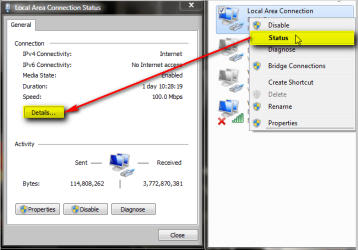
3. Go to the 'Change Adaptor Settings' page again double click your ethernet connection usally named "Local Area Connection". This should bring up the status page.

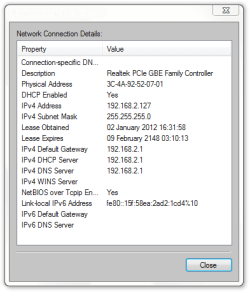
4. Click Details. On this screen you will find:
IPv4 Address - This is the ip address that your computer is given.
IPv4 Subnet Mask - This should be 255.255.255.0 for a Class C IP Address. Class C - Address in the range 192.0.0.0 - 233.255.255.255
IPv4 Default Gateway - This will be your modems address, the one that should allow access to the configuration page.
IPv4 DNS Server - This would typically be the same as the default gateway.

5. Check these numbers. The subnet mask is 255.255.255.0, yes/no? The default gateway and dns server are the same, yes/no? The first 3 octets of the Address and Gateway match and the last octet is different (eg. same.same.same.different), yes/no?

6. Ping the default gateway. Open a cmd prompt and type "ping " followed by the gateway. Did you get a reply?

7. If all this is correct try typing your the default gateway into your web browser.

Let me know the results of all this. If you have internet access then all this should be correct and you are using the correct address and there is some other reason you get this error.

Also 'Tanyam' gave some troubleshooting steps in post #13,
These are probably redundant, but in the interest of process of elimination, perhaps you could try the following.
Have you tried them? Different browser, disabling proxies, flush dns.


The 4th part i don't have any kind of numbers, it's automatically both and when i try manually it's empty and cmd /ipconfig all etc... there doesen't come any numbers and my internet is hybrid so any help?? I can copy here ''default gateway starts with 243.184....... and subnet mask too'' So :S What do i do?

HAPPY NEW YEAR
 

My Computer My Computer

At a glance

Windows 7 64 bitAMD Athlon(tm) II X2 215 Processor 2.70 GHz4gb RAM (3.75 In use)Nvidia Integrated Geforce 9200
Computer Manufacturer/Model Number
Acer Aspire X1301
OS
Windows 7 64 bit
CPU
AMD Athlon(tm) II X2 215 Processor 2.70 GHz
Motherboard
Acer Aspire
Memory
4gb RAM (3.75 In use)
Graphics Card(s)
Nvidia Integrated Geforce 9200
Monitor(s) Displays
Philips 192E
Screen Resolution
1368 x 766 (Recommended)
Hard Drives
HDD 1TB
Internet Speed
110MB/S (11 - 12MB Download per second.)
I am unsure of what hybrid internet is exactly, from a very short Google search I only found info on hybrid networks which from a quick glance appears to be the most common home network of more than one device.

Although in saying that it's seems strange to me that you can't see your IP Address even when set to auto and your Gateway if rather different to what I would normally see. If I'm reading it right your saying your subnet mask starts with the same numbers as the gateway, if this is true then this is a whole new world to me.

Out of curiosity you only have the one modem connected directly to your computer and to the cable no other devices in between?

Try typing the gateway number into your browser if you havn't already. If the modem is the first device on your network and it is the access point to the internet then I would presume this would work.
 

My Computer My Computer

At a glance

Windows 7 Ultimate x64Intel Pentium Dual Core E5200 2.5GHz (3.77GHz...Corsair 4GB DDR2 (4x1GB CM2X1024-6400C4)Palit GeForce GTS 250 (1024MB)
Computer Manufacturer/Model Number
Self built
OS
Windows 7 Ultimate x64
CPU
Intel Pentium Dual Core E5200 2.5GHz (3.77GHz OC)
Motherboard
Asus P5Q-E
Memory
Corsair 4GB DDR2 (4x1GB CM2X1024-6400C4)
Graphics Card(s)
Palit GeForce GTS 250 (1024MB)
Sound Card
On Board (ADI AD2000B 8ch HD)
Monitor(s) Displays
Samsung 32in LCD TV
Screen Resolution
1360x768
Hard Drives
2 x 1TB Samsung 103SJ (Raid0)
2 x External 500GB Samsung 502IJ (NexStar 3 HD Enclosures)
PSU
550W Antec Neo HE 550
Case
Antec P180
Cooling
Xigmatex Red Scorpion CPU Cooler. 3x120mm Fans
Keyboard
Logitech MX5000 Laser (Combo)
Mouse
Logitech MX5000 Laser (Combo)
Internet Speed
ADSL2+ (avg 10 Mbps Down, 0.80 Mbps up)
Other Info
Gigabyte GN-WP01GS 54g Wireless Lan Card
Strange

I am unsure of what hybrid internet is exactly, from a very short Google search I only found info on hybrid networks which from a quick glance appears to be the most common home network of more than one device.

Although in saying that it's seems strange to me that you can't see your IP Address even when set to auto and your Gateway if rather different to what I would normally see. If I'm reading it right your saying your subnet mask starts with the same numbers as the gateway, if this is true then this is a whole new world to me.

Out of curiosity you only have the one modem connected directly to your computer and to the cable no other devices in between?

Try typing the gateway number into your browser if you havn't already. If the modem is the first device on your network and it is the access point to the internet then I would presume this would work.

Really strange :mad2:

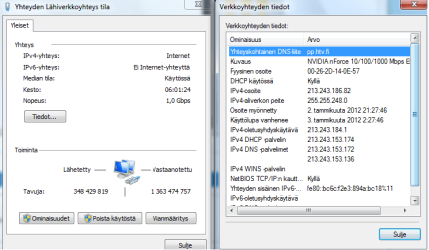
My subnet mask is 255.255.248.0
Default gateway 213.243.184.1 :note:
I try to put that on browser... no response (Using cable atm)
When i try to ping my gateway i DO get reponse? so... What more i need to do so i can connect to my router? So my IP & DNS Are automatically set, i don't see anything else on my cmd /ipconfig all. I see only subnet mask, default gateway and IP4v address.
 

My Computer My Computer

At a glance

Windows 7 64 bitAMD Athlon(tm) II X2 215 Processor 2.70 GHz4gb RAM (3.75 In use)Nvidia Integrated Geforce 9200
Computer Manufacturer/Model Number
Acer Aspire X1301
OS
Windows 7 64 bit
CPU
AMD Athlon(tm) II X2 215 Processor 2.70 GHz
Motherboard
Acer Aspire
Memory
4gb RAM (3.75 In use)
Graphics Card(s)
Nvidia Integrated Geforce 9200
Monitor(s) Displays
Philips 192E
Screen Resolution
1368 x 766 (Recommended)
Hard Drives
HDD 1TB
Internet Speed
110MB/S (11 - 12MB Download per second.)
Finland_orb_small.png

Ole hyvä ja postaa verkkoyhteytesi yksityiskohdat.

Klikkaa verkkoyhteys-kuvaketta hiiren oikealla painikkeella ja valitse Status (kuva 1), sen jälkeen klikkaa Details (Yksityiskohdat) avautuvasta ikkunasta. Ota kuvakaappaus ikkunasta (kuva 2) ja postaa se tähän ketjuun.


US-UK.png

Please post details of your network connection. Right click network connection icon, select Status, click Details (image 1). Take now a screenshot of the Details window (image 2) and post it in this thread.


Image 1 (kuva 1):

IP_Details_1.png

Image 2 (kuva 2):

IP_Details_2.png

Kari
 

My Computer My Computer

At a glance

Windows 10 Pro x64 EN-GB1.6 GHz Intel Core i7-720QM Processor6 GBATI Mobility Radeon HD 5850 Graphics
Computer type
Laptop
Computer Manufacturer/Model Number
HP ENVY 17-1150eg
OS
Windows 10 Pro x64 EN-GB
CPU
1.6 GHz Intel Core i7-720QM Processor
Memory
6 GB
Graphics Card(s)
ATI Mobility Radeon HD 5850 Graphics
Sound Card
Beats sound system with integrated subwoofer
Monitor(s) Displays
17" laptop display, 22" LED and 32" Full HD TV through HDMI
Screen Resolution
1600*900 (1), 1920*1080 (2&3)
Hard Drives
Internal: 2 x 500 GB SATA Hard Disk Drive 7200 rpm
External: 2TB for backups, 3TB USB3 network drive for media
Cooling
As Envy runs a bit warm, I have it on a Cooler Master pad
Keyboard
Logitech diNovo Media Desktop Laser (bluetooth)
Mouse
Logitech Performance Mouse MX
Internet Speed
50/10 Mbps VDSL
Antivirus
Windows Defender 4.3.9431.0
Browser
Maxthon 3.5.2., IE11
Tässä näin / Here's the picture

View attachment 191136

ole hyvä ja postaa verkkoyhteytesi yksityiskohdat.

Klikkaa verkkoyhteys-kuvaketta hiiren oikealla painikkeella ja valitse status (kuva 1), sen jälkeen klikkaa details (yksityiskohdat) avautuvasta ikkunasta. Ota kuvakaappaus ikkunasta (kuva 2) ja postaa se tähän ketjuun.


View attachment 191137

please post details of your network connection. Right click network connection icon, select status, click details (image 1). Take now a screenshot of the details window (image 2) and post it in this thread.


Image 1 (kuva 1):

View attachment 191141

image 2 (kuva 2):

View attachment 191139

kari

internet.png
 

My Computer My Computer

At a glance

Windows 7 64 bitAMD Athlon(tm) II X2 215 Processor 2.70 GHz4gb RAM (3.75 In use)Nvidia Integrated Geforce 9200
Computer Manufacturer/Model Number
Acer Aspire X1301
OS
Windows 7 64 bit
CPU
AMD Athlon(tm) II X2 215 Processor 2.70 GHz
Motherboard
Acer Aspire
Memory
4gb RAM (3.75 In use)
Graphics Card(s)
Nvidia Integrated Geforce 9200
Monitor(s) Displays
Philips 192E
Screen Resolution
1368 x 766 (Recommended)
Hard Drives
HDD 1TB
Internet Speed
110MB/S (11 - 12MB Download per second.)
191136d1325533839-i-cannot-connect-my-router-but-i-can-connect-internet-finland_orb_small.png_


OK, kiitos. En todellakaan tiedä mitä sinulle sanoisin, kyllä tuon perusteella reititin pitäisi löytyä osoitteesta 213.243.184.1.

191137d1325533839-i-cannot-connect-my-router-but-i-can-connect-internet-us-uk.png


OK, thank you. I do not know what else to suggest, according to information you have provided the router should be found at 213.243.184.1.

Kari
 

My Computer My Computer

At a glance

Windows 10 Pro x64 EN-GB1.6 GHz Intel Core i7-720QM Processor6 GBATI Mobility Radeon HD 5850 Graphics
Computer type
Laptop
Computer Manufacturer/Model Number
HP ENVY 17-1150eg
OS
Windows 10 Pro x64 EN-GB
CPU
1.6 GHz Intel Core i7-720QM Processor
Memory
6 GB
Graphics Card(s)
ATI Mobility Radeon HD 5850 Graphics
Sound Card
Beats sound system with integrated subwoofer
Monitor(s) Displays
17" laptop display, 22" LED and 32" Full HD TV through HDMI
Screen Resolution
1600*900 (1), 1920*1080 (2&3)
Hard Drives
Internal: 2 x 500 GB SATA Hard Disk Drive 7200 rpm
External: 2TB for backups, 3TB USB3 network drive for media
Cooling
As Envy runs a bit warm, I have it on a Cooler Master pad
Keyboard
Logitech diNovo Media Desktop Laser (bluetooth)
Mouse
Logitech Performance Mouse MX
Internet Speed
50/10 Mbps VDSL
Antivirus
Windows Defender 4.3.9431.0
Browser
Maxthon 3.5.2., IE11
o_O Anyone else know how can i connect to my router? After all of these information????
 

My Computer My Computer

At a glance

Windows 7 64 bitAMD Athlon(tm) II X2 215 Processor 2.70 GHz4gb RAM (3.75 In use)Nvidia Integrated Geforce 9200
Computer Manufacturer/Model Number
Acer Aspire X1301
OS
Windows 7 64 bit
CPU
AMD Athlon(tm) II X2 215 Processor 2.70 GHz
Motherboard
Acer Aspire
Memory
4gb RAM (3.75 In use)
Graphics Card(s)
Nvidia Integrated Geforce 9200
Monitor(s) Displays
Philips 192E
Screen Resolution
1368 x 766 (Recommended)
Hard Drives
HDD 1TB
Internet Speed
110MB/S (11 - 12MB Download per second.)
Well i have portforwarded 192.168.0.1 before with my router and i know how to do these things and i'm only one in the family who's the computer master :D Soo... any other tips? I'm going to try to cable thing now.

This make no sense at all.

If you had previously made changes to your routers configuration at 192.168.0.1, yet your gateway is 213.243.184.1 this would not work. Something must have changed?

Have you changed provider/telco?

Have you talked to your proivider? What did they say?

What was the answer to Duzzy's question? Are there any other devices between your modem and your PC?

The response just means that ICMP ping is enabled. The configuration is a web page, typically on port 80. It's not very common, but I have heard of some providers disabling access to the modem's port 80 or changing it to another port to stop customers fiddling with settings. May not be true in your case, and I've only come across it once or twice over the last 10 years or so.
 

My Computer My Computer

At a glance

Linux Mint 17 Cinnamon | Win 7 Ult x64Intel I7-3770K @ 4.2ghz32GB G-Skill C10QEVGA GTX 670 2GB SC
Computer type
PC/Desktop
Computer Manufacturer/Model Number
Home Made
OS
Linux Mint 17 Cinnamon | Win 7 Ult x64
CPU
Intel I7-3770K @ 4.2ghz
Motherboard
ASRock Extreme 4
Memory
32GB G-Skill C10Q
Graphics Card(s)
EVGA GTX 670 2GB SC
Sound Card
Creative Fatality ExtremeGamer
Monitor(s) Displays
LG E2742V x 2
Screen Resolution
1920x1080
Hard Drives
256GB Vertex 4 SSD
2TB Seagate ST2000DM001
1TB Seagate ST1000DM003
PSU
Corsair HX 650
Case
HAF 932 advanced
Cooling
Corsair H100i liquid cooler
Keyboard
Logitech Wireless
Mouse
Logitech Wireless
Internet Speed
OptusNet NBN 100/40
Antivirus
Malwarebytes
Browser
Firefox 30
Other Info
Router: Sagemcom F@st 3846 Crippled by Optus.
I haven't made any configurations on my router only portforwarded and suddenly don't know when, ports are closed, there are no other devices between router modem and my pc. (Modem is wireless + cable spots, (used on 1 pc cable, xbox 360 cable, 2 pc wireless) So :S) I should maybe try to call my provider? But what do i ask from them? I'm so confused
 

My Computer My Computer

At a glance

Windows 7 64 bitAMD Athlon(tm) II X2 215 Processor 2.70 GHz4gb RAM (3.75 In use)Nvidia Integrated Geforce 9200
Computer Manufacturer/Model Number
Acer Aspire X1301
OS
Windows 7 64 bit
CPU
AMD Athlon(tm) II X2 215 Processor 2.70 GHz
Motherboard
Acer Aspire
Memory
4gb RAM (3.75 In use)
Graphics Card(s)
Nvidia Integrated Geforce 9200
Monitor(s) Displays
Philips 192E
Screen Resolution
1368 x 766 (Recommended)
Hard Drives
HDD 1TB
Internet Speed
110MB/S (11 - 12MB Download per second.)
I haven't made any configurations on my router only portforwarded and suddenly don't know when, ports are closed, there are no other devices between router modem and my pc. (Modem is wireless + cable spots, (used on 1 pc cable, xbox 360 cable, 2 pc wireless) So :S) I should maybe try to call my provider? But what do i ask from them? I'm so confused

Just tell them exactly what you told us.

1. You want to do some port forwarding on your router
2. You can't connect to the routers configuration to do the port forwarding.

let us know how you go.

Edit: Port forwarding is a configuration change - on your router. SO when you say you haven't made any configuration changes, then how did you achieve the port forwarding last time?
 

My Computer My Computer

At a glance

Linux Mint 17 Cinnamon | Win 7 Ult x64Intel I7-3770K @ 4.2ghz32GB G-Skill C10QEVGA GTX 670 2GB SC
Computer type
PC/Desktop
Computer Manufacturer/Model Number
Home Made
OS
Linux Mint 17 Cinnamon | Win 7 Ult x64
CPU
Intel I7-3770K @ 4.2ghz
Motherboard
ASRock Extreme 4
Memory
32GB G-Skill C10Q
Graphics Card(s)
EVGA GTX 670 2GB SC
Sound Card
Creative Fatality ExtremeGamer
Monitor(s) Displays
LG E2742V x 2
Screen Resolution
1920x1080
Hard Drives
256GB Vertex 4 SSD
2TB Seagate ST2000DM001
1TB Seagate ST1000DM003
PSU
Corsair HX 650
Case
HAF 932 advanced
Cooling
Corsair H100i liquid cooler
Keyboard
Logitech Wireless
Mouse
Logitech Wireless
Internet Speed
OptusNet NBN 100/40
Antivirus
Malwarebytes
Browser
Firefox 30
Other Info
Router: Sagemcom F@st 3846 Crippled by Optus.
I haven't made any configurations on my router only portforwarded and suddenly don't know when, ports are closed, there are no other devices between router modem and my pc. (Modem is wireless + cable spots, (used on 1 pc cable, xbox 360 cable, 2 pc wireless) So :S) I should maybe try to call my provider? But what do i ask from them? I'm so confused

Just tell them exactly what you told us.

1. You want to do some port forwarding on your router
2. You can't connect to the routers configuration to do the port forwarding.

let us know how you go.

Edit: Port forwarding is a configuration change - on your router. SO when you say you haven't made any configuration changes, then how did you achieve the port forwarding last time?

Yes before i did portforward my games and etc.. Now i can't don't know why... example :''canyouseeme.org: Reason: Connection refused'' And you know what i mean
 

My Computer My Computer

At a glance

Windows 7 64 bitAMD Athlon(tm) II X2 215 Processor 2.70 GHz4gb RAM (3.75 In use)Nvidia Integrated Geforce 9200
Computer Manufacturer/Model Number
Acer Aspire X1301
OS
Windows 7 64 bit
CPU
AMD Athlon(tm) II X2 215 Processor 2.70 GHz
Motherboard
Acer Aspire
Memory
4gb RAM (3.75 In use)
Graphics Card(s)
Nvidia Integrated Geforce 9200
Monitor(s) Displays
Philips 192E
Screen Resolution
1368 x 766 (Recommended)
Hard Drives
HDD 1TB
Internet Speed
110MB/S (11 - 12MB Download per second.)
I'm sorry but I have no idea how to help. In my experiences typing the default gateway into the browser will take you to the modem/router configuration page.

I agree with TanyaC, call your Provider.

Good luck, I hope they can help.
 

My Computer My Computer

At a glance

Windows 7 Ultimate x64Intel Pentium Dual Core E5200 2.5GHz (3.77GHz...Corsair 4GB DDR2 (4x1GB CM2X1024-6400C4)Palit GeForce GTS 250 (1024MB)
Computer Manufacturer/Model Number
Self built
OS
Windows 7 Ultimate x64
CPU
Intel Pentium Dual Core E5200 2.5GHz (3.77GHz OC)
Motherboard
Asus P5Q-E
Memory
Corsair 4GB DDR2 (4x1GB CM2X1024-6400C4)
Graphics Card(s)
Palit GeForce GTS 250 (1024MB)
Sound Card
On Board (ADI AD2000B 8ch HD)
Monitor(s) Displays
Samsung 32in LCD TV
Screen Resolution
1360x768
Hard Drives
2 x 1TB Samsung 103SJ (Raid0)
2 x External 500GB Samsung 502IJ (NexStar 3 HD Enclosures)
PSU
550W Antec Neo HE 550
Case
Antec P180
Cooling
Xigmatex Red Scorpion CPU Cooler. 3x120mm Fans
Keyboard
Logitech MX5000 Laser (Combo)
Mouse
Logitech MX5000 Laser (Combo)
Internet Speed
ADSL2+ (avg 10 Mbps Down, 0.80 Mbps up)
Other Info
Gigabyte GN-WP01GS 54g Wireless Lan Card
Fixed some problems!

Yaay one women help me 6 hours and fixed!!! now it shows my 192.168.0.1 etc... but i got onee problem! If i want to portforward, it doesen't show at Open Port Check Tool It doesen't show that my port is open, only error could no see blaablaa.

I've tryed many options disablind dhcp but then my internet wont work (Iexplorer ff google.com)

So you got any tips for this problem? I have now tryed putting new statics ip many things...


[I fixed my default gateway problem by unplugging the white cable that goes to wall (restarting pc) And plugging back and it showed my 192.168.100.1, :)]
 

My Computer My Computer

At a glance

Windows 7 64 bitAMD Athlon(tm) II X2 215 Processor 2.70 GHz4gb RAM (3.75 In use)Nvidia Integrated Geforce 9200
Computer Manufacturer/Model Number
Acer Aspire X1301
OS
Windows 7 64 bit
CPU
AMD Athlon(tm) II X2 215 Processor 2.70 GHz
Motherboard
Acer Aspire
Memory
4gb RAM (3.75 In use)
Graphics Card(s)
Nvidia Integrated Geforce 9200
Monitor(s) Displays
Philips 192E
Screen Resolution
1368 x 766 (Recommended)
Hard Drives
HDD 1TB
Internet Speed
110MB/S (11 - 12MB Download per second.)
Why do you want/need Port Forwarding?
 

My Computer My Computer

At a glance

Main - Windows 7 Pro SP1 64-Bit; 2nd - Window...Main - Core i7 2600K; 2nd - Core i7 920Main - 16GB Corsair Vengeance; 2nd - 12GB Cor...Main - XFX Radeon 6870 1GB; 2nd - XFX Radeon ...
Computer Manufacturer/Model Number
Self
OS
Main - Windows 7 Pro SP1 64-Bit; 2nd - Windows Server 2008 R2
CPU
Main - Core i7 2600K; 2nd - Core i7 920
Motherboard
Main - Asus P8Z68-V Pro/Gen3; 2nd - Gigabyte GA-EX58-UDR3
Memory
Main - 16GB Corsair Vengeance; 2nd - 12GB Corsair Vengeance
Graphics Card(s)
Main - XFX Radeon 6870 1GB; 2nd - XFX Radeon 4870 1GB
Sound Card
Both: Onboard Realtek Azalia
Monitor(s) Displays
Main - Hann 25" + I-INC 25" + Acer 23"; 2nd - Upgrading Soon
Screen Resolution
Main - 1920x1080 (All Three Monitors); 2nd - Upgrading Soon
Hard Drives
Main - (1) Crucial M4 128GB (Boot)
Main - (1) Seagate 2TB 64MB Cache (Data)
Main - (1) Seagate 2TB 64MB Cache (Data Backup)
2nd - (1) Intel X25-M SSD 80GB (Boot)
2nd - (3) Seagate 1TB 32MB Cache (Data Backup)
2nd - (1) Seagate 320GB (Because)
PSU
Main - OCZ 600W Modular; 2nd - OCZ 600W
Case
Main - Thermaltake Element G; 2nd - NZXT something or other
Cooling
Main - Corsair H80; 2nd - Prolimatech Megahalems
Keyboard
Main - Razer Reclusa; 2nd - Old MS Keyboard
Mouse
Main - Logitech MX Revolution; 2nd - Old MS Mouse
Internet Speed
20Mbps Time-Warner Cable
Reason

Why do you want/need Port Forwarding?

Well i want to portforward so i can host servers, and get some of my options back in one thing
And you know, host servers :)
 

My Computer My Computer

At a glance

Windows 7 64 bitAMD Athlon(tm) II X2 215 Processor 2.70 GHz4gb RAM (3.75 In use)Nvidia Integrated Geforce 9200
Computer Manufacturer/Model Number
Acer Aspire X1301
OS
Windows 7 64 bit
CPU
AMD Athlon(tm) II X2 215 Processor 2.70 GHz
Motherboard
Acer Aspire
Memory
4gb RAM (3.75 In use)
Graphics Card(s)
Nvidia Integrated Geforce 9200
Monitor(s) Displays
Philips 192E
Screen Resolution
1368 x 766 (Recommended)
Hard Drives
HDD 1TB
Internet Speed
110MB/S (11 - 12MB Download per second.)
Have you tried what Tanya suggested, especially the second link? :)

...You might also like to have a read of this PDF.. it's the user manual for your modem. It is in English though. Sorry, I was unable to find one in Finnish.

http://bandaancha.eu/store/inar/UM_TCW770_V2.2.pdf

If your modem's IP address is not 192.168.0.1 and you have not changed it, you might want to contact your telco provider. They may have set specific configurations.

If you're not familiar with router configurations I'd be careful with port forwarding. If you get it wrong, you could kill your internet connection. It might be worthwhile taking a look at some of the information on Port Forwarding Guides Listed by Manufacturer and Model - PortForward.com too.
 

My Computer My Computer

At a glance

Main - Windows 7 Pro SP1 64-Bit; 2nd - Window...Main - Core i7 2600K; 2nd - Core i7 920Main - 16GB Corsair Vengeance; 2nd - 12GB Cor...Main - XFX Radeon 6870 1GB; 2nd - XFX Radeon ...
Computer Manufacturer/Model Number
Self
OS
Main - Windows 7 Pro SP1 64-Bit; 2nd - Windows Server 2008 R2
CPU
Main - Core i7 2600K; 2nd - Core i7 920
Motherboard
Main - Asus P8Z68-V Pro/Gen3; 2nd - Gigabyte GA-EX58-UDR3
Memory
Main - 16GB Corsair Vengeance; 2nd - 12GB Corsair Vengeance
Graphics Card(s)
Main - XFX Radeon 6870 1GB; 2nd - XFX Radeon 4870 1GB
Sound Card
Both: Onboard Realtek Azalia
Monitor(s) Displays
Main - Hann 25" + I-INC 25" + Acer 23"; 2nd - Upgrading Soon
Screen Resolution
Main - 1920x1080 (All Three Monitors); 2nd - Upgrading Soon
Hard Drives
Main - (1) Crucial M4 128GB (Boot)
Main - (1) Seagate 2TB 64MB Cache (Data)
Main - (1) Seagate 2TB 64MB Cache (Data Backup)
2nd - (1) Intel X25-M SSD 80GB (Boot)
2nd - (3) Seagate 1TB 32MB Cache (Data Backup)
2nd - (1) Seagate 320GB (Because)
PSU
Main - OCZ 600W Modular; 2nd - OCZ 600W
Case
Main - Thermaltake Element G; 2nd - NZXT something or other
Cooling
Main - Corsair H80; 2nd - Prolimatech Megahalems
Keyboard
Main - Razer Reclusa; 2nd - Old MS Keyboard
Mouse
Main - Logitech MX Revolution; 2nd - Old MS Mouse
Internet Speed
20Mbps Time-Warner Cable
I have a port forwarded for Utorrent and Utorrent must be open and running for Open Port Check Tool to succeed. You need any program open and listening on the port your checking, if your port is forwarded correctly it should succeed. You can also try Open Port Check - PortForward.com.

You will also need a static IP on your computer otherwise your IP will change and the port forward will no longer point to your IP.

You can use Google Translate to translate the manual if required although it won't display the images and it may not be perfect.
http://www.labnol.org/internet/tools/translate-pdf-word-documents-online-google-translate/3553/http://portforward.com/help/portcheck.htm
 

My Computer My Computer

At a glance

Windows 7 Ultimate x64Intel Pentium Dual Core E5200 2.5GHz (3.77GHz...Corsair 4GB DDR2 (4x1GB CM2X1024-6400C4)Palit GeForce GTS 250 (1024MB)
Computer Manufacturer/Model Number
Self built
OS
Windows 7 Ultimate x64
CPU
Intel Pentium Dual Core E5200 2.5GHz (3.77GHz OC)
Motherboard
Asus P5Q-E
Memory
Corsair 4GB DDR2 (4x1GB CM2X1024-6400C4)
Graphics Card(s)
Palit GeForce GTS 250 (1024MB)
Sound Card
On Board (ADI AD2000B 8ch HD)
Monitor(s) Displays
Samsung 32in LCD TV
Screen Resolution
1360x768
Hard Drives
2 x 1TB Samsung 103SJ (Raid0)
2 x External 500GB Samsung 502IJ (NexStar 3 HD Enclosures)
PSU
550W Antec Neo HE 550
Case
Antec P180
Cooling
Xigmatex Red Scorpion CPU Cooler. 3x120mm Fans
Keyboard
Logitech MX5000 Laser (Combo)
Mouse
Logitech MX5000 Laser (Combo)
Internet Speed
ADSL2+ (avg 10 Mbps Down, 0.80 Mbps up)
Other Info
Gigabyte GN-WP01GS 54g Wireless Lan Card
Back
Top