Help with adding RAM to my new laptop.

HS5964

New member
Local time
11:07 AM
Messages
12
Hey all, I want to upgrade the RAM on my new laptop, but I have a few questions. It came with 4 gigs, but it's upgradeable to 8gigs. It runs great with 4gigs, but I might as well unleash its full potential. I know it takes DDR3 Ram, but is that all there is to it? Do I have to worry about speeds, pins, connectors, brands or anything else like that? Or is all DDR3 Ram created equal?

Is there anything else I need to be aware of when it comes to replacing it? I've added RAM to a PC before, but never to a laptop. I just want to make sure I don't screw anything up.

Thanks.
 

My Computer My Computer

At a glance

Windows 7 64 bit, home premiumIntel(R) Core(TM) i5-3570K CPU @ 3.40GHz8.00 GBAMD Radeon HD 7900 Series
OS
Windows 7 64 bit, home premium
CPU
Intel(R) Core(TM) i5-3570K CPU @ 3.40GHz
Motherboard
ASUSTeK COMPUTER INC. P8Z77-V LK
Memory
8.00 GB
Graphics Card(s)
AMD Radeon HD 7900 Series
Sound Card
(1) AMD High Definition Audio Device (2) Audio Device on H
Monitor(s) Displays
ASUS VE248h
Hard Drives
OCZ-AGILITY3 ATA Device

ST31500341AS ATA Device

My Computer My Computer

At a glance

Windows 7 Pro X64 SP1Intel Core I7-3930k16 GB Gskill DDR3-2133eVGA GTX680
Computer Manufacturer/Model Number
homegrown
OS
Windows 7 Pro X64 SP1
CPU
Intel Core I7-3930k
Motherboard
Asus P9X79 Pro
Memory
16 GB Gskill DDR3-2133
Graphics Card(s)
eVGA GTX680
Sound Card
Creative X-Fi Titanium
Monitor(s) Displays
As PA246Q
Screen Resolution
1920 X 1200
Hard Drives
Corsair Force GT, 120 GB
WDC 1.5TB Caviar Black
PSU
PCP&C Silencer 750 Crossfire
Case
Silverstone FT02
Cooling
Noctua NH-D14
Keyboard
cheap Logitech USB
Mouse
Microsoft Intellimouse Explorer (old optical) USB
Internet Speed
6Mb cable
Other Info
Pioneer BDR-205
Samsung SH-203B
Monsoon 5.1 speakers
Ok, so there's not any speed ratings or anything like that when it comes to RAM? Just get some that fits and it's plug and play?

Thanks for the reply.
 

My Computer My Computer

At a glance

Windows 7 64 bit, home premiumIntel(R) Core(TM) i5-3570K CPU @ 3.40GHz8.00 GBAMD Radeon HD 7900 Series
OS
Windows 7 64 bit, home premium
CPU
Intel(R) Core(TM) i5-3570K CPU @ 3.40GHz
Motherboard
ASUSTeK COMPUTER INC. P8Z77-V LK
Memory
8.00 GB
Graphics Card(s)
AMD Radeon HD 7900 Series
Sound Card
(1) AMD High Definition Audio Device (2) Audio Device on H
Monitor(s) Displays
ASUS VE248h
Hard Drives
OCZ-AGILITY3 ATA Device

ST31500341AS ATA Device
Have a look at this short video:


My Computer My Computer

At a glance

Windows 7 Ultimate SP1 64-BitIntel Core i7 870 @ 2.93GHz8Gb Dual-Channel DDR3 @ 664MHznVidia GeForce GTX 460 1024MB dedicated RAM
Computer Manufacturer/Model Number
HP Pavilion Elite 495UK
OS
Windows 7 Ultimate SP1 64-Bit
CPU
Intel Core i7 870 @ 2.93GHz
Motherboard
MSI 2A9C (CPU1)
Memory
8Gb Dual-Channel DDR3 @ 664MHz
Graphics Card(s)
nVidia GeForce GTX 460 1024MB dedicated RAM
Sound Card
Realtek HD Audio
Monitor(s) Displays
HP2310i
Screen Resolution
1920 x 1080
Hard Drives
1x1954GB Hitachi HDS22020ALA 330 (RAID), 1x1954GB Hitachi External for backup and storage
PSU
460W
Case
HP Elite
Cooling
Air cooled
Keyboard
Logitech K750 solar-powered keyboard
Mouse
Logitech Wireless M180 mouse
Internet Speed
2Mb
Other Info
Pure Avanti Flow Internet Radio with iPod Dock, 64Gb iPod, HP USB Speakers, Sony MDR-V500 Headphones, Sony Vaio F-Series Laptop
Just a word of caution before you spend any money. Unless you have a lot of CAD applications, the upgrade to 8GB will not buy you anything. I have 3, 4 and 8GB systems and do not notice any performance difference. Even when I do video encoding (a really heavy duty task), hardly more than 2GBs are used on my 8GB system.
 

My Computer My Computer

At a glance

Vista, Windows7, Mint Mate, Zorin, Windows 8from 1.6GHz Duo to i7
Computer Manufacturer/Model Number
HP, Dell, Gateway, Toshiba - 4 laptops and 2 desktops
OS
Vista, Windows7, Mint Mate, Zorin, Windows 8
CPU
from 1.6GHz Duo to i7
Monitor(s) Displays
2x HP w2207
Hard Drives
5x HDD, 7x SSD, 12x Externals
Keyboard
with trackball - no mices
Mouse
Trackball mice
Internet Speed
DSL 6000
Really? Not even with gaming? I mean, it runs all my games perfectly fine, I just figured it might make them run a little bit better/easier.

Or not.
 

My Computer My Computer

At a glance

Windows 7 64 bit, home premiumIntel(R) Core(TM) i5-3570K CPU @ 3.40GHz8.00 GBAMD Radeon HD 7900 Series
OS
Windows 7 64 bit, home premium
CPU
Intel(R) Core(TM) i5-3570K CPU @ 3.40GHz
Motherboard
ASUSTeK COMPUTER INC. P8Z77-V LK
Memory
8.00 GB
Graphics Card(s)
AMD Radeon HD 7900 Series
Sound Card
(1) AMD High Definition Audio Device (2) Audio Device on H
Monitor(s) Displays
ASUS VE248h
Hard Drives
OCZ-AGILITY3 ATA Device

ST31500341AS ATA Device
More RAM means you're not using the pagefile so much.

I upgraded my RAM from 6GB to 8GB and didn't notice any improvement in performance.

The best performance boost these days is upgrading to a SSD.
 

My Computer My Computer

At a glance

Windows 7 Ultimate SP1 64-BitIntel Core i7 870 @ 2.93GHz8Gb Dual-Channel DDR3 @ 664MHznVidia GeForce GTX 460 1024MB dedicated RAM
Computer Manufacturer/Model Number
HP Pavilion Elite 495UK
OS
Windows 7 Ultimate SP1 64-Bit
CPU
Intel Core i7 870 @ 2.93GHz
Motherboard
MSI 2A9C (CPU1)
Memory
8Gb Dual-Channel DDR3 @ 664MHz
Graphics Card(s)
nVidia GeForce GTX 460 1024MB dedicated RAM
Sound Card
Realtek HD Audio
Monitor(s) Displays
HP2310i
Screen Resolution
1920 x 1080
Hard Drives
1x1954GB Hitachi HDS22020ALA 330 (RAID), 1x1954GB Hitachi External for backup and storage
PSU
460W
Case
HP Elite
Cooling
Air cooled
Keyboard
Logitech K750 solar-powered keyboard
Mouse
Logitech Wireless M180 mouse
Internet Speed
2Mb
Other Info
Pure Avanti Flow Internet Radio with iPod Dock, 64Gb iPod, HP USB Speakers, Sony MDR-V500 Headphones, Sony Vaio F-Series Laptop
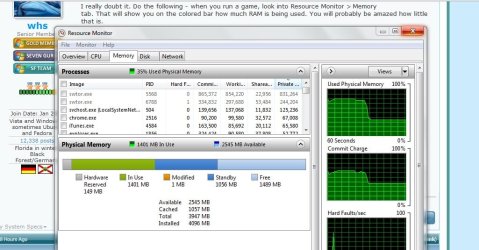
I really doubt it. Do the following - when you run a game, look into Resource Monitor > Memory tab. That will show you on the colored bar how much RAM is being used. You will probably be amazed how little that is.
 

My Computer My Computer

At a glance

Vista, Windows7, Mint Mate, Zorin, Windows 8from 1.6GHz Duo to i7
Computer Manufacturer/Model Number
HP, Dell, Gateway, Toshiba - 4 laptops and 2 desktops
OS
Vista, Windows7, Mint Mate, Zorin, Windows 8
CPU
from 1.6GHz Duo to i7
Monitor(s) Displays
2x HP w2207
Hard Drives
5x HDD, 7x SSD, 12x Externals
Keyboard
with trackball - no mices
Mouse
Trackball mice
Internet Speed
DSL 6000
More RAM means you're not using the pagefile so much
With 4GBs of RAM, the pagefile is only used by some very special programs. That btw. is the same with 8GBs of RAM. Those programs do not use the pagefile because there is not enough available RAM, but for other reasons. With normal processing, the pagefile is never used.

The best performance boost these days is upgrading to a SSD.

SSDs are gereat for general performance increase. Games, however, generally do not acces the disk very often. So even an SSD will not buy a lot. Best boost for games is a fast CPU, a super graphics card and fast RAM.
 

My Computer My Computer

At a glance

Vista, Windows7, Mint Mate, Zorin, Windows 8from 1.6GHz Duo to i7
Computer Manufacturer/Model Number
HP, Dell, Gateway, Toshiba - 4 laptops and 2 desktops
OS
Vista, Windows7, Mint Mate, Zorin, Windows 8
CPU
from 1.6GHz Duo to i7
Monitor(s) Displays
2x HP w2207
Hard Drives
5x HDD, 7x SSD, 12x Externals
Keyboard
with trackball - no mices
Mouse
Trackball mice
Internet Speed
DSL 6000
when i game it uses 2.5gbs to 3gbs depends what i'm running lowest ive seen it is 2gbs but crysis 2 went up to like almost 3gbs
 

My Computer My Computer

At a glance

Windows 10 64bitAMD Phenom II X4 925 (Deneb)(2.8GHz) OC 3.4GHzCorsair Vengeance DDR3 4GBX2 (8192MB)XFX HD 6870 1GB (OC)- 940MHz core, mem 1150MHz
Computer type
PC/Desktop
Computer Manufacturer/Model Number
custom build
OS
Windows 10 64bit
CPU
AMD Phenom II X4 925 (Deneb)(2.8GHz) OC 3.4GHz
Motherboard
M5A78L-MLX Plus
Memory
Corsair Vengeance DDR3 4GBX2 (8192MB)
Graphics Card(s)
XFX HD 6870 1GB (OC)- 940MHz core, mem 1150MHz
Monitor(s) Displays
Vizio 26' 1920x1080 / Acer 1336x768
Screen Resolution
1920x1080 60Hz /1336x768
Hard Drives
Kingston Digital 60GB SSDNow V300/500gb HDD Western Digital 7200rpm (/WD 160GB HDD 7200rpm
PSU
CORSAIR CX600 600w
Case
AZZA Orion 202 EVO
Cooling
cooler master hyper TX3 cpu cooler
Keyboard
Razer DeathStalker
Mouse
Logitech Optical Gaming Mouse G400
Antivirus
Defualt on win 10
Browser
Firefox
Other Info
cpu is overclocked in bios
More RAM means you're not using the pagefile so much
With 4GBs of RAM, the pagefile is only used by some very special programs. That btw. is the same with 8GBs of RAM. Those programs do not use the pagefile because there is not enough available RAM, but for other reasons. With normal processing, the pagefile is never used.

The best performance boost these days is upgrading to a SSD.

SSDs are gereat for general performance increase. Games, however, generally do not acces the disk very often. So even an SSD will not buy a lot. Best boost for games is a fast CPU, a super graphics card and fast RAM.

Can't argue on that one Wolfgang as I never use games. :)

Thanks for putting me right.
 

My Computer My Computer

At a glance

Windows 7 Ultimate SP1 64-BitIntel Core i7 870 @ 2.93GHz8Gb Dual-Channel DDR3 @ 664MHznVidia GeForce GTX 460 1024MB dedicated RAM
Computer Manufacturer/Model Number
HP Pavilion Elite 495UK
OS
Windows 7 Ultimate SP1 64-Bit
CPU
Intel Core i7 870 @ 2.93GHz
Motherboard
MSI 2A9C (CPU1)
Memory
8Gb Dual-Channel DDR3 @ 664MHz
Graphics Card(s)
nVidia GeForce GTX 460 1024MB dedicated RAM
Sound Card
Realtek HD Audio
Monitor(s) Displays
HP2310i
Screen Resolution
1920 x 1080
Hard Drives
1x1954GB Hitachi HDS22020ALA 330 (RAID), 1x1954GB Hitachi External for backup and storage
PSU
460W
Case
HP Elite
Cooling
Air cooled
Keyboard
Logitech K750 solar-powered keyboard
Mouse
Logitech Wireless M180 mouse
Internet Speed
2Mb
Other Info
Pure Avanti Flow Internet Radio with iPod Dock, 64Gb iPod, HP USB Speakers, Sony MDR-V500 Headphones, Sony Vaio F-Series Laptop
So you have plenty of RAM, don't you.
 

My Computer My Computer

At a glance

Vista, Windows7, Mint Mate, Zorin, Windows 8from 1.6GHz Duo to i7
Computer Manufacturer/Model Number
HP, Dell, Gateway, Toshiba - 4 laptops and 2 desktops
OS
Vista, Windows7, Mint Mate, Zorin, Windows 8
CPU
from 1.6GHz Duo to i7
Monitor(s) Displays
2x HP w2207
Hard Drives
5x HDD, 7x SSD, 12x Externals
Keyboard
with trackball - no mices
Mouse
Trackball mice
Internet Speed
DSL 6000
Ok, so there's not any speed ratings or anything like that when it comes to RAM? Just get some that fits and it's plug and play?

Thanks for the reply.

1333 is a speed rating. (PC-10667).

I agree with the other posters that going to 8GB may not help much, if gaming is your purpose.

On the other hand, for less than $50....
 

My Computer My Computer

At a glance

Windows 7 Pro X64 SP1Intel Core I7-3930k16 GB Gskill DDR3-2133eVGA GTX680
Computer Manufacturer/Model Number
homegrown
OS
Windows 7 Pro X64 SP1
CPU
Intel Core I7-3930k
Motherboard
Asus P9X79 Pro
Memory
16 GB Gskill DDR3-2133
Graphics Card(s)
eVGA GTX680
Sound Card
Creative X-Fi Titanium
Monitor(s) Displays
As PA246Q
Screen Resolution
1920 X 1200
Hard Drives
Corsair Force GT, 120 GB
WDC 1.5TB Caviar Black
PSU
PCP&C Silencer 750 Crossfire
Case
Silverstone FT02
Cooling
Noctua NH-D14
Keyboard
cheap Logitech USB
Mouse
Microsoft Intellimouse Explorer (old optical) USB
Internet Speed
6Mb cable
Other Info
Pioneer BDR-205
Samsung SH-203B
Monsoon 5.1 speakers
I really doubt it. Do the following - when you run a game, look into Resource Monitor > Memory tab. That will show you on the colored bar how much RAM is being used. You will probably be amazed how little that is.

I did as you said, and I dunno, I may be reading the info incorrectly, but with my game running (Along with all my other normal programs), it seems as if the system is using up a little more than 3/4's of the total ram. Now keep in mind, even with all my programs and the game running at one time, it was running smooooooooth as butter with all the graphics at max settings. I'm posting up a screen shot of Resource Manager both with the game running, and without the game running. Tell me what y'all think.:D
 

Attachments

  • ram.jpg
    ram.jpg
    94.7 KB · Views: 23
  • ram2.jpg
    ram2.jpg
    90.8 KB · Views: 19

My Computer My Computer

At a glance

Windows 7 64 bit, home premiumIntel(R) Core(TM) i5-3570K CPU @ 3.40GHz8.00 GBAMD Radeon HD 7900 Series
OS
Windows 7 64 bit, home premium
CPU
Intel(R) Core(TM) i5-3570K CPU @ 3.40GHz
Motherboard
ASUSTeK COMPUTER INC. P8Z77-V LK
Memory
8.00 GB
Graphics Card(s)
AMD Radeon HD 7900 Series
Sound Card
(1) AMD High Definition Audio Device (2) Audio Device on H
Monitor(s) Displays
ASUS VE248h
Hard Drives
OCZ-AGILITY3 ATA Device

ST31500341AS ATA Device
The snips of your resource monitor show over 3GB RAM in use while the game is running and a bit less than 1.5GB when it's not. The thing about Windows 7 is it's much better at utilizing available RAM compared to previous operating systems. RAM is always faster than a pagefile/virtual memory running on a mechanical hard drive so if RAM is available, 7 will use it. If you upgrade to 8GB, it wouldn't surprise me if RAM usage remained pretty much the same.

For me, the biggest advantage to upgrading now is the low prices on RAM and making sure your computer can handle more memory intensive games that are sure to come out in the not too distant future.
 

My Computer My Computer

At a glance

Win 7 Pro 64-bitIntel i5 2.4 Ghz8GB DDR3Intel HD 3000
Computer type
Laptop
Computer Manufacturer/Model Number
Sony Vaio VPCEB47GM Laptop
OS
Win 7 Pro 64-bit
CPU
Intel i5 2.4 Ghz
Memory
8GB DDR3
Graphics Card(s)
Intel HD 3000
Sound Card
IDT High Definition
Monitor(s) Displays
15.6 WGXA Anti-Glare LED
Screen Resolution
1280x800
Hard Drives
640Gb 7200rpm
Antivirus
MSE
Browser
Opera (primary) with IE9 backup
As Lee says, if you want to plan for the future, an upgrade may be OK. But for the time being you are fine. 8GB would provide more RAM for caching, but that is not such a big deal.

Considering that the RAM upgrade would cost you around $50 and an SSD is $100, I would rather go for the SSD. That would give you a lot more overall benefits.
 

My Computer My Computer

At a glance

Vista, Windows7, Mint Mate, Zorin, Windows 8from 1.6GHz Duo to i7
Computer Manufacturer/Model Number
HP, Dell, Gateway, Toshiba - 4 laptops and 2 desktops
OS
Vista, Windows7, Mint Mate, Zorin, Windows 8
CPU
from 1.6GHz Duo to i7
Monitor(s) Displays
2x HP w2207
Hard Drives
5x HDD, 7x SSD, 12x Externals
Keyboard
with trackball - no mices
Mouse
Trackball mice
Internet Speed
DSL 6000
Back
Top