What's your memory assessment speed?

Status
Not open for further replies.
After a bit of tweaking, I'm happy with my Corsair Vengeance LP DDR3 1600Mhz results.


At stock DDR3-1333Mhz, NB 2000Mhz, the results were:
Copy 10466 MB/s
Read 8107 MB/s
Write 6831 MB/s
Score 7.47GB/s
Latency 66.9 ns

winsat mem: 14911.50 MB/s

At DDR3-1600Mhz (9-9-9-24-1T), which the RAM is specified for, I got:
Copy 10560 MB/s
Read 8667 MB/s
Write 6734 MB/s
Score 7.70 GB/s
Latency 65.0 ns

At DDR3-1600Mhz (9-9-9-24-1T), NB 2400Mhz, CPU-NB 1.32v I got:
Copy 11602 MB/s
Read 9457 MB/s
Write 7883 MB/s
Score 8.67 GB/s
Latency 61.5 ns

winsat mem 18172.96 MB/s

With the RAM at 1600Mhz, the highest NB I could boot at was 2600Mhz (with CPU-NB 1.32v, NB 1.3v) which gave the following but wasn't stable (I was getting crashes in Explorer):

Copy 11867 MB/s
Read 9822 MB/s
Write 8457 MB/s
Score 9.14 GB/s
Latency 60.4 ns

winsat mem 19929.93 MB/s

So I decided to drop the RAM back to 1333Mhz and see if I could increase the NB, which is how I got my current results with the NB @ 2800Mhz, which are somewhat slower in MaxxMemm for everything except Write speed, which gets a nice boost, but gives a better result with winsat mem.
 

My Computer My Computer

At a glance

Windows 7 Ultimate x64Phenom II X4 95516GB (4*4GB) DDR3 Corsair Vengeance6950 2GB
Computer type
PC/Desktop
OS
Windows 7 Ultimate x64
CPU
Phenom II X4 955
Motherboard
MSI 990FXA-GD80
Memory
16GB (4*4GB) DDR3 Corsair Vengeance
Graphics Card(s)
6950 2GB
Sound Card
Onboard Realtek
Monitor(s) Displays
Dell 24" IPS LCD
Hard Drives
Samsung Evo 256GB SSD, Samsung 2TB, & Samsung 500GB HDDs
PSU
Antec CP-850
Case
Bench
Cooling
TRUE rev.c

My Computer My Computer

At a glance

Windows 7 Ultimate 64bit SP1Intel Core 2 Quad Q66002X2GB DDR2 PC6400 800MHZ DUAL CHANNELXFX RADEON HD 6850 1GB GDDR5
Computer Manufacturer/Model Number
Custom Built by me.
OS
Windows 7 Ultimate 64bit SP1
CPU
Intel Core 2 Quad Q6600
Motherboard
Gigabyte GA-X38-DS4
Memory
2X2GB DDR2 PC6400 800MHZ DUAL CHANNEL
Graphics Card(s)
XFX RADEON HD 6850 1GB GDDR5
Sound Card
2/4/5.1/7.1-channel Realtek High Definition
Monitor(s) Displays
Samsung LE40A656F1 1080p 100Hz LCD HD TV 50,000:1
Screen Resolution
1366x768 in Desktop,1920x1080p in gaming and video
Hard Drives
C:\WD VelociRaptor 150 GB,10,000 RPM
E:\WESTERN DIGITAL WD15EADS 1.5TB CAVIAR GREEN SATA2 F:\WESTERN DIGITAL WD15EADS 1.5TB CAVIAR GREEN SATA2
PSU
THERMALTAKE W0229 TOUGHPOWER XT 750W
Case
A-Case Twin Engine BB
Cooling
3 x thermaltake smart case fan II + 1 arctic cooling fan
Keyboard
Wireless Logitech LX710
Mouse
Logitech Wireless Gaming Mouse G700
Internet Speed
ADSL 12000 plus
Other Info
Mouse Logitech G700,with 13 buttons who needs keyboard in RPG?

D:\Sony high speed sata Dvd Rewriter
Logitech Cordless Rumblepad 2
doveman007 try setting your NB to 1.4V or 1.425 to see if that will stabilize it.
 

My Computer My Computer

At a glance

Windows 7 Ultimate X64 SP1Intel i5-2550K, Differing ~4.4-4.8GHz No buil...16GB G.Skill Sniper 1866MHz @ 2133MHz 2x8GBASUS GTX650TIB-DC2OC-2GD5, (650TI Boost)
Computer type
PC/Desktop
Computer Manufacturer/Model Number
Home Built Desktop By DataTech
OS
Windows 7 Ultimate X64 SP1
CPU
Intel i5-2550K, Differing ~4.4-4.8GHz No built in GPU
Motherboard
ASUS P8Z68-V PRO/GEN3
Memory
16GB G.Skill Sniper 1866MHz @ 2133MHz 2x8GB
Graphics Card(s)
ASUS GTX650TIB-DC2OC-2GD5, (650TI Boost)
Sound Card
Onboard Realtek 5-1
Monitor(s) Displays
Samsung P2570HD
Screen Resolution
1920x1080
Hard Drives
Samsung 840 Pro 256GB SSD for OS, 500GB Seagate Constellation (Enterprise drive) for Data
PSU
Corsair HX650W
Case
Inwin Dragon Rider
Cooling
Hyper 212 EVO w/two Noctua fans, push-pull, @1300 RPM
Keyboard
E-Z Eyes, bright yellow keys with large characters
Mouse
steelseries SENSEI Laser Pro Gaming
Internet Speed
48-51Mbs Mbs down, 11 Mbs up Xfinity Cable
Antivirus
Norton Internet Security 2013
Browser
IE 10, Opera, Pale Moon if needed
Other Info
4 case fans, LG BluRay-RE, ASUS DVD-RW, Mr. Fusion power supply, 1.21 gigawatts.

My Computer My Computer

At a glance

Windows 7 Ultimate x64Phenom II X4 95516GB (4*4GB) DDR3 Corsair Vengeance6950 2GB
Computer type
PC/Desktop
OS
Windows 7 Ultimate x64
CPU
Phenom II X4 955
Motherboard
MSI 990FXA-GD80
Memory
16GB (4*4GB) DDR3 Corsair Vengeance
Graphics Card(s)
6950 2GB
Sound Card
Onboard Realtek
Monitor(s) Displays
Dell 24" IPS LCD
Hard Drives
Samsung Evo 256GB SSD, Samsung 2TB, & Samsung 500GB HDDs
PSU
Antec CP-850
Case
Bench
Cooling
TRUE rev.c
doveman007 try setting your NB to 1.4V or 1.425 to see if that will stabilize it.

I actually forgot which one you said and increased the CPU-NB to 1.4v, but it seems to have done the trick :D

DDR3-800 (1600) Mhz (9-9-9-24-1T), NB 2800, CPU-NB 1.4v, NB 1.3v:

Copy 12049 MB/s
Read 10094 MB/s
Write 9021 MB/s
Score 9.56 GB/s
Latency 58.9 ns

winsat mem 21452.53 MB/s
 

My Computer My Computer

At a glance

Windows 7 Ultimate x64Phenom II X4 95516GB (4*4GB) DDR3 Corsair Vengeance6950 2GB
Computer type
PC/Desktop
OS
Windows 7 Ultimate x64
CPU
Phenom II X4 955
Motherboard
MSI 990FXA-GD80
Memory
16GB (4*4GB) DDR3 Corsair Vengeance
Graphics Card(s)
6950 2GB
Sound Card
Onboard Realtek
Monitor(s) Displays
Dell 24" IPS LCD
Hard Drives
Samsung Evo 256GB SSD, Samsung 2TB, & Samsung 500GB HDDs
PSU
Antec CP-850
Case
Bench
Cooling
TRUE rev.c
doveman007 try setting your NB to 1.4V or 1.425 to see if that will stabilize it.
This one :) It runs the memory contoller. what you did is fine too.
 

My Computer My Computer

At a glance

Windows 7 Ultimate X64 SP1Intel i5-2550K, Differing ~4.4-4.8GHz No buil...16GB G.Skill Sniper 1866MHz @ 2133MHz 2x8GBASUS GTX650TIB-DC2OC-2GD5, (650TI Boost)
Computer type
PC/Desktop
Computer Manufacturer/Model Number
Home Built Desktop By DataTech
OS
Windows 7 Ultimate X64 SP1
CPU
Intel i5-2550K, Differing ~4.4-4.8GHz No built in GPU
Motherboard
ASUS P8Z68-V PRO/GEN3
Memory
16GB G.Skill Sniper 1866MHz @ 2133MHz 2x8GB
Graphics Card(s)
ASUS GTX650TIB-DC2OC-2GD5, (650TI Boost)
Sound Card
Onboard Realtek 5-1
Monitor(s) Displays
Samsung P2570HD
Screen Resolution
1920x1080
Hard Drives
Samsung 840 Pro 256GB SSD for OS, 500GB Seagate Constellation (Enterprise drive) for Data
PSU
Corsair HX650W
Case
Inwin Dragon Rider
Cooling
Hyper 212 EVO w/two Noctua fans, push-pull, @1300 RPM
Keyboard
E-Z Eyes, bright yellow keys with large characters
Mouse
steelseries SENSEI Laser Pro Gaming
Internet Speed
48-51Mbs Mbs down, 11 Mbs up Xfinity Cable
Antivirus
Norton Internet Security 2013
Browser
IE 10, Opera, Pale Moon if needed
Other Info
4 case fans, LG BluRay-RE, ASUS DVD-RW, Mr. Fusion power supply, 1.21 gigawatts.
Hmm, seems I spoke to soon. Next time I tried to boot it had the same problem accessing the HDD. It boots grub4dos OK but then can't seem to find the drive when I select the "boot from partiton 0" entry.

Do you think increasing the NB to 1.4v, so that both that and the CPU-NB are at 1.4v, will be safe and likely to fix this?
 

My Computer My Computer

At a glance

Windows 7 Ultimate x64Phenom II X4 95516GB (4*4GB) DDR3 Corsair Vengeance6950 2GB
Computer type
PC/Desktop
OS
Windows 7 Ultimate x64
CPU
Phenom II X4 955
Motherboard
MSI 990FXA-GD80
Memory
16GB (4*4GB) DDR3 Corsair Vengeance
Graphics Card(s)
6950 2GB
Sound Card
Onboard Realtek
Monitor(s) Displays
Dell 24" IPS LCD
Hard Drives
Samsung Evo 256GB SSD, Samsung 2TB, & Samsung 500GB HDDs
PSU
Antec CP-850
Case
Bench
Cooling
TRUE rev.c
Hmm, seems I spoke to soon. Next time I tried to boot it had the same problem accessing the HDD. It boots grub4dos OK but then can't seem to find the drive when I select the "boot from partiton 0" entry.

Do you think increasing the NB to 1.4v, so that both that and the CPU-NB are at 1.4v, will be safe and likely to fix this?
Yup, that was my original suggestion, NB>1.4V. The CPU NB may be better lower than that, say, 1.25
 

My Computer My Computer

At a glance

Windows 7 Ultimate X64 SP1Intel i5-2550K, Differing ~4.4-4.8GHz No buil...16GB G.Skill Sniper 1866MHz @ 2133MHz 2x8GBASUS GTX650TIB-DC2OC-2GD5, (650TI Boost)
Computer type
PC/Desktop
Computer Manufacturer/Model Number
Home Built Desktop By DataTech
OS
Windows 7 Ultimate X64 SP1
CPU
Intel i5-2550K, Differing ~4.4-4.8GHz No built in GPU
Motherboard
ASUS P8Z68-V PRO/GEN3
Memory
16GB G.Skill Sniper 1866MHz @ 2133MHz 2x8GB
Graphics Card(s)
ASUS GTX650TIB-DC2OC-2GD5, (650TI Boost)
Sound Card
Onboard Realtek 5-1
Monitor(s) Displays
Samsung P2570HD
Screen Resolution
1920x1080
Hard Drives
Samsung 840 Pro 256GB SSD for OS, 500GB Seagate Constellation (Enterprise drive) for Data
PSU
Corsair HX650W
Case
Inwin Dragon Rider
Cooling
Hyper 212 EVO w/two Noctua fans, push-pull, @1300 RPM
Keyboard
E-Z Eyes, bright yellow keys with large characters
Mouse
steelseries SENSEI Laser Pro Gaming
Internet Speed
48-51Mbs Mbs down, 11 Mbs up Xfinity Cable
Antivirus
Norton Internet Security 2013
Browser
IE 10, Opera, Pale Moon if needed
Other Info
4 case fans, LG BluRay-RE, ASUS DVD-RW, Mr. Fusion power supply, 1.21 gigawatts.
Seems rather low for what's meant to be an enthusiast's board, but the BIOS only lets me take the NB to 1.388v so I've set it to that and the CPU-NB to 1.3v for now. Booted OK but it did so once before with only the CPU-NB at 1.4v, so I'll have to see if it consistently boots OK and then look at maybe decreasing the CPU-NB a bit.
 

My Computer My Computer

At a glance

Windows 7 Ultimate x64Phenom II X4 95516GB (4*4GB) DDR3 Corsair Vengeance6950 2GB
Computer type
PC/Desktop
OS
Windows 7 Ultimate x64
CPU
Phenom II X4 955
Motherboard
MSI 990FXA-GD80
Memory
16GB (4*4GB) DDR3 Corsair Vengeance
Graphics Card(s)
6950 2GB
Sound Card
Onboard Realtek
Monitor(s) Displays
Dell 24" IPS LCD
Hard Drives
Samsung Evo 256GB SSD, Samsung 2TB, & Samsung 500GB HDDs
PSU
Antec CP-850
Case
Bench
Cooling
TRUE rev.c
Always good to find the lowest stable voltage.

Run Prime95 Blend test, max RAM, to check for CPU-NB stability.
Be sure to watch the CPU core temps, use Core Temp.
 

My Computer My Computer

At a glance

Windows 7 Ult x64 - SP1/ Windows 8 Pro x64Intel Core i5-3570K 4.6GHz8GB (2X4GB) DDR3 1600 Corsair Vengeance CL8 1.5vSapphire HD 7770 Vapor-X OC 1GB DDR5
Computer type
PC/Desktop
Computer Manufacturer/Model Number
76~2.0
OS
Windows 7 Ult x64 - SP1/ Windows 8 Pro x64
CPU
Intel Core i5-3570K 4.6GHz
Motherboard
Gigabyte GA-Z77X UD3H, f18
Memory
8GB (2X4GB) DDR3 1600 Corsair Vengeance CL8 1.5v
Graphics Card(s)
Sapphire HD 7770 Vapor-X OC 1GB DDR5
Sound Card
Onboard VIA VT2021
Monitor(s) Displays
22" LCD Dell
Screen Resolution
1680x1050
Hard Drives
Samsung 840Pro 128GB SSD,
Seagate Barracuda 500GB SATA2 7200rpm 32MB cache, Seagate Barracuda 1TB SATA2 7200rpm 32MB cache,
PSU
Corsair HX650W
Case
Cooler Master Storm Scout
Cooling
Corsair H80 2x12cm Noctua NF P12 , 2x14cm case fans
Keyboard
Logitech Wave
Mouse
CM Sentinel
Internet Speed
Dismal
Antivirus
Avast
Browser
Opera Next
Other Info
Haswell laptop: HP Envy 17t-j, i7-4700MQ, GeForce 740M 2GB DDR3, 17.3" Full HD 1920x1080, 16GB RAM, Samsung 840 Pro 128GB, 1TB Hitachi 7200 HDD,
Desktop: eSATA ports,
External eSATA Seagate 500GB SATA2 7200rpm,
External WD USB 500GB
Thanks, I'll do that.

In the meantime, here's my latest results. Some things up, some down but overall I'm happy.


My Computer My Computer

At a glance

Windows 7 Ultimate x64Phenom II X4 95516GB (4*4GB) DDR3 Corsair Vengeance6950 2GB
Computer type
PC/Desktop
OS
Windows 7 Ultimate x64
CPU
Phenom II X4 955
Motherboard
MSI 990FXA-GD80
Memory
16GB (4*4GB) DDR3 Corsair Vengeance
Graphics Card(s)
6950 2GB
Sound Card
Onboard Realtek
Monitor(s) Displays
Dell 24" IPS LCD
Hard Drives
Samsung Evo 256GB SSD, Samsung 2TB, & Samsung 500GB HDDs
PSU
Antec CP-850
Case
Bench
Cooling
TRUE rev.c
Prime95 defaults to 8K FFT, which doesn't work on my system, so I set it to Custom 1024K and 8000MB. Unfortunately, it errored straight away and BSOD my PC!

I tried upping the CPU-NB back to 1.4v, but it failed to boot (seems quite random), so I've dropped the NB down to 2600Mhz for now and Prime95 is running OK at the moment, although everything gets a bit toasty so I'm going to have to look at my cooling (running a TRUE rev.C with Nexus 120mm @ 1050RPM).
 

My Computer My Computer

At a glance

Windows 7 Ultimate x64Phenom II X4 95516GB (4*4GB) DDR3 Corsair Vengeance6950 2GB
Computer type
PC/Desktop
OS
Windows 7 Ultimate x64
CPU
Phenom II X4 955
Motherboard
MSI 990FXA-GD80
Memory
16GB (4*4GB) DDR3 Corsair Vengeance
Graphics Card(s)
6950 2GB
Sound Card
Onboard Realtek
Monitor(s) Displays
Dell 24" IPS LCD
Hard Drives
Samsung Evo 256GB SSD, Samsung 2TB, & Samsung 500GB HDDs
PSU
Antec CP-850
Case
Bench
Cooling
TRUE rev.c
Can you define 'a bit toasty' in °C?

Better to run the torture test as it will test some RAM also.

CPU - Stress Test with Prime95
Prime95 Torture test
First open Core Temp to monitor CPU temperatures, don't go over 78°C.
Open Prime95 and stop the test if it is running, in Advanced tab select 'Round off checking', in the Options tab select 'Torture Test...', in the window that opens select 'Blend', after 'Number of torture test threads to run' enter 3 or 4 (depending on which rig you are using), then click OK to start the test.
 

My Computer My Computer

At a glance

Windows 7 Ult x64 - SP1/ Windows 8 Pro x64Intel Core i5-3570K 4.6GHz8GB (2X4GB) DDR3 1600 Corsair Vengeance CL8 1.5vSapphire HD 7770 Vapor-X OC 1GB DDR5
Computer type
PC/Desktop
Computer Manufacturer/Model Number
76~2.0
OS
Windows 7 Ult x64 - SP1/ Windows 8 Pro x64
CPU
Intel Core i5-3570K 4.6GHz
Motherboard
Gigabyte GA-Z77X UD3H, f18
Memory
8GB (2X4GB) DDR3 1600 Corsair Vengeance CL8 1.5v
Graphics Card(s)
Sapphire HD 7770 Vapor-X OC 1GB DDR5
Sound Card
Onboard VIA VT2021
Monitor(s) Displays
22" LCD Dell
Screen Resolution
1680x1050
Hard Drives
Samsung 840Pro 128GB SSD,
Seagate Barracuda 500GB SATA2 7200rpm 32MB cache, Seagate Barracuda 1TB SATA2 7200rpm 32MB cache,
PSU
Corsair HX650W
Case
Cooler Master Storm Scout
Cooling
Corsair H80 2x12cm Noctua NF P12 , 2x14cm case fans
Keyboard
Logitech Wave
Mouse
CM Sentinel
Internet Speed
Dismal
Antivirus
Avast
Browser
Opera Next
Other Info
Haswell laptop: HP Envy 17t-j, i7-4700MQ, GeForce 740M 2GB DDR3, 17.3" Full HD 1920x1080, 16GB RAM, Samsung 840 Pro 128GB, 1TB Hitachi 7200 HDD,
Desktop: eSATA ports,
External eSATA Seagate 500GB SATA2 7200rpm,
External WD USB 500GB
Yeah, not very technical but that's what came to mind when I went to plug a USB stick in and felt the heat coming off it!

In HwInfo, the CPU temp (under AMD 10h+ CPU Thermal Sensor) was about 71c and I think the others (CPU, Aux, Motherboard) were in the 60s, but I was more concerned with stopping the test than noting them down at that point.

I'm running Prime95x64 to test the NB @ 2600Mhz now, and the Blend option is working. Maybe it didn't work before because I was running the 32-bit version.

I've updated my BIOS from 11.6 to 11.8 hoping it might offer higher NB voltages than 1.388v, but it doesn't.
 

My Computer My Computer

At a glance

Windows 7 Ultimate x64Phenom II X4 95516GB (4*4GB) DDR3 Corsair Vengeance6950 2GB
Computer type
PC/Desktop
OS
Windows 7 Ultimate x64
CPU
Phenom II X4 955
Motherboard
MSI 990FXA-GD80
Memory
16GB (4*4GB) DDR3 Corsair Vengeance
Graphics Card(s)
6950 2GB
Sound Card
Onboard Realtek
Monitor(s) Displays
Dell 24" IPS LCD
Hard Drives
Samsung Evo 256GB SSD, Samsung 2TB, & Samsung 500GB HDDs
PSU
Antec CP-850
Case
Bench
Cooling
TRUE rev.c
AMD CPUs normally run pretty cool, have you checked the CPU cooler?
Maybe time to replace the thermal paste.

I've seen AMD CPUs run Prime95 torture test at 60°C and below.

Use Core Temp to monitor your CPU core temps.
 

My Computer My Computer

At a glance

Windows 7 Ult x64 - SP1/ Windows 8 Pro x64Intel Core i5-3570K 4.6GHz8GB (2X4GB) DDR3 1600 Corsair Vengeance CL8 1.5vSapphire HD 7770 Vapor-X OC 1GB DDR5
Computer type
PC/Desktop
Computer Manufacturer/Model Number
76~2.0
OS
Windows 7 Ult x64 - SP1/ Windows 8 Pro x64
CPU
Intel Core i5-3570K 4.6GHz
Motherboard
Gigabyte GA-Z77X UD3H, f18
Memory
8GB (2X4GB) DDR3 1600 Corsair Vengeance CL8 1.5v
Graphics Card(s)
Sapphire HD 7770 Vapor-X OC 1GB DDR5
Sound Card
Onboard VIA VT2021
Monitor(s) Displays
22" LCD Dell
Screen Resolution
1680x1050
Hard Drives
Samsung 840Pro 128GB SSD,
Seagate Barracuda 500GB SATA2 7200rpm 32MB cache, Seagate Barracuda 1TB SATA2 7200rpm 32MB cache,
PSU
Corsair HX650W
Case
Cooler Master Storm Scout
Cooling
Corsair H80 2x12cm Noctua NF P12 , 2x14cm case fans
Keyboard
Logitech Wave
Mouse
CM Sentinel
Internet Speed
Dismal
Antivirus
Avast
Browser
Opera Next
Other Info
Haswell laptop: HP Envy 17t-j, i7-4700MQ, GeForce 740M 2GB DDR3, 17.3" Full HD 1920x1080, 16GB RAM, Samsung 840 Pro 128GB, 1TB Hitachi 7200 HDD,
Desktop: eSATA ports,
External eSATA Seagate 500GB SATA2 7200rpm,
External WD USB 500GB
It should be fine. Only built the system a couple of months ago and used Arctic MX-2.

With nothing overclocked, with Prime95 CPU Thermal Sensor is at 62c, CPU 51c, Motherboard 37c, T1/D1+ 52c. At idle, I get CPU Thermal Sensor 33c, CPU 23c, Motherboard 35c, T1/D1+ 24c

I'll double-check with CoreTemp next time but running it now at idle the temps shown are the same as HwInfo
 

My Computer My Computer

At a glance

Windows 7 Ultimate x64Phenom II X4 95516GB (4*4GB) DDR3 Corsair Vengeance6950 2GB
Computer type
PC/Desktop
OS
Windows 7 Ultimate x64
CPU
Phenom II X4 955
Motherboard
MSI 990FXA-GD80
Memory
16GB (4*4GB) DDR3 Corsair Vengeance
Graphics Card(s)
6950 2GB
Sound Card
Onboard Realtek
Monitor(s) Displays
Dell 24" IPS LCD
Hard Drives
Samsung Evo 256GB SSD, Samsung 2TB, & Samsung 500GB HDDs
PSU
Antec CP-850
Case
Bench
Cooling
TRUE rev.c
Actually I do have the CPU overclocked to 3.9Ghz. Did that with ATI CCC, so forgot about it as it's not shown in the BIOS :o

I just flashed the latest beta BIOS (11.8b2) and it does offer one extra step for NB at 1.394v, but even at that and CPU-NB at 1.3v I got BSOD pretty soon trying NB at 2800Mhz, even with the RAM on Auto (1333Mhz).

Just testing with the RAM on Auto and the NB @ 2600Mhz, with NB and CPU-NB both at 1.3v. Seems OK so far and might keep the temps down a bit. Then I'll test again with the RAM at 1600Mhz to see if that increases temps.
 

My Computer My Computer

At a glance

Windows 7 Ultimate x64Phenom II X4 95516GB (4*4GB) DDR3 Corsair Vengeance6950 2GB
Computer type
PC/Desktop
OS
Windows 7 Ultimate x64
CPU
Phenom II X4 955
Motherboard
MSI 990FXA-GD80
Memory
16GB (4*4GB) DDR3 Corsair Vengeance
Graphics Card(s)
6950 2GB
Sound Card
Onboard Realtek
Monitor(s) Displays
Dell 24" IPS LCD
Hard Drives
Samsung Evo 256GB SSD, Samsung 2TB, & Samsung 500GB HDDs
PSU
Antec CP-850
Case
Bench
Cooling
TRUE rev.c
Another thing to do is power off the PC and let it get cold to help cure the thermal paste. Run some more torture tests to get it hot and repeat. I found this accidentally, my PhenomII X4 had been idling at 42C-46C which is hot for it. I ran some tests, Prime95 and Intel Burn Test and it got to a max of 63C. I turned it off one night and the next day I noticed the idle temp had dropped to 31C-33C.
I had fresh Artic Silver 5 since I had put on a different heatsink/fan.
Thanks to Essenbe for pointing this out.:)
 

My Computer My Computer

At a glance

Windows 7 Ultimate X64 SP1Intel i5-2550K, Differing ~4.4-4.8GHz No buil...16GB G.Skill Sniper 1866MHz @ 2133MHz 2x8GBASUS GTX650TIB-DC2OC-2GD5, (650TI Boost)
Computer type
PC/Desktop
Computer Manufacturer/Model Number
Home Built Desktop By DataTech
OS
Windows 7 Ultimate X64 SP1
CPU
Intel i5-2550K, Differing ~4.4-4.8GHz No built in GPU
Motherboard
ASUS P8Z68-V PRO/GEN3
Memory
16GB G.Skill Sniper 1866MHz @ 2133MHz 2x8GB
Graphics Card(s)
ASUS GTX650TIB-DC2OC-2GD5, (650TI Boost)
Sound Card
Onboard Realtek 5-1
Monitor(s) Displays
Samsung P2570HD
Screen Resolution
1920x1080
Hard Drives
Samsung 840 Pro 256GB SSD for OS, 500GB Seagate Constellation (Enterprise drive) for Data
PSU
Corsair HX650W
Case
Inwin Dragon Rider
Cooling
Hyper 212 EVO w/two Noctua fans, push-pull, @1300 RPM
Keyboard
E-Z Eyes, bright yellow keys with large characters
Mouse
steelseries SENSEI Laser Pro Gaming
Internet Speed
48-51Mbs Mbs down, 11 Mbs up Xfinity Cable
Antivirus
Norton Internet Security 2013
Browser
IE 10, Opera, Pale Moon if needed
Other Info
4 case fans, LG BluRay-RE, ASUS DVD-RW, Mr. Fusion power supply, 1.21 gigawatts.
Thanks, but MX-2 doesn't require curing.

It's hard to compare temperatures without knowing the CPU, heatsink, fan, etc but as my X4 is idling at 33c with the Nexus 120mm only pushing 36.87 CFM, I probably haven't got the same problem you had.

I'll probably try the Scythe Slip Stream 120mm PWM Fan, as it goes up to 1300 RPM / 74.25 CFM when needed but will still run quietly the rest of the time. As I can't run the NB higher than 2600Mhz, I'll see if I can shave a few °C off by lowering the voltages a bit as well.
 

My Computer My Computer

At a glance

Windows 7 Ultimate x64Phenom II X4 95516GB (4*4GB) DDR3 Corsair Vengeance6950 2GB
Computer type
PC/Desktop
OS
Windows 7 Ultimate x64
CPU
Phenom II X4 955
Motherboard
MSI 990FXA-GD80
Memory
16GB (4*4GB) DDR3 Corsair Vengeance
Graphics Card(s)
6950 2GB
Sound Card
Onboard Realtek
Monitor(s) Displays
Dell 24" IPS LCD
Hard Drives
Samsung Evo 256GB SSD, Samsung 2TB, & Samsung 500GB HDDs
PSU
Antec CP-850
Case
Bench
Cooling
TRUE rev.c
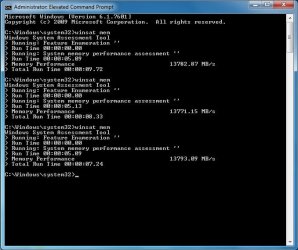
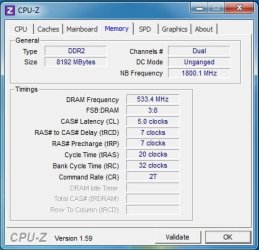
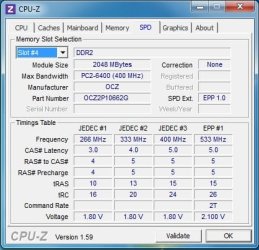
DDR 2, 8 GB, should be running dual channel. I'm confused by the CPU-Z timing. I've never quite understood what everything means. It says my memory is running at 533? I'm confused. The memory should be running at 1066...unless that's what each stick is, and dual channel is 1066...someone help?
 

Attachments

  • Memory Test.jpg
    Memory Test.jpg
    49.5 KB · Views: 15
  • CPU-Z Memory.jpg
    CPU-Z Memory.jpg
    29.1 KB · Views: 6
  • CPU-Z Memory #2.jpg
    CPU-Z Memory #2.jpg
    36.9 KB · Views: 2

My Computer My Computer

At a glance

Windows 7 Professional 64-bit SP1AMD Athlon X4 3.0 GHz8 GB DDR2Nvidia GeForce 9800 GTX+
OS
Windows 7 Professional 64-bit SP1
CPU
AMD Athlon X4 3.0 GHz
Motherboard
MSi
Memory
8 GB DDR2
Graphics Card(s)
Nvidia GeForce 9800 GTX+
Sound Card
On board HQ
Monitor(s) Displays
Acer 21" @ 16x9
Hard Drives
Sata II 250GB
PSU
650W
Case
Thermaltake
Cooling
6 fans
Keyboard
Logitech K800 laser LED illuminated
Mouse
Logitech Performance MX -Darkfield-
Internet Speed
Currently wireless...2.0 MB/s+
Status
Not open for further replies.
Back
Top