Solved "Open in New Tab" option missing in IE9

HairyScot

New member
Power User
Local time
12:36 AM
Messages
113
I have just discovered that the"Open in New Tab" option does not appear for some drop down entries in IE9.
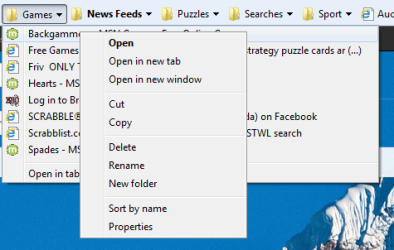
In the Favorites drop down if I right click on a folder there is an option "Open in New Window"
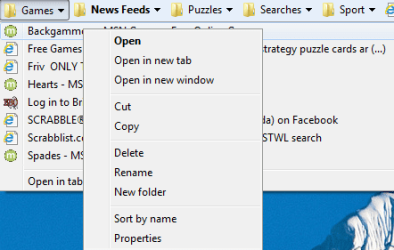
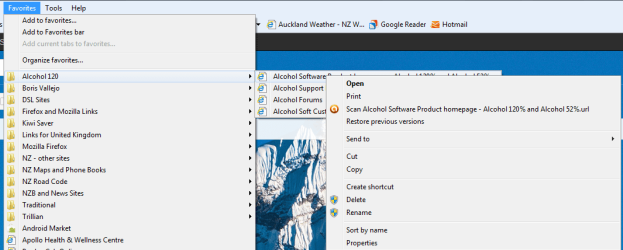
If I hold the pointer over the folder entry and then right click on one of the content entries then in some cases I see "Open in New Tab" but in some cases not, and in some cases I see both the new window and new tab options.
Would welcome any help or info.
:confused:

Have attached some screen shots
 

Attachments
  • missing.PNG
    missing.PNG
    46.5 KB · Views: 29
  • Tab&Window.PNG
    Tab&Window.PNG
    24.4 KB · Views: 26
  • Tab&window2.PNG
    Tab&window2.PNG
    15.8 KB · Views: 26
  • window.PNG
    window.PNG
    157.2 KB · Views: 26
Last edited:

My Computer My Computer

At a glance

Microsoft Windows 7 Professional 64-bit 7601 ...Intel(R) Core(TM) i5-3470 CPU @ 3.20GHz8 GB DDR3 1600MHZAMD Radeon HD 6570
Computer type
PC/Desktop
Computer Manufacturer/Model Number
Home Build
OS
Microsoft Windows 7 Professional 64-bit 7601 Multiprocessor Free Service Pack 1
CPU
Intel(R) Core(TM) i5-3470 CPU @ 3.20GHz
Motherboard
ASUSTeK COMPUTER INC. H61M-K
Memory
8 GB DDR3 1600MHZ
Graphics Card(s)
AMD Radeon HD 6570
Sound Card
(1) AMD High Definition Audio Device (2) Realtek High Defi
Monitor(s) Displays
Dell 2407 WFP
Screen Resolution
1920x1080
Hard Drives
SAMSUNG HD103SJ ATA Device 1TB
ST31000524AS ATA Device 1TB
Keyboard
Logitech
Mouse
Logitech
If you want to open a page in a new tab, simply click on the item with the mouse wheel.

You could also try disabling the Google toolbar and trying again.
 

My Computer My Computer

At a glance

Windows 7 Ultimate x64/Windows 8 Consumer Pre...Intel Pentium Dual Core E6700 3.2GHzStrontium 8192MB DDR3 1333Mhzmsi GeForce N560GTX-M2D1GD5 1GB
Computer Manufacturer/Model Number
Custom Build
OS
Windows 7 Ultimate x64/Windows 8 Consumer Preview x64/Ubuntu 11.04
CPU
Intel Pentium Dual Core E6700 3.2GHz
Motherboard
ASUS P5G41T-M LX
Memory
Strontium 8192MB DDR3 1333Mhz
Graphics Card(s)
msi GeForce N560GTX-M2D1GD5 1GB
Sound Card
Realtek HD Audio
Monitor(s) Displays
CHIMEI CMV 221D 22"
Screen Resolution
1680x1050
Hard Drives
Seagate Barracuda LP Green 3.5'' 2TB Internal HDD 5900RPM + WD Elements Desktop 1TB External HDD 7200RPM
PSU
SHAW Viper-1500w Gaming PSU
Case
Black eMaxx ATX Mini Tower Case
Keyboard
Microsoft Wireless Keyboard 1000
Mouse
Microsoft Wireless Optical Mouse 2000
Internet Speed
100GB @ 4.76Mbps
If you want to open a page in a new tab, simply click on the item with the mouse wheel.

You could also try disabling the Google toolbar and trying again.

Thanks for the info, but I don't use Google toolbar and I am aware that the mouse wheel can be used.

There is an inconsistency with Internet Explorer that I would like resolved.
 

My Computer My Computer

At a glance

Microsoft Windows 7 Professional 64-bit 7601 ...Intel(R) Core(TM) i5-3470 CPU @ 3.20GHz8 GB DDR3 1600MHZAMD Radeon HD 6570
Computer type
PC/Desktop
Computer Manufacturer/Model Number
Home Build
OS
Microsoft Windows 7 Professional 64-bit 7601 Multiprocessor Free Service Pack 1
CPU
Intel(R) Core(TM) i5-3470 CPU @ 3.20GHz
Motherboard
ASUSTeK COMPUTER INC. H61M-K
Memory
8 GB DDR3 1600MHZ
Graphics Card(s)
AMD Radeon HD 6570
Sound Card
(1) AMD High Definition Audio Device (2) Realtek High Defi
Monitor(s) Displays
Dell 2407 WFP
Screen Resolution
1920x1080
Hard Drives
SAMSUNG HD103SJ ATA Device 1TB
ST31000524AS ATA Device 1TB
Keyboard
Logitech
Mouse
Logitech
It looks like those Alcohol shortcuts are recognised as file shortcuts rather than internet shortcuts. Have you tried deleting the favourites/bookmarks and re-bookmarking?
 

My Computer My Computer

At a glance

Windows 7 Ultimate x64/Windows 8 Consumer Pre...Intel Pentium Dual Core E6700 3.2GHzStrontium 8192MB DDR3 1333Mhzmsi GeForce N560GTX-M2D1GD5 1GB
Computer Manufacturer/Model Number
Custom Build
OS
Windows 7 Ultimate x64/Windows 8 Consumer Preview x64/Ubuntu 11.04
CPU
Intel Pentium Dual Core E6700 3.2GHz
Motherboard
ASUS P5G41T-M LX
Memory
Strontium 8192MB DDR3 1333Mhz
Graphics Card(s)
msi GeForce N560GTX-M2D1GD5 1GB
Sound Card
Realtek HD Audio
Monitor(s) Displays
CHIMEI CMV 221D 22"
Screen Resolution
1680x1050
Hard Drives
Seagate Barracuda LP Green 3.5'' 2TB Internal HDD 5900RPM + WD Elements Desktop 1TB External HDD 7200RPM
PSU
SHAW Viper-1500w Gaming PSU
Case
Black eMaxx ATX Mini Tower Case
Keyboard
Microsoft Wireless Keyboard 1000
Mouse
Microsoft Wireless Optical Mouse 2000
Internet Speed
100GB @ 4.76Mbps
It looks like those Alcohol shortcuts are recognised as file shortcuts rather than internet shortcuts. Have you tried deleting the favourites/bookmarks and re-bookmarking?

Used the Alcohol shortcuts as an example. Problem occurs with others too.

Use the same shortcuts in both Firefox and Chrome with no problem.

However I did try deleting and recreating as you suggested. Made no difference.

Thanks for your help.

:D
 

My Computer My Computer

At a glance

Microsoft Windows 7 Professional 64-bit 7601 ...Intel(R) Core(TM) i5-3470 CPU @ 3.20GHz8 GB DDR3 1600MHZAMD Radeon HD 6570
Computer type
PC/Desktop
Computer Manufacturer/Model Number
Home Build
OS
Microsoft Windows 7 Professional 64-bit 7601 Multiprocessor Free Service Pack 1
CPU
Intel(R) Core(TM) i5-3470 CPU @ 3.20GHz
Motherboard
ASUSTeK COMPUTER INC. H61M-K
Memory
8 GB DDR3 1600MHZ
Graphics Card(s)
AMD Radeon HD 6570
Sound Card
(1) AMD High Definition Audio Device (2) Realtek High Defi
Monitor(s) Displays
Dell 2407 WFP
Screen Resolution
1920x1080
Hard Drives
SAMSUNG HD103SJ ATA Device 1TB
ST31000524AS ATA Device 1TB
Keyboard
Logitech
Mouse
Logitech

My Computer My Computer

At a glance

Windows 7 Ultimate x64/Windows 8 Consumer Pre...Intel Pentium Dual Core E6700 3.2GHzStrontium 8192MB DDR3 1333Mhzmsi GeForce N560GTX-M2D1GD5 1GB
Computer Manufacturer/Model Number
Custom Build
OS
Windows 7 Ultimate x64/Windows 8 Consumer Preview x64/Ubuntu 11.04
CPU
Intel Pentium Dual Core E6700 3.2GHz
Motherboard
ASUS P5G41T-M LX
Memory
Strontium 8192MB DDR3 1333Mhz
Graphics Card(s)
msi GeForce N560GTX-M2D1GD5 1GB
Sound Card
Realtek HD Audio
Monitor(s) Displays
CHIMEI CMV 221D 22"
Screen Resolution
1680x1050
Hard Drives
Seagate Barracuda LP Green 3.5'' 2TB Internal HDD 5900RPM + WD Elements Desktop 1TB External HDD 7200RPM
PSU
SHAW Viper-1500w Gaming PSU
Case
Black eMaxx ATX Mini Tower Case
Keyboard
Microsoft Wireless Keyboard 1000
Mouse
Microsoft Wireless Optical Mouse 2000
Internet Speed
100GB @ 4.76Mbps
  • Like
Reactions: JMH
Hmm, okay.

When did the problem first start? Would it be possible to restore to a System Restore point before the problem began?

It might also be worth installing a fresh copy of IE9. Uninstall it first with a trial or free copy of Revo Uninstaller before installing.
Revo Uninstaller Pro - Uninstall Software, Remove Programs easily
Not sure when it first started. :confused:

I have Revo Uninstaller Pro, unfortunately since IE is a Windows Feature it does not show up in the Revo installed apps list.

Went back to IE8 and the problem is there too! :(

Did fresh install of IE9. Problem still there.

Note: The problem occurs with the dropdown from Favourites on the Menu Bar and the middle button or wheel on the mouse has no effect..
From the Favorites drop down on the Favorites Bar there is no problem.
So perhaps it's meant to be that way.
 
Last edited:

My Computer My Computer

At a glance

Microsoft Windows 7 Professional 64-bit 7601 ...Intel(R) Core(TM) i5-3470 CPU @ 3.20GHz8 GB DDR3 1600MHZAMD Radeon HD 6570
Computer type
PC/Desktop
Computer Manufacturer/Model Number
Home Build
OS
Microsoft Windows 7 Professional 64-bit 7601 Multiprocessor Free Service Pack 1
CPU
Intel(R) Core(TM) i5-3470 CPU @ 3.20GHz
Motherboard
ASUSTeK COMPUTER INC. H61M-K
Memory
8 GB DDR3 1600MHZ
Graphics Card(s)
AMD Radeon HD 6570
Sound Card
(1) AMD High Definition Audio Device (2) Realtek High Defi
Monitor(s) Displays
Dell 2407 WFP
Screen Resolution
1920x1080
Hard Drives
SAMSUNG HD103SJ ATA Device 1TB
ST31000524AS ATA Device 1TB
Keyboard
Logitech
Mouse
Logitech
:doh:

Just tried it out on my IE9 and it looks like you're right.

Untitled.png
 

My Computer My Computer

At a glance

Windows 7 Ultimate x64/Windows 8 Consumer Pre...Intel Pentium Dual Core E6700 3.2GHzStrontium 8192MB DDR3 1333Mhzmsi GeForce N560GTX-M2D1GD5 1GB
Computer Manufacturer/Model Number
Custom Build
OS
Windows 7 Ultimate x64/Windows 8 Consumer Preview x64/Ubuntu 11.04
CPU
Intel Pentium Dual Core E6700 3.2GHz
Motherboard
ASUS P5G41T-M LX
Memory
Strontium 8192MB DDR3 1333Mhz
Graphics Card(s)
msi GeForce N560GTX-M2D1GD5 1GB
Sound Card
Realtek HD Audio
Monitor(s) Displays
CHIMEI CMV 221D 22"
Screen Resolution
1680x1050
Hard Drives
Seagate Barracuda LP Green 3.5'' 2TB Internal HDD 5900RPM + WD Elements Desktop 1TB External HDD 7200RPM
PSU
SHAW Viper-1500w Gaming PSU
Case
Black eMaxx ATX Mini Tower Case
Keyboard
Microsoft Wireless Keyboard 1000
Mouse
Microsoft Wireless Optical Mouse 2000
Internet Speed
100GB @ 4.76Mbps

My Computer My Computer

At a glance

Microsoft Windows 7 Professional 64-bit 7601 ...Intel(R) Core(TM) i5-3470 CPU @ 3.20GHz8 GB DDR3 1600MHZAMD Radeon HD 6570
Computer type
PC/Desktop
Computer Manufacturer/Model Number
Home Build
OS
Microsoft Windows 7 Professional 64-bit 7601 Multiprocessor Free Service Pack 1
CPU
Intel(R) Core(TM) i5-3470 CPU @ 3.20GHz
Motherboard
ASUSTeK COMPUTER INC. H61M-K
Memory
8 GB DDR3 1600MHZ
Graphics Card(s)
AMD Radeon HD 6570
Sound Card
(1) AMD High Definition Audio Device (2) Realtek High Defi
Monitor(s) Displays
Dell 2407 WFP
Screen Resolution
1920x1080
Hard Drives
SAMSUNG HD103SJ ATA Device 1TB
ST31000524AS ATA Device 1TB
Keyboard
Logitech
Mouse
Logitech
Sounds like something you should ask Microsoft about, as this is an easy repro. It appears that .lnk and .url files are handled by the shell handler (rather than IE) and as such you don't get the "open in new tab" option because the shell can't really do that (it can call CreateProcess or try to CoCreate the object, but it has no control over how IE handles that call, whether it gets a new tab or not).
 

My Computer My Computer

At a glance

Windows 10 Pro x64Intel Core i7 4790K @ 4.5GHz32GB DDR3Nvidia GeForce GTX970
Computer type
PC/Desktop
Computer Manufacturer/Model Number
Custom
OS
Windows 10 Pro x64
CPU
Intel Core i7 4790K @ 4.5GHz
Motherboard
Asus Maximus Hero VII
Memory
32GB DDR3
Graphics Card(s)
Nvidia GeForce GTX970
Sound Card
Realtek HD Audio
Screen Resolution
1920x1200
Hard Drives
1x Samsung 250GB SSD
4x WD RE 2TB (RAIDZ)
PSU
Corsair AX760i
Case
Fractal Design Define R4
Cooling
Noctua NH-D15
Have just found out that the Favorites drop down on the menu bar is working as designed: ie. the "Open in New tab" option has never been available for items in that dropdown.
That function is available if you got to Favorites via the Yellow Star in the upper right corner.
I worked around this by creating my own Favourites folder on the Favorites Bar and copying the links to that.
Just so I wouldn't need an extra click or two. ;)
 

My Computer My Computer

At a glance

Microsoft Windows 7 Professional 64-bit 7601 ...Intel(R) Core(TM) i5-3470 CPU @ 3.20GHz8 GB DDR3 1600MHZAMD Radeon HD 6570
Computer type
PC/Desktop
Computer Manufacturer/Model Number
Home Build
OS
Microsoft Windows 7 Professional 64-bit 7601 Multiprocessor Free Service Pack 1
CPU
Intel(R) Core(TM) i5-3470 CPU @ 3.20GHz
Motherboard
ASUSTeK COMPUTER INC. H61M-K
Memory
8 GB DDR3 1600MHZ
Graphics Card(s)
AMD Radeon HD 6570
Sound Card
(1) AMD High Definition Audio Device (2) Realtek High Defi
Monitor(s) Displays
Dell 2407 WFP
Screen Resolution
1920x1080
Hard Drives
SAMSUNG HD103SJ ATA Device 1TB
ST31000524AS ATA Device 1TB
Keyboard
Logitech
Mouse
Logitech
Back
Top