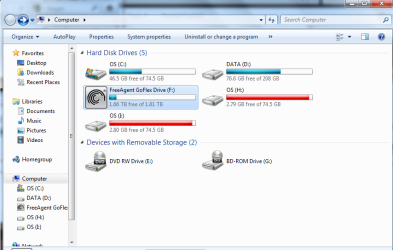
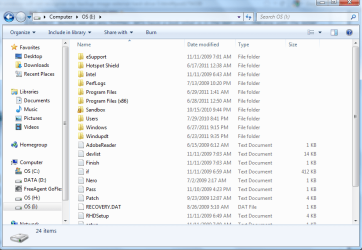
Windows will not recognise my backup image on external hard drive?

No, DVDs do NOT work. It may work with the BartPE version. I am just trying that. But that is long - see below.

Just a word of warning. Up to now I used the 'old' (from Macrium Rel. 4.2) Linux CDs for recovery. And those were easy and straight forward. I just tried out the new Linux version (from this rel.5) and ran into a problem. When I got to the last step which is "Select target drive", it did not give me the option to select the partition from where I had taken my test image. I needed the 5th out of 5 partitions, but it only showed 2 partitions as options - the 2nd and the 3d.

I do not know whether that is particular to my Linux CD or to the fact that I did not image the system, but if you run into the same snag, we will have to use the BartPE CD version. Unfortunately that takes a long time to produce because it needs a 1.7GB file which it has to download from Microsoft.

I would still say you should try with the Linux version because that is quick. But if you run into the same problem as me (which may not be the case because you are restoring the system and not a little rinky dink test partition), then we have to go the long route with the BartPE version.
ok CD has been successfully made. Okay I just realized that after I made the backup onto the CD that I had restarted my computer earlier and the attached VHD was not attached anymore. Do I need to make another CD or does that part not matter at this stage? (The VHD is attached now, just not when I made the backup CD in Macrium)
 

My Computer My Computer

At a glance

windows 7 home premium 64 bit
OS
windows 7 home premium 64 bit
ok i did everything in the video
here's where I am at this point:
 

Attachments

  • after macrium.png
    after macrium.png
    39.9 KB · Views: 24

My Computer My Computer

At a glance

windows 7 home premium 64 bit
OS
windows 7 home premium 64 bit
It does not matter when you did make the recovery CD. But how come there are 2 VHDs. Did you alredy image the Windows VHD (the original one) and then also mount the Macrium one.

PS: Just look at my video again (already forgot what I was talking about). It looks like you did mount the Macrium VHD which should be volume "I".

Now you can restore from your Macrium image file (not from volume "I"). I assume you have your image file on an external disk.
 

My Computer My Computer

At a glance

Vista, Windows7, Mint Mate, Zorin, Windows 8from 1.6GHz Duo to i7
Computer Manufacturer/Model Number
HP, Dell, Gateway, Toshiba - 4 laptops and 2 desktops
OS
Vista, Windows7, Mint Mate, Zorin, Windows 8
CPU
from 1.6GHz Duo to i7
Monitor(s) Displays
2x HP w2207
Hard Drives
5x HDD, 7x SSD, 12x Externals
Keyboard
with trackball - no mices
Mouse
Trackball mice
Internet Speed
DSL 6000
It does not matter when you did make the recovery CD. But how come there are 2 VHDs. Did you alredy image the Windows VHD (the original one) and then also mount the Macrium one.

PS: Just look at my video again (already forgot what I was talking about). It looks like you did mount the Macrium VHD which should be volume "I".

Now you can restore from your Macrium image file (not from volume "I"). I assume you have your image file on an external disk.
i did just like you did in your video. You attached the new vhd and it made a new drive. Then you went in and double clicked it and it made a new drive so you had two new drives with the new VHD
 

My Computer My Computer

At a glance

windows 7 home premium 64 bit
OS
windows 7 home premium 64 bit
Excellent. Before we go any further, let's have a look what is in the lasr VHD - the one with the letter "I". Just double click on it, take a snip of the Explorer window and post it.
 

My Computer My Computer

At a glance

Vista, Windows7, Mint Mate, Zorin, Windows 8from 1.6GHz Duo to i7
Computer Manufacturer/Model Number
HP, Dell, Gateway, Toshiba - 4 laptops and 2 desktops
OS
Vista, Windows7, Mint Mate, Zorin, Windows 8
CPU
from 1.6GHz Duo to i7
Monitor(s) Displays
2x HP w2207
Hard Drives
5x HDD, 7x SSD, 12x Externals
Keyboard
with trackball - no mices
Mouse
Trackball mice
Internet Speed
DSL 6000
Excellent. Before we go any further, let's have a look what is in the lasr VHD - the one with the letter "I". Just double click on it, take a snip of the Explorer window and post it.
wtf...everytime i restart my computer, all that stuff goes away...is that supposed to happen?
 

My Computer My Computer

At a glance

windows 7 home premium 64 bit
OS
windows 7 home premium 64 bit
Yes, the attached VHDs disappear with a reboot. That is in fact the only way you can get rid of them. Just double click on the Macrium image, then check the little box and it will come back. The other one (the one from the Windows image) is of no interest at this point.
 

My Computer My Computer

At a glance

Vista, Windows7, Mint Mate, Zorin, Windows 8from 1.6GHz Duo to i7
Computer Manufacturer/Model Number
HP, Dell, Gateway, Toshiba - 4 laptops and 2 desktops
OS
Vista, Windows7, Mint Mate, Zorin, Windows 8
CPU
from 1.6GHz Duo to i7
Monitor(s) Displays
2x HP w2207
Hard Drives
5x HDD, 7x SSD, 12x Externals
Keyboard
with trackball - no mices
Mouse
Trackball mice
Internet Speed
DSL 6000
ok heres my drive letter I
 

Attachments

  • drive I.png
    drive I.png
    39.9 KB · Views: 28

My Computer My Computer

At a glance

windows 7 home premium 64 bit
OS
windows 7 home premium 64 bit
That looks like a good image. So insert the recovery CD and rerstore this image. Unfortunately I cannot give you any pictures or videos because during that phase I have absolutely no tools to record anything.

But it should not be too difficult to follow the wizard. Just make sure you pick the right image and the right partition to which to restore it. Let me know when you are done. Theoretically your system should boot windows7 after the recovery. If not, let me know and we will fix it.
 

My Computer My Computer

At a glance

Vista, Windows7, Mint Mate, Zorin, Windows 8from 1.6GHz Duo to i7
Computer Manufacturer/Model Number
HP, Dell, Gateway, Toshiba - 4 laptops and 2 desktops
OS
Vista, Windows7, Mint Mate, Zorin, Windows 8
CPU
from 1.6GHz Duo to i7
Monitor(s) Displays
2x HP w2207
Hard Drives
5x HDD, 7x SSD, 12x Externals
Keyboard
with trackball - no mices
Mouse
Trackball mice
Internet Speed
DSL 6000
ok so restore through macrium or windows? and also restore off the CD? or the CD tricks computer so i use real backup on external HDD?
 

My Computer My Computer

At a glance

windows 7 home premium 64 bit
OS
windows 7 home premium 64 bit
Set your BIOS boot sequence to load from CD. Then put the Macrium recovery CD in and let it spin and press Enter. That should load the Linux recovery program which will guide you.
 

My Computer My Computer

At a glance

Vista, Windows7, Mint Mate, Zorin, Windows 8from 1.6GHz Duo to i7
Computer Manufacturer/Model Number
HP, Dell, Gateway, Toshiba - 4 laptops and 2 desktops
OS
Vista, Windows7, Mint Mate, Zorin, Windows 8
CPU
from 1.6GHz Duo to i7
Monitor(s) Displays
2x HP w2207
Hard Drives
5x HDD, 7x SSD, 12x Externals
Keyboard
with trackball - no mices
Mouse
Trackball mice
Internet Speed
DSL 6000
Interesting point. I've wondered about this.
.......................
Since your fresh install can not see your external drive's system image, it implies that maybe this whole process needs the C partition (OS) : \ System Volume Information folder which contains information about the system images as well as Restore Points.
If this were the case you couldn't restore to a brand new HDD. You can.

On another point concerning Macrium recovery disks I have never had a problem with DVD +R discs. I think DL RW may have been the issue.
 

My Computer My Computer

At a glance

Windows 7x64 Home Premium SP1Intel i7 2600kG.Skill Ripjaws (DDR3-1600) 2x4GBNvidia GeForce GTS 450; Intel HD Graphics 300...
Computer type
PC/Desktop
Computer Manufacturer/Model Number
Own build
OS
Windows 7x64 Home Premium SP1
CPU
Intel i7 2600k
Motherboard
ASUS P8Z68 Deluxe
Memory
G.Skill Ripjaws (DDR3-1600) 2x4GB
Graphics Card(s)
Nvidia GeForce GTS 450; Intel HD Graphics 3000(GT2+)
Monitor(s) Displays
Dell Ultrasharp IPS panel U2311H, Samsung SyncMaster P2350
Screen Resolution
1920x1080
Hard Drives
Samsung 850 Pro SSD 256GB, Samsung SSD 840 120GB, Seagates 1TB Barracuda ST31000528AS x2
PSU
Seasonic M12II 520W
Case
Lian Li Lancool PC-K60
Cooling
Case: 1x120mm, 3x140mm CPU: Hyper 212+
Keyboard
Logitech MK520 (wireless)
Mouse
Logitech MK520
Internet Speed
6-7 Mbps
Antivirus
Norton Security Premium, Malwarebytes on 2 (MSE on 3rd PC)
Browser
FireFox
Other Info
Audio: Logitech Z523 2.1
Set your BIOS boot sequence to load from CD. Then put the Macrium recovery CD in and let it spin and press Enter. That should load the Linux recovery program which will guide you.
ok and after that part starts, do i choose the backup on the CD or choose the backup on the external HDD?
 

My Computer My Computer

At a glance

windows 7 home premium 64 bit
OS
windows 7 home premium 64 bit
The CD is not the backup. It contains the program to pull the backup in. You have to look for the image on the external disk to where you imaged with Macrium.
 

My Computer My Computer

At a glance

Vista, Windows7, Mint Mate, Zorin, Windows 8from 1.6GHz Duo to i7
Computer Manufacturer/Model Number
HP, Dell, Gateway, Toshiba - 4 laptops and 2 desktops
OS
Vista, Windows7, Mint Mate, Zorin, Windows 8
CPU
from 1.6GHz Duo to i7
Monitor(s) Displays
2x HP w2207
Hard Drives
5x HDD, 7x SSD, 12x Externals
Keyboard
with trackball - no mices
Mouse
Trackball mice
Internet Speed
DSL 6000
The CD is not the backup. It contains the program to pull the backup in. You have to look for the image on the external disk to where you imaged with Macrium.
so i put the CD in, load up the back up software, I then choose the backup on my external HDD, then that is it??
 

My Computer My Computer

At a glance

windows 7 home premium 64 bit
OS
windows 7 home premium 64 bit
Yeah, you will see when you have the program from the CD running. It is no rocket science.
 

My Computer My Computer

At a glance

Vista, Windows7, Mint Mate, Zorin, Windows 8from 1.6GHz Duo to i7
Computer Manufacturer/Model Number
HP, Dell, Gateway, Toshiba - 4 laptops and 2 desktops
OS
Vista, Windows7, Mint Mate, Zorin, Windows 8
CPU
from 1.6GHz Duo to i7
Monitor(s) Displays
2x HP w2207
Hard Drives
5x HDD, 7x SSD, 12x Externals
Keyboard
with trackball - no mices
Mouse
Trackball mice
Internet Speed
DSL 6000
Yeah, you will see when you have the program from the CD running. It is no rocket science.
ok, so i booted from the CD and the backup software opened and told me to select the folder where the backup is and i clicked the folder and there was nothing to select in the macrium software...I went through my external HDD and into the original backup that i made a while back and nothing was found through the software, although i checked my HDD right now and the backup was still there...
 

My Computer My Computer

At a glance

windows 7 home premium 64 bit
OS
windows 7 home premium 64 bit
That is odd. Are you sure you navigated to the Macrium image and NOT to the original Windows image.
 

My Computer My Computer

At a glance

Vista, Windows7, Mint Mate, Zorin, Windows 8from 1.6GHz Duo to i7
Computer Manufacturer/Model Number
HP, Dell, Gateway, Toshiba - 4 laptops and 2 desktops
OS
Vista, Windows7, Mint Mate, Zorin, Windows 8
CPU
from 1.6GHz Duo to i7
Monitor(s) Displays
2x HP w2207
Hard Drives
5x HDD, 7x SSD, 12x Externals
Keyboard
with trackball - no mices
Mouse
Trackball mice
Internet Speed
DSL 6000
That is odd. Are you sure you navigated to the Macrium image and NOT to the original Windows image.
well i navigated through my drives and didnt see the VHD Image folder that we created earlier?
 

My Computer My Computer

At a glance

windows 7 home premium 64 bit
OS
windows 7 home premium 64 bit
Are you telling me that the image that you created with Macrium went AWOL. Where did you put it originally. It would look something like this. Note the Macrium icon in the front.
 

Attachments

  • 2012-01-21_1434.png
    2012-01-21_1434.png
    1.6 KB · Views: 3

My Computer My Computer

At a glance

Vista, Windows7, Mint Mate, Zorin, Windows 8from 1.6GHz Duo to i7
Computer Manufacturer/Model Number
HP, Dell, Gateway, Toshiba - 4 laptops and 2 desktops
OS
Vista, Windows7, Mint Mate, Zorin, Windows 8
CPU
from 1.6GHz Duo to i7
Monitor(s) Displays
2x HP w2207
Hard Drives
5x HDD, 7x SSD, 12x Externals
Keyboard
with trackball - no mices
Mouse
Trackball mice
Internet Speed
DSL 6000
Back
Top