Solved 'Element not found' when trying to delete old Windows XP partition

CiaraJansonFan

New member
Member
Local time
2:08 PM
Messages
31
Hi all,

I've been trying to (finally) get rid of my old Windows XP partition from the dual boot setup I've had for over 12 months now, but I'm struggling :(

I've been using the instructions from here:

Video: Remove Windows XP from a dual-boot configuration with Windows 7 | TechRepublic

It works OK until I try the step to write a new boot sector to the Windows 7 partition:

Bootrec /fixboot

which gives the error: 'Element not found'

I then have to run Startup Repair to get Windows 7 to boot. It fixes the problem and the log says:

"Partition table does not have a valid System Partition"

It repairs the partition table and when I get back into Windows 7, the Windows XP partition I deleted in DISKPART is back again! :cry:

I have Windows 7 installed on a 120Gb SSD and 2 x 2TB HDDs, one of which has Windows XP still installed on the 1st partition.

Can anyone assist me please?

Thanks
Steven
 

My Computer My Computer

Computer Manufacturer/Model Number
Home built
OS
Windows 7 Home Premium 32-bit
CPU
AMD Phenom II X4 955 Black 3.2GHz
Motherboard
Asus M4A88TD-M EVO/USB3
Memory
GEIL 4GB DDR3 Black Dragon
Graphics Card(s)
ATI Radeon HD 4250

My Computer My Computer

Computer Manufacturer/Model Number
HP Pavilion Elite 495UK
OS
Windows 7 Ultimate SP1 64-Bit
CPU
Intel Core i7 870 @ 2.93GHz
Motherboard
MSI 2A9C (CPU1)
Memory
8Gb Dual-Channel DDR3 @ 664MHz
Graphics Card(s)
nVidia GeForce GTX 460 1024MB dedicated RAM
Sound Card
Realtek HD Audio
Monitor(s) Displays
HP2310i
Screen Resolution
1920 x 1080
Hard Drives
1x1954GB Hitachi HDS22020ALA 330 (RAID), 1x1954GB Hitachi External for backup and storage
PSU
460W
Case
HP Elite
Cooling
Air cooled
Keyboard
Logitech K750 solar-powered keyboard
Mouse
Logitech Wireless M180 mouse
Internet Speed
2Mb
Other Info
Pure Avanti Flow Internet Radio with iPod Dock, 64Gb iPod, HP USB Speakers, Sony MDR-V500 Headphones, Sony Vaio F-Series Laptop
Thanks for the quick reply! :D

That tutorial looks useful and I haven't tried that yet so will hopefully be able to give it a go tomorrow and get back to you in the next few days.

Thanks again
Steven
 

My Computer My Computer

Computer Manufacturer/Model Number
Home built
OS
Windows 7 Home Premium 32-bit
CPU
AMD Phenom II X4 955 Black 3.2GHz
Motherboard
Asus M4A88TD-M EVO/USB3
Memory
GEIL 4GB DDR3 Black Dragon
Graphics Card(s)
ATI Radeon HD 4250

My Computer My Computer

Computer Manufacturer/Model Number
HP Pavilion Elite 495UK
OS
Windows 7 Ultimate SP1 64-Bit
CPU
Intel Core i7 870 @ 2.93GHz
Motherboard
MSI 2A9C (CPU1)
Memory
8Gb Dual-Channel DDR3 @ 664MHz
Graphics Card(s)
nVidia GeForce GTX 460 1024MB dedicated RAM
Sound Card
Realtek HD Audio
Monitor(s) Displays
HP2310i
Screen Resolution
1920 x 1080
Hard Drives
1x1954GB Hitachi HDS22020ALA 330 (RAID), 1x1954GB Hitachi External for backup and storage
PSU
460W
Case
HP Elite
Cooling
Air cooled
Keyboard
Logitech K750 solar-powered keyboard
Mouse
Logitech Wireless M180 mouse
Internet Speed
2Mb
Other Info
Pure Avanti Flow Internet Radio with iPod Dock, 64Gb iPod, HP USB Speakers, Sony MDR-V500 Headphones, Sony Vaio F-Series Laptop
Hi,

I've done what you said but I'm afraid it didn't work :(

When I tried running bootsect /nt60 SYS /mbr I got the following error:

The System partition was not found:
The requested system device cannot be found.

I read the help for bootsect and then tried:

bootsect /nt60 C: /mbr

which seemed to have worked, but I still can't get Windows 7 to boot without running a Startup Repair, which puts me back to square one (dual boot with XP).

I tried bootrec /fixboot again but still get 'Element not found'.

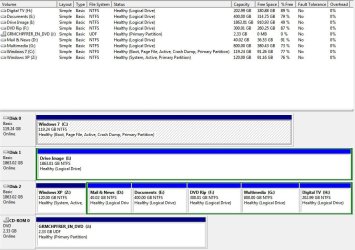
In Disk Management my Windows 7 drive shows (Boot, Page File, Active, Crash Dump, Primary Partition). My Windows XP drive shows (System, Active, Primary Partition).

Anything else I can try please?

Thanks
Steven
 

My Computer My Computer

Computer Manufacturer/Model Number
Home built
OS
Windows 7 Home Premium 32-bit
CPU
AMD Phenom II X4 955 Black 3.2GHz
Motherboard
Asus M4A88TD-M EVO/USB3
Memory
GEIL 4GB DDR3 Black Dragon
Graphics Card(s)
ATI Radeon HD 4250

My Computer My Computer

Computer Manufacturer/Model Number
HP Pavilion Elite 495UK
OS
Windows 7 Ultimate SP1 64-Bit
CPU
Intel Core i7 870 @ 2.93GHz
Motherboard
MSI 2A9C (CPU1)
Memory
8Gb Dual-Channel DDR3 @ 664MHz
Graphics Card(s)
nVidia GeForce GTX 460 1024MB dedicated RAM
Sound Card
Realtek HD Audio
Monitor(s) Displays
HP2310i
Screen Resolution
1920 x 1080
Hard Drives
1x1954GB Hitachi HDS22020ALA 330 (RAID), 1x1954GB Hitachi External for backup and storage
PSU
460W
Case
HP Elite
Cooling
Air cooled
Keyboard
Logitech K750 solar-powered keyboard
Mouse
Logitech Wireless M180 mouse
Internet Speed
2Mb
Other Info
Pure Avanti Flow Internet Radio with iPod Dock, 64Gb iPod, HP USB Speakers, Sony MDR-V500 Headphones, Sony Vaio F-Series Laptop
Yes, Seavixen,

That was the issue.

Is his win 7 partition primary?
 

My Computers My Computers

System One System Two

  • Computer type
    PC/Desktop
    OS
    7 X64
    CPU
    i5 8400
    Motherboard
    gigabyte b365m ds3h
    Memory
    2x8gb 3200mhz
    Hard Drives
    various
    PSU
    pure power 11 400w cm
    Case
    Coolermaster
    Cooling
    cryorig m9i
  • Computer type
    PC/Desktop
    OS
    7x64
    CPU
    g5400
    Motherboard
    ga b365m ds3h
    Memory
    8gb ddr4 2400
    PSU
    xfx pro 450w
Thanks again - I've removed the Active flag from the XP partition and I'll run the Startup Repair 3 times tomorrow night (hopefully).

After I've done that, should I just carry on as before and delete the XP partition using Partition Wizard and then I assume Windows 7 should be capable of booting on its own, is that right?

Cheers
Steven
 

My Computer My Computer

Computer Manufacturer/Model Number
Home built
OS
Windows 7 Home Premium 32-bit
CPU
AMD Phenom II X4 955 Black 3.2GHz
Motherboard
Asus M4A88TD-M EVO/USB3
Memory
GEIL 4GB DDR3 Black Dragon
Graphics Card(s)
ATI Radeon HD 4250
Yes, Seavixen,

That was the issue.

Is his win 7 partition primary?

According to an earlier post, yes, it is.
 

My Computer My Computer

Computer Manufacturer/Model Number
HP Pavilion Elite 495UK
OS
Windows 7 Ultimate SP1 64-Bit
CPU
Intel Core i7 870 @ 2.93GHz
Motherboard
MSI 2A9C (CPU1)
Memory
8Gb Dual-Channel DDR3 @ 664MHz
Graphics Card(s)
nVidia GeForce GTX 460 1024MB dedicated RAM
Sound Card
Realtek HD Audio
Monitor(s) Displays
HP2310i
Screen Resolution
1920 x 1080
Hard Drives
1x1954GB Hitachi HDS22020ALA 330 (RAID), 1x1954GB Hitachi External for backup and storage
PSU
460W
Case
HP Elite
Cooling
Air cooled
Keyboard
Logitech K750 solar-powered keyboard
Mouse
Logitech Wireless M180 mouse
Internet Speed
2Mb
Other Info
Pure Avanti Flow Internet Radio with iPod Dock, 64Gb iPod, HP USB Speakers, Sony MDR-V500 Headphones, Sony Vaio F-Series Laptop
Thanks again - I've removed the Active flag from the XP partition and I'll run the Startup Repair 3 times tomorrow night (hopefully).

After I've done that, should I just carry on as before and delete the XP partition using Partition Wizard and then I assume Windows 7 should be capable of booting on its own, is that right?

Cheers
Steven

You've got it in one.

Best of luck and I hope the outcome is a positive one.

Please update us as to to how you get on.
 

My Computer My Computer

Computer Manufacturer/Model Number
HP Pavilion Elite 495UK
OS
Windows 7 Ultimate SP1 64-Bit
CPU
Intel Core i7 870 @ 2.93GHz
Motherboard
MSI 2A9C (CPU1)
Memory
8Gb Dual-Channel DDR3 @ 664MHz
Graphics Card(s)
nVidia GeForce GTX 460 1024MB dedicated RAM
Sound Card
Realtek HD Audio
Monitor(s) Displays
HP2310i
Screen Resolution
1920 x 1080
Hard Drives
1x1954GB Hitachi HDS22020ALA 330 (RAID), 1x1954GB Hitachi External for backup and storage
PSU
460W
Case
HP Elite
Cooling
Air cooled
Keyboard
Logitech K750 solar-powered keyboard
Mouse
Logitech Wireless M180 mouse
Internet Speed
2Mb
Other Info
Pure Avanti Flow Internet Radio with iPod Dock, 64Gb iPod, HP USB Speakers, Sony MDR-V500 Headphones, Sony Vaio F-Series Laptop
Please post back a screenshot of your maximized Disk Management drive map with listings, using the Snipping Tool in Start Menu. Screen Shots

The procedure is to mark the Win7 partition Active, then run Startup Repair - Run 3 Separate Time.
Partition - Mark as Active (Method Two)

However there are unknowns which frequently exist that require seeing the disk picture, e.g. if Win7 is on a Logical partition it must be converted to Primary using Partition Wizard, or if a Recovery partition or other boot partition is present that's marked Active it needs to be considered. So it is flying blind to advise you without seeing the DIsk Mgmt screenshot.
 
Have you tried using the partition wizard bootable disc yet ? There is no reason it won`t work.
Also, as asked, please upload a shot of disk management.
 

My Computer My Computer

Computer type
PC/Desktop
Computer Manufacturer/Model Number
Skylake Special #666
OS
Windows 10 Pro x64
CPU
Intel Core i7 6700K
Motherboard
Asus Sabertooth Z170 Mark 1
Memory
GSkill TridentZ RGB 16GB 3600 16-16-16-36
Graphics Card(s)
EVGA GTX 980 Ti SC x2
Sound Card
Realtek High Definition
Monitor(s) Displays
AOC G2460PG
Screen Resolution
1920 x 1080 144Hz
Hard Drives
Samsung 860 Pro 256GB, Seagate Barracuda 4TB x2
PSU
EVGA 1000 P2, EVGA White Custom Braided Cables
Case
Corsair Vengeance C70 Gunmetal Black
Cooling
Corsair H100i v2, Corsair ML120 x2, Thermal Grizzly Kryonaut
Keyboard
Logitech G910 Orion Spectrum
Mouse
Logitech G700s
Internet Speed
Verizon Fios Quantum Gateway 75/75
Antivirus
Windows Defender, Malwarebytes Free 3.8.3
Browser
Chrome
Other Info
Corsair SP120 x4, LG Blu-ray Drive, Durabrand HT-395 100 Watt Dolby Digital Amp, Corsair H2100 Wireless 7.1 Headset
Hi all,

I ran Startup Repair 3 times tonight after marking the Windows XP partition inactive last night. The first time it said it had fixed the problem, the second and third times it said there was no problem to fix.

I haven't tried deleting the XP partition again yet, but I suspect Windows 7 still won't boot when I do so as the Startup Repair hasn't made the Windows 7 partition a System one and the XP partition is ACTIVE again! :mad:

Please see attached screenshot as requested:

Disk Management.jpg

Thanks in advance,
Steven
 

My Computer My Computer

Computer Manufacturer/Model Number
Home built
OS
Windows 7 Home Premium 32-bit
CPU
AMD Phenom II X4 955 Black 3.2GHz
Motherboard
Asus M4A88TD-M EVO/USB3
Memory
GEIL 4GB DDR3 Black Dragon
Graphics Card(s)
ATI Radeon HD 4250
Have you tried using the partition wizard bootable disc yet ? There is no reason it won`t work.
Also, as asked, please upload a shot of disk management.

Yes, I used the Partition Wizard CD last night to delete the XP partition.
 

My Computer My Computer

Computer Manufacturer/Model Number
Home built
OS
Windows 7 Home Premium 32-bit
CPU
AMD Phenom II X4 955 Black 3.2GHz
Motherboard
Asus M4A88TD-M EVO/USB3
Memory
GEIL 4GB DDR3 Black Dragon
Graphics Card(s)
ATI Radeon HD 4250
Can you give us an update ?
 

My Computer My Computer

Computer type
PC/Desktop
Computer Manufacturer/Model Number
Skylake Special #666
OS
Windows 10 Pro x64
CPU
Intel Core i7 6700K
Motherboard
Asus Sabertooth Z170 Mark 1
Memory
GSkill TridentZ RGB 16GB 3600 16-16-16-36
Graphics Card(s)
EVGA GTX 980 Ti SC x2
Sound Card
Realtek High Definition
Monitor(s) Displays
AOC G2460PG
Screen Resolution
1920 x 1080 144Hz
Hard Drives
Samsung 860 Pro 256GB, Seagate Barracuda 4TB x2
PSU
EVGA 1000 P2, EVGA White Custom Braided Cables
Case
Corsair Vengeance C70 Gunmetal Black
Cooling
Corsair H100i v2, Corsair ML120 x2, Thermal Grizzly Kryonaut
Keyboard
Logitech G910 Orion Spectrum
Mouse
Logitech G700s
Internet Speed
Verizon Fios Quantum Gateway 75/75
Antivirus
Windows Defender, Malwarebytes Free 3.8.3
Browser
Chrome
Other Info
Corsair SP120 x4, LG Blu-ray Drive, Durabrand HT-395 100 Watt Dolby Digital Amp, Corsair H2100 Wireless 7.1 Headset

My Computer My Computer

Computer Manufacturer/Model Number
Home built
OS
Windows 7 Home Premium 32-bit
CPU
AMD Phenom II X4 955 Black 3.2GHz
Motherboard
Asus M4A88TD-M EVO/USB3
Memory
GEIL 4GB DDR3 Black Dragon
Graphics Card(s)
ATI Radeon HD 4250
I saw that, I meant was everything ok.

Don`t forget to click the scale on those that`ve helped you.
 

My Computer My Computer

Computer type
PC/Desktop
Computer Manufacturer/Model Number
Skylake Special #666
OS
Windows 10 Pro x64
CPU
Intel Core i7 6700K
Motherboard
Asus Sabertooth Z170 Mark 1
Memory
GSkill TridentZ RGB 16GB 3600 16-16-16-36
Graphics Card(s)
EVGA GTX 980 Ti SC x2
Sound Card
Realtek High Definition
Monitor(s) Displays
AOC G2460PG
Screen Resolution
1920 x 1080 144Hz
Hard Drives
Samsung 860 Pro 256GB, Seagate Barracuda 4TB x2
PSU
EVGA 1000 P2, EVGA White Custom Braided Cables
Case
Corsair Vengeance C70 Gunmetal Black
Cooling
Corsair H100i v2, Corsair ML120 x2, Thermal Grizzly Kryonaut
Keyboard
Logitech G910 Orion Spectrum
Mouse
Logitech G700s
Internet Speed
Verizon Fios Quantum Gateway 75/75
Antivirus
Windows Defender, Malwarebytes Free 3.8.3
Browser
Chrome
Other Info
Corsair SP120 x4, LG Blu-ray Drive, Durabrand HT-395 100 Watt Dolby Digital Amp, Corsair H2100 Wireless 7.1 Headset
I saw that, I meant was everything ok.

Don`t forget to click the scale on those that`ve helped you.

It's not OK, no. You should have noticed from the screenshot I posted that the XP partition is very much alive and I suspect if I delete it, Windows 7 will fail to boot again :(
 

My Computer My Computer

Computer Manufacturer/Model Number
Home built
OS
Windows 7 Home Premium 32-bit
CPU
AMD Phenom II X4 955 Black 3.2GHz
Motherboard
Asus M4A88TD-M EVO/USB3
Memory
GEIL 4GB DDR3 Black Dragon
Graphics Card(s)
ATI Radeon HD 4250

My Computer My Computer

Computer Manufacturer/Model Number
Home built
OS
Windows 7 Home Premium 32-bit
CPU
AMD Phenom II X4 955 Black 3.2GHz
Motherboard
Asus M4A88TD-M EVO/USB3
Memory
GEIL 4GB DDR3 Black Dragon
Graphics Card(s)
ATI Radeon HD 4250
Back
Top