
try to backup and it puts 656Gb on backup drive

so you don't think then that i have to try to copy all the files on K to another drive before hooking it up after the install tomorrow?

Does K have anything on it right now that you care about?

If not, you may as well see if you can delete the K partition right now, before you reinstall. No harm done if there is nothing on it you care about.

Obviously, whatever data files you have that you do care about should be backed up in some way before beginning any reinstall.

If you cannot delete K now because it is dynamic or for any other reason, I wouldn't worry about it. Deal with it after the fresh install.
 

My Computer My Computer

At a glance

Windows 7 Home Premium SP1, 64-bitIntel Skylake i5-6600K, not overclocked8 GB HyperX DDR4-2666 (2 x 4 GB)none; graphics are integrated on CPU
Computer type
PC/Desktop
Computer Manufacturer/Model Number
Ignatz Special; 4 speed manual gearbox; factory air conditioning; one of one
OS
Windows 7 Home Premium SP1, 64-bit
CPU
Intel Skylake i5-6600K, not overclocked
Motherboard
AsRock Z170M Extreme 4, micro ATX
Memory
8 GB HyperX DDR4-2666 (2 x 4 GB)
Graphics Card(s)
none; graphics are integrated on CPU
Sound Card
onboard: Realtek ALC1150; external: USB Behringer UF0-202
Monitor(s) Displays
Dell S2340M 23 inch IPS
Screen Resolution
1600 x 900
Hard Drives
System: Crucial MX100 series SSD, 128 GB;
Data: Samsung Spinpoint 103SJ, 1 TB;
Backup: WD Caviar Green WD30EZRX-00D8PB0, 3 TB
PSU
Rosewill SilentNight 500 watt fanless, semi-modular
Case
Antec Solo II
Cooling
Noctua NH-U12S; Noctua F12 intake, Noctua S12A exhaust
Keyboard
Microsoft 200 6JH-00001 USB
Mouse
Dell or Microsoft optical wired; USB
Antivirus
Microsoft Security Essentials and Malwarebytes Premium
Browser
Pale Moon
Other Info
All fans PWM; speeds at idle: CPU circa 500 rpm; intake circa 600 rpm; exhaust circa 600 rpm; CPU temps 27 idle and 47 C load in a warm room (27 C/81 F) when running Intel Extreme Tuning Utility stress test.
ok. will do...
 

My Computer My Computer

At a glance

Windows 7 64 bit
OS
Windows 7 64 bit
ufoortunately K has lots of files that i want to save especially a large video project that i was working on.
 

My Computer My Computer

At a glance

Windows 7 64 bit
OS
Windows 7 64 bit
ufoortunately K has lots of files that i want to save especially a large video project that i was working on.

OK.

Get those files backed up in some way because your only choice after a fresh install may be to totally delete that partition.
 

My Computer My Computer

At a glance

Windows 7 Home Premium SP1, 64-bitIntel Skylake i5-6600K, not overclocked8 GB HyperX DDR4-2666 (2 x 4 GB)none; graphics are integrated on CPU
Computer type
PC/Desktop
Computer Manufacturer/Model Number
Ignatz Special; 4 speed manual gearbox; factory air conditioning; one of one
OS
Windows 7 Home Premium SP1, 64-bit
CPU
Intel Skylake i5-6600K, not overclocked
Motherboard
AsRock Z170M Extreme 4, micro ATX
Memory
8 GB HyperX DDR4-2666 (2 x 4 GB)
Graphics Card(s)
none; graphics are integrated on CPU
Sound Card
onboard: Realtek ALC1150; external: USB Behringer UF0-202
Monitor(s) Displays
Dell S2340M 23 inch IPS
Screen Resolution
1600 x 900
Hard Drives
System: Crucial MX100 series SSD, 128 GB;
Data: Samsung Spinpoint 103SJ, 1 TB;
Backup: WD Caviar Green WD30EZRX-00D8PB0, 3 TB
PSU
Rosewill SilentNight 500 watt fanless, semi-modular
Case
Antec Solo II
Cooling
Noctua NH-U12S; Noctua F12 intake, Noctua S12A exhaust
Keyboard
Microsoft 200 6JH-00001 USB
Mouse
Dell or Microsoft optical wired; USB
Antivirus
Microsoft Security Essentials and Malwarebytes Premium
Browser
Pale Moon
Other Info
All fans PWM; speeds at idle: CPU circa 500 rpm; intake circa 600 rpm; exhaust circa 600 rpm; CPU temps 27 idle and 47 C load in a warm room (27 C/81 F) when running Intel Extreme Tuning Utility stress test.
ok. i can take the drive out and put it into a hard drive dock and copy the files to another computer and then out the drive in and format it and then copy the files back to it...
 

My Computer My Computer

At a glance

Windows 7 64 bit
OS
Windows 7 64 bit
ignatz... that's what my father used to call be when i was a kid...
thanks so much for your help
 

My Computer My Computer

At a glance

Windows 7 64 bit
OS
Windows 7 64 bit
how's this look? thanks again for all the help. much better to do this now like you said.
 

Attachments

  • disk management.jpg
    disk management.jpg
    51.8 KB · Views: 11

My Computer My Computer

At a glance

Windows 7 64 bit
OS
Windows 7 64 bit
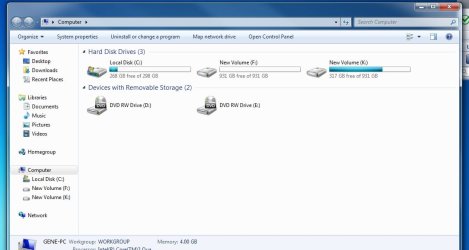
I would rename the 2 partitions called "New Volume" and give them meaningful names. Else it is easy to confuse them and e.g. when you transfer data, it may end up on the wrong partition.
 

My Computer My Computer

At a glance

Vista, Windows7, Mint Mate, Zorin, Windows 8from 1.6GHz Duo to i7
Computer Manufacturer/Model Number
HP, Dell, Gateway, Toshiba - 4 laptops and 2 desktops
OS
Vista, Windows7, Mint Mate, Zorin, Windows 8
CPU
from 1.6GHz Duo to i7
Monitor(s) Displays
2x HP w2207
Hard Drives
5x HDD, 7x SSD, 12x Externals
Keyboard
with trackball - no mices
Mouse
Trackball mice
Internet Speed
DSL 6000
Thanks... I never thought of doing that!!!
 

My Computer My Computer

At a glance

Windows 7 64 bit
OS
Windows 7 64 bit
ok. now that i have reinstalled Win7 64 and everything is fine and i made a backup of C: drive like i tried to do before all this happened, earlier you spoke of a better way to do backups. if you would, can you tell me of those opetions?
thanks
 

My Computer My Computer

At a glance

Windows 7 64 bit
OS
Windows 7 64 bit
I have initially used Windows7 imaging. But I found it to be very iffy and not very reliable, That's why I switched to free Macrium which has never given me any problems in backups and recoveries. T

here is also free Paragon which I have used a few times. It makes differentials which is nice if you are short of storage space. But I prefer full images. They are much easier to manage.
 

My Computer My Computer

At a glance

Vista, Windows7, Mint Mate, Zorin, Windows 8from 1.6GHz Duo to i7
Computer Manufacturer/Model Number
HP, Dell, Gateway, Toshiba - 4 laptops and 2 desktops
OS
Vista, Windows7, Mint Mate, Zorin, Windows 8
CPU
from 1.6GHz Duo to i7
Monitor(s) Displays
2x HP w2207
Hard Drives
5x HDD, 7x SSD, 12x Externals
Keyboard
with trackball - no mices
Mouse
Trackball mice
Internet Speed
DSL 6000
ok. now that i have reinstalled Win7 64 and everything is fine and i made a backup of C: drive like i tried to do before all this happened, earlier you spoke of a better way to do backups. if you would, can you tell me of those opetions?
thanks

I'd use Macrium to backup my "system" (C partition) and use a "file-by-file" backup program to back up personal data. There are many of the latter--most of them free--which all work on the same principle.
 

My Computer My Computer

At a glance

Windows 7 Home Premium SP1, 64-bitIntel Skylake i5-6600K, not overclocked8 GB HyperX DDR4-2666 (2 x 4 GB)none; graphics are integrated on CPU
Computer type
PC/Desktop
Computer Manufacturer/Model Number
Ignatz Special; 4 speed manual gearbox; factory air conditioning; one of one
OS
Windows 7 Home Premium SP1, 64-bit
CPU
Intel Skylake i5-6600K, not overclocked
Motherboard
AsRock Z170M Extreme 4, micro ATX
Memory
8 GB HyperX DDR4-2666 (2 x 4 GB)
Graphics Card(s)
none; graphics are integrated on CPU
Sound Card
onboard: Realtek ALC1150; external: USB Behringer UF0-202
Monitor(s) Displays
Dell S2340M 23 inch IPS
Screen Resolution
1600 x 900
Hard Drives
System: Crucial MX100 series SSD, 128 GB;
Data: Samsung Spinpoint 103SJ, 1 TB;
Backup: WD Caviar Green WD30EZRX-00D8PB0, 3 TB
PSU
Rosewill SilentNight 500 watt fanless, semi-modular
Case
Antec Solo II
Cooling
Noctua NH-U12S; Noctua F12 intake, Noctua S12A exhaust
Keyboard
Microsoft 200 6JH-00001 USB
Mouse
Dell or Microsoft optical wired; USB
Antivirus
Microsoft Security Essentials and Malwarebytes Premium
Browser
Pale Moon
Other Info
All fans PWM; speeds at idle: CPU circa 500 rpm; intake circa 600 rpm; exhaust circa 600 rpm; CPU temps 27 idle and 47 C load in a warm room (27 C/81 F) when running Intel Extreme Tuning Utility stress test.
Back
Top