Solved Moving Factory Image Partition, shrinking boot disk size

Thank you!
 

My Computer My Computer

At a glance

Windows 7 64bit Home PremiumAMD Phenom II X4 945 3.0GHz8GB
Computer Manufacturer/Model Number
HP HPE-210f
OS
Windows 7 64bit Home Premium
CPU
AMD Phenom II X4 945 3.0GHz
Memory
8GB
Hard Drives
Intel 320 Series SSD - 80GB
WD Green - 1TB
Hopalong X reported an issue I believe. I don't think it bothered him and I don't even know if he used the Paragon product.
Problems with the MS Reliability task (RACTask) and the reliability monitor crop up a lot.
Now when I use Paragon Migrate I get the problem.
When I do it all manually - you know

  • SSD prep - align, partition
  • Macrium reimage,
  • change disk signatures
  • Bootrec ..... to fix up boot files
  • Check Trim & other things
It all goes well. RACTask remains totally functioning. But it's not turnkey.
If the Reliability analysis task isn't working I think what else.

If Paragon come back with an answer then I'll report back because in principle it's a good turn key solution.

I'll do it manually from now on. I'm just trying to be a good Corporate Citizen:D
Understand. No need to take any risks. The manual method is easy for us. But think of all these poor blokes that could not handle it. For them Paragon did a good job.
 

My Computer My Computer

At a glance

Vista, Windows7, Mint Mate, Zorin, Windows 8from 1.6GHz Duo to i7
Computer Manufacturer/Model Number
HP, Dell, Gateway, Toshiba - 4 laptops and 2 desktops
OS
Vista, Windows7, Mint Mate, Zorin, Windows 8
CPU
from 1.6GHz Duo to i7
Monitor(s) Displays
2x HP w2207
Hard Drives
5x HDD, 7x SSD, 12x Externals
Keyboard
with trackball - no mices
Mouse
Trackball mice
Internet Speed
DSL 6000
I want to practice installing a clean win7 build.
Can I install win7 on a new partition on my big HDD and boot from it to verify?
 

My Computer My Computer

At a glance

Windows 7 64bit Home PremiumAMD Phenom II X4 945 3.0GHz8GB
Computer Manufacturer/Model Number
HP HPE-210f
OS
Windows 7 64bit Home Premium
CPU
AMD Phenom II X4 945 3.0GHz
Memory
8GB
Hard Drives
Intel 320 Series SSD - 80GB
WD Green - 1TB
Yes.
 

My Computers My Computers

  • At a glance

    7 X64i5 84002x8gb 3200mhz
    Computer type
    PC/Desktop
    OS
    7 X64
    CPU
    i5 8400
    Motherboard
    gigabyte b365m ds3h
    Memory
    2x8gb 3200mhz
    Hard Drives
    various
    PSU
    pure power 11 400w cm
    Case
    Coolermaster
    Cooling
    cryorig m9i
  • At a glance

    7x64g54008gb ddr4 2400
    Computer type
    PC/Desktop
    OS
    7x64
    CPU
    g5400
    Motherboard
    ga b365m ds3h
    Memory
    8gb ddr4 2400
    PSU
    xfx pro 450w
I wouldn't attempt that without first disconnecting the new SSD. Odd things can and will happen if you do installs with 2 drives attached.

Other than that, sure. It's just like if your SSD failed and you had to revert to a spinning drive.

I assume you are going to use a downloaded ISO, burned to a DVD?
 

My Computer My Computer

At a glance

Windows 7 Home Premium SP1, 64-bitIntel Skylake i5-6600K, not overclocked8 GB HyperX DDR4-2666 (2 x 4 GB)none; graphics are integrated on CPU
Computer type
PC/Desktop
Computer Manufacturer/Model Number
Ignatz Special; 4 speed manual gearbox; factory air conditioning; one of one
OS
Windows 7 Home Premium SP1, 64-bit
CPU
Intel Skylake i5-6600K, not overclocked
Motherboard
AsRock Z170M Extreme 4, micro ATX
Memory
8 GB HyperX DDR4-2666 (2 x 4 GB)
Graphics Card(s)
none; graphics are integrated on CPU
Sound Card
onboard: Realtek ALC1150; external: USB Behringer UF0-202
Monitor(s) Displays
Dell S2340M 23 inch IPS
Screen Resolution
1600 x 900
Hard Drives
System: Crucial MX100 series SSD, 128 GB;
Data: Samsung Spinpoint 103SJ, 1 TB;
Backup: WD Caviar Green WD30EZRX-00D8PB0, 3 TB
PSU
Rosewill SilentNight 500 watt fanless, semi-modular
Case
Antec Solo II
Cooling
Noctua NH-U12S; Noctua F12 intake, Noctua S12A exhaust
Keyboard
Microsoft 200 6JH-00001 USB
Mouse
Dell or Microsoft optical wired; USB
Antivirus
Microsoft Security Essentials and Malwarebytes Premium
Browser
Pale Moon
Other Info
All fans PWM; speeds at idle: CPU circa 500 rpm; intake circa 600 rpm; exhaust circa 600 rpm; CPU temps 27 idle and 47 C load in a warm room (27 C/81 F) when running Intel Extreme Tuning Utility stress test.
yes, I have the iso already burned to DVD.
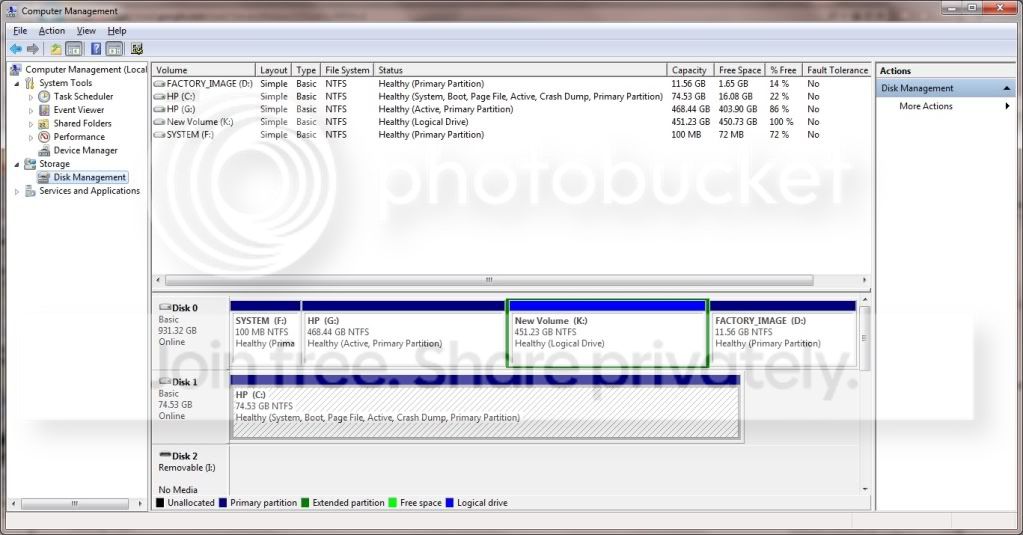
Here's my partition layout:
disklayout.jpg


Can I shrink partition K and create a new partition L that's 60GB and specify partition L during the Win7 installation?
I don't want to format and overwrite my big hdd. I want to limit my testing to just the new partition L.

Thanks!
 

My Computer My Computer

At a glance

Windows 7 64bit Home PremiumAMD Phenom II X4 945 3.0GHz8GB
Computer Manufacturer/Model Number
HP HPE-210f
OS
Windows 7 64bit Home Premium
CPU
AMD Phenom II X4 945 3.0GHz
Memory
8GB
Hard Drives
Intel 320 Series SSD - 80GB
WD Green - 1TB
You can do that. Just be aware that the bootmgr for that new installation will land in the 100MB system partition on that disk. So you will end up with a double boot situation on disk0.
 

My Computer My Computer

At a glance

Vista, Windows7, Mint Mate, Zorin, Windows 8from 1.6GHz Duo to i7
Computer Manufacturer/Model Number
HP, Dell, Gateway, Toshiba - 4 laptops and 2 desktops
OS
Vista, Windows7, Mint Mate, Zorin, Windows 8
CPU
from 1.6GHz Duo to i7
Monitor(s) Displays
2x HP w2207
Hard Drives
5x HDD, 7x SSD, 12x Externals
Keyboard
with trackball - no mices
Mouse
Trackball mice
Internet Speed
DSL 6000
You can do that. Just be aware that the bootmgr for that new installation will land in the 100MB system partition on that disk. So you will end up with a double boot situation on disk0.
Well the BCD boot entry will.
 

My Computer My Computer

At a glance

Windows 7x64 Home Premium SP1Intel i7 2600kG.Skill Ripjaws (DDR3-1600) 2x4GBNvidia GeForce GTS 450; Intel HD Graphics 300...
Computer type
PC/Desktop
Computer Manufacturer/Model Number
Own build
OS
Windows 7x64 Home Premium SP1
CPU
Intel i7 2600k
Motherboard
ASUS P8Z68 Deluxe
Memory
G.Skill Ripjaws (DDR3-1600) 2x4GB
Graphics Card(s)
Nvidia GeForce GTS 450; Intel HD Graphics 3000(GT2+)
Monitor(s) Displays
Dell Ultrasharp IPS panel U2311H, Samsung SyncMaster P2350
Screen Resolution
1920x1080
Hard Drives
Samsung 850 Pro SSD 256GB, Samsung SSD 840 120GB, Seagates 1TB Barracuda ST31000528AS x2
PSU
Seasonic M12II 520W
Case
Lian Li Lancool PC-K60
Cooling
Case: 1x120mm, 3x140mm CPU: Hyper 212+
Keyboard
Logitech MK520 (wireless)
Mouse
Logitech MK520
Internet Speed
6-7 Mbps
Antivirus
Norton Security Premium, Malwarebytes on 2 (MSE on 3rd PC)
Browser
FireFox
Other Info
Audio: Logitech Z523 2.1
You can do that. Just be aware that the bootmgr for that new installation will land in the 100MB system partition on that disk. So you will end up with a double boot situation on disk0.
Well the BCD boot entry will.
Correct Michael. Sorry for the loose language.
 

My Computer My Computer

At a glance

Vista, Windows7, Mint Mate, Zorin, Windows 8from 1.6GHz Duo to i7
Computer Manufacturer/Model Number
HP, Dell, Gateway, Toshiba - 4 laptops and 2 desktops
OS
Vista, Windows7, Mint Mate, Zorin, Windows 8
CPU
from 1.6GHz Duo to i7
Monitor(s) Displays
2x HP w2207
Hard Drives
5x HDD, 7x SSD, 12x Externals
Keyboard
with trackball - no mices
Mouse
Trackball mice
Internet Speed
DSL 6000
What's a double boot situation?

Thanks all for your patience as I learn....
 

My Computer My Computer

At a glance

Windows 7 64bit Home PremiumAMD Phenom II X4 945 3.0GHz8GB
Computer Manufacturer/Model Number
HP HPE-210f
OS
Windows 7 64bit Home Premium
CPU
AMD Phenom II X4 945 3.0GHz
Memory
8GB
Hard Drives
Intel 320 Series SSD - 80GB
WD Green - 1TB
Double boot is when you have 2 BCDs of 2 different systems in 1 bootmgr.
 

My Computer My Computer

At a glance

Vista, Windows7, Mint Mate, Zorin, Windows 8from 1.6GHz Duo to i7
Computer Manufacturer/Model Number
HP, Dell, Gateway, Toshiba - 4 laptops and 2 desktops
OS
Vista, Windows7, Mint Mate, Zorin, Windows 8
CPU
from 1.6GHz Duo to i7
Monitor(s) Displays
2x HP w2207
Hard Drives
5x HDD, 7x SSD, 12x Externals
Keyboard
with trackball - no mices
Mouse
Trackball mice
Internet Speed
DSL 6000
Are there any concerns or precautions I should take having 2 BCDs in 1 bootmgr?

Also I moved my Bootmg to C already using easyBCD when installing my SSD. Does that affect anything.
 

My Computer My Computer

At a glance

Windows 7 64bit Home PremiumAMD Phenom II X4 945 3.0GHz8GB
Computer Manufacturer/Model Number
HP HPE-210f
OS
Windows 7 64bit Home Premium
CPU
AMD Phenom II X4 945 3.0GHz
Memory
8GB
Hard Drives
Intel 320 Series SSD - 80GB
WD Green - 1TB
The way I understand your plan is that you want to install an additional OS on the HDD. This should not really effct your SSD especially as the HDD is on a lower port than the SSD.

But that second OS on the HDD will put the BCD into the little 100MB partition. That is a completely normal procedure. So you should make sure that this little partition is not being deleted, else you will not be able to boot anything from the HDD. And if you want to boot from the HDD, you have to change the BIOS boot sequence.
 

My Computer My Computer

At a glance

Vista, Windows7, Mint Mate, Zorin, Windows 8from 1.6GHz Duo to i7
Computer Manufacturer/Model Number
HP, Dell, Gateway, Toshiba - 4 laptops and 2 desktops
OS
Vista, Windows7, Mint Mate, Zorin, Windows 8
CPU
from 1.6GHz Duo to i7
Monitor(s) Displays
2x HP w2207
Hard Drives
5x HDD, 7x SSD, 12x Externals
Keyboard
with trackball - no mices
Mouse
Trackball mice
Internet Speed
DSL 6000
You are running a test install on the HD to see how it works, so that you can clean reinstall to the SSD if it works out?

That's fine, but when you get ready to clean reinstall to the SSD, dont' forget to unplug the HD so it doesn't intefere. Later we can help you wipe the HD using Diskpart Clean Command.
 
Got it.
Thank you very much!!!

I'll post back if I run into any issues.
 

My Computer My Computer

At a glance

Windows 7 64bit Home PremiumAMD Phenom II X4 945 3.0GHz8GB
Computer Manufacturer/Model Number
HP HPE-210f
OS
Windows 7 64bit Home Premium
CPU
AMD Phenom II X4 945 3.0GHz
Memory
8GB
Hard Drives
Intel 320 Series SSD - 80GB
WD Green - 1TB
Ok, I installed a fresh Win7 on a partition on my sata hdd. I'm writing this post from that instance.
When I boot I get an options to install "Windows 7" or "Windows 7". I assume this is in the bootmgr which is the 100mb partition? How do I rename one of them so I can tell which is which?
 

My Computer My Computer

At a glance

Windows 7 64bit Home PremiumAMD Phenom II X4 945 3.0GHz8GB
Computer Manufacturer/Model Number
HP HPE-210f
OS
Windows 7 64bit Home Premium
CPU
AMD Phenom II X4 945 3.0GHz
Memory
8GB
Hard Drives
Intel 320 Series SSD - 80GB
WD Green - 1TB

My Computer My Computer

At a glance

Vista, Windows7, Mint Mate, Zorin, Windows 8from 1.6GHz Duo to i7
Computer Manufacturer/Model Number
HP, Dell, Gateway, Toshiba - 4 laptops and 2 desktops
OS
Vista, Windows7, Mint Mate, Zorin, Windows 8
CPU
from 1.6GHz Duo to i7
Monitor(s) Displays
2x HP w2207
Hard Drives
5x HDD, 7x SSD, 12x Externals
Keyboard
with trackball - no mices
Mouse
Trackball mice
Internet Speed
DSL 6000
Perfect! Thanks.

So my next question...
Once I get this "test" Win7 install to where I want it I plan to:
1. Backup my SSD with Reflect (Image backup)
2. Clone my "test" Win7 partition with Paragon

Do I need to use easyBCD to move my bootmgr to C like I did for my HP Win7 build that is now on my SSD?

Thanks
 

My Computer My Computer

At a glance

Windows 7 64bit Home PremiumAMD Phenom II X4 945 3.0GHz8GB
Computer Manufacturer/Model Number
HP HPE-210f
OS
Windows 7 64bit Home Premium
CPU
AMD Phenom II X4 945 3.0GHz
Memory
8GB
Hard Drives
Intel 320 Series SSD - 80GB
WD Green - 1TB
Back
Top