
Hi, I can't get my brand new Win7 PC to connect to my WLAN reliably. It will work sporadically, but only <10% of the time.
Timeline Summary:
- Bought new Lenovo ThinkCentre w/Win7. Moved PCI wireless NIC from my old XP PC to the new one. Installed latest driver for the NIC from web.
- New PC seemed to connect to WLAN ok.
- attached ethernet cable to the new PC to transfer files faster from old harddrive.
(NOTE: I didn't give it much time "working" before connecting the ethernet cable. It's possible that had I done nothing at that point, it still would have stopped working)
- while cable was attached, downloaded and installed some software
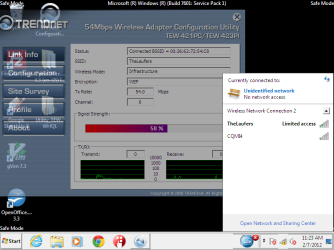
- after unplugging the ethernet cable, now I only get "Limited Access" or "No Internet Access" when connecting wirelessly.
- Have tried many remedies found by googling. Most failed. It has connected successfully twice since this point. (Once by rolling back to earlier System Restore, once by powering down for 10 minutes, then booting back up, disconnecting and re-connecting from network.) In both cases, it worked for a few minutes (was able to print to shared printer on this PC from another one, and got to the web from this PC in chrome) but then stopped working suddenly.
- Other devices in the house have no issue connecting to the WLAN (2 XP laptops, 1 Android phone, 1 ipod touch, and 1 TiVo). The NIC had no issue connecting when it was in my ancient Pentium III PC running XP.
- Leaving the ethernet cable connected permanently is not an option, since it would be strewn across living areas of my home, and I don't want to run it through the wall. Hence, the wireless card.
Hardware:
Lenovo ThinkCentre Celeron E3400 2.6 GHz dual core. 2GB RAM.
(This One: http://www.newegg.com/Product/Product.aspx?Item=N82E16883108659 )
TrendNet TEW-423PI PCI 802.11b/g NIC
Verizon wireless router/fios modem - ActionTec MI424WR2
Software:
Windows 7 Home Premium SP1 32-bit
TrendNET driver version 6.1125.615.2010 (latest)
Wireless router firmware 20.19.8 (latest)
Software I installed via ethernet after it was "working":
Spybot
Malwarebytes
Folding@home
Google Sketchup
Filezilla client
openoffice
Vim
Itunes
Adaware
I have since rolled back to a system restore prior to itunes and adaware installs (since I'd heard that itunes can mess up win7 networking). As mentioned earlier, this appeared to fix it, but only for 10 minutes.
Things I have tried:
- retyping the WEP key many times.
- uninstalling and reinstalling the NIC driver and software
- setting a static IP address
- rebooting the Win7 machine
- resetting the network stack with netsh
- disconnecting and reconnecting from the network
- rolling back to a system restore point pre-Itunes
- running the "troubleshooting" wizard (which pretty much just told me to type the WEP key again)
- turning off suspicious/unneeded services in msconfig
- disabling the wired ethernet adaptor
Here is the output of ipconfig /all
Windows IP Configuration
Host Name . . . . . . . . . . . . : dracolich
Primary Dns Suffix . . . . . . . :
Node Type . . . . . . . . . . . . : Hybrid
IP Routing Enabled. . . . . . . . : No
WINS Proxy Enabled. . . . . . . . : No
Wireless LAN adapter Wireless Network Connection 2:
Connection-specific DNS Suffix . :
Description . . . . . . . . . . . : Realtek 8185 Extensible 802.11b/g Wireles
s Device
Physical Address. . . . . . . . . : 00-14-D1-34-CD-5F
DHCP Enabled. . . . . . . . . . . : No
Autoconfiguration Enabled . . . . : Yes
Link-local IPv6 Address . . . . . : fe80::3895:cafc:ce69:2dc8%15(Preferred)
IPv4 Address. . . . . . . . . . . : 192.168.1.42(Preferred)
Subnet Mask . . . . . . . . . . . : 255.255.255.0
Default Gateway . . . . . . . . . : 192.168.1.1
DHCPv6 IAID . . . . . . . . . . . : 369104081
DHCPv6 Client DUID. . . . . . . . : 00-01-00-01-16-6A-61-0E-50-E5-49-71-C5-27
DNS Servers . . . . . . . . . . . : 192.168.1.1
NetBIOS over Tcpip. . . . . . . . : Enabled
Tunnel adapter isatap.{20403BE7-FBA9-43B6-982C-AE880CC57C79}:
Media State . . . . . . . . . . . : Media disconnected
Connection-specific DNS Suffix . :
Description . . . . . . . . . . . : Microsoft ISATAP Adapter
Physical Address. . . . . . . . . : 00-00-00-00-00-00-00-E0
DHCP Enabled. . . . . . . . . . . : No
Autoconfiguration Enabled . . . . : Yes
Tunnel adapter Local Area Connection* 9:
Media State . . . . . . . . . . . : Media disconnected
Connection-specific DNS Suffix . :
Description . . . . . . . . . . . : Microsoft 6to4 Adapter
Physical Address. . . . . . . . . : 00-00-00-00-00-00-00-E0
DHCP Enabled. . . . . . . . . . . : No
Autoconfiguration Enabled . . . . : Yes
Tunnel adapter Teredo Tunneling Pseudo-Interface:
Media State . . . . . . . . . . . : Media disconnected
Connection-specific DNS Suffix . :
Description . . . . . . . . . . . : Teredo Tunneling Pseudo-Interface
Physical Address. . . . . . . . . : 00-00-00-00-00-00-00-E0
DHCP Enabled. . . . . . . . . . . : No
Autoconfiguration Enabled . . . . : Yes
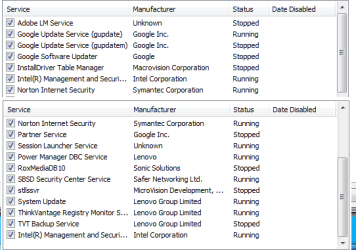
See attached screen grabs for services and startup entries from msconfig.
Any help would be appreciated. Thanks in advance!
Timeline Summary:
- Bought new Lenovo ThinkCentre w/Win7. Moved PCI wireless NIC from my old XP PC to the new one. Installed latest driver for the NIC from web.
- New PC seemed to connect to WLAN ok.
- attached ethernet cable to the new PC to transfer files faster from old harddrive.
(NOTE: I didn't give it much time "working" before connecting the ethernet cable. It's possible that had I done nothing at that point, it still would have stopped working)
- while cable was attached, downloaded and installed some software
- after unplugging the ethernet cable, now I only get "Limited Access" or "No Internet Access" when connecting wirelessly.
- Have tried many remedies found by googling. Most failed. It has connected successfully twice since this point. (Once by rolling back to earlier System Restore, once by powering down for 10 minutes, then booting back up, disconnecting and re-connecting from network.) In both cases, it worked for a few minutes (was able to print to shared printer on this PC from another one, and got to the web from this PC in chrome) but then stopped working suddenly.
- Other devices in the house have no issue connecting to the WLAN (2 XP laptops, 1 Android phone, 1 ipod touch, and 1 TiVo). The NIC had no issue connecting when it was in my ancient Pentium III PC running XP.
- Leaving the ethernet cable connected permanently is not an option, since it would be strewn across living areas of my home, and I don't want to run it through the wall. Hence, the wireless card.
Hardware:
Lenovo ThinkCentre Celeron E3400 2.6 GHz dual core. 2GB RAM.
(This One: http://www.newegg.com/Product/Product.aspx?Item=N82E16883108659 )
TrendNet TEW-423PI PCI 802.11b/g NIC
Verizon wireless router/fios modem - ActionTec MI424WR2
Software:
Windows 7 Home Premium SP1 32-bit
TrendNET driver version 6.1125.615.2010 (latest)
Wireless router firmware 20.19.8 (latest)
Software I installed via ethernet after it was "working":
Spybot
Malwarebytes
Folding@home
Google Sketchup
Filezilla client
openoffice
Vim
Itunes
Adaware
I have since rolled back to a system restore prior to itunes and adaware installs (since I'd heard that itunes can mess up win7 networking). As mentioned earlier, this appeared to fix it, but only for 10 minutes.
Things I have tried:
- retyping the WEP key many times.
- uninstalling and reinstalling the NIC driver and software
- setting a static IP address
- rebooting the Win7 machine
- resetting the network stack with netsh
- disconnecting and reconnecting from the network
- rolling back to a system restore point pre-Itunes
- running the "troubleshooting" wizard (which pretty much just told me to type the WEP key again)
- turning off suspicious/unneeded services in msconfig
- disabling the wired ethernet adaptor
Here is the output of ipconfig /all
Windows IP Configuration
Host Name . . . . . . . . . . . . : dracolich
Primary Dns Suffix . . . . . . . :
Node Type . . . . . . . . . . . . : Hybrid
IP Routing Enabled. . . . . . . . : No
WINS Proxy Enabled. . . . . . . . : No
Wireless LAN adapter Wireless Network Connection 2:
Connection-specific DNS Suffix . :
Description . . . . . . . . . . . : Realtek 8185 Extensible 802.11b/g Wireles
s Device
Physical Address. . . . . . . . . : 00-14-D1-34-CD-5F
DHCP Enabled. . . . . . . . . . . : No
Autoconfiguration Enabled . . . . : Yes
Link-local IPv6 Address . . . . . : fe80::3895:cafc:ce69:2dc8%15(Preferred)
IPv4 Address. . . . . . . . . . . : 192.168.1.42(Preferred)
Subnet Mask . . . . . . . . . . . : 255.255.255.0
Default Gateway . . . . . . . . . : 192.168.1.1
DHCPv6 IAID . . . . . . . . . . . : 369104081
DHCPv6 Client DUID. . . . . . . . : 00-01-00-01-16-6A-61-0E-50-E5-49-71-C5-27
DNS Servers . . . . . . . . . . . : 192.168.1.1
NetBIOS over Tcpip. . . . . . . . : Enabled
Tunnel adapter isatap.{20403BE7-FBA9-43B6-982C-AE880CC57C79}:
Media State . . . . . . . . . . . : Media disconnected
Connection-specific DNS Suffix . :
Description . . . . . . . . . . . : Microsoft ISATAP Adapter
Physical Address. . . . . . . . . : 00-00-00-00-00-00-00-E0
DHCP Enabled. . . . . . . . . . . : No
Autoconfiguration Enabled . . . . : Yes
Tunnel adapter Local Area Connection* 9:
Media State . . . . . . . . . . . : Media disconnected
Connection-specific DNS Suffix . :
Description . . . . . . . . . . . : Microsoft 6to4 Adapter
Physical Address. . . . . . . . . : 00-00-00-00-00-00-00-E0
DHCP Enabled. . . . . . . . . . . : No
Autoconfiguration Enabled . . . . : Yes
Tunnel adapter Teredo Tunneling Pseudo-Interface:
Media State . . . . . . . . . . . : Media disconnected
Connection-specific DNS Suffix . :
Description . . . . . . . . . . . : Teredo Tunneling Pseudo-Interface
Physical Address. . . . . . . . . : 00-00-00-00-00-00-00-E0
DHCP Enabled. . . . . . . . . . . : No
Autoconfiguration Enabled . . . . : Yes
See attached screen grabs for services and startup entries from msconfig.
Any help would be appreciated. Thanks in advance!
Attachments

My Computer
At a glance
Win7 Home Premium 32bit SP1
- OS
- Win7 Home Premium 32bit SP1

 Best to secure your wireless network with WPA2.

