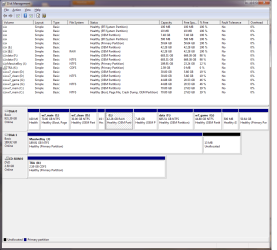
disk manager is show two entries per partition

may88

New member
Local time
8:50 PM
Messages
5
Hello all,

When I open up disk manager I see two entries each for c:,d:,e:,f: and g: partitions.
I have an efi system with a GPT disk. Win7, Ubuntu and CentOS6 all installed in various partitions. There are a number of other partitions but only those with drive letters are duplicated. But only one instance has the filesystem type.

I have a second disk and a DVD and both these are okay/normal/displayed once.

The disk 0 schematic looks normal. Clicking on the partitions grey-highlights the entry with the filesystem types.

If I right-click on the either of the duplicated Volumes I just get a "help" otion where as my 2nd disk as the full range of actions.

I think I may know what has caused this but having read the internet twice I've not been able to find any clue on how to go about fixing it.

My idea was to copy/clone the C: soon after installation and have one "save" copy and another "game" copy. Dual boot to "w7_game" for clean OS without bloat.

I fiddled with bcdedit (easyBCD does NOT work with GPT and it tool a lot of hacking to fix the mess it left) and created a dual boot set-up but when I boot from w7_game (G:) it recognised it was using that box (windows flag against the drive when exploring the "Computer") but it was picked up the user account from c:
Not tried anything else on this topic but since then I spotted the dupicates.

Searched registry for whole word "e:" and only found one entry.

At a lost how to got about fixing this.
 

My Computer My Computer

OS
Windows 7 Home Premium 64-bit.
CPU
Intel i5 2500k
Motherboard
Asrock Z68 Pro3 Gen3
Memory
8Gb
Graphics Card(s)
intel HD 3000 (integrated)
Monitor(s) Displays
LG 1920x1080
Hard Drives
Samsung 1Tb
Cooling
Intel retail fan (for i7 2600k)
Hi,

It might be easier if we started with a screen capture image of your Disk Management. Could you post one here?

Regards,
Golden
 

My Computer My Computer

Computer type
PC/Desktop
Computer Manufacturer/Model Number
Golden Mk. I.4
OS
Windows 10 Pro x64 ; Xubuntu x64
CPU
Intel i7 860 @ 2.80 GHz O/C'ed to 4.0GHz
Motherboard
Gigabyte P55A-UD3R Rev.1. Award BIOS F13
Memory
16GB Corsair Vengance DDR3 @ 661 MHz Dual Channel (9-9-9-24)
Graphics Card(s)
EVGA NVidia GTX 560 1024MB
Sound Card
Realtek Integrated
Monitor(s) Displays
Dual Samsung SyncMaster 2494HS
Screen Resolution
1920*1080 and 1920*1080
Hard Drives
1*Samsung 840 EVO 120GB SSD;
1*OCZ Vertex 2 60GB SSD;
2*Samsung F3 SpinPoint 1TB in RAID0;
1*Samsung F1 SpinPoint 1TB;
2*Western Digital 1TB External USB 3.0
1*Western Digital 500GB External USB 3.0
1*Seagate 500GB External USB 2.0
PSU
Thermaltake ToughPower QFan 750W
Case
Thermaltake Element S VK60001W2Z
Cooling
Corsair H60 Water Cooling, 2*230mm and 2*80mm case fans
Keyboard
Logitech G110
Mouse
Logitech MX518
Hi,

It might be easier if we started with a screen capture image of your Disk Management. Could you post one here?

Regards,
Golden
I replied with a link to the image but it flashed up something about moderator review.

Trying an attachment.

screenshot.png
 

My Computer My Computer

OS
Windows 7 Home Premium 64-bit.
CPU
Intel i5 2500k
Motherboard
Asrock Z68 Pro3 Gen3
Memory
8Gb
Graphics Card(s)
intel HD 3000 (integrated)
Monitor(s) Displays
LG 1920x1080
Hard Drives
Samsung 1Tb
Cooling
Intel retail fan (for i7 2600k)
Wow!

I don't know where to start, but a quick guess : do you have mirroring enabled on any of these drives?

Regards,
Golden
 

My Computer My Computer

Computer type
PC/Desktop
Computer Manufacturer/Model Number
Golden Mk. I.4
OS
Windows 10 Pro x64 ; Xubuntu x64
CPU
Intel i7 860 @ 2.80 GHz O/C'ed to 4.0GHz
Motherboard
Gigabyte P55A-UD3R Rev.1. Award BIOS F13
Memory
16GB Corsair Vengance DDR3 @ 661 MHz Dual Channel (9-9-9-24)
Graphics Card(s)
EVGA NVidia GTX 560 1024MB
Sound Card
Realtek Integrated
Monitor(s) Displays
Dual Samsung SyncMaster 2494HS
Screen Resolution
1920*1080 and 1920*1080
Hard Drives
1*Samsung 840 EVO 120GB SSD;
1*OCZ Vertex 2 60GB SSD;
2*Samsung F3 SpinPoint 1TB in RAID0;
1*Samsung F1 SpinPoint 1TB;
2*Western Digital 1TB External USB 3.0
1*Western Digital 500GB External USB 3.0
1*Seagate 500GB External USB 2.0
PSU
Thermaltake ToughPower QFan 750W
Case
Thermaltake Element S VK60001W2Z
Cooling
Corsair H60 Water Cooling, 2*230mm and 2*80mm case fans
Keyboard
Logitech G110
Mouse
Logitech MX518
nothing of the sort.
 

My Computer My Computer

OS
Windows 7 Home Premium 64-bit.
CPU
Intel i5 2500k
Motherboard
Asrock Z68 Pro3 Gen3
Memory
8Gb
Graphics Card(s)
intel HD 3000 (integrated)
Monitor(s) Displays
LG 1920x1080
Hard Drives
Samsung 1Tb
Cooling
Intel retail fan (for i7 2600k)
Shame. I was hoping to be able to fix this.
I'm not sure that Windows 7 knows how to handle EFI/GPT correctly.
I was unable to rescue my BCD via the install media like you're supposed to.

I have three OSes on here not so I'm not keen wipe everything.
 

My Computer My Computer

OS
Windows 7 Home Premium 64-bit.
CPU
Intel i5 2500k
Motherboard
Asrock Z68 Pro3 Gen3
Memory
8Gb
Graphics Card(s)
intel HD 3000 (integrated)
Monitor(s) Displays
LG 1920x1080
Hard Drives
Samsung 1Tb
Cooling
Intel retail fan (for i7 2600k)
How can I say this would appearing rude? I don't think you have quite absorbed my original post.

I suspect the entries without filesystem types are the duplicates but I have no actions available to me when I right click (other than just "help").

I can't get as far as "Set-up repair" .. I can't recall the error message. I get to the "Install now" and if I click on the bottom repair option then I'm told something like "This option is not valid for your set-up". EFI/GPT presumeably.

EasyBCD - tip to anyone reading... DO NOT USE if you have a GPT disk layout. It's not there yet for GPT. It adds MBR style entried to the BCD and its only saving grace is that it has an easy save option which I did run, only after I'd seriously buggered up the BCD but I'm grateful for the backup. From the ubuntu system I was able to move the backup from the windows NTFS filesystem to the /boot/efi/Microsoft/Boot area (sorry for the unix slashes)
and after the system booted and I was able to use bcdedit to tidy this up.
I then created the entry for my clone which lead to my current (this) issue.

I used Magic Partition Manager live cd to partition the disk as GPT before installing win7. Spent ages sizing and adding all the other OS area... waste of time as I needed a clean slate for MS to add its own take of GPT which includes second partition.

There is no spoon MBR. :p
 

My Computer My Computer

OS
Windows 7 Home Premium 64-bit.
CPU
Intel i5 2500k
Motherboard
Asrock Z68 Pro3 Gen3
Memory
8Gb
Graphics Card(s)
intel HD 3000 (integrated)
Monitor(s) Displays
LG 1920x1080
Hard Drives
Samsung 1Tb
Cooling
Intel retail fan (for i7 2600k)
I have the some problem

Sorry I can't give a screen shot ("alt+PrtSc" dose not work...).

Sorry for the spelling I am dyslex.....
I have the same problem, but it dose not seem to affect the opperation apart from when booting windows keeps fixing the same partition. I don't know why, or which one but it dose not add more then 1 secound to the boot time. I find it a little frustratting as the message is on the screen for such a short time I can't take note of it.

The afects and why the obvious fix would be to back up data wipe the drive and re-install. BUT I have one of these laptops that don't come with instlation media/CD/DVD it has all of that on the HDD. This is a thing I hate I would have to contact Lenovo to get the DVD before I atempted a fix.

I think I'll just leave it be.
 

My Computer My Computer

Computer type
PC/Desktop
OS
windows 8.1
Here is how to post a screenshot of Disk Management - How to Post a Screenshot of.

What is your exact problem?

You'll always have a much better install if you http://www.sevenforums.com/tutorials/219487-clean-reinstall-factory-oem-windows-7-a.html#post1839164 since the factory install is the worst install of Win7 one can have. Everything needed is in the blue link to get and keep a perfect install.

Otherwise let us know exactly what you've done, what the problem is, and what you've tried to correct it.
 
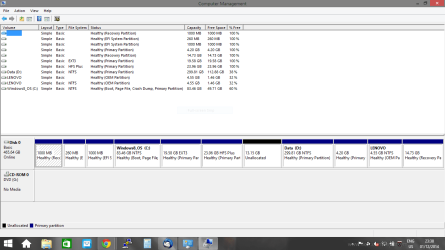
If you look at the partitions labled Lenove you will note they are exatley the same. The DiskPart tool only has one entry but the Disk Manager now has two.
 

Attachments

  • Disk-problem.PNG
    Disk-problem.PNG
    31.6 KB · Views: 8

My Computer My Computer

Computer type
PC/Desktop
OS
windows 8.1
I only see one Lenovo 4.55gb partition on the drive map which maps the actual space used on disk. The second one on the listings above is likely an anomaly, although bad listings in Disk Mgmt can indicate corruption.

Have you made any changes to the disk as it is quite a mess. I would want to take control of the situation and do a perfect Clean Reinstall - Factory OEM Windows 7 which we can help you get perfect. Then stick only with the tools and methods in the tutorial and you'll keep it perfect for as long as you do. Over a million have used it without a single complaint, almost all normal consumers like you.
 
I only see one Lenovo 4.55gb partition on the drive map which maps the actual space used on disk. The second one on the listings above is likely an anomaly, although bad listings in Disk Mgmt can indicate corruption.

Have you made any changes to the disk as it is quite a mess. I would want to take control of the situation and do a perfect Clean Reinstall - Factory OEM Windows 7 which we can help you get perfect. Then stick only with the tools and methods in the tutorial and you'll keep it perfect for as long as you do. Over a million have used it without a single complaint, almost all normal consumers like you.

Thank you for the replay. Yes I would love to do a clean install and Yes it's quite a mess but lots of that mess is how it came from "Lenovo" The first 4 partitions and the last 2 where the ones that it came with. That's 6!!! partitions I think this is over kill and have sead that to "Lenovo". 3 Partitions are the most!!! I think are needed. I would perfare one and restore DVD/s. The laptop has a "OneButton" restore system (you press the small reset button on the side and it boots the system restore. From what I can make out that is the 3rd partition and the one marked Lenovo.

I was hopping there was a way of removing the anomaly without a clean install but I see that is not to be SO:

The other partitions have been added by me. 1 big one for my data, 1 for Linux and 1 for OSX (testing only) and as this is a very delicate blance to keep I think for the time being I will live with the anomaly. At lease until I can confarm that I have made or have working system restore DVD/s.

I did get online with a MicroSoft person and let them take remote control until I noted that they where looking at the same web pages I was for the answers.

Thank you for your help, Over the past two days I have learned much one of which is how much I hate windows vista and up. XP was the best version by far
 

My Computer My Computer

Computer type
PC/Desktop
OS
windows 8.1
In July 2014 I ordered and got an HP 15-D005TU laptop for my housemaid's son. It came with Windows 8.1 preinstalled. I did the initial setup and updated it. There was no bloatware in it and I only had to remove the obnoxious McAfee. Strangely I found the same duplicate entries in Windows Disk Management as reported by stevetmq. Though surprised, I didn't do anything for it was a brand new lappy and it was functioning well. There was no sign of any impaired performance. My maid's son carried it away to his college in two days and has been using it without any problems.

About a month back one of my relatives who resides nearby also purchased another HP15 on my recommendation and again I did the initial setup and updates. This laptop also has double entries in Windows Disk Management. And again it has been functioning well. Just a while ago I walked to his house to capture a screenshot but unfortunately his lappy is busy communicating with his daughter in U.S.A on Skype. May be tomorrow I shall post a screenshot.

Though I don't know why it is happening, it seems to be an innocuous glitch if at all . So stevetmq need not worry. He may perhaps take it up with Lenovo support and they may have an answer.
 

My Computer My Computer

OS
Windows 7 Home Premium 32 bit
I would judge by performance. If it performs fast with no hangs ever then it meets the Win7 standard. If not then you can benefit from the Clean Reinstall during which I'd wipe all partitions. It is always infinitely better than the factory install which is what OneKey restores.

For now if you need the 17 gb Unallocated space on either side of Data partition you can use Partition Wizard extend function demonstrated here: How to extend partition easily with partition magic
 
Last edited:
Well there are allot of 100% free space entries using little space ?
Might help if you start to Name/ label them for what you intend to use them for ;)

Those are some powerful tools you've been using is it possible you didn't mistakenly hit duplicate drive/ partition :o
Otherwise yep I would ask the manufacture and see what's up :/
Cheers.
 

My Computer My Computer

Computer type
PC/Desktop
Computer Manufacturer/Model Number
Custom assembled by me :}
OS
Win-7-Pro64bit 7-H-Prem-64bit
CPU
i7-5930K 2nd i9-9940x both water blocked VRM's too
Motherboard
ASUS SABERTOOTH X99 2nd ASUS x299 Apex
Memory
Trident-z 3200C14 2nd Trident-z 3600C16
Graphics Card(s)
EVGA 1080ti ftw3 2nd Titan Xp both water blocked
Sound Card
Built-in Realtek
Monitor(s) Displays
1-AOC G2460PG 24"G-Sync 144Hz/ 2nd 1-ASUS VG248QE 24" 144Hz
Screen Resolution
1920 x 1080 144Hz
Hard Drives
2-Samsung M.2 Evo & Evo Plus
2-Samsung 850 EVO 500GB SSD's/ 3-2.5 W.D. Black 1tb-&3-1tb/3-3.5 WD Black 1tb hdd's
PSU
EVGA SuperNOVA 1000-P2 2nd 1200-P2
Case
2-Corsair Obsidian Series 450D Black ATX Mid Tower
Cooling
Custom water loops
Keyboard
Logitech G710+/ 2nd Logitech G910
Mouse
2-RedDragon M901 Perdition 16400 dpi Gaming mouse = wired
Internet Speed
Comcast Ping 19ms 89.31mbps download speed 6.12mbps upload
Antivirus
Malwarebytes Pro/ Superantispyware Pro
Browser
FireFox & Pale moon
Other Info
2nd ASUS X299 Apex/Intel i9-9940x with Custom water loop/7H-Prem-x64/Corsair 450D case/Ram Trident-z 3600C16 4x8gb / Samsung970Evo plus 500gb SSD/Dual ssd EZ swap evo/PSU EVGA SuperNova 1200w-P2 80+Platinum/GPU Titan Xp /8-ML-140 on push-pull on 2-280GTX rads
In July 2014 I ordered and got an HP 15-D005TU laptop for my housemaid's son. It came with Windows 8.1 preinstalled. I did the initial setup and updated it. There was no bloatware in it and I only had to remove the obnoxious McAfee. Strangely I found the same duplicate entries in Windows Disk Management as reported by stevetmq. Though surprised, I didn't do anything for it was a brand new lappy and it was functioning well. There was no sign of any impaired performance. My maid's son carried it away to his college in two days and has been using it without any problems.

About a month back one of my relatives who resides nearby also purchased another HP15 on my recommendation and again I did the initial setup and updates. This laptop also has double entries in Windows Disk Management. And again it has been functioning well. Just a while ago I walked to his house to capture a screenshot but unfortunately his lappy is busy communicating with his daughter in U.S.A on Skype. May be tomorrow I shall post a screenshot.

Though I don't know why it is happening, it seems to be an innocuous glitch if at all . So stevetmq need not worry. He may perhaps take it up with Lenovo support and they may have an answer.

OK, here is the screenshot of HP15-R032TX Windows Disk Management as seen by me in the middle of October as soon as it was unpacked and the initial setup was done.

WDM.JPG

One can see that Recovery (D: ) is listed twice.

The Windows Disk Management was the same on HP15-T005TU which I ordered and received in July 2014.

As I said both the laptops are functioning well.

Since this matter has come up here now, I intend to get in touch with HP Support just to know whats cooking but for that I should have the HP15-T005TU - which is the one still on my name - on my desk. And that will be possible in the middle of Jan 2015, when my maid's son visits his parents here.

Whatever, I never bothered about it since both the laptops were brand new and didn't show any signs of impaired performance.

stevetmq should not try to fix something which is not broken, under any pretext and if he is still bothered he should only take up the matter with Lenovo Support . For all I know they may say it is normal. They may or may not give a technical explanation for that occurrence - that would depend upon the technical acumen of the person taking the call and how well informed he is.:)

( I am also not well informed on this :D - I am only sharing my recent experience and my perception on it -but my guess is that UEFI,GPT and the way the recovery partition is created may be responsible for this double listing - neither the OS nor HDD can be blamed.)
 
Last edited:

My Computer My Computer

OS
Windows 7 Home Premium 32 bit
I often see two Recovery partitions, with the first being way too small and apparently serving as the Recov boot partition since it almost always sits on the boot sector.

These are never needed unless one wants to keep or restore the factory install which is an inferior install of Win7, compared to doing the Clean Reinstall Windows 7
 
Yep once the machine is out of warrantee it's past time to get rid of all of factory crapware and disk setup ;)
 

My Computer My Computer

Computer type
PC/Desktop
Computer Manufacturer/Model Number
Custom assembled by me :}
OS
Win-7-Pro64bit 7-H-Prem-64bit
CPU
i7-5930K 2nd i9-9940x both water blocked VRM's too
Motherboard
ASUS SABERTOOTH X99 2nd ASUS x299 Apex
Memory
Trident-z 3200C14 2nd Trident-z 3600C16
Graphics Card(s)
EVGA 1080ti ftw3 2nd Titan Xp both water blocked
Sound Card
Built-in Realtek
Monitor(s) Displays
1-AOC G2460PG 24"G-Sync 144Hz/ 2nd 1-ASUS VG248QE 24" 144Hz
Screen Resolution
1920 x 1080 144Hz
Hard Drives
2-Samsung M.2 Evo & Evo Plus
2-Samsung 850 EVO 500GB SSD's/ 3-2.5 W.D. Black 1tb-&3-1tb/3-3.5 WD Black 1tb hdd's
PSU
EVGA SuperNOVA 1000-P2 2nd 1200-P2
Case
2-Corsair Obsidian Series 450D Black ATX Mid Tower
Cooling
Custom water loops
Keyboard
Logitech G710+/ 2nd Logitech G910
Mouse
2-RedDragon M901 Perdition 16400 dpi Gaming mouse = wired
Internet Speed
Comcast Ping 19ms 89.31mbps download speed 6.12mbps upload
Antivirus
Malwarebytes Pro/ Superantispyware Pro
Browser
FireFox & Pale moon
Other Info
2nd ASUS X299 Apex/Intel i9-9940x with Custom water loop/7H-Prem-x64/Corsair 450D case/Ram Trident-z 3600C16 4x8gb / Samsung970Evo plus 500gb SSD/Dual ssd EZ swap evo/PSU EVGA SuperNova 1200w-P2 80+Platinum/GPU Titan Xp /8-ML-140 on push-pull on 2-280GTX rads
Back
Top