Help overclocking my 6970

1.4 -1.5v is a bit more than a 'tiny' boost ;)

1.425-1.45v is a bit more realistic. Just make sure you keep an eye on the temps.

ok, thank you
 

My Computer My Computer

Computer type
PC/Desktop
Computer Manufacturer/Model Number
Custom Build
OS
windows 7 Professional
CPU
Intel I7 4790k
Motherboard
ASUS Hero VII
Memory
16gb DDR3 1600mhz
Graphics Card(s)
Dual GTX 780 ASUS
Monitor(s) Displays
2x HP 2331
Screen Resolution
1080p
Hard Drives
750gb Hitachi 7200rpm
500gb Crucial SSD
PSU
Corsair 800g
Case
NZXT Phantom
Cooling
fan
Keyboard
Razer Deathstalker
Mouse
Razer Ouroboros
Internet Speed
70mbps
Antivirus
MSE + M-Bam
Browser
Chrome
1.4 -1.5v is a bit more than a 'tiny' boost ;)

1.425-1.45v is a bit more realistic. Just make sure you keep an eye on the temps.

ok, so i bumped it up to 1.425v and ran a stability test, the heat peaked around 55.6 degrees. it seems as though im getting less taring and stuttering
 

My Computer My Computer

Computer type
PC/Desktop
Computer Manufacturer/Model Number
Custom Build
OS
windows 7 Professional
CPU
Intel I7 4790k
Motherboard
ASUS Hero VII
Memory
16gb DDR3 1600mhz
Graphics Card(s)
Dual GTX 780 ASUS
Monitor(s) Displays
2x HP 2331
Screen Resolution
1080p
Hard Drives
750gb Hitachi 7200rpm
500gb Crucial SSD
PSU
Corsair 800g
Case
NZXT Phantom
Cooling
fan
Keyboard
Razer Deathstalker
Mouse
Razer Ouroboros
Internet Speed
70mbps
Antivirus
MSE + M-Bam
Browser
Chrome
What stability test?

Is it the GPU that's tearing and stuttering, if so the GPU OC is not stable. CPU overclocks don't cause screen tearing or stuttering.
 

My Computer My Computer

Computer type
PC/Desktop
Computer Manufacturer/Model Number
Systems by SmartEyeball
OS
8 Pro x64
CPU
i7 3770K 4.6GHz
Motherboard
ASUS P8Z77 WS
Memory
16GB G.Skill Trident X 2666mhz
Graphics Card(s)
x2 EVGA 780 Ti Superclocked SLI
Sound Card
SB X-FI Surround 5.1 PRO USB / ATH-AD900 Headphones
Monitor(s) Displays
x3 Dell U2410 / 58" Samsung
Screen Resolution
5760*1200/ 1920*1200
Hard Drives
2x Intel 520 240GB (RAID 0) * 2x WD Caviar Blacks 2TB (RAID 0) * 2TB WD Caviar Black * Sony Optirac DVD
PSU
Silverstone Strider Evolution 1200W
Case
Thermaltake Level 10 GT Snow Edition
Cooling
Noctua NH-D14
Keyboard
Topre Realforce // Ducky Shine MX Black // Filco Ninja TKL
Mouse
Thermaltake Theron (Highly Recommended) + Razer Imperator
Antivirus
MSE
Browser
IE, FF, WaterFox
Other Info
GT Extreme V2 Sim Racing Cockpit + 40" LCD and K/B Mouse stand ▼
Fanatec CSR Elite Wheel + Clubsport V1 Pedals + CSR shifter/7G-H ▼Saitek X52 Pro ▼ TrackIR 5 Pro
Buttkicker v2 Seat Rumbler with Dedicated 5.1 and Sub Woofer attached to frame ▼
=
Bloody Big Grin
What stability test?

Is it the GPU that's tearing and stuttering, if so the GPU OC is not stable. CPU overclocks don't cause screen tearing or stuttering.

ok, well all i know is the computer will lock up for a milisecond and all of a suddent everything is trying to catch up to iether the gpu or cpu. i think it was cpu as i dont see the problem anymore, i could see it being the gpu possibly, but it is weird, if i get a gpu crash, i get vertical lines of grey and white. if i have a cpu crash i get horizontal lines of rainbow colors then a BSOD. as for the stability test, amd overdrive has a stability check for the cpu, it runs a "cpu, fpu, and calculation" test which will max the heat output and is kindof like a bench mark but is more to say if it is running O.K. i wouldnt know how to test the stability of my GPU when overclocked unfortunately, if you know of a way i could do this if you let me know id appreciate it
 

My Computer My Computer

Computer type
PC/Desktop
Computer Manufacturer/Model Number
Custom Build
OS
windows 7 Professional
CPU
Intel I7 4790k
Motherboard
ASUS Hero VII
Memory
16gb DDR3 1600mhz
Graphics Card(s)
Dual GTX 780 ASUS
Monitor(s) Displays
2x HP 2331
Screen Resolution
1080p
Hard Drives
750gb Hitachi 7200rpm
500gb Crucial SSD
PSU
Corsair 800g
Case
NZXT Phantom
Cooling
fan
Keyboard
Razer Deathstalker
Mouse
Razer Ouroboros
Internet Speed
70mbps
Antivirus
MSE + M-Bam
Browser
Chrome
What stability test?

Is it the GPU that's tearing and stuttering, if so the GPU OC is not stable. CPU overclocks don't cause screen tearing or stuttering.

i actually had another question, im running my graphics clocks at cor: 930, mem: 1425, and gpu: 1175. as youve pointed out before, somthign in my graphics is unstable and i agree, the question is, is it more likely to be my ram or my core? or would i really have to run a stabillity test to know for sure (well duh, but you know what i mean)? i want games to run smoother, and this plus+ cpu OC has helped tremendously, but i can still go smoother, what part is more important to the frame rate? i would imagine it would be the memory clock, because that is the ammount of frames that can be cached, but also because the game is FPS, its kinda spntanious which makes me believe more gpu may be in order, anyways, which can i lower, and which can i increase, or rather, what could i do that would increase the over all frame rate?
 

My Computer My Computer

Computer type
PC/Desktop
Computer Manufacturer/Model Number
Custom Build
OS
windows 7 Professional
CPU
Intel I7 4790k
Motherboard
ASUS Hero VII
Memory
16gb DDR3 1600mhz
Graphics Card(s)
Dual GTX 780 ASUS
Monitor(s) Displays
2x HP 2331
Screen Resolution
1080p
Hard Drives
750gb Hitachi 7200rpm
500gb Crucial SSD
PSU
Corsair 800g
Case
NZXT Phantom
Cooling
fan
Keyboard
Razer Deathstalker
Mouse
Razer Ouroboros
Internet Speed
70mbps
Antivirus
MSE + M-Bam
Browser
Chrome
Sorry, just noticed this.

It's hard to pinpoint the exact culprit. Probably the core speed. The best way to work out it if it's core or mem is to dial one back a step or two and re-test until it's replicable.

ie:

900 / 1425

If that eliminates tearing, then you simply keep raising the core (or mem, depending on which value you're testing) until you can reproduce the tearing/choppines.

Overall, the core clock has the biggest impact on framerate. But both have an impact on each other.

Since the core is doing the lions share of the processing, the the faster that is, the more that can be processed. However the memory is almost as important since it's 'feeding' the core. If too slow, it can't feed the data to the core quick which leads to diminishing returns. (frame dips, choppy)

The diminishing returns also apply to the 'voltage wall'. If either, or both, the core and memory aren't receiving sufficient voltage then performance will suffer as it will be unsustainable which results in the choppy/frame dipping. It's like an engine running on lower octane fuel - the engine is capable of X amount of performance, but with a lower octane it simply can't deliver the full performance capability.


For testing I personally use a combo of apps and games.

I start with Kombustor to check the heat and artifacts (flickering dots/long black shadows etc)

Then I use some benchmark apps like 3D Mark Vantage, 3D Mark 11, Heaven Benchmarks to check for artifacts. (Vantage and 3D Mark have 'free' and 'full' versions. The full versions can be free if you know where to look)

Lastly I test 'real world' performance by playing games.

Of equal importance to checking for artifacts I also pay strong attention to the framerate counters in these apps. I take note of how much they fluctuate at certain spots. With the exception of Kombustor, framerates fluctuate a lot in these apps. That's why I choose a particular spot and compare each run.

If there are no artifacts, yet the framerate goes up and down and is not constant, then I know I'm in diminishing return territory. From there I either lower the clock speed or up the voltage until the framerate is stable and constant. Otherwise performance in games won't be smooth.
 

My Computer My Computer

Computer type
PC/Desktop
Computer Manufacturer/Model Number
Systems by SmartEyeball
OS
8 Pro x64
CPU
i7 3770K 4.6GHz
Motherboard
ASUS P8Z77 WS
Memory
16GB G.Skill Trident X 2666mhz
Graphics Card(s)
x2 EVGA 780 Ti Superclocked SLI
Sound Card
SB X-FI Surround 5.1 PRO USB / ATH-AD900 Headphones
Monitor(s) Displays
x3 Dell U2410 / 58" Samsung
Screen Resolution
5760*1200/ 1920*1200
Hard Drives
2x Intel 520 240GB (RAID 0) * 2x WD Caviar Blacks 2TB (RAID 0) * 2TB WD Caviar Black * Sony Optirac DVD
PSU
Silverstone Strider Evolution 1200W
Case
Thermaltake Level 10 GT Snow Edition
Cooling
Noctua NH-D14
Keyboard
Topre Realforce // Ducky Shine MX Black // Filco Ninja TKL
Mouse
Thermaltake Theron (Highly Recommended) + Razer Imperator
Antivirus
MSE
Browser
IE, FF, WaterFox
Other Info
GT Extreme V2 Sim Racing Cockpit + 40" LCD and K/B Mouse stand ▼
Fanatec CSR Elite Wheel + Clubsport V1 Pedals + CSR shifter/7G-H ▼Saitek X52 Pro ▼ TrackIR 5 Pro
Buttkicker v2 Seat Rumbler with Dedicated 5.1 and Sub Woofer attached to frame ▼
=
Bloody Big Grin
Sorry, just noticed this.

It's hard to pinpoint the exact culprit. Probably the core speed. The best way to work out it if it's core or mem is to dial one back a step or two and re-test until it's replicable.

ie:

900 / 1425

If that eliminates tearing, then you simply keep raising the core (or mem, depending on which value you're testing) until you can reproduce the tearing/choppines.

Overall, the core clock has the biggest impact on framerate. But both have an impact on each other.

Since the core is doing the lions share of the processing, the the faster that is, the more that can be processed. However the memory is almost as important since it's 'feeding' the core. If too slow, it can't feed the data to the core quick which leads to diminishing returns. (frame dips, choppy)

The diminishing returns also apply to the 'voltage wall'. If either, or both, the core and memory aren't receiving sufficient voltage then performance will suffer as it will be unsustainable which results in the choppy/frame dipping. It's like an engine running on lower octane fuel - the engine is capable of X amount of performance, but with a lower octane it simply can't deliver the full performance capability.


For testing I personally use a combo of apps and games.

I start with Kombustor to check the heat and artifacts (flickering dots/long black shadows etc)

Then I use some benchmark apps like 3D Mark Vantage, 3D Mark 11, Heaven Benchmarks to check for artifacts. (Vantage and 3D Mark have 'free' and 'full' versions. The full versions can be free if you know where to look)

Lastly I test 'real world' performance by playing games.

Of equal importance to checking for artifacts I also pay strong attention to the framerate counters in these apps. I take note of how much they fluctuate at certain spots. With the exception of Kombustor, framerates fluctuate a lot in these apps. That's why I choose a particular spot and compare each run.

If there are no artifacts, yet the framerate goes up and down and is not constant, then I know I'm in diminishing return territory. From there I either lower the clock speed or up the voltage until the framerate is stable and constant. Otherwise performance in games won't be smooth.

thank you very much. although, i will not be able to use 3d mark, it does not support 5760x1080, last time i ran it it screwed up my resolution horibly, had to restart without even seeing my score and then reset my drivers (not fun). so if i understand you correctly, just start slowly lowering the core and increasing the ram. id like to play with the voltage a little also, im assuming the same rules apply as to CPU, only go up in .12-.25 increments. but i may need help finding out why TriXX wont let me edit my voltage, understood, it is in beta and it has not gained a reputation, i would like to point out, afterburner didnt work at all. so i need somthing to allow me to edit voltage on the fly easily, ore help finding out why sapphire trixx wont let me so i possibly could
 

My Computer My Computer

Computer type
PC/Desktop
Computer Manufacturer/Model Number
Custom Build
OS
windows 7 Professional
CPU
Intel I7 4790k
Motherboard
ASUS Hero VII
Memory
16gb DDR3 1600mhz
Graphics Card(s)
Dual GTX 780 ASUS
Monitor(s) Displays
2x HP 2331
Screen Resolution
1080p
Hard Drives
750gb Hitachi 7200rpm
500gb Crucial SSD
PSU
Corsair 800g
Case
NZXT Phantom
Cooling
fan
Keyboard
Razer Deathstalker
Mouse
Razer Ouroboros
Internet Speed
70mbps
Antivirus
MSE + M-Bam
Browser
Chrome
Sorry, just noticed this.

It's hard to pinpoint the exact culprit. Probably the core speed. The best way to work out it if it's core or mem is to dial one back a step or two and re-test until it's replicable.

ie:

900 / 1425

If that eliminates tearing, then you simply keep raising the core (or mem, depending on which value you're testing) until you can reproduce the tearing/choppines.

Overall, the core clock has the biggest impact on framerate. But both have an impact on each other.

Since the core is doing the lions share of the processing, the the faster that is, the more that can be processed. However the memory is almost as important since it's 'feeding' the core. If too slow, it can't feed the data to the core quick which leads to diminishing returns. (frame dips, choppy)

The diminishing returns also apply to the 'voltage wall'. If either, or both, the core and memory aren't receiving sufficient voltage then performance will suffer as it will be unsustainable which results in the choppy/frame dipping. It's like an engine running on lower octane fuel - the engine is capable of X amount of performance, but with a lower octane it simply can't deliver the full performance capability.


For testing I personally use a combo of apps and games.

I start with Kombustor to check the heat and artifacts (flickering dots/long black shadows etc)

Then I use some benchmark apps like 3D Mark Vantage, 3D Mark 11, Heaven Benchmarks to check for artifacts. (Vantage and 3D Mark have 'free' and 'full' versions. The full versions can be free if you know where to look)

Lastly I test 'real world' performance by playing games.

Of equal importance to checking for artifacts I also pay strong attention to the framerate counters in these apps. I take note of how much they fluctuate at certain spots. With the exception of Kombustor, framerates fluctuate a lot in these apps. That's why I choose a particular spot and compare each run.

If there are no artifacts, yet the framerate goes up and down and is not constant, then I know I'm in diminishing return territory. From there I either lower the clock speed or up the voltage until the framerate is stable and constant. Otherwise performance in games won't be smooth.

gpu voltage problem fixed, just had to update trixx
 

My Computer My Computer

Computer type
PC/Desktop
Computer Manufacturer/Model Number
Custom Build
OS
windows 7 Professional
CPU
Intel I7 4790k
Motherboard
ASUS Hero VII
Memory
16gb DDR3 1600mhz
Graphics Card(s)
Dual GTX 780 ASUS
Monitor(s) Displays
2x HP 2331
Screen Resolution
1080p
Hard Drives
750gb Hitachi 7200rpm
500gb Crucial SSD
PSU
Corsair 800g
Case
NZXT Phantom
Cooling
fan
Keyboard
Razer Deathstalker
Mouse
Razer Ouroboros
Internet Speed
70mbps
Antivirus
MSE + M-Bam
Browser
Chrome
Sorry, just noticed this.

It's hard to pinpoint the exact culprit. Probably the core speed. The best way to work out it if it's core or mem is to dial one back a step or two and re-test until it's replicable.

ie:

900 / 1425

If that eliminates tearing, then you simply keep raising the core (or mem, depending on which value you're testing) until you can reproduce the tearing/choppines.

Overall, the core clock has the biggest impact on framerate. But both have an impact on each other.

Since the core is doing the lions share of the processing, the the faster that is, the more that can be processed. However the memory is almost as important since it's 'feeding' the core. If too slow, it can't feed the data to the core quick which leads to diminishing returns. (frame dips, choppy)

The diminishing returns also apply to the 'voltage wall'. If either, or both, the core and memory aren't receiving sufficient voltage then performance will suffer as it will be unsustainable which results in the choppy/frame dipping. It's like an engine running on lower octane fuel - the engine is capable of X amount of performance, but with a lower octane it simply can't deliver the full performance capability.


For testing I personally use a combo of apps and games.

I start with Kombustor to check the heat and artifacts (flickering dots/long black shadows etc)

Then I use some benchmark apps like 3D Mark Vantage, 3D Mark 11, Heaven Benchmarks to check for artifacts. (Vantage and 3D Mark have 'free' and 'full' versions. The full versions can be free if you know where to look)

Lastly I test 'real world' performance by playing games.

Of equal importance to checking for artifacts I also pay strong attention to the framerate counters in these apps. I take note of how much they fluctuate at certain spots. With the exception of Kombustor, framerates fluctuate a lot in these apps. That's why I choose a particular spot and compare each run.

If there are no artifacts, yet the framerate goes up and down and is not constant, then I know I'm in diminishing return territory. From there I either lower the clock speed or up the voltage until the framerate is stable and constant. Otherwise performance in games won't be smooth.

i tryed going to 1200 from 1175 on the voltage, and i traded 25 with the core and ram, so i whent from 930/1425 to 905/1450. havent gotten to try it out yet, but when i do i hope that works out. i found increasing the voltage on my cpu caused more problems than it solved, it would lock up suddenly periodically and the temp would ramp up suddenly, so i ran it back down to 1.4. anyways now that you know what i did with my voltage, feel free to tell me anything you would do differently, esspecially if you think i ramped my voltage up to high
 

My Computer My Computer

Computer type
PC/Desktop
Computer Manufacturer/Model Number
Custom Build
OS
windows 7 Professional
CPU
Intel I7 4790k
Motherboard
ASUS Hero VII
Memory
16gb DDR3 1600mhz
Graphics Card(s)
Dual GTX 780 ASUS
Monitor(s) Displays
2x HP 2331
Screen Resolution
1080p
Hard Drives
750gb Hitachi 7200rpm
500gb Crucial SSD
PSU
Corsair 800g
Case
NZXT Phantom
Cooling
fan
Keyboard
Razer Deathstalker
Mouse
Razer Ouroboros
Internet Speed
70mbps
Antivirus
MSE + M-Bam
Browser
Chrome
erm.. might i ask why you want to? up until a few weeks ago your card was one of the fastest single Gpu's around, only beaten by the 580gtx and the new 7970 (or what varients out now).

It would be a pointless achievement at best, you wont see improvements in game play as your already getting more than enough frames to spare. just my 2 cents well pence.. being a brit lol

1 word "BF3" it K.I.L.Ls my frame rate, sweet 60-65 down to 47-55

Not always the Gpu that bottlenecks things ;)

Have you tryed Oc'ing the Cpu instead of the Gpu that might be why it is dropping cpu can't keep up even though i have the same chip i have mine oc'ed to 4 Ghz
 

My Computer My Computer

Computer type
PC/Desktop
Computer Manufacturer/Model Number
CoreI7-6700K MrFingerIII Special Builds
OS
Windows 10 Home Premium 64bit sp1
CPU
Intel I7-6700K @ 4.6 Ghz 1.344 volts everyday OC
Motherboard
Asrock Fatality K6 Z170 Socket 1151
Memory
32GB G-Skill TridentZ 3200mhz 16-18-18-38 DDR4
Graphics Card(s)
Sli Gigabyte Windforce GTX 980 G1
Sound Card
AC97 Creative Rage Tactic 3D Headphones Bluetooth
Monitor(s) Displays
27" Asus ROG Swift PG278Q G-Sync 48" Vizio Smart HD TV
Screen Resolution
2560x1440p 27"- 48" Currently Gaming at 2560x1440p Res 2K
Hard Drives
250GB Samsung Evo840SSD Seagate baracuda 500 GB WD Mybook 500Gb 1TB Seagate Barracuda
PSU
HX1050w Corsair Silver 80plus certified crosfire/sli
Case
Enthod Pro Full Tower
Cooling
Corsair H110i GT 280 mm High Performance WaterBlock
Keyboard
Logitech wireless keyboard
Mouse
Logitech wireless mouse
Internet Speed
Cox Cable 100+ mb
Antivirus
WebRoot Spysweeper with Antivirus
Browser
IE-10, Chrome, Opera
Other Info
My Other Rig is a AMD FX8320E @4.6Ghz 16GB Ballistic Sport Ram
Mobo Asrock Fatality 990FX 120GB OCZ SSD 1TB Seagate Barracuda Corsair H75 Cooling PSU Corsair CX750
GPU GTX Gigabyte 970G1
erm.. might i ask why you want to? up until a few weeks ago your card was one of the fastest single Gpu's around, only beaten by the 580gtx and the new 7970 (or what varients out now).

It would be a pointless achievement at best, you wont see improvements in game play as your already getting more than enough frames to spare. just my 2 cents well pence.. being a brit lol

1 word "BF3" it K.I.L.Ls my frame rate, sweet 60-65 down to 47-55

Not always the Gpu that bottlenecks things ;)

Have you tryed Oc'ing the Cpu instead of the Gpu that might be why it is dropping cpu can't keep up even though i have the same chip i have mine oc'ed to 4 Ghz

im OCing to 3.7 and it is running around 55-60 at any given time, its great, periodically im lucky enough to go higher than 60, i would love to oc mine to 4, ive seen people with a 965be go as high as 4.7. but i will need to wait till i have a better heat sink, im OCing with a stock heat sink (i know O_o) but i have multiple fans on it and it runs nice and cool so i dont think much of it. i am ocing both, i find i can run at a faster frame rate with higher cpu, but the frame rate seems prety static, where the graphics lets me get an extra boost while playing on "High" quality, i want to be able to run 60fps at "Very High" at some point
 

My Computer My Computer

Computer type
PC/Desktop
Computer Manufacturer/Model Number
Custom Build
OS
windows 7 Professional
CPU
Intel I7 4790k
Motherboard
ASUS Hero VII
Memory
16gb DDR3 1600mhz
Graphics Card(s)
Dual GTX 780 ASUS
Monitor(s) Displays
2x HP 2331
Screen Resolution
1080p
Hard Drives
750gb Hitachi 7200rpm
500gb Crucial SSD
PSU
Corsair 800g
Case
NZXT Phantom
Cooling
fan
Keyboard
Razer Deathstalker
Mouse
Razer Ouroboros
Internet Speed
70mbps
Antivirus
MSE + M-Bam
Browser
Chrome
thank you very much. although, i will not be able to use 3d mark, it does not support 5760x1080, last time i ran it it screwed up my resolution horibly, had to restart without even seeing my score and then reset my drivers (not fun).

You should be able to set a custom resolution, but it's been a while since since I had an Eyefinity setup but I don't recall if ran any of the 3D mark in Eyefinity.

Heaven supports it though.

For simplicities sake, stick with a single screen while initially testing.

so if i understand you correctly, just start slowly lowering the core and increasing the ram. id like to play with the voltage a little also, im assuming the same rules apply as to CPU, only go up in .12-.25 increments.

Basically you're looking for for the 'wall' of both the core and memory separately. The point where it runs out of oomph and starts to misbehave. It doesn't matter which one you start with really, as long as one is stock and the other overclocked.

When you find the wall, you can focus on the other and finally test both together. By doing both together from the start as you've noticed, it's hard to pinpoint which is unstable.

And yes, the voltage rules apply to the GPU as well. You could go balls to the wall and start out maxed, but end up pumping more voltage than necessary. Doing it incremental gives you an better idea of what the card can do at any given clock speed.

You can even use profiles to allow for varying overclocks depending on game or task, so it doesn't have to run at full OC speed when it doesn't need to be.
 

My Computer My Computer

Computer type
PC/Desktop
Computer Manufacturer/Model Number
Systems by SmartEyeball
OS
8 Pro x64
CPU
i7 3770K 4.6GHz
Motherboard
ASUS P8Z77 WS
Memory
16GB G.Skill Trident X 2666mhz
Graphics Card(s)
x2 EVGA 780 Ti Superclocked SLI
Sound Card
SB X-FI Surround 5.1 PRO USB / ATH-AD900 Headphones
Monitor(s) Displays
x3 Dell U2410 / 58" Samsung
Screen Resolution
5760*1200/ 1920*1200
Hard Drives
2x Intel 520 240GB (RAID 0) * 2x WD Caviar Blacks 2TB (RAID 0) * 2TB WD Caviar Black * Sony Optirac DVD
PSU
Silverstone Strider Evolution 1200W
Case
Thermaltake Level 10 GT Snow Edition
Cooling
Noctua NH-D14
Keyboard
Topre Realforce // Ducky Shine MX Black // Filco Ninja TKL
Mouse
Thermaltake Theron (Highly Recommended) + Razer Imperator
Antivirus
MSE
Browser
IE, FF, WaterFox
Other Info
GT Extreme V2 Sim Racing Cockpit + 40" LCD and K/B Mouse stand ▼
Fanatec CSR Elite Wheel + Clubsport V1 Pedals + CSR shifter/7G-H ▼Saitek X52 Pro ▼ TrackIR 5 Pro
Buttkicker v2 Seat Rumbler with Dedicated 5.1 and Sub Woofer attached to frame ▼
=
Bloody Big Grin
thank you very much. although, i will not be able to use 3d mark, it does not support 5760x1080, last time i ran it it screwed up my resolution horibly, had to restart without even seeing my score and then reset my drivers (not fun).

You should be able to set a custom resolution, but it's been a while since since I had an Eyefinity setup but I don't recall if ran any of the 3D mark in Eyefinity.

Heaven supports it though.

For simplicities sake, stick with a single screen while initially testing.

so if i understand you correctly, just start slowly lowering the core and increasing the ram. id like to play with the voltage a little also, im assuming the same rules apply as to CPU, only go up in .12-.25 increments.

Basically you're looking for for the 'wall' of both the core and memory separately. The point where it runs out of oomph and starts to misbehave. It doesn't matter which one you start with really, as long as one is stock and the other overclocked.

When you find the wall, you can focus on the other and finally test both together. By doing both together from the start as you've noticed, it's hard to pinpoint which is unstable.

And yes, the voltage rules apply to the GPU as well. You could go balls to the wall and start out maxed, but end up pumping more voltage than necessary. Doing it incremental gives you an better idea of what the card can do at any given clock speed.

You can even use profiles to allow for varying overclocks depending on game or task, so it doesn't have to run at full OC speed when it doesn't need to be.

okay so i found somthing interesting, my origonal 930x1425x1175 was close, if i ramp iether of the clock or the memory higher i lage horridly, which i find odd cuz i see people who OC WAY higher than i am with less than half the problems. i have it setup now, 930x1425x1185. not much of a voltage difference, and im really not sure whether or not im actually seeing less taring. so im just a bit comfused at this point i think. why am i having graphics lag, and taring when im not even clocked as high as some other people who run it just fine? somthing is screwed up in my combination somewhere im sure. ill start from scratch later, see if i can go higher, i run my fan at 40% and its kinda loud, but still not bad and it keeps me at 60o-70o at any given time. as for 3d mark, they no longer have a free version exactly. i cant change the resolution past 720p, besides, they are all pre defined resolutions.
ill try that O. one you mentiond to see if that works
 

My Computer My Computer

Computer type
PC/Desktop
Computer Manufacturer/Model Number
Custom Build
OS
windows 7 Professional
CPU
Intel I7 4790k
Motherboard
ASUS Hero VII
Memory
16gb DDR3 1600mhz
Graphics Card(s)
Dual GTX 780 ASUS
Monitor(s) Displays
2x HP 2331
Screen Resolution
1080p
Hard Drives
750gb Hitachi 7200rpm
500gb Crucial SSD
PSU
Corsair 800g
Case
NZXT Phantom
Cooling
fan
Keyboard
Razer Deathstalker
Mouse
Razer Ouroboros
Internet Speed
70mbps
Antivirus
MSE + M-Bam
Browser
Chrome
thank you very much. although, i will not be able to use 3d mark, it does not support 5760x1080, last time i ran it it screwed up my resolution horibly, had to restart without even seeing my score and then reset my drivers (not fun).

You should be able to set a custom resolution, but it's been a while since since I had an Eyefinity setup but I don't recall if ran any of the 3D mark in Eyefinity.

Heaven supports it though.

For simplicities sake, stick with a single screen while initially testing.

so if i understand you correctly, just start slowly lowering the core and increasing the ram. id like to play with the voltage a little also, im assuming the same rules apply as to CPU, only go up in .12-.25 increments.

Basically you're looking for for the 'wall' of both the core and memory separately. The point where it runs out of oomph and starts to misbehave. It doesn't matter which one you start with really, as long as one is stock and the other overclocked.

When you find the wall, you can focus on the other and finally test both together. By doing both together from the start as you've noticed, it's hard to pinpoint which is unstable.

And yes, the voltage rules apply to the GPU as well. You could go balls to the wall and start out maxed, but end up pumping more voltage than necessary. Doing it incremental gives you an better idea of what the card can do at any given clock speed.

You can even use profiles to allow for varying overclocks depending on game or task, so it doesn't have to run at full OC speed when it doesn't need to be.

i downloaded heavin, ran a few bench marks, and find this really rather odd, im encountering lag with and without overclocking, i think just as bad without. i pulled a 673 with overclocking, and 671 without. it whould be MUCH higher than this in my opinion, and why in the world im lagging, well, i need some help finding that out too. i think the lag issue is is odd because it just spontaniously started happening, i looked through task manager, processes and services, somthing im unaware of is running my ram up from 3.2gb, to 4.1, some times as much as 5gb. other than that, i gust dont get it lol, i think im gong hysterical
 

My Computer My Computer

Computer type
PC/Desktop
Computer Manufacturer/Model Number
Custom Build
OS
windows 7 Professional
CPU
Intel I7 4790k
Motherboard
ASUS Hero VII
Memory
16gb DDR3 1600mhz
Graphics Card(s)
Dual GTX 780 ASUS
Monitor(s) Displays
2x HP 2331
Screen Resolution
1080p
Hard Drives
750gb Hitachi 7200rpm
500gb Crucial SSD
PSU
Corsair 800g
Case
NZXT Phantom
Cooling
fan
Keyboard
Razer Deathstalker
Mouse
Razer Ouroboros
Internet Speed
70mbps
Antivirus
MSE + M-Bam
Browser
Chrome
Is this screen tearing using Eyefinity? And does the screen tearing look like the top half of the screen is out of sync with the lower half?

It sounds like a V-Sync issue. V-Sync was permanently broken when I used to run Eyefinity, maybe it still is :huh:

Alternatively, do your monitors have a 'Game Mode' function, and if so, are they enabled? Game mode also introduces tearing.


which i find odd cuz i see people who OC WAY higher than i am with less than half the problems
when im not even clocked as high as some other people who run it just fine?

The higher the clock speed, the 'smoother' it should be. Try lowering/disabling XAA (anti-aliasing). This has a big impact on both frame rate and VRAM usage, particularly in Eyefinty.

Also is your 6970 a 1GB or 2GB version?

somthing im unaware of is running my ram up from 3.2gb, to 4.1, some times as much as 5gb

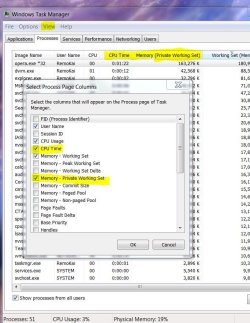
Sounds like a possible memory leak. To attempt to try and find out what the culprit is:


Task Manager>Processes then select View>Select Columns... and tick Memory - Private Working Set and CPU Time

Task Manager.JPG

It might help show what process is hogging both the CPU and Memory.
 

My Computer My Computer

Computer type
PC/Desktop
Computer Manufacturer/Model Number
Systems by SmartEyeball
OS
8 Pro x64
CPU
i7 3770K 4.6GHz
Motherboard
ASUS P8Z77 WS
Memory
16GB G.Skill Trident X 2666mhz
Graphics Card(s)
x2 EVGA 780 Ti Superclocked SLI
Sound Card
SB X-FI Surround 5.1 PRO USB / ATH-AD900 Headphones
Monitor(s) Displays
x3 Dell U2410 / 58" Samsung
Screen Resolution
5760*1200/ 1920*1200
Hard Drives
2x Intel 520 240GB (RAID 0) * 2x WD Caviar Blacks 2TB (RAID 0) * 2TB WD Caviar Black * Sony Optirac DVD
PSU
Silverstone Strider Evolution 1200W
Case
Thermaltake Level 10 GT Snow Edition
Cooling
Noctua NH-D14
Keyboard
Topre Realforce // Ducky Shine MX Black // Filco Ninja TKL
Mouse
Thermaltake Theron (Highly Recommended) + Razer Imperator
Antivirus
MSE
Browser
IE, FF, WaterFox
Other Info
GT Extreme V2 Sim Racing Cockpit + 40" LCD and K/B Mouse stand ▼
Fanatec CSR Elite Wheel + Clubsport V1 Pedals + CSR shifter/7G-H ▼Saitek X52 Pro ▼ TrackIR 5 Pro
Buttkicker v2 Seat Rumbler with Dedicated 5.1 and Sub Woofer attached to frame ▼
=
Bloody Big Grin
Is this screen tearing using Eyefinity? And does the screen tearing look like the top half of the screen is out of sync with the lower half?

It sounds like a V-Sync issue. V-Sync was permanently broken when I used to run Eyefinity, maybe it still is :huh:

Alternatively, do your monitors have a 'Game Mode' function, and if so, are they enabled? Game mode also introduces tearing.


which i find odd cuz i see people who OC WAY higher than i am with less than half the problems
when im not even clocked as high as some other people who run it just fine?

The higher the clock speed, the 'smoother' it should be. Try lowering/disabling XAA (anti-aliasing). This has a big impact on both frame rate and VRAM usage, particularly in Eyefinty.

Also is your 6970 a 1GB or 2GB version?

somthing im unaware of is running my ram up from 3.2gb, to 4.1, some times as much as 5gb

Sounds like a possible memory leak. To attempt to try and find out what the culprit is:


Task Manager>Processes then select View>Select Columns... and tick Memory - Private Working Set and CPU Time

View attachment 197888

It might help show what process is hogging both the CPU and Memory.

i know SQL is hogging my cpu so i turn it off, ill look into my ram issue, the taring is similar to what you described, sounds like they havent done much with the V-Sync issue, i looked it up, people are saying if it is using tri-buffer, leave it on, most games use quad-buffer though, so does that mean i should turn V-Sync off? im using the 2gb sapphire BFBC2ed (you proly din' need to know that part about BFBC2, but special ed.s sometimes change specs here and there). im finding this taring when i watch youtube videos also, especially vimeo, idk what the deal is with the whole, start-stop-start-stop issue with the video quality.
i changed my graphics from use application settings to override application settings and set them to "2x standard" with "morphalogical filtering" off.
i have my sample quality at Super-sample AA so i dont get that choppy MW2/3 effect, leme know if i need to turn that down to adaptive multi sample or multi sample.
i have set the anisoropic filtering to 2, i was using application setting, dk how that was working out, leme know if you think i could get away with turning that up cuz on 2x it looks REALLY crappy.
im leaving my "standard 3d settings" at "use application settings" but am able to turn that off if you think it would be necessary.

back to the taring issue, the part i find really odd, is its not taring in the game, its taring er'y where else, the game is still running just fine besides the laggyness and the sudden frame rate drops
 

My Computer My Computer

Computer type
PC/Desktop
Computer Manufacturer/Model Number
Custom Build
OS
windows 7 Professional
CPU
Intel I7 4790k
Motherboard
ASUS Hero VII
Memory
16gb DDR3 1600mhz
Graphics Card(s)
Dual GTX 780 ASUS
Monitor(s) Displays
2x HP 2331
Screen Resolution
1080p
Hard Drives
750gb Hitachi 7200rpm
500gb Crucial SSD
PSU
Corsair 800g
Case
NZXT Phantom
Cooling
fan
Keyboard
Razer Deathstalker
Mouse
Razer Ouroboros
Internet Speed
70mbps
Antivirus
MSE + M-Bam
Browser
Chrome
Is this screen tearing using Eyefinity? And does the screen tearing look like the top half of the screen is out of sync with the lower half?

It sounds like a V-Sync issue. V-Sync was permanently broken when I used to run Eyefinity, maybe it still is :huh:

Alternatively, do your monitors have a 'Game Mode' function, and if so, are they enabled? Game mode also introduces tearing.


which i find odd cuz i see people who OC WAY higher than i am with less than half the problems
when im not even clocked as high as some other people who run it just fine?

The higher the clock speed, the 'smoother' it should be. Try lowering/disabling XAA (anti-aliasing). This has a big impact on both frame rate and VRAM usage, particularly in Eyefinty.

Also is your 6970 a 1GB or 2GB version?

somthing im unaware of is running my ram up from 3.2gb, to 4.1, some times as much as 5gb

Sounds like a possible memory leak. To attempt to try and find out what the culprit is:


Task Manager>Processes then select View>Select Columns... and tick Memory - Private Working Set and CPU Time

View attachment 197888

It might help show what process is hogging both the CPU and Memory.

oh, no game mode that i am aware of also
 

My Computer My Computer

Computer type
PC/Desktop
Computer Manufacturer/Model Number
Custom Build
OS
windows 7 Professional
CPU
Intel I7 4790k
Motherboard
ASUS Hero VII
Memory
16gb DDR3 1600mhz
Graphics Card(s)
Dual GTX 780 ASUS
Monitor(s) Displays
2x HP 2331
Screen Resolution
1080p
Hard Drives
750gb Hitachi 7200rpm
500gb Crucial SSD
PSU
Corsair 800g
Case
NZXT Phantom
Cooling
fan
Keyboard
Razer Deathstalker
Mouse
Razer Ouroboros
Internet Speed
70mbps
Antivirus
MSE + M-Bam
Browser
Chrome
sounds like they havent done much with the V-Sync issue,

One thing to check would be to use the frame rate counter Fraps.

If V-Sync is set to ON in the app (forcing it in CCC never worked for me) and the framerate still jumps over 60fps and maxes out a 120fps, it's still broken.

In single screen mode it shouldn't shoot past 60FPS.

i looked it up, people are saying if it is using tri-buffer, leave it on, most games use quad-buffer though, so does that mean i should turn V-Sync off?

Leave triple buffering on. It only affects OpenGL and not DirectX (which 97% of games use).

Quad buffering is only used for 3D (HD3D, iZ3D)


im using the 2gb sapphire BFBC2ed (you proly din' need to know that part about BFBC2, but special ed.s sometimes change specs here and there).

The important part is that it's a 2GB model. 1GB models really struggle with Eyefinity.


im finding this taring when i watch youtube videos also, especially vimeo, idk what the deal is with the whole, start-stop-start-stop issue with the video quality.

You don't mean buffering do you? It loads a bit, plays - stops until it loads, plays, stops, loads, plays?

The tearing is another factor.


i have my sample quality at Super-sample AA so i dont get that choppy MW2/3 effect, leme know if i need to turn that down to adaptive multi sample or multi sample.

Just use the one you are most happy with performance/quality wise. MSAA probably has the biggest hit on performance.


i have set the anisoropic filtering to 2, i was using application setting, dk how that was working out, leme know if you think i could get away with turning that up cuz on 2x it looks REALLY crappy.

lol, it certainly would :p

@ 1920x1080 the card can handle x16

In eyefinity, x4 or x8, even x16 depending on the game.

With Eyefinity there are usually a few sacrifices needed to attain smoothness.

Anti-Aliasing @x2 or even off. MLAA Off. AF x4-x8 SSAO (Ambient Occlusion low/off


im leaving my "standard 3d settings" at "use application settings" but am able to turn that off if you think it would be necessary.

I always found with CCC that the "use application settings" was best. For those options that aren't available in game, you can always attempt to override them in CCC.


back to the taring issue, the part i find really odd, is its not taring in the game, its taring er'y where else, the game is still running just fine besides the laggyness and the sudden frame rate drops


Just to clarify, this is all happening using the Eyefinity setup/resolution?

►Have you tried single screen / breaking the eyfinity group to see if the tearing happens when the monitors are in extended mode instead?

►When did this tearing first start?
From the day you installed the card, overclocked the CPU or overclocked the GPU?

►If it only happened after overclocking the CPU, set it back to stock for now.

►What previous card did you have before the 6970?

It might be worth doing another driver uninstall/driversweep and re-installation if not already done so.
 

My Computer My Computer

Computer type
PC/Desktop
Computer Manufacturer/Model Number
Systems by SmartEyeball
OS
8 Pro x64
CPU
i7 3770K 4.6GHz
Motherboard
ASUS P8Z77 WS
Memory
16GB G.Skill Trident X 2666mhz
Graphics Card(s)
x2 EVGA 780 Ti Superclocked SLI
Sound Card
SB X-FI Surround 5.1 PRO USB / ATH-AD900 Headphones
Monitor(s) Displays
x3 Dell U2410 / 58" Samsung
Screen Resolution
5760*1200/ 1920*1200
Hard Drives
2x Intel 520 240GB (RAID 0) * 2x WD Caviar Blacks 2TB (RAID 0) * 2TB WD Caviar Black * Sony Optirac DVD
PSU
Silverstone Strider Evolution 1200W
Case
Thermaltake Level 10 GT Snow Edition
Cooling
Noctua NH-D14
Keyboard
Topre Realforce // Ducky Shine MX Black // Filco Ninja TKL
Mouse
Thermaltake Theron (Highly Recommended) + Razer Imperator
Antivirus
MSE
Browser
IE, FF, WaterFox
Other Info
GT Extreme V2 Sim Racing Cockpit + 40" LCD and K/B Mouse stand ▼
Fanatec CSR Elite Wheel + Clubsport V1 Pedals + CSR shifter/7G-H ▼Saitek X52 Pro ▼ TrackIR 5 Pro
Buttkicker v2 Seat Rumbler with Dedicated 5.1 and Sub Woofer attached to frame ▼
=
Bloody Big Grin
sounds like they havent done much with the V-Sync issue,

One thing to check would be to use the frame rate counter Fraps.

If V-Sync is set to ON in the app (forcing it in CCC never worked for me) and the framerate still jumps over 60fps and maxes out a 120fps, it's still broken.

In single screen mode it shouldn't shoot past 60FPS.

i looked it up, people are saying if it is using tri-buffer, leave it on, most games use quad-buffer though, so does that mean i should turn V-Sync off?

Leave triple buffering on. It only affects OpenGL and not DirectX (which 97% of games use).

Quad buffering is only used for 3D (HD3D, iZ3D)


The important part is that it's a 2GB model. 1GB models really struggle with Eyefinity.


You don't mean buffering do you? It loads a bit, plays - stops until it loads, plays, stops, loads, plays?

The tearing is another factor.


Just use the one you are most happy with performance/quality wise. MSAA probably has the biggest hit on performance.


lol, it certainly would :p

@ 1920x1080 the card can handle x16

In eyefinity, x4 or x8, even x16 depending on the game.

With Eyefinity there are usually a few sacrifices needed to attain smoothness.

Anti-Aliasing @x2 or even off. MLAA Off. AF x4-x8 SSAO (Ambient Occlusion low/off


im leaving my "standard 3d settings" at "use application settings" but am able to turn that off if you think it would be necessary.

I always found with CCC that the "use application settings" was best. For those options that aren't available in game, you can always attempt to override them in CCC.


back to the taring issue, the part i find really odd, is its not taring in the game, its taring er'y where else, the game is still running just fine besides the laggyness and the sudden frame rate drops


Just to clarify, this is all happening using the Eyefinity setup/resolution?

►Have you tried single screen / breaking the eyfinity group to see if the tearing happens when the monitors are in extended mode instead?

►When did this tearing first start?
From the day you installed the card, overclocked the CPU or overclocked the GPU?

►If it only happened after overclocking the CPU, set it back to stock for now.

►What previous card did you have before the 6970?

It might be worth doing another driver uninstall/driversweep and re-installation if not already done so.

ty, i was using a 5770 before this one, i may try using the microsoft default 3 monitor setup, i rarely use eyfinity except for few veriouse things. i praticularly liked it for DA:O and DA][. ill try that. this happens whan my graphics is OCd, some times rarely when its not, and by rarely i mean almost never, i think there was a possibilty it was happening before OC, but i just never noticed because it was not often enough.
 

My Computer My Computer

Computer type
PC/Desktop
Computer Manufacturer/Model Number
Custom Build
OS
windows 7 Professional
CPU
Intel I7 4790k
Motherboard
ASUS Hero VII
Memory
16gb DDR3 1600mhz
Graphics Card(s)
Dual GTX 780 ASUS
Monitor(s) Displays
2x HP 2331
Screen Resolution
1080p
Hard Drives
750gb Hitachi 7200rpm
500gb Crucial SSD
PSU
Corsair 800g
Case
NZXT Phantom
Cooling
fan
Keyboard
Razer Deathstalker
Mouse
Razer Ouroboros
Internet Speed
70mbps
Antivirus
MSE + M-Bam
Browser
Chrome
sounds like they havent done much with the V-Sync issue,

One thing to check would be to use the frame rate counter Fraps.

If V-Sync is set to ON in the app (forcing it in CCC never worked for me) and the framerate still jumps over 60fps and maxes out a 120fps, it's still broken.

In single screen mode it shouldn't shoot past 60FPS.

i looked it up, people are saying if it is using tri-buffer, leave it on, most games use quad-buffer though, so does that mean i should turn V-Sync off?

Leave triple buffering on. It only affects OpenGL and not DirectX (which 97% of games use).

Quad buffering is only used for 3D (HD3D, iZ3D)


The important part is that it's a 2GB model. 1GB models really struggle with Eyefinity.


You don't mean buffering do you? It loads a bit, plays - stops until it loads, plays, stops, loads, plays?

The tearing is another factor.


Just use the one you are most happy with performance/quality wise. MSAA probably has the biggest hit on performance.


lol, it certainly would :p

@ 1920x1080 the card can handle x16

In eyefinity, x4 or x8, even x16 depending on the game.

With Eyefinity there are usually a few sacrifices needed to attain smoothness.

Anti-Aliasing @x2 or even off. MLAA Off. AF x4-x8 SSAO (Ambient Occlusion low/off


im leaving my "standard 3d settings" at "use application settings" but am able to turn that off if you think it would be necessary.

I always found with CCC that the "use application settings" was best. For those options that aren't available in game, you can always attempt to override them in CCC.


back to the taring issue, the part i find really odd, is its not taring in the game, its taring er'y where else, the game is still running just fine besides the laggyness and the sudden frame rate drops


Just to clarify, this is all happening using the Eyefinity setup/resolution?

►Have you tried single screen / breaking the eyfinity group to see if the tearing happens when the monitors are in extended mode instead?

►When did this tearing first start?
From the day you installed the card, overclocked the CPU or overclocked the GPU?

►If it only happened after overclocking the CPU, set it back to stock for now.

►What previous card did you have before the 6970?

It might be worth doing another driver uninstall/driversweep and re-installation if not already done so.

i "changed" my type of eyefinity display, its not true eyfinity anymore, concept is the same, but it should lower my GPU/GRAM by a particularly noticeable amount. instead of running 3 1920x1080 displays as 5760x1080 im now running just 3 extended displays which should speed things up hopfully. i once AGAIN updated my trixx drivers, ill try running some benchmarks later
 

My Computer My Computer

Computer type
PC/Desktop
Computer Manufacturer/Model Number
Custom Build
OS
windows 7 Professional
CPU
Intel I7 4790k
Motherboard
ASUS Hero VII
Memory
16gb DDR3 1600mhz
Graphics Card(s)
Dual GTX 780 ASUS
Monitor(s) Displays
2x HP 2331
Screen Resolution
1080p
Hard Drives
750gb Hitachi 7200rpm
500gb Crucial SSD
PSU
Corsair 800g
Case
NZXT Phantom
Cooling
fan
Keyboard
Razer Deathstalker
Mouse
Razer Ouroboros
Internet Speed
70mbps
Antivirus
MSE + M-Bam
Browser
Chrome
Back
Top