Windows wakes up immediately from sleep

DannyG13

New member
Local time
9:15 PM
Messages
30
Ok, this is a problem I've had for about 4 months. It's very sporadic and intermittent and despite my best efforts, I've been unable to solve it. I put the system into sleep mode, and almost every time it wakes up immediately. I have narrowed it down to a keyboard issue (Logitech Illuminated Keyboard) because it has never woken up immediately when I disconnect said keyboard. And sometimes it DOES sleep with the keyboard plugged in, but not often. I've tried powercfg -lastwake and using power troubleshooter in event manager and come up with either 'unknown' or 'power-troubleshooter'. I've disabled all power management wake modes for all the devices like LAN and USB in device manager but it doesn't cure the problem. I used a sleep utility to try to help but it made no difference. Anyone got any genius words of wisdom? Something I haven't tried yet? It really is frustrating the bejesus out of me.
 

My Computer My Computer

At a glance

Windows 7 Ultimate 64I7 92018GB Corsair 9-9-9-24 1600MhzBFG 2XGTX 285 SLI
OS
Windows 7 Ultimate 64
CPU
I7 920
Motherboard
EX58-Extreme
Memory
18GB Corsair 9-9-9-24 1600Mhz
Graphics Card(s)
BFG 2XGTX 285 SLI
Sound Card
Onboard Realtek HD
Monitor(s) Displays
Acer 17"
Hard Drives
WD 500GB
PSU
Seasonic 700W
Case
Antec
Err... replace with a different keyboard? I'm only half joking :D
 

My Computer My Computer

At a glance

Windows 10 Pro X64Intel Quad Core i7-4770 @ 3.4Ghz16.0GB PC3-12800 DDR3 SDRAM 1600 MHzIntel Integrated HD Graphics
Computer type
PC/Desktop
Computer Manufacturer/Model Number
Lenovo IdeaCenter 450
OS
Windows 10 Pro X64
CPU
Intel Quad Core i7-4770 @ 3.4Ghz
Memory
16.0GB PC3-12800 DDR3 SDRAM 1600 MHz
Graphics Card(s)
Intel Integrated HD Graphics
Sound Card
Realtek HD Audio
Monitor(s) Displays
HP 22" LCD
Screen Resolution
1680 x 1050
Hard Drives
250GB Samsung EVO SATA-3 SSD
2TB Seagate ST2000DM001 SATA-2
1.5TB Seagate ST3150041AS SATA
Keyboard
Dell USB
Mouse
Lenovo USB
Internet Speed
Cable via Road Runner 3MB Upload, 30MB Download
Antivirus
Windows Defender, MBAM Pro, MBAE
Browser
Seamonkey
Other Info
UEFI/GPT
PLDS DVD-RW DH16AERSH
Err... replace with a different keyboard? I'm only half joking :D

I don't have a spare one lying around and I don't know anyone else who does. But yes, I had thought of that...
 

My Computer My Computer

At a glance

Windows 7 Ultimate 64I7 92018GB Corsair 9-9-9-24 1600MhzBFG 2XGTX 285 SLI
OS
Windows 7 Ultimate 64
CPU
I7 920
Motherboard
EX58-Extreme
Memory
18GB Corsair 9-9-9-24 1600Mhz
Graphics Card(s)
BFG 2XGTX 285 SLI
Sound Card
Onboard Realtek HD
Monitor(s) Displays
Acer 17"
Hard Drives
WD 500GB
PSU
Seasonic 700W
Case
Antec
No, this is not the problem - tested the same keyboard on another machine, and it went to sleep no issue. I really have no idea what the problem is here.
 

My Computer My Computer

At a glance

Windows 7 Ultimate 64I7 92018GB Corsair 9-9-9-24 1600MhzBFG 2XGTX 285 SLI
OS
Windows 7 Ultimate 64
CPU
I7 920
Motherboard
EX58-Extreme
Memory
18GB Corsair 9-9-9-24 1600Mhz
Graphics Card(s)
BFG 2XGTX 285 SLI
Sound Card
Onboard Realtek HD
Monitor(s) Displays
Acer 17"
Hard Drives
WD 500GB
PSU
Seasonic 700W
Case
Antec

My Computer My Computer

At a glance

Windows 10 Pro X64Intel Quad Core i7-4770 @ 3.4Ghz16.0GB PC3-12800 DDR3 SDRAM 1600 MHzIntel Integrated HD Graphics
Computer type
PC/Desktop
Computer Manufacturer/Model Number
Lenovo IdeaCenter 450
OS
Windows 10 Pro X64
CPU
Intel Quad Core i7-4770 @ 3.4Ghz
Memory
16.0GB PC3-12800 DDR3 SDRAM 1600 MHz
Graphics Card(s)
Intel Integrated HD Graphics
Sound Card
Realtek HD Audio
Monitor(s) Displays
HP 22" LCD
Screen Resolution
1680 x 1050
Hard Drives
250GB Samsung EVO SATA-3 SSD
2TB Seagate ST2000DM001 SATA-2
1.5TB Seagate ST3150041AS SATA
Keyboard
Dell USB
Mouse
Lenovo USB
Internet Speed
Cable via Road Runner 3MB Upload, 30MB Download
Antivirus
Windows Defender, MBAM Pro, MBAE
Browser
Seamonkey
Other Info
UEFI/GPT
PLDS DVD-RW DH16AERSH
I did, yes, up till about 2 months ago then I removed XP and went back to just having Windows 7 alone.
 

My Computer My Computer

At a glance

Windows 7 Ultimate 64I7 92018GB Corsair 9-9-9-24 1600MhzBFG 2XGTX 285 SLI
OS
Windows 7 Ultimate 64
CPU
I7 920
Motherboard
EX58-Extreme
Memory
18GB Corsair 9-9-9-24 1600Mhz
Graphics Card(s)
BFG 2XGTX 285 SLI
Sound Card
Onboard Realtek HD
Monitor(s) Displays
Acer 17"
Hard Drives
WD 500GB
PSU
Seasonic 700W
Case
Antec
Are you sure the problem didn't start around the time you removed the dual boot setup?

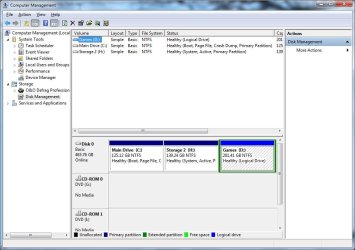
What does Disk Management look like? Can you post a screen shot of it?
 

My Computer My Computer

At a glance

Windows 10 Pro X64Intel Quad Core i7-4770 @ 3.4Ghz16.0GB PC3-12800 DDR3 SDRAM 1600 MHzIntel Integrated HD Graphics
Computer type
PC/Desktop
Computer Manufacturer/Model Number
Lenovo IdeaCenter 450
OS
Windows 10 Pro X64
CPU
Intel Quad Core i7-4770 @ 3.4Ghz
Memory
16.0GB PC3-12800 DDR3 SDRAM 1600 MHz
Graphics Card(s)
Intel Integrated HD Graphics
Sound Card
Realtek HD Audio
Monitor(s) Displays
HP 22" LCD
Screen Resolution
1680 x 1050
Hard Drives
250GB Samsung EVO SATA-3 SSD
2TB Seagate ST2000DM001 SATA-2
1.5TB Seagate ST3150041AS SATA
Keyboard
Dell USB
Mouse
Lenovo USB
Internet Speed
Cable via Road Runner 3MB Upload, 30MB Download
Antivirus
Windows Defender, MBAM Pro, MBAE
Browser
Seamonkey
Other Info
UEFI/GPT
PLDS DVD-RW DH16AERSH
Ok, this is a problem I've had for about 4 months. It's very sporadic and intermittent and despite my best efforts, I've been unable to solve it. I put the system into sleep mode, and almost every time it wakes up immediately. I have narrowed it down to a keyboard issue (Logitech Illuminated Keyboard) because it has never woken up immediately when I disconnect said keyboard. And sometimes it DOES sleep with the keyboard plugged in, but not often. I've tried powercfg -lastwake and using power troubleshooter in event manager and come up with either 'unknown' or 'power-troubleshooter'. I've disabled all power management wake modes for all the devices like LAN and USB in device manager but it doesn't cure the problem. I used a sleep utility to try to help but it made no difference. Anyone got any genius words of wisdom? Something I haven't tried yet? It really is frustrating the bejesus out of me.


I had the EXACT same issue after getting the Logitech Illuminated KeyBoard (love it - BTW).

This should solve the issue: Go to the Device Manager & find "Logitech HID Compliant Keyboard". Right-click > Properties > Power Management Tab and Uncheck "Allow this device to wake computer".

That should do it!
 

My Computer My Computer

At a glance

Windows 7 Professional 64 Bit SP1Intel i7-3770K. Mild Overclock to 4.2 GhzCrucial Ballistix Sport 32GB DDR3-1600 (PC3-1...Intel 4000 - On CPU
Computer type
PC/Desktop
Computer Manufacturer/Model Number
Custom Build
OS
Windows 7 Professional 64 Bit SP1
CPU
Intel i7-3770K. Mild Overclock to 4.2 Ghz
Motherboard
ASUS Sabertooth Z77
Memory
Crucial Ballistix Sport 32GB DDR3-1600 (PC3-12800)
Graphics Card(s)
Intel 4000 - On CPU
Sound Card
On Board
Monitor(s) Displays
HP w2408h
Screen Resolution
1920 x 1200
Hard Drives
Samsung 840 Pro 256Gb SSD, --
Two - WDC WD1001FALS-00J7B0 SATA
PSU
Antec EarthWatts Green Series 650 Watt ATX
Case
Fractal Design Core 3000 ATX
Cooling
Corsair H80i Water Cooled
Keyboard
Logitech Illuminated
Mouse
Logitech Wireless Trackball M570 + Touchpad T650
Internet Speed
9.5 Mbps down - 25.4 Mbps upload
Antivirus
MSE
Browser
IE 10, Chrome
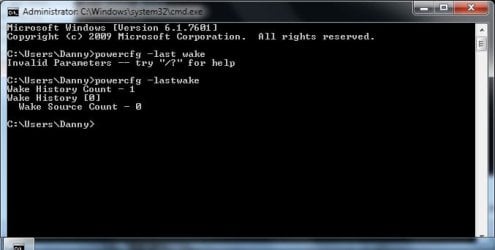
To confirm what woke up your Windows from sleep:

Start> Type CMD in search box> Click on CMD.exe in results above> Type in:

powercfg –lastwake

Enter

nn3cir.jpg


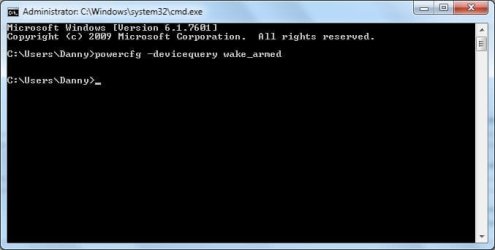
To get the more detailed info on the device that wakes your Windows up during the sleep, and the most likely suspect, type:

powercfg –devicequery wake_armed

Enter

w9wqvr.jpg


If the PC was last awoken by itself, this will be you culprit

A Guy
 

My Computer My Computer

At a glance

Windows 10 Home x64INTEL Core i5-750 Quad-Core 3.37GHzHyperX Fury Black Series 8GB (2 x 4GB) 1866MhzEVGA GeForce GTX 750 Superclocked 1GB 128-Bit...
Computer type
PC/Desktop
OS
Windows 10 Home x64
CPU
INTEL Core i5-750 Quad-Core 3.37GHz
Motherboard
ASUS P7P55D
Memory
HyperX Fury Black Series 8GB (2 x 4GB) 1866Mhz
Graphics Card(s)
EVGA GeForce GTX 750 Superclocked 1GB 128-Bit GDDR5
Monitor(s) Displays
LG 32MA68HY 32" IPS
Screen Resolution
1920 x 1080
Hard Drives
Samsung 840 Evo 120GB, SEAGATE 500GB Barracuda® 7200.12, SATA 3 Gb/s, 7200 RPM, 16MB cache
PSU
ANTEC TruePower New TP-550, 80 PLUS, 550W
Case
ANTEC Three Hundred Illusion
Cooling
COOLER MASTER Hyper 212 Plus, 4 x 120mm 1 x 140mm Noctua's
Internet Speed
85 + Mbps
Antivirus
Avast
Browser
Vivaldi
Are you sure the problem didn't start around the time you removed the dual boot setup?

What does Disk Management look like? Can you post a screen shot of it?

Possibly did. I've attached a grab of Disk Management. Cheers.
 

Attachments

  • Disk management.jpg
    Disk management.jpg
    76.2 KB · Views: 81

My Computer My Computer

At a glance

Windows 7 Ultimate 64I7 92018GB Corsair 9-9-9-24 1600MhzBFG 2XGTX 285 SLI
OS
Windows 7 Ultimate 64
CPU
I7 920
Motherboard
EX58-Extreme
Memory
18GB Corsair 9-9-9-24 1600Mhz
Graphics Card(s)
BFG 2XGTX 285 SLI
Sound Card
Onboard Realtek HD
Monitor(s) Displays
Acer 17"
Hard Drives
WD 500GB
PSU
Seasonic 700W
Case
Antec
Ok, this is a problem I've had for about 4 months. It's very sporadic and intermittent and despite my best efforts, I've been unable to solve it. I put the system into sleep mode, and almost every time it wakes up immediately. I have narrowed it down to a keyboard issue (Logitech Illuminated Keyboard) because it has never woken up immediately when I disconnect said keyboard. And sometimes it DOES sleep with the keyboard plugged in, but not often. I've tried powercfg -lastwake and using power troubleshooter in event manager and come up with either 'unknown' or 'power-troubleshooter'. I've disabled all power management wake modes for all the devices like LAN and USB in device manager but it doesn't cure the problem. I used a sleep utility to try to help but it made no difference. Anyone got any genius words of wisdom? Something I haven't tried yet? It really is frustrating the bejesus out of me.


I had the EXACT same issue after getting the Logitech Illuminated KeyBoard (love it - BTW).

This should solve the issue: Go to the Device Manager & find "Logitech HID Compliant Keyboard". Right-click > Properties > Power Management Tab and Uncheck "Allow this device to wake computer".

That should do it!

If only it did. Checking or unchecking that box makes no difference. Thanks for the reply though.
 

My Computer My Computer

At a glance

Windows 7 Ultimate 64I7 92018GB Corsair 9-9-9-24 1600MhzBFG 2XGTX 285 SLI
OS
Windows 7 Ultimate 64
CPU
I7 920
Motherboard
EX58-Extreme
Memory
18GB Corsair 9-9-9-24 1600Mhz
Graphics Card(s)
BFG 2XGTX 285 SLI
Sound Card
Onboard Realtek HD
Monitor(s) Displays
Acer 17"
Hard Drives
WD 500GB
PSU
Seasonic 700W
Case
Antec
To confirm what woke up your Windows from sleep:

Start> Type CMD in search box> Click on CMD.exe in results above> Type in:

powercfg –lastwake

Enter

nn3cir.jpg


To get the more detailed info on the device that wakes your Windows up during the sleep, and the most likely suspect, type:

powercfg –devicequery wake_armed

Enter

w9wqvr.jpg


If the PC was last awoken by itself, this will be you culprit

A Guy

Appreciate the response. I have tried all this and while occasionally it does give a culprit, I then remedy that culprit but it still wakes anyway. I've attached screengrabs of all the evidence. Hope this enlightens someone. But as I say, if I disconnect the keyboard, it sleeps no problem at all.
 

Attachments

  • unknown.jpg
    unknown.jpg
    91.8 KB · Views: 40
  • last wake.jpg
    last wake.jpg
    21.3 KB · Views: 39
  • wake armed.jpg
    wake armed.jpg
    16.4 KB · Views: 33

My Computer My Computer

At a glance

Windows 7 Ultimate 64I7 92018GB Corsair 9-9-9-24 1600MhzBFG 2XGTX 285 SLI
OS
Windows 7 Ultimate 64
CPU
I7 920
Motherboard
EX58-Extreme
Memory
18GB Corsair 9-9-9-24 1600Mhz
Graphics Card(s)
BFG 2XGTX 285 SLI
Sound Card
Onboard Realtek HD
Monitor(s) Displays
Acer 17"
Hard Drives
WD 500GB
PSU
Seasonic 700W
Case
Antec
Looks like you have the same setup the guy in the link I gave you had, or very similar, where Windows is not on the boot drive.

C: Boot, Page File, etc.
H: System, Active <== Windows here ??

I don't know how to fix this so I'm hoping one of the other folks here, like Gregrocker, will stop by with some ideas. I'll send him a PM.
 

My Computer My Computer

At a glance

Windows 10 Pro X64Intel Quad Core i7-4770 @ 3.4Ghz16.0GB PC3-12800 DDR3 SDRAM 1600 MHzIntel Integrated HD Graphics
Computer type
PC/Desktop
Computer Manufacturer/Model Number
Lenovo IdeaCenter 450
OS
Windows 10 Pro X64
CPU
Intel Quad Core i7-4770 @ 3.4Ghz
Memory
16.0GB PC3-12800 DDR3 SDRAM 1600 MHz
Graphics Card(s)
Intel Integrated HD Graphics
Sound Card
Realtek HD Audio
Monitor(s) Displays
HP 22" LCD
Screen Resolution
1680 x 1050
Hard Drives
250GB Samsung EVO SATA-3 SSD
2TB Seagate ST2000DM001 SATA-2
1.5TB Seagate ST3150041AS SATA
Keyboard
Dell USB
Mouse
Lenovo USB
Internet Speed
Cable via Road Runner 3MB Upload, 30MB Download
Antivirus
Windows Defender, MBAM Pro, MBAE
Browser
Seamonkey
Other Info
UEFI/GPT
PLDS DVD-RW DH16AERSH
Are you sure the problem didn't start around the time you removed the dual boot setup?

What does Disk Management look like? Can you post a screen shot of it?

Possibly did. I've attached a grab of Disk Management. Cheers.


Ztruker is correct. Your HD is still configured for a Dual Boot.

Why are your System Active boot files for Win7 on the Storage partition? Was this where XP was located?

If you did not correctly delete XP in Disk Mgmt then you still have a Dual Boot setup with the Win7 boot files updating the XP ones on XP partition.

I cannot say for sure this is the cause of your sleep problems but it is not at all a correct configuration of your HD.

Please explain what you have done so we can proceed with reconfiguring it correctly.
 
Yes, I do still have dual boot configuration because I merely removed the XP partition and left the Windows 7 bootmanager as it was bar removing the 30 second choice option. The setup is all on a single 500MB HD - divided into 3 partitions. With the price of HDs right now I refuse to invest in a bigger faster additional one - put simply they cost too much. Anyway, I originally installed Windows 7 onto the C: partition, and had created the other 2 partitions for Games and Storage space. Problem was I wanted to revisit some older XP software which didn't run on 7, so I created a new partition after D: and installed XP on there. I used Neosmart Easy BCD to configure a dual boot given the XP install had over written the 7 boot files. Then, once I was done with XP I simply erased that partition, redistributed the free space and removed the dual boot choice from the manager in 7. I'd be genuinely stunned if this was the cause of my sleep problems though.
 

My Computer My Computer

At a glance

Windows 7 Ultimate 64I7 92018GB Corsair 9-9-9-24 1600MhzBFG 2XGTX 285 SLI
OS
Windows 7 Ultimate 64
CPU
I7 920
Motherboard
EX58-Extreme
Memory
18GB Corsair 9-9-9-24 1600Mhz
Graphics Card(s)
BFG 2XGTX 285 SLI
Sound Card
Onboard Realtek HD
Monitor(s) Displays
Acer 17"
Hard Drives
WD 500GB
PSU
Seasonic 700W
Case
Antec
Yes, I do still have dual boot configuration because I merely removed the XP partition and left the Windows 7 bootmanager as it was bar removing the 30 second choice option. The setup is all on a single 500MB HD - divided into 3 partitions. With the price of HDs right now I refuse to invest in a bigger faster additional one - put simply they cost too much. Anyway, I originally installed Windows 7 onto the C: partition, and had created the other 2 partitions for Games and Storage space. Problem was I wanted to revisit some older XP software which didn't run on 7, so I created a new partition after D: and installed XP on there. I used Neosmart Easy BCD to configure a dual boot given the XP install had over written the 7 boot files. Then, once I was done with XP I simply erased that partition, redistributed the free space and removed the dual boot choice from the manager in 7. I'd be genuinely stunned if this was the cause of my sleep problems though.

From another one of your posts/screenshots, it appears that the device causing your PC to wake up is unknown. Is there anything in your device manager listed as "unknown"?

Also, from what you just wrote, a better solution to having Win XP available to run some programs is to download & install Win XP mode, which runs on Virtual PC. This is free from Microsoft:

Download Windows XP Mode

I use it to run stuff that only works in XP & works fine. It can run simultaneously with Win 7.

Just maybe your wake from sleep issue will be gone. No guarantee, but you should consider trying XP Mode.

You need to get rid of the dual boot setup first & reinstall Win 7 before installing XP mode.
 

My Computer My Computer

At a glance

Windows 7 Professional 64 Bit SP1Intel i7-3770K. Mild Overclock to 4.2 GhzCrucial Ballistix Sport 32GB DDR3-1600 (PC3-1...Intel 4000 - On CPU
Computer type
PC/Desktop
Computer Manufacturer/Model Number
Custom Build
OS
Windows 7 Professional 64 Bit SP1
CPU
Intel i7-3770K. Mild Overclock to 4.2 Ghz
Motherboard
ASUS Sabertooth Z77
Memory
Crucial Ballistix Sport 32GB DDR3-1600 (PC3-12800)
Graphics Card(s)
Intel 4000 - On CPU
Sound Card
On Board
Monitor(s) Displays
HP w2408h
Screen Resolution
1920 x 1200
Hard Drives
Samsung 840 Pro 256Gb SSD, --
Two - WDC WD1001FALS-00J7B0 SATA
PSU
Antec EarthWatts Green Series 650 Watt ATX
Case
Fractal Design Core 3000 ATX
Cooling
Corsair H80i Water Cooled
Keyboard
Logitech Illuminated
Mouse
Logitech Wireless Trackball M570 + Touchpad T650
Internet Speed
9.5 Mbps down - 25.4 Mbps upload
Antivirus
MSE
Browser
IE 10, Chrome
Your response does not answer the question of why the System Active boot files are located on the H storage partition. This indicates it is where XP was installed and that XP has not been removed unless it was deleted piecemeal. Is there a Windows folder on H?

Either way what I would do is mark C Active then boot into Win7 DVD or System Repair Disk to Run Startup Repair 3 Separate Times with reboots until Repair writes the System boot files to C and it starts up on its own without H.

Confirm C is now System Active, then move the data off H to delete and recreate it in Disk Management.

Once you have the boot configured correctly if the Sleep issue persists and the other suggestions dont' help, get a Sleep trace by Gathering a Startup, Shutdown, Sleep, Hibernate, or Reboot Trace - Windows 7 Forums and posting it up for analysis.
 
Your response does not answer the question of why the System Active boot files are located on the H storage partition. This indicates it is where XP was installed and that XP has not been removed unless it was deleted piecemeal. Is there a Windows folder on H?

Either way what I would do is mark C Active then boot into Win7 DVD or System Repair Disk to Run Startup Repair 3 Separate Times with reboots until Repair writes the System boot files to C and it starts up on its own without H.

Confirm C is now System Active, then move the data off H to delete and recreate it in Disk Management.

Once you have the boot configured correctly if the Sleep issue persists and the other suggestions dont' help, get a Sleep trace by Gathering a Startup, Shutdown, Sleep, Hibernate, or Reboot Trace - Windows 7 Forums and posting it up for analysis.

That is correct, Greg. I'm aware of that. But, because he mentioned a need to run XP programs, the virtual disc would be a good solution vs a dual boot, unless there is some reason he particularly wants a dual boot setup.

Just in case he is interested in reinstalling Win 7 & the virtual disc, who knows? - His current problem may no longer be an issue.
 

My Computer My Computer

At a glance

Windows 7 Professional 64 Bit SP1Intel i7-3770K. Mild Overclock to 4.2 GhzCrucial Ballistix Sport 32GB DDR3-1600 (PC3-1...Intel 4000 - On CPU
Computer type
PC/Desktop
Computer Manufacturer/Model Number
Custom Build
OS
Windows 7 Professional 64 Bit SP1
CPU
Intel i7-3770K. Mild Overclock to 4.2 Ghz
Motherboard
ASUS Sabertooth Z77
Memory
Crucial Ballistix Sport 32GB DDR3-1600 (PC3-12800)
Graphics Card(s)
Intel 4000 - On CPU
Sound Card
On Board
Monitor(s) Displays
HP w2408h
Screen Resolution
1920 x 1200
Hard Drives
Samsung 840 Pro 256Gb SSD, --
Two - WDC WD1001FALS-00J7B0 SATA
PSU
Antec EarthWatts Green Series 650 Watt ATX
Case
Fractal Design Core 3000 ATX
Cooling
Corsair H80i Water Cooled
Keyboard
Logitech Illuminated
Mouse
Logitech Wireless Trackball M570 + Touchpad T650
Internet Speed
9.5 Mbps down - 25.4 Mbps upload
Antivirus
MSE
Browser
IE 10, Chrome
Yes, I do still have dual boot configuration because I merely removed the XP partition and left the Windows 7 bootmanager as it was bar removing the 30 second choice option. The setup is all on a single 500MB HD - divided into 3 partitions. With the price of HDs right now I refuse to invest in a bigger faster additional one - put simply they cost too much. Anyway, I originally installed Windows 7 onto the C: partition, and had created the other 2 partitions for Games and Storage space. Problem was I wanted to revisit some older XP software which didn't run on 7, so I created a new partition after D: and installed XP on there. I used Neosmart Easy BCD to configure a dual boot given the XP install had over written the 7 boot files. Then, once I was done with XP I simply erased that partition, redistributed the free space and removed the dual boot choice from the manager in 7. I'd be genuinely stunned if this was the cause of my sleep problems though.

From another one of your posts/screenshots, it appears that the device causing your PC to wake up is unknown. Is there anything in your device manager listed as "unknown"?

Also, from what you just wrote, a better solution to having Win XP available to run some programs is to download & install Win XP mode, which runs on Virtual PC. This is free from Microsoft:

Download Windows XP Mode

I use it to run stuff that only works in XP & works fine. It can run simultaneously with Win 7.

Just maybe your wake from sleep issue will be gone. No guarantee, but you should consider trying XP Mode.

You need to get rid of the dual boot setup first & reinstall Win 7 before installing XP mode.

No need for XP any more, hence I removed it.
 

My Computer My Computer

At a glance

Windows 7 Ultimate 64I7 92018GB Corsair 9-9-9-24 1600MhzBFG 2XGTX 285 SLI
OS
Windows 7 Ultimate 64
CPU
I7 920
Motherboard
EX58-Extreme
Memory
18GB Corsair 9-9-9-24 1600Mhz
Graphics Card(s)
BFG 2XGTX 285 SLI
Sound Card
Onboard Realtek HD
Monitor(s) Displays
Acer 17"
Hard Drives
WD 500GB
PSU
Seasonic 700W
Case
Antec
As for the issue regarding the boot setup - if it was an issue with the way my boot files and partitions are set up, why do I never have the same problem when the keyboard is disconnected? Appreciate all the responses though, and what I may do is this sleep trace described before going crazy with changing any partition setups or whatever.
 

My Computer My Computer

At a glance

Windows 7 Ultimate 64I7 92018GB Corsair 9-9-9-24 1600MhzBFG 2XGTX 285 SLI
OS
Windows 7 Ultimate 64
CPU
I7 920
Motherboard
EX58-Extreme
Memory
18GB Corsair 9-9-9-24 1600Mhz
Graphics Card(s)
BFG 2XGTX 285 SLI
Sound Card
Onboard Realtek HD
Monitor(s) Displays
Acer 17"
Hard Drives
WD 500GB
PSU
Seasonic 700W
Case
Antec
Back
Top