CPU level stuck at 100% - Causing a lot of problems

Pimmalage

New member
Member
Local time
5:07 PM
Messages
30
Location
England, North West
Okay so recently i noticed alot of problems with my pc running extremely slow, i took no notice of it, and carried on as usual, the problem got more prominent as programs would become unresponsive and crash more often than not.

This is starting to cause a big problem for me so i did a little research and come back with no fix, so i thought i'd ask here to see if my problem can be resolved.

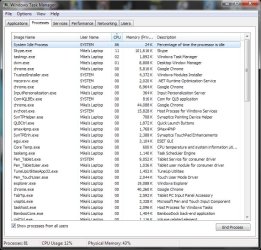
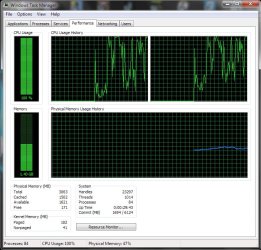
I noticed on task manager that my CPU was spiking at 100% constantly, so i looked what was the cause and my "System idle process" was running at around 80-100%.
I thought this wasn't a problem because system idle is just the free space on the CPU waiting to be used?

I come the the end of my tether with this, and I'm contemplating burning the computer.

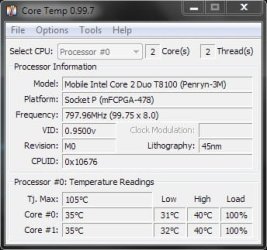
Some screens added to show my problems.
 

Attachments
  • drfgvbhgtfrew.jpg
    drfgvbhgtfrew.jpg
    23.2 KB · Views: 32
  • gfadsfdsa.jpg
    gfadsfdsa.jpg
    96.5 KB · Views: 74
  • ghrfdfvgdf.jpg
    ghrfdfvgdf.jpg
    95.7 KB · Views: 39

My Computer My Computer

Computer Manufacturer/Model Number
HP Compaq 6710b
OS
Windows 7 Ultimate 32-bit SP1 (Build 7601)
CPU
Intel Core 2 Duo @ 2.10GHz
Motherboard
Hewlett-Packard 30C0 KBC Version 71.2E
Memory
4096Mb Installed - 3064 Usable
Graphics Card(s)
Mobile Intel(R) 965 Express Chipset Family
Sound Card
SoundMAX Integrated Digital HD Audio
Monitor(s) Displays
Generic PnP Monitor (15.4"vis, January 2006)
Screen Resolution
1280x800
Hard Drives
Hitachi HTS542580K9A300 [Hard drive] (80.03 GB)
Internet Speed
25 Mbit Download - 2.8 Mbit upload
Go to resource monitor from task manager.

Look at the CPU tab there. Sort it with the mouse to show most to least CPU usage.

Post a picture of that result.

We need to see what process is using up the CPU when the CPU is at 100%.

As you say, for the system idle process, higher is better.
 

My Computer My Computer

Computer type
PC/Desktop
Computer Manufacturer/Model Number
Ignatz Special; 4 speed manual gearbox; factory air conditioning; one of one
OS
Windows 7 Home Premium SP1, 64-bit
CPU
Intel Skylake i5-6600K, not overclocked
Motherboard
AsRock Z170M Extreme 4, micro ATX
Memory
8 GB HyperX DDR4-2666 (2 x 4 GB)
Graphics Card(s)
none; graphics are integrated on CPU
Sound Card
onboard: Realtek ALC1150; external: USB Behringer UF0-202
Monitor(s) Displays
Dell S2340M 23 inch IPS
Screen Resolution
1600 x 900
Hard Drives
System: Crucial MX100 series SSD, 128 GB;
Data: Samsung Spinpoint 103SJ, 1 TB;
Backup: WD Caviar Green WD30EZRX-00D8PB0, 3 TB
PSU
Rosewill SilentNight 500 watt fanless, semi-modular
Case
Antec Solo II
Cooling
Noctua NH-U12S; Noctua F12 intake, Noctua S12A exhaust
Keyboard
Microsoft 200 6JH-00001 USB
Mouse
Dell or Microsoft optical wired; USB
Antivirus
Microsoft Security Essentials and Malwarebytes Premium
Browser
Pale Moon
Other Info
All fans PWM; speeds at idle: CPU circa 500 rpm; intake circa 600 rpm; exhaust circa 600 rpm; CPU temps 27 idle and 47 C load in a warm room (27 C/81 F) when running Intel Extreme Tuning Utility stress test.
What anti-virus software do you use?
 

My Computer My Computer

Computer type
PC/Desktop
Computer Manufacturer/Model Number
Custom Built
OS
Windows 8.1 Pro x64
CPU
Intel Core i7 4790k
Motherboard
MSI Z97S Krait Edition
Memory
8GB Corsair Dominator 1600MHz
Graphics Card(s)
MSI TwinFrozr GeForce GTX770
Sound Card
ASUS Xonar DX/XD 7.1
Monitor(s) Displays
Dell 24" S2409W + Dell 20" E207WFP
Screen Resolution
1920x1080 + 1680x1050
Hard Drives
1x 120GB OCZ Agility 3, 1x 750GB Western Digital Caviar Black, 1x 1TB Western Digital Caviar Blue
PSU
Corsair HX850 modular
Case
Fractal Design Define R4
Cooling
Corsair H60 w/ twin Corsair SP120 fans
Keyboard
Logitech G510S Keyboard
Mouse
Logitech G500S Laser Mouse
Internet Speed
40Mbps
Antivirus
Microsoft Security Essentials
Browser
Google Chrome
Other Info
LG Blu-Ray player
Go to resource monitor from task manager.

Look at the CPU tab there. Sort it with the mouse to show most to least CPU usage.

Post a picture of that result.

We need to see what process is using up the CPU when the CPU is at 100%.

As you say, for the system idle process, higher is better.

I've attached a screen of processes sorted from high to low CPU in the OP.
EDIT:
But there seems to be no problem on resource monitor, only perfmon.exe which if i'm not mistaken is the actual resource moniter?
only using about 10%.

But the problem still remains on task manager and still getting crashes.

What anti-virus software do you use?
And my anti-virus software is: ESET Smart Security 4.2
 
Last edited:

My Computer My Computer

Computer Manufacturer/Model Number
HP Compaq 6710b
OS
Windows 7 Ultimate 32-bit SP1 (Build 7601)
CPU
Intel Core 2 Duo @ 2.10GHz
Motherboard
Hewlett-Packard 30C0 KBC Version 71.2E
Memory
4096Mb Installed - 3064 Usable
Graphics Card(s)
Mobile Intel(R) 965 Express Chipset Family
Sound Card
SoundMAX Integrated Digital HD Audio
Monitor(s) Displays
Generic PnP Monitor (15.4"vis, January 2006)
Screen Resolution
1280x800
Hard Drives
Hitachi HTS542580K9A300 [Hard drive] (80.03 GB)
Internet Speed
25 Mbit Download - 2.8 Mbit upload
I'm surprised performance monitor takes up 10% of your CPU. On my system, it ranges between 0 and 1.

If you are having crash issues, you might try a post in the crashes/debugging section.

I'm not sure how to diagnose whether you should believe 100% CPU from task manager or 10% from performance monitor. PM is the more refined tool, but I don't know why TM would be wrong.

Event Viewer should tell you something, but I'm not experienced in its use.

81 processes is above average, but I wouldn't think they would be causing the problem if tools show them not to be resource-intensive.

Your first pic shows low temps when supposedly at 100% CPU--that would lead me to believe the CPU figure may be erroneous, particularly when resource monitor does NOT show 100% CPU.
 

My Computer My Computer

Computer type
PC/Desktop
Computer Manufacturer/Model Number
Ignatz Special; 4 speed manual gearbox; factory air conditioning; one of one
OS
Windows 7 Home Premium SP1, 64-bit
CPU
Intel Skylake i5-6600K, not overclocked
Motherboard
AsRock Z170M Extreme 4, micro ATX
Memory
8 GB HyperX DDR4-2666 (2 x 4 GB)
Graphics Card(s)
none; graphics are integrated on CPU
Sound Card
onboard: Realtek ALC1150; external: USB Behringer UF0-202
Monitor(s) Displays
Dell S2340M 23 inch IPS
Screen Resolution
1600 x 900
Hard Drives
System: Crucial MX100 series SSD, 128 GB;
Data: Samsung Spinpoint 103SJ, 1 TB;
Backup: WD Caviar Green WD30EZRX-00D8PB0, 3 TB
PSU
Rosewill SilentNight 500 watt fanless, semi-modular
Case
Antec Solo II
Cooling
Noctua NH-U12S; Noctua F12 intake, Noctua S12A exhaust
Keyboard
Microsoft 200 6JH-00001 USB
Mouse
Dell or Microsoft optical wired; USB
Antivirus
Microsoft Security Essentials and Malwarebytes Premium
Browser
Pale Moon
Other Info
All fans PWM; speeds at idle: CPU circa 500 rpm; intake circa 600 rpm; exhaust circa 600 rpm; CPU temps 27 idle and 47 C load in a warm room (27 C/81 F) when running Intel Extreme Tuning Utility stress test.
I'm surprised performance monitor takes up 10% of your CPU. On my system, it ranges between 0 and 1.

If you are having crash issues, you might try a post in the crashes/debugging section.

I'm not sure how to diagnose whether you should believe 100% CPU from task manager or 10% from performance monitor. PM is the more refined tool, but I don't know why TM would be wrong.

Event Viewer should tell you something, but I'm not experienced in its use.

81 processes is above average, but I wouldn't think they would be causing the problem if tools show them not to be resource-intensive.

Your first pic shows low temps when supposedly at 100% CPU--that would lead me to believe the CPU figure may be erroneous, particularly when resource monitor does NOT show 100% CPU.

What do you suggest i do then?
It's got to the point where almost everything will crash upon opening (For example my documents).
I'm stumped at this problem and have no clue what to do about it.
I'm running a security scan now, to see if it might be malicious malware of some sort.
If nothing shows up from that i might just fresh install windows 7 again.
 

My Computer My Computer

Computer Manufacturer/Model Number
HP Compaq 6710b
OS
Windows 7 Ultimate 32-bit SP1 (Build 7601)
CPU
Intel Core 2 Duo @ 2.10GHz
Motherboard
Hewlett-Packard 30C0 KBC Version 71.2E
Memory
4096Mb Installed - 3064 Usable
Graphics Card(s)
Mobile Intel(R) 965 Express Chipset Family
Sound Card
SoundMAX Integrated Digital HD Audio
Monitor(s) Displays
Generic PnP Monitor (15.4"vis, January 2006)
Screen Resolution
1280x800
Hard Drives
Hitachi HTS542580K9A300 [Hard drive] (80.03 GB)
Internet Speed
25 Mbit Download - 2.8 Mbit upload
What do you suggest i do then?

I'd see what other comments you get in this thread over the next 24 hours or so.

If that leads nowhere, you could post in the crash forum regarding your crashes---I don't know if you mean blue screens or no response or slow response.

I'd consider memory and hard drive testing if your virus/malware scans show nothing.

You could try running as few processes as possible to see if that points to a particular process as problematic, but you could have driver or hardware issues.

I'll yield to others. I'm out of suggestions. Event Viewer would probably be worth looking at, but I'm not the guy you need to analyze it.
 

My Computer My Computer

Computer type
PC/Desktop
Computer Manufacturer/Model Number
Ignatz Special; 4 speed manual gearbox; factory air conditioning; one of one
OS
Windows 7 Home Premium SP1, 64-bit
CPU
Intel Skylake i5-6600K, not overclocked
Motherboard
AsRock Z170M Extreme 4, micro ATX
Memory
8 GB HyperX DDR4-2666 (2 x 4 GB)
Graphics Card(s)
none; graphics are integrated on CPU
Sound Card
onboard: Realtek ALC1150; external: USB Behringer UF0-202
Monitor(s) Displays
Dell S2340M 23 inch IPS
Screen Resolution
1600 x 900
Hard Drives
System: Crucial MX100 series SSD, 128 GB;
Data: Samsung Spinpoint 103SJ, 1 TB;
Backup: WD Caviar Green WD30EZRX-00D8PB0, 3 TB
PSU
Rosewill SilentNight 500 watt fanless, semi-modular
Case
Antec Solo II
Cooling
Noctua NH-U12S; Noctua F12 intake, Noctua S12A exhaust
Keyboard
Microsoft 200 6JH-00001 USB
Mouse
Dell or Microsoft optical wired; USB
Antivirus
Microsoft Security Essentials and Malwarebytes Premium
Browser
Pale Moon
Other Info
All fans PWM; speeds at idle: CPU circa 500 rpm; intake circa 600 rpm; exhaust circa 600 rpm; CPU temps 27 idle and 47 C load in a warm room (27 C/81 F) when running Intel Extreme Tuning Utility stress test.
What do you suggest i do then?

I'd see what other comments you get in this thread over the next 24 hours or so.

If that leads nowhere, you could post in the crash forum regarding your crashes---I don't know if you mean blue screens or no response or slow response.

I'd consider memory and hard drive testing if your virus/malware scans show nothing.

You could try running as few processes as possible to see if that points to a particular process as problematic, but you could have driver or hardware issues.

I'll yield to others. I'm out of suggestions.

Well i shall try and narrow it down, after these scans have finished, and i shall check driver updates, i initially went to check drivers but Intel's site was down when i last checked.
I've already defragmented and disk error checked, none showed any changes.
I'll keep trying to find a fix, if not fire and new PC will fix the problem.
 

My Computer My Computer

Computer Manufacturer/Model Number
HP Compaq 6710b
OS
Windows 7 Ultimate 32-bit SP1 (Build 7601)
CPU
Intel Core 2 Duo @ 2.10GHz
Motherboard
Hewlett-Packard 30C0 KBC Version 71.2E
Memory
4096Mb Installed - 3064 Usable
Graphics Card(s)
Mobile Intel(R) 965 Express Chipset Family
Sound Card
SoundMAX Integrated Digital HD Audio
Monitor(s) Displays
Generic PnP Monitor (15.4"vis, January 2006)
Screen Resolution
1280x800
Hard Drives
Hitachi HTS542580K9A300 [Hard drive] (80.03 GB)
Internet Speed
25 Mbit Download - 2.8 Mbit upload

My Computer My Computer

Computer type
PC/Desktop
Computer Manufacturer/Model Number
Ignatz Special; 4 speed manual gearbox; factory air conditioning; one of one
OS
Windows 7 Home Premium SP1, 64-bit
CPU
Intel Skylake i5-6600K, not overclocked
Motherboard
AsRock Z170M Extreme 4, micro ATX
Memory
8 GB HyperX DDR4-2666 (2 x 4 GB)
Graphics Card(s)
none; graphics are integrated on CPU
Sound Card
onboard: Realtek ALC1150; external: USB Behringer UF0-202
Monitor(s) Displays
Dell S2340M 23 inch IPS
Screen Resolution
1600 x 900
Hard Drives
System: Crucial MX100 series SSD, 128 GB;
Data: Samsung Spinpoint 103SJ, 1 TB;
Backup: WD Caviar Green WD30EZRX-00D8PB0, 3 TB
PSU
Rosewill SilentNight 500 watt fanless, semi-modular
Case
Antec Solo II
Cooling
Noctua NH-U12S; Noctua F12 intake, Noctua S12A exhaust
Keyboard
Microsoft 200 6JH-00001 USB
Mouse
Dell or Microsoft optical wired; USB
Antivirus
Microsoft Security Essentials and Malwarebytes Premium
Browser
Pale Moon
Other Info
All fans PWM; speeds at idle: CPU circa 500 rpm; intake circa 600 rpm; exhaust circa 600 rpm; CPU temps 27 idle and 47 C load in a warm room (27 C/81 F) when running Intel Extreme Tuning Utility stress test.
Skype is using a lot of memory.
See if this might be the problem ...

LOGIN TO SKYPE
THEN TOOLS>OPTIONS>GENERAL SETTINGS
UNTICK "START SKYPE WHEN WINDOWS STARTS"
THEN SAVE

You can always start the program manually when needed.
 

My Computer My Computer

Computer type
PC/Desktop
Computer Manufacturer/Model Number
Bruce ... somewhere in his 40's
OS
Windows 7 Ultimate 32bit SP1
CPU
Intel(R) Core(TM)2 Quad CPU @ 2.40GHz, 2400 MHz
Motherboard
INTEL/D975XBX2
Memory
4 GB
Graphics Card(s)
ATI Radeon HD 2600 Pro
Monitor(s) Displays
Samsung SyncMaster 914v
Screen Resolution
1280 x 1024
Hard Drives
2/500GB each ... ST3500630AS ATA Device.
One is not connected
PSU
Rocketfish 700 W
Case
G.Skill Gigabyte Chassis
Keyboard
Standard PS/2 Keyboard
Mouse
Microsoft PS/2 Mouse
Internet Speed
DSL
Antivirus
Avira Internet Security
Browser
IE 11
Other Info
ATI HDMI Audio
Here is some general troubleshooting info:

http://www.sevenforums.com/general-...-lags-every-couple-seconds-2.html#post1131640

You can also run sfc /scannow from a command prompt---repeatedly until it shows no errors.

Did the scan, no errors were found.
a03b9960b6986ae2e1725930e061040b.png


Skype is using a lot of memory.
See if this might be the problem ...

LOGIN TO SKYPE
THEN TOOLS>OPTIONS>GENERAL SETTINGS
UNTICK "START SKYPE WHEN WINDOWS STARTS"
THEN SAVE

You can always start the program manually when needed.
I've tried exiting skype, and I think it's set to not open on start-up anyway.
 

My Computer My Computer

Computer Manufacturer/Model Number
HP Compaq 6710b
OS
Windows 7 Ultimate 32-bit SP1 (Build 7601)
CPU
Intel Core 2 Duo @ 2.10GHz
Motherboard
Hewlett-Packard 30C0 KBC Version 71.2E
Memory
4096Mb Installed - 3064 Usable
Graphics Card(s)
Mobile Intel(R) 965 Express Chipset Family
Sound Card
SoundMAX Integrated Digital HD Audio
Monitor(s) Displays
Generic PnP Monitor (15.4"vis, January 2006)
Screen Resolution
1280x800
Hard Drives
Hitachi HTS542580K9A300 [Hard drive] (80.03 GB)
Internet Speed
25 Mbit Download - 2.8 Mbit upload
Do the spikes happen even when your not actively doing anything? I.e. at times when the computer should be idle?

If so, if you sort the task manager window by CPU and sit there and watch it over time, does it ever show anything other than Idle a the top? Launching a program or having a program do something will cause it to spike of course, but just sitting there it should be mostly the idle process at the top.

If you don't see anything in the task list at the top over time while you have it open then I'd try running a separate CPU meter and see if it shows the same thing as the built in one (with task manager completely closed). And most importantly see if the problem goes away when you have the task manager open at the same time. Some viruses hide (stop working, even unload) from the task manager so you can't see them running. Seeing CPU use when the task manager is closed but none when open is suspicious behaviour.

If the problem shows up in a third party CPU meter, but then goes away when you launch the windows task manager, I would highly suspect a virus or other malware and proceed from there.

You can also try the tool ProcessExplorer (Process Explorer) from Microsoft which is a slightly more complex version of the task manager, mainly meant for programmers, but it does similar things and may show more information.
 

My Computer My Computer

Computer Manufacturer/Model Number
Scratch built
OS
Windows 7 x64 Ultimate
CPU
i7 960
Motherboard
Asus P6X58D
Memory
12 Gig Corsair Dominator
Graphics Card(s)
Nvidia 480
Sound Card
Maudio Delta 44 + breakout box
Monitor(s) Displays
Dell UltraSharp U2410 24in and Samsung 21 dual monitors
Screen Resolution
1920x1200 and 1280x1024
Hard Drives
Primary: Intel X-25M G2 160G SSD
Secondary: Segate baracuda 1.0 TB
HDs in AHCI mode.
PSU
Corasair TX850
Case
Cooler Master HAF
Cooling
Corsair H50
Keyboard
Logitech G15 + N52 game pad
Mouse
Logitech MX518
Internet Speed
15kbs down 4.5kbps up
Other Info
WEI 7.6
CPU & RAM 7.6
Graphics 7.9
Hard disk 7.7
Do the spikes happen even when your not actively doing anything? I.e. at times when the computer should be idle?

If so, if you sort the task manager window by CPU and sit there and watch it over time, does it ever show anything other than Idle a the top? Launching a program or having a program do something will cause it to spike of course, but just sitting there it should be mostly the idle process at the top.

If you don't see anything in the task list at the top over time while you have it open then I'd try running a separate CPU meter and see if it shows the same thing as the built in one (with task manager completely closed). And most importantly see if the problem goes away when you have the task manager open at the same time. Some viruses hide (stop working, even unload) from the task manager so you can't see them running. Seeing CPU use when the task manager is closed but none when open is suspicious behaviour.

If the problem shows up in a third party CPU meter, but then goes away when you launch the windows task manager, I would highly suspect a virus or other malware and proceed from there.

You can also try the tool ProcessExplorer (Process Explorer) from Microsoft which is a slightly more complex version of the task manager, mainly meant for programmers, but it does similar things and may show more information.
I've read through and looked at task manager sorted by CPU - highest to lowest, and i've noticed "scvhost.exe" spike quite a little.
i'll download process explorer now, and try out what you said.

I also noticed while watching youtube videos i get alot of lagginess on the video's regardless or resolution i set it to, and browser (Google chrome being the main browser i use).
I've re-installed my Drivers for my GPU, and showed no difference, although the CPU now remains at 20%, i'm still getting non-responsive windows throughout.
I'm really stumped by this problem as i can't really do much to identify it, only hitch i've got is it's crashing almost everything i try and do.
 

My Computer My Computer

Computer Manufacturer/Model Number
HP Compaq 6710b
OS
Windows 7 Ultimate 32-bit SP1 (Build 7601)
CPU
Intel Core 2 Duo @ 2.10GHz
Motherboard
Hewlett-Packard 30C0 KBC Version 71.2E
Memory
4096Mb Installed - 3064 Usable
Graphics Card(s)
Mobile Intel(R) 965 Express Chipset Family
Sound Card
SoundMAX Integrated Digital HD Audio
Monitor(s) Displays
Generic PnP Monitor (15.4"vis, January 2006)
Screen Resolution
1280x800
Hard Drives
Hitachi HTS542580K9A300 [Hard drive] (80.03 GB)
Internet Speed
25 Mbit Download - 2.8 Mbit upload
Okay so i've sat for a little while watching process explorer, and opening and closing Task manager, also doing the same with desktop manager and looking at task manager.

And the only things i've seen spike, are: dllhost.exe and dwm.exe, but only to around 15-20 CPU.
It seems as if nothing on my cpu is going wrong but when looking at performance it's stuck at 100%.
And youtube video's are still sketchy as ever.
I tried to backtrack and think what might've caused this problem, and the only thing i can remember was a power outage around 2-4 days ago caused the laptop to power off as i run it with no battery in.
Other than that i don't think anything else could've caused it.
 

My Computer My Computer

Computer Manufacturer/Model Number
HP Compaq 6710b
OS
Windows 7 Ultimate 32-bit SP1 (Build 7601)
CPU
Intel Core 2 Duo @ 2.10GHz
Motherboard
Hewlett-Packard 30C0 KBC Version 71.2E
Memory
4096Mb Installed - 3064 Usable
Graphics Card(s)
Mobile Intel(R) 965 Express Chipset Family
Sound Card
SoundMAX Integrated Digital HD Audio
Monitor(s) Displays
Generic PnP Monitor (15.4"vis, January 2006)
Screen Resolution
1280x800
Hard Drives
Hitachi HTS542580K9A300 [Hard drive] (80.03 GB)
Internet Speed
25 Mbit Download - 2.8 Mbit upload
Okay so i've just had a massive chain of events happen.
I was carrying on as normal browsing the web, when for some reason everything lost connection to the internet, i checked my router ect, and everyone else in my house was still online with no problems.
i checked my network adapter settings, and to my surprise ALL of my adapters were disabled!
So i did the normal thing and tried to enable them again, and for some reason it got no response and wouldn't re-enable, i tried to restart my pc and it got stuck on the "Shutting down" with the circling symbol for around 5-10 minutes.
It eventually went on to a massive error (From what i saw across the room), i didn't see anything it said, but it started up and recovered from an unexpected shutdown.

As seen here: http://gyazo.com/f8146ea9fd3c7ba7187c9f35afe8985c.png?1329168391

I'm starting to think this is malicious software attacking my computer causing all sorts of problems :cry:
I'm contemplating fresh booting my PC, that is if worse comes to worst.
I've ran through some Anti-virus scans such as:
Malwarebytes
Spybot - search and destroy
and superantispyware.
All showed up nothing (Except the odd cookie here and there).
 

My Computer My Computer

Computer Manufacturer/Model Number
HP Compaq 6710b
OS
Windows 7 Ultimate 32-bit SP1 (Build 7601)
CPU
Intel Core 2 Duo @ 2.10GHz
Motherboard
Hewlett-Packard 30C0 KBC Version 71.2E
Memory
4096Mb Installed - 3064 Usable
Graphics Card(s)
Mobile Intel(R) 965 Express Chipset Family
Sound Card
SoundMAX Integrated Digital HD Audio
Monitor(s) Displays
Generic PnP Monitor (15.4"vis, January 2006)
Screen Resolution
1280x800
Hard Drives
Hitachi HTS542580K9A300 [Hard drive] (80.03 GB)
Internet Speed
25 Mbit Download - 2.8 Mbit upload
It certainly does seem to be showing all the signs of an infection but the test results are good. Do you have any actual virus software like Security Essentials? Most of those programs you tried are malware but don't necessarily detect virii. Microsoft has a stand alone AV scanner you can DL. I believe you need to burn a bootable CD of it to be sure it works correctly. (A lot of virii disable AV scanner software if they are running first)

Though it's possible that it could be a hardware or a bad driver problem as well :/
 

My Computer My Computer

Computer Manufacturer/Model Number
Scratch built
OS
Windows 7 x64 Ultimate
CPU
i7 960
Motherboard
Asus P6X58D
Memory
12 Gig Corsair Dominator
Graphics Card(s)
Nvidia 480
Sound Card
Maudio Delta 44 + breakout box
Monitor(s) Displays
Dell UltraSharp U2410 24in and Samsung 21 dual monitors
Screen Resolution
1920x1200 and 1280x1024
Hard Drives
Primary: Intel X-25M G2 160G SSD
Secondary: Segate baracuda 1.0 TB
HDs in AHCI mode.
PSU
Corasair TX850
Case
Cooler Master HAF
Cooling
Corsair H50
Keyboard
Logitech G15 + N52 game pad
Mouse
Logitech MX518
Internet Speed
15kbs down 4.5kbps up
Other Info
WEI 7.6
CPU & RAM 7.6
Graphics 7.9
Hard disk 7.7

My Computer My Computer

Computer type
PC/Desktop
Computer Manufacturer/Model Number
Own build
OS
Windows 7x64 Home Premium SP1
CPU
Intel i7 2600k
Motherboard
ASUS P8Z68 Deluxe
Memory
G.Skill Ripjaws (DDR3-1600) 2x4GB
Graphics Card(s)
Nvidia GeForce GTS 450; Intel HD Graphics 3000(GT2+)
Monitor(s) Displays
Dell Ultrasharp IPS panel U2311H, Samsung SyncMaster P2350
Screen Resolution
1920x1080
Hard Drives
Samsung 850 Pro SSD 256GB, Samsung SSD 840 120GB, Seagates 1TB Barracuda ST31000528AS x2
PSU
Seasonic M12II 520W
Case
Lian Li Lancool PC-K60
Cooling
Case: 1x120mm, 3x140mm CPU: Hyper 212+
Keyboard
Logitech MK520 (wireless)
Mouse
Logitech MK520
Internet Speed
6-7 Mbps
Antivirus
Norton Security Premium, Malwarebytes on 2 (MSE on 3rd PC)
Browser
FireFox
Other Info
Audio: Logitech Z523 2.1

It certainly does seem to be showing all the signs of an infection but the test results are good. Do you have any actual virus software like Security Essentials? Most of those programs you tried are malware but don't necessarily detect virii. Microsoft has a stand alone AV scanner you can DL. I believe you need to burn a bootable CD of it to be sure it works correctly. (A lot of virii disable AV scanner software if they are running first)

Though it's possible that it could be a hardware or a bad driver problem as well :/
Thanks for the quick reply, and i would i be able to stick this onto a pendrive or somthing?
i don't have any spare CDs/dvd lying around currently (and its 9:47Pm)
 

My Computer My Computer

Computer Manufacturer/Model Number
HP Compaq 6710b
OS
Windows 7 Ultimate 32-bit SP1 (Build 7601)
CPU
Intel Core 2 Duo @ 2.10GHz
Motherboard
Hewlett-Packard 30C0 KBC Version 71.2E
Memory
4096Mb Installed - 3064 Usable
Graphics Card(s)
Mobile Intel(R) 965 Express Chipset Family
Sound Card
SoundMAX Integrated Digital HD Audio
Monitor(s) Displays
Generic PnP Monitor (15.4"vis, January 2006)
Screen Resolution
1280x800
Hard Drives
Hitachi HTS542580K9A300 [Hard drive] (80.03 GB)
Internet Speed
25 Mbit Download - 2.8 Mbit upload
Well it looks like by default the scanner just runs while you boot normally. Seems like it would be a lot safer if it booten on it's own but.. Give that a quick try anyway :)
 

My Computer My Computer

Computer Manufacturer/Model Number
Scratch built
OS
Windows 7 x64 Ultimate
CPU
i7 960
Motherboard
Asus P6X58D
Memory
12 Gig Corsair Dominator
Graphics Card(s)
Nvidia 480
Sound Card
Maudio Delta 44 + breakout box
Monitor(s) Displays
Dell UltraSharp U2410 24in and Samsung 21 dual monitors
Screen Resolution
1920x1200 and 1280x1024
Hard Drives
Primary: Intel X-25M G2 160G SSD
Secondary: Segate baracuda 1.0 TB
HDs in AHCI mode.
PSU
Corasair TX850
Case
Cooler Master HAF
Cooling
Corsair H50
Keyboard
Logitech G15 + N52 game pad
Mouse
Logitech MX518
Internet Speed
15kbs down 4.5kbps up
Other Info
WEI 7.6
CPU & RAM 7.6
Graphics 7.9
Hard disk 7.7

My Computer My Computer

Computer type
PC/Desktop
Computer Manufacturer/Model Number
Own build
OS
Windows 7x64 Home Premium SP1
CPU
Intel i7 2600k
Motherboard
ASUS P8Z68 Deluxe
Memory
G.Skill Ripjaws (DDR3-1600) 2x4GB
Graphics Card(s)
Nvidia GeForce GTS 450; Intel HD Graphics 3000(GT2+)
Monitor(s) Displays
Dell Ultrasharp IPS panel U2311H, Samsung SyncMaster P2350
Screen Resolution
1920x1080
Hard Drives
Samsung 850 Pro SSD 256GB, Samsung SSD 840 120GB, Seagates 1TB Barracuda ST31000528AS x2
PSU
Seasonic M12II 520W
Case
Lian Li Lancool PC-K60
Cooling
Case: 1x120mm, 3x140mm CPU: Hyper 212+
Keyboard
Logitech MK520 (wireless)
Mouse
Logitech MK520
Internet Speed
6-7 Mbps
Antivirus
Norton Security Premium, Malwarebytes on 2 (MSE on 3rd PC)
Browser
FireFox
Other Info
Audio: Logitech Z523 2.1
Back
Top