Quasi-Administrator account versus a true Adminstrator Account?

glennc

New member
Power User
VIP
Local time
2:49 PM
Messages
1,024
Hello to all,
I am using W7 Ultimate 64 bits. I am have a what has been described on this forum as a quasi-administrator account. It is not called Administrator but seems to function as one. UAC prompts, when admin rights required in user accounts, this account's password will fulfil the requirement. Might someone care to discuss the differences, values and problems. Which should I be using??
I do my regular computing under a user account. I am lost at this depth of computerocrasy!
Thanks for any assistance!
Glenn
 

My Computer My Computer

At a glance

Windows 7 UltimateAMD Phenom-II X4 9658192 MB DDR2-SDRAMATI Radeon HD 4200
Computer type
PC/Desktop
Computer Manufacturer/Model Number
Self-Built
OS
Windows 7 Ultimate
CPU
AMD Phenom-II X4 965
Motherboard
Gigabyte GA-MA785GM-US2H
Memory
8192 MB DDR2-SDRAM
Graphics Card(s)
ATI Radeon HD 4200
Sound Card
ATI Radeon HD 4200 High Definition Audo
Monitor(s) Displays
LG Electronics W1943
Screen Resolution
1360 X 768
Hard Drives
C: 500 GB Caviar Black SATA
E: 500 GB Caviar Black SATA
PSU
Ultra LSP 750
Case
Ultra XBlaster
Cooling
2 Fans, CPU Fan, PS Fan
Keyboard
Acer
Mouse
Logitech
Internet Speed
6 MB
Glenn

If you havent changed the permissions there are only three types of accounts. Admin, Regular user, and guest.

What does your user say under your name in user CP?
 

My Computer My Computer

At a glance

Win 8 Release candidate 8400[email protected]4 gigsNvidia 9600M
Computer Manufacturer/Model Number
HP Pavillion dv-7 1005 Tx
OS
Win 8 Release candidate 8400
CPU
[email protected]
Memory
4 gigs
Graphics Card(s)
Nvidia 9600M
Sound Card
HD built-in
Monitor(s) Displays
17" Wxga
Screen Resolution
1440x900
Cooling
none
Internet Speed
45Mb down 5Mb up
buit-in Administrator account is not the same as "user-created" Administrator account.

the differences are pretty obvious if you look into local security policy>local policies>local rights assigment
(run secpol.msc)

EDIT:
local security policy>local policies>security options
 

My Computer My Computer

At a glance

Windows 7 Enterprise x64 SP1 Version 6.1 Buil...x64bit AMD Turion(tm) X2 Ultra Dual-Core Mobi...4096 (2048 + 2048) MB, DDR2 RAM (800 MHz), ma...ATI Mobility Radeon™ HD 3650+HyperMemory™(512...
Computer Manufacturer/Model Number
Toshiba Satelite P300D 13J (Short model No: PSPDCE)
OS
Windows 7 Enterprise x64 SP1 Version 6.1 Build 7601
CPU
x64bit AMD Turion(tm) X2 Ultra Dual-Core Mobile ZM-82
Memory
4096 (2048 + 2048) MB, DDR2 RAM (800 MHz), max 8,192 MB
Graphics Card(s)
ATI Mobility Radeon™ HD 3650+HyperMemory™(512MB VRAM+2302MB)
Sound Card
Manufacturer: harman/kardon
Monitor(s) Displays
Generic PnP Monitor (MONITOR\LPLA101)
Screen Resolution
1440 x 900 (19" LCD)
Hard Drives
HDD1: TOSHIBA MK3252GSX ATA Device (IDE 320 GB 5,400 o/min) ,
HDD2: Msft Virtual Disk SCSI Disk Device (Virtual Hard Drive),
HDD3: TOSHIBA MK3263GSX USB Device (USB Mobile HDD) (TakeMS MemLine)
PSU
Batery: technology : lithium-ion
Cooling
integrated cooler + 3x external cooler
Keyboard
USB Logitech S520
Mouse
USB Logitech S520
Internet Speed
WAN: 7,2 Mbit/sec, WLAN: 54 Mbit/sec + Bluetooth®
SU vs Admin for a regular user is a bit deep dont you think?
 

My Computer My Computer

At a glance

Win 8 Release candidate 8400[email protected]4 gigsNvidia 9600M
Computer Manufacturer/Model Number
HP Pavillion dv-7 1005 Tx
OS
Win 8 Release candidate 8400
CPU
[email protected]
Memory
4 gigs
Graphics Card(s)
Nvidia 9600M
Sound Card
HD built-in
Monitor(s) Displays
17" Wxga
Screen Resolution
1440x900
Cooling
none
Internet Speed
45Mb down 5Mb up
The difference...when UAC is on The User-Administrator account runs under Medium MIC until it elevates with UAC to High MIC. The By default disabled Administrator account runs with High MIC by default. That is purely the only difference. One has all the same power as the built in Administrator account once elevated.

See Mandatory Integrity Control: https://en.wikipedia.org/wiki/Mandatory_Integrity_Control
 

My Computer My Computer

At a glance

Windows 10 Pro (x64)Intel Core i7-3930K (3.2GHz - 4.5GHz)4x Samsung 4GB PC3-12800 DDR3 (16GB 1600MHz)Nvidia Geforce GTX 690
Computer type
PC/Desktop
Computer Manufacturer/Model Number
Alienware Aurora ALX R4
OS
Windows 10 Pro (x64)
CPU
Intel Core i7-3930K (3.2GHz - 4.5GHz)
Motherboard
Alienware Aurora-R4 x79
Memory
4x Samsung 4GB PC3-12800 DDR3 (16GB 1600MHz)
Graphics Card(s)
Nvidia Geforce GTX 690
Sound Card
SteelSeries Siberia Elite
Monitor(s) Displays
Dell UltraSharp U3011
Screen Resolution
2560x1600
Hard Drives
Samsung 850 Pro 256 GB, Seagate 1TB Desktop Hybrid HDD, 2x Western Digital 4TB Green HDD
PSU
875W Some Dell PSU <.<
Case
Alienware Aurora ALX
Cooling
Custom Liquid Cooling (EK CPU & GPU blocks) dual EK 480RAD
Keyboard
Logitech G710+ Mechanical
Mouse
Logitech G700s
Internet Speed
Verizon Fios (50 mbps average)
Other Info
Server: Intel NUC D54250WYK: i5-4250U, 16GB, 256 GB mSATA, Windows Server 2012 R2
Glenn

If you havent changed the permissions there are only three types of accounts. Admin, Regular user, and guest.

What does your user say under your name in user CP?

Hello and thanks,
Under the user name that is the administering account it say Administer Password Protected. Hope that helps.
Glenn
 

My Computer My Computer

At a glance

Windows 7 UltimateAMD Phenom-II X4 9658192 MB DDR2-SDRAMATI Radeon HD 4200
Computer type
PC/Desktop
Computer Manufacturer/Model Number
Self-Built
OS
Windows 7 Ultimate
CPU
AMD Phenom-II X4 965
Motherboard
Gigabyte GA-MA785GM-US2H
Memory
8192 MB DDR2-SDRAM
Graphics Card(s)
ATI Radeon HD 4200
Sound Card
ATI Radeon HD 4200 High Definition Audo
Monitor(s) Displays
LG Electronics W1943
Screen Resolution
1360 X 768
Hard Drives
C: 500 GB Caviar Black SATA
E: 500 GB Caviar Black SATA
PSU
Ultra LSP 750
Case
Ultra XBlaster
Cooling
2 Fans, CPU Fan, PS Fan
Keyboard
Acer
Mouse
Logitech
Internet Speed
6 MB
buit-in Administrator account is not the same as "user-created" Administrator account.

the differences are pretty obvious if you look into local security policy>local policies>local rights assigment
(run secpol.msc)

EDIT:
local security policy>local policies>security options

Hello codekiddy,
Unfortunately you might as well be speaking chinese with a lithuanian accent about brain surgery {:-))! I will look as far as I feel comfortable in secpol.msc, but as what exactly or where or for what, I am without sufficient knowledge.
Glenn
 

My Computer My Computer

At a glance

Windows 7 UltimateAMD Phenom-II X4 9658192 MB DDR2-SDRAMATI Radeon HD 4200
Computer type
PC/Desktop
Computer Manufacturer/Model Number
Self-Built
OS
Windows 7 Ultimate
CPU
AMD Phenom-II X4 965
Motherboard
Gigabyte GA-MA785GM-US2H
Memory
8192 MB DDR2-SDRAM
Graphics Card(s)
ATI Radeon HD 4200
Sound Card
ATI Radeon HD 4200 High Definition Audo
Monitor(s) Displays
LG Electronics W1943
Screen Resolution
1360 X 768
Hard Drives
C: 500 GB Caviar Black SATA
E: 500 GB Caviar Black SATA
PSU
Ultra LSP 750
Case
Ultra XBlaster
Cooling
2 Fans, CPU Fan, PS Fan
Keyboard
Acer
Mouse
Logitech
Internet Speed
6 MB
SU vs Admin for a regular user is a bit deep dont you think?

Hello again,
I am not sure what your message is or to whom it was directed, sorry!
Glenn
 

My Computer My Computer

At a glance

Windows 7 UltimateAMD Phenom-II X4 9658192 MB DDR2-SDRAMATI Radeon HD 4200
Computer type
PC/Desktop
Computer Manufacturer/Model Number
Self-Built
OS
Windows 7 Ultimate
CPU
AMD Phenom-II X4 965
Motherboard
Gigabyte GA-MA785GM-US2H
Memory
8192 MB DDR2-SDRAM
Graphics Card(s)
ATI Radeon HD 4200
Sound Card
ATI Radeon HD 4200 High Definition Audo
Monitor(s) Displays
LG Electronics W1943
Screen Resolution
1360 X 768
Hard Drives
C: 500 GB Caviar Black SATA
E: 500 GB Caviar Black SATA
PSU
Ultra LSP 750
Case
Ultra XBlaster
Cooling
2 Fans, CPU Fan, PS Fan
Keyboard
Acer
Mouse
Logitech
Internet Speed
6 MB
The difference...when UAC is on The User-Administrator account runs under Medium MIC until it elevates with UAC to High MIC. The By default disabled Administrator account runs with High MIC by default. That is purely the only difference. One has all the same power as the built in Administrator account once elevated.

See Mandatory Integrity Control: https://en.wikipedia.org/wiki/Mandatory_Integrity_Control

Hello logicearth,
Are you saying under the user/administration account with the UAC it runs under a lower security and pops up the UAC box when it switches to the security/control level of the real Administrator account? I don't know MIC from a hole in the ground, honestly.... Thanks and I will look at the link with the hopes I can understand it!
Glenn
 

My Computer My Computer

At a glance

Windows 7 UltimateAMD Phenom-II X4 9658192 MB DDR2-SDRAMATI Radeon HD 4200
Computer type
PC/Desktop
Computer Manufacturer/Model Number
Self-Built
OS
Windows 7 Ultimate
CPU
AMD Phenom-II X4 965
Motherboard
Gigabyte GA-MA785GM-US2H
Memory
8192 MB DDR2-SDRAM
Graphics Card(s)
ATI Radeon HD 4200
Sound Card
ATI Radeon HD 4200 High Definition Audo
Monitor(s) Displays
LG Electronics W1943
Screen Resolution
1360 X 768
Hard Drives
C: 500 GB Caviar Black SATA
E: 500 GB Caviar Black SATA
PSU
Ultra LSP 750
Case
Ultra XBlaster
Cooling
2 Fans, CPU Fan, PS Fan
Keyboard
Acer
Mouse
Logitech
Internet Speed
6 MB
When a user installs WIn7 or sets up a preinstalled computer, the account set up is an Administrator-level account since it's assumed this is the owner. It will allow changes after warning you by dimming the desktop and prompting about impending changes being made.

Inexperienced users are sometimes advised to set up in Control Panel a Standard User Account for regular use, as we helped you do last year Glenn. This will prompt for Admin password whenever changes are being made to the machine.

If you don't understand what changes are being made and their implications, I wouldn't proceed without asking here first.

The hidden Built-in Administrator account should only be used by the most experienced users - you know who you are. It also cannot serve a Standard User without another Administrative level account being present since when hidden the Built-in Admin account will fail to provide a box for prompted password resulting in an elevation stalemate which may require System Restore from boot.
 
When a user installs WIn7 or sets up a preinstalled computer, the account set up is an Administrator-level account since it's assumed this is the owner. It will allow changes after warning you by dimming the desktop and prompting about impending changes being made.

Inexperienced users are sometimes advised to set up in Control Panel a Standard User Account for regular use, as we helped you do last year Glenn. This will prompt for Admin password whenever changes are being made to the machine.

If you don't understand what changes are being made and their implications, I wouldn't proceed without asking here first.

The hidden Built-in Administrator account should only be used by the most experienced users - you know who you are. It also cannot serve a Standard User without another Administrative level account being present since when hidden the Built-in Admin account will fail to provide a box for prompted password resulting in an elevation stalemate which may require System Restore from boot.

Thanks Greg,
You are the one who coined quasi-adminstrator. So far I have not had any problems that I can recall except a few incidents that might be related, thus my question. I'll ask the specific question in another thread! Thanks kind dude! Also your last sentence was unclear and scary enough to be pretty comfortable as it is!
Glenn
 

My Computer My Computer

At a glance

Windows 7 UltimateAMD Phenom-II X4 9658192 MB DDR2-SDRAMATI Radeon HD 4200
Computer type
PC/Desktop
Computer Manufacturer/Model Number
Self-Built
OS
Windows 7 Ultimate
CPU
AMD Phenom-II X4 965
Motherboard
Gigabyte GA-MA785GM-US2H
Memory
8192 MB DDR2-SDRAM
Graphics Card(s)
ATI Radeon HD 4200
Sound Card
ATI Radeon HD 4200 High Definition Audo
Monitor(s) Displays
LG Electronics W1943
Screen Resolution
1360 X 768
Hard Drives
C: 500 GB Caviar Black SATA
E: 500 GB Caviar Black SATA
PSU
Ultra LSP 750
Case
Ultra XBlaster
Cooling
2 Fans, CPU Fan, PS Fan
Keyboard
Acer
Mouse
Logitech
Internet Speed
6 MB
One is supposed to be able to establish a Standard account only as long as an Administrator account also exists (to approve requests).

However if you delete the existing quasi-Administrator account you set up under (as distinguished from the Built-in Hidden Administrator) it will give prompt for password which has no password box to type into.

To undo this one needs to unhide Built-in Administrator but you cannot approve an elevated Command Prompt to do so, so you're stuck with trying to run it's Enable command from WinRe command line which doesn't help, or System Restore which does work. Phew! :shock:

This all happened to me yesterday when I was testing it while flying cross country.
 
Last edited:
One is supposed to be able to establish a Standard account as long as an Administrator account also exists (to approve requests).

However if you delete the existing quasi-Administrator account you set up under (as distinguished from the Built-in Hidden Administrator) it will give prompt for password which has no password box to type into.

To undo this one needs to unhide Built-in Administrator but you cannot approve an elevated Command Prompt to do so, so you're stuck with trying to run it's Enable command from WinRe command line which doesn't help, or System Restore which does work. Phew! :shock:

This all happened to me yesterday when I was testing it while flying cross country.

Sounds like you had a heck of a time! Least you can do something about it, most of what you wrote in not decoded, so I will take it as heavy duty and difficult!
L8tr
Glenn
 

My Computer My Computer

At a glance

Windows 7 UltimateAMD Phenom-II X4 9658192 MB DDR2-SDRAMATI Radeon HD 4200
Computer type
PC/Desktop
Computer Manufacturer/Model Number
Self-Built
OS
Windows 7 Ultimate
CPU
AMD Phenom-II X4 965
Motherboard
Gigabyte GA-MA785GM-US2H
Memory
8192 MB DDR2-SDRAM
Graphics Card(s)
ATI Radeon HD 4200
Sound Card
ATI Radeon HD 4200 High Definition Audo
Monitor(s) Displays
LG Electronics W1943
Screen Resolution
1360 X 768
Hard Drives
C: 500 GB Caviar Black SATA
E: 500 GB Caviar Black SATA
PSU
Ultra LSP 750
Case
Ultra XBlaster
Cooling
2 Fans, CPU Fan, PS Fan
Keyboard
Acer
Mouse
Logitech
Internet Speed
6 MB
http://postimage.org/image/e95otdpyn
e95otdpyn

to show what I thought,
here in this screenShot only Administrator can rename Admin. account :)
 

My Computer My Computer

At a glance

Windows 7 Enterprise x64 SP1 Version 6.1 Buil...x64bit AMD Turion(tm) X2 Ultra Dual-Core Mobi...4096 (2048 + 2048) MB, DDR2 RAM (800 MHz), ma...ATI Mobility Radeon™ HD 3650+HyperMemory™(512...
Computer Manufacturer/Model Number
Toshiba Satelite P300D 13J (Short model No: PSPDCE)
OS
Windows 7 Enterprise x64 SP1 Version 6.1 Build 7601
CPU
x64bit AMD Turion(tm) X2 Ultra Dual-Core Mobile ZM-82
Memory
4096 (2048 + 2048) MB, DDR2 RAM (800 MHz), max 8,192 MB
Graphics Card(s)
ATI Mobility Radeon™ HD 3650+HyperMemory™(512MB VRAM+2302MB)
Sound Card
Manufacturer: harman/kardon
Monitor(s) Displays
Generic PnP Monitor (MONITOR\LPLA101)
Screen Resolution
1440 x 900 (19" LCD)
Hard Drives
HDD1: TOSHIBA MK3252GSX ATA Device (IDE 320 GB 5,400 o/min) ,
HDD2: Msft Virtual Disk SCSI Disk Device (Virtual Hard Drive),
HDD3: TOSHIBA MK3263GSX USB Device (USB Mobile HDD) (TakeMS MemLine)
PSU
Batery: technology : lithium-ion
Cooling
integrated cooler + 3x external cooler
Keyboard
USB Logitech S520
Mouse
USB Logitech S520
Internet Speed
WAN: 7,2 Mbit/sec, WLAN: 54 Mbit/sec + Bluetooth®

My Computer My Computer

At a glance

Windows 7 UltimateAMD Phenom-II X4 9658192 MB DDR2-SDRAMATI Radeon HD 4200
Computer type
PC/Desktop
Computer Manufacturer/Model Number
Self-Built
OS
Windows 7 Ultimate
CPU
AMD Phenom-II X4 965
Motherboard
Gigabyte GA-MA785GM-US2H
Memory
8192 MB DDR2-SDRAM
Graphics Card(s)
ATI Radeon HD 4200
Sound Card
ATI Radeon HD 4200 High Definition Audo
Monitor(s) Displays
LG Electronics W1943
Screen Resolution
1360 X 768
Hard Drives
C: 500 GB Caviar Black SATA
E: 500 GB Caviar Black SATA
PSU
Ultra LSP 750
Case
Ultra XBlaster
Cooling
2 Fans, CPU Fan, PS Fan
Keyboard
Acer
Mouse
Logitech
Internet Speed
6 MB
http://postimage.org/image/e95otdpyn
e95otdpyn

to show what I thought,
here in this screenShot only Administrator can rename Admin. account :)
However, that's not necessarily true.

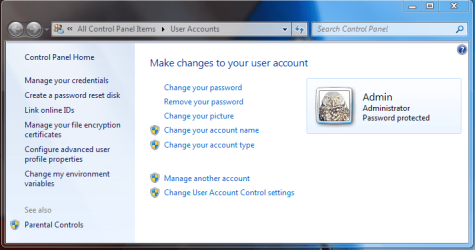
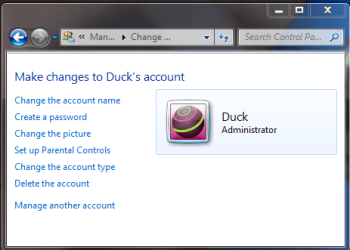
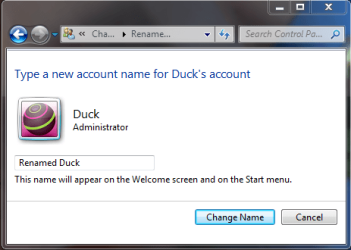
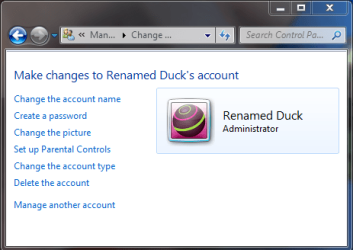
As the attached thumbnails illustrate, from a created account in the Administrators Group I created another account in the Administrators Group, and gave it a name. I then renamed that account in the Administrators Group from my original created account in the Adminstrators Group, not the default Windows Administrator.

But then, I don't run a standard installation of Windows 7.
 

Attachments

  • Admin User Accounts.PNG
    Admin User Accounts.PNG
    34 KB · Views: 12
  • Create Duck.PNG
    Create Duck.PNG
    23.6 KB · Views: 12
  • New Duck.PNG
    New Duck.PNG
    16.6 KB · Views: 9
  • Renaming Duck.PNG
    Renaming Duck.PNG
    16.5 KB · Views: 9
  • Renamed Duck.PNG
    Renamed Duck.PNG
    16.8 KB · Views: 8

My Computer My Computer

At a glance

7 Ultimate x64/7 Home Premium x64Intel i3 550 3.2 GHzCorsair 16 GB DDR3 (4 X 4GB)Intel HD Graphics
Computer Manufacturer/Model Number
Dell Inspiron 580
OS
7 Ultimate x64/7 Home Premium x64
CPU
Intel i3 550 3.2 GHz
Motherboard
Dell/Intel H57
Memory
Corsair 16 GB DDR3 (4 X 4GB)
Graphics Card(s)
Intel HD Graphics
Sound Card
Intel P55 HD Audio
Monitor(s) Displays
LG E2360 LED
Screen Resolution
1920 X 1080
Hard Drives
Seagate 1TB X 2 Internal,
Seagate 1TB eSATA (Backup)
PSU
Dell 300W
Case
Dell Inspiron
Cooling
Dell/Intel
Keyboard
Microsoft Wireless Comfort Keyboard 5000
Mouse
Microsoft Wireless Mouse 5000
Internet Speed
4,000 Mbit DSL
Other Info
Custom Installation -
OS separate on C:
Pagefile Separate on P:
Program Files Separate on U:
Users and ProgramData separate on V:
http://postimage.org/image/e95otdpyn
e95otdpyn

to show what I thought,
here in this screenShot only Administrator can rename Admin. account :)
However, that's not necessarily true.

As the attached thumbnails illustrate, from a created account in the Administrators Group I created another account in the Administrators Group, and gave it a name. I then renamed that account in the Administrators Group from my original created account in the Adminstrators Group, not the default Windows Administrator.

But then, I don't run a standard installation of Windows 7.

Hello bbearren,
Many thanks for the time and explanations, with examples! Much appreciated. But I still can not get my head around it! There are so many questions and not enough room for the answers {:-))!
Glenn
 

My Computer My Computer

At a glance

Windows 7 UltimateAMD Phenom-II X4 9658192 MB DDR2-SDRAMATI Radeon HD 4200
Computer type
PC/Desktop
Computer Manufacturer/Model Number
Self-Built
OS
Windows 7 Ultimate
CPU
AMD Phenom-II X4 965
Motherboard
Gigabyte GA-MA785GM-US2H
Memory
8192 MB DDR2-SDRAM
Graphics Card(s)
ATI Radeon HD 4200
Sound Card
ATI Radeon HD 4200 High Definition Audo
Monitor(s) Displays
LG Electronics W1943
Screen Resolution
1360 X 768
Hard Drives
C: 500 GB Caviar Black SATA
E: 500 GB Caviar Black SATA
PSU
Ultra LSP 750
Case
Ultra XBlaster
Cooling
2 Fans, CPU Fan, PS Fan
Keyboard
Acer
Mouse
Logitech
Internet Speed
6 MB
The default Windows Administrator is a part of the OS; there can be only one (the original) Windows Administrator. The Administrators Group is also part of the OS. The OOBE when setting up a new desktop or laptop creates the first member account in the Administrators Group. One can use this first created member of the Administrators Group to create more members of the Administrators Group, but just the one (created during the OOBE) is sufficient for all practical purposes when first setting up a new system.

In my rambling/poking/dissecting/deviling-in-the-details of Windows 7, I have found only a handful of registry entries that cannot be tampered with unless one is logged on as the default Windows Administrator. Most users will never go there.

For all other practical purposes, the privileges of a created account in the Administrators Group are sufficient for anything. When UAC is triggered and the box pops up asking if you want to allow such-and-such program to make changes to the computer, when you enter the password for the created account in the Administrators Group and click OK (or if you are logged on using that account, just click OK), you have successfully elevated the privileges of such-and-such program sufficiently to make changes to the computer that will have effects system wide (that is to say, all users), for that instance. Once those changes are made, if you should go back again to such-and-such program to make some more adjustments (system-wide changes), UAC will popup again, asking for permission, again.

In order to avoid unintended consequences and unforeseen intractable conundrums, Windows requires two members in the Administrators Group. The first (the default inactive Windows Administrator) is always there; the second is a created account that is a member of the Administrators Group. Leave the default Windows Administrator account inactive, and the created Administrators Group account will suffice for all your needs.

If you find that you wish to run routinely as a Standard User (this is what I always advise, and so does Microsoft) but you don't want to lose all the files and settings that you got used to when running under the OOBE-created Administrators Group account, you can create another account that is a member of the Administrators Group (I always name mine Admin), create a password for that account (make it something you can easily remember and/or write it down), then logoff. Next, logon as the newly created member of the Administrators Group, go to Start > Control Panel > User Accounts and click on "Manage another account". Select your original OOBE account name and then select "Change the account type". Click the radio button for Standard user, and OK your way back out.

This will save all your files and settings from your first account, but that account will now only have the privileges of a Standard User. And you will have an Administrators Group account and password to use whenever UAC pops up asking for permission for some program to make changes to the computer.

Some programs require Administrator privileges and will refuse to run for a Standard User. There are two ways to deal with them. You can right-click the shortcut for such a program whenever you want to run it and select "Run as administrator", then type in the correct password when UAC pops up. The other method saves a step; again, right-click on the shortcut for such a program and select "Properties". Click on the "Advanced" button on the Shortcut properties sheet and put a check in the box by "Run as adminstrator". UAC will still popup, but this saves you the step of always right-clicking the shortcut every time you want to run that program; once and done. Routine system maintenance tasks (defragging, disk cleanup, etc.) can be run in this manner, all from a Standard User account.

 

My Computer My Computer

At a glance

7 Ultimate x64/7 Home Premium x64Intel i3 550 3.2 GHzCorsair 16 GB DDR3 (4 X 4GB)Intel HD Graphics
Computer Manufacturer/Model Number
Dell Inspiron 580
OS
7 Ultimate x64/7 Home Premium x64
CPU
Intel i3 550 3.2 GHz
Motherboard
Dell/Intel H57
Memory
Corsair 16 GB DDR3 (4 X 4GB)
Graphics Card(s)
Intel HD Graphics
Sound Card
Intel P55 HD Audio
Monitor(s) Displays
LG E2360 LED
Screen Resolution
1920 X 1080
Hard Drives
Seagate 1TB X 2 Internal,
Seagate 1TB eSATA (Backup)
PSU
Dell 300W
Case
Dell Inspiron
Cooling
Dell/Intel
Keyboard
Microsoft Wireless Comfort Keyboard 5000
Mouse
Microsoft Wireless Mouse 5000
Internet Speed
4,000 Mbit DSL
Other Info
Custom Installation -
OS separate on C:
Pagefile Separate on P:
Program Files Separate on U:
Users and ProgramData separate on V:

My Computer My Computer

At a glance

Windows 7 Enterprise x64 SP1 Version 6.1 Buil...x64bit AMD Turion(tm) X2 Ultra Dual-Core Mobi...4096 (2048 + 2048) MB, DDR2 RAM (800 MHz), ma...ATI Mobility Radeon™ HD 3650+HyperMemory™(512...
Computer Manufacturer/Model Number
Toshiba Satelite P300D 13J (Short model No: PSPDCE)
OS
Windows 7 Enterprise x64 SP1 Version 6.1 Build 7601
CPU
x64bit AMD Turion(tm) X2 Ultra Dual-Core Mobile ZM-82
Memory
4096 (2048 + 2048) MB, DDR2 RAM (800 MHz), max 8,192 MB
Graphics Card(s)
ATI Mobility Radeon™ HD 3650+HyperMemory™(512MB VRAM+2302MB)
Sound Card
Manufacturer: harman/kardon
Monitor(s) Displays
Generic PnP Monitor (MONITOR\LPLA101)
Screen Resolution
1440 x 900 (19" LCD)
Hard Drives
HDD1: TOSHIBA MK3252GSX ATA Device (IDE 320 GB 5,400 o/min) ,
HDD2: Msft Virtual Disk SCSI Disk Device (Virtual Hard Drive),
HDD3: TOSHIBA MK3263GSX USB Device (USB Mobile HDD) (TakeMS MemLine)
PSU
Batery: technology : lithium-ion
Cooling
integrated cooler + 3x external cooler
Keyboard
USB Logitech S520
Mouse
USB Logitech S520
Internet Speed
WAN: 7,2 Mbit/sec, WLAN: 54 Mbit/sec + Bluetooth®
Thank you again bbearren,
You have a way of explanation that allowed me to follow most of what you wrote. At this moment, I don't have sufficient horsepower to really get it.... I have the account that I use as the administrator, my standard user account and another persons user account. Seems to work okay.
Where I get lost is the changing the properties to run as administrator. This would allow the other user account to have too much privilege in my limited understanding. So basically I am good enough for now.
What I find confusing is when I install a program in the admin account as opposed to my user account. It seems in the first case, if I run the program in the user account it pops up asking for my admin password. If I do it in the user account it doesn't, when run.
In another thread I was having a problem installing a .msi program even as admin as the newer version said I didn't uninstall it. I couldn't find it in Revo Pro (did not run as administratore) and couldn't find it. Did a forced uninstall to the program name. CCleaned and it wouldn't get everything.
Luckily a member of the Software group Raw Therapee sent me a complete install in a directory that I could just cut and paste into the Program Files (x86). Couldn't get it to unpack with msciexec. In any case, I pinned the executable to my taskbar. So my only access is via that shortcut. I would like to get it in the All Programs menu in the Start Up tab. Again, haven't a clue.
To many pots on the stove. Thanks for your help!!
Glenn
 

My Computer My Computer

At a glance

Windows 7 UltimateAMD Phenom-II X4 9658192 MB DDR2-SDRAMATI Radeon HD 4200
Computer type
PC/Desktop
Computer Manufacturer/Model Number
Self-Built
OS
Windows 7 Ultimate
CPU
AMD Phenom-II X4 965
Motherboard
Gigabyte GA-MA785GM-US2H
Memory
8192 MB DDR2-SDRAM
Graphics Card(s)
ATI Radeon HD 4200
Sound Card
ATI Radeon HD 4200 High Definition Audo
Monitor(s) Displays
LG Electronics W1943
Screen Resolution
1360 X 768
Hard Drives
C: 500 GB Caviar Black SATA
E: 500 GB Caviar Black SATA
PSU
Ultra LSP 750
Case
Ultra XBlaster
Cooling
2 Fans, CPU Fan, PS Fan
Keyboard
Acer
Mouse
Logitech
Internet Speed
6 MB
Back
Top