Autorun on USB drives

LucienDol

New member
Local time
8:11 PM
Messages
2
Hi all,

It appears that Microsoft has disabled the Autorun feature for USB devices in Windows 7. If you create an appropriate Autorun.inf file on your USB drive, Vista (and XP?) will happily run the program it points to when you plug the device in, but in Windows 7 that is no longer the case. I've read a few news articles explaining that this is by design, out of security concerns.

While I understand and even agree with the reasoning, I was wondering whether there was a way (perhaps in the Group Policy editor, or some Registry hack) to override or bypass this?

I have just created a nice autorun feature to enable me to mount a TrueCrypt-encrypted container on my USB stick, but that no longer works in Win7. (Can't use BitLocker as I still need uncrypted access to the root of the drive in order for BitLocker to allow Win7 to start on my fully encrypted C:-drive).

Any hints?

Lucien.
 
Last edited:

My Computer My Computer

OS
Windows 7 RC 64-bit Build 7100
I have the same problem and i searched on google and no result . The only way to open my TrueCrypt usb is to create a shortcut of the TrueCrypt.exe from my USB and use as Target :

G:\TrueCrypt\TrueCrypt.exe /q background /lZ /e /m rm /v "TrueCrypt.tc"

I`m still looking for a way to make it run the autorun.inf . I will come back here to help you in case i find something .

Cya and sorry for my english :D
 

My Computer My Computer

OS
MultiBoot : Windows 7 Ultimate , Windows Vista Ultimate SP1
Thanks for that, JustMe.

I have sort of worked my way around it with a solution similar to yours, but I still have to invoke it "manually". In my case I created a VB script and a command file to enable a clean start, both placed on the unencrypted part of the USB stick.

The script file (named "Mount TrueCrypt Volume.vbs") looks like this:

Set WshShell = CreateObject("WScript.Shell")
WshShell.Run chr(34) & "Mount.cmd" & Chr(34), 0
Set WshShell = Nothing
while the command file ("mount.cmd") contains:

@echo off
TrueCrypt\TrueCrypt.exe /q background /e /m rm /v "MyCrypt"
This combination ensures that no black command window pops up while opening TrueCrypt. The reason why I didn't use shortcuts is that if you use the USB stick on different computers (with different operating systems) you can't guarantee that the USB drive has the same drive letter (like the G: in your solution) and you'll have to create a shortcut on every PC.

In addition to the above I still have my "autorun.inf" file on the USB stick that will fire TrueCrypt automatically when plugged into computers running XP or Vista:

[autorun]
action=Mount TrueCrypt Volume
open=TrueCrypt\TrueCrypt.exe /q background /e /m rm /v "MyCrypt"
shell\start=Start TrueCrypt
shell\start\command=TrueCrypt\TrueCrypt.exe
shell\dismount=Dismount all TrueCrypt volumes
shell\dismount\command=TrueCrypt\TrueCrypt.exe /q /d
Only on Windows 7 I still run the VBS script when I need access to the encrypted data.

You learn to live with it and both Windows 7 and TrueCrypt are great. :-)

Lucien.
 

My Computer My Computer

OS
Windows 7 RC 64-bit Build 7100
Now are you guys accessing a program (like U3) off of the USB? Or just trying to do basic copying files to and fro. If autoplay isn't working for you (my PNY 4GB autoplays just fine) than use the Windows 7 partitioner to make the drive active (you may have to actually partition the USB for that)...it autoplayed for me after that
 

My Computer My Computer

Computer Manufacturer/Model Number
Compal JFT02 (Custom Build Laptop)
OS
Windows 7 Home Premium x64 - Mac OS X 10.6.4 x64
CPU
Intel Core 2 Duo T9300 2.5 GHz
Motherboard
JFT02
Memory
4GB Kingston DDR2-800
Graphics Card(s)
NVIDIA Geforce 8600M GT (512MB Model)
Sound Card
Realtek HD Audio
Monitor(s) Displays
WUXGA Standard Laptop Display
Screen Resolution
1680*1050
Hard Drives
Toshiba 320GB 5400RPM Laptop HD
PSU
Standard Laptop Power Supply
Case
Standard Laptop Case
Cooling
Standard Laptop Cooling
Keyboard
Standard Laptop 105 Key-Keyboard
Mouse
Synaptics Touchpad
Internet Speed
Verizion Online DSL 3360/864 kbs (dl/up)
Autoplay is different from autorun. Zidane, autorun.ini/.bat files start up off a usb when you plug it in? They shouldn't at all because that was intentionally disabled in 7.
 

My Computer My Computer

OS
7264x64/7260x86
strange I have a USB Hardisk and it autoplays normally in windows 7..
 

My Computer My Computer

Computer Manufacturer/Model Number
home made
OS
Windows 7 7264x64(main), 7260x86(secendary), XP SP3 Triple Boot
CPU
Intel Core 2 Duo E7400 2.8Mhz
Motherboard
Intel G33 express chipset
Memory
2GB DD2 667
Graphics Card(s)
Intel(R) 82G33 Graphics and Memory Controller Hub
Sound Card
Realtek Built into the G31
Monitor(s) Displays
19"
Screen Resolution
1280x1024
Hard Drives
320GB SATA (Main), 160GB IDE (Backup)
Case
Gigabyte SETTO
Keyboard
Genius
Mouse
Logitech
Internet Speed
1MB Download, 128k Upload
strange I have a USB Hardisk and it autoplays normally in windows 7..
They are using "Truecrypt" its a disk encryption software. They need the above command to run to enable access to the encrypted volume.
 

My Computer My Computer

Computer Manufacturer/Model Number
Black_Box (homebuilt)
OS
windows 7 RTM x64
CPU
Phenom II 965 Quad Core 3.4Ghz
Motherboard
Asus M4A79T Deluxe
Memory
Mushkin Blackline 8GB (4x2gb)
Graphics Card(s)
XFX Radeon 5970 Black Edition
Sound Card
onboard
Monitor(s) Displays
Dell 2408WPF-main Dell E248WFP-secondary
Screen Resolution
1920x1200-main 1920x1200-secondary
Hard Drives
OCZ Vertex Limited Edition 100GB (OS)
x1 WD Black Edition 500GB drive (Storage)
PSU
XFX 850w Black Edition (Modular)
Case
Mountian Mods H2go
Cooling
CoolITSystems ECO A.L.C.
Keyboard
Logitech MX 5500 wireless keyboard
Mouse
Razor Copperhead
Internet Speed
16Mb down/2Mb up Wowway Cable Internet
Autoplay is different from autorun. Zidane, autorun.ini/.bat files start up off a usb when you plug it in? They shouldn't at all because that was intentionally disabled in 7.
lmao...I need to get my eyes checked...I thought it said autoplay problems:o....oh well carry on then:D
 

My Computer My Computer

Computer Manufacturer/Model Number
Compal JFT02 (Custom Build Laptop)
OS
Windows 7 Home Premium x64 - Mac OS X 10.6.4 x64
CPU
Intel Core 2 Duo T9300 2.5 GHz
Motherboard
JFT02
Memory
4GB Kingston DDR2-800
Graphics Card(s)
NVIDIA Geforce 8600M GT (512MB Model)
Sound Card
Realtek HD Audio
Monitor(s) Displays
WUXGA Standard Laptop Display
Screen Resolution
1680*1050
Hard Drives
Toshiba 320GB 5400RPM Laptop HD
PSU
Standard Laptop Power Supply
Case
Standard Laptop Case
Cooling
Standard Laptop Cooling
Keyboard
Standard Laptop 105 Key-Keyboard
Mouse
Synaptics Touchpad
Internet Speed
Verizion Online DSL 3360/864 kbs (dl/up)
There is no way around it... If there was, Viruses would start using it. But you could program something that when it notices a USB drive it runs your command for you automatically... or it runs the autorun.inf for all connected drives (I wouldn't recommend this, it would present the same issue for why they disabled it in the first place)
 

My Computer My Computer

Computer Manufacturer/Model Number
fakeasdf (c)
OS
Win 7 Pro x64 x 3, Win 7 Pro x86, Ubuntu 9.04
CPU
2 x C2D [email protected] Ghz, C2D [email protected] ghz, P4 @ 3.0 ghz,
Motherboard
GIGABYTE GA-EP35-DS3P LGA 775 Intel P35 ATX Dynamic Energy S
Memory
2x8 GB Corsair, 4GB Kingston, 2GB GSkill
Graphics Card(s)
ATI Radeon 4670 1 GB DDR3, 2600 Pro, 2400 Pro, Intel 965
Sound Card
I don't care... Connected using Optical on Media Center
Monitor(s) Displays
Panasonic Viera 50" Plasma, 2x 19"
Screen Resolution
1080P, 1280x1024's
Hard Drives
4 Terabytes
Case
Antec P182 Gun Metal Black
Internet Speed
20 Mbit U/D
I searched on google and there is no way to make it work :cry: Anyway i have multiboot and now i`m using my Vista Ultimate again :D . Hope the guys from TrueCrypt will do something until Microsoft release the final version of Win7 .
Cya
 

My Computer My Computer

OS
MultiBoot : Windows 7 Ultimate , Windows Vista Ultimate SP1
I searched on google and there is no way to make it work :cry: Anyway i have multiboot and now i`m using my Vista Ultimate again :D . Hope the guys from TrueCrypt will do something until Microsoft release the final version of Win7 .
Cya

Try this out... Extract this and run it, if you want it to always start with windows put it in your startup folder. It will check every 2 seconds for a new removable drive, if it has an autorun, it will ask if you want to run it. Lemme know if it works with your TrueCrypt program... If it doesn't just let me know, I can modify it... I don't know what the truecrypt autorun exactly does, I just did a generalization of autoruns when programming it... I didn't add much error protection, so malformed autoruns probably won't work... If there is a reason I might fix it up... but we'll see....


Code:
using System;
using System.Collections.Generic;
using System.Linq;
using System.Windows.Forms;
using System.IO;
using Microsoft.Win32;


namespace Autorunner
{
    public class RegKeysAndDrives
    {
        public RegistryKey basekey;
        public String subkey;
        public String driveLetter;
        public RegKeysAndDrives(RegistryKey _basekey, String _subkey, String _driveLetter)
        {
            basekey = _basekey;
            subkey = _subkey;
            driveLetter = _driveLetter;
        }
    }

    static class Program
    {
        /// <summary>
        /// The main entry point for the application.
        /// </summary>
        /// 
        public static List<RegKeysAndDrives> toDelete;

        [STAThread]
        static void Main()
        {
            
            //keep track of drives we've already ran, Must compare strings, DriveInfo only compares using the Object
            List<String> haveRun = new List<String>();
            toDelete = new List<RegKeysAndDrives>();
            while (true)
            {
                //let's check every 2 seconds...  We don't want to slow down the machine!
                System.Threading.Thread.Sleep(2000);

                try
                {
                    //Get current drives
                    DriveInfo[] drives = DriveInfo.GetDrives();
                    List<DriveInfo> curDrives = new List<DriveInfo>(drives);

                    //remove any drives from haverun that don't exist anymore
                    for (int i = 0; i < haveRun.Count; i++)
                    {
                        if (DriveInfoContains(curDrives, haveRun[i]) == false)
                        {
                            for (int j = 0;j<toDelete.Count;j++)
                            {
                                if (toDelete[j].driveLetter == haveRun[i])
                                {
                                    try
                                    {
                                        toDelete[j].basekey.DeleteSubKeyTree(toDelete[j].subkey);
                                    }
                                    catch(Exception ex)
                                    {
                                        //subkey doesn't exist anymore :P
                                    }

                                    toDelete.RemoveAt(j);
                                    j--;
                                }
                            }
                            haveRun.RemoveAt(i);
                            i--;
                        }
                    }

                    //let's remove our haveRuns from drives, no point in checking them again...
                    for (int i = 0; i < curDrives.Count; i++)
                    {
                        if (haveRun.Contains(curDrives[i].RootDirectory.Name) == true)
                        {
                            curDrives.RemoveAt(i);
                            i--;
                        }
                    }


                    //Check any new Removable type drives, and run them...
                    foreach (DriveInfo drive in curDrives)
                    {
                        if (drive.DriveType == DriveType.Removable)
                        {
                            if (drive.IsReady)
                            {
                                try
                                {
                                    AutoRunDrive(drive);
                                }
                                catch(Exception ex)
                                {
                                    //I don't care if it crashes trying to launch it, let's just let it go...
                                }
                                haveRun.Add(drive.RootDirectory.Name);
                            }
                        }
                    }
                }
                catch(Exception ex)
                {
                    //Let's not crash if something gets unplugged while we're accessing it...
                }
            }

        }

        private static bool DriveInfoContains(List<DriveInfo> curDrives, string haveRunDriveName)
        {
            foreach (DriveInfo di in curDrives)
            {
                if (di.RootDirectory.Name == haveRunDriveName)
                    return true;
            }
            return false;
        }

        private static void AutoRunDrive(DriveInfo drive)
        {
            bool doAutoRun = false;
            String root = drive.RootDirectory.Name;
            String autorun = root + "autorun.inf";
            if (File.Exists(autorun))
            {
                StreamReader sr = new StreamReader(autorun);
                while (!sr.EndOfStream)
                {
                    String line = sr.ReadLine();
                    if (line.ToLower().StartsWith("open"))
                    {
                        int idxEquals = line.IndexOf('=');
                        String toRun = root + line.Substring(idxEquals + 1);
                        
                        //This isn't a good guess of where the args should be, but I don't care
                        int spaceArgs = toRun.IndexOf(' ');
                        String args = toRun.Substring(spaceArgs + 1);
                        args = FixArgs(args,root, toRun.ToLower().Contains("truecrypt"));
                        toRun = toRun.Substring(0, spaceArgs);
                        if (MessageBox.Show("Would you like to Autorun '" + toRun + " " + args + "'?", "Autorunner", MessageBoxButtons.YesNo) == DialogResult.Yes)
                        {
                            System.Diagnostics.Process.Start(toRun, args);
                            doAutoRun = true;
                        }
                    }
                    else if(doAutoRun && line.ToLower().StartsWith("shell"))
                    {
                        int equalidx = line.IndexOf("=");
                        String keyName;
                        String subkey;
                        String value;

                        if(equalidx==-1)
                            continue;
                        
                        keyName = line.Substring(5, equalidx - 5);
                        value = line.Substring(equalidx + 1);

                        if (keyName.Contains("command"))
                        {
                            value = root + value;
                        }
                        
                        RegistryKey baseKey = Registry.CurrentUser;
                        subkey = "Software\\Classes\\Drive\\shell" + keyName;
                        RegistryKey key = baseKey.CreateSubKey(subkey);
                        key.SetValue("", value);
                        toDelete.Add(new RegKeysAndDrives(baseKey, subkey, root));
                            
                    }
                }
                sr.Close();
            }
        }

        private static string FixArgs(string args, string root, bool isTrueCrypt)
        {
            if (isTrueCrypt)
            {
                int idxv = args.IndexOf("/v");
                int idxfile = args.IndexOf("\"", idxv);
                return args.Substring(0, idxfile+1) + root + args.Substring(idxfile + 1);
            }
            return args;
            
        }
    }
}
 

Attachments

Last edited:

My Computer My Computer

Computer Manufacturer/Model Number
fakeasdf (c)
OS
Win 7 Pro x64 x 3, Win 7 Pro x86, Ubuntu 9.04
CPU
2 x C2D [email protected] Ghz, C2D [email protected] ghz, P4 @ 3.0 ghz,
Motherboard
GIGABYTE GA-EP35-DS3P LGA 775 Intel P35 ATX Dynamic Energy S
Memory
2x8 GB Corsair, 4GB Kingston, 2GB GSkill
Graphics Card(s)
ATI Radeon 4670 1 GB DDR3, 2600 Pro, 2400 Pro, Intel 965
Sound Card
I don't care... Connected using Optical on Media Center
Monitor(s) Displays
Panasonic Viera 50" Plasma, 2x 19"
Screen Resolution
1080P, 1280x1024's
Hard Drives
4 Terabytes
Case
Antec P182 Gun Metal Black
Internet Speed
20 Mbit U/D
To be more specific, this is my problem :

TrueCrypt have some options that can encrypt a USB stick with a password protect . I bought a 32GB USB stick and i found out that the stick does not have his own password protect program , so i installed TrueCrypt .

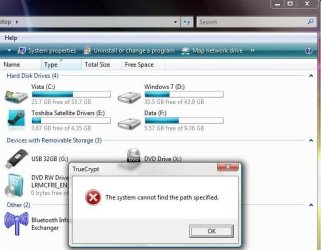
Now , TrueCript have an autorun and when you insert the stick you will get this :

Photo1

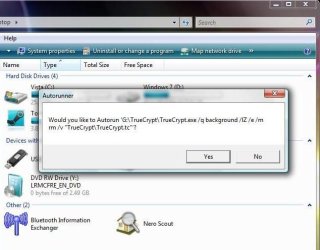
After i click there i get :

Photo2

On Win7 , i don`t get these options . I have to create a shortcut of TrueCrypt that is on my USB and put some options at target , in order to get that password screen from Photo2 . Or i can run TrueCrypt and mount the partition ( but this require too many clicks :D)

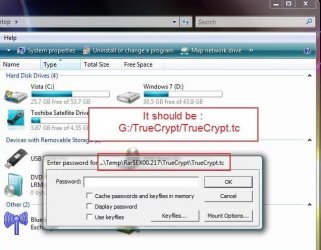
Also , another thing that i dont get when i use the USB with Win7 is this :

Photo3

When i click there i get the password screen like Photo2.
Everything works on Vista and XP but not on Win7 because of the new autorun security.

Hope you will understand me because i`m from Romania and i don`t know how to write grammatically correct.

Cya

PS: Here is the autorun.inf

[autorun]
label=USB 32GB
icon=icon.ico
action=Mount TrueCrypt volume
open=TrueCrypt\TrueCrypt.exe /q background /lZ /e /m rm /v "TrueCrypt\TrueCrypt.tc"
shell\start=Start TrueCrypt Background Task
shell\start\command=TrueCrypt\TrueCrypt.exe
shell\dismount=Dismount all TrueCrypt volumes
shell\dismount\command=TrueCrypt\TrueCrypt.exe /q /d
 

My Computer My Computer

OS
MultiBoot : Windows 7 Ultimate , Windows Vista Ultimate SP1
To be more specific, this is my problem :

TrueCrypt have some options that can encrypt a USB stick with a password protect . I bought a 32GB USB stick and i found out that the stick does not have his own password protect program , so i installed TrueCrypt .

Now , TrueCript have an autorun and when you insert the stick you will get this :

Photo1

After i click there i get :

Photo2

On Win7 , i don`t get these options . I have to create a shortcut of TrueCrypt that is on my USB and put some options at target , in order to get that password screen from Photo2 . Or i can run TrueCrypt and mount the partition ( but this require too many clicks :D)

Also , another thing that i dont get when i use the USB with Win7 is this :

Photo3

When i click there i get the password screen like Photo2.
Everything works on Vista and XP but not on Win7 because of the new autorun security.

Hope you will understand me because i`m from Romania and i don`t know how to write grammatically correct.

Cya

PS: Here is the autorun.inf

[autorun]
label=USB 32GB
icon=icon.ico
action=Mount TrueCrypt volume
open=TrueCrypt\TrueCrypt.exe /q background /lZ /e /m rm /v "TrueCrypt\TrueCrypt.tc"
shell\start=Start TrueCrypt Background Task
shell\start\command=TrueCrypt\TrueCrypt.exe
shell\dismount=Dismount all TrueCrypt volumes
shell\dismount\command=TrueCrypt\TrueCrypt.exe /q /d

I'll look at the shell part of the autorun.inf, did you try out the autorunner program I posted? Did the autorun part start correctly?
 

My Computer My Computer

Computer Manufacturer/Model Number
fakeasdf (c)
OS
Win 7 Pro x64 x 3, Win 7 Pro x86, Ubuntu 9.04
CPU
2 x C2D [email protected] Ghz, C2D [email protected] ghz, P4 @ 3.0 ghz,
Motherboard
GIGABYTE GA-EP35-DS3P LGA 775 Intel P35 ATX Dynamic Energy S
Memory
2x8 GB Corsair, 4GB Kingston, 2GB GSkill
Graphics Card(s)
ATI Radeon 4670 1 GB DDR3, 2600 Pro, 2400 Pro, Intel 965
Sound Card
I don't care... Connected using Optical on Media Center
Monitor(s) Displays
Panasonic Viera 50" Plasma, 2x 19"
Screen Resolution
1080P, 1280x1024's
Hard Drives
4 Terabytes
Case
Antec P182 Gun Metal Black
Internet Speed
20 Mbit U/D
Yes i did , but there is a problem . TrueCypt mount the partition from temp folder and this is not good. The only thing that works is the VB script from LucienDol , but your program is better :D . All you have to do is that when i click on yes , truecrypt must mount the partition from the USB , not temp folder . Check the pics. They are made on Win Vista but i get the same thing on Win7.

10x
 

Attachments

  • 1.jpg
    1.jpg
    49.3 KB · Views: 190
  • 2.jpg
    2.jpg
    55.8 KB · Views: 155
  • 3.jpg
    3.jpg
    51.2 KB · Views: 124

My Computer My Computer

OS
MultiBoot : Windows 7 Ultimate , Windows Vista Ultimate SP1
Yes i did , but there is a problem . TrueCypt mount the partition from temp folder and this is not good. The only thing that works is the VB script from LucienDol , but your program is better :D . All you have to do is that when i click on yes , truecrypt must mount the partition from the USB , not temp folder . Check the pics. They are made on Win Vista but i get the same thing on Win7.

10x


I see what's going on... The truecrypt program is searching for the volume to mount relative to where my executable is, and not relative to the usb drives root. I've modified the code above to handle it. I'll work on getting the context menus to show up later today, but first I gotta go help my brother move :)
 

My Computer My Computer

Computer Manufacturer/Model Number
fakeasdf (c)
OS
Win 7 Pro x64 x 3, Win 7 Pro x86, Ubuntu 9.04
CPU
2 x C2D [email protected] Ghz, C2D [email protected] ghz, P4 @ 3.0 ghz,
Motherboard
GIGABYTE GA-EP35-DS3P LGA 775 Intel P35 ATX Dynamic Energy S
Memory
2x8 GB Corsair, 4GB Kingston, 2GB GSkill
Graphics Card(s)
ATI Radeon 4670 1 GB DDR3, 2600 Pro, 2400 Pro, Intel 965
Sound Card
I don't care... Connected using Optical on Media Center
Monitor(s) Displays
Panasonic Viera 50" Plasma, 2x 19"
Screen Resolution
1080P, 1280x1024's
Hard Drives
4 Terabytes
Case
Antec P182 Gun Metal Black
Internet Speed
20 Mbit U/D
Okay, I updated the file above... It now will do the shell extensions and will remove them when the usb drive is removed..
 

My Computer My Computer

Computer Manufacturer/Model Number
fakeasdf (c)
OS
Win 7 Pro x64 x 3, Win 7 Pro x86, Ubuntu 9.04
CPU
2 x C2D [email protected] Ghz, C2D [email protected] ghz, P4 @ 3.0 ghz,
Motherboard
GIGABYTE GA-EP35-DS3P LGA 775 Intel P35 ATX Dynamic Energy S
Memory
2x8 GB Corsair, 4GB Kingston, 2GB GSkill
Graphics Card(s)
ATI Radeon 4670 1 GB DDR3, 2600 Pro, 2400 Pro, Intel 965
Sound Card
I don't care... Connected using Optical on Media Center
Monitor(s) Displays
Panasonic Viera 50" Plasma, 2x 19"
Screen Resolution
1080P, 1280x1024's
Hard Drives
4 Terabytes
Case
Antec P182 Gun Metal Black
Internet Speed
20 Mbit U/D
It`s working . Thank you very much :)
 

My Computer My Computer

OS
MultiBoot : Windows 7 Ultimate , Windows Vista Ultimate SP1
Okay, I updated the file above... It now will do the shell extensions and will remove them when the usb drive is removed..


appreciate the work youve done will be useful when i git a new computer..

maybe this can be added to the instruct ables section :D
 

My Computer My Computer

Computer Manufacturer/Model Number
Dell 110L
OS
XP SP3
CPU
Pentum M 1.7 Ghz
Memory
1.25 Gb
Graphics Card(s)
intel 915
Sound Card
Sigma Tel C-Majior
Screen Resolution
1024x768
Hard Drives
Fjitsu 40 Gb
Case
Laptop
Mouse
HP
Internet Speed
6Mb/s
glad it worked out for yall... if there are any issues let me know... the code is above for those who don't want to trust an exe sitting on a website... It's c#...
 

My Computer My Computer

Computer Manufacturer/Model Number
fakeasdf (c)
OS
Win 7 Pro x64 x 3, Win 7 Pro x86, Ubuntu 9.04
CPU
2 x C2D [email protected] Ghz, C2D [email protected] ghz, P4 @ 3.0 ghz,
Motherboard
GIGABYTE GA-EP35-DS3P LGA 775 Intel P35 ATX Dynamic Energy S
Memory
2x8 GB Corsair, 4GB Kingston, 2GB GSkill
Graphics Card(s)
ATI Radeon 4670 1 GB DDR3, 2600 Pro, 2400 Pro, Intel 965
Sound Card
I don't care... Connected using Optical on Media Center
Monitor(s) Displays
Panasonic Viera 50" Plasma, 2x 19"
Screen Resolution
1080P, 1280x1024's
Hard Drives
4 Terabytes
Case
Antec P182 Gun Metal Black
Internet Speed
20 Mbit U/D
Simple .bat solution?

This is very old style, but works. This way a mounted Truecrypt volume is just a doubleclick further than with Autoplay.

Create run.bat in the USB stick root and edit this one line into it:

Code:
open=TrueCrypt\TrueCrypt.exe /q background /m rm /v "Data.tc"

This line expects that Truecrypt has been installed (as with the Traveler wizard) in the root in a 'Truecrypt' folder. Rename Data.tc according to the name of your encrypted volume.

Now as Windows 7 opens the 'Open to view files' option, choose that, then double click run.bat to open the Truecrypt password screen.
 

My Computer My Computer

OS
Windows 7 RC
Back
Top