
Shifting System reserved partition to other HDD .!

sasha007

New member
Local time
10:37 PM
Messages
17
Hi,

I've two HDD connected to my system , a 1TB & an 160 GB .!

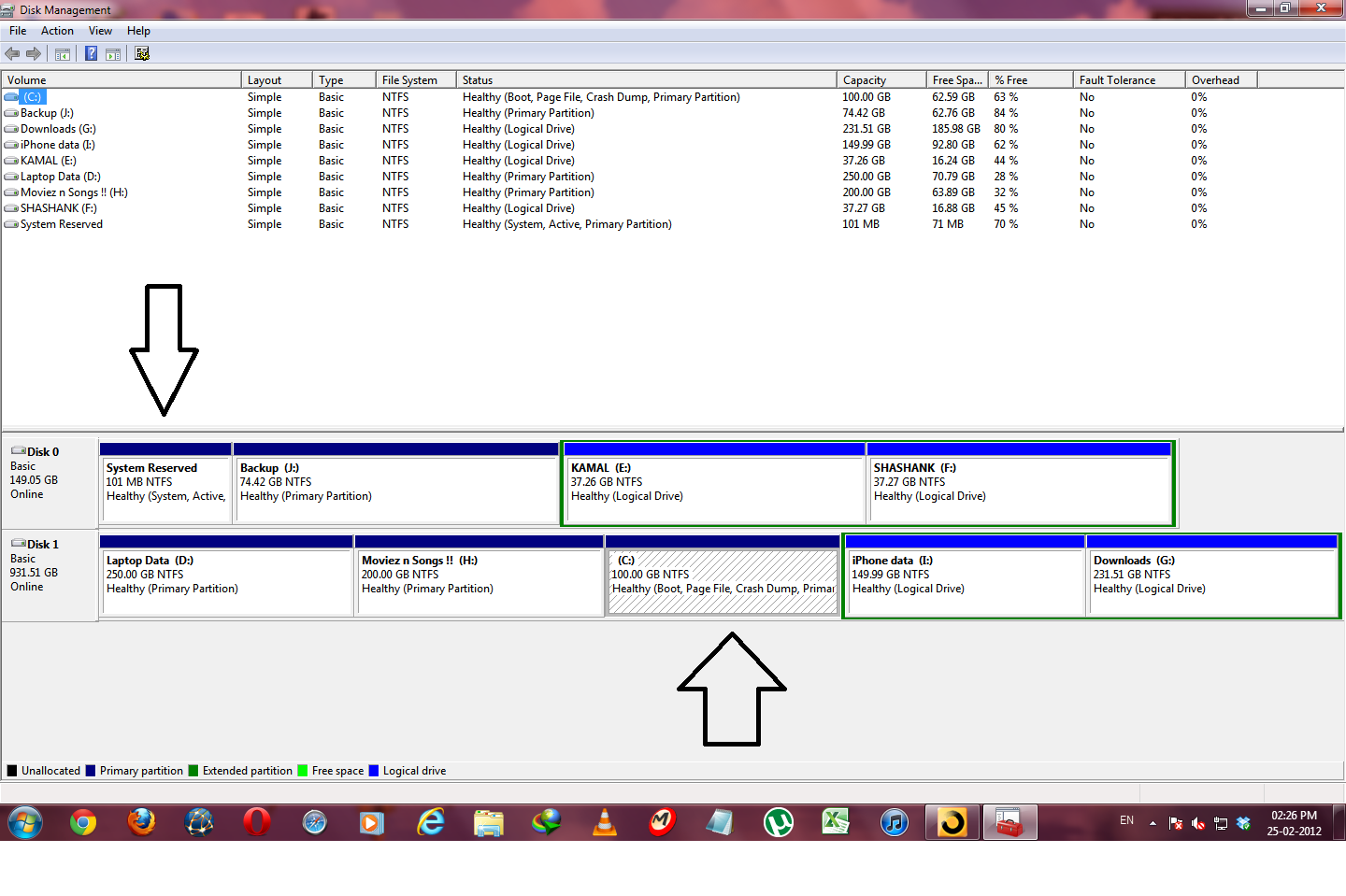
But now i want to remove the 160 GB HDD . But i noticed a weird problem when i opened disk management . Here is a screenshot :

lNsXg.png


As you can see my OS ( Win 7 ) is installed on C: drive which is on Disk 1 . While its System reserved partition is on Disk 0 .

Now since I have to remove Disk 0 , The System reserved partition has to be moved to Disk 1 .

I don't wanna reinstall the OS , so how can i shift the System reserved partition (With all its contents ) from Disk 0 to Disk 1 .?? :-?
 

My Computer My Computer

At a glance

Windows 7 Ultimate 32-bit
OS
Windows 7 Ultimate 32-bit
You need to write the System boot files to Win7 partition. Follow these steps:

Mark Win7 partition Active so Repair knows where to write the System boot files: Partition - Mark as Active

Power down, open the case, unplug Disk0, swap its data cable to Disk1 so that it becomes Disk0 and remains set to boot first in BIOS setup.

Now boot the Win7 DVD Repair console or System Repair Disk, run Startup Repair - Run 3 Separate Times to write the System boot files to Win7 partition until it starts on its own and holds the System Active boot flags.

You can now power down to plug back in the other HD to Disk1 to access its data or wipe with Diskpart Clean Command to clear the boot sector to prepare for repartitioning in Disk Mgmt..
 

My Computer My Computer

At a glance

Vista, Windows7, Mint Mate, Zorin, Windows 8from 1.6GHz Duo to i7
Computer Manufacturer/Model Number
HP, Dell, Gateway, Toshiba - 4 laptops and 2 desktops
OS
Vista, Windows7, Mint Mate, Zorin, Windows 8
CPU
from 1.6GHz Duo to i7
Monitor(s) Displays
2x HP w2207
Hard Drives
5x HDD, 7x SSD, 12x Externals
Keyboard
with trackball - no mices
Mouse
Trackball mice
Internet Speed
DSL 6000
If i shift Bootmgr to C:\ , can i then remove System reserved partition from Disk 0 then .?

Will i be able to use recovery console after removing System reserved partition then .? :shock:
 

My Computer My Computer

At a glance

Windows 7 Ultimate 32-bit
OS
Windows 7 Ultimate 32-bit

My Computer My Computer

At a glance

Vista, Windows7, Mint Mate, Zorin, Windows 8from 1.6GHz Duo to i7
Computer Manufacturer/Model Number
HP, Dell, Gateway, Toshiba - 4 laptops and 2 desktops
OS
Vista, Windows7, Mint Mate, Zorin, Windows 8
CPU
from 1.6GHz Duo to i7
Monitor(s) Displays
2x HP w2207
Hard Drives
5x HDD, 7x SSD, 12x Externals
Keyboard
with trackball - no mices
Mouse
Trackball mice
Internet Speed
DSL 6000
If i shift Bootmgr to C:\ , can i then remove System reserved partition from Disk 0 then .?

Will i be able to use recovery console after removing System reserved partition then .? :shock:

Good question, Sasha.

One reason we've evolved here in thousands of similar cases to always recommending Startup Repair x3 method of rewriting the System boot files is because it also writes the System Recovery Options to the F8 Advanced Boot Options menu which you would almost certainly be missing otherwise.

It's not that the System Reserved partition holds the WinRE file since it is in the Windows/System 32 folder on C, however it is the link to F8 which must be rewritten and only Startup Repair will do that when run the requisite number of times.
 
If i shift Bootmgr to C:\ , can i then remove System reserved partition from Disk 0 then .?

Will i be able to use recovery console after removing System reserved partition then .? :shock:

Good question, Sasha.

One reason we've evolved here in thousands of similar cases to always recommending Startup Repair x3 method of rewriting the System boot files is because it also writes the System Recovery Options to the F8 Advanced Boot Options menu which you would almost certainly be missing otherwise.

It's not that the System Reserved partition holds the WinRE file since it is in the Windows/System 32 folder on C, however it is the link to F8 which must be rewritten and only Startup Repair will do that when run the requisite number of times.


Okay . But there is slight a problem with my system . My DVD drive is dead , so i cannot have Windows 7 DVD to boot into the repair console . What should i do then .?

And do you mean that using the startup repair x3 method would rewrite the link to f8 ( which actually is in System reserved partition ) to the c:\ drive .? After that would the System reserved partition be still required .? :rolleyes:
 

My Computer My Computer

At a glance

Windows 7 Ultimate 32-bit
OS
Windows 7 Ultimate 32-bit
Once you moved the bootmgr, the system reserved partition is no more required.

Regarding system recovery, I do not see a recovery partition on your disks. But that should not be a big problem. Images are a lot easier to deal with. I would make images instead. http://www.sevenforums.com/tutorials/73828-imaging-free-macrium.html?ltr=I


By system recovery i meant the recovery options in the Repair console . Those reside in the System reserved partition as well right .? :shock:
 

My Computer My Computer

At a glance

Windows 7 Ultimate 32-bit
OS
Windows 7 Ultimate 32-bit
As I said before the WinRE Recovery Tools are in the WIndows folder on the Win7 partition not the System Reserved partition. A link is written to the F8 Advanced Boot Options menu during install or using Startup Repair to rewrite the System boot files to the partition marked Active.

You can make a System Repair Disc - Create which is why I had a blue link in my post for it.

Or if you don't have a working CD drive you can extract the DVD ISO on another computer using ImgBurn then write it to flash stick using Universal USB Installer with Win7 in dropdown menu, boot the stick under USB, Removable or HD's, follow the steps I gave.

You'll know it's done correctly when Win7 starts with the other HD unplugged and holds the System Active flags. You can then reboot to test that F8 has the Repair choice on it.
 

My Computer My Computer

At a glance

Windows 7x64 Home Premium SP1Intel i7 2600kG.Skill Ripjaws (DDR3-1600) 2x4GBNvidia GeForce GTS 450; Intel HD Graphics 300...
Computer type
PC/Desktop
Computer Manufacturer/Model Number
Own build
OS
Windows 7x64 Home Premium SP1
CPU
Intel i7 2600k
Motherboard
ASUS P8Z68 Deluxe
Memory
G.Skill Ripjaws (DDR3-1600) 2x4GB
Graphics Card(s)
Nvidia GeForce GTS 450; Intel HD Graphics 3000(GT2+)
Monitor(s) Displays
Dell Ultrasharp IPS panel U2311H, Samsung SyncMaster P2350
Screen Resolution
1920x1080
Hard Drives
Samsung 850 Pro SSD 256GB, Samsung SSD 840 120GB, Seagates 1TB Barracuda ST31000528AS x2
PSU
Seasonic M12II 520W
Case
Lian Li Lancool PC-K60
Cooling
Case: 1x120mm, 3x140mm CPU: Hyper 212+
Keyboard
Logitech MK520 (wireless)
Mouse
Logitech MK520
Internet Speed
6-7 Mbps
Antivirus
Norton Security Premium, Malwarebytes on 2 (MSE on 3rd PC)
Browser
FireFox
Other Info
Audio: Logitech Z523 2.1
You need to write the System boot files to Win7 partition. Follow these steps:

Mark Win7 partition Active so Repair knows where to write the System boot files: Partition - Mark as Active

Power down, open the case, unplug Disk0, swap its data cable to Disk1 so that it becomes Disk0 and remains set to boot first in BIOS setup.

Now boot the Win7 DVD Repair console or System Repair Disk, run Startup Repair - Run 3 Separate Times to write the System boot files to Win7 partition until it starts on its own and holds the System Active boot flags.

You can now power down to plug back in the other HD to Disk1 to access its data or wipe with Diskpart Clean Command to clear the boot sector to prepare for repartitioning in Disk Mgmt..

Hey hi .!

I did as was told . Marked the C:\ drive on disk 1 as active and the system reserved partition on Disk 0 as inactive .
The shut down , swapped the disk 0 sata cable & connected it to disk 1 , so now disk 1 became disk 0 . Restarted and booted with a usb drive containing Windows 7 ultimate.

It loaded operating system files . And then when it started , i clicked repair my computer . It scanned and found a recovery option . I clicked repair and it now says Windows 7 ultimate ( Recovered) on Drive C :/

Restarted and again booted via usb drive . Now i clicked on startup repair . The first time it said that it has detected an error and repaired ( within like 5-6 seconds ) . Then restarted . Again for the second and third time ran startup repair , but both of these times it said that startup repair could not find any problems . After running 3 startup repairs ,& restarting it still says Error loading the operating system . :cry:

I followed all the steps , could you tell what is the problem then .? :huh:

FYI : I used a pen drive to boot to the Windows 7 setup , so that partition had to be active . Thus apart from C:/ , the pen drive partition is also active .
 

My Computer My Computer

At a glance

Windows 7 Ultimate 32-bit
OS
Windows 7 Ultimate 32-bit
Is the Win7 HD set first to boot in BIOS setup?

There are problems sometimes with running repairs from a pen drive. Can you use a System Repair Disk or Win7 DVD Repair console?

Confirm C is set Active: Partition - Mark as Active (Method Two)

If all of these fail, plug back in the old HD, set it first to boot in BIOS setup, in Win7 install EasyBCD to move the boot files as suggested by Wolfgang.
 
Is the Win7 HD set first to boot in BIOS setup?

There are problems sometimes with running repairs from a pen drive. Can you use a System Repair Disk or Win7 DVD Repair console?

Confirm C is set Active: Partition - Mark as Active (Method Two)

If all of these fail, plug back in the old HD, set it first to boot in BIOS setup, in Win7 install EasyBCD to move the boot files as suggested by Wolfgang.


Yes Windows 7 HDD is set first to boot .
Okay , I'll try and run it via dvd and revert .

BTW is it normal for the Startup repair to say it did not detect any problems in its 2nd and 3rd runs ( after the 1st run says it has found a problem and repairs it .? ) ?
 

My Computer My Computer

At a glance

Windows 7 Ultimate 32-bit
OS
Windows 7 Ultimate 32-bit
Sometimes Startup Repair needs to be run no matter what it reports.

If it refuses to write the System boot files to C as it should, then you can try moving the boot files per whs's link using EasyBCD, or we can help you construct a System Reserved partition on the HD.

Don't panic as you can plug back in the other HD and set it first to boot if needed to use it to boot.
 
Last edited:
Hi,

After multiple retries , Startup repair does not work . Every time it says that Setup could not detect a problem :( .
Could you please tell if there is an alternative .?

Like creating a System reserved partition on the same disk manually and then transferring the contents to the new System reserved partition & then creating links manually .?

Plz assist ...
 

My Computer My Computer

At a glance

Windows 7 Ultimate 32-bit
OS
Windows 7 Ultimate 32-bit
First double check Win7 HD is set first to boot in BIOS setup. Try booting again.

Next boot into free Partition Wizard bootable CD, confirm Active flag is on Win7 partition, then click on HD # to highlight it, from Disk tab select Rebuild MBR, Apply. Reboot. If it fails post back a camera snap of PW drive map showing all listings.

Next plug back in the other HD which contains the System Reserved partition, set it first to boot in BIOS setup (after DVD drive) then if it won't boot remove the Active flag from WIn7 partition using PW CD to rightclick>Modify, then run Startup Repairs again.

When WIn7 starts try using whs's method to move boot files to C using EasyBCD. Remember you'll need to set WIn7 HD first to boot before restarting once you do this for it to boot. See if it then holds the System flag.

If these fail we can construct a System Reserved partition or rescue any files needed to Clean Reinstall. I am around all day today to help you.
 
If that fails and you are comfortable using the command prompt then you can try:
1) Ensure C: is the only active partition for both HDDs. This should set the active flag in the MBR partition table. It would be best to have the C: partition drive plugged in
2) Go into a command prompt from the system repair DVD or USB
3) enter the following commands
>bootrec /fixmbr
..........This will ensure you have boot code in the 2nd HDD's MBR
>bootrec /fixboot
..........This will give you a bootsector on C: partition
>bootrec /rebuildbcd
..........This will build the BCD (boot configuration data table) on C:
4) Your system should now boot

More information on Bootrec.
 

My Computer My Computer

At a glance

Windows 7x64 Home Premium SP1Intel i7 2600kG.Skill Ripjaws (DDR3-1600) 2x4GBNvidia GeForce GTS 450; Intel HD Graphics 300...
Computer type
PC/Desktop
Computer Manufacturer/Model Number
Own build
OS
Windows 7x64 Home Premium SP1
CPU
Intel i7 2600k
Motherboard
ASUS P8Z68 Deluxe
Memory
G.Skill Ripjaws (DDR3-1600) 2x4GB
Graphics Card(s)
Nvidia GeForce GTS 450; Intel HD Graphics 3000(GT2+)
Monitor(s) Displays
Dell Ultrasharp IPS panel U2311H, Samsung SyncMaster P2350
Screen Resolution
1920x1080
Hard Drives
Samsung 850 Pro SSD 256GB, Samsung SSD 840 120GB, Seagates 1TB Barracuda ST31000528AS x2
PSU
Seasonic M12II 520W
Case
Lian Li Lancool PC-K60
Cooling
Case: 1x120mm, 3x140mm CPU: Hyper 212+
Keyboard
Logitech MK520 (wireless)
Mouse
Logitech MK520
Internet Speed
6-7 Mbps
Antivirus
Norton Security Premium, Malwarebytes on 2 (MSE on 3rd PC)
Browser
FireFox
Other Info
Audio: Logitech Z523 2.1

My Computer My Computer

At a glance

Vista, Windows7, Mint Mate, Zorin, Windows 8from 1.6GHz Duo to i7
Computer Manufacturer/Model Number
HP, Dell, Gateway, Toshiba - 4 laptops and 2 desktops
OS
Vista, Windows7, Mint Mate, Zorin, Windows 8
CPU
from 1.6GHz Duo to i7
Monitor(s) Displays
2x HP w2207
Hard Drives
5x HDD, 7x SSD, 12x Externals
Keyboard
with trackball - no mices
Mouse
Trackball mice
Internet Speed
DSL 6000
Your call how you like to fix the problem. But I would just move the bootmgr to the C partition. That is a 1 minute operation http://www.sevenforums.com/tutorials/209885-bootmgr-move-c-easybcd.html

Ofcourse i would like to do it the easy way .

But i also want the System Recovery Options in the F8 Advanced Boot Options menu to be functioning as well .

After moving bootmgr to the C partition , is there a way to write the link to the F8 Advanced boot options menu for System Recovery Options , so that it can work again .? :shock:

EDIT : I did move the bootmgr using Easy BCD to C:/ .
Then Marked the System reserved partition on the other drive inactive and C:/ pn the first drive active .
Restarted and the set the drive with C: to booth first .

But it still says Error loading the Operating System . Why is that .? :(
 
Last edited:

My Computer My Computer

At a glance

Windows 7 Ultimate 32-bit
OS
Windows 7 Ultimate 32-bit
First double check Win7 HD is set first to boot in BIOS setup. Try booting again.

Next boot into free Partition Wizard bootable CD, confirm Active flag is on Win7 partition, then click on HD # to highlight it, from Disk tab select Rebuild MBR, Apply. Reboot. If it fails post back a camera snap of PW drive map showing all listings.

Next plug back in the other HD which contains the System Reserved partition, set it first to boot in BIOS setup (after DVD drive) then if it won't boot remove the Active flag from WIn7 partition using PW CD to rightclick>Modify, then run Startup Repairs again.

When WIn7 starts try using whs's method to move boot files to C using EasyBCD. Remember you'll need to set WIn7 HD first to boot before restarting once you do this for it to boot. See if it then holds the System flag.

If these fail we can construct a System Reserved partition or rescue any files needed to Clean Reinstall. I am around all day today to help you.

If i just move the bootmgr using Easy BCD , is there a way to manually write the link to the F8 Advanced Boot Options menu for System Recovery Options to work again .?

I don't want to complicate things :confused:

Besides , if i just move the bootmgr , only the system recovery options won't be accessible from F8 right .? They can still be accessed from the Windows 7 DVD right .? And rest everything will be fine by using this method .?

And would start up repair from the Windows 7 dvd work in future in case something goes wrong with Windows again .?

Also , i wanna know that i have created the Windows 7 DVD by slip-streaming SP1 using RT7lite . Will the start up repair work from this Windows 7 slip streamed DVD .?
 

My Computer My Computer

At a glance

Windows 7 Ultimate 32-bit
OS
Windows 7 Ultimate 32-bit
Back
Top