
You are using an out of date browser. It may not display this or other websites correctly.
You should upgrade or use an alternative browser.
You should upgrade or use an alternative browser.
Solved Help with how i can choice which programs tht start up.
- Thread starter Majid2
- Start date

- Local time
- 6:51 PM
- Messages
- 35,002
Click on the start button ... and in the search box below it type "msconfig" without the quote strings , and hit enter.
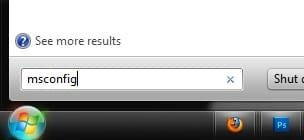
it will open the system configuration window. In the window, the fourth tab is "startup" .
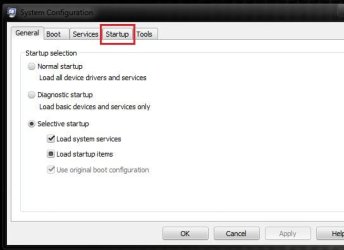
Go there, and uncheck everything other than the antivirus. Then apply and OK.
it will open the system configuration window. In the window, the fourth tab is "startup" .
Go there, and uncheck everything other than the antivirus. Then apply and OK.
My Computer
- Computer type
- PC/Desktop
- Computer Manufacturer/Model Number
- Self Assembled
- OS
- Microsoft Windows 10 Pro Insider Preview 64-bit
- CPU
- Intel(R) Core(TM) i3-4130 CPU @ 3.40GHz
- Motherboard
- Gigabyte Technology Co., Ltd. B85M-D3H
- Memory
- Corsair Vengence 4GB x2 (8.00GB Dual-Channel DDR3 @ 798MHz)
- Graphics Card(s)
- 2047MB GeForce GTS 450 (ZOTAC International)
- Sound Card
- Onboard (Realtek High Definition Audio)
- Monitor(s) Displays
- LG Flatron E2040T
- Screen Resolution
- 1600x900
- Hard Drives
- Western Digital 1 TB
Seagate 500 GB
- PSU
- Corsair VS550
- Case
- Cooler Master K380
- Cooling
- Cooler Master Seidon 120V Plus
- Keyboard
- Logitech MK260r
- Mouse
- Logitech MK260r
- Internet Speed
- PMPL Broadband
- Antivirus
- Windows Defender + MBAM
- Browser
- Firefox
- Other Info
- Dell Studio 15" Laptop

- Local time
- 7:21 PM
- Messages
- 14,164
start button  rb: > type in msconfig in search > go to the boot tab and un tick msn and skype. make sure you don't un tick anything else (that may be important) .
or go through step 4 on this tutorial http://www.sevenforums.com/tutorials/1401-startup-programs-change.html
rb: > type in msconfig in search > go to the boot tab and un tick msn and skype. make sure you don't un tick anything else (that may be important) . or go through step 4 on this tutorial http://www.sevenforums.com/tutorials/1401-startup-programs-change.html
My Computer
- Computer type
- PC/Desktop
- Computer Manufacturer/Model Number
- Self assembled
- OS
- Windows 10 Home 64Bit
- CPU
- Intel Core i5 10400 @ 2.90GHz
- Motherboard
- Intel Corporation DG41WV (PROCESSOR)
- Memory
- 8.00GB Single-Channel Unknown @ 1329MHz (16-20-20-38)
- Sound Card
- Realtek High Definition Audio
- Monitor(s) Displays
- DELL E170S
- Screen Resolution
- 1280x1024 pixels
- Hard Drives
- 931GB TOSHIBA DT01ACA100 (SATA)
238GB TEAM TM8PS7256G (SATA SSD)
- Case
- Nothing Fancy
- Cooling
- Fans
- Keyboard
- A4 Tech Co LTD
- Mouse
- A4 Tech Co Ltd/Logitech
- Internet Speed
- 25 Mbps
seavixen32
New member
Just to add to Arc's advice:
My Computer
- Computer Manufacturer/Model Number
- HP Pavilion Elite 495UK
- OS
- Windows 7 Ultimate SP1 64-Bit
- CPU
- Intel Core i7 870 @ 2.93GHz
- Motherboard
- MSI 2A9C (CPU1)
- Memory
- 8Gb Dual-Channel DDR3 @ 664MHz
- Graphics Card(s)
- nVidia GeForce GTX 460 1024MB dedicated RAM
- Sound Card
- Realtek HD Audio
- Monitor(s) Displays
- HP2310i
- Screen Resolution
- 1920 x 1080
- Hard Drives
- 1x1954GB Hitachi HDS22020ALA 330 (RAID), 1x1954GB Hitachi External for backup and storage
- PSU
- 460W
- Case
- HP Elite
- Cooling
- Air cooled
- Keyboard
- Logitech K750 solar-powered keyboard
- Mouse
- Logitech Wireless M180 mouse
- Internet Speed
- 2Mb
- Other Info
- Pure Avanti Flow Internet Radio with iPod Dock, 64Gb iPod, HP USB Speakers, Sony MDR-V500 Headphones, Sony Vaio F-Series Laptop
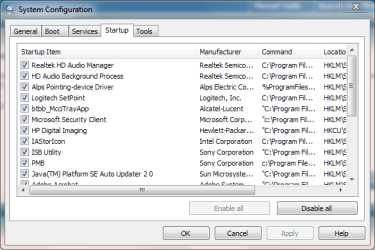
Click on the start button ... and in the search box below it type "msconfig" without the quote strings , and hit enter. it will open the system configuration window. In the window, the fourth tab is "startup" . Go there, and uncheck everything other than the antivirus. Then apply and OK.
why everything m8?
isnt some of the other things important? like the intel? or the bluetooth? dont i need tht for internet?
My Computer
- OS
- windows 7 64
seavixen32
New member
Just uncheck anything you don't need at startup - the choice is yours.
My Computer
- Computer Manufacturer/Model Number
- HP Pavilion Elite 495UK
- OS
- Windows 7 Ultimate SP1 64-Bit
- CPU
- Intel Core i7 870 @ 2.93GHz
- Motherboard
- MSI 2A9C (CPU1)
- Memory
- 8Gb Dual-Channel DDR3 @ 664MHz
- Graphics Card(s)
- nVidia GeForce GTX 460 1024MB dedicated RAM
- Sound Card
- Realtek HD Audio
- Monitor(s) Displays
- HP2310i
- Screen Resolution
- 1920 x 1080
- Hard Drives
- 1x1954GB Hitachi HDS22020ALA 330 (RAID), 1x1954GB Hitachi External for backup and storage
- PSU
- 460W
- Case
- HP Elite
- Cooling
- Air cooled
- Keyboard
- Logitech K750 solar-powered keyboard
- Mouse
- Logitech Wireless M180 mouse
- Internet Speed
- 2Mb
- Other Info
- Pure Avanti Flow Internet Radio with iPod Dock, 64Gb iPod, HP USB Speakers, Sony MDR-V500 Headphones, Sony Vaio F-Series Laptop

Even though you uncheck the item's they just don't start at startup, their still there to use when needed.
My Computer
- Computer Manufacturer/Model Number
- Dell XPS 730
- OS
- Windows 7 Home Premium 64 bit
- CPU
- Intel Core 2 quad Extreme Q9770 @ 3.2 GHz
- Memory
- 4x2 GB Muskin 1600 MHz ram
- Graphics Card(s)
- NVidia GTX 250
- Sound Card
- Soundblaster X-Fi Fatality Champion
- Monitor(s) Displays
- 2 Dell 2007WFP Ultrascans
- Screen Resolution
- 3360 x 1050
- Hard Drives
- WD Black 1TB sata, 2-WD Black 500 sata, 2-Seagate 500 Go external
- PSU
- 1000 Watt
- Cooling
- air
- Keyboard
- MS Natrual Keyboard Pro
- Mouse
- Logitech Wireless Trackball
- Internet Speed
- DSL Elite

Infinite
Closed as requested
- Local time
- 2:21 PM
- Messages
- 958
An alternative method would be to use CCleaner and click on the Startup Tab, Disable and Delete whatever or manually remove the Startup Entries from the Registry which I would not attempt.
My Computer
- Computer type
- PC/Desktop
- Computer Manufacturer/Model Number
- Novatech iRush Pro
- OS
- Windows 7 Ultimate SP1 - 64 Bit
- CPU
- Intel Core i5 2500k
- Motherboard
- Foxconn H67M-S/H67M-V/H67
- Memory
- 2x4GB DDR3 1333Hz
- Graphics Card(s)
- Ati Radeon 6770
- Sound Card
- None
- Monitor(s) Displays
- Samsung S22B150
- Screen Resolution
- 1920x1080
- Hard Drives
- 2x500GB
- PSU
- 500W
- Cooling
- Fan
- Keyboard
- HP KU0316
- Mouse
- Wireless Logitech M185
- Internet Speed
- 20MB/s
- Antivirus
- Avast Free
- Browser
- Google Chrome
- Other Info
- Logitech M185 Mouse
KU-M316 Keyboard
An alternative method would be to use CCleaner and click on the Startup Tab, Disable and Delete whatever or manually remove the Startup Entries from the Registry which I would not attempt.
Infinite neither of those are good choice's when you can check and uncheck in msconfig without the possibility of really deleteing something and then can't get it back. Just for what's it's worth.
My Computer
- Computer Manufacturer/Model Number
- Dell XPS 730
- OS
- Windows 7 Home Premium 64 bit
- CPU
- Intel Core 2 quad Extreme Q9770 @ 3.2 GHz
- Memory
- 4x2 GB Muskin 1600 MHz ram
- Graphics Card(s)
- NVidia GTX 250
- Sound Card
- Soundblaster X-Fi Fatality Champion
- Monitor(s) Displays
- 2 Dell 2007WFP Ultrascans
- Screen Resolution
- 3360 x 1050
- Hard Drives
- WD Black 1TB sata, 2-WD Black 500 sata, 2-Seagate 500 Go external
- PSU
- 1000 Watt
- Cooling
- air
- Keyboard
- MS Natrual Keyboard Pro
- Mouse
- Logitech Wireless Trackball
- Internet Speed
- DSL Elite
- Local time
- 6:51 PM
- Messages
- 35,002
You can find one thing is important to start up with windows ... the antivirus . All the others are not. Even, the antivirus is also an optional thing. Not a must.Click on the start button ... and in the search box below it type "msconfig" without the quote strings , and hit enter. it will open the system configuration window. In the window, the fourth tab is "startup" . Go there, and uncheck everything other than the antivirus. Then apply and OK.
why everything m8?
isnt some of the other things important? like the intel? or the bluetooth? dont i need tht for internet?
My Computer
- Computer type
- PC/Desktop
- Computer Manufacturer/Model Number
- Self Assembled
- OS
- Microsoft Windows 10 Pro Insider Preview 64-bit
- CPU
- Intel(R) Core(TM) i3-4130 CPU @ 3.40GHz
- Motherboard
- Gigabyte Technology Co., Ltd. B85M-D3H
- Memory
- Corsair Vengence 4GB x2 (8.00GB Dual-Channel DDR3 @ 798MHz)
- Graphics Card(s)
- 2047MB GeForce GTS 450 (ZOTAC International)
- Sound Card
- Onboard (Realtek High Definition Audio)
- Monitor(s) Displays
- LG Flatron E2040T
- Screen Resolution
- 1600x900
- Hard Drives
- Western Digital 1 TB
Seagate 500 GB
- PSU
- Corsair VS550
- Case
- Cooler Master K380
- Cooling
- Cooler Master Seidon 120V Plus
- Keyboard
- Logitech MK260r
- Mouse
- Logitech MK260r
- Internet Speed
- PMPL Broadband
- Antivirus
- Windows Defender + MBAM
- Browser
- Firefox
- Other Info
- Dell Studio 15" Laptop
You can find one thing is important to start up with windows ... the antivirus . All the others are not. Even, the antivirus is also an optional thing. Not a must.Click on the start button ... and in the search box below it type "msconfig" without the quote strings , and hit enter. it will open the system configuration window. In the window, the fourth tab is "startup" . Go there, and uncheck everything other than the antivirus. Then apply and OK.
why everything m8?
isnt some of the other things important? like the intel? or the bluetooth? dont i need tht for internet?
do they save battery-time? else i dont really need to deaktivate!

My Computer
- OS
- windows 7 64
- Local time
- 6:51 PM
- Messages
- 35,002
For a few fractions of a second, no doubt. But if those are of any real importance, you didn't have an option to deactivate those.do they save battery-time? else i dont really need to deaktivate!
For somebody like me, rainmeter, objectdock etc are important, so I have those in startup, alongwith antivirus (and nothing else). Many a people dont use those programs ... it's not a very serious issue, other than a load on startup time.
My Computer
- Computer type
- PC/Desktop
- Computer Manufacturer/Model Number
- Self Assembled
- OS
- Microsoft Windows 10 Pro Insider Preview 64-bit
- CPU
- Intel(R) Core(TM) i3-4130 CPU @ 3.40GHz
- Motherboard
- Gigabyte Technology Co., Ltd. B85M-D3H
- Memory
- Corsair Vengence 4GB x2 (8.00GB Dual-Channel DDR3 @ 798MHz)
- Graphics Card(s)
- 2047MB GeForce GTS 450 (ZOTAC International)
- Sound Card
- Onboard (Realtek High Definition Audio)
- Monitor(s) Displays
- LG Flatron E2040T
- Screen Resolution
- 1600x900
- Hard Drives
- Western Digital 1 TB
Seagate 500 GB
- PSU
- Corsair VS550
- Case
- Cooler Master K380
- Cooling
- Cooler Master Seidon 120V Plus
- Keyboard
- Logitech MK260r
- Mouse
- Logitech MK260r
- Internet Speed
- PMPL Broadband
- Antivirus
- Windows Defender + MBAM
- Browser
- Firefox
- Other Info
- Dell Studio 15" Laptop

Maybe I'm missing something here, but if I'm not mistaken (and it's possible that I could be), in order for the MSCONFIG command to work, on the General tab, you will have to put a check next to the box that says, "Selective startup". Then in the startup tab, simply uncheck whatever you don't want to start. It won't take effect until you restart your computer.
My Computer
- Computer type
- Laptop
- Computer Manufacturer/Model Number
- HP Pavilion g7-1260us Notebook
- OS
- Desk Top with Win 7 Home Premium 64 bit and Lap Top with Windows 8.1 Pro 64 bit
- Memory
- 8Gig
- Screen Resolution
- 1600x900
Infinite
Closed as requested
- Local time
- 2:21 PM
- Messages
- 958
An alternative method would be to use CCleaner and click on the Startup Tab, Disable and Delete whatever or manually remove the Startup Entries from the Registry which I would not attempt.
Infinite neither of those are good choice's when you can check and uncheck in msconfig without the possibility of really deleteing something and then can't get it back. Just for what's it's worth.
Then you only select Disable, not Delete. The registry method is not though.
My Computer
- Computer type
- PC/Desktop
- Computer Manufacturer/Model Number
- Novatech iRush Pro
- OS
- Windows 7 Ultimate SP1 - 64 Bit
- CPU
- Intel Core i5 2500k
- Motherboard
- Foxconn H67M-S/H67M-V/H67
- Memory
- 2x4GB DDR3 1333Hz
- Graphics Card(s)
- Ati Radeon 6770
- Sound Card
- None
- Monitor(s) Displays
- Samsung S22B150
- Screen Resolution
- 1920x1080
- Hard Drives
- 2x500GB
- PSU
- 500W
- Cooling
- Fan
- Keyboard
- HP KU0316
- Mouse
- Wireless Logitech M185
- Internet Speed
- 20MB/s
- Antivirus
- Avast Free
- Browser
- Google Chrome
- Other Info
- Logitech M185 Mouse
KU-M316 Keyboard

- Local time
- 6:21 AM
- Messages
- 50,634
I uncheck everything except AV and gadgets: Startup Programs - Change. If you have a question about an item, just google it to read what it is.
After unchecking Startup tab, after reboots enter msconfig>Services, tick the box to Hide All MS Services, then do the same there as in Startup tab.
Check back periodically that nothing writes itself back in, if so change it's Program Preferences or Uninstall the freeloader. In Adobe Reader, for example, you need to uncheck Check for Updates in General>Preferences or Updates tab.
After unchecking Startup tab, after reboots enter msconfig>Services, tick the box to Hide All MS Services, then do the same there as in Startup tab.
Check back periodically that nothing writes itself back in, if so change it's Program Preferences or Uninstall the freeloader. In Adobe Reader, for example, you need to uncheck Check for Updates in General>Preferences or Updates tab.

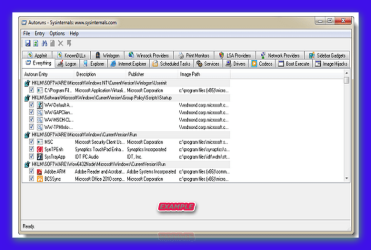
hi if you want a more comprehensive look at what starts up please use autoruns by Microsoft sysinternals
DOWNLOAD >>> http://goo.gl/3Sqv
WEBSITE >>>>>>> Autoruns for Windows
DOWNLOAD >>> http://goo.gl/3Sqv
WEBSITE >>>>>>> Autoruns for Windows
Introduction
This utility, which has the most comprehensive knowledge of auto-starting locations of any startup monitor, shows you what programs are configured to run during system bootup or login, and shows you the entries in the order Windows processes them. These programs include ones in your startup folder, Run, RunOnce, and other Registry keys. You can configure Autoruns to show other locations, including Explorer shell extensions, toolbars, browser helper objects, Winlogon notifications, auto-start services, and much more. Autoruns goes way beyond the MSConfig utility bundled with Windows Me and XP.
Autoruns' Hide Signed Microsoft Entries option helps you to zoom in on third-party auto-starting images that have been added to your system and it has support for looking at the auto-starting images configured for other accounts configured on a system. Also included in the download package is a command-line equivalent that can output in CSV format, Autorunsc.
You'll probably be surprised at how many executables are launched automatically!
Attachments
Last edited:
My Computer
- Computer Manufacturer/Model Number
- packard bell IXTREME M5722
- OS
- Operating System : Windows 7 Home Premium Edition 6.01.7600 SP1 (x64)
- CPU
- Processor : Intel Core 2 Quad Q8300 @ 2500 MHz
- Motherboard
- Mainboard : Packard Bell (Acer EG43M )
- Memory
- Physical Memory :8GB Corsair4x 2GB 800MHz C5 DDR2
- Graphics Card(s)
- Video Card : XFX 6700 AMD
- Monitor(s) Displays
- Maestro 234DL - BenQ V2220 - BenQ VW2420H
- Screen Resolution
- Current Display :1920x1080p pixels at 60 Hz in HD LED
- Hard Drives
- Hard Disks : WDC (1000 GB)
Drive C: (Hard Disk) : 428 GB available on 491 GB
Drive D: (Hard Disk) : 426 GB available on 492 GB
SAMSUNG spinpoint HD103SJ 1000.2 GB
(X 2) KINGSTON SSD NOW V 30GB
- PSU
- XFX ProSeries 550W PSU
- Case
- PACKARD BELL IXTREME
- Cooling
- System Blower Current: 150mA Air Flow16CFM ;Akasa 90mm rear
- Keyboard
- Gigabyte Aivia K8100
- Mouse
- TRUST-Wireless Laser Mouse - Carbon edition MI-7770C
- Internet Speed
- TP-LINK > TL-WN951N / AV500 Gigabit Powerline Adapters
- Browser
- chrome dev
- Other Info
- EXTRA COOLING>(FAN CONTROLLER) PC Bay Cooler 3 x 40mm fans; Akasa AK-HD-BL Blue hard drive cooler 2 x 40 mm fan 4500 rpm 29.7 dBA
Bios> American Megatrends Inc.
Version : P01-A1
Date : 08/31/2009

Dear Majid2,
A warm welcome to SevenForums! Yes, you have a very valid point there! I will give you an example: i have an Bluetooth keyboard and Mouse and i want them in the Startup items. I have Zone Alarm Browser Security too, but as i run a Sandboxie browser and have WOT, i have un-ticked it in the stert up menu! I don't need Dolby system in startup, hence i have just"disabled" it. You actually just disable them, not "remove".
best wishes,
sree
A warm welcome to SevenForums
! Yes, you have a very valid point there! I will give you an example: i have an Bluetooth keyboard and Mouse and i want them in the Startup items. I have Zone Alarm Browser Security too, but as i run a Sandboxie browser and have WOT, i have un-ticked it in the stert up menu! I don't need Dolby system in startup, hence i have just"disabled" it. You actually just disable them, not "remove".best wishes,
sree
My Computer
- Computer Manufacturer/Model Number
- Sony Vaio C series VPCCB35FN laptop
- OS
- MS Windows 7 Home Premium 64-bit SP1
- CPU
- IntelCore [email protected]; Sandy Bridge 32nm Tech.
- Motherboard
- Sony Vaio Version:C609NJYJ
- Memory
- 4096Mb RAM; Single ChannelDDR3@665MHz; DRAM Freq:662MHz
- Graphics Card(s)
- AMD Radeon HD 6630M; GPU:Whistler;BIOS Core&mem Clock:123.36
- Sound Card
- REALTEK High Definition Audio Device; INTEL Display Card
- Monitor(s) Displays
- Generic PnP Intel HD;Resolution:1920*1040 Pixels; BPP:32bits
- Screen Resolution
- Current Resolution:1920*1080 Pixels; Monitor Frequency:60Hz
- Hard Drives
- Internal HD:TOSHIBA MK5061GSY; Real Size:488 GB;NTFS; 3 Partitions; SATA; HEADS:16
External HDD: WD Elements 1023 PORTABLE; Estimated Size: 1TB; NTFS; 3 Partitions
- Cooling
- Lateral Exhaust with a Cooling Pad Placed Beneath.
- Keyboard
- Logitech Bluetooth+ Generic Integrated K-B
- Mouse
- Logitech Bluetooth
- Internet Speed
- 2MBPS
- Other Info
- 1)Trend Micro Titanium Maximum Security Suite Version:3
2)SAS-PRO
3)MBAM--PRO
4)WATERFOX+IE9 +WOT+LINKEXTEND+ DRWEBCUREIT LINK CHECKER
5)SPYWAREBLASTER
6) WINPATROL PLUS
7) SANDBOXIE and
8) A BIT OF COMMON SENSE.
alishathomaz
Banned
- Local time
- 8:21 AM
- Messages
- 130
You can manage startup programs here:
Start > Type msconfig > Click on StartUp Tab
Deselect those programs that you don't want to load.
Start > Type msconfig > Click on StartUp Tab
Deselect those programs that you don't want to load.
My Computer
- OS
- Windows 7 Ultimate x64
Similar threads
- Replies
- 1
- Views
- 945

- Replies
- 1
- Views
- 536

- Replies
- 2
- Views
- 11K

- Replies
- 14
- Views
- 53K