Solved Constant Hiiiigh Fan Speeds

phillybizzle

New member
Local time
7:24 PM
Messages
13
Location
Milwaukee, WI
Hi all,

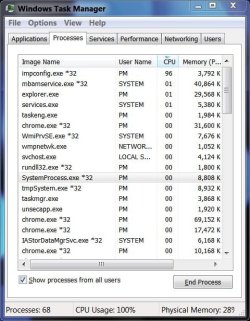
All of a sudden after installing a malware program; my laptops fans have been going at high speeds constantly. I checked the task manager, and i see a lot of processes that weren't there before ( see screen shot picture) I have ran a full Microsof security scan and nothing is picked up.

for now, I guess I'll boot safe mode and see if this problem persists, if so I will run ubuntu until i can figure out what's wrong

Thanks guys!
 

Attachments
  • Capture.JPG
    Capture.JPG
    64.3 KB · Views: 24

My Computer My Computer

At a glance

Windows 7 Ultimate x64Intel(R) Core(TM) i5-243OM CPU 2.40GHz 2.39GHz8GB
Computer Manufacturer/Model Number
Acer Aspire 5750
OS
Windows 7 Ultimate x64
CPU
Intel(R) Core(TM) i5-243OM CPU 2.40GHz 2.39GHz
Memory
8GB
Case
P.O.S. creeky piece of plastic :(
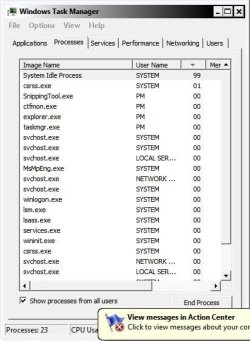
Here is the safe mode processes...the problem defiantly has stopped in safe mode...now to figure out how and what to do.
 

Attachments

  • Capture.JPG
    Capture.JPG
    44.8 KB · Views: 15

My Computer My Computer

At a glance

Windows 7 Ultimate x64Intel(R) Core(TM) i5-243OM CPU 2.40GHz 2.39GHz8GB
Computer Manufacturer/Model Number
Acer Aspire 5750
OS
Windows 7 Ultimate x64
CPU
Intel(R) Core(TM) i5-243OM CPU 2.40GHz 2.39GHz
Memory
8GB
Case
P.O.S. creeky piece of plastic :(
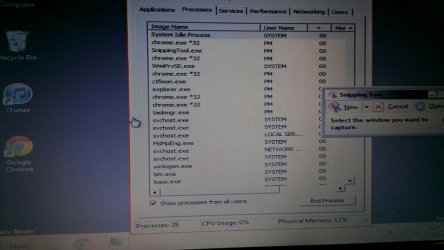
nevermind the processes started 5 minutes into boot. Although nothing but system idle is taking up CPU?! now I'm confused LOL. All the *32 are freaking me out.
 

Attachments

  • uploadfromtaptalk1332236456159.jpg
    uploadfromtaptalk1332236456159.jpg
    61.4 KB · Views: 26

My Computer My Computer

At a glance

Windows 7 Ultimate x64Intel(R) Core(TM) i5-243OM CPU 2.40GHz 2.39GHz8GB
Computer Manufacturer/Model Number
Acer Aspire 5750
OS
Windows 7 Ultimate x64
CPU
Intel(R) Core(TM) i5-243OM CPU 2.40GHz 2.39GHz
Memory
8GB
Case
P.O.S. creeky piece of plastic :(
What was it you installed and is it malware, or antimalware.
Notice your CPU is at 96% hence the fast fan speed, the file open is impconfig.exe which I don't see in the list of Wndows files, where has it come from and does it abate if you select it and end the process in task manager ?
 

My Computer My Computer

At a glance

Windows 7 home premium x64AMD FX-4100 AM3+ 3.6GHz 12MB Black EditionCrsair vengeance 12Gb DDR3 1600MHz CL9Asus GTX 560 1GB
Computer Manufacturer/Model Number
DIY
OS
Windows 7 home premium x64
CPU
AMD FX-4100 AM3+ 3.6GHz 12MB Black Edition
Motherboard
Asus M5A97 Pro
Memory
Crsair vengeance 12Gb DDR3 1600MHz CL9
Graphics Card(s)
Asus GTX 560 1GB
Sound Card
Realtek onboard
Monitor(s) Displays
Hanns G 1680x1050 native
Hard Drives
OCZ 128Gb Petrol ssd
2x500 Gb Samsung
PSU
OCZ StealthXstream II 500W
Internet Speed
8Mb or better
What was it you installed and is it malware, or antimalware.
Notice your CPU is at 96% hence the fast fan speed, the file open is impconfig.exe which I don't see in the list of Wndows files, where has it come from and does it abate if you select it and end the process in task manager ?

Malwarebytes' Anti-Malware is the name of the program that I installed. I've tried to end process on impconfig.exe but it just comes right back. Also, all the processes that end in *32 never were present before either, more and more of them keep popping up which is making me nervous
 

My Computer My Computer

At a glance

Windows 7 Ultimate x64Intel(R) Core(TM) i5-243OM CPU 2.40GHz 2.39GHz8GB
Computer Manufacturer/Model Number
Acer Aspire 5750
OS
Windows 7 Ultimate x64
CPU
Intel(R) Core(TM) i5-243OM CPU 2.40GHz 2.39GHz
Memory
8GB
Case
P.O.S. creeky piece of plastic :(
That just identifies them as 32 bit not 64. Yes Malwarebytes is a good and well known program, I just wanted to ensure you didn't install any malware, which ain't good !

Now about impconfig, are you running a php server of any sort ? if not go to services and prevent it running, then run an upated version of Malwarebytes again.


BTW the system idle process should take most of the CPU %, it means nothings taking CPU cycles.
during this time the system processes any tasks that are set to idle or low priority.
 
Last edited:

My Computer My Computer

At a glance

Windows 7 home premium x64AMD FX-4100 AM3+ 3.6GHz 12MB Black EditionCrsair vengeance 12Gb DDR3 1600MHz CL9Asus GTX 560 1GB
Computer Manufacturer/Model Number
DIY
OS
Windows 7 home premium x64
CPU
AMD FX-4100 AM3+ 3.6GHz 12MB Black Edition
Motherboard
Asus M5A97 Pro
Memory
Crsair vengeance 12Gb DDR3 1600MHz CL9
Graphics Card(s)
Asus GTX 560 1GB
Sound Card
Realtek onboard
Monitor(s) Displays
Hanns G 1680x1050 native
Hard Drives
OCZ 128Gb Petrol ssd
2x500 Gb Samsung
PSU
OCZ StealthXstream II 500W
Internet Speed
8Mb or better
That just identifies them as 32 bit not 64. Yes Malwarebytes is a good and well known program, I just wanted to ensure you didn't install any malware, which ain't good !

Now about impconfig, are you running a php server of any sort ? if not go to services and prevent it running, then run an upated version of Malwarebytes again.

Nope, my network is very, very basic. It consists of my cable modem, attached is my netgear router, and that's it.

What is the exact service name i should disable. Also should i do this via safe mode or normal boot?
 

My Computer My Computer

At a glance

Windows 7 Ultimate x64Intel(R) Core(TM) i5-243OM CPU 2.40GHz 2.39GHz8GB
Computer Manufacturer/Model Number
Acer Aspire 5750
OS
Windows 7 Ultimate x64
CPU
Intel(R) Core(TM) i5-243OM CPU 2.40GHz 2.39GHz
Memory
8GB
Case
P.O.S. creeky piece of plastic :(
Open task manager and highlight that file, right click the highlight and at the bottom of the context menu select ,go to services.
The services list will arrive with the service name highlighted, with that name in mind, go to the run box on the start menu, type in services.msc
the whole list of services will appear. Find the one named and first stop it, then choose its default starting mode to disabled.
That should be the end of that.
 

My Computer My Computer

At a glance

Windows 7 home premium x64AMD FX-4100 AM3+ 3.6GHz 12MB Black EditionCrsair vengeance 12Gb DDR3 1600MHz CL9Asus GTX 560 1GB
Computer Manufacturer/Model Number
DIY
OS
Windows 7 home premium x64
CPU
AMD FX-4100 AM3+ 3.6GHz 12MB Black Edition
Motherboard
Asus M5A97 Pro
Memory
Crsair vengeance 12Gb DDR3 1600MHz CL9
Graphics Card(s)
Asus GTX 560 1GB
Sound Card
Realtek onboard
Monitor(s) Displays
Hanns G 1680x1050 native
Hard Drives
OCZ 128Gb Petrol ssd
2x500 Gb Samsung
PSU
OCZ StealthXstream II 500W
Internet Speed
8Mb or better
Open task manager and highlight that file, right click the highlight and at the bottom of the context menu select ,go to services.
The services list will arrive with the service name highlighted, with that name in mind, go to the run box on the start menu, type in services.msc
the whole list of services will appear. Find the one named and first stop it, then choose its default starting mode to disabled.
That should be the end of that.

LoL thank you for your help and advice, disabling the services didn't work, so luckily i made a restore point before all of this happened, and i just restored back to that. Thanks again for your fast reply and A+ effott
 

My Computer My Computer

At a glance

Windows 7 Ultimate x64Intel(R) Core(TM) i5-243OM CPU 2.40GHz 2.39GHz8GB
Computer Manufacturer/Model Number
Acer Aspire 5750
OS
Windows 7 Ultimate x64
CPU
Intel(R) Core(TM) i5-243OM CPU 2.40GHz 2.39GHz
Memory
8GB
Case
P.O.S. creeky piece of plastic :(
Back
Top