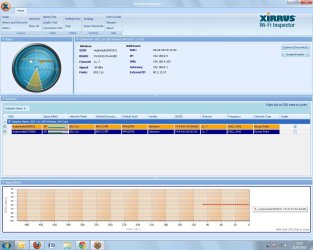
Desktop wifi slow.Wired desktop Fast.Laptop wifi fast.

user755

New member
Local time
3:58 PM
Messages
14
Just boosted my ISP BBand speed from 10MB to 30MB... the wired pc and the wifi laptop have shown great improvement (approx 40MB), however the wifi desktop is still slow. I have replaced the adapter to a new up-to-date one, (USB) and alothough it is showing small improvement it is still restricting to approx 15MB.

My IP CONFIG Shows:

_____________________________________________________________________

Microsoft Windows [Version 6.1.7601]
Copyright (c) 2009 Microsoft Corporation. All rights reserved.

C:\Users\down>ipconfig/all

Windows IP Configuration

Host Name . . . . . . . . . . . . : down-PC
Primary Dns Suffix . . . . . . . :
Node Type . . . . . . . . . . . . : Hybrid
IP Routing Enabled. . . . . . . . : No
WINS Proxy Enabled. . . . . . . . : No

Wireless LAN adapter Wireless Network Connection 3:

Media State . . . . . . . . . . . : Media disconnected
Connection-specific DNS Suffix . :
Description . . . . . . . . . . . : Microsoft Virtual WiFi Miniport Adapter
Physical Address. . . . . . . . . : C8-3A-35-C0-1C-9D
DHCP Enabled. . . . . . . . . . . : Yes
Autoconfiguration Enabled . . . . : Yes

Wireless LAN adapter Wireless Network Connection 2:

Connection-specific DNS Suffix . :
Description . . . . . . . . . . . : 802.11 USB Wireless LAN Card
Physical Address. . . . . . . . . : C8-3A-35-C0-1C-9C
DHCP Enabled. . . . . . . . . . . : Yes
Autoconfiguration Enabled . . . . : Yes
Link-local IPv6 Address . . . . . : fe80::81e1:d07f:d134:ad47%18(Preferred)
IPv4 Address. . . . . . . . . . . : 192.168.0.9(Preferred)
Subnet Mask . . . . . . . . . . . : 255.255.255.0
Lease Obtained. . . . . . . . . . : 12 March 2012 10:40:09
Lease Expires . . . . . . . . . . : 12 March 2012 11:40:10
Default Gateway . . . . . . . . . : 192.168.0.1
DHCP Server . . . . . . . . . . . : 192.168.0.1
DHCPv6 IAID . . . . . . . . . . . : 315111989
DHCPv6 Client DUID. . . . . . . . : 00-01-00-01-15-75-8F-07-00-1D-09-95-75-B0

DNS Servers . . . . . . . . . . . : 194.168.4.100
194.168.8.100
NetBIOS over Tcpip. . . . . . . . : Enabled

Ethernet adapter Local Area Connection:

Media State . . . . . . . . . . . : Media disconnected
Connection-specific DNS Suffix . :
Description . . . . . . . . . . . : Intel(R) 82562V-2 10/100 Network Connecti
on
Physical Address. . . . . . . . . : 00-1D-09-95-75-B0
DHCP Enabled. . . . . . . . . . . : Yes
Autoconfiguration Enabled . . . . : Yes

Tunnel adapter isatap.{E446E2AE-9B40-49D3-B331-9136F6E44F6C}:

Media State . . . . . . . . . . . : Media disconnected
Connection-specific DNS Suffix . :
Description . . . . . . . . . . . : Microsoft ISATAP Adapter
Physical Address. . . . . . . . . : 00-00-00-00-00-00-00-E0
DHCP Enabled. . . . . . . . . . . : No
Autoconfiguration Enabled . . . . : Yes

Tunnel adapter Teredo Tunneling Pseudo-Interface:

Connection-specific DNS Suffix . :
Description . . . . . . . . . . . : Teredo Tunneling Pseudo-Interface
Physical Address. . . . . . . . . : 00-00-00-00-00-00-00-E0
DHCP Enabled. . . . . . . . . . . : No
Autoconfiguration Enabled . . . . : Yes
IPv6 Address. . . . . . . . . . . : 2001:0:5ef5:79fb:1c57:164:affd:f2c6(Prefe
rred)
Link-local IPv6 Address . . . . . : fe80::1c57:164:affd:f2c6%11(Preferred)
Default Gateway . . . . . . . . . : ::
NetBIOS over Tcpip. . . . . . . . : Disabled

Tunnel adapter isatap.{847BE389-C594-4927-83C5-55068B9842C2}:

Media State . . . . . . . . . . . : Media disconnected
Connection-specific DNS Suffix . :
Description . . . . . . . . . . . : Microsoft ISATAP Adapter #2
Physical Address. . . . . . . . . : 00-00-00-00-00-00-00-E0
DHCP Enabled. . . . . . . . . . . : No
Autoconfiguration Enabled . . . . : Yes

Tunnel adapter isatap.{01BD19E1-792B-4357-B8AB-4193AED0B20A}:

Media State . . . . . . . . . . . : Media disconnected
Connection-specific DNS Suffix . :
Description . . . . . . . . . . . : Microsoft ISATAP Adapter #3
Physical Address. . . . . . . . . : 00-00-00-00-00-00-00-E0
DHCP Enabled. . . . . . . . . . . : No
Autoconfiguration Enabled . . . . : Yes

C:\Users\down>


______________________________________________________________________

Any advice would be helpful, with thanks in advance :)
 

My Computer My Computer

At a glance

Win 7 Ultimate1.6 GHz1 GB
Computer Manufacturer/Model Number
Dell 32 bit
OS
Win 7 Ultimate
CPU
1.6 GHz
Memory
1 GB
You should run this tunnel adaptor remover first. Too many of these indicates a driver problem and it will also ruin your connection if there are too many of those tunnel adaptors. This problem happens all the time. Click and save the zip file, then run the zip file and reboot.

You might also considering using a different driver for this network adaptor. If the problem happens again it may help to remove the Microsoft Virtual WiFi Miniport Adapter using device manager as it's known to cause connection problems such as you seem to be having. :)


Just use Tunnel Adapter – Microsoft 6to4 adapter Remover
http://www.sordum.com/deneme/6to4/do...to4remover.zip
 

My Computer My Computer

At a glance

Windows 7 Ult, Windows 8.1 Pro,Q9650-4.275GHz, E8600 4.5GHz, E6750-3.8GHzG.Skill PC2 9600 1200Mhz 5 5 5 15 2TGTX480
Computer type
PC/Desktop
Computer Manufacturer/Model Number
Home built
OS
Windows 7 Ult, Windows 8.1 Pro,
CPU
Q9650-4.275GHz, E8600 4.5GHz, E6750-3.8GHz
Motherboard
Evga 780i FTW
Memory
G.Skill PC2 9600 1200Mhz 5 5 5 15 2T
Graphics Card(s)
GTX480
Sound Card
Asus Xonar D2
Monitor(s) Displays
HannsG
Screen Resolution
1680X1050
Hard Drives
GSkill Phoenix Pro 120GB SSD
PSU
ThermalTake Toughpower 1000Watt modular
Case
ThermalTake XaserV
Cooling
Xigmatek S1283
Keyboard
Logitech G15
Mouse
Logitech G9
Internet Speed
T1
Following what you said about tunnel adapters (had to google it) and the MS miniport I have considered installing the new USB driver on disk would be a good idea... so have done... futher to this I used the tool for tunnel removal and removed unecessary adapters (including miniport) then viewed the config file again. This reads as:

________________________________________________________________________

Microsoft Windows [Version 6.1.7601]
Copyright (c) 2009 Microsoft Corporation. All rights reserved.

C:\Users\down>ipconfig/all

Windows IP Configuration

Host Name . . . . . . . . . . . . : down-PC
Primary Dns Suffix . . . . . . . :
Node Type . . . . . . . . . . . . : Hybrid
IP Routing Enabled. . . . . . . . : No
WINS Proxy Enabled. . . . . . . . : No

Wireless LAN adapter Wireless Network Connection 3:

Media State . . . . . . . . . . . : Media disconnected
Connection-specific DNS Suffix . :
Description . . . . . . . . . . . : Microsoft Virtual WiFi Miniport Adapter
Physical Address. . . . . . . . . : C8-3A-35-C0-1C-9D
DHCP Enabled. . . . . . . . . . . : Yes
Autoconfiguration Enabled . . . . : Yes

Wireless LAN adapter Wireless Network Connection 2:

Connection-specific DNS Suffix . :
Description . . . . . . . . . . . : 802.11n USB Wireless LAN Card
Physical Address. . . . . . . . . : C8-3A-35-C0-1C-9C
DHCP Enabled. . . . . . . . . . . : Yes
Autoconfiguration Enabled . . . . : Yes
Link-local IPv6 Address . . . . . : fe80::81e1:d07f:d134:ad47%14(Preferred)
IPv4 Address. . . . . . . . . . . : 192.168.0.9(Preferred)
Subnet Mask . . . . . . . . . . . : 255.255.255.0
Lease Obtained. . . . . . . . . . : 12 March 2012 21:44:17
Lease Expires . . . . . . . . . . : 12 March 2012 22:44:22
Default Gateway . . . . . . . . . : 192.168.0.1
DHCP Server . . . . . . . . . . . : 192.168.0.1
DHCPv6 IAID . . . . . . . . . . . : 315111989
DHCPv6 Client DUID. . . . . . . . : 00-01-00-01-15-75-8F-07-00-1D-09-95-75-B0

DNS Servers . . . . . . . . . . . : 194.168.4.100
194.168.8.100
NetBIOS over Tcpip. . . . . . . . : Enabled

Ethernet adapter Local Area Connection:

Media State . . . . . . . . . . . : Media disconnected
Connection-specific DNS Suffix . :
Description . . . . . . . . . . . : Intel(R) 82562V-2 10/100 Network Connecti
on
Physical Address. . . . . . . . . : 00-1D-09-95-75-B0
DHCP Enabled. . . . . . . . . . . : Yes
Autoconfiguration Enabled . . . . : Yes

Tunnel adapter isatap.{01BD19E1-792B-4357-B8AB-4193AED0B20A}:

Media State . . . . . . . . . . . : Media disconnected
Connection-specific DNS Suffix . :
Description . . . . . . . . . . . : Microsoft ISATAP Adapter
Physical Address. . . . . . . . . : 00-00-00-00-00-00-00-E0
DHCP Enabled. . . . . . . . . . . : No
Autoconfiguration Enabled . . . . : Yes

Tunnel adapter Teredo Tunneling Pseudo-Interface:

Connection-specific DNS Suffix . :
Description . . . . . . . . . . . : Teredo Tunneling Pseudo-Interface
Physical Address. . . . . . . . . : 00-00-00-00-00-00-00-E0
DHCP Enabled. . . . . . . . . . . : No
Autoconfiguration Enabled . . . . : Yes
IPv6 Address. . . . . . . . . . . : 2001:0:5ef5:79fd:47f:8de:affd:f2c6(Prefer
red)
Link-local IPv6 Address . . . . . : fe80::47f:8de:affd:f2c6%11(Preferred)
Default Gateway . . . . . . . . . : ::
NetBIOS over Tcpip. . . . . . . . : Disabled

Tunnel adapter isatap.{E446E2AE-9B40-49D3-B331-9136F6E44F6C}:

Media State . . . . . . . . . . . : Media disconnected
Connection-specific DNS Suffix . :
Description . . . . . . . . . . . : Microsoft ISATAP Adapter #2
Physical Address. . . . . . . . . : 00-00-00-00-00-00-00-E0
DHCP Enabled. . . . . . . . . . . : No
Autoconfiguration Enabled . . . . : Yes

Tunnel adapter isatap.{847BE389-C594-4927-83C5-55068B9842C2}:

Media State . . . . . . . . . . . : Media disconnected
Connection-specific DNS Suffix . :
Description . . . . . . . . . . . : Microsoft ISATAP Adapter #3
Physical Address. . . . . . . . . : 00-00-00-00-00-00-00-E0
DHCP Enabled. . . . . . . . . . . : No
Autoconfiguration Enabled . . . . : Yes

C:\Users\down>

_______________________________________________________________________

Can you advise anything further from the new config results?
 
Last edited:

My Computer My Computer

At a glance

Win 7 Ultimate1.6 GHz1 GB
Computer Manufacturer/Model Number
Dell 32 bit
OS
Win 7 Ultimate
CPU
1.6 GHz
Memory
1 GB
The tunnel adaptors aren't gone. You will keep having problems with this connection unless they are all deleted. Are you sure that you ran the zip file after it was downloaded?

The remover file worked for everyone else so I'm not sure why it's not working for you although you can delete them by going into Device Manager, open up network tab that relates to your network adaptor and delete them all from there.

If you want to get rid of those rogue tunnel adaptor entries then go to device manager, go to view at the top of the page and then select "show hidden devices". Then go to "Network adaptors" and just delete all the extra tunnel adaptors you see there, windows will create a new one automatically. After that check your ipconfig /all to see if they all have been deleted. You will want to reboot after removing them.

If they all don't show up you can change a registry setting to make them all show up "backup the registry first". You should have a nice clean ipconfig after that.
smile.gif


Registry Settings, navigate too the following key.
System Key: [HKEY_LOCAL_MACHINE\SYSTE\CurrentControlSet\Control \Session Manager\Environment]
Value Name: DEVMGR_SHOW_NONPRESENT_DEVICES
Data Type: REG_SZ (String Value)
Value Data: (1 = show all hidden devices)
 
Last edited:

My Computer My Computer

At a glance

Windows 7 Ult, Windows 8.1 Pro,Q9650-4.275GHz, E8600 4.5GHz, E6750-3.8GHzG.Skill PC2 9600 1200Mhz 5 5 5 15 2TGTX480
Computer type
PC/Desktop
Computer Manufacturer/Model Number
Home built
OS
Windows 7 Ult, Windows 8.1 Pro,
CPU
Q9650-4.275GHz, E8600 4.5GHz, E6750-3.8GHz
Motherboard
Evga 780i FTW
Memory
G.Skill PC2 9600 1200Mhz 5 5 5 15 2T
Graphics Card(s)
GTX480
Sound Card
Asus Xonar D2
Monitor(s) Displays
HannsG
Screen Resolution
1680X1050
Hard Drives
GSkill Phoenix Pro 120GB SSD
PSU
ThermalTake Toughpower 1000Watt modular
Case
ThermalTake XaserV
Cooling
Xigmatek S1283
Keyboard
Logitech G15
Mouse
Logitech G9
Internet Speed
T1
Thanks for the guide... I manually removed all the adapters from Network adapters in Device Manager. Ran the IPConfig/all command and they had all gone...

Rebooted and there was a system error and checkdisk ran. Following this Win7 eventually restarted and found the current network adapter. Checked the IPConfig again and it is now reshowing all the original tunnels/miniports etc.

______________________________________________________________________


Microsoft Windows [Version 6.1.7601]
Copyright (c) 2009 Microsoft Corporation. All rights reserved.

C:\Users\down>ipconfig/all

Windows IP Configuration

Host Name . . . . . . . . . . . . : down-PC
Primary Dns Suffix . . . . . . . :
Node Type . . . . . . . . . . . . : Hybrid
IP Routing Enabled. . . . . . . . : No
WINS Proxy Enabled. . . . . . . . : No

Wireless LAN adapter Wireless Network Connection 3:

Media State . . . . . . . . . . . : Media disconnected
Connection-specific DNS Suffix . :
Description . . . . . . . . . . . : Microsoft Virtual WiFi Miniport Adapter
Physical Address. . . . . . . . . : C8-3A-35-C0-1C-9D
DHCP Enabled. . . . . . . . . . . : Yes
Autoconfiguration Enabled . . . . : Yes

Ethernet adapter Local Area Connection:

Media State . . . . . . . . . . . : Media disconnected
Connection-specific DNS Suffix . :
Description . . . . . . . . . . . : Intel(R) 82562V-2 10/100 Network Connecti
on
Physical Address. . . . . . . . . : 00-1D-09-95-75-B0
DHCP Enabled. . . . . . . . . . . : Yes
Autoconfiguration Enabled . . . . : Yes

Wireless LAN adapter Wireless Network Connection 2:

Connection-specific DNS Suffix . :
Description . . . . . . . . . . . : 802.11n USB Wireless LAN Card
Physical Address. . . . . . . . . : C8-3A-35-C0-1C-9C
DHCP Enabled. . . . . . . . . . . : Yes
Autoconfiguration Enabled . . . . : Yes
Link-local IPv6 Address . . . . . : fe80::8993:66e:2162:7d18%13(Preferred)
IPv4 Address. . . . . . . . . . . : 192.168.0.9(Preferred)
Subnet Mask . . . . . . . . . . . : 255.255.255.0
Lease Obtained. . . . . . . . . . : 13 March 2012 15:55:22
Lease Expires . . . . . . . . . . : 13 March 2012 16:55:23
Default Gateway . . . . . . . . . : 192.168.0.1
DHCP Server . . . . . . . . . . . : 192.168.0.1
DHCPv6 IAID . . . . . . . . . . . : 315111989
DHCPv6 Client DUID. . . . . . . . : 00-01-00-01-15-75-8F-07-00-1D-09-95-75-B0

DNS Servers . . . . . . . . . . . : 194.168.4.100
194.168.8.100
NetBIOS over Tcpip. . . . . . . . : Enabled

Tunnel adapter isatap.{BD7EE479-A9D8-4D8A-85B5-35288EF4912B}:

Media State . . . . . . . . . . . : Media disconnected
Connection-specific DNS Suffix . :
Description . . . . . . . . . . . : Microsoft ISATAP Adapter
Physical Address. . . . . . . . . : 00-00-00-00-00-00-00-E0
DHCP Enabled. . . . . . . . . . . : No
Autoconfiguration Enabled . . . . : Yes

Tunnel adapter Teredo Tunneling Pseudo-Interface:

Connection-specific DNS Suffix . :
Description . . . . . . . . . . . : Teredo Tunneling Pseudo-Interface
Physical Address. . . . . . . . . : 00-00-00-00-00-00-00-E0
DHCP Enabled. . . . . . . . . . . : No
Autoconfiguration Enabled . . . . : Yes
IPv6 Address. . . . . . . . . . . : 2001:0:5ef5:79fb:2811:2c06:affd:f2c6(Pref
erred)
Link-local IPv6 Address . . . . . : fe80::2811:2c06:affd:f2c6%19(Preferred)
Default Gateway . . . . . . . . . : ::
NetBIOS over Tcpip. . . . . . . . : Disabled

C:\Users\down>
________________________________________________________________________

Still no improvement on speed... currently registering between 12-15 MBps... does this give you any further indication to the possible fault? Your help really is appreciated.
 

My Computer My Computer

At a glance

Win 7 Ultimate1.6 GHz1 GB
Computer Manufacturer/Model Number
Dell 32 bit
OS
Win 7 Ultimate
CPU
1.6 GHz
Memory
1 GB
Since doing the above my ping test appears to have some improvement (??) approx 17/18 ms (originally quite erratic between 20 and 60 m/s)
 

My Computer My Computer

At a glance

Win 7 Ultimate1.6 GHz1 GB
Computer Manufacturer/Model Number
Dell 32 bit
OS
Win 7 Ultimate
CPU
1.6 GHz
Memory
1 GB
The erratic part was probably because of the extra tunnel adaptors. Looks like they are gone now.

Have you tried to disable the secondary wireless adaptor which is showing up as:

Wireless LAN adapter Wireless Network Connection 3:
Media State . . . . . . . . . . . : Media disconnected
Connection-specific DNS Suffix . :
Description . . . . . . . . . . . : Microsoft Virtual WiFi Miniport Adapter
Physical Address. . . . . . . . . : C8-3A-35-C0-1C-9D
DHCP Enabled. . . . . . . . . . . : Yes
Autoconfiguration Enabled . . . . : Yes

The auto configuration for this adaptor is enabled and DHCP is turned on but you aren't using this connection to connect to the internet.

After disabling this connection can you post your new ipconfig/all here. :)
 

My Computer My Computer

At a glance

Windows 7 Ult, Windows 8.1 Pro,Q9650-4.275GHz, E8600 4.5GHz, E6750-3.8GHzG.Skill PC2 9600 1200Mhz 5 5 5 15 2TGTX480
Computer type
PC/Desktop
Computer Manufacturer/Model Number
Home built
OS
Windows 7 Ult, Windows 8.1 Pro,
CPU
Q9650-4.275GHz, E8600 4.5GHz, E6750-3.8GHz
Motherboard
Evga 780i FTW
Memory
G.Skill PC2 9600 1200Mhz 5 5 5 15 2T
Graphics Card(s)
GTX480
Sound Card
Asus Xonar D2
Monitor(s) Displays
HannsG
Screen Resolution
1680X1050
Hard Drives
GSkill Phoenix Pro 120GB SSD
PSU
ThermalTake Toughpower 1000Watt modular
Case
ThermalTake XaserV
Cooling
Xigmatek S1283
Keyboard
Logitech G15
Mouse
Logitech G9
Internet Speed
T1
Disabled the miniport through Device Manager and got this reading:
__________________________________________________________

Microsoft Windows [Version 6.1.7601]
Copyright (c) 2009 Microsoft Corporation. All rights reserved.

C:\Users\down>ipconfig/all

Windows IP Configuration

Host Name . . . . . . . . . . . . : down-PC
Primary Dns Suffix . . . . . . . :
Node Type . . . . . . . . . . . . : Hybrid
IP Routing Enabled. . . . . . . . : No
WINS Proxy Enabled. . . . . . . . : No

Ethernet adapter Local Area Connection:

Media State . . . . . . . . . . . : Media disconnected
Connection-specific DNS Suffix . :
Description . . . . . . . . . . . : Intel(R) 82562V-2 10/100 Network Connect
on
Physical Address. . . . . . . . . : 00-1D-09-95-75-B0
DHCP Enabled. . . . . . . . . . . : Yes
Autoconfiguration Enabled . . . . : Yes

Wireless LAN adapter Wireless Network Connection 2:

Connection-specific DNS Suffix . :
Description . . . . . . . . . . . : 802.11n USB Wireless LAN Card
Physical Address. . . . . . . . . : C8-3A-35-C0-1C-9C
DHCP Enabled. . . . . . . . . . . : Yes
Autoconfiguration Enabled . . . . : Yes
Link-local IPv6 Address . . . . . : fe80::8993:66e:2162:7d18%13(Preferred)
IPv4 Address. . . . . . . . . . . : 192.168.0.9(Preferred)
Subnet Mask . . . . . . . . . . . : 255.255.255.0
Lease Obtained. . . . . . . . . . : 14 March 2012 09:03:48
Lease Expires . . . . . . . . . . : 14 March 2012 13:33:55
Default Gateway . . . . . . . . . : 192.168.0.1
DHCP Server . . . . . . . . . . . : 192.168.0.1
DHCPv6 IAID . . . . . . . . . . . : 315111989
DHCPv6 Client DUID. . . . . . . . : 00-01-00-01-15-75-8F-07-00-1D-09-95-75-B

DNS Servers . . . . . . . . . . . : 194.168.4.100
194.168.8.100
NetBIOS over Tcpip. . . . . . . . : Enabled

Tunnel adapter isatap.{BD7EE479-A9D8-4D8A-85B5-35288EF4912B}:

Media State . . . . . . . . . . . : Media disconnected
Connection-specific DNS Suffix . :
Description . . . . . . . . . . . : Microsoft ISATAP Adapter #2
Physical Address. . . . . . . . . : 00-00-00-00-00-00-00-E0
DHCP Enabled. . . . . . . . . . . : No
Autoconfiguration Enabled . . . . : Yes

Tunnel adapter isatap.{3BD9D8D4-7746-4A99-ACE4-BCD547027DFB}:

Media State . . . . . . . . . . . : Media disconnected
Connection-specific DNS Suffix . :
Description . . . . . . . . . . . : Microsoft ISATAP Adapter #3
Physical Address. . . . . . . . . : 00-00-00-00-00-00-00-E0
DHCP Enabled. . . . . . . . . . . : No
Autoconfiguration Enabled . . . . : Yes

Tunnel adapter Teredo Tunneling Pseudo-Interface:

Connection-specific DNS Suffix . :
Description . . . . . . . . . . . : Teredo Tunneling Pseudo-Interface
Physical Address. . . . . . . . . : 00-00-00-00-00-00-00-E0
DHCP Enabled. . . . . . . . . . . : No
Autoconfiguration Enabled . . . . : Yes
IPv6 Address. . . . . . . . . . . : 2001:0:5ef5:79fd:305d:197f:affd:f2c6(Pre
erred)
Link-local IPv6 Address . . . . . : fe80::305d:197f:affd:f2c6%19(Preferred)
Default Gateway . . . . . . . . . : ::
NetBIOS over Tcpip. . . . . . . . : Disabled

C:\Users\down>
_______________________________________________________________________
 

My Computer My Computer

At a glance

Win 7 Ultimate1.6 GHz1 GB
Computer Manufacturer/Model Number
Dell 32 bit
OS
Win 7 Ultimate
CPU
1.6 GHz
Memory
1 GB
At this point I see more tunnel adaptors being created which usually means the wireless driver is having problems.
You might try looking around for a more updated driver for your particular USB adaptor.

I can't see what adaptor you are using so can't find a driver for it, however if you can post the specifics of the wireless USB adaptor I can look around for you.

As for the wireless network speed problem, this depends greatly on the number of walls between this PC and your wireless access point or router. The wireless channels being used also can have a big impact on your wireless speeds. You need to choose channels in a range that your neighbors aren't using.

You can use the program below to scan for clear wireless channels in your area. If you post a screen shot of the results here I can tell you which channel might be best.
Wi-Fi Inspector | Xirrus
 

My Computer My Computer

At a glance

Windows 7 Ult, Windows 8.1 Pro,Q9650-4.275GHz, E8600 4.5GHz, E6750-3.8GHzG.Skill PC2 9600 1200Mhz 5 5 5 15 2TGTX480
Computer type
PC/Desktop
Computer Manufacturer/Model Number
Home built
OS
Windows 7 Ult, Windows 8.1 Pro,
CPU
Q9650-4.275GHz, E8600 4.5GHz, E6750-3.8GHz
Motherboard
Evga 780i FTW
Memory
G.Skill PC2 9600 1200Mhz 5 5 5 15 2T
Graphics Card(s)
GTX480
Sound Card
Asus Xonar D2
Monitor(s) Displays
HannsG
Screen Resolution
1680X1050
Hard Drives
GSkill Phoenix Pro 120GB SSD
PSU
ThermalTake Toughpower 1000Watt modular
Case
ThermalTake XaserV
Cooling
Xigmatek S1283
Keyboard
Logitech G15
Mouse
Logitech G9
Internet Speed
T1
hi Chev65, Sorry its been a week since I last looked into this issue. however:

The Xirrus Wifi Inspector found 2 wifis... Mine is using channels 11,7 ...and a neighbouring wifi is using 6, 10...

My device mgr states:
802.11n USB wireless LAN card (Ralink, driver v.3.1.6.0)
IntelR 82562v-2 10/100 netowrk connection (Microsoft, driver v.9.13.4.10)
Microsoft virtual wifi miniport adapter (Microsoft, driver v.6.1.7600.16385) - DISABLED

The box from new USB adapter says: TENDA 300Mpbs Model w322U V.2.0

I have d/loaded+installed a new driver for it and will see how it goes. Signing off this post to reboot. (fingers crossed)

:-)
 

My Computer My Computer

At a glance

Win 7 Ultimate1.6 GHz1 GB
Computer Manufacturer/Model Number
Dell 32 bit
OS
Win 7 Ultimate
CPU
1.6 GHz
Memory
1 GB
following reboot the speedtest still showing approx 20Mbps ... however upon getting up this morning and testing it has shown me 30-35 Mbps...

The Xirrus monitor is showing both local VM wifis registering approx 60 dbm (as it was last night).

I am going to attempt to remove all adapters again and reinstall the necessary ones, I'm a little unsure why my USB LAN card is showing as Ralink as I'm sure that was the old one (?), and I'm unsure precisely what the IntelR network connection is.

Thank you again for advice :-)
 

My Computer My Computer

At a glance

Win 7 Ultimate1.6 GHz1 GB
Computer Manufacturer/Model Number
Dell 32 bit
OS
Win 7 Ultimate
CPU
1.6 GHz
Memory
1 GB
following reboot the speedtest still showing approx 20Mbps ... however upon getting up this morning and testing it has shown me 30-35 Mbps...

The Xirrus monitor is showing both local VM wifis registering approx 60 dbm (as it was last night).

I am going to attempt to remove all adapters again and reinstall the necessary ones, I'm a little unsure why my USB LAN card is showing as Ralink as I'm sure that was the old one (?), and I'm unsure precisely what the IntelR network connection is.

Thank you again for advice :-)

When I run the speed test on my wireless I also get 20mbps which is fast considering that my wired connection speed test is at 30mbps.

It looks like you have channel bonding turned on because you showed that you are using both channels 11 and 7. It may work better to turn off channel bonding in your router's control page.

If you can post the Xirrus read out here I can help with finding the best channel.
 

My Computer My Computer

At a glance

Windows 7 Ult, Windows 8.1 Pro,Q9650-4.275GHz, E8600 4.5GHz, E6750-3.8GHzG.Skill PC2 9600 1200Mhz 5 5 5 15 2TGTX480
Computer type
PC/Desktop
Computer Manufacturer/Model Number
Home built
OS
Windows 7 Ult, Windows 8.1 Pro,
CPU
Q9650-4.275GHz, E8600 4.5GHz, E6750-3.8GHz
Motherboard
Evga 780i FTW
Memory
G.Skill PC2 9600 1200Mhz 5 5 5 15 2T
Graphics Card(s)
GTX480
Sound Card
Asus Xonar D2
Monitor(s) Displays
HannsG
Screen Resolution
1680X1050
Hard Drives
GSkill Phoenix Pro 120GB SSD
PSU
ThermalTake Toughpower 1000Watt modular
Case
ThermalTake XaserV
Cooling
Xigmatek S1283
Keyboard
Logitech G15
Mouse
Logitech G9
Internet Speed
T1
Jpg attached of xirrus screenprint. My router ends 5531.

For some reason the 2 wifis have started using same channels... I don't know why... I haven't changed anything in the router as yet.
 

Attachments

  • xirrus screenprint.jpg
    xirrus screenprint.jpg
    158.2 KB · Views: 17

My Computer My Computer

At a glance

Win 7 Ultimate1.6 GHz1 GB
Computer Manufacturer/Model Number
Dell 32 bit
OS
Win 7 Ultimate
CPU
1.6 GHz
Memory
1 GB
Jpg attached of xirrus screenprint. My router ends 5531.

For some reason the 2 wifis have started using same channels... I don't know why... I haven't changed anything in the router as yet.

Is this your router and a separate access point? I can't tell what's going on here please explain.

Either way it looks like you have channel auto scan turned on which may be why it changed channels automatically. You also have channel bonding turned on which can increase bandwidth but can also cause problems with channel crossover.

You should go into your router's and access point set up pages and turn off the auto channel scan and turn off channel bonding then assign different channels to both, say channel 11 for the router and channel 1 or 6 for the access point and see if the speed or connection quality is any better. :)
 

My Computer My Computer

At a glance

Windows 7 Ult, Windows 8.1 Pro,Q9650-4.275GHz, E8600 4.5GHz, E6750-3.8GHzG.Skill PC2 9600 1200Mhz 5 5 5 15 2TGTX480
Computer type
PC/Desktop
Computer Manufacturer/Model Number
Home built
OS
Windows 7 Ult, Windows 8.1 Pro,
CPU
Q9650-4.275GHz, E8600 4.5GHz, E6750-3.8GHz
Motherboard
Evga 780i FTW
Memory
G.Skill PC2 9600 1200Mhz 5 5 5 15 2T
Graphics Card(s)
GTX480
Sound Card
Asus Xonar D2
Monitor(s) Displays
HannsG
Screen Resolution
1680X1050
Hard Drives
GSkill Phoenix Pro 120GB SSD
PSU
ThermalTake Toughpower 1000Watt modular
Case
ThermalTake XaserV
Cooling
Xigmatek S1283
Keyboard
Logitech G15
Mouse
Logitech G9
Internet Speed
T1
I'm not aware of an access point. As far as I know the 2nd Virginmedia signal (ending in 9858) is a neighbour's router. Where does it say I have an access point, and is this a bad thing to have??

I was under the impression I should avoid channel 11 if that is what my neighbour is using. Is this correct??

Currently getting speedtest readings IRO 10MB :-(
 

My Computer My Computer

At a glance

Win 7 Ultimate1.6 GHz1 GB
Computer Manufacturer/Model Number
Dell 32 bit
OS
Win 7 Ultimate
CPU
1.6 GHz
Memory
1 GB
did you considder that the download speed might be because of wifi signal quality? is the signal full and is it experiencing errors? how is the signal to noise ratio? You can use many tools to get snr
 

My Computer My Computer

At a glance

windows XP
Computer Manufacturer/Model Number
wi
OS
windows XP
I'm not aware of an access point. As far as I know the 2nd Virginmedia signal (ending in 9858) is a neighbour's router. Where does it say I have an access point, and is this a bad thing to have??

I was under the impression I should avoid channel 11 if that is what my neighbour is using. Is this correct??

Currently getting speedtest readings IRO 10MB :-(


Oh ok, well if that's your neighbors router then you definitely need to change channels in your routers set up page.

The signal strength is fine but the channel overlap is certainly there because you are both using the same channels which isn't good.

I would go with channel 1 with channel bonding turned off at this point because he's using channel bonding on 11 and 7 which is hogging all the bandwidth in that range.

You should have no problems with your wireless after that. :)
 

My Computer My Computer

At a glance

Windows 7 Ult, Windows 8.1 Pro,Q9650-4.275GHz, E8600 4.5GHz, E6750-3.8GHzG.Skill PC2 9600 1200Mhz 5 5 5 15 2TGTX480
Computer type
PC/Desktop
Computer Manufacturer/Model Number
Home built
OS
Windows 7 Ult, Windows 8.1 Pro,
CPU
Q9650-4.275GHz, E8600 4.5GHz, E6750-3.8GHz
Motherboard
Evga 780i FTW
Memory
G.Skill PC2 9600 1200Mhz 5 5 5 15 2T
Graphics Card(s)
GTX480
Sound Card
Asus Xonar D2
Monitor(s) Displays
HannsG
Screen Resolution
1680X1050
Hard Drives
GSkill Phoenix Pro 120GB SSD
PSU
ThermalTake Toughpower 1000Watt modular
Case
ThermalTake XaserV
Cooling
Xigmatek S1283
Keyboard
Logitech G15
Mouse
Logitech G9
Internet Speed
T1
You should not use the same channel if possible. That is correct.
 

My Computer My Computer

At a glance

windows XP
Computer Manufacturer/Model Number
wi
OS
windows XP
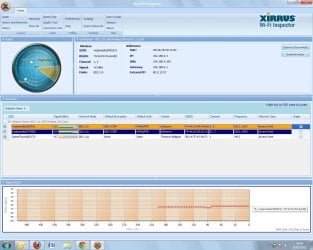
I don't see a 'channel bonding' section of the hub, I'll have a proper search later but its not located on the 'easy wifi' page.

Since amending the channel to Ch1, another router has appeared using channel 1 :-(

Although there is a small change in the graph following this change its not very significant. Still only recording 25MB when other pc/laptop are receiving near 60MB.

I think I will take the pc up to the router, connect directly and see what I'm getting...
 

Attachments

  • xirrus screenprint 2.jpg
    xirrus screenprint 2.jpg
    160.9 KB · Views: 5

My Computer My Computer

At a glance

Win 7 Ultimate1.6 GHz1 GB
Computer Manufacturer/Model Number
Dell 32 bit
OS
Win 7 Ultimate
CPU
1.6 GHz
Memory
1 GB
did you considder that the download speed might be because of wifi signal quality? is the signal full and is it experiencing errors? how is the signal to noise ratio? You can use many tools to get snr


Looking into SNR now... When enginer fitted new hub he showed me a splitter had been used with no cap and explained about the noise interference, was very surprised the previous engineers didn't spot/mention it before!
 

My Computer My Computer

At a glance

Win 7 Ultimate1.6 GHz1 GB
Computer Manufacturer/Model Number
Dell 32 bit
OS
Win 7 Ultimate
CPU
1.6 GHz
Memory
1 GB
Back
Top