Solved Need to Recover Data from WD Passport External HD

torre

New member
Power User
Local time
3:27 PM
Messages
156
My Passport External HD suddenly failed.

- Replaced cable. Apparently this is not the problem.

- I have tried on another computer with same result.

- Light on HD is on but no sound of turning or no clicking sound.

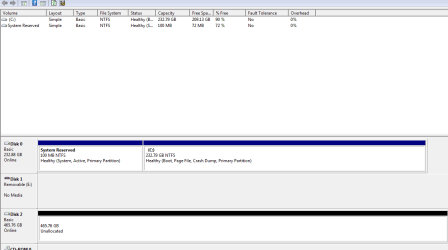
- HD is recognized only in Disk Management. It does not show up under drives when clicking My Computer, thus I cannot access the drive.

- I downloaded Easeus Data Recovery (Trial) but when scanned does not find drive for Passport.

- I have not contacted WD, but searched their site for solutions/troubleshooting. Basically, they say use data recovery software. I do not want to pay many $$$ to send to a professoinal.

Anyone know of a Data Recovery Software or have ideas how I can access My Passport ? Thanks !

(Note: Passport is only about 15 months old and not really used that much. Not sure I would recommend WD to anyone)
 

My Computer My Computer

At a glance

Win 7, 32bit, Premium
OS
Win 7, 32bit, Premium

My Computer My Computer

At a glance

Vista, Windows7, Mint Mate, Zorin, Windows 8from 1.6GHz Duo to i7
Computer Manufacturer/Model Number
HP, Dell, Gateway, Toshiba - 4 laptops and 2 desktops
OS
Vista, Windows7, Mint Mate, Zorin, Windows 8
CPU
from 1.6GHz Duo to i7
Monitor(s) Displays
2x HP w2207
Hard Drives
5x HDD, 7x SSD, 12x Externals
Keyboard
with trackball - no mices
Mouse
Trackball mice
Internet Speed
DSL 6000
It's possible the USB drive controller has failed. If it is no longer covered under warrenty, you should be able to remote the internal drive from the shell and insert it directly into your computer.
 

My Computer My Computer

At a glance

Windows 8 Pro (32-bit)1.83GHz Intel Core Duo2GB 667MHz DDR2 SDRAM (PC2-5300) (upgrade)ATI Radeon X1600 with 128MB GDDR3 memory
Computer type
PC/Desktop
Computer Manufacturer/Model Number
Apple 17" iMac MA199LL (Early 2006)
OS
Windows 8 Pro (32-bit)
CPU
1.83GHz Intel Core Duo
Memory
2GB 667MHz DDR2 SDRAM (PC2-5300) (upgrade)
Graphics Card(s)
ATI Radeon X1600 with 128MB GDDR3 memory
Monitor(s) Displays
17-inch TFT active-matrix LCD, millions of colors
Screen Resolution
1440 x 900
Hard Drives
Hitachi 320GB HDT721032SLA360 7200RPM SATA II (upgrade)
Keyboard
Microsoft Wired Keyboard 600
Mouse
Microsoft Basic Optical Mouse v2.0
Internet Speed
4 Mbps
Antivirus
Microsoft Security Essentials
Browser
Google Chrome
Other Info
WEI:
Base Score: 3.9 Processor: 4.4 Memory 4.7
Graphics: 3.9 Gaming Graphics: 4.1 Primary HD: 5.9
Capture.PNG (39.9 KB)


Picture above. Disk 2 is the Passport.


FuturDreamz - This is an external HD. Can the HD be removed from the plastic case and attached/inserted to a laptop ?
 

Attachments

  • Capture.PNG
    Capture.PNG
    11.3 KB · Views: 646

My Computer My Computer

At a glance

Win 7, 32bit, Premium
OS
Win 7, 32bit, Premium
Yes, you should be able to remove the drive from the case. That's exactly what FuturDreamz was describing.

It looks like Disk Management sees it just fine, online and ready for you to partition. Since you've got data on there, you might want to try Testdisk to rebuild the partitions that are there: http://www.cgsecurity.org/
 

My Computer My Computer

At a glance

Windows 7 Ultimate x64
OS
Windows 7 Ultimate x64
If we are talking about Disk2, everything on that disk vanished - at least as Windows is concerned. If you have data on there, it may still be there and only the MFT may be corrupted. Try some of those recovery programs. Then you have to reformat the disk and allocate a new partition.
 

My Computer My Computer

At a glance

Vista, Windows7, Mint Mate, Zorin, Windows 8from 1.6GHz Duo to i7
Computer Manufacturer/Model Number
HP, Dell, Gateway, Toshiba - 4 laptops and 2 desktops
OS
Vista, Windows7, Mint Mate, Zorin, Windows 8
CPU
from 1.6GHz Duo to i7
Monitor(s) Displays
2x HP w2207
Hard Drives
5x HDD, 7x SSD, 12x Externals
Keyboard
with trackball - no mices
Mouse
Trackball mice
Internet Speed
DSL 6000
Might be easier to go with Paragon first, recommended by whs earlier. If that doesn't do it for you, then try Testdisk.
 

My Computer My Computer

At a glance

Windows 7 Ultimate x64
OS
Windows 7 Ultimate x64
Thanks for the replies.

Having problems burning Paragon to a disk after download. Keep receiving error. Even so, I am concerned that the data recovery software will not recognize the Passport during a scan as I encountered with Easeus. I believe that is why no data is indicated under Disk Management for Disk 2 (Passport) It is not recognized by Windows.

If I remove external HD from the case as stated by futur above, how do you connect to a laptop ?
 

My Computer My Computer

At a glance

Win 7, 32bit, Premium
OS
Win 7, 32bit, Premium
Capture.PNG (39.9 KB)


Picture above. Disk 2 is the Passport.


FuturDreamz - This is an external HD. Can the HD be removed from the plastic case and attached/inserted to a laptop ?

Usually yes. External HDD drives are usually just a standard 2.5"/3.5" sized SATA drive with a SATA to USB adaptor. It's possible the SATA to USB adaptor has failed. You should be able to dissasemble the shell and have a proper SATA drive inside.

As for connecting to a laptop, there's three possibilities:
1. use the SATA to USB adaptor. this assumes that you'r adaptor works, but the connection got loose
2. buy a adaptor, like this one (depending on what size of drive is inside)
3. pull out the laptop's hard drive and install this one. a bit more difficult to do, and is useless if you don't have another means of booting.
 

My Computer My Computer

At a glance

Windows 8 Pro (32-bit)1.83GHz Intel Core Duo2GB 667MHz DDR2 SDRAM (PC2-5300) (upgrade)ATI Radeon X1600 with 128MB GDDR3 memory
Computer type
PC/Desktop
Computer Manufacturer/Model Number
Apple 17" iMac MA199LL (Early 2006)
OS
Windows 8 Pro (32-bit)
CPU
1.83GHz Intel Core Duo
Memory
2GB 667MHz DDR2 SDRAM (PC2-5300) (upgrade)
Graphics Card(s)
ATI Radeon X1600 with 128MB GDDR3 memory
Monitor(s) Displays
17-inch TFT active-matrix LCD, millions of colors
Screen Resolution
1440 x 900
Hard Drives
Hitachi 320GB HDT721032SLA360 7200RPM SATA II (upgrade)
Keyboard
Microsoft Wired Keyboard 600
Mouse
Microsoft Basic Optical Mouse v2.0
Internet Speed
4 Mbps
Antivirus
Microsoft Security Essentials
Browser
Google Chrome
Other Info
WEI:
Base Score: 3.9 Processor: 4.4 Memory 4.7
Graphics: 3.9 Gaming Graphics: 4.1 Primary HD: 5.9
Thanks for the replies.

Having problems burning Paragon to a disk after download. Keep receiving error. Even so, I am concerned that the data recovery software will not recognize the Passport during a scan as I encountered with Easeus. I believe that is why no data is indicated under Disk Management for Disk 2 (Passport) It is not recognized by Windows.

If I remove external HD from the case as stated by futur above, how do you connect to a laptop ?

Well, if you're having problems with burning the disk, and aren't even sure if it'll work anyway, you could just download and run testdisk (linked to above), it runs directly in Windows.
 

My Computer My Computer

At a glance

Windows 7 Ultimate x64
OS
Windows 7 Ultimate x64
Thanks all, leaning toward futur's recommendation, but will try teskdisk. Thanks sibbil.
 

My Computer My Computer

At a glance

Win 7, 32bit, Premium
OS
Win 7, 32bit, Premium
Hi there
As a last resort I see that Windows hasn't assigned the drive a letter.
Just try in Computer management to assign a letter (Change / add Drive letter).

Can't do any harm and you *Might* just get lucky.

Cheers
jimbo
 

My Computer My Computer

At a glance

Linux CENTOS 7 / various Windows OS'es and se...Intel i7 Intel i58GB, 16GBOn Motherboard
Computer type
PC/Desktop
Computer Manufacturer/Model Number
Custom built, several laptops HP/ASUS
OS
Linux CENTOS 7 / various Windows OS'es and servers
CPU
Intel i7 Intel i5
Memory
8GB, 16GB
Graphics Card(s)
On Motherboard
Sound Card
Realtek HD audio
Monitor(s) Displays
Apple Cinema display, Samsung LCD
Screen Resolution
1920 X 1080
Hard Drives
4 X 1TB SATA
Mouse
Toshiba wireless laser
Internet Speed
> 20MB up
Install Partition Wizard Home edition, rightclick on the HD to Check File System. You may have to Add a drive letter in PW first.

If this fails try a Surface Scan of drive. Then File System check again.

Last resort is to take drive out of case, install into a laptop to run HD Diagnostic extended CD scan to see if it can repair the HD.

Any of these may repair it enough to copy out data. If not try Recuva - Features
 
Install Partition Wizard Home edition, rightclick on the HD to Check File System. You may have to Add a drive letter in PW first.

If this fails try a Surface Scan of drive. Then File System check again.

Last resort is to take drive out of case, install into a laptop to run HD Diagnostic extended CD scan to see if it can repair the HD.

Any of these may repair it enough to copy out data. If not try Recuva - Features

Maybe, but the "No Media" error seems to be like Windows can see the controller, but not the drive. It would be like trying to do a disk scan on a CD drive with no CD inserted.
 

My Computer My Computer

At a glance

Windows 8 Pro (32-bit)1.83GHz Intel Core Duo2GB 667MHz DDR2 SDRAM (PC2-5300) (upgrade)ATI Radeon X1600 with 128MB GDDR3 memory
Computer type
PC/Desktop
Computer Manufacturer/Model Number
Apple 17" iMac MA199LL (Early 2006)
OS
Windows 8 Pro (32-bit)
CPU
1.83GHz Intel Core Duo
Memory
2GB 667MHz DDR2 SDRAM (PC2-5300) (upgrade)
Graphics Card(s)
ATI Radeon X1600 with 128MB GDDR3 memory
Monitor(s) Displays
17-inch TFT active-matrix LCD, millions of colors
Screen Resolution
1440 x 900
Hard Drives
Hitachi 320GB HDT721032SLA360 7200RPM SATA II (upgrade)
Keyboard
Microsoft Wired Keyboard 600
Mouse
Microsoft Basic Optical Mouse v2.0
Internet Speed
4 Mbps
Antivirus
Microsoft Security Essentials
Browser
Google Chrome
Other Info
WEI:
Base Score: 3.9 Processor: 4.4 Memory 4.7
Graphics: 3.9 Gaming Graphics: 4.1 Primary HD: 5.9
Installed the Partition Wizard. It does recognize Disk 2 (Passport) It will take almost an hour to scan.

Thanks all. Will report results, probably later tonight or tomorrow.
 

My Computer My Computer

At a glance

Win 7, 32bit, Premium
OS
Win 7, 32bit, Premium
Watch for the autorun box to pop up which will mean that it has been repaired enough to access - let it complete anyway.

It is a partition and not Unallocated Space if it accepted a drive letter and is Checking File System. Looking good.
 
torre, you may have overthought the problem and process.

I had one Passport. When I bought another Passport of the same size, the PC rejected the second saying it's sharing the same ID as the first. ???

After giving up initially and working around it by using it singularly, I tried again and went into disk management as you did. This time, I right-clicked the unrecognized Passport and selected one of the options (it may have been allocation). While I was at it, I also changed the name and drive letter. It's been working cooperatively ever since without loss of data from the allocation.
 

My Computer My Computer

At a glance

Windows 7 Home Premium x64
OS
Windows 7 Home Premium x64
Thanks greg. Only prob this is a 500GB drive, estimated time to complete is approx 5 hrs.

Before starting scan, I did a partial recover operation with the wizard which indicated the files were there.

But do you think my problem of the disk not being recognized is disk error or a power issue with the usb controller ? Thanks !
 

My Computer My Computer

At a glance

Win 7, 32bit, Premium
OS
Win 7, 32bit, Premium
torre, you may have overthought the problem and process.

I had one Passport. When I bought another Passport of the same size, the PC rejected the second saying it's sharing the same ID as the first. ???

After giving up initially and working around it by using it singularly, I tried again and went into disk management as you did. This time, I right-clicked the unrecognized Passport and selected one of the options (it may have been allocation). While I was at it, I also changed the name and drive letter. It's been working cooperatively ever since without loss of data from the allocation.


Thanks for the reply, but my problem is the Passport is not recognized and can't be accessed.

Also, I can't find the option to assign a drive letter to disk 2 (passport)
 

My Computer My Computer

At a glance

Win 7, 32bit, Premium
OS
Win 7, 32bit, Premium
Before starting scan, I did a partial recover operation with the wizard which indicated the files were there.

But do you think my problem of the disk not being recognized is disk error or a power issue with the usb controller ? Thanks !

This info, along with the screenshot you posted, makes it appear as though there is nothing wrong at all with your external drive (physical/electronics).

But system data at the very beginning of the drive got corrupted somehow. The data located there is necessary to allow the OS to access anything on the drive.

Is it possible that it was unplugged while files were still being written to it?
 

My Computer My Computer

At a glance

Windows 7 Ultimate x64
OS
Windows 7 Ultimate x64
Back
Top