
iNViSiBiLiTY
New member
- Local time
- 6:32 AM
- Messages
- 3
Greetings everyone,
I'm having quite a bit of bad luck at backing up data from a WD My Book Essential. I had a feeling something was faulty, so I started backing up my data. The hard disk in it was 1TB, and lets say about 450 GB of it was used.
I started copying everything, and about 50% went smoothly. Normal speed, no hickups. Then the drive started randomly dying and rebooting. It would copy for a number of minutes, then stopped as if the drive had been unplugged, and then poped up again after a few seconds. After a while, I just couldn't access it anymore. I had a feeling something might be wrong with the case.
So I disassembled it, and took the hard drive out. I plugged it into my computer, and it's recognized, but the capacity of it is showing up as unallocated in Computer Management.
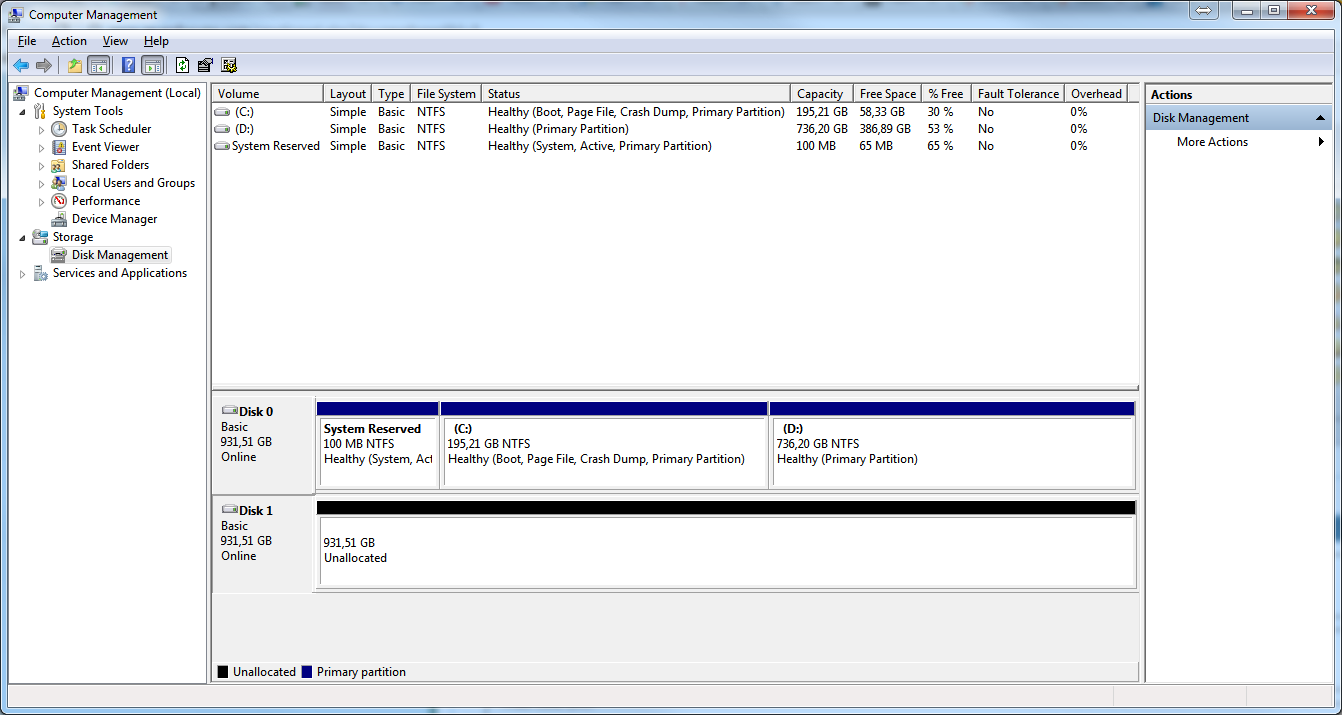
Disk 0 is my main hard disk, split into two partitions, and Disk 1 is the drive in questions.
Right now I'm running TestDisk and it will take till morning to analyse all 121600 cylinders. I'm wondering what my next step(s) should be if the scan comes up empty? Should I try to use any other software to recover the partition, or should I use something to try to recover the files?
Thank you in advance for any tips and ideas.
I'm having quite a bit of bad luck at backing up data from a WD My Book Essential. I had a feeling something was faulty, so I started backing up my data. The hard disk in it was 1TB, and lets say about 450 GB of it was used.
I started copying everything, and about 50% went smoothly. Normal speed, no hickups. Then the drive started randomly dying and rebooting. It would copy for a number of minutes, then stopped as if the drive had been unplugged, and then poped up again after a few seconds. After a while, I just couldn't access it anymore. I had a feeling something might be wrong with the case.
So I disassembled it, and took the hard drive out. I plugged it into my computer, and it's recognized, but the capacity of it is showing up as unallocated in Computer Management.
Disk 0 is my main hard disk, split into two partitions, and Disk 1 is the drive in questions.
Right now I'm running TestDisk and it will take till morning to analyse all 121600 cylinders. I'm wondering what my next step(s) should be if the scan comes up empty? Should I try to use any other software to recover the partition, or should I use something to try to recover the files?
Thank you in advance for any tips and ideas.
My Computer
At a glance
Microsoft Windows 7 Ultimate 32-bit 7601 Mult...Intel(R) Core(TM)2 Duo CPU T7100 @ 1.80GHz2,00 GBATI Mobility Radeon HD 2600
- Computer type
- Laptop
- Computer Manufacturer/Model Number
- Toshiba
- OS
- Microsoft Windows 7 Ultimate 32-bit 7601 Multiprocessor Free Service Pack 1
- CPU
- Intel(R) Core(TM)2 Duo CPU T7100 @ 1.80GHz
- Motherboard
- TOSHIBA ISKAA
- Memory
- 2,00 GB
- Graphics Card(s)
- ATI Mobility Radeon HD 2600
- Sound Card
- (1) ATI HDMI Audio (2) Realtek High Definition Audio
- Screen Resolution
- 1280 x 800 x 32 bits (4294967296 colors) @ 59 Hz
- Hard Drives
- (1) Hitachi HTS542525K9SA00 (2) CBM Flash Disk USB Device


