Solved Need to Recover Data from WD Passport External HD

If it goes like others and fixes File System errors enough to autostart to access the data then the problem is/was file system errors. We've had several repair this way recently.

I'm wondering what tells you this is to take five hours. Check File System is Partition Wizard's version of Disk Check and uses the same programming which doesn't given times like that. And it normally won't run if a Drive Letter is not assigned to the partition, same as Disk Check
 
Thanks for the replies.

Having problems burning Paragon to a disk after download. Keep receiving error. Even so, I am concerned that the data recovery software will not recognize the Passport during a scan as I encountered with Easeus. I believe that is why no data is indicated under Disk Management for Disk 2 (Passport) It is not recognized by Windows.

If I remove external HD from the case as stated by futur above, how do you connect to a laptop ?
In this case I do not think removing the HDD from the case will buy you anything. I would leave it as is.
 

My Computer My Computer

At a glance

Vista, Windows7, Mint Mate, Zorin, Windows 8from 1.6GHz Duo to i7
Computer Manufacturer/Model Number
HP, Dell, Gateway, Toshiba - 4 laptops and 2 desktops
OS
Vista, Windows7, Mint Mate, Zorin, Windows 8
CPU
from 1.6GHz Duo to i7
Monitor(s) Displays
2x HP w2207
Hard Drives
5x HDD, 7x SSD, 12x Externals
Keyboard
with trackball - no mices
Mouse
Trackball mice
Internet Speed
DSL 6000

My Computer My Computer

At a glance

Win 7, 32bit, Premium
OS
Win 7, 32bit, Premium
Repair the file system.

Are you going to respond to my questions about how PW "Check File System" is giving an estimated time when it doesn't normally do this, and cannot run without a drive letter?
 
Sorry, greg. I was away from the computer.

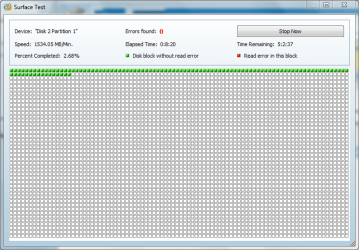
When I right clicked on the drive, the check file option was "grayed", so the only option I had was "surface scan" In the estimated time remaining block, it states 5 hours.

Will post a picture in a few.

Capture 4.PNG
 

Attachments

  • Capture   4.PNG
    Capture 4.PNG
    16.5 KB · Views: 34

My Computer My Computer

At a glance

Win 7, 32bit, Premium
OS
Win 7, 32bit, Premium
Is there a correction for corrupted system data ?

That's what Testdisk does. It picks out what part of that data is still valid, analyzes it with other data that's still on the disk, then rebuilds that system data.
 

My Computer My Computer

At a glance

Windows 7 Ultimate x64
OS
Windows 7 Ultimate x64
Sorry, greg. I was away from the computer.

When I right clicked on the drive, the check file option was "grayed", so the only option I had was "surface scan" In the estimated time remaining block, it states 5 hours.

Will post a picture in a few.

That sounds exactly what Greg was talking about: It was grayed out because there was no drive letter assigned.

The surface scan is basically check the drive platters for defects (mechanical/magnetic). You probably don't need to do that at this point.
 

My Computer My Computer

At a glance

Windows 7 Ultimate x64
OS
Windows 7 Ultimate x64
My apologies, everyone.

My computer has started to lag and very slow. Will post more info when avail.
 

My Computer My Computer

At a glance

Win 7, 32bit, Premium
OS
Win 7, 32bit, Premium
cap2.PNG


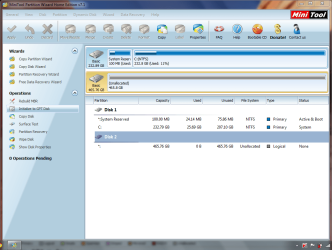
This is what the wizard looks like on my computer. I can find no options to change the drive letter ?


I can't capture the right click, but as prev stated, assign a letter and check disk are grayed out.
 

Attachments

  • cap2.PNG
    cap2.PNG
    64.5 KB · Views: 88

My Computer My Computer

At a glance

Win 7, 32bit, Premium
OS
Win 7, 32bit, Premium
I think you would have to create a partition out of that "unnallocated" space before you can assign a drive letter. But I'm not sure if you should do that just yet.

Have you already recovered all files from the drive yet? Or just a few of them (as I think you previously posted)?

What method (program) were you using before where you could finally see files there to recover?
 
Last edited:

My Computer My Computer

At a glance

Windows 7 Ultimate x64
OS
Windows 7 Ultimate x64
No, I did not recover files because you need to upgrade to the commercial version for more than 1GB. May do so later. I was using the Data Recovery section of the wizard.

I am currently running test disk. Will post the results. Thanks for your help.
 

My Computer My Computer

At a glance

Win 7, 32bit, Premium
OS
Win 7, 32bit, Premium
I think you would have to create a partition out of that "unnallocated" space before you can assign a drive letter
That is correct. But that would wipe your data. Before you pay any money, try Recuva. It is a bit messy but many people have recovered data with it. http://www.piriform.com/recuva
 

My Computer My Computer

At a glance

Vista, Windows7, Mint Mate, Zorin, Windows 8from 1.6GHz Duo to i7
Computer Manufacturer/Model Number
HP, Dell, Gateway, Toshiba - 4 laptops and 2 desktops
OS
Vista, Windows7, Mint Mate, Zorin, Windows 8
CPU
from 1.6GHz Duo to i7
Monitor(s) Displays
2x HP w2207
Hard Drives
5x HDD, 7x SSD, 12x Externals
Keyboard
with trackball - no mices
Mouse
Trackball mice
Internet Speed
DSL 6000
Yeah, that's why I mentioned not to do that. If Partition Wizard is good at it, I think it would be worth a shot at trying partition recovery. That would probably be much cleaner than trying to use the various file recovery programs.

That's really the reason I mentioned earlier about using Testdisk. A little harder to use, but you end up with the cleanest, and most accurate recovery. And you don't have to deal with any of the "after-mess" that other recovery program leave.

If it was repartioned, I don't think Partition Wizard could recover from that. The only one I know that would is Testdisk (as long as the disk wasn't zeroed out in the process).
 

My Computer My Computer

At a glance

Windows 7 Ultimate x64
OS
Windows 7 Ultimate x64
Took me a few minutes to figure out how to execute test disk. Currently at 25%.

As I have tried to explain, for some reason the only option available for me in Partition Wizard is the surface scan. All others (change driver letter, check system) are grayed out.

Would running surface scan be of benefit ? Takes 5 hrs on 500GB HD.
 

My Computer My Computer

At a glance

Win 7, 32bit, Premium
OS
Win 7, 32bit, Premium
I doubt a surface scan will help, it doesn't sound like you've got surface problems.
 

My Computer My Computer

At a glance

Windows 7 Ultimate x64
OS
Windows 7 Ultimate x64

My Computer My Computer

At a glance

Vista, Windows7, Mint Mate, Zorin, Windows 8from 1.6GHz Duo to i7
Computer Manufacturer/Model Number
HP, Dell, Gateway, Toshiba - 4 laptops and 2 desktops
OS
Vista, Windows7, Mint Mate, Zorin, Windows 8
CPU
from 1.6GHz Duo to i7
Monitor(s) Displays
2x HP w2207
Hard Drives
5x HDD, 7x SSD, 12x Externals
Keyboard
with trackball - no mices
Mouse
Trackball mice
Internet Speed
DSL 6000
Completed Test Disk. There were no results indicated at completion ?

A couple of drivers were installed automatically while Test Disk was running.

Problem is now Partition Wizard does not recognize the Passport (Disk 2) like before.

Thanks to everyone. Will continue to explore tomorrow.
 

My Computer My Computer

At a glance

Win 7, 32bit, Premium
OS
Win 7, 32bit, Premium
Completed Test Disk. There were no results indicated at completion ?

Are you sure? Did you pick around at the different menu options at the bottom of the Testdisk window? I've never seen it not identify something recoverable..

A couple of drivers were installed automatically while Test Disk was running.

Where did these come from?
 

My Computer My Computer

At a glance

Windows 7 Ultimate x64
OS
Windows 7 Ultimate x64
Back
Top