Solved W7 Reports Network Cable not connected - but it is

Derek66

New member
Local time
6:45 PM
Messages
6
I went away for the weekend turned off all computers but the one that we store files and our voip phone system on. I disconnected our wireless router. When I returned home, I powered up the wireles router then noted that the "server" computer had no internet access - I checked and out two other wired network computers have access, and the wireless router is emitting signal ( checked with phone). I have changed the cable from my "Server" to the router, and have connected the cable to different ports on the router, have connected the cable into the ports on the wireless router unit. NOthing works

I did the netsh winsock reset catalog thing, I have done all the ipoconfig flushdns renewdns reset dns , but still I can not get that computer to connect to our network.

Could I please get some help.
 

My Computer My Computer

OS
windows 7 64 bit
Try shutting down the problem machine then remove the power cord and bleed off the power by pushing the start button. Power back up and see if it connects.
 

My Computer My Computer

Computer type
PC/Desktop
Computer Manufacturer/Model Number
Home built
OS
Windows 7 Ult, Windows 8.1 Pro,
CPU
Q9650-4.275GHz, E8600 4.5GHz, E6750-3.8GHz
Motherboard
Evga 780i FTW
Memory
G.Skill PC2 9600 1200Mhz 5 5 5 15 2T
Graphics Card(s)
GTX480
Sound Card
Asus Xonar D2
Monitor(s) Displays
HannsG
Screen Resolution
1680X1050
Hard Drives
GSkill Phoenix Pro 120GB SSD
PSU
ThermalTake Toughpower 1000Watt modular
Case
ThermalTake XaserV
Cooling
Xigmatek S1283
Keyboard
Logitech G15
Mouse
Logitech G9
Internet Speed
T1
Have you looked at the device manager to see if the NIC shows up and/or is disabled?
 

My Computer My Computer

Computer Manufacturer/Model Number
Dell XPS 15 L502x
OS
Windows 7 Ultimate x64 SP1
CPU
Core i7-2670QM
Memory
8GB DDR3 PC3-10600
Graphics Card(s)
Intel HD Graphics 3000 + GeForce GT 540M
Screen Resolution
1920x1080
Hard Drives
1TB 5400RPM Seagate
What I have done

I have powered off the machine, I have powered of the router, I have left them sitting then repowered, to no avail.

I have swapped the cable over, and tried a different cable, and using it in different ports.

I have tried refreshing and renewing the dns.

I have used the MS Troubleshooter and it constantly reports the ethernet cable is not connected.

I did a ping test that I read about which showed the adapter was ok, I checked in Device Manager no exclamation marks, states all is fine.

I am a bit lost and am getting ready to spend the day reformatting and re-installing out computer
 

My Computer My Computer

OS
windows 7 64 bit
Maybe resetting the entire TCP/IP stack would help.

Lets try flushing DNS cache and renewing your IP.

Flush the DNS cache and restore MS's Hosts file ...
Copy and paste these lines in Note pad.

@Echo on
pushd\windows\system32\drivers\etc
attrib -h -s -r hosts
echo 127.0.0.1 localhost>HOSTS
attrib +r +h +s hosts
popd
ipconfig /release
ipconfig /renew
ipconfig /flushdns
netsh winsock reset all
netsh int ip reset all
shutdown -r -t 1
del %0

Save as flush.bat to your desktop. Right click on the flush.bat file to run it as Administrator.

Your computer will reboot itself.


If that doesn't work I would try clearing the cmos on the board before I reformatted. Sometimes power surges or other problems can wreck the NIC and it won't function any longer until the cmos is cleared. Reinstalling the driver for this adaptor might also be worth doing.

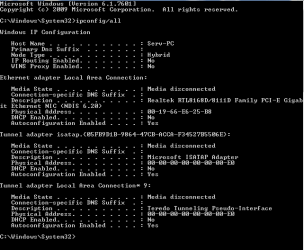
I may be able to spot other problems if you can post a screen shot of your ipconfig/all.
 

My Computer My Computer

Computer type
PC/Desktop
Computer Manufacturer/Model Number
Home built
OS
Windows 7 Ult, Windows 8.1 Pro,
CPU
Q9650-4.275GHz, E8600 4.5GHz, E6750-3.8GHz
Motherboard
Evga 780i FTW
Memory
G.Skill PC2 9600 1200Mhz 5 5 5 15 2T
Graphics Card(s)
GTX480
Sound Card
Asus Xonar D2
Monitor(s) Displays
HannsG
Screen Resolution
1680X1050
Hard Drives
GSkill Phoenix Pro 120GB SSD
PSU
ThermalTake Toughpower 1000Watt modular
Case
ThermalTake XaserV
Cooling
Xigmatek S1283
Keyboard
Logitech G15
Mouse
Logitech G9
Internet Speed
T1
Thanks

Just posting so that you know I am following you, I have nearly completed a full back up so I have prepared the flush.bat, but am waiting on the B up - having to use thumb drive between comps to follow yr instructions, am appreciative will try an post ipconfig/ all up shortly
 

My Computer My Computer

OS
windows 7 64 bit
my ipconfig/all

This attachment should show my ip config
 

Attachments

  • ipconfig all 8  4 12.PNG
    ipconfig all 8 4 12.PNG
    8 KB · Views: 31

My Computer My Computer

OS
windows 7 64 bit
Did the Flush Bat

No Change - am just researching the Cmos clearance and what is required
 

My Computer My Computer

OS
windows 7 64 bit
No connection at all according to the ipconfig. It looks like something broke the network adaptor or the cable is bad or something. Clearing the cmos isn't a bad idea at this point. If this is a PC there should be a button somewhere on the board for this. No system specs are listed so I can't look that up for you.

A recent system image would come in handy at this point although if it's a board problem that won't help, clearing the cmos might work.
 

My Computer My Computer

Computer type
PC/Desktop
Computer Manufacturer/Model Number
Home built
OS
Windows 7 Ult, Windows 8.1 Pro,
CPU
Q9650-4.275GHz, E8600 4.5GHz, E6750-3.8GHz
Motherboard
Evga 780i FTW
Memory
G.Skill PC2 9600 1200Mhz 5 5 5 15 2T
Graphics Card(s)
GTX480
Sound Card
Asus Xonar D2
Monitor(s) Displays
HannsG
Screen Resolution
1680X1050
Hard Drives
GSkill Phoenix Pro 120GB SSD
PSU
ThermalTake Toughpower 1000Watt modular
Case
ThermalTake XaserV
Cooling
Xigmatek S1283
Keyboard
Logitech G15
Mouse
Logitech G9
Internet Speed
T1
Thanks all for your help - Solved

I had to replace the onboard LAN card with a standalone unit- appears that was the problem thank you for your advice and assistance -
 

My Computer My Computer

OS
windows 7 64 bit
I had to replace the onboard LAN card with a standalone unit- appears that was the problem thank you for your advice and assistance -

I guess that something did break the network adaptor part was close to correct then. :sarc:

Although the few times I've seen this type of onboard LAN going out problem I just needed to clear the cmos and it worked straight away.

It pays to write all the bios setting written down before hand.

I'm glad you have it working either way. :)
 

My Computer My Computer

Computer type
PC/Desktop
Computer Manufacturer/Model Number
Home built
OS
Windows 7 Ult, Windows 8.1 Pro,
CPU
Q9650-4.275GHz, E8600 4.5GHz, E6750-3.8GHz
Motherboard
Evga 780i FTW
Memory
G.Skill PC2 9600 1200Mhz 5 5 5 15 2T
Graphics Card(s)
GTX480
Sound Card
Asus Xonar D2
Monitor(s) Displays
HannsG
Screen Resolution
1680X1050
Hard Drives
GSkill Phoenix Pro 120GB SSD
PSU
ThermalTake Toughpower 1000Watt modular
Case
ThermalTake XaserV
Cooling
Xigmatek S1283
Keyboard
Logitech G15
Mouse
Logitech G9
Internet Speed
T1
Back
Top