Install Windows 7 on Computer with Less than 512MB RAM

How to Install Windows 7 on Computer with Less than 512MB RAM

   Information
This is a process by we can install Windows 7 on computers with less than 512 MB of memory.

This is only for 32-bit version of Windows 7 because it is nearly impossible to run 64-bit version of the OS in a computer with less than 512 ram.

Although you can install Windows 7 Ultimate edition, but I recommend to install Home Premium, Home Basic, or Starter editions. Use at least 256MB ram.

   Warning
Things you need:

1) Windows 7 32bit ISO
2) A HEX editor. I prefer Free Hex Editor Neo.
3) UltraISO or powerISO.


Lets get started:

1) mount the ISO and copy the file "winsetup.dll" from the sources folder to any of your local drive.

2) Now open winsetup.dll with the help of Free Hex Editor Neo.

3) Under 0008e528 on the left side, find 77 07 3D 78 01 string as in the screenshot below.
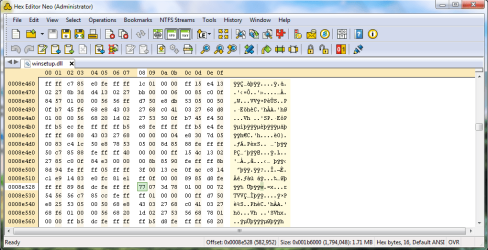
hex default.png
4) Replace 77 07 3D 78 01 with E9 04 00 00 00 and save the file.
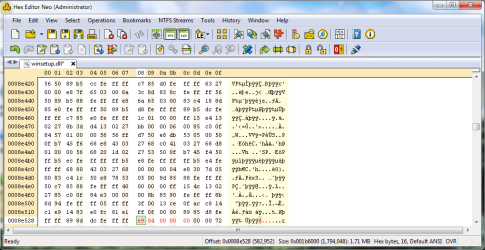
after change.png
5) Now open the windows 7 32bit iso with UltraISO or PowerISO. Open sources folder and replace the winsetup.dll with the file you just modified. And delete ei.cfg file to unlock all windows 7 SKU. And then save the ISO. Burn it and Install.


Last edited by a moderator:
windows 7

Hello everybody! I followed step by step the tutorial and I used the same tools like in tutorial, but when I wanted to install OS in the virtual machine, at "setup is preparing" it`s says "install.wim does not exist". I have a small netbook and I want to install windows 7 on it. It has only 500MB memory. How can I do that, can you tell me? Thank you verry much.
 

My Computer My Computer

OS
windows 7 ultimate x32
I threw that laptop away and bought myself a new laptop ;) (gateway) 4gb ram, 250gb hdd, 15.4 screen, wifi b/g/n, AMD Athlon X2 Dual-Core QL-60 works like a charm ;) P.S. i tried the tutorial and it didn't work so i just got tired and got this one :D
 
Last edited:

My Computer My Computer

Computer Manufacturer/Model Number
Gateway M-2414U
OS
Windows 7 Ultimate 32bit/x86
CPU
AMD Athlon X2 Dual-Core QL60 1.9Ghz
Motherboard
SA8 W370X015
Memory
4GB DDR2
Graphics Card(s)
ATI Readon HD 3200 Graphics
Sound Card
Conexant High Defintion Smartaudio 221
Monitor(s) Displays
15.4-inch WXGA Ultrabright™ TFT Active Matrix
Screen Resolution
1280x800
Hard Drives
1 Sata 250GB
Case
Portable
Cooling
Normal laptop fan
Keyboard
Standard PS/2 Keyboard
Mouse
Touch Pad
Internet Speed
3 Mbps
Have a tut for Windows 8?. Quite weirdly, someone is asking me how to bypass the limit in Windows 8 with a 312mb system.
 

My Computer My Computer

OS
Win7 Ultimate x64 SP1 / WCP x64 / Ubuntu 11 x64
Hello Ken,

If that's all they have, then it would not be recommended to install Windows 8 on it. If it was even able to run on it, it would only run like snail anyways. Time for an upgrade. :(
 

My Computer My Computer

Computer type
PC/Desktop
Computer Manufacturer/Model Number
Self built custom
OS
64-bit Windows 11 Pro for Workstations
CPU
Intel i7-8700K OC'd to 5 GHz
Motherboard
ASUS ROG Maximus XI Formula Z390
Memory
64 GB (4x16GB) G.SKILL TridentZ RGB DDR4 3600 MHz
Graphics Card(s)
ASUS ROG-STRIX-GTX1080TI-O11G-GAMING
Sound Card
Integrated
Monitor(s) Displays
2 x Samsung Odyssey G7 27"
Screen Resolution
2560x1440
Hard Drives
1TB Samsung 990 PRO M.2,
4TB Samsung 990 PRO PRO M.2,
TerraMaster F8 SSD Plus NAS
PSU
Seasonic Prime Titanium 850W
Case
Thermaltake Core P3
Cooling
Corsair Hydro H115i
Keyboard
Logitech wireless K800
Mouse
Logitech MX Master 4
Internet Speed
2 Gb/s Download and 100 Mb/s Upload
Antivirus
Malwarebyte Anti-Malware Premium
Browser
Google Chrome
Other Info
Logitech Z625 speaker system,
Logitech BRIO 4K Pro webcam,
HP Color LaserJet Pro MFP M477fdn,
APC SMART-UPS RT 1000 XL - SURT1000XLI,
Galaxy S23 Plus phone

My Computer My Computer

OS
Win7 Ultimate x64 SP1 / WCP x64 / Ubuntu 11 x64
Hello Ken,

If that's all they have, then it would not be recommended to install Windows 8 on it. If it was even able to run on it, it would only run like snail anyways. Time for an upgrade. :(

I have no idea Shawn, but now he did get to run it. :geek:
 

My Computer My Computer

OS
Win7 Ultimate x64 SP1 / WCP x64 / Ubuntu 11 x64
Yeah, but it will be slow.
 

My Computer My Computer

Computer type
PC/Desktop
Computer Manufacturer/Model Number
Self built custom
OS
64-bit Windows 11 Pro for Workstations
CPU
Intel i7-8700K OC'd to 5 GHz
Motherboard
ASUS ROG Maximus XI Formula Z390
Memory
64 GB (4x16GB) G.SKILL TridentZ RGB DDR4 3600 MHz
Graphics Card(s)
ASUS ROG-STRIX-GTX1080TI-O11G-GAMING
Sound Card
Integrated
Monitor(s) Displays
2 x Samsung Odyssey G7 27"
Screen Resolution
2560x1440
Hard Drives
1TB Samsung 990 PRO M.2,
4TB Samsung 990 PRO PRO M.2,
TerraMaster F8 SSD Plus NAS
PSU
Seasonic Prime Titanium 850W
Case
Thermaltake Core P3
Cooling
Corsair Hydro H115i
Keyboard
Logitech wireless K800
Mouse
Logitech MX Master 4
Internet Speed
2 Gb/s Download and 100 Mb/s Upload
Antivirus
Malwarebyte Anti-Malware Premium
Browser
Google Chrome
Other Info
Logitech Z625 speaker system,
Logitech BRIO 4K Pro webcam,
HP Color LaserJet Pro MFP M477fdn,
APC SMART-UPS RT 1000 XL - SURT1000XLI,
Galaxy S23 Plus phone
crap, man... my winsetup.dll doesn't have the string mentioned above.

I have the ALL-IN-ONE disk with both x32 & x64 stuff could this be the issue? anybody have a solution for me?

i am googling my butt off before i post this, but it seems as simple as pie, some people even report modifying a vista brand dll with success.

me - i crap out of luck over here, i am going to google some more before i post...

there is NO way of pinning a keyword set to this issue, there is too many floods of how to do what this very tutorial says, that number string is VERY popular.

Thank you all in advance as usual

-=UPDATE=-
I just downloaded a Windows 7 Ultimate x32 and SAME problem.
no matching string code of 77 07 3D 78 01.
MAN... what gives here?
anyone???

i even downloaded this file:
** REMOVED **

-=UPDATE #2=-
I just tried the link above and there is NO SUCH STRING in that file either.
man I am about to give UP!!!
 
Last edited by a moderator:

My Computer My Computer

Computer type
PC/Desktop
Computer Manufacturer/Model Number
Homemade Heap
OS
Windows 7 x64 Ultimate
CPU
AMD Phenom II X4 965 Black Edition 3.4Ghz (OC @ 3.7Ghz)
Motherboard
ASUS M5A97 LE R2.0
Memory
G-Skill (2x4GB) DDR3 1333 1.5v (OV to 1.65v @ 1432)
Graphics Card(s)
EVGA GeForce GTS 450 SC Edition
Sound Card
Onboard
Monitor(s) Displays
42 inch HP Television/Monitor
Screen Resolution
1920x1080
Hard Drives
SSD OS:OCZ RevoDrive X2 220GB PCIe SSD >>>
HDD Storage: 1x Western Digital Black 750GB, 32MB, 6.0,
2x Western Digital Blue 1TB, 32MB, 6.0,
1x Seagate Baracuda 3TB, 64MB, 6.0
PSU
Antec EarthWatts EA750 750W
Case
IN WIN Dragon Rider Black Steel Full Tower
Cooling
ALL AIR. Case:1x 220mm, 4x 120mm / CPU:Stock 4 pipe AMD PIB
Keyboard
Steelseries MERC Stealth
Mouse
Tek Republic TM Black 7 Button + 1 Wheel
Internet Speed
10Mb/s
Antivirus
ESET Security Suite v6
Browser
Firefox
Other Info
Optical Drive: Sony Optiarc 24x DVD Double Layer Lightscribe,
Fan Controller: NZXT Sentry-2 Touch Screen (5 fans + temps),
Audio: Kenwood 500w Home System
really???

like that huh.

well i have given up on this idea, and some of my other ideas regarding this issues related and non.

i boggled my brain until 5:30 this morning to NO avail... and there is NOTHING i can't figure out with the help of
a] google
b] keyword of issue/thing related.

10-04, over & out.
 

My Computer My Computer

Computer type
PC/Desktop
Computer Manufacturer/Model Number
Homemade Heap
OS
Windows 7 x64 Ultimate
CPU
AMD Phenom II X4 965 Black Edition 3.4Ghz (OC @ 3.7Ghz)
Motherboard
ASUS M5A97 LE R2.0
Memory
G-Skill (2x4GB) DDR3 1333 1.5v (OV to 1.65v @ 1432)
Graphics Card(s)
EVGA GeForce GTS 450 SC Edition
Sound Card
Onboard
Monitor(s) Displays
42 inch HP Television/Monitor
Screen Resolution
1920x1080
Hard Drives
SSD OS:OCZ RevoDrive X2 220GB PCIe SSD >>>
HDD Storage: 1x Western Digital Black 750GB, 32MB, 6.0,
2x Western Digital Blue 1TB, 32MB, 6.0,
1x Seagate Baracuda 3TB, 64MB, 6.0
PSU
Antec EarthWatts EA750 750W
Case
IN WIN Dragon Rider Black Steel Full Tower
Cooling
ALL AIR. Case:1x 220mm, 4x 120mm / CPU:Stock 4 pipe AMD PIB
Keyboard
Steelseries MERC Stealth
Mouse
Tek Republic TM Black 7 Button + 1 Wheel
Internet Speed
10Mb/s
Antivirus
ESET Security Suite v6
Browser
Firefox
Other Info
Optical Drive: Sony Optiarc 24x DVD Double Layer Lightscribe,
Fan Controller: NZXT Sentry-2 Touch Screen (5 fans + temps),
Audio: Kenwood 500w Home System
I just read the thread.

If you have access to a second computer with at least 512MB RAM there is a much quicker/simpler solution:

1. Put your disk into the second computer and start the installation from the DVD as normal.

2. At the FIRST reboot, stop the computer BEFORE it starts again, remove the disk and put it back into your first computer.

3. Start your computer and it should continue the installation as normal.

The first part of the Windows installation before the first reboot just prepares the disk and copies the files to the disk. The computer specific configuration takes place after reboot. This should work with Vista, 7 and 8 as well as the corresponding server versions.

I also use this trick to install on computers without a DVD-drive.
 
Last edited:

My Computer My Computer

OS
Windows 7
I have a "Win7.AIO.ESD.en-US.Sep2015.iso". I opened its "winsetup.dll"file with Hex Editor Neo. But there is no "77 07 3D 78 01" in it. (I attached the picture.)
Can you help me?
 

Attachments

  • Untitled.png
    Untitled.png
    52.6 KB · Views: 28
Last edited:

My Computer My Computer

Computer type
PC/Desktop
OS
windows 7 ultimate, a 32bit and a 64bit

My Computers My Computers

System One System Two

  • Computer type
    PC/Desktop
    OS
    7 X64
    CPU
    i5 8400
    Motherboard
    gigabyte b365m ds3h
    Memory
    2x8gb 3200mhz
    Hard Drives
    various
    PSU
    pure power 11 400w cm
    Case
    Coolermaster
    Cooling
    cryorig m9i
  • Computer type
    PC/Desktop
    OS
    7x64
    CPU
    g5400
    Motherboard
    ga b365m ds3h
    Memory
    8gb ddr4 2400
    PSU
    xfx pro 450w
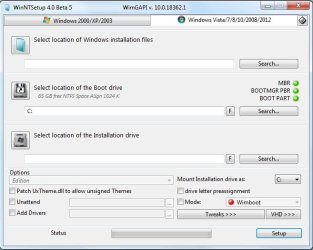
If you apply the image using winntsetup, or dism++, or gimagex, etc , then you are not using the file "winsetup.dll" from the sources folder.

Simplest way is to put winntsetup on a flash drive.

Boot the installation media. Use notepad to navigate to winntsetup_x86.exe on the flash drive.

Then you point it at the install.wim file and at the target partition.

2020-05-12_063901.jpg
 

My Computers My Computers

System One System Two

  • Computer type
    PC/Desktop
    OS
    7 X64
    CPU
    i5 8400
    Motherboard
    gigabyte b365m ds3h
    Memory
    2x8gb 3200mhz
    Hard Drives
    various
    PSU
    pure power 11 400w cm
    Case
    Coolermaster
    Cooling
    cryorig m9i
  • Computer type
    PC/Desktop
    OS
    7x64
    CPU
    g5400
    Motherboard
    ga b365m ds3h
    Memory
    8gb ddr4 2400
    PSU
    xfx pro 450w
If you apply the image using winntsetup, or dism++, or gimagex, etc , then you are not using the file "winsetup.dll" from the sources folder.

Simplest way is to put winntsetup on a flash drive.

Boot the installation media. Use notepad to navigate to winntsetup_x86.exe on the flash drive.

Then you point it at the install.wim file and at the target partition.

View attachment 411800


I need a beginner tutorial.
 

My Computer My Computer

Computer type
PC/Desktop
OS
windows 7 ultimate, a 32bit and a 64bit
look up winntsetup on youtube.
 

My Computers My Computers

System One System Two

  • Computer type
    PC/Desktop
    OS
    7 X64
    CPU
    i5 8400
    Motherboard
    gigabyte b365m ds3h
    Memory
    2x8gb 3200mhz
    Hard Drives
    various
    PSU
    pure power 11 400w cm
    Case
    Coolermaster
    Cooling
    cryorig m9i
  • Computer type
    PC/Desktop
    OS
    7x64
    CPU
    g5400
    Motherboard
    ga b365m ds3h
    Memory
    8gb ddr4 2400
    PSU
    xfx pro 450w
Back
Top