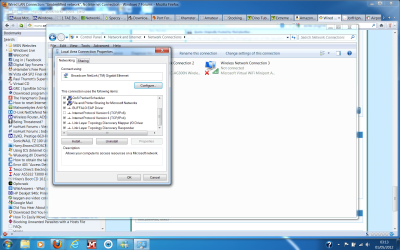
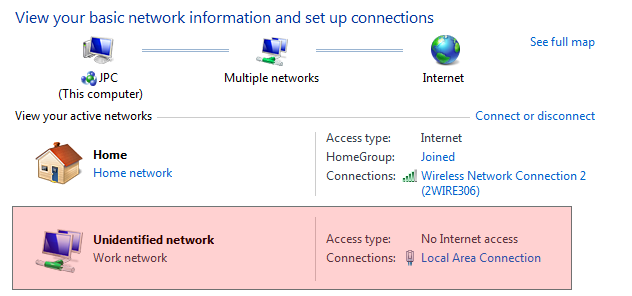
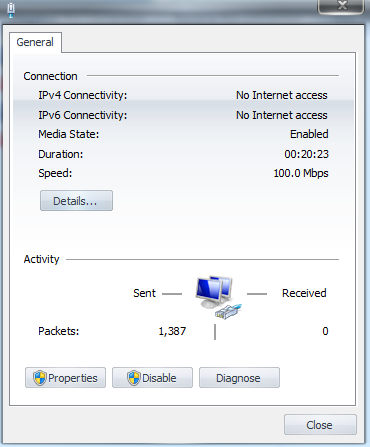
Wired LAN Connection: "Unidentified network", No Internet Connection
Microsoft Windows [Version 6.1.7600]
Copyright (c) 2009 Microsoft Corporation. All rights reserved.
C:\Users\Jesse>ipconfig /all
Windows IP Configuration
Host Name . . . . . . . . . . . . : JPC
Primary Dns Suffix . . . . . . . :
Node Type . . . . . . . . . . . . : Hybrid
IP Routing Enabled. . . . . . . . : No
WINS Proxy Enabled. . . . . . . . : No
DNS Suffix Search List. . . . . . : gateway.2wire.net
Ethernet adapter Local Area Connection 2:
Media State . . . . . . . . . . . : Media disconnected
Connection-specific DNS Suffix . :
Description . . . . . . . . . . . :
Physical Address. . . . . . . . . : 00-FF-4F-90-AE-87
DHCP Enabled. . . . . . . . . . . : Yes
Autoconfiguration Enabled . . . . : Yes
Ethernet adapter Local Area Connection* 17:
Media State . . . . . . . . . . . : Media disconnected
Connection-specific DNS Suffix . :
Description . . . . . . . . . . . : Anchorfree HSS Adapter
Physical Address. . . . . . . . . : 00-FF-87-80-C8-DB
DHCP Enabled. . . . . . . . . . . : Yes
Autoconfiguration Enabled . . . . : Yes
Wireless LAN adapter Wireless Network Connection 2:
Connection-specific DNS Suffix . : gateway.2wire.net
Description . . . . . . . . . . . : NETGEAR WNA1100 N150 Wireless USB Adapter
Physical Address. . . . . . . . . : E0-46-9A-0D-FE-12
DHCP Enabled. . . . . . . . . . . : Yes
Autoconfiguration Enabled . . . . : Yes
Link-local IPv6 Address . . . . . : fe80::dde5:3e0a:b9e5:4db4%13(Preferred)
IPv4 Address. . . . . . . . . . . : 172.16.1.36(Preferred)
Subnet Mask . . . . . . . . . . . : 255.255.0.0
Lease Obtained. . . . . . . . . . : Sunday, April 29, 2012 11:43:04 AM
Lease Expires . . . . . . . . . . : Monday, April 30, 2012 11:43:03 AM
Default Gateway . . . . . . . . . : 172.16.0.1
DHCP Server . . . . . . . . . . . : 172.16.0.1
DHCPv6 IAID . . . . . . . . . . . : 434128538
DHCPv6 Client DUID. . . . . . . . : 00-01-00-01-16-71-A3-BC-00-24-8C-5B-D8-ED
DNS Servers . . . . . . . . . . . : 172.16.0.1
NetBIOS over Tcpip. . . . . . . . : Enabled
Wireless LAN adapter Wireless Network Connection:
Media State . . . . . . . . . . . : Media disconnected
Connection-specific DNS Suffix . :
Description . . . . . . . . . . . : USB Wireless 802.11 b/g Adaptor
Physical Address. . . . . . . . . : 00-22-5F-75-2A-C3
DHCP Enabled. . . . . . . . . . . : Yes
Autoconfiguration Enabled . . . . : Yes
Ethernet adapter Local Area Connection:
Connection-specific DNS Suffix . :
Description . . . . . . . . . . . : NVIDIA nForce 10/100 Mbps Ethernet
Physical Address. . . . . . . . . : 00-24-8C-5B-D8-ED
DHCP Enabled. . . . . . . . . . . : Yes
Autoconfiguration Enabled . . . . : Yes
Link-local IPv6 Address . . . . . : fe80::cd4b:b34a:115c:fbf3%11(Preferred)
Autoconfiguration IPv4 Address. . : 169.254.251.243(Preferred)
Subnet Mask . . . . . . . . . . . : 255.255.0.0
Default Gateway . . . . . . . . . :
DHCPv6 IAID . . . . . . . . . . . : 234890380
DHCPv6 Client DUID. . . . . . . . : 00-01-00-01-16-71-A3-BC-00-24-8C-5B-D8-ED
DNS Servers . . . . . . . . . . . : fec0:0:0:ffff::1%1
fec0:0:0:ffff::2%1
fec0:0:0:ffff::3%1
NetBIOS over Tcpip. . . . . . . . : Enabled
Tunnel adapter isatap.gateway.2wire.net:
Media State . . . . . . . . . . . : Media disconnected
Connection-specific DNS Suffix . : gateway.2wire.net
Description . . . . . . . . . . . : Microsoft ISATAP Adapter
Physical Address. . . . . . . . . : 00-00-00-00-00-00-00-E0
DHCP Enabled. . . . . . . . . . . : No
Autoconfiguration Enabled . . . . : Yes
Tunnel adapter Teredo Tunneling Pseudo-Interface:
Media State . . . . . . . . . . . : Media disconnected
Connection-specific DNS Suffix . :
Description . . . . . . . . . . . : Teredo Tunneling Pseudo-Interface
Physical Address. . . . . . . . . : 00-00-00-00-00-00-00-E0
DHCP Enabled. . . . . . . . . . . : No
Autoconfiguration Enabled . . . . : Yes
Tunnel adapter isatap.{4F90AE87-F941-4412-A521-662E304A856C}:
Media State . . . . . . . . . . . : Media disconnected
Connection-specific DNS Suffix . :
Description . . . . . . . . . . . : Microsoft ISATAP Adapter #3
Physical Address. . . . . . . . . : 00-00-00-00-00-00-00-E0
DHCP Enabled. . . . . . . . . . . : No
Autoconfiguration Enabled . . . . : Yes
Tunnel adapter isatap.{8780C8DB-3FBF-42C9-AD79-659545AF4010}:
Media State . . . . . . . . . . . : Media disconnected
Connection-specific DNS Suffix . :
Description . . . . . . . . . . . : Microsoft ISATAP Adapter #4
Physical Address. . . . . . . . . : 00-00-00-00-00-00-00-E0
DHCP Enabled. . . . . . . . . . . : No
Autoconfiguration Enabled . . . . : Yes
Tunnel adapter isatap.{163A909D-9E85-4538-BDF6-117AEB8A595F}:
Media State . . . . . . . . . . . : Media disconnected
Connection-specific DNS Suffix . :
Description . . . . . . . . . . . : Microsoft ISATAP Adapter #6
Physical Address. . . . . . . . . : 00-00-00-00-00-00-00-E0
DHCP Enabled. . . . . . . . . . . : No
Autoconfiguration Enabled . . . . : Yes
C:\Users\Jesse>
A few things to note:
I've already reset the AT&T modem multiple times, and my attempts were to no avail.
How this issue came about: My internet disconnected for about 2 minutes (randomly, I suppose) and ever since then the wired connection has been "unidentified."
A few pictures that may help clear things up:
I am using an Asoka PlugLink for my wired connection, it worked for 6 months with no issues. It was never bumped, I believe it is working fine and not what is causing the issue.
My laptop has the same issue, so the issue is network-sided, not computer-sided.
My wireless internet disconnects every 3 minutes for no apparent reasons, the AT&T technician had no idea what was causing the error. However, using the Asoka PlugLink, I was able to use the LAN connection with no trouble at all, up until now.
Microsoft Windows [Version 6.1.7600]
Copyright (c) 2009 Microsoft Corporation. All rights reserved.
C:\Users\Jesse>ipconfig /all
Windows IP Configuration
Host Name . . . . . . . . . . . . : JPC
Primary Dns Suffix . . . . . . . :
Node Type . . . . . . . . . . . . : Hybrid
IP Routing Enabled. . . . . . . . : No
WINS Proxy Enabled. . . . . . . . : No
DNS Suffix Search List. . . . . . : gateway.2wire.net
Ethernet adapter Local Area Connection 2:
Media State . . . . . . . . . . . : Media disconnected
Connection-specific DNS Suffix . :
Description . . . . . . . . . . . :
Physical Address. . . . . . . . . : 00-FF-4F-90-AE-87
DHCP Enabled. . . . . . . . . . . : Yes
Autoconfiguration Enabled . . . . : Yes
Ethernet adapter Local Area Connection* 17:
Media State . . . . . . . . . . . : Media disconnected
Connection-specific DNS Suffix . :
Description . . . . . . . . . . . : Anchorfree HSS Adapter
Physical Address. . . . . . . . . : 00-FF-87-80-C8-DB
DHCP Enabled. . . . . . . . . . . : Yes
Autoconfiguration Enabled . . . . : Yes
Wireless LAN adapter Wireless Network Connection 2:
Connection-specific DNS Suffix . : gateway.2wire.net
Description . . . . . . . . . . . : NETGEAR WNA1100 N150 Wireless USB Adapter
Physical Address. . . . . . . . . : E0-46-9A-0D-FE-12
DHCP Enabled. . . . . . . . . . . : Yes
Autoconfiguration Enabled . . . . : Yes
Link-local IPv6 Address . . . . . : fe80::dde5:3e0a:b9e5:4db4%13(Preferred)
IPv4 Address. . . . . . . . . . . : 172.16.1.36(Preferred)
Subnet Mask . . . . . . . . . . . : 255.255.0.0
Lease Obtained. . . . . . . . . . : Sunday, April 29, 2012 11:43:04 AM
Lease Expires . . . . . . . . . . : Monday, April 30, 2012 11:43:03 AM
Default Gateway . . . . . . . . . : 172.16.0.1
DHCP Server . . . . . . . . . . . : 172.16.0.1
DHCPv6 IAID . . . . . . . . . . . : 434128538
DHCPv6 Client DUID. . . . . . . . : 00-01-00-01-16-71-A3-BC-00-24-8C-5B-D8-ED
DNS Servers . . . . . . . . . . . : 172.16.0.1
NetBIOS over Tcpip. . . . . . . . : Enabled
Wireless LAN adapter Wireless Network Connection:
Media State . . . . . . . . . . . : Media disconnected
Connection-specific DNS Suffix . :
Description . . . . . . . . . . . : USB Wireless 802.11 b/g Adaptor
Physical Address. . . . . . . . . : 00-22-5F-75-2A-C3
DHCP Enabled. . . . . . . . . . . : Yes
Autoconfiguration Enabled . . . . : Yes
Ethernet adapter Local Area Connection:
Connection-specific DNS Suffix . :
Description . . . . . . . . . . . : NVIDIA nForce 10/100 Mbps Ethernet
Physical Address. . . . . . . . . : 00-24-8C-5B-D8-ED
DHCP Enabled. . . . . . . . . . . : Yes
Autoconfiguration Enabled . . . . : Yes
Link-local IPv6 Address . . . . . : fe80::cd4b:b34a:115c:fbf3%11(Preferred)
Autoconfiguration IPv4 Address. . : 169.254.251.243(Preferred)
Subnet Mask . . . . . . . . . . . : 255.255.0.0
Default Gateway . . . . . . . . . :
DHCPv6 IAID . . . . . . . . . . . : 234890380
DHCPv6 Client DUID. . . . . . . . : 00-01-00-01-16-71-A3-BC-00-24-8C-5B-D8-ED
DNS Servers . . . . . . . . . . . : fec0:0:0:ffff::1%1
fec0:0:0:ffff::2%1
fec0:0:0:ffff::3%1
NetBIOS over Tcpip. . . . . . . . : Enabled
Tunnel adapter isatap.gateway.2wire.net:
Media State . . . . . . . . . . . : Media disconnected
Connection-specific DNS Suffix . : gateway.2wire.net
Description . . . . . . . . . . . : Microsoft ISATAP Adapter
Physical Address. . . . . . . . . : 00-00-00-00-00-00-00-E0
DHCP Enabled. . . . . . . . . . . : No
Autoconfiguration Enabled . . . . : Yes
Tunnel adapter Teredo Tunneling Pseudo-Interface:
Media State . . . . . . . . . . . : Media disconnected
Connection-specific DNS Suffix . :
Description . . . . . . . . . . . : Teredo Tunneling Pseudo-Interface
Physical Address. . . . . . . . . : 00-00-00-00-00-00-00-E0
DHCP Enabled. . . . . . . . . . . : No
Autoconfiguration Enabled . . . . : Yes
Tunnel adapter isatap.{4F90AE87-F941-4412-A521-662E304A856C}:
Media State . . . . . . . . . . . : Media disconnected
Connection-specific DNS Suffix . :
Description . . . . . . . . . . . : Microsoft ISATAP Adapter #3
Physical Address. . . . . . . . . : 00-00-00-00-00-00-00-E0
DHCP Enabled. . . . . . . . . . . : No
Autoconfiguration Enabled . . . . : Yes
Tunnel adapter isatap.{8780C8DB-3FBF-42C9-AD79-659545AF4010}:
Media State . . . . . . . . . . . : Media disconnected
Connection-specific DNS Suffix . :
Description . . . . . . . . . . . : Microsoft ISATAP Adapter #4
Physical Address. . . . . . . . . : 00-00-00-00-00-00-00-E0
DHCP Enabled. . . . . . . . . . . : No
Autoconfiguration Enabled . . . . : Yes
Tunnel adapter isatap.{163A909D-9E85-4538-BDF6-117AEB8A595F}:
Media State . . . . . . . . . . . : Media disconnected
Connection-specific DNS Suffix . :
Description . . . . . . . . . . . : Microsoft ISATAP Adapter #6
Physical Address. . . . . . . . . : 00-00-00-00-00-00-00-E0
DHCP Enabled. . . . . . . . . . . : No
Autoconfiguration Enabled . . . . : Yes
C:\Users\Jesse>
A few things to note:
I've already reset the AT&T modem multiple times, and my attempts were to no avail.
How this issue came about: My internet disconnected for about 2 minutes (randomly, I suppose) and ever since then the wired connection has been "unidentified."
A few pictures that may help clear things up:
I am using an Asoka PlugLink for my wired connection, it worked for 6 months with no issues. It was never bumped, I believe it is working fine and not what is causing the issue.
My laptop has the same issue, so the issue is network-sided, not computer-sided.
My wireless internet disconnects every 3 minutes for no apparent reasons, the AT&T technician had no idea what was causing the error. However, using the Asoka PlugLink, I was able to use the LAN connection with no trouble at all, up until now.
My Computer
- OS
- Windows 7 Ultimate x64