nick james
New member
- Local time
- 5:13 AM
- Messages
- 32
My Computer
At a glance
Washington
- OS
- Washington


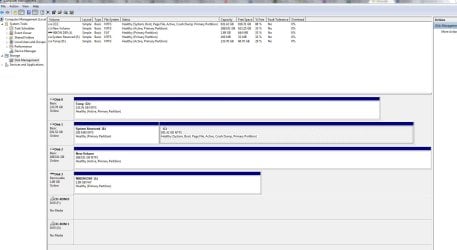
haha, I took that screen shot right after I rebooted due to some new updates. I had totally forgot to do that before posting the screen shot.So what happens if you right click disk2 and just assign a drive letter right there?
 , it requires me to this every time I reboot in order for the drive to be accessed.
You could delete the system reserved partition.
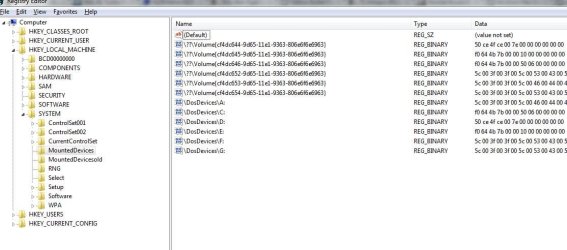
Open regedit and rename mounteddevices to mounteddevicesold .
Then reboot.
Better have decent external boot media in case you mess something up.
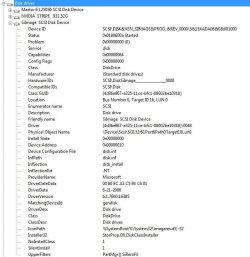
Alright I renamed mounteddevices to mounteddevicesold and I still get the following (see screen shots)Yes. it should be fine.
If you have win 7 install disc - the system recovery options and access to command prompt are on there.
How are you attempting to do this? What error or result are you getting? Screenshot?I'm also not having luck deleting the system reserve partition. I went back and read through it and it seems that its not just an easy "right-click > delete" option.
How are you attempting to do this? What error or result are you getting? Screenshot?I'm also not having luck deleting the system reserve partition. I went back and read through it and it seems that its not just an easy "right-click > delete" option.
You should be able to delete it with a right-click on it from that DISKMGMT.MSC state. You should see "delete volume" on the context menu.
From your screenshot it's just a primary partition, no longer the "active" partition. So it should appear as deletable using DISKMGMT I would have thought.
You can always use Partition Wizard, free home edition, as well. For this task (which should have also been doable through DISKMGMT while Windows is running) you should be able to also use the installed version of PW itself while Windows is running. But if you want to be "safe" you can also do it while booted from the standalone PW boot CD.
Drive A: is not a floppy drive, I dont have one present.Is drive A: in your screenshot a floppy drive?
What do you use to manage your RAID1?
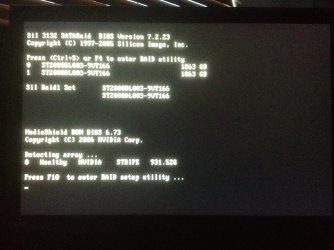
So that's where you would go to managa your RAID (using the hotkeys displayed).
Two 2 TB disks should allow for a 2 TB RAID1. Why does it show in that bootscreen as 1 TB?
A: just shows up as a floppy but I have no floppy installed. Its always showed up like that. Under mycomputer it shows a floppy but there isnt oneSo that's where you would go to manage your RAID (using the hotkeys displayed).
Two 2 TB disks should allow for a 2 TB RAID1. Why does it show in that bootscreen as 1 TB?
And what would A: be?
Correct, C: is RAID0 and running on NVIDIA controller, stripedSorry, didn't notice the "STRIPE" displayed at the bottom of the screenshot...
Understand on A:.
So C: is a RAID0?
I will reboot now and check it outSo have you gone into the management utility for the RAID controller that manages the H: drive? Hardware/firmware controllers can limit how Windows sees the actual devices. Was there ever a time in which the drive letter stuck successfully across boots?