Drive letter disappear after reboot

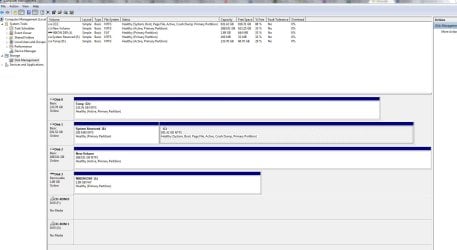
disk2 is a raid1 and consists of (2) SATA drives

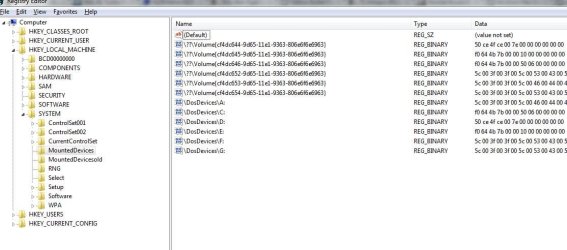
attached is the txt of the files requested... I see the hex values like you were talking about now.. I'm not sure what to do with them though
 

Attachments

  • regedit.txt
    regedit.txt
    156.6 KB · Views: 9
  • ss03.JPG
    ss03.JPG
    136.5 KB · Views: 17

My Computer My Computer

At a glance

Washington
OS
Washington
So what happens if you right click disk2 and just assign a drive letter right there?
 

My Computer My Computer

At a glance

Windows 7 Ultimate x64
OS
Windows 7 Ultimate x64
You could delete the system reserved partition.

Open regedit and rename mounteddevices to mounteddevicesold .

Then reboot.

Better have decent external boot media in case you mess something up.
 

My Computers My Computers

  • At a glance

    7 X64i5 84002x8gb 3200mhz
    Computer type
    PC/Desktop
    OS
    7 X64
    CPU
    i5 8400
    Motherboard
    gigabyte b365m ds3h
    Memory
    2x8gb 3200mhz
    Hard Drives
    various
    PSU
    pure power 11 400w cm
    Case
    Coolermaster
    Cooling
    cryorig m9i
  • At a glance

    7x64g54008gb ddr4 2400
    Computer type
    PC/Desktop
    OS
    7x64
    CPU
    g5400
    Motherboard
    ga b365m ds3h
    Memory
    8gb ddr4 2400
    PSU
    xfx pro 450w
So what happens if you right click disk2 and just assign a drive letter right there?
haha, I took that screen shot right after I rebooted due to some new updates. I had totally forgot to do that before posting the screen shot.

Please see attach- when I assign it the drive letter (H:), it requires me to this every time I reboot in order for the drive to be accessed.
You could delete the system reserved partition.

Open regedit and rename mounteddevices to mounteddevicesold .

Then reboot.

Better have decent external boot media in case you mess something up.

I thought you can't delete that partition- it drives me nuts. I could have sworn I looked into doing this before but that answer was no. Is it safe to delete?

What is considered to be decent external boot media? I have a spare laptop, Win7 installation disk, thumb drives, etc.
 

My Computer My Computer

At a glance

Washington
OS
Washington
Yes. it should be fine.

If you have win 7 install disc - the system recovery options and access to command prompt are on there.
 

My Computers My Computers

  • At a glance

    7 X64i5 84002x8gb 3200mhz
    Computer type
    PC/Desktop
    OS
    7 X64
    CPU
    i5 8400
    Motherboard
    gigabyte b365m ds3h
    Memory
    2x8gb 3200mhz
    Hard Drives
    various
    PSU
    pure power 11 400w cm
    Case
    Coolermaster
    Cooling
    cryorig m9i
  • At a glance

    7x64g54008gb ddr4 2400
    Computer type
    PC/Desktop
    OS
    7x64
    CPU
    g5400
    Motherboard
    ga b365m ds3h
    Memory
    8gb ddr4 2400
    PSU
    xfx pro 450w
Yes. it should be fine.

If you have win 7 install disc - the system recovery options and access to command prompt are on there.
Alright I renamed mounteddevices to mounteddevicesold and I still get the following (see screen shots)

I still had to mount the drive after a restart
 

Attachments

  • ss06.txt
    ss06.txt
    15.6 KB · Views: 3
  • ss06.JPG
    ss06.JPG
    78.6 KB · Views: 10
  • ss05.JPG
    ss05.JPG
    103.9 KB · Views: 11

My Computer My Computer

At a glance

Washington
OS
Washington
I'm also not having luck deleting the system reserve partition. I went back and read through it and it seems that its not just an easy "right-click > delete" option.

Anyone else able to shed some light onto this?
 

My Computer My Computer

At a glance

Washington
OS
Washington
I'm also not having luck deleting the system reserve partition. I went back and read through it and it seems that its not just an easy "right-click > delete" option.
How are you attempting to do this? What error or result are you getting? Screenshot?


You should be able to delete it with a right-click on it from that DISKMGMT.MSC state. You should see "delete volume" on the context menu.

From your screenshot it's just a primary partition, no longer the "active" partition. So it should appear as deletable using DISKMGMT I would have thought.

You can always use Partition Wizard, free home edition, as well. For this task (which should have also been doable through DISKMGMT while Windows is running) you should be able to also use the installed version of PW itself while Windows is running. But if you want to be "safe" you can also do it while booted from the standalone PW boot CD.
 

My Computer My Computer

At a glance

Windows 7 Pro x64 (1), Win7 Pro X64 (2)i5-3350p 3.1Ghz/6MB-cache (1); E8400 3.0Ghz/6...8GB PC3-12800 DDR3 (1); 4GB PC3-10600 DDR3 (2)ATI HD7750 (1), (see TV cards); ATI R7 250 (2)
Computer type
PC/Desktop
Computer Manufacturer/Model Number
Home-built, two systems (1) and (2)
OS
Windows 7 Pro x64 (1), Win7 Pro X64 (2)
CPU
i5-3350p 3.1Ghz/6MB-cache (1); E8400 3.0Ghz/6MB-cache (2)
Motherboard
ASUS P8Z77-V Pro (1); ASUS P5Q3 (2)
Memory
8GB PC3-12800 DDR3 (1); 4GB PC3-10600 DDR3 (2)
Graphics Card(s)
ATI HD7750 (1), (see TV cards); ATI R7 250 (2)
Sound Card
Realtek ALC892 HD Audio (1); Realtek ALC1200 HD Audio (2)
Monitor(s) Displays
Eizo HD2441W LCD, Eizo S2433W (1); Eizo 24" S2433W (2)
Screen Resolution
1920x1200, 1920x1200 (1); 1920x1200 (2)
Hard Drives
(1) 1TB SATA-II (7200RPM), 2x2TB SATA-III (7200RPM), 250GB SATA-III (10000RPM) for OS; 2x2TB external USB 3.0

(2) 320GB SATA-II (7200RPM), 750GB SATA-II (7200RPM), 150GB SATA-II (10000RPM) for OS; 2TB external USB 3.0
PSU
Nesteq ECS-6001 600W (1); Nesteq ECS-5001 500W (2)
Case
Acousti-Case 360 (1) and (2)
Cooling
Noctua NH-U12P SE2 for CPU, 2x120mm case fans (1) and (2)
Keyboard
IBM PS/2 (1) and (2)
Mouse
Logitech MX Revolution wireless (1); Microsoft wired (2)
Internet Speed
100mbps down / 10mbps up
Antivirus
Microsoft Security Essentials; Malwarebyte Anti-Malware Pro
Browser
Firefox
Other Info
Ceton InfiniTV 4-tuner cablecard-enabled TV card as well as Hauppauge HVR-2250 OTA/ATSC 2-tuner TV card in (1), running under Win7 WMC
Is drive A: in your screenshot a floppy drive?

What do you use to manage your RAID1?
 

My Computer My Computer

At a glance

Windows 7 Ultimate x64
OS
Windows 7 Ultimate x64
I'm also not having luck deleting the system reserve partition. I went back and read through it and it seems that its not just an easy "right-click > delete" option.
How are you attempting to do this? What error or result are you getting? Screenshot?


You should be able to delete it with a right-click on it from that DISKMGMT.MSC state. You should see "delete volume" on the context menu.

From your screenshot it's just a primary partition, no longer the "active" partition. So it should appear as deletable using DISKMGMT I would have thought.

You can always use Partition Wizard, free home edition, as well. For this task (which should have also been doable through DISKMGMT while Windows is running) you should be able to also use the installed version of PW itself while Windows is running. But if you want to be "safe" you can also do it while booted from the standalone PW boot CD.

I deleted the volume and now I just have unallocated space.

Is drive A: in your screenshot a floppy drive?

What do you use to manage your RAID1?
Drive A: is not a floppy drive, I dont have one present.

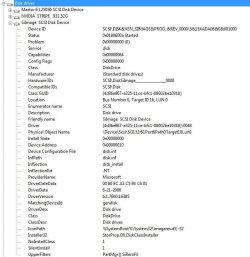
I don't have any software installed to manage the RAID1. Last time I tried to install the NVIDIA software ironically my RAID died due to hard drive failure. Since then I installed a card to handle it but I dont recall the information on the card. A friend gave it to me but here is what shows up when I looked it up in a program called "System Information for Windows by Gabriel Topala". I'm not sure how much of help it will be but let me know what else I could do to help
 

Attachments

  • ss07.JPG
    ss07.JPG
    63 KB · Views: 10

My Computer My Computer

At a glance

Washington
OS
Washington
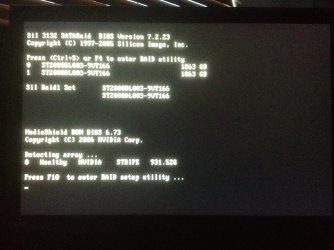
I figured you'd be asking sooner than later... Here is a screen shot of what I see at start up

The stripe, from my understanding, is controlled by the MB and then RAID1 is controlled by a controller that I installed. This is the RAID that I'm having problems with
 

Attachments

  • photo.JPG
    photo.JPG
    212.6 KB · Views: 13

My Computer My Computer

At a glance

Washington
OS
Washington
What are F: and G:?
 

My Computer My Computer

At a glance

Windows 7 Ultimate x64
OS
Windows 7 Ultimate x64
F: is the actual DVD drive and G: is an mountable virtual disc (CloneDrive)
 

My Computer My Computer

At a glance

Washington
OS
Washington
So that's where you would go to manage your RAID (using the hotkeys displayed).

Two 2 TB disks should allow for a 2 TB RAID1. Why does it show in that bootscreen as 1 TB?

And what would A: be?
 

My Computer My Computer

At a glance

Windows 7 Ultimate x64
OS
Windows 7 Ultimate x64
So that's where you would go to managa your RAID (using the hotkeys displayed).

Two 2 TB disks should allow for a 2 TB RAID1. Why does it show in that bootscreen as 1 TB?

It shows two RAIDs- RAID1 and RAID0. One is 1.8tb(RAID1) and the other is 900gb (raid0)
 

My Computer My Computer

At a glance

Washington
OS
Washington
So that's where you would go to manage your RAID (using the hotkeys displayed).

Two 2 TB disks should allow for a 2 TB RAID1. Why does it show in that bootscreen as 1 TB?

And what would A: be?
A: just shows up as a floppy but I have no floppy installed. Its always showed up like that. Under mycomputer it shows a floppy but there isnt one
 

My Computer My Computer

At a glance

Washington
OS
Washington
Sorry, didn't notice the "STRIPE" displayed at the bottom of the screenshot...

Understand on A:.

So C: is a RAID0?
 

My Computer My Computer

At a glance

Windows 7 Ultimate x64
OS
Windows 7 Ultimate x64
Sorry, didn't notice the "STRIPE" displayed at the bottom of the screenshot...

Understand on A:.

So C: is a RAID0?
Correct, C: is RAID0 and running on NVIDIA controller, striped

H:\ is the RAID1 and running on the other controller and I have to set the drive letter manually at start up
 

My Computer My Computer

At a glance

Washington
OS
Washington
So have you gone into the management utility for the RAID controller that manages the H: drive? Hardware/firmware controllers can limit how Windows sees the actual devices. Was there ever a time in which the drive letter stuck successfully across boots?
 

My Computer My Computer

At a glance

Windows 7 Ultimate x64
OS
Windows 7 Ultimate x64
So have you gone into the management utility for the RAID controller that manages the H: drive? Hardware/firmware controllers can limit how Windows sees the actual devices. Was there ever a time in which the drive letter stuck successfully across boots?
I will reboot now and check it out

I don't recall it ever showing up since the new controller... I've been dealing with this for a while. I'll take some screen shots of the menus
 

My Computer My Computer

At a glance

Washington
OS
Washington
Back
Top