Solved Computer turned off suddenly, now doesn't turn on

praeambulus

New member
Member
Local time
2:04 PM
Messages
91
i was working in Maya..actually just browsing.i havent even created anything.the scene was empty.and i just started to make a basic model the computer suddenly turned off.then in 2 seconds turned on again (almost) but the monitor wasnt showing anything.hdd light was off (everytime my computer starts normally it's ON)..cpu fan was rotating slowly.and the diagnostic lights (i guess) were on on the motherboard..i was afraid that cpu may get overheated (because the fan was rotating very slowly) i cut off the electricity.then started the comp again..this time..the fan didin't even start rotating (just showed little signs that it kind of wants to start rotating)..2 seconds that last..then it turned off again..after that it's on for a second then off for another..it just turns on and off if i dont cut the electricity
and the thing that.if i wait some time.then turn on the comp it goes a little long and wants to start ( maybe for 4-5 seconds) and then the same thing..so i thought it might a overheating problem (though i haven't done anything that could cause that) and disconnected the graphics card, the drives and the hdds..didn't help

havent' had these kind of problems before.the comp is in good conditions.bought in 2009

the specs are:

Quad Core 2.66
4GB RAM
GTX 560Ti
Windows 7
580w power supply

and there's a ups..600v/s i think..it's old..dunno if this can cause the problem.just additioanl info

this is urgent..please help with anything u can.thank u very much
 

My Computer My Computer

OS
Windows 7
CPU
Intel Core2 Quad 2.66
Memory
4GB
Graphics Card(s)
GTX 560Ti
Monitor(s) Displays
HPL2208w
Case
Gigabyte Sumo
I hate to guess, but my initial reaction is Power Supply. But the UPS could be a complicating factor.

First, I would remove the UPS from the system and test.

Then, try another power supply in your system or try your power supply in another system. Do you have access to another PS you could test with?

Another thing you can try is to disconnect all external devices, all drives, and any other power draws that you can and see if the system will boot with just basic components: PS, MB/CPU, RAM, Graphics.

If we can eliminate the power supply as the cause (prove that it is good) then we can move on to the other potential causes.
 

My Computer My Computer

Computer type
PC/Desktop
Computer Manufacturer/Model Number
Home Built - Jan 2013
OS
Windows 7 64 Bit Home Premium SP1
CPU
i7-3820
Motherboard
Asus P9X79-PRO - Bios 4608
Memory
GSkill F3-14900CL9Q - 16GB
Graphics Card(s)
EVGA GeForce GTX660 - Driver 352.86
Sound Card
On board Realtek ALC898
Monitor(s) Displays
Acer S271HL
Screen Resolution
1920 x 1080
Hard Drives
#1- Samsung 840 Pro Series
#2- Western Digital WD1002FAEX Sata3 Black
#3- Western Digital WD1002FAEX Sata3 Black
PSU
Corsair CMPSU-850TX-V2 - 850 watt (by Seasonic)
Case
Corsair Obsidian 550D
Cooling
Standard 3 120mm case fans, Cooler Master Hyper 212 EVO
Keyboard
MS KC-0405
Mouse
Intellimouse 5-button
Internet Speed
56 Mbits/Sec (on a good day)
Antivirus
Avast & Malwarebytes
Browser
Firefox
Other Info
Asus DVD - DRW-24B1ST 24X
i havnt seen something like that happen since my bios update failed and i didn't have a bios. the other time was on a laptop because the cmos battery was dead.

Id replace the cmos battery before replacing the power supply

The other times when i have seen similar issues was with bad ram or cpu. but start with the little things first. make sure your psu 4-8 pin CPU power cord is still plugged in and didn't come loose. and make sure your heat sink didnt come loose as well. after i moved to another apartment and didn't notice my heat sink came loose until i hooked my computer up and it would not last more than 20 seconds
 
Last edited:

My Computer My Computer

Computer type
PC/Desktop
Computer Manufacturer/Model Number
Pandora (computer name)
OS
Windows 7 x64 / Windows Server 2008 / Linux (Redhat & Deb distros) / OS X / More
CPU
AMD FX 8150 Eight-Core Processor 4.23 Ghz OC
Motherboard
ASUS SaberTooth 990FX
Memory
G.SKILL Ripjaws X Series 32GB (4 x 8GB) DDR3 SDRAM 1333
Graphics Card(s)
2X Radeon HD 4870 CrossFire X
Sound Card
Onboard and loving it
Monitor(s) Displays
2x HP w2480 Wide LCD
Screen Resolution
1920x1200 each
Hard Drives
RAID (6x0 Seagate Barracuda 7200 rpm 32 MB cache 500Gb SATA)
PSU
Antec 850 Watt
Case
Antec 900
Cooling
Lots of fans
Keyboard
Logitech
Mouse
Rat 9
Internet Speed
40 Mbps Down 5 Mbps Up
Antivirus
AVG
Browser
Chrome, Firefox, IE
Other Info
My main desktop
thank you guys for replies

@TVeblen

i disconnected the ups.didn't help.so the ups is ok
i even disconnected all 'non-important' devices: all hdds, graphics card, drives.still same thing
unfortunately i don't have another ps to test with

@FaberTech

thanx for the suggestion.i'll change the cmos battery.but is it normal for it to be dead this soon? or it's not that soon? (3years in july)
'psu 4-8 pin CPU power' sorry, how exactly can i find it? cpu fan does work.all fans work.psu's as well
 

My Computer My Computer

OS
Windows 7
CPU
Intel Core2 Quad 2.66
Memory
4GB
Graphics Card(s)
GTX 560Ti
Monitor(s) Displays
HPL2208w
Case
Gigabyte Sumo
thank you guys for replies

@TVeblen

i disconnected the ups.didn't help.so the ups is ok
i even disconnected all 'non-important' devices: all hdds, graphics card, drives.still same thing
unfortunately i don't have another ps to test with

@FaberTech

thanx for the suggestion.i'll change the cmos battery.but is it normal for it to be dead this soon? or it's not that soon? (3years in july)
'psu 4-8 pin CPU power' sorry, how exactly can i find it? cpu fan does work.all fans work.psu's as well

3 years is normal. actual rated life of those things. if you have a 4-8 pin power plug for extra cpu power on your board, it will be located right next to the cpu and is reqired if located on your board.it will be either 4 6 or 8 pin plug. good luck

P.S. it could never hurt to try a different power cord on your psu. borrow a monitor cord if you don't have an extra one lying around.
 

My Computer My Computer

Computer type
PC/Desktop
Computer Manufacturer/Model Number
Pandora (computer name)
OS
Windows 7 x64 / Windows Server 2008 / Linux (Redhat & Deb distros) / OS X / More
CPU
AMD FX 8150 Eight-Core Processor 4.23 Ghz OC
Motherboard
ASUS SaberTooth 990FX
Memory
G.SKILL Ripjaws X Series 32GB (4 x 8GB) DDR3 SDRAM 1333
Graphics Card(s)
2X Radeon HD 4870 CrossFire X
Sound Card
Onboard and loving it
Monitor(s) Displays
2x HP w2480 Wide LCD
Screen Resolution
1920x1200 each
Hard Drives
RAID (6x0 Seagate Barracuda 7200 rpm 32 MB cache 500Gb SATA)
PSU
Antec 850 Watt
Case
Antec 900
Cooling
Lots of fans
Keyboard
Logitech
Mouse
Rat 9
Internet Speed
40 Mbps Down 5 Mbps Up
Antivirus
AVG
Browser
Chrome, Firefox, IE
Other Info
My main desktop
All good suggestions by FaberTech.

To be clear: this just happened out of the blue while running Maya? Have you made any recent changes to the PC (hardware, BIOS settings, moved the unit)? And there have been no previous symptoms?
 

My Computer My Computer

Computer type
PC/Desktop
Computer Manufacturer/Model Number
Home Built - Jan 2013
OS
Windows 7 64 Bit Home Premium SP1
CPU
i7-3820
Motherboard
Asus P9X79-PRO - Bios 4608
Memory
GSkill F3-14900CL9Q - 16GB
Graphics Card(s)
EVGA GeForce GTX660 - Driver 352.86
Sound Card
On board Realtek ALC898
Monitor(s) Displays
Acer S271HL
Screen Resolution
1920 x 1080
Hard Drives
#1- Samsung 840 Pro Series
#2- Western Digital WD1002FAEX Sata3 Black
#3- Western Digital WD1002FAEX Sata3 Black
PSU
Corsair CMPSU-850TX-V2 - 850 watt (by Seasonic)
Case
Corsair Obsidian 550D
Cooling
Standard 3 120mm case fans, Cooler Master Hyper 212 EVO
Keyboard
MS KC-0405
Mouse
Intellimouse 5-button
Internet Speed
56 Mbits/Sec (on a good day)
Antivirus
Avast & Malwarebytes
Browser
Firefox
Other Info
Asus DVD - DRW-24B1ST 24X
you should also reset the cmos while your in there. if the battery isnt dead, it may be your bios is goofed up. you could try resetting it.
 

My Computer My Computer

Computer type
PC/Desktop
Computer Manufacturer/Model Number
Pandora (computer name)
OS
Windows 7 x64 / Windows Server 2008 / Linux (Redhat & Deb distros) / OS X / More
CPU
AMD FX 8150 Eight-Core Processor 4.23 Ghz OC
Motherboard
ASUS SaberTooth 990FX
Memory
G.SKILL Ripjaws X Series 32GB (4 x 8GB) DDR3 SDRAM 1333
Graphics Card(s)
2X Radeon HD 4870 CrossFire X
Sound Card
Onboard and loving it
Monitor(s) Displays
2x HP w2480 Wide LCD
Screen Resolution
1920x1200 each
Hard Drives
RAID (6x0 Seagate Barracuda 7200 rpm 32 MB cache 500Gb SATA)
PSU
Antec 850 Watt
Case
Antec 900
Cooling
Lots of fans
Keyboard
Logitech
Mouse
Rat 9
Internet Speed
40 Mbps Down 5 Mbps Up
Antivirus
AVG
Browser
Chrome, Firefox, IE
Other Info
My main desktop
that's the thing.i haven't made any changes to the hardware or bios..yes it just happened out of the blue
i'll replace the battery..i have extra cord coming out of ps..if i fond that 4 pin power cord.where do i plug it in? but the extra cords always been unplugged

thanx
 

My Computer My Computer

OS
Windows 7
CPU
Intel Core2 Quad 2.66
Memory
4GB
Graphics Card(s)
GTX 560Ti
Monitor(s) Displays
HPL2208w
Case
Gigabyte Sumo

My Computer My Computer

Computer type
PC/Desktop
Computer Manufacturer/Model Number
Pandora (computer name)
OS
Windows 7 x64 / Windows Server 2008 / Linux (Redhat & Deb distros) / OS X / More
CPU
AMD FX 8150 Eight-Core Processor 4.23 Ghz OC
Motherboard
ASUS SaberTooth 990FX
Memory
G.SKILL Ripjaws X Series 32GB (4 x 8GB) DDR3 SDRAM 1333
Graphics Card(s)
2X Radeon HD 4870 CrossFire X
Sound Card
Onboard and loving it
Monitor(s) Displays
2x HP w2480 Wide LCD
Screen Resolution
1920x1200 each
Hard Drives
RAID (6x0 Seagate Barracuda 7200 rpm 32 MB cache 500Gb SATA)
PSU
Antec 850 Watt
Case
Antec 900
Cooling
Lots of fans
Keyboard
Logitech
Mouse
Rat 9
Internet Speed
40 Mbps Down 5 Mbps Up
Antivirus
AVG
Browser
Chrome, Firefox, IE
Other Info
My main desktop
that's the thing.i haven't made any changes to the hardware or bios..yes it just happened out of the blue
i'll replace the battery..i have extra cord coming out of ps..if i fond that 4 pin power cord.where do i plug it in? but the extra cords always been unplugged

thanx

psus often come with a four and a six pin plug because the motherboard uses one or the other. if you have one, your six or four pin plug should be next to the processor. it would help if you could post your motherboard model to find out if you require one or not. also, applications can change bios settings even without telling you.

P.S. my motherboard on the computer im using right now uses a six pin plug. my other micro atx computer uses a four pin plug. thats why power supplies often have both. in case you need one or the other.
 

My Computer My Computer

Computer type
PC/Desktop
Computer Manufacturer/Model Number
Pandora (computer name)
OS
Windows 7 x64 / Windows Server 2008 / Linux (Redhat & Deb distros) / OS X / More
CPU
AMD FX 8150 Eight-Core Processor 4.23 Ghz OC
Motherboard
ASUS SaberTooth 990FX
Memory
G.SKILL Ripjaws X Series 32GB (4 x 8GB) DDR3 SDRAM 1333
Graphics Card(s)
2X Radeon HD 4870 CrossFire X
Sound Card
Onboard and loving it
Monitor(s) Displays
2x HP w2480 Wide LCD
Screen Resolution
1920x1200 each
Hard Drives
RAID (6x0 Seagate Barracuda 7200 rpm 32 MB cache 500Gb SATA)
PSU
Antec 850 Watt
Case
Antec 900
Cooling
Lots of fans
Keyboard
Logitech
Mouse
Rat 9
Internet Speed
40 Mbps Down 5 Mbps Up
Antivirus
AVG
Browser
Chrome, Firefox, IE
Other Info
My main desktop
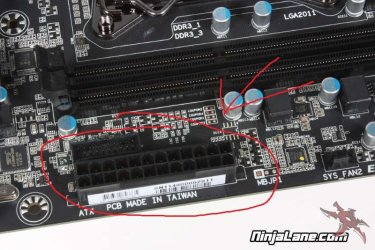
here are some examples of power ports on your motherboard.

ATX power port
 

Attachments

  • atx_power.jpg
    atx_power.jpg
    76.6 KB · Views: 9

My Computer My Computer

Computer type
PC/Desktop
Computer Manufacturer/Model Number
Pandora (computer name)
OS
Windows 7 x64 / Windows Server 2008 / Linux (Redhat & Deb distros) / OS X / More
CPU
AMD FX 8150 Eight-Core Processor 4.23 Ghz OC
Motherboard
ASUS SaberTooth 990FX
Memory
G.SKILL Ripjaws X Series 32GB (4 x 8GB) DDR3 SDRAM 1333
Graphics Card(s)
2X Radeon HD 4870 CrossFire X
Sound Card
Onboard and loving it
Monitor(s) Displays
2x HP w2480 Wide LCD
Screen Resolution
1920x1200 each
Hard Drives
RAID (6x0 Seagate Barracuda 7200 rpm 32 MB cache 500Gb SATA)
PSU
Antec 850 Watt
Case
Antec 900
Cooling
Lots of fans
Keyboard
Logitech
Mouse
Rat 9
Internet Speed
40 Mbps Down 5 Mbps Up
Antivirus
AVG
Browser
Chrome, Firefox, IE
Other Info
My main desktop
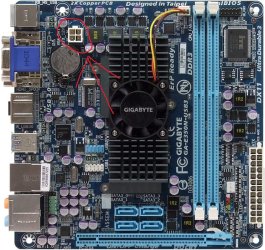
4 pin
 

Attachments

  • gigabyte_e350n-usb3_top.jpg
    gigabyte_e350n-usb3_top.jpg
    193.1 KB · Views: 5

My Computer My Computer

Computer type
PC/Desktop
Computer Manufacturer/Model Number
Pandora (computer name)
OS
Windows 7 x64 / Windows Server 2008 / Linux (Redhat & Deb distros) / OS X / More
CPU
AMD FX 8150 Eight-Core Processor 4.23 Ghz OC
Motherboard
ASUS SaberTooth 990FX
Memory
G.SKILL Ripjaws X Series 32GB (4 x 8GB) DDR3 SDRAM 1333
Graphics Card(s)
2X Radeon HD 4870 CrossFire X
Sound Card
Onboard and loving it
Monitor(s) Displays
2x HP w2480 Wide LCD
Screen Resolution
1920x1200 each
Hard Drives
RAID (6x0 Seagate Barracuda 7200 rpm 32 MB cache 500Gb SATA)
PSU
Antec 850 Watt
Case
Antec 900
Cooling
Lots of fans
Keyboard
Logitech
Mouse
Rat 9
Internet Speed
40 Mbps Down 5 Mbps Up
Antivirus
AVG
Browser
Chrome, Firefox, IE
Other Info
My main desktop
6 pin
 

Attachments

  • cpu_power_plug.jpg
    cpu_power_plug.jpg
    70.8 KB · Views: 5

My Computer My Computer

Computer type
PC/Desktop
Computer Manufacturer/Model Number
Pandora (computer name)
OS
Windows 7 x64 / Windows Server 2008 / Linux (Redhat & Deb distros) / OS X / More
CPU
AMD FX 8150 Eight-Core Processor 4.23 Ghz OC
Motherboard
ASUS SaberTooth 990FX
Memory
G.SKILL Ripjaws X Series 32GB (4 x 8GB) DDR3 SDRAM 1333
Graphics Card(s)
2X Radeon HD 4870 CrossFire X
Sound Card
Onboard and loving it
Monitor(s) Displays
2x HP w2480 Wide LCD
Screen Resolution
1920x1200 each
Hard Drives
RAID (6x0 Seagate Barracuda 7200 rpm 32 MB cache 500Gb SATA)
PSU
Antec 850 Watt
Case
Antec 900
Cooling
Lots of fans
Keyboard
Logitech
Mouse
Rat 9
Internet Speed
40 Mbps Down 5 Mbps Up
Antivirus
AVG
Browser
Chrome, Firefox, IE
Other Info
My main desktop
If you have made no changes to the PC, did not move the machine, or drop it it is more likely to be a piece of hardware that blinked out. The power supply is the obvious one, but Maya is a graphics intensive program and it is also likely that the graphics card faulted.

It is difficult to diagnose bad parts without replacements, so at some point you need to consider bringing it to a shop where they have everything to switch out without you having to buy components willy-nilly.

The following is a standard diagnostic we do on new builds that do not boot. The purpose is to isolate the offending part. You should try this to see if you can determine what part is defective before considering outside professional help.

*****
New System Failure Diagnostic

Basic diagnostic procedure is to uninstall the entire build and start over. Some people do this out of the case by placing the motherboard on an anti-static surface. This eliminates the possibility that there is a short circuit between the motherboard and the case through the connection posts (stand-offs). A standoff in the wrong location or a sloppy job will cause a short.

The Test (power off, power cord unplugged):

  • Disconnect everything externally connected except the mouse and keyboard (printers, USB devices, etc). If you are not using a wired mouse and keyboard see if you can borrow one. The wireless device is just another component you have to deal with.
  • Disconnect the power and data cables from all the drives inside the computer (Hard drives, DVD/CD drives, etc).
  • Remove all the cards installed in the expansion slots (PCI/PCI-e) including the video card. (Be careful handling them and place them on a non conductive surface while testing).
  • Remove all the RAM sticks (same rules as above).
Now connect the power cord and turn the PC on.

  • The motherboard should start beeping. You should get a beep code that tells you there is no memory. This is good, it means the processor is functioning and the motherboard is good so far.
  • Now add one stick of memory in Slot A1 and power on. More beeping: "no video card" beep code. This is good.
  • Then add the video card and connect it to the monitor. You should get no beeping and you should see the BIOS start screens, ending with the message that there is no boot device.
  • If you get no video then switch the one memory stick installed for another one and test.
  • If you do get video then start adding components back, one at a time, until the system fails to boot. The last component you added is then the problem component.
 

My Computer My Computer

Computer type
PC/Desktop
Computer Manufacturer/Model Number
Home Built - Jan 2013
OS
Windows 7 64 Bit Home Premium SP1
CPU
i7-3820
Motherboard
Asus P9X79-PRO - Bios 4608
Memory
GSkill F3-14900CL9Q - 16GB
Graphics Card(s)
EVGA GeForce GTX660 - Driver 352.86
Sound Card
On board Realtek ALC898
Monitor(s) Displays
Acer S271HL
Screen Resolution
1920 x 1080
Hard Drives
#1- Samsung 840 Pro Series
#2- Western Digital WD1002FAEX Sata3 Black
#3- Western Digital WD1002FAEX Sata3 Black
PSU
Corsair CMPSU-850TX-V2 - 850 watt (by Seasonic)
Case
Corsair Obsidian 550D
Cooling
Standard 3 120mm case fans, Cooler Master Hyper 212 EVO
Keyboard
MS KC-0405
Mouse
Intellimouse 5-button
Internet Speed
56 Mbits/Sec (on a good day)
Antivirus
Avast & Malwarebytes
Browser
Firefox
Other Info
Asus DVD - DRW-24B1ST 24X
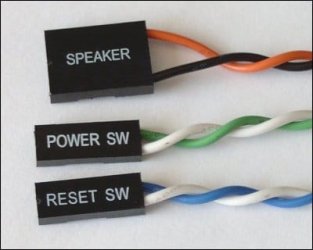
also make sure these are not coming loose. they are for your case power button, reset switch, and system speaker and are usually located at the bottom of the board
 

Attachments

  • power.jpg
    power.jpg
    14.7 KB · Views: 3

My Computer My Computer

Computer type
PC/Desktop
Computer Manufacturer/Model Number
Pandora (computer name)
OS
Windows 7 x64 / Windows Server 2008 / Linux (Redhat & Deb distros) / OS X / More
CPU
AMD FX 8150 Eight-Core Processor 4.23 Ghz OC
Motherboard
ASUS SaberTooth 990FX
Memory
G.SKILL Ripjaws X Series 32GB (4 x 8GB) DDR3 SDRAM 1333
Graphics Card(s)
2X Radeon HD 4870 CrossFire X
Sound Card
Onboard and loving it
Monitor(s) Displays
2x HP w2480 Wide LCD
Screen Resolution
1920x1200 each
Hard Drives
RAID (6x0 Seagate Barracuda 7200 rpm 32 MB cache 500Gb SATA)
PSU
Antec 850 Watt
Case
Antec 900
Cooling
Lots of fans
Keyboard
Logitech
Mouse
Rat 9
Internet Speed
40 Mbps Down 5 Mbps Up
Antivirus
AVG
Browser
Chrome, Firefox, IE
Other Info
My main desktop
make sure the red switch at the back of the power supply is at the right setting as well. in the us it would be 115v and in Europe it would be 230v. although it is unlikely it switched itself as you need a tool to move it. just a thought
 

My Computer My Computer

Computer type
PC/Desktop
Computer Manufacturer/Model Number
Pandora (computer name)
OS
Windows 7 x64 / Windows Server 2008 / Linux (Redhat & Deb distros) / OS X / More
CPU
AMD FX 8150 Eight-Core Processor 4.23 Ghz OC
Motherboard
ASUS SaberTooth 990FX
Memory
G.SKILL Ripjaws X Series 32GB (4 x 8GB) DDR3 SDRAM 1333
Graphics Card(s)
2X Radeon HD 4870 CrossFire X
Sound Card
Onboard and loving it
Monitor(s) Displays
2x HP w2480 Wide LCD
Screen Resolution
1920x1200 each
Hard Drives
RAID (6x0 Seagate Barracuda 7200 rpm 32 MB cache 500Gb SATA)
PSU
Antec 850 Watt
Case
Antec 900
Cooling
Lots of fans
Keyboard
Logitech
Mouse
Rat 9
Internet Speed
40 Mbps Down 5 Mbps Up
Antivirus
AVG
Browser
Chrome, Firefox, IE
Other Info
My main desktop
Is the fan still not working?
It sounds like the CPU fan bearings are gunked up. See if you can free it up by spinning it back and forth using some canned air.

Cautions-
- case unplugged from wall
- hold onto metal of case while working inside of it
- don't spin fan too fast/long - may cause damage
- don't use vacuum cleaner or air compressor as the may cause damage to system

Good luck!
 

My Computer My Computer

Computer Manufacturer/Model Number
Home built (x64), Lenovo x61s Tablet, Samsung Netbook
OS
Win7 x64 + x86
CPU
Intel i7 920, other Intel chips, and the Atom in the netbook
Motherboard
Asus P6T Deluxe
Memory
12 gB; 4 gB Lenovo; 1 gB Samsung netbook
Graphics Card(s)
ATI 4870
Sound Card
Yes, I have one of these
Monitor(s) Displays
32" Sharp Aquos TV
Screen Resolution
800x600 - I have vision issues
Hard Drives
4 - 150 gB Velociraptors in RAID 5
Promise controller
PSU
1000 watt (can't recall the brand)
Case
Antec 300
Cooling
Big honking cooler that was rated highly at Toms Hardware
Keyboard
Microsoft Natural
Mouse
Logitech Trackman
Internet Speed
Cable
Other Info
GeekSquad UPS
CyberPower UPS
DLink DNS-323 NAS (2 tB)
Netgear wireless router as an access point
Netgear wired router FSV-318
Home network consists of
4 desktop computers (2 Vista, 2 Win7)
1 netbook (Win7)
4 laptop computers (XP, 2-Vista, Win7)
Wii and XBox 360
Is the fan still not working?
It sound like the CPU fan bearings are gunked up. See if you can free it up by spinning it back and fort using some canned air.

Cautions-
- case unplugged from wall
- hold onto metal of case while working inside of it
- don't spin fan too fast/long - may cause damage
- don't use vacuum cleaner or air compressor as the may cause damage to system

Good luck!

If the fan is not working and other ones are you should also check the power plug for that fan and make sure no wiring is caught up in it.
 

My Computer My Computer

Computer type
PC/Desktop
Computer Manufacturer/Model Number
Pandora (computer name)
OS
Windows 7 x64 / Windows Server 2008 / Linux (Redhat & Deb distros) / OS X / More
CPU
AMD FX 8150 Eight-Core Processor 4.23 Ghz OC
Motherboard
ASUS SaberTooth 990FX
Memory
G.SKILL Ripjaws X Series 32GB (4 x 8GB) DDR3 SDRAM 1333
Graphics Card(s)
2X Radeon HD 4870 CrossFire X
Sound Card
Onboard and loving it
Monitor(s) Displays
2x HP w2480 Wide LCD
Screen Resolution
1920x1200 each
Hard Drives
RAID (6x0 Seagate Barracuda 7200 rpm 32 MB cache 500Gb SATA)
PSU
Antec 850 Watt
Case
Antec 900
Cooling
Lots of fans
Keyboard
Logitech
Mouse
Rat 9
Internet Speed
40 Mbps Down 5 Mbps Up
Antivirus
AVG
Browser
Chrome, Firefox, IE
Other Info
My main desktop
thanx guys
all the fans are working
I think i found that 6pin cord.it's connected.it's on the upper right corner of the heatsink..it's getting late.i couldnt find a cmos battery.ill look for it tomorrow.but i reseated the battery.no result..
I guess got to do the diagnostic test.ill post the results.thank u very much
 

My Computer My Computer

OS
Windows 7
CPU
Intel Core2 Quad 2.66
Memory
4GB
Graphics Card(s)
GTX 560Ti
Monitor(s) Displays
HPL2208w
Case
Gigabyte Sumo
good luck
 

My Computer My Computer

Computer type
PC/Desktop
Computer Manufacturer/Model Number
Pandora (computer name)
OS
Windows 7 x64 / Windows Server 2008 / Linux (Redhat & Deb distros) / OS X / More
CPU
AMD FX 8150 Eight-Core Processor 4.23 Ghz OC
Motherboard
ASUS SaberTooth 990FX
Memory
G.SKILL Ripjaws X Series 32GB (4 x 8GB) DDR3 SDRAM 1333
Graphics Card(s)
2X Radeon HD 4870 CrossFire X
Sound Card
Onboard and loving it
Monitor(s) Displays
2x HP w2480 Wide LCD
Screen Resolution
1920x1200 each
Hard Drives
RAID (6x0 Seagate Barracuda 7200 rpm 32 MB cache 500Gb SATA)
PSU
Antec 850 Watt
Case
Antec 900
Cooling
Lots of fans
Keyboard
Logitech
Mouse
Rat 9
Internet Speed
40 Mbps Down 5 Mbps Up
Antivirus
AVG
Browser
Chrome, Firefox, IE
Other Info
My main desktop
Back
Top