Skogtrollet
New member
Hello, this is my first post on these forums.
Okay, so when I got home today my computer was still on from yesterday. It was working fine, but when I played some Team Fortress 2 I noticed that the performance wasn't all there. So I decided to restart it because that usually fixes everything, and I thought it might be ''tired'' from running for a long time.
Here comes the weird part:
Or, one of the weird parts I guess.
Anyway, when it started from the reboot I couldn't see the accounts, so I couldn't log in. The only thing visible on the screen was the windows 7 background. So I'm like wtf. I tried restarting it again, but then the starting screen got black and it got stuck on some white text. Plus a spinning /. So I found my Windows 7 CD and put it in. Then I got two choices after pressing install, repair and install. So I tried repair, and it asked me if I wanted to upgrade the computer(or fix it) and keep all my files and everything, so I thought yeah. But it didn't work, can't remember why. I'm sorry that I don't know everything it said. Anyway, I decide to just reinstall Windows and I do, deleting all of my shit. Oh well.
ANYWAY, it works now. I made a new account and all that, but when I got in the resolution was off. Here is the first current problem.
The resolution is stuck at 640 x 480. I can't choose any other resolution, but I could once. But I clicked the wrong one and declined when I got asked if I wanted to keep that resolution. It won't give me another chance. I'm trying to intall drivers, but I can't click the buttons because they're out of the screen because of the resolution. This is so frustrating.
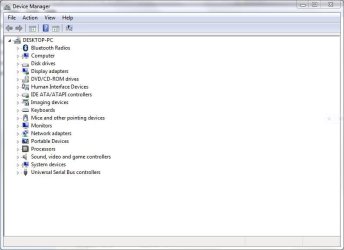
My other problem is that I can't connect to internet either. So I can't download drivers on the internet. My computer tells me I need to install a driver for the internet. ****.
SO, does anyone have any kind of idea what I can do to fix the resolution without internet? There's a lot of buttons that would be helpful, but I can't click them all because they don't fit in the screen.
My computer is relatively new, had it in maybe 6 months or something, and it's supposed to be pretty good.
I copy pasted my order when I bought the computer:
1.00 620824 Komplett Gamer i30
1.00 628842 Ahead Nero 10 Essentials OEM
Støtter LabelFlash og LightScribe
1.00 497731 CyberLink DVD Suite 7, 6Channel, OEM CD
for XP/Vista/Windows 7
1.00 200504 Støtsikker PC-eske
1.00 605781 SteelSeries QcK, Musematte i Tøy
Professional Cloth Mousepad (med Komplett logo)
1.00 461645 Cooler Master HAF 922 Midi Tower Sort
Vifter: 1x 200mm Front, 1x 200mm Topp, 1x 120mm Ba
1.00 601824 Silver Power SP-SS620M 620W PSU
ATX 12V V2.2, 80 Plus Bronze, Modular, 2× 6pin PCI
1.00 635741 Intel® Core? i5-2310 Processor
Socket-LGA1155, Quad Core, 2.9Ghz, 6MB, 95W, Boxed
1.00 626996 MSI P67A-GD65 B3, Socket-1155
ATX, P67, DDR3, 2xPCIe(2.0)x16, SLI/CFX, SATA 6Gb/
1.00 618010 Corsair Vengeance? DDR3 1600MHz 8GB CL9
Kit w/2x 4GB XMS3 modules, CL9-9-9-24, 1.5V, Venge
1.00 639513 XFX Radeon HD 6950 2GB GDDR5 "Dual Fan"
PCI-Express 2.1, 2xDVI, HDMI, 2xmini-DisplayPort,
1.00 630518 Corsair SSD Force Series? F60A, 60GB
SATA2, 2,5", 285MB/275MB/s read/write, incl 2,5" t
1.00 575736 OEM SSD 2.5" to 3.5" Bracket SATA
SSD 2.5" to 3.5" (Bracket and screws)
1.00 627518 Seagate Barracuda® 7200.12 1TB
SATA 6Gb/s (SATA 3.0), 32MB Cache, 7200RPM, 3,5"
1.00 605827 Sony Optiarc DVD±RW Burner, AD-7260S
SATA, DVD±R: 24x, DVD+RW: 8x, DVD-R: 6x, DVD-RAM:
1.00 423287 Razer Arctosa Silver Keyboard
USB, Nordic layout
1.00 616075 Razer Goliathus Alpha mouse pad - Speed
Control - (444mm X 355mm X 4.3mm) Speed fragged ed
1.00 340930 Steelseries 5H v2 Headset
Gaming headset med mikrofon
1.00 497593 MS COA Label Windows Home Premium 7
Nordic, 32/64 bit
1.00 497666 MS DVD Win H.P/Pro/Ultimate 7 NO 64bit
Komplett
1.00 497635 MS ROYALTY Win Home Premium 7 Nordic
32/64 bit
I really hope somebody can help me <3 And if not, thanks for reading anyway.
Okay, so when I got home today my computer was still on from yesterday. It was working fine, but when I played some Team Fortress 2 I noticed that the performance wasn't all there. So I decided to restart it because that usually fixes everything, and I thought it might be ''tired'' from running for a long time.
Here comes the weird part:
Or, one of the weird parts I guess.
Anyway, when it started from the reboot I couldn't see the accounts, so I couldn't log in. The only thing visible on the screen was the windows 7 background. So I'm like wtf. I tried restarting it again, but then the starting screen got black and it got stuck on some white text. Plus a spinning /. So I found my Windows 7 CD and put it in. Then I got two choices after pressing install, repair and install. So I tried repair, and it asked me if I wanted to upgrade the computer(or fix it) and keep all my files and everything, so I thought yeah. But it didn't work, can't remember why. I'm sorry that I don't know everything it said. Anyway, I decide to just reinstall Windows and I do, deleting all of my shit. Oh well.
ANYWAY, it works now. I made a new account and all that, but when I got in the resolution was off. Here is the first current problem.
The resolution is stuck at 640 x 480. I can't choose any other resolution, but I could once. But I clicked the wrong one and declined when I got asked if I wanted to keep that resolution. It won't give me another chance. I'm trying to intall drivers, but I can't click the buttons because they're out of the screen because of the resolution. This is so frustrating.
My other problem is that I can't connect to internet either. So I can't download drivers on the internet. My computer tells me I need to install a driver for the internet. ****.
SO, does anyone have any kind of idea what I can do to fix the resolution without internet? There's a lot of buttons that would be helpful, but I can't click them all because they don't fit in the screen.
My computer is relatively new, had it in maybe 6 months or something, and it's supposed to be pretty good.
I copy pasted my order when I bought the computer:
1.00 620824 Komplett Gamer i30
1.00 628842 Ahead Nero 10 Essentials OEM
Støtter LabelFlash og LightScribe
1.00 497731 CyberLink DVD Suite 7, 6Channel, OEM CD
for XP/Vista/Windows 7
1.00 200504 Støtsikker PC-eske
1.00 605781 SteelSeries QcK, Musematte i Tøy
Professional Cloth Mousepad (med Komplett logo)
1.00 461645 Cooler Master HAF 922 Midi Tower Sort
Vifter: 1x 200mm Front, 1x 200mm Topp, 1x 120mm Ba
1.00 601824 Silver Power SP-SS620M 620W PSU
ATX 12V V2.2, 80 Plus Bronze, Modular, 2× 6pin PCI
1.00 635741 Intel® Core? i5-2310 Processor
Socket-LGA1155, Quad Core, 2.9Ghz, 6MB, 95W, Boxed
1.00 626996 MSI P67A-GD65 B3, Socket-1155
ATX, P67, DDR3, 2xPCIe(2.0)x16, SLI/CFX, SATA 6Gb/
1.00 618010 Corsair Vengeance? DDR3 1600MHz 8GB CL9
Kit w/2x 4GB XMS3 modules, CL9-9-9-24, 1.5V, Venge
1.00 639513 XFX Radeon HD 6950 2GB GDDR5 "Dual Fan"
PCI-Express 2.1, 2xDVI, HDMI, 2xmini-DisplayPort,
1.00 630518 Corsair SSD Force Series? F60A, 60GB
SATA2, 2,5", 285MB/275MB/s read/write, incl 2,5" t
1.00 575736 OEM SSD 2.5" to 3.5" Bracket SATA
SSD 2.5" to 3.5" (Bracket and screws)
1.00 627518 Seagate Barracuda® 7200.12 1TB
SATA 6Gb/s (SATA 3.0), 32MB Cache, 7200RPM, 3,5"
1.00 605827 Sony Optiarc DVD±RW Burner, AD-7260S
SATA, DVD±R: 24x, DVD+RW: 8x, DVD-R: 6x, DVD-RAM:
1.00 423287 Razer Arctosa Silver Keyboard
USB, Nordic layout
1.00 616075 Razer Goliathus Alpha mouse pad - Speed
Control - (444mm X 355mm X 4.3mm) Speed fragged ed
1.00 340930 Steelseries 5H v2 Headset
Gaming headset med mikrofon
1.00 497593 MS COA Label Windows Home Premium 7
Nordic, 32/64 bit
1.00 497666 MS DVD Win H.P/Pro/Ultimate 7 NO 64bit
Komplett
1.00 497635 MS ROYALTY Win Home Premium 7 Nordic
32/64 bit
I really hope somebody can help me
<3 And if not, thanks for reading anyway.My Computer
At a glance
Windows 7 Home Premium 64bit
- OS
- Windows 7 Home Premium 64bit