
Solved Laptop Disk Drive Not Writing disks

inkyvoyd

New member
Local time
4:07 PM
Messages
11
Hi,
Recently I tried to burn an .iso with my disk drive and a DVD rw with a third party program (Astroburn). It would always begin burning, and say "operation failed" after 20 seconds or so. Each read/write speed would fail, as well. I tried to use the windows disk burner, but that did not solve the problem. The error I got was that the disk had read-write speeds incompatible with my drive.

However, I know that is impossible, because when I first got my laptop, I used the 5 disks from the exact same package to create my system recovery disks. I was also able to (around 6 months to 1 year go) create a Fedora boot disk a while back; again, with the same disks.

Other notes: I have no idea if I can write to other disks, because I don't have any other brands of DVDr's lying around in my house. I can definitely read any disk - I can read the exact same disk, but I can't write to those disks. I suspect the information I am giving about my hardware is incomplete, but I am unsure as to what I need to say about it. Please tell me.

Any help would be greatly appreciated.

EDIT: I am using "Slimtype BD E DS4E1S"

FINAL EDIT: I took it back to my manufacturer (ASUS) and they switched out the drive for another. Turns out it was just faulty. Thanks for helping.
 
Last edited:

My Computer My Computer

At a glance

Win 7 Home Premium x64Intel Core i7-740QM8GB DDR3Nvidia GeForce GTX 460M
Computer Manufacturer/Model Number
ASUS (G73JW)
OS
Win 7 Home Premium x64
CPU
Intel Core i7-740QM
Memory
8GB DDR3
Graphics Card(s)
Nvidia GeForce GTX 460M
Screen Resolution
1080*1920
Hard Drives
2X 500GB (Not sure the model)
PSU
Laptop;150.15W, 19.5V, 7.7A(100-240V, 50-60 Hz, 2A AC input)
Case
N/A
Cooling
N/A
Keyboard
Illuminated Chiclet Keyboard (Part of laptop)
Internet Speed
50 megabit per second
Anyone have any ideas of what is wrong? If it is hardware, I could replace it, although I do believe that my warranty might be invalid. I can't seem to find this problem using google; I found a lot of related issues with my same model, but no one seems to be having my issue. In addition, I downloaded and ran the Microsoft auto-fix for disk drives - reading/writing disk players as well as dvd/blue ray disk drives. Neither detected any sort of problem with my disk drive.

In addition, a disk I could not burn worked perfectly fine on another computer. I'm completely sure it is my computer and not the disk.
Thanks.
 

My Computer My Computer

At a glance

Win 7 Home Premium x64Intel Core i7-740QM8GB DDR3Nvidia GeForce GTX 460M
Computer Manufacturer/Model Number
ASUS (G73JW)
OS
Win 7 Home Premium x64
CPU
Intel Core i7-740QM
Memory
8GB DDR3
Graphics Card(s)
Nvidia GeForce GTX 460M
Screen Resolution
1080*1920
Hard Drives
2X 500GB (Not sure the model)
PSU
Laptop;150.15W, 19.5V, 7.7A(100-240V, 50-60 Hz, 2A AC input)
Case
N/A
Cooling
N/A
Keyboard
Illuminated Chiclet Keyboard (Part of laptop)
Internet Speed
50 megabit per second
There are only three things that you can do.

1. Clean the lense with a lense Cleaner CD.

2. Check that you have the latest firmware. (The firmware listed for PLDS DS-4E1S in the ASUS site is PLDS DS-4E1S ODD Firmware_EA2B dated Dec 2009. So I presume that you will have it already. 0
ASUSTeK Computer Inc. -Support- Drivers and Download Optical Disk Drive Firmware

You can check the firmware version of your ODD with VSO Inspector.
VSO Inspector: free CD, DVD and Blu-ray scanning reporting tool for testing your medias and burners

3. Sometimes connections that are impaired can also cause problems. If you can get into your laptop confidently, just undo and redo the connections.

If none of this helps, replace the drive. Blu-ray Super Multi Combo Drive (DS-4E1S) ( Well, you can look for some other good drive if you have to replace. I have no idea as to which one is best at this point of time. Google is your friend.)
 

My Computer My Computer

At a glance

Windows 7 Home Premium 32 bit
OS
Windows 7 Home Premium 32 bit
There are only three things that you can do.

1. Clean the lense with a lense Cleaner CD.

2. Check that you have the latest firmware. (The firmware listed for PLDS DS-4E1S in the ASUS site is PLDS DS-4E1S ODD Firmware_EA2B dated Dec 2009. So I presume that you will have it already. 0
ASUSTeK Computer Inc. -Support- Drivers and Download Optical Disk Drive Firmware

You can check the firmware version of your ODD with VSO Inspector.
VSO Inspector: free CD, DVD and Blu-ray scanning reporting tool for testing your medias and burners

3. Sometimes connections that are impaired can also cause problems. If you can get into your laptop confidently, just undo and redo the connections.

If none of this helps, replace the drive. Blu-ray Super Multi Combo Drive (DS-4E1S) ( Well, you can look for some other good drive if you have to replace. I have no idea as to which one is best at this point of time. Google is your friend.)
I have confirmed that I have the latest firmware, and installed VSO. I was wondering if I could uninstall my drive and reinstall it - I was sort of scared that I might do something irreparable to my drive, so I haven't done that yet...
EDIT: I just tried to write to a CD - it worked. I am at a public location and unable to test if the problem is fixed, but it might be (although I doubt it).
 

My Computer My Computer

At a glance

Win 7 Home Premium x64Intel Core i7-740QM8GB DDR3Nvidia GeForce GTX 460M
Computer Manufacturer/Model Number
ASUS (G73JW)
OS
Win 7 Home Premium x64
CPU
Intel Core i7-740QM
Memory
8GB DDR3
Graphics Card(s)
Nvidia GeForce GTX 460M
Screen Resolution
1080*1920
Hard Drives
2X 500GB (Not sure the model)
PSU
Laptop;150.15W, 19.5V, 7.7A(100-240V, 50-60 Hz, 2A AC input)
Case
N/A
Cooling
N/A
Keyboard
Illuminated Chiclet Keyboard (Part of laptop)
Internet Speed
50 megabit per second
This Driver Fixed It For Me

While I understand your problem is resolved, I'm still gonna post this for others to see for their quest in finding a solution. I'll also make a new thread. I jst ran into this issue myself today & I've been going crazy trying to find the issue. After a lot of googling, I found out the Slimtype BD E DS4E1S driver is actually made by Lite-On. It appears the drives may just need a firmware flash update. The Lite-On site appeared to be doing some sort of maintenance but, Lite-On DS-4E1S Firmware Downloads - Firmware HQ has the driver. Just download. extract & install the .exe file. I think the DOS file has the same result but, just a different method ;) My BD drive is ow properly reading discs. Give it a try folks.
P.S. in case you guys find the link is dead, inbox me & I'll try to get it to you. And please inbox me your results, I don't wanna thread jack this guy.
 

My Computer My Computer

At a glance

Windows 7 Home Premium 64 Bit2.53 GHz4 GBNvidia Geforce GT 555M Cuda 2GB
Computer Manufacturer/Model Number
Acer Aspire 5742G-7200
OS
Windows 7 Home Premium 64 Bit
CPU
2.53 GHz
Memory
4 GB
Graphics Card(s)
Nvidia Geforce GT 555M Cuda 2GB
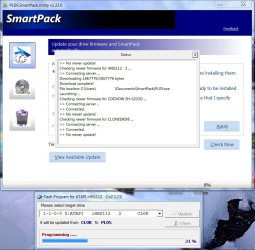
For Liteon ODDs, there is a SmartPack Utility which can check for firmware updates automatically, download and install it.

The utility can be downloaded here Download System

PLDS SmartPack.jpg

For Samsung ODDs too, there is a live update program.

ODD SUPPORT
 

My Computer My Computer

At a glance

Windows 7 Home Premium 32 bit
OS
Windows 7 Home Premium 32 bit
For Liteon ODDs, there is a SmartPack Utility which can check for firmware updates automatically, download and install it.

The utility can be downloaded here Download System

View attachment 221138

For Samsung ODDs too, there is a live update program.

ODD SUPPORT

Hey thanks man. I ran the SmartPack utility & found no updates so, I'm guessing that's because the firmware I found was correct. If you would be so kind as to post your findings here:

http://www.sevenforums.com/hardware-devices/240008-potential-slimtype-bd-e-ds4e1s-driver-fix.html#post2002736

Potential Slimtype BD E DS4E1S Driver Fix

that would be awesome. As always, Rep+. Thanks again.
 

My Computer My Computer

At a glance

Windows 7 Home Premium 64 Bit2.53 GHz4 GBNvidia Geforce GT 555M Cuda 2GB
Computer Manufacturer/Model Number
Acer Aspire 5742G-7200
OS
Windows 7 Home Premium 64 Bit
CPU
2.53 GHz
Memory
4 GB
Graphics Card(s)
Nvidia Geforce GT 555M Cuda 2GB
And yep Harvey Dent, I forgot to mention that these will apply only for the retail ODDs sold by the ODD manufacturers. The firmware for the OEM ODDs are and have to be provided by the computer manufacturers and are not provided by the ODD manufacturers.

And it is a pain since most OEMs (computer manufacturers) fail to provide updated firmware.

I wanted to edit my previous post adding this note. Thanks for your keen followup I have to hurry up and put this now instead of tomorrow as planned. :)
 

My Computer My Computer

At a glance

Windows 7 Home Premium 32 bit
OS
Windows 7 Home Premium 32 bit
Check the specs of the dvd burner(max write speeds) and set the settings to the burning software to match
 

My Computer My Computer

At a glance

Windows 7 Home Premium 64bitAMD Athlon II Dual-Core M300 2.0 GHz2X 2GB DDR2 667MHzIntegrated ATI Mobility Radeon HD 4200-1919MB...
Computer Manufacturer/Model Number
Gateway NV5378u Laptop
OS
Windows 7 Home Premium 64bit
CPU
AMD Athlon II Dual-Core M300 2.0 GHz
Motherboard
AMD M880G
Memory
2X 2GB DDR2 667MHz
Graphics Card(s)
Integrated ATI Mobility Radeon HD 4200-1919MB of HyperMemory
Sound Card
ATI HD Audio / Conexant HD Audio
Monitor(s) Displays
15.6" 16:9 aspect ratio, Ultrabright™ LED-backlight
Screen Resolution
1366 x 768
Hard Drives
500GB Hitachi HTS545050B9A300 SATA
PSU
Laptop
Case
Laptop
Cooling
Laptop
Keyboard
Laptop
Mouse
Laptop/External
Check the specs of the dvd burner(max write speeds) and set the settings to the burning software to match
Although my problem is already solved, I will still clarify. I am completely sure that my DVD burner was not working, because based off a VSO check, and using the default Windows burner (which should work), it failed. In addition, all speeds would not work. At least one speed would work before, so I know that it is not a software problem and is a hardware problem.
 

My Computer My Computer

At a glance

Win 7 Home Premium x64Intel Core i7-740QM8GB DDR3Nvidia GeForce GTX 460M
Computer Manufacturer/Model Number
ASUS (G73JW)
OS
Win 7 Home Premium x64
CPU
Intel Core i7-740QM
Memory
8GB DDR3
Graphics Card(s)
Nvidia GeForce GTX 460M
Screen Resolution
1080*1920
Hard Drives
2X 500GB (Not sure the model)
PSU
Laptop;150.15W, 19.5V, 7.7A(100-240V, 50-60 Hz, 2A AC input)
Case
N/A
Cooling
N/A
Keyboard
Illuminated Chiclet Keyboard (Part of laptop)
Internet Speed
50 megabit per second
And yep Harvey Dent, I forgot to mention that these will apply only for the retail ODDs sold by the ODD manufacturers. The firmware for the OEM ODDs are and have to be provided by the computer manufacturers and are not provided by the ODD manufacturers.

And it is a pain since most OEMs (computer manufacturers) fail to provide updated firmware.

I wanted to edit my previous post adding this note. Thanks for your keen followup I have to hurry up and put this now instead of tomorrow as planned. :)

Damn that sucks. Thanks for the info. I think I'm gonna start buying retail ODDs from now on lol. Because Acer Updater sure as hell didn't tell me about such an update.
 

My Computer My Computer

At a glance

Windows 7 Home Premium 64 Bit2.53 GHz4 GBNvidia Geforce GT 555M Cuda 2GB
Computer Manufacturer/Model Number
Acer Aspire 5742G-7200
OS
Windows 7 Home Premium 64 Bit
CPU
2.53 GHz
Memory
4 GB
Graphics Card(s)
Nvidia Geforce GT 555M Cuda 2GB
Back
Top