So i just reformatted and had to do some things to where i have 2 disk drives now under computer.
Local Disk (c: ) and New volume (J: )
Now the reason why I have 2 is because after I reformatted something went wrong to where my what should be 1T C drive only has 100G so i did some changes to where not i have another drive J thats has 900G on it but now C drive still have program files (x86) on it and stuff and whenever i want to download something it wants to put it on my C drive not J so how do i make it to where all my files and downloads go directly to my J drive?
My Computer
At a glance
windows 7 x64Intel(R) Core(TM) i7 930 @ 2.80GHz 2.80 GHzATI Radeon HD 5700 Series
but now C drive still have program files (x86) on it and stuff and whenever i want to download something it wants to put it on my C drive not J so how do i make it to where all my files and downloads go directly to my J drive?
but now C drive still have program files (x86) on it and stuff and whenever i want to download something it wants to put it on my C drive not J so how do i make it to where all my files and downloads go directly to my J drive?
Well my browser just puts everything into my downloads folder which im fine with it when i run the .exe' when they want me to choose where i want the program to be installed it automatically puts in on C drive i have to click browse and change it to my J drive.
My Computer
At a glance
windows 7 x64Intel(R) Core(TM) i7 930 @ 2.80GHz 2.80 GHzATI Radeon HD 5700 Series
Well my browser just puts everything into my downloads folder which im fine with it when i run the .exe' when they want me to choose where i want the program to be installed it automatically puts in on C drive i have to click browse and change it to my J drive.
Oh, that's what you meant. This by design in Windows, warfareDigital.
Most installations (run from setup.exe files), point to the C:\ drive by default.
There is a way to change the default location that setup programs will point to when installing programs, but it involves your registry, so proceed with EXTREME caution:-
1) Press Start, type in regedit, and press Enter.
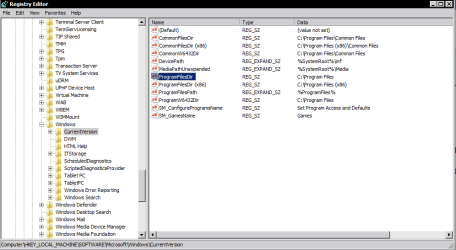
2) Navigate to the following registry key in the Registry Editor:
3) Locate the value named “ProgramFilesDir” and change the default value “C:\Program Files” to your new directory path(address).
(For 32 bit programs installed on a 64 bit Windows 7 OS, change the "ProgramFilesDir (x86)" value instead)
Since you want J:\Programs to be your new destination you would change it J:\Programs like below.
Repeat the procedure again for the entry "ProgramFilesDir (x86)" if you want both 32 bit and 64 bit installers to point to the same destination on your J: partition.
4) Close the registry editor and reboot.
Hope that helps!
My Computer
At a glance
Windows 7 x64 Professional SP1Intel C2D T9550 2.66 GHz @ 2.793 GHz (Thanks ...8 GB DDR3ATI MOBILITY RADEON 4670
The first thing right off when going to reformat your drive you also apparently repartitioned it as well explaining how one single primary became two separate partitions. The options in any browser will allow you to choose where to save each download where you can create a totally separate folder outside of the "C:\users\user account name\downloads\" folder or even anywhere else in the user account sub folders.
If you still have nothing much on the drive at present only just having redone things over the option to nuke the J partition to expand C outward with a regular drive partitioning program while booted live from disk will allow expanding out to full capacity or reserved a certain amount for a second storage partition to be created after the expansion.
For most however that want a large single primary wiping the drive clean and creating the one large primary would be the thing seen to when planning a drive wipe as well as insuring the best results since resizing existing partitions can come wirh risks at times if something goes wrong during the resize. This is also why backing things up first from the drive before proceeding is advised as well.
W7 Ultimate x64/W10 Pro x64/W11 Pro Triple Bo...AMD Phenom II X4 975 Deneb 3.6ghz - 965 2nd r...Kingston Hyper X DDR3 1600 1.5v 16gb - Hyper ...MSI HD Radeon 5750 1gb - MSI HD Radeon 6450 o...
Computer type
PC/Desktop
Computer Manufacturer/Model Number
Custom builds = 2
OS
W7 Ultimate x64/W10 Pro x64/W11 Pro Triple Boot - Main PC W7 Remote PC Micro ATX W7 Pro x64/W11 Pro
CPU
AMD Phenom II X4 975 Deneb 3.6ghz - 965 2nd remote pc
Motherboard
Gigabyte GA-790XTA-UD4-Gigabyte GA-880GM-D2H remote pc
Memory
Kingston Hyper X DDR3 1600 1.5v 16gb - Hyper X Fury 8gb 2nd
Graphics Card(s)
MSI HD Radeon 5750 1gb - MSI HD Radeon 6450 on mini tower
Sound Card
Creative Labs X-Fi Xtreme Audio P - Realtek onooard 2nd case
Monitor(s) Displays
ASUS VW199T-P 19" HP 2082a Main-HP 2082a 20" remote pc
Screen Resolution
Asus 1440x900 - HP 1600x900
Hard Drives
WD Black 1TB HD per OS W7, W10, and pending W11 presently on 500gb OS Drive - Pending Triple 1TB HDs for Spanned Storage/backup volume
Single 2TB external USB enclosure, single 1TB System 7 Host/Boot drive, Pending 8TB external HD for system image b
PSU
Corsair 750TX - primary / Corsair CX600 - second
Case
Antec 900-2 - SSD compatible / NZXT Vulcan mini tower
Repeat the procedure again for the entry "ProgramFilesDir (x86)" if you want both 32 bit and 64 bit installers to point to the same destination on your J: partition.
If it works out you would simply nuke the J partition off of the drive as I was saying before in order to expand the C primary outward to fill the drive in. Or as the last resort clean the drive off entirely to see a brand new single C primary created.
You can't simp[ly combine or merge two partitions except in the case of expanding one into a large space of unallocated raw drive space where nothing is on it. If you look at the unallocated space as a second partition then that would be a merger of two when expanding into it.
But the J volume either needs to be reduced in size and "moved" towards the back of the drive to expand C while present or totally removed from the drive unless you start all over fresh. Moving a good sized partition is time consuming for sure where most would simply nuke it!
W7 Ultimate x64/W10 Pro x64/W11 Pro Triple Bo...AMD Phenom II X4 975 Deneb 3.6ghz - 965 2nd r...Kingston Hyper X DDR3 1600 1.5v 16gb - Hyper ...MSI HD Radeon 5750 1gb - MSI HD Radeon 6450 o...
Computer type
PC/Desktop
Computer Manufacturer/Model Number
Custom builds = 2
OS
W7 Ultimate x64/W10 Pro x64/W11 Pro Triple Boot - Main PC W7 Remote PC Micro ATX W7 Pro x64/W11 Pro
CPU
AMD Phenom II X4 975 Deneb 3.6ghz - 965 2nd remote pc
Motherboard
Gigabyte GA-790XTA-UD4-Gigabyte GA-880GM-D2H remote pc
Memory
Kingston Hyper X DDR3 1600 1.5v 16gb - Hyper X Fury 8gb 2nd
Graphics Card(s)
MSI HD Radeon 5750 1gb - MSI HD Radeon 6450 on mini tower
Sound Card
Creative Labs X-Fi Xtreme Audio P - Realtek onooard 2nd case
Monitor(s) Displays
ASUS VW199T-P 19" HP 2082a Main-HP 2082a 20" remote pc
Screen Resolution
Asus 1440x900 - HP 1600x900
Hard Drives
WD Black 1TB HD per OS W7, W10, and pending W11 presently on 500gb OS Drive - Pending Triple 1TB HDs for Spanned Storage/backup volume
Single 2TB external USB enclosure, single 1TB System 7 Host/Boot drive, Pending 8TB external HD for system image b
PSU
Corsair 750TX - primary / Corsair CX600 - second
Case
Antec 900-2 - SSD compatible / NZXT Vulcan mini tower
Once you get familiar with how to partition and format drives you'll be surprised at how relatively easy it is! After wiping the drive again and going to see 7 put back on you will want to see how to use the drive tools on the 7 dvd for a start at seeing a single OS primary created. http://www.sevenforums.com/tutorials/52291-partition-hard-drive-windows-7-install.html
W7 Ultimate x64/W10 Pro x64/W11 Pro Triple Bo...AMD Phenom II X4 975 Deneb 3.6ghz - 965 2nd r...Kingston Hyper X DDR3 1600 1.5v 16gb - Hyper ...MSI HD Radeon 5750 1gb - MSI HD Radeon 6450 o...
Computer type
PC/Desktop
Computer Manufacturer/Model Number
Custom builds = 2
OS
W7 Ultimate x64/W10 Pro x64/W11 Pro Triple Boot - Main PC W7 Remote PC Micro ATX W7 Pro x64/W11 Pro
CPU
AMD Phenom II X4 975 Deneb 3.6ghz - 965 2nd remote pc
Motherboard
Gigabyte GA-790XTA-UD4-Gigabyte GA-880GM-D2H remote pc
Memory
Kingston Hyper X DDR3 1600 1.5v 16gb - Hyper X Fury 8gb 2nd
Graphics Card(s)
MSI HD Radeon 5750 1gb - MSI HD Radeon 6450 on mini tower
Sound Card
Creative Labs X-Fi Xtreme Audio P - Realtek onooard 2nd case
Monitor(s) Displays
ASUS VW199T-P 19" HP 2082a Main-HP 2082a 20" remote pc
Screen Resolution
Asus 1440x900 - HP 1600x900
Hard Drives
WD Black 1TB HD per OS W7, W10, and pending W11 presently on 500gb OS Drive - Pending Triple 1TB HDs for Spanned Storage/backup volume
Single 2TB external USB enclosure, single 1TB System 7 Host/Boot drive, Pending 8TB external HD for system image b
PSU
Corsair 750TX - primary / Corsair CX600 - second
Case
Antec 900-2 - SSD compatible / NZXT Vulcan mini tower