HP laserjet 5 driver anyone?

Does your computer even have a parallel connector? Most nowadays don't.... And in reality and PCL driver should print....

If his computer didn't have a parallel port, he wouldn't be trying to install this driver.
 

My Computer My Computer

At a glance

Windows 7 Ultimate x64 SP1Core i7-2670QM8GB DDR3 PC3-10600Intel HD Graphics 3000 + GeForce GT 540M
Computer Manufacturer/Model Number
Dell XPS 15 L502x
OS
Windows 7 Ultimate x64 SP1
CPU
Core i7-2670QM
Memory
8GB DDR3 PC3-10600
Graphics Card(s)
Intel HD Graphics 3000 + GeForce GT 540M
Screen Resolution
1920x1080
Hard Drives
1TB 5400RPM Seagate
Yes it has a parallel port card. There is no other way to connect the printer.

FWIW: I have also installed other laserjet printers that no drivers are available as a lj 2000 and they worked,

Well I'd like to get this one running.
 

My Computer My Computer

At a glance

ASUS X79 DELUXE LGA 2011 Intel X79 SATA 6Gb/s...Intel Core i7-4930K Ivy Bridge-E 3.4GHz LGA 2...CORSAIR Dominator Platinum 16GB (4 x 4GB) 240...ASUS EAH6450 Silent/DI/1GD3(LP) Radeon HD 645...
Computer type
PC/Desktop
Computer Manufacturer/Model Number
Home built
OS
ASUS X79 DELUXE LGA 2011 Intel X79 SATA 6Gb/s USB 3.0 ATX
CPU
Intel Core i7-4930K Ivy Bridge-E 3.4GHz LGA 2011 130W 6-Core
Motherboard
ASUS X79 DELUXE LGA 2011 Intel X79 SATA 6Gb/s USB 3.0 ATX
Memory
CORSAIR Dominator Platinum 16GB (4 x 4GB) 240-Pin DDR3 SDRAM
Graphics Card(s)
ASUS EAH6450 Silent/DI/1GD3(LP) Radeon HD 6450 1GB 64-bit DD
Sound Card
onboard
Monitor(s) Displays
Dell lcd 32"
Hard Drives
1tb SATA, 2tb SATA, 500 gig SATA, 500 Gig SATA, 500 Gig IDE
PSU
CORSAIR HX Series HX750 750W ATX12V 2.3 / EPS12V 2.91 SLI Re
Case
something colored black
Cooling
Cooler Master Seidon 120XL
Keyboard
this thing with buttons on it
Mouse
a tailed devil
Internet Speed
whizzing along
Antivirus
KASPERSKY
Browser
Firefox. Opra, Explorer.
Other Info
I am naked and outside your window shouting Non Sequiturs in a loony high pitched voice.
There seems to be a problem with Windows update in the print wizard in some systems.
Go to this thread (page 2) and go down to the post from Gearsawe.
Perform the steps mentioned and the Windows update should work to get you the drivers.

Windows was unable to get a list of devices from Windows Update. Try - Microsoft Answers

From Gearsawe

"What I did to get the update to work once and what I have to do every time to add another printer using Window Update.

1. Open Task Manager (Ctrl-Alt-Del)
2. Click Sevices Tab and then Services Button (Bottom Right)
3. Under Name find "Windows Update"
4. Right click "Windows Update" and select Stop. do not close
5. Open Window Exploper and browse to C:\Windows
6. Delete the Folder "SoftwareDistribution"
7. Go back to Servies, Right click "Windows Update" and select Start

Now the "Windows Update" button should work. For me I have to do this every time I install a printer which requires me to use windows update"
 

My Computer My Computer

At a glance

Windows 10 Pro x64, Windows 8.1 Pro x64, Wind...INTEL i9-7920X LGA 206664 GB (4 X 16 GB) G-Skill V Series DDR4 3200 ...EVGA GTX 1060 SC 3 GB
Computer type
PC/Desktop
Computer Manufacturer/Model Number
Custom Built
OS
Windows 10 Pro x64, Windows 8.1 Pro x64, Windows 7 Ultimate x64 SP1,
CPU
INTEL i9-7920X LGA 2066
Motherboard
Gigabyte X299-WU8 F3
Memory
64 GB (4 X 16 GB) G-Skill V Series DDR4 3200 Quad Channel
Graphics Card(s)
EVGA GTX 1060 SC 3 GB
Sound Card
Realtek Onboard ALC1220
Monitor(s) Displays
2 x Samsung S27E310
Screen Resolution
1920x1080
Hard Drives
Samsung 2 x 970 EVO Plus 500 GB NVMe
1 x 6TB WD 6003FZBX SATA
1 x 6TB WD 60EFRX SATA
12 x 3TB WD 30EFRX SATA
PSU
Seasonic X-1050
Case
Thermaltake Armor+
Cooling
Corsair H80i V2 Liquid AOI Cooler
Keyboard
Logitech G510s
Mouse
Logitech MX Master 2S
Internet Speed
200 Mb/s
Antivirus
ESET NOD32 13.1
Browser
EDGE (Dev, Canary, Beta), Chrome
Other Info
ASUS RT-AC68U router
Malwarebytes 4.0.4
Before you do that, make sure the print queue is cleared.

1. Turn off printer
2. In search, type: services.msc. Scroll down to Print Spooler and Stop it.
3. Navigate to Windows\System32\Spool\Printers\ and delete all contents.
4. Reboot
 

My Computer My Computer

At a glance

W7 Home Premium 32bit
Computer Manufacturer/Model Number
8 home-builds from the 80's into 2004
OS
W7 Home Premium 32bit
FWIW: I have also installed other laserjet printers that no drivers are available as a lj 2000 and they worked, especially when connected via the parallel port.

Rich

I don't have a Lenovo option in my Add Printer selection window No LJ 2000 or LJ a anything
 

My Computer My Computer

At a glance

ASUS X79 DELUXE LGA 2011 Intel X79 SATA 6Gb/s...Intel Core i7-4930K Ivy Bridge-E 3.4GHz LGA 2...CORSAIR Dominator Platinum 16GB (4 x 4GB) 240...ASUS EAH6450 Silent/DI/1GD3(LP) Radeon HD 645...
Computer type
PC/Desktop
Computer Manufacturer/Model Number
Home built
OS
ASUS X79 DELUXE LGA 2011 Intel X79 SATA 6Gb/s USB 3.0 ATX
CPU
Intel Core i7-4930K Ivy Bridge-E 3.4GHz LGA 2011 130W 6-Core
Motherboard
ASUS X79 DELUXE LGA 2011 Intel X79 SATA 6Gb/s USB 3.0 ATX
Memory
CORSAIR Dominator Platinum 16GB (4 x 4GB) 240-Pin DDR3 SDRAM
Graphics Card(s)
ASUS EAH6450 Silent/DI/1GD3(LP) Radeon HD 6450 1GB 64-bit DD
Sound Card
onboard
Monitor(s) Displays
Dell lcd 32"
Hard Drives
1tb SATA, 2tb SATA, 500 gig SATA, 500 Gig SATA, 500 Gig IDE
PSU
CORSAIR HX Series HX750 750W ATX12V 2.3 / EPS12V 2.91 SLI Re
Case
something colored black
Cooling
Cooler Master Seidon 120XL
Keyboard
this thing with buttons on it
Mouse
a tailed devil
Internet Speed
whizzing along
Antivirus
KASPERSKY
Browser
Firefox. Opra, Explorer.
Other Info
I am naked and outside your window shouting Non Sequiturs in a loony high pitched voice.
Before you do that, make sure the print queue is cleared.

1. Turn off printer
2. In search, type: services.msc. Scroll down to Print Spooler and Stop it.
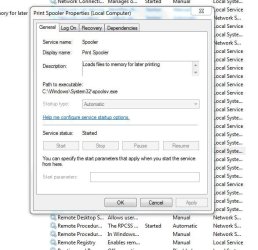
How do I stop it? When I double click it to get the properties dialog box in the part of the dialog box where Start and Stop are it is grayed out and unresponsive.
print spooler-01.JPG


I'm guessing the next step won't help until I stop it - - or is it stopped already and that's why it's gray?
3. Navigate to Windows\System32\Spool\Printers\ and delete all contents.
4. Reboot
 

My Computer My Computer

At a glance

ASUS X79 DELUXE LGA 2011 Intel X79 SATA 6Gb/s...Intel Core i7-4930K Ivy Bridge-E 3.4GHz LGA 2...CORSAIR Dominator Platinum 16GB (4 x 4GB) 240...ASUS EAH6450 Silent/DI/1GD3(LP) Radeon HD 645...
Computer type
PC/Desktop
Computer Manufacturer/Model Number
Home built
OS
ASUS X79 DELUXE LGA 2011 Intel X79 SATA 6Gb/s USB 3.0 ATX
CPU
Intel Core i7-4930K Ivy Bridge-E 3.4GHz LGA 2011 130W 6-Core
Motherboard
ASUS X79 DELUXE LGA 2011 Intel X79 SATA 6Gb/s USB 3.0 ATX
Memory
CORSAIR Dominator Platinum 16GB (4 x 4GB) 240-Pin DDR3 SDRAM
Graphics Card(s)
ASUS EAH6450 Silent/DI/1GD3(LP) Radeon HD 6450 1GB 64-bit DD
Sound Card
onboard
Monitor(s) Displays
Dell lcd 32"
Hard Drives
1tb SATA, 2tb SATA, 500 gig SATA, 500 Gig SATA, 500 Gig IDE
PSU
CORSAIR HX Series HX750 750W ATX12V 2.3 / EPS12V 2.91 SLI Re
Case
something colored black
Cooling
Cooler Master Seidon 120XL
Keyboard
this thing with buttons on it
Mouse
a tailed devil
Internet Speed
whizzing along
Antivirus
KASPERSKY
Browser
Firefox. Opra, Explorer.
Other Info
I am naked and outside your window shouting Non Sequiturs in a loony high pitched voice.
There seems to be a problem with Windows update in the print wizard in some systems.

6. Delete the Folder "SoftwareDistribution"

No can do. I get an error message telling me the the folder or a file in is being used by another program.
When I try to do it using CMD I get "Access Denied"
 

My Computer My Computer

At a glance

ASUS X79 DELUXE LGA 2011 Intel X79 SATA 6Gb/s...Intel Core i7-4930K Ivy Bridge-E 3.4GHz LGA 2...CORSAIR Dominator Platinum 16GB (4 x 4GB) 240...ASUS EAH6450 Silent/DI/1GD3(LP) Radeon HD 645...
Computer type
PC/Desktop
Computer Manufacturer/Model Number
Home built
OS
ASUS X79 DELUXE LGA 2011 Intel X79 SATA 6Gb/s USB 3.0 ATX
CPU
Intel Core i7-4930K Ivy Bridge-E 3.4GHz LGA 2011 130W 6-Core
Motherboard
ASUS X79 DELUXE LGA 2011 Intel X79 SATA 6Gb/s USB 3.0 ATX
Memory
CORSAIR Dominator Platinum 16GB (4 x 4GB) 240-Pin DDR3 SDRAM
Graphics Card(s)
ASUS EAH6450 Silent/DI/1GD3(LP) Radeon HD 6450 1GB 64-bit DD
Sound Card
onboard
Monitor(s) Displays
Dell lcd 32"
Hard Drives
1tb SATA, 2tb SATA, 500 gig SATA, 500 Gig SATA, 500 Gig IDE
PSU
CORSAIR HX Series HX750 750W ATX12V 2.3 / EPS12V 2.91 SLI Re
Case
something colored black
Cooling
Cooler Master Seidon 120XL
Keyboard
this thing with buttons on it
Mouse
a tailed devil
Internet Speed
whizzing along
Antivirus
KASPERSKY
Browser
Firefox. Opra, Explorer.
Other Info
I am naked and outside your window shouting Non Sequiturs in a loony high pitched voice.
hp laserjet 5m for Windows 7-driver need

I have searched every forum including windows and hp and I think I just may be out of luck and there is nothing out there. hp has posters that just post the directions on if you see your printer, which I don't.

Secondly, there is an option that says do a Windows Update and when I get to that point nothing "Windows Update" doesn't appear.

Gearsawe posted a solution to that, but it didn't work for me or another poster.

I don't want to buy a new printer as this works on my MacBook Pro, but the lenovo is a work computer and I work remote and I definitely do not want to head into the office to print or keep sending my file to my mac and then print.

What's odd is that my only lenovo 400 died and it worked on that computer, but when the new data was transferred to a my T410 is when it stopped working. Any help?!!!!!
 

My Computer My Computer

At a glance

Windows 7 64a lot
Computer type
PC/Desktop
Computer Manufacturer/Model Number
lenovo
OS
Windows 7 64
Memory
a lot
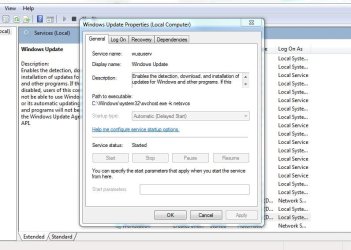
I can't stop either print spooler or windows update.
when I open the dialog window to either the option for STOP grayed out and unresponsive
windows update.JPG
 

My Computer My Computer

At a glance

ASUS X79 DELUXE LGA 2011 Intel X79 SATA 6Gb/s...Intel Core i7-4930K Ivy Bridge-E 3.4GHz LGA 2...CORSAIR Dominator Platinum 16GB (4 x 4GB) 240...ASUS EAH6450 Silent/DI/1GD3(LP) Radeon HD 645...
Computer type
PC/Desktop
Computer Manufacturer/Model Number
Home built
OS
ASUS X79 DELUXE LGA 2011 Intel X79 SATA 6Gb/s USB 3.0 ATX
CPU
Intel Core i7-4930K Ivy Bridge-E 3.4GHz LGA 2011 130W 6-Core
Motherboard
ASUS X79 DELUXE LGA 2011 Intel X79 SATA 6Gb/s USB 3.0 ATX
Memory
CORSAIR Dominator Platinum 16GB (4 x 4GB) 240-Pin DDR3 SDRAM
Graphics Card(s)
ASUS EAH6450 Silent/DI/1GD3(LP) Radeon HD 6450 1GB 64-bit DD
Sound Card
onboard
Monitor(s) Displays
Dell lcd 32"
Hard Drives
1tb SATA, 2tb SATA, 500 gig SATA, 500 Gig SATA, 500 Gig IDE
PSU
CORSAIR HX Series HX750 750W ATX12V 2.3 / EPS12V 2.91 SLI Re
Case
something colored black
Cooling
Cooler Master Seidon 120XL
Keyboard
this thing with buttons on it
Mouse
a tailed devil
Internet Speed
whizzing along
Antivirus
KASPERSKY
Browser
Firefox. Opra, Explorer.
Other Info
I am naked and outside your window shouting Non Sequiturs in a loony high pitched voice.
They are going to have to use a helicopter to shoot me out of the bell tower

This whole thing is making me craZZZZy

If I'm lucky it'll be a head shot.

I've read and tried the solution

1. Open Task Manager (Ctrl-Alt-Del)
2. Click Sevices Tab and then Services Button (Bottom Right)
3. Under Name find "Windows Update"
4. Right click "Windows Update" and select Stop. do not close
5. Open Window Exploper and browse to C:\Windows
6. Delete the Folder "SoftwareDistribution"
7. Go back to Servies, Right click "Windows Update" and select Start
It doesn't work because I am unable to use the STOP option on "Windows Update" in the Services and I can neither rename nor delete the C:/windows/Software Distribution directory thanks to an error message telling me that some application is using that file. I can't do it using CMD either.


I wonder if there's a Geek Shop that can do this?

Edit:

While typing that I though of another approach and googled stop windows update. I found an alternate way to stop the updater.

Go to START

type in UPDATE

select Windows Update then

use the dialog box to turn update off

then RESTART

then open computer to C:/windows and rename or delete the “SoftwareDistribution” directory

then RESTART

then re open and turn on Windows Update

then RESTART
And install the printer using Update to find the printer.


It went through it's internet update finished let me install the printer and then ~ ~ ~ ~ ~ ~ ~ ~


Wait for it
~ ~ ~ ~ ~ ~ ~ ~ ~

NOTHING~!!!
The very first time I tried to print a page the damn yellow triangle popped up in the printer's dialog box and the whole damn thing failed - AGAIN~!!!

Where is that Bell tower?

 
Last edited:

My Computer My Computer

At a glance

ASUS X79 DELUXE LGA 2011 Intel X79 SATA 6Gb/s...Intel Core i7-4930K Ivy Bridge-E 3.4GHz LGA 2...CORSAIR Dominator Platinum 16GB (4 x 4GB) 240...ASUS EAH6450 Silent/DI/1GD3(LP) Radeon HD 645...
Computer type
PC/Desktop
Computer Manufacturer/Model Number
Home built
OS
ASUS X79 DELUXE LGA 2011 Intel X79 SATA 6Gb/s USB 3.0 ATX
CPU
Intel Core i7-4930K Ivy Bridge-E 3.4GHz LGA 2011 130W 6-Core
Motherboard
ASUS X79 DELUXE LGA 2011 Intel X79 SATA 6Gb/s USB 3.0 ATX
Memory
CORSAIR Dominator Platinum 16GB (4 x 4GB) 240-Pin DDR3 SDRAM
Graphics Card(s)
ASUS EAH6450 Silent/DI/1GD3(LP) Radeon HD 6450 1GB 64-bit DD
Sound Card
onboard
Monitor(s) Displays
Dell lcd 32"
Hard Drives
1tb SATA, 2tb SATA, 500 gig SATA, 500 Gig SATA, 500 Gig IDE
PSU
CORSAIR HX Series HX750 750W ATX12V 2.3 / EPS12V 2.91 SLI Re
Case
something colored black
Cooling
Cooler Master Seidon 120XL
Keyboard
this thing with buttons on it
Mouse
a tailed devil
Internet Speed
whizzing along
Antivirus
KASPERSKY
Browser
Firefox. Opra, Explorer.
Other Info
I am naked and outside your window shouting Non Sequiturs in a loony high pitched voice.
1. Open Task Manager (Ctrl-Alt-Del)
2. Click Services Tab and then Services Button (Bottom Right)
3. Under Name find "Background Intelligent Transfer Service"
4. Right click "Stop" and select Stop. Do not close.
5. Open Window Explorer and browse to C:\Windows
6. Delete the Folder "SoftwareDistribution"
7. Go back to Services, Right click "Background Intelligent Transfer Service" and select Star
 

My Computer My Computer

At a glance

Windows 7 Home Premium 64bitIntel Core i3-32408GB DDR3 SDRAMEVGA GeForce GT 620
Computer type
PC/Desktop
Computer Manufacturer/Model Number
Dell Inspiron 660
OS
Windows 7 Home Premium 64bit
CPU
Intel Core i3-3240
Motherboard
Dell 084J0R
Memory
8GB DDR3 SDRAM
Graphics Card(s)
EVGA GeForce GT 620
Sound Card
Intel Panther Point PCH High Definition Audio
Monitor(s) Displays
Acer G205HV
Screen Resolution
1600 x 900
Hard Drives
Sandisk SSD 64GB SDSSDP064G
Seagate HDD 1TB ST1000DM003-1CH162
PSU
Dell 300W
Case
Dell Inspiron
Keyboard
Logitech Wireless K320/B350
Mouse
Microsoft
Internet Speed
25Mbps/4Mbps
Antivirus
Avast
Browser
Mozilla Firefox
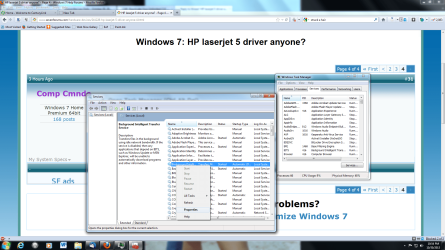
Can't select it, can't highlight it.
What other approach is there to accomplish this?
See pic
Can't select it.png
 

My Computer My Computer

At a glance

ASUS X79 DELUXE LGA 2011 Intel X79 SATA 6Gb/s...Intel Core i7-4930K Ivy Bridge-E 3.4GHz LGA 2...CORSAIR Dominator Platinum 16GB (4 x 4GB) 240...ASUS EAH6450 Silent/DI/1GD3(LP) Radeon HD 645...
Computer type
PC/Desktop
Computer Manufacturer/Model Number
Home built
OS
ASUS X79 DELUXE LGA 2011 Intel X79 SATA 6Gb/s USB 3.0 ATX
CPU
Intel Core i7-4930K Ivy Bridge-E 3.4GHz LGA 2011 130W 6-Core
Motherboard
ASUS X79 DELUXE LGA 2011 Intel X79 SATA 6Gb/s USB 3.0 ATX
Memory
CORSAIR Dominator Platinum 16GB (4 x 4GB) 240-Pin DDR3 SDRAM
Graphics Card(s)
ASUS EAH6450 Silent/DI/1GD3(LP) Radeon HD 6450 1GB 64-bit DD
Sound Card
onboard
Monitor(s) Displays
Dell lcd 32"
Hard Drives
1tb SATA, 2tb SATA, 500 gig SATA, 500 Gig SATA, 500 Gig IDE
PSU
CORSAIR HX Series HX750 750W ATX12V 2.3 / EPS12V 2.91 SLI Re
Case
something colored black
Cooling
Cooler Master Seidon 120XL
Keyboard
this thing with buttons on it
Mouse
a tailed devil
Internet Speed
whizzing along
Antivirus
KASPERSKY
Browser
Firefox. Opra, Explorer.
Other Info
I am naked and outside your window shouting Non Sequiturs in a loony high pitched voice.
While you are on the Services Tab in Task Manager, scroll until you find the listing for BITS.
Right click on it; is the option to "Stop Service" clickable or grayed out?

If it is grayed out from there you have a corrupted registry key.

go through the list of services and make sure all of the following are set to Automatic or Manual:
Remote Procedure Call (RPC), System Event Notification, Windows Management Instrumentation Driver Extensions, COM+ Event System, DCOM Server Process Launcher

Try to start these services (of not started yet). All start fine?

Start REGEDIT and browse to HKEY_LOCAL_MACHINE\SYSTEM\CurrentControlSet\Services\BITS\Parameters
What do you see on the right side of screen?

See Post #3: http://www.sevenforums.com/windows-...m-cannot-find-file-specified.html#post2071560
Is yours like Kaktussoft's?

It may work to merge his reg file of that key found as an attachment at the bottom of Post #5.
This file is x64, do you have the windows 7 x64 OS version? You have your motherboard listed where your OS should be in your system specs.

If you do go ahead and merge, please make a restore point, and a backup of your registry before you do.
 
Last edited:

My Computer My Computer

At a glance

Originally Win 7 Hm Prem x64 Ver 6.1.7600 Bui...Intel i3 530 2.93GHz, 2933MHz 2 Cores 4 Logic...6GB of 1,333MHz DDR3 SDRAM32MB Intel Graphics Media Accelerator HD IGChip
Computer type
PC/Desktop
Computer Manufacturer/Model Number
Gateway DX4831-01e (Mid-Tower Desktop)
OS
Originally Win 7 Hm Prem x64 Ver 6.1.7600 Build 7601-SP1 | Upgraded to Windows 10 December 14, 2019
CPU
Intel i3 530 2.93GHz, 2933MHz 2 Cores 4 Logical Processors
Motherboard
Gateway H57M01 133 megahertz
Memory
6GB of 1,333MHz DDR3 SDRAM
Graphics Card(s)
32MB Intel Graphics Media Accelerator HD IGChip
Sound Card
Realtek High Definition Audio
Monitor(s) Displays
Gateway HX2000 20inch TFT active matrix TN
Screen Resolution
1600 x 900 x 59 hertz
Hard Drives
WDC WD10EADS-00M2B0 [HDD] (1000.20 GB) -- drive 0,
HL-DT-ST DVDRAM GH41N [CD-ROM dr]
Four card readers, and Four USB 2.0
PSU
300watts.
Case
Mid-Tower Desktop
Cooling
Stock from Gateway
Keyboard
Natural Ergonomic Keyboard 4000, see Other Info
Mouse
Orig. Gateway wore out now using Insignia USB wired optical
Internet Speed
Vz FIOS 10ms png 57.64Mbps down 65.53Mbps up Speedtest.org
Antivirus
Zamana Anti-logger with Anti-malware, MSE, Windows Firewall,
Browser
IE11.0.9600.19399-Upd ver11.0.135, Firefox 68.0.1 x64
Other Info
System Specs by Belarc.

BIOS: American Megatrends Inc. P01-A0 11/17/2009

Replaced the MS 'Natural' Standard PS/2 Enhanced 101-102 Keyboard with a new Natural Ergonomic Keyboard 4000 on August 1st 2014.

Canon Pixma MG3222 Printer.

Updated to IE11 on 12102015 | Fios Quantum Router g1100

Additional AV: SpywareBlaster, manual Mbam, SAS
My BITS got mangled last week on WinXP machine, took me a couple days to figure out why MSE wouldn't auto or manual update.
Am using ERUNT ([SIZE=+1]Emergency Recovery Utility NT)[/SIZE]to backup registry every day.
Download Erunt - MajorGeeks


Other thread asked:
Have you had malware problems recently?
I check for malware frequently, using both Malwarebytes and superantispyware.. I haven't specifically noticed any problem until now.

Same answer for me.
 

My Computer My Computer

At a glance

Windows 7 Home Premium 64bitIntel Core i3-32408GB DDR3 SDRAMEVGA GeForce GT 620
Computer type
PC/Desktop
Computer Manufacturer/Model Number
Dell Inspiron 660
OS
Windows 7 Home Premium 64bit
CPU
Intel Core i3-3240
Motherboard
Dell 084J0R
Memory
8GB DDR3 SDRAM
Graphics Card(s)
EVGA GeForce GT 620
Sound Card
Intel Panther Point PCH High Definition Audio
Monitor(s) Displays
Acer G205HV
Screen Resolution
1600 x 900
Hard Drives
Sandisk SSD 64GB SDSSDP064G
Seagate HDD 1TB ST1000DM003-1CH162
PSU
Dell 300W
Case
Dell Inspiron
Keyboard
Logitech Wireless K320/B350
Mouse
Microsoft
Internet Speed
25Mbps/4Mbps
Antivirus
Avast
Browser
Mozilla Firefox
Back
Top