
0xc00000f

0080900

New member
Member
Local time
11:28 PM
Messages
53
Windows wasn't genuine so I used MBR Regenerator to kick it back to 30 day trial to re-activate.

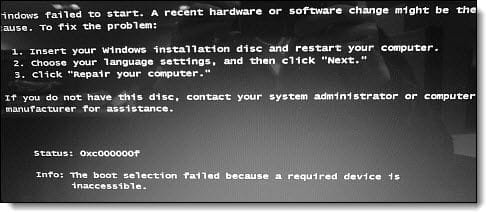
But when it rebooted, I got the same message like in the pic.

Is there any way to fix/repair this?

We installed Windows 7 Ultimate x64 via a usb stick.
 

Attachments
  • error-code-0xc000000f.jpg
    error-code-0xc000000f.jpg
    19.1 KB · Views: 177

My Computer

Computer Manufacturer/Model Number
Compaq Presario CQ60 Notebook PC
OS
Windows 7 Ultimate
CPU
Processor AMD Athlon Dual-Core QL-62, 2000 Mhz, 2 Core(s), 2
Motherboard
Wistron 303C (Socket A)
Memory
2.0GB DDR2
Graphics Card(s)
NVIDIA GeForce 8200M G
Sound Card
Conexant High Definition SmartAudio 221
Screen Resolution
1366 x 768
Hard Drives
232GB SAMSUNG HM251JI ATA Device
Keyboard
tandard PS/2 Keyboard
Mouse
Synaptics PS/2 Port TouchPad
Windows wasn't genuine so I used MBR Regenerator to kick it back to 30 day trial to re-activate.

But when it rebooted, I got the same message like in the pic.

Is there any way to fix/repair this?

We installed Windows 7 Ultimate x64 via a usb stick.

The purpose of this forum is not to assist people in violating any software license agreement; at least, that's my position.

If, however, you have a legitimate copy, which doesn't appear to be the case, contact MS customer support for assistance.

HTH
 

My Computer

Computer type
PC/Desktop
Computer Manufacturer/Model Number
Custom Built
OS
Windows 7 Professional x64
CPU
Intel i5 quad processor
Motherboard
DP67BG
Memory
16 GB
Graphics Card(s)
Radeon HD 5770
Sound Card
Realtek High Definition Audio
Monitor(s) Displays
Samsung SyncMaster
Screen Resolution
1920X1080
Hard Drives
WD 2TB (SATA Internal)
WD 1TB (USB External)
PSU
Corsair GS800
Case
Tower (Generic)
Cooling
3 Internal Fans
Keyboard
MS Wireless
Mouse
MS Optical Wired
Internet Speed
54 mbps
Antivirus
Emsisoft
Browser
IE-Version 9, Palemoon-Version 24.2.0
Windows wasn't genuine so I used MBR Regenerator to kick it back to 30 day trial to re-activate.

But when it rebooted, I got the same message like in the pic.

Is there any way to fix/repair this?

We installed Windows 7 Ultimate x64 via a usb stick.

Shortened form of forum rule #4:
4) No discussion of piracy or anything illegal is allowed at all.

You will receive no help here.
 

My Computer

Computer Manufacturer/Model Number
Toshiba Satellite S875D-S7239 laptop
OS
MS Windows 7 Ultimate SP1 64-bit
CPU
AMD A10-4600M
Motherboard
AMD Pumori (Socket FT1)
Memory
6.00 GB Dual-Channel DDR3 @ 798MHz (11-11-12-28)
Graphics Card(s)
AMD Radeon HD 7660G
Sound Card
High Definition Audio Device
Monitor(s) Displays
Generic PnP Monitor (1600x900@60Hz)
Screen Resolution
1600x900@60Hz
Hard Drives
SSD 119GB Corsair CSSD-V128GB2 ATA Device
Keyboard
Standard PS/2 Keyboard
Mouse
HP Wireless Optical Mobile Mouse Model FHA-3410
Internet Speed
What the local pub, local coffee shop offers.
Other Info
Optical Drive:MATSHITA BD-CMB UJ160B ATA Device


Also have an Asus ha1002xp netbook with Win 7 Ultimate installed.
In the event you thought it was genuine, or were planning to make it genuine (legally), you'll likely need to repair the OS buy booting the USB stick and running through the repair options.

However, any type of "hack" could easily damage a system and do something other than what was intended.
 

My Computer

OS
Windows 7 Ultimate x64 SP1
CPU
Intel Core i7-2600
Motherboard
Gigabyte GA-P67A-UD3P-B3
Memory
12 GB Patriot Extreme DDR3-1333
Graphics Card(s)
Nvidia GTX 470
Monitor(s) Displays
Dell UltraSharp 2209WA
Hard Drives
OCZ Agility3 240 GB, WD5001AALS, WD7501AALS
PSU
OCZ ModStream 700W
Case
CoolerMaster HAF 912 Advanced
Cooling
CoolerMaster Hyper 212 Plus
Back
Top