Solved Where do wires from case connect to on my motherboard?

exitPr0gram

New member
Power User
VIP
Local time
6:01 PM
Messages
213
Hi,

I am putting a water coolant system in to my computer and i had to go ahead and upgrade the case as well to make room for the Corsair H100.

My problem is that, like an idiot, I wasn't paying attention to a specific group of wires that i disconnected when removing my old motherboard and now i do not know where the cables for my new case connect to on the motherboard. The cluster of cabling i disconnected was coming from the case itself (the old case)

The cables for my case, which is a Phantom 410, that i am having a problem with are labeled as follows:

H.D.D LED
POWER SW (Pwr switch, i'm sure?)
RESET SW
+P LED and -P LED (each of these are only a 1 pin cable)
HD Audio

The place where i think it goes is labeled like this:

+MSG- +PW- +SPEAK-

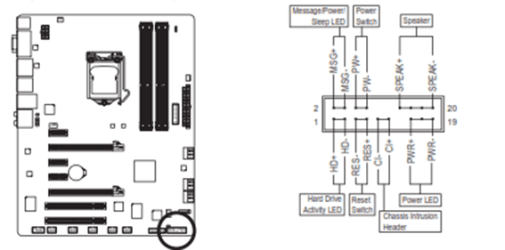
+HD- -RES+ -CI+ +PWR LED-


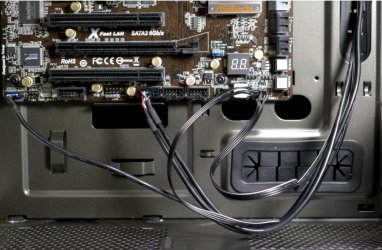
To give u an idea of what i did so far I put the negative cable of the Reset SW where it goes on the -RES+ then put the + where positive goes. I did this until i got stumped no knowing where to put the -P LED and +P LED cables. As well as which spot to put the HD Audio cable at. And i think the "-CI+" is irrelevant because i have no cable that fits in the spot. At least none of the cables from the case.

There are other cables as well but i think those are just fans and i can figure them out... if they're suppose to connect a certain way, then a heads up would be grateful.

As far as the HD Audio cable from the case goes, there is a connection labeled as "F AUDIO" on the motherboard and the pin count is correct and it fits but i seem to have to force it a little and i don't remember anything being there when i unplugged the old cases cabling. BUT it also fits over where i was connecting the cables mentioned above. Even after connecting all the ones i mentioned (whether they be right or wrong) there was still enough room to connect the cable labeled HD Audio but the spot where it fits is labeled +speak- +PWR LED- instead of F AUDIO. Which one do i connect the HD Audio to? The "+speak-" makes me think "Speaker" ... isnt this the cable that provides beep codes, etc? Anyway...

For the most part it seems like almost all the cables from the case plug in to the same little area on my motherboard, except the fan cables which i'm sure plug in to the power supply itself, correct me if i'm wrong. There is ONE connection on my motherboard that sais "SYS Fan 1" but i'm not sure which fan goes there.

I am pretty sure that i've got it most of the connections right but i don't have the manual and can't seem to find the proper documentation. Obviously, i'd rather not guess about this. The manual from the website doesn't help much.

i cannot take pictures because the wording on the PCB are too small for my camera to pickup clearly. Sorry. i really hope someone can help with this. I'm stuck using a super weak laptop and i miss my monster machine! Thank in advance.

Here is the motherboard and case that i am using:
CASE: Phantom 410 USB3.0
Motherboard: Gigabyte GA-Z68X-UD3H-B3
(Website

Other non-relevant info:
i7-2600k
2x4GB DDR3 RippJaw RAM
120GB SSD
3TB Internal
560Ti 1GB Graphics.
 

My Computer My Computer

At a glance

Windows 7 Professional Version 6.1 Build 7601...Q66004GB TotalGeForce 9500GT =(
Computer type
PC/Desktop
Computer Manufacturer/Model Number
Dell Inspiron 530
OS
Windows 7 Professional Version 6.1 Build 7601 SP1
CPU
Q6600
Motherboard
IDK
Memory
4GB Total
Graphics Card(s)
GeForce 9500GT =(
Sound Card
Onboard
Monitor(s) Displays
Smaller than what i want
Screen Resolution
Not up to par
Hard Drives
Not an SSD
PSU
350 Watt or W/E this model comes with
Case
Dell Inspiron 530
Cooling
Factory
Keyboard
Logitech G510
Mouse
Logitech G500
Internet Speed
Eh, its okay.
Browser
Aviator.
Other Info
I want my old computer back.
here is the link to the manual for my motherboard....

Here is the link to the manual for my case

Sorry for the long explanation but i didn't know how to simplify it haha.

Reading that manual i am 99 percent sure i got everything hooked up right. Negative to negative, etc.

BUT....

I have 2 cables and i dont know where they go. The first is +P LED which has a connector for 1 pin only. And then i have its friend, -P LED... There is a spot that sais LED- on the board, so thats a given. But where do i put the positive (+P LED) cable? On the pin above or to the left of where i put the negative?

Thanks again.
 

My Computer My Computer

At a glance

Windows 7 Professional Version 6.1 Build 7601...Q66004GB TotalGeForce 9500GT =(
Computer type
PC/Desktop
Computer Manufacturer/Model Number
Dell Inspiron 530
OS
Windows 7 Professional Version 6.1 Build 7601 SP1
CPU
Q6600
Motherboard
IDK
Memory
4GB Total
Graphics Card(s)
GeForce 9500GT =(
Sound Card
Onboard
Monitor(s) Displays
Smaller than what i want
Screen Resolution
Not up to par
Hard Drives
Not an SSD
PSU
350 Watt or W/E this model comes with
Case
Dell Inspiron 530
Cooling
Factory
Keyboard
Logitech G510
Mouse
Logitech G500
Internet Speed
Eh, its okay.
Browser
Aviator.
Other Info
I want my old computer back.
I am going to go to bed but I will lead you to the right path
http://download.gigabyte.us/FileList/Manual/mb_manual_ga-z68x-ud3h-b3_e.pdf
Page 20 and foward talk about connectors, more specifically you want to know about FRONT PANEL CONNECTORS.

Not all of them have to be used, i have a lot of LED type of connecters unused. PW/RESET/AUDIO/USB/ are the main ones, that should be plug in.
 

My Computer My Computer

At a glance

Windows 8 64 bit PROAMD Phenom X4 9100e2GB X2 DDR2Sapphire HD 6850
Computer type
PC/Desktop
Computer Manufacturer/Model Number
Gateway / Slight Modifications
OS
Windows 8 64 bit PRO
CPU
AMD Phenom X4 9100e
Motherboard
Gateway RS780
Memory
2GB X2 DDR2
Graphics Card(s)
Sapphire HD 6850
Sound Card
Integrated
Monitor(s) Displays
Gateway 19" + Dell 19"
Screen Resolution
1440X900 sometimes 2880 by 900
Hard Drives
WD 80GB
WD 640GB
WD 1,000GB
PSU
Antec BP 550watts
Case
Antec 300
Cooling
Stock Cooling
Keyboard
Saitek Eclipse II
Mouse
Gigabyte GM-M6800
Internet Speed
D: 30Mbps U:4Mbps
Antivirus
Avast version 8
Browser
Internet Explorer ver 10 64 bit
Other Info
This is my work computer.
I have another laptop running Windows 7 64 bit.
Another PC running Windows 8 64 bit pro.
Total of 3
I am going to go to bed but I will lead you to the right path
http://download.gigabyte.us/FileList/Manual/mb_manual_ga-z68x-ud3h-b3_e.pdf
Page 20 and foward talk about connectors, more specifically you want to know about FRONT PANEL CONNECTORS.

Not all of them have to be used, i have a lot of LED type of connecters unused. PW/RESET/AUDIO/USB/ are the main ones, that should be plug in.

Yea i found the manual and that most definately confirmed i was doing it right. But i still don't know where the two + and - P LED cables go. Doesn't say and there are lots of pins but only 2 to cables left.
 

My Computer My Computer

At a glance

Windows 7 Professional Version 6.1 Build 7601...Q66004GB TotalGeForce 9500GT =(
Computer type
PC/Desktop
Computer Manufacturer/Model Number
Dell Inspiron 530
OS
Windows 7 Professional Version 6.1 Build 7601 SP1
CPU
Q6600
Motherboard
IDK
Memory
4GB Total
Graphics Card(s)
GeForce 9500GT =(
Sound Card
Onboard
Monitor(s) Displays
Smaller than what i want
Screen Resolution
Not up to par
Hard Drives
Not an SSD
PSU
350 Watt or W/E this model comes with
Case
Dell Inspiron 530
Cooling
Factory
Keyboard
Logitech G510
Mouse
Logitech G500
Internet Speed
Eh, its okay.
Browser
Aviator.
Other Info
I want my old computer back.
Your fast to reply, so let me get this straight you have P LED cables on your case but you dont know where they go on your motherboard? Page 28 of manual anyways they go in PWR + and PWR -.
Power switch on the other hand go to PW+ and PW-.

Please let me know if your confused, my grammar structure can be really bad sometimes.
 

My Computer My Computer

At a glance

Windows 8 64 bit PROAMD Phenom X4 9100e2GB X2 DDR2Sapphire HD 6850
Computer type
PC/Desktop
Computer Manufacturer/Model Number
Gateway / Slight Modifications
OS
Windows 8 64 bit PRO
CPU
AMD Phenom X4 9100e
Motherboard
Gateway RS780
Memory
2GB X2 DDR2
Graphics Card(s)
Sapphire HD 6850
Sound Card
Integrated
Monitor(s) Displays
Gateway 19" + Dell 19"
Screen Resolution
1440X900 sometimes 2880 by 900
Hard Drives
WD 80GB
WD 640GB
WD 1,000GB
PSU
Antec BP 550watts
Case
Antec 300
Cooling
Stock Cooling
Keyboard
Saitek Eclipse II
Mouse
Gigabyte GM-M6800
Internet Speed
D: 30Mbps U:4Mbps
Antivirus
Avast version 8
Browser
Internet Explorer ver 10 64 bit
Other Info
This is my work computer.
I have another laptop running Windows 7 64 bit.
Another PC running Windows 8 64 bit pro.
Total of 3
Your fast to reply, so let me get this straight you have P LED cables on your case but you dont know where they go on your motherboard? Page 28 of manual anyways they go in PWR + and PWR -.
Power switch on the other hand go to PW+ and PW-.

Please let me know if your confused, my grammar structure can be really bad sometimes.

Yea i'm quick to reply i'm still looking at the case with a stupid look on my face and my laptop besides me with the forums up hitting F5 to refresh haha....

But okay...

I have 3 pins on the bottom right hand corner of the area for the Front connections. Two of those pins seem to be labeled "+PWR". The pin to the right of that sais "LED-" ... Which of the three pins to i plug my -P LED and +P LED cables?
 

My Computer My Computer

At a glance

Windows 7 Professional Version 6.1 Build 7601...Q66004GB TotalGeForce 9500GT =(
Computer type
PC/Desktop
Computer Manufacturer/Model Number
Dell Inspiron 530
OS
Windows 7 Professional Version 6.1 Build 7601 SP1
CPU
Q6600
Motherboard
IDK
Memory
4GB Total
Graphics Card(s)
GeForce 9500GT =(
Sound Card
Onboard
Monitor(s) Displays
Smaller than what i want
Screen Resolution
Not up to par
Hard Drives
Not an SSD
PSU
350 Watt or W/E this model comes with
Case
Dell Inspiron 530
Cooling
Factory
Keyboard
Logitech G510
Mouse
Logitech G500
Internet Speed
Eh, its okay.
Browser
Aviator.
Other Info
I want my old computer back.
I wont lie to you, I do not know. I will see if someone else can take a look at this. When i was looking at the manual

there is PWR+ O=O=O PWR-
The entire set goes to POWER LED, I would assume thet you would plug it into the first one on the left side and that would be your +p LED, leave middle empty, and -p LED on right side. Just an assumptions and i been told before to not make assumptions >_<

Anyways ill see if i can get someone else to look at it
 

My Computer My Computer

At a glance

Windows 8 64 bit PROAMD Phenom X4 9100e2GB X2 DDR2Sapphire HD 6850
Computer type
PC/Desktop
Computer Manufacturer/Model Number
Gateway / Slight Modifications
OS
Windows 8 64 bit PRO
CPU
AMD Phenom X4 9100e
Motherboard
Gateway RS780
Memory
2GB X2 DDR2
Graphics Card(s)
Sapphire HD 6850
Sound Card
Integrated
Monitor(s) Displays
Gateway 19" + Dell 19"
Screen Resolution
1440X900 sometimes 2880 by 900
Hard Drives
WD 80GB
WD 640GB
WD 1,000GB
PSU
Antec BP 550watts
Case
Antec 300
Cooling
Stock Cooling
Keyboard
Saitek Eclipse II
Mouse
Gigabyte GM-M6800
Internet Speed
D: 30Mbps U:4Mbps
Antivirus
Avast version 8
Browser
Internet Explorer ver 10 64 bit
Other Info
This is my work computer.
I have another laptop running Windows 7 64 bit.
Another PC running Windows 8 64 bit pro.
Total of 3
I wont lie to you, I do not know. I will see if someone else can take a look at this. When i was looking at the manual

there is PWR+ O=O=O PWR-
The entire set goes to POWER LED, I would assume thet you would plug it into the first one on the left side and that would be your +p LED, leave middle empty, and -p LED on right side. Just an assumptions and i been told before to not make assumptions >_<

Anyways ill see if i can get someone else to look at it

That's EXaCTLY what i was planning to do... man your good your not even here to see it in person.

Imagine three dots . . .

The first two are label PWR and the last dot is labeled LED - ....

So i plugged the positive in to the very first pin... skipped the middle one and plugged the negative in to the last... Sound right ???
 

My Computer My Computer

At a glance

Windows 7 Professional Version 6.1 Build 7601...Q66004GB TotalGeForce 9500GT =(
Computer type
PC/Desktop
Computer Manufacturer/Model Number
Dell Inspiron 530
OS
Windows 7 Professional Version 6.1 Build 7601 SP1
CPU
Q6600
Motherboard
IDK
Memory
4GB Total
Graphics Card(s)
GeForce 9500GT =(
Sound Card
Onboard
Monitor(s) Displays
Smaller than what i want
Screen Resolution
Not up to par
Hard Drives
Not an SSD
PSU
350 Watt or W/E this model comes with
Case
Dell Inspiron 530
Cooling
Factory
Keyboard
Logitech G510
Mouse
Logitech G500
Internet Speed
Eh, its okay.
Browser
Aviator.
Other Info
I want my old computer back.
If that was my machine yes thats what i would try.
Other option is to leave it unplug. You loose power light indicator as well as sleep indicator
 

My Computer My Computer

At a glance

Windows 8 64 bit PROAMD Phenom X4 9100e2GB X2 DDR2Sapphire HD 6850
Computer type
PC/Desktop
Computer Manufacturer/Model Number
Gateway / Slight Modifications
OS
Windows 8 64 bit PRO
CPU
AMD Phenom X4 9100e
Motherboard
Gateway RS780
Memory
2GB X2 DDR2
Graphics Card(s)
Sapphire HD 6850
Sound Card
Integrated
Monitor(s) Displays
Gateway 19" + Dell 19"
Screen Resolution
1440X900 sometimes 2880 by 900
Hard Drives
WD 80GB
WD 640GB
WD 1,000GB
PSU
Antec BP 550watts
Case
Antec 300
Cooling
Stock Cooling
Keyboard
Saitek Eclipse II
Mouse
Gigabyte GM-M6800
Internet Speed
D: 30Mbps U:4Mbps
Antivirus
Avast version 8
Browser
Internet Explorer ver 10 64 bit
Other Info
This is my work computer.
I have another laptop running Windows 7 64 bit.
Another PC running Windows 8 64 bit pro.
Total of 3
Worst case scenario is when you power on the machine - the lights won't work. Turn off an switch them around. You won't damage anything.

If the machine fails to start - you know you the cables/polarity are the wrong way around.
 

My Computer My Computer

At a glance

8 Pro x64i7 3770K 4.6GHz16GB G.Skill Trident X 2666mhzx2 EVGA 780 Ti Superclocked SLI
Computer type
PC/Desktop
Computer Manufacturer/Model Number
Systems by SmartEyeball
OS
8 Pro x64
CPU
i7 3770K 4.6GHz
Motherboard
ASUS P8Z77 WS
Memory
16GB G.Skill Trident X 2666mhz
Graphics Card(s)
x2 EVGA 780 Ti Superclocked SLI
Sound Card
SB X-FI Surround 5.1 PRO USB / ATH-AD900 Headphones
Monitor(s) Displays
x3 Dell U2410 / 58" Samsung
Screen Resolution
5760*1200/ 1920*1200
Hard Drives
2x Intel 520 240GB (RAID 0) * 2x WD Caviar Blacks 2TB (RAID 0) * 2TB WD Caviar Black * Sony Optirac DVD
PSU
Silverstone Strider Evolution 1200W
Case
Thermaltake Level 10 GT Snow Edition
Cooling
Noctua NH-D14
Keyboard
Topre Realforce // Ducky Shine MX Black // Filco Ninja TKL
Mouse
Thermaltake Theron (Highly Recommended) + Razer Imperator
Antivirus
MSE
Browser
IE, FF, WaterFox
Other Info
GT Extreme V2 Sim Racing Cockpit + 40" LCD and K/B Mouse stand ▼
Fanatec CSR Elite Wheel + Clubsport V1 Pedals + CSR shifter/7G-H ▼Saitek X52 Pro ▼ TrackIR 5 Pro
Buttkicker v2 Seat Rumbler with Dedicated 5.1 and Sub Woofer attached to frame ▼
=
Bloody Big Grin
The power and reset switch connections aren't polarized. They'll work if connected backwards.

The LEDs won't light if the cables are connected backwards. The LEDs won't be damaged, fortunately.

The HD audio connector is for the FPA (front panel audio). It can only be plugged in in the right orientation (unless you bend the pins). Make sure that the onboard audio is set in the motherboard's BIOS to match the FPA. (Default is usually HD.)
 

My Computer My Computer

At a glance

Windows 7 Pro X64 SP1Intel Core I7-3930k16 GB Gskill DDR3-2133eVGA GTX680
Computer Manufacturer/Model Number
homegrown
OS
Windows 7 Pro X64 SP1
CPU
Intel Core I7-3930k
Motherboard
Asus P9X79 Pro
Memory
16 GB Gskill DDR3-2133
Graphics Card(s)
eVGA GTX680
Sound Card
Creative X-Fi Titanium
Monitor(s) Displays
As PA246Q
Screen Resolution
1920 X 1200
Hard Drives
Corsair Force GT, 120 GB
WDC 1.5TB Caviar Black
PSU
PCP&C Silencer 750 Crossfire
Case
Silverstone FT02
Cooling
Noctua NH-D14
Keyboard
cheap Logitech USB
Mouse
Microsoft Intellimouse Explorer (old optical) USB
Internet Speed
6Mb cable
Other Info
Pioneer BDR-205
Samsung SH-203B
Monsoon 5.1 speakers
Here is a copy from your Motherboard Manual
They go;HDD Led on the bottom left two pins
Power SW on the center top
Reset switch on the 3rd and 4th pins from left on the bottom
+pwr led and -pwr led go on the 1st and third pins from the right on the bottom leave the second pin empty.
The front panel audio connects to the header just behind the rear panel
It is labelled (12) in the manual
Be careful as there are two types of Audio (AC97 and HD) and the plugs are not interchangeable.
Just a bit of info on the Power led plugs, it appears there was no standard for them and some Manufacturers used a Two pin plug and some used a Three pin plug and by using two single plugs you can use it on both.
 

Attachments

  • Capture 333.PNG
    Capture 333.PNG
    20.3 KB · Views: 103
Last edited:

My Computer My Computer

At a glance

Windows 10 Pro x64i7-4770K16Gig DDR3-2400Gigabyte GT740
Computer type
PC/Desktop
Computer Manufacturer/Model Number
Self Built Custom Computer.
OS
Windows 10 Pro x64
CPU
i7-4770K
Motherboard
Asus Z87 Sabertooth
Memory
16Gig DDR3-2400
Graphics Card(s)
Gigabyte GT740
Sound Card
Onboard
Monitor(s) Displays
Benq 27" - Dell 23' - Benq 22"
Screen Resolution
1680x1050
Hard Drives
Samsung 840 Pro 128g SSD
1xWestern Digital Caviar Green 1tb
2xWestern Digital Caviar Green 2 tb
PSU
Seasonic 760 watt Platinum
Case
Coolermaster Haf - X
Cooling
Noctua NH-C12P CPU Cooler
Keyboard
Logitech illuminated keyboard
Mouse
Logitech Perfomance MX
Internet Speed
Cable = speeds to 20Mbps downsteam and 512kbps upsteam
Antivirus
Avast Internet Security
Browser
Firefox
Here is a copy from your Motherboard Manual
They go;HDD Led on the bottom left two pins
Power SW on the center top
Reset switch on the 3rd and 4th pins from left on the bottom
+pwr led and -pwr led go on the 1st and third pins from the right on the bottom leave the second pin empty.
The front panel audio connects to the header just behind the rear panel
It is labelled (12) in the manual
Be careful as there are two types of Audio (AC97 and HD) and the plugs are not interchangeable.
Just a bit of info on the Power led plugs, it appears there was no standard for them and some Manufacturers used a Two pin plug and some used a Three pin plug and by using two single plugs you can use it on both.

Thanks a lot for the detailed info man, i really appreciate it. This is my baby, though, and even though i know i got 98 percent of the connections right that 2 percent could fry something then i'd go crazy and hook myself up to a 1000 watt PSU, lol.

FRY's electronics said they will hook everything up for 17 bucks. Better safe than sorry.

Thanks again guys, ya'll are awesome.
 

My Computer My Computer

At a glance

Windows 7 Professional Version 6.1 Build 7601...Q66004GB TotalGeForce 9500GT =(
Computer type
PC/Desktop
Computer Manufacturer/Model Number
Dell Inspiron 530
OS
Windows 7 Professional Version 6.1 Build 7601 SP1
CPU
Q6600
Motherboard
IDK
Memory
4GB Total
Graphics Card(s)
GeForce 9500GT =(
Sound Card
Onboard
Monitor(s) Displays
Smaller than what i want
Screen Resolution
Not up to par
Hard Drives
Not an SSD
PSU
350 Watt or W/E this model comes with
Case
Dell Inspiron 530
Cooling
Factory
Keyboard
Logitech G510
Mouse
Logitech G500
Internet Speed
Eh, its okay.
Browser
Aviator.
Other Info
I want my old computer back.
Just dropped of my PC at Fry's.

I will post pictures as to where each cables goes so that if anyone gets confused like i did, the answer will be here for them. Maybe i'll even make a youtube video ... in case i gotta do this all over again in the future lol.
 

My Computer My Computer

At a glance

Windows 7 Professional Version 6.1 Build 7601...Q66004GB TotalGeForce 9500GT =(
Computer type
PC/Desktop
Computer Manufacturer/Model Number
Dell Inspiron 530
OS
Windows 7 Professional Version 6.1 Build 7601 SP1
CPU
Q6600
Motherboard
IDK
Memory
4GB Total
Graphics Card(s)
GeForce 9500GT =(
Sound Card
Onboard
Monitor(s) Displays
Smaller than what i want
Screen Resolution
Not up to par
Hard Drives
Not an SSD
PSU
350 Watt or W/E this model comes with
Case
Dell Inspiron 530
Cooling
Factory
Keyboard
Logitech G510
Mouse
Logitech G500
Internet Speed
Eh, its okay.
Browser
Aviator.
Other Info
I want my old computer back.
Just dropped of my PC at Fry's.

I will post pictures as to where each cables goes so that if anyone gets confused like i did, the answer will be here for them. Maybe i'll even make a youtube video ... in case i gotta do this all over again in the future lol.

I make it a point to take pics whenever tearing down and then rebuilding a piece of equipment (computer, appliance, auto, etc). It surprising how often it has come in handy having pics to refer to at a later date. Beats having to reopen just to take a peek at something inside. And as you've found, pics can sometimes help when putting things back together.
 

My Computer My Computer

At a glance

Windows 7 Ultimate x64
OS
Windows 7 Ultimate x64
I agree. That's exactly what i did when i replaced the old psu. I have no idea why i didnt do it this time
 

My Computer My Computer

At a glance

Windows 7 Professional Version 6.1 Build 7601...Q66004GB TotalGeForce 9500GT =(
Computer type
PC/Desktop
Computer Manufacturer/Model Number
Dell Inspiron 530
OS
Windows 7 Professional Version 6.1 Build 7601 SP1
CPU
Q6600
Motherboard
IDK
Memory
4GB Total
Graphics Card(s)
GeForce 9500GT =(
Sound Card
Onboard
Monitor(s) Displays
Smaller than what i want
Screen Resolution
Not up to par
Hard Drives
Not an SSD
PSU
350 Watt or W/E this model comes with
Case
Dell Inspiron 530
Cooling
Factory
Keyboard
Logitech G510
Mouse
Logitech G500
Internet Speed
Eh, its okay.
Browser
Aviator.
Other Info
I want my old computer back.
OK Guys.

Frys pretty much did nothing for me. I got home and none of the cables i was having a problem with were connected. At least my fans are working now, which is all they did. At least it was only 20 bucks. I'll be getting that money back soon.

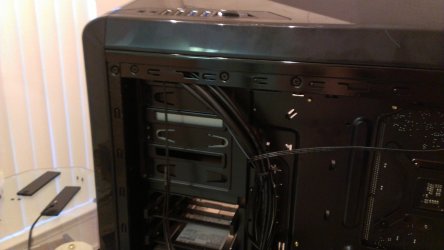
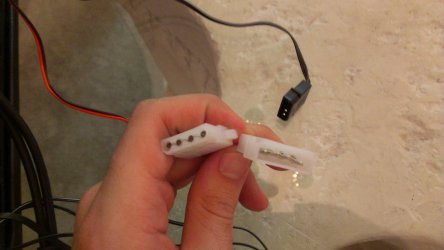
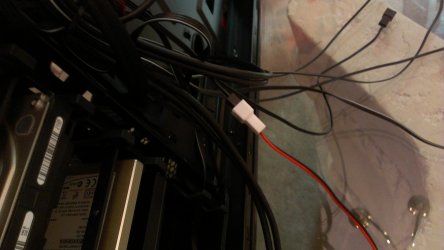
I have extra cabling coming from the top of my case where the fan control, usb 2.0/3.0, audio and mic jacks are. There are a total of six. I do not know where these are plugged in to. I think they plug in to my PSU because there isn't a place on my motherboard for a connection of that type. The guy from frys had to use a Molex adapter to hook a fan up to my PSU. I'm thinking i'll have to do the same with these ones. But what the heck do they do ?

I really wish there was someone reading this that's had experience with this specific case =(

Here is the link to my case and all other relevant info. And yes, i've already submitted 2 trouble tickets.

The Phantom 410 case manual

Link to Phantom 410 Manufacturer page

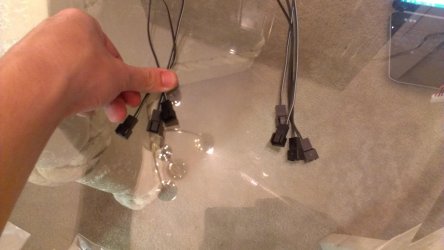
I just need to know where those six cables go and their purpose. here are pictures of them.
 

Attachments

  • IMAG0006.jpg
    IMAG0006.jpg
    477.5 KB · Views: 51
  • IMAG0007.jpg
    IMAG0007.jpg
    488.8 KB · Views: 40

My Computer My Computer

At a glance

Windows 7 Professional Version 6.1 Build 7601...Q66004GB TotalGeForce 9500GT =(
Computer type
PC/Desktop
Computer Manufacturer/Model Number
Dell Inspiron 530
OS
Windows 7 Professional Version 6.1 Build 7601 SP1
CPU
Q6600
Motherboard
IDK
Memory
4GB Total
Graphics Card(s)
GeForce 9500GT =(
Sound Card
Onboard
Monitor(s) Displays
Smaller than what i want
Screen Resolution
Not up to par
Hard Drives
Not an SSD
PSU
350 Watt or W/E this model comes with
Case
Dell Inspiron 530
Cooling
Factory
Keyboard
Logitech G510
Mouse
Logitech G500
Internet Speed
Eh, its okay.
Browser
Aviator.
Other Info
I want my old computer back.
The wires in the left picture appear to be 3 pin fan connectors. They plug into the fans wires. But somewhere there has to be a molex connector to power them. I am not familar with that case, but I am guessing it has a fan controller on it.

See if this will hel you. Newegg Phantom 410.

If you noticed when she is talking about the front panel connectors, she shows thee molex connector to power the fan controller. It plugs into a molex from the PSU. The fan connectors you showed plug into the fan cables and can then be controlled by the fan controller.

EDIT: I know this picture won't help much but it may. There is a decent review of the case. http://www.overclockers.com/nzxt-phantom-410

z.JPG
 
Last edited:

My Computers My Computers

  • At a glance

    Windows 11 ProRyzen 9 5900X32GB G Skill DDR4-3600EVGA RTX 3080 FTW 3 Ultra
    Computer type
    PC/Desktop
    Computer Manufacturer/Model Number
    ALWAYS UNDER CONSTRUCTION
    OS
    Windows 11 Pro
    CPU
    Ryzen 9 5900X
    Motherboard
    Asus X570 Crosshair Viii Hero
    Memory
    32GB G Skill DDR4-3600
    Graphics Card(s)
    EVGA RTX 3080 FTW 3 Ultra
    Sound Card
    On Board/Sennheiser PC37X Headset
    Monitor(s) Displays
    3 X Asus 27"
    Screen Resolution
    2560x1440
    Hard Drives
    2 X 1 TB NVME drives
    PSU
    EVGA 850
    Case
    Phanteks Eclipse P400A
    Cooling
    EVGA 280 AIO
    Keyboard
    Logitech G510s/ Logitech G13
    Mouse
    Logitech G502
    Internet Speed
    24/1
    Antivirus
    ESET/MBAM Pro/SAS Pro
    Browser
    Chrome/ Firefox/ Edge
  • At a glance

    Windows 11 ProIntel Ultra 9 288V32 GB LPDDR5X 8533
    Computer type
    Laptop
    System Manufacturer/Model Number
    Dell 16 Plus
    OS
    Windows 11 Pro
    CPU
    Intel Ultra 9 288V
    Memory
    32 GB LPDDR5X 8533
    Monitor(s) Displays
    16" Mini-LED HDR600 Touch 90 Hz
    Screen Resolution
    2560X1600
    Hard Drives
    1 TB NVME
The wires in the left picture appear to be 3 pin fan connectors. They plug into the fans wires. But somewhere there has to be a molex connector to power them. I am not familar with that case, but I am guessing it has a fan controller on it.

See if this will hel you. Newegg Phantom 410.

If you noticed when she is talking about the front panel connectors, she shows thee molex connector to power the fan controller. It plugs into a molex from the PSU. The fan connectors you showed plug into the fan cables and can then be controlled by the fan controller.

EDIT: I know this picture won't help much but it may. There is a decent review of the case. NZXT Phantom 410 Case Review | Overclockers

View attachment 223877

Yes, this case does have fan speed control at the top. The cables are all bundled together so i do not know exactly which one of them is the fan speed cabling... i see a cable with a connector that has red black and yellow wheres. There are two connections on one end, and the other picture shows it connected to another cable. one of the connectors has 4 prongs to connect in to something (male connector? not sure what its called) and another with something plugged in to it. The "male" connect wont connect to any of the cables i have on my PSU, so i'm guessing i will need a molex adapter?

The "Female" connect that you see in the picture was connected to the black cable u see on the table in the background.

Sorry if i'm not making sense. I'm kinda of a noob and i'm doing my best to learn. I didn't know that video existed so i am also in the process of checking it out.
 

Attachments

  • IMAG0008.jpg
    IMAG0008.jpg
    488.7 KB · Views: 17
  • IMAG0009.jpg
    IMAG0009.jpg
    476.8 KB · Views: 30

My Computer My Computer

At a glance

Windows 7 Professional Version 6.1 Build 7601...Q66004GB TotalGeForce 9500GT =(
Computer type
PC/Desktop
Computer Manufacturer/Model Number
Dell Inspiron 530
OS
Windows 7 Professional Version 6.1 Build 7601 SP1
CPU
Q6600
Motherboard
IDK
Memory
4GB Total
Graphics Card(s)
GeForce 9500GT =(
Sound Card
Onboard
Monitor(s) Displays
Smaller than what i want
Screen Resolution
Not up to par
Hard Drives
Not an SSD
PSU
350 Watt or W/E this model comes with
Case
Dell Inspiron 530
Cooling
Factory
Keyboard
Logitech G510
Mouse
Logitech G500
Internet Speed
Eh, its okay.
Browser
Aviator.
Other Info
I want my old computer back.
The picture of the molex connectors you are showing is of a male and a female connetor. I can't tell for sure, but if they are on the same wire, plug the male connector into a female from your PSU. Some molex connectors have both male/female on the same cable to allow you to daisy chain them together. A female connector gives power an male connector receives power. In the video watch the part where she is showing the front panel connectors. She shows a molex connector that provides power to the fan controller. Then the 3 fan connections that you plug fan wires into. That should be all you need to do to power and control the fans connected to the controller. I hope this didn't confuse you more.
 

My Computers My Computers

  • At a glance

    Windows 11 ProRyzen 9 5900X32GB G Skill DDR4-3600EVGA RTX 3080 FTW 3 Ultra
    Computer type
    PC/Desktop
    Computer Manufacturer/Model Number
    ALWAYS UNDER CONSTRUCTION
    OS
    Windows 11 Pro
    CPU
    Ryzen 9 5900X
    Motherboard
    Asus X570 Crosshair Viii Hero
    Memory
    32GB G Skill DDR4-3600
    Graphics Card(s)
    EVGA RTX 3080 FTW 3 Ultra
    Sound Card
    On Board/Sennheiser PC37X Headset
    Monitor(s) Displays
    3 X Asus 27"
    Screen Resolution
    2560x1440
    Hard Drives
    2 X 1 TB NVME drives
    PSU
    EVGA 850
    Case
    Phanteks Eclipse P400A
    Cooling
    EVGA 280 AIO
    Keyboard
    Logitech G510s/ Logitech G13
    Mouse
    Logitech G502
    Internet Speed
    24/1
    Antivirus
    ESET/MBAM Pro/SAS Pro
    Browser
    Chrome/ Firefox/ Edge
  • At a glance

    Windows 11 ProIntel Ultra 9 288V32 GB LPDDR5X 8533
    Computer type
    Laptop
    System Manufacturer/Model Number
    Dell 16 Plus
    OS
    Windows 11 Pro
    CPU
    Intel Ultra 9 288V
    Memory
    32 GB LPDDR5X 8533
    Monitor(s) Displays
    16" Mini-LED HDR600 Touch 90 Hz
    Screen Resolution
    2560X1600
    Hard Drives
    1 TB NVME
Back
Top