- Local time
- 9:07 AM
- Messages
- 16,790
You don't need to create one.
You want to open an existing one
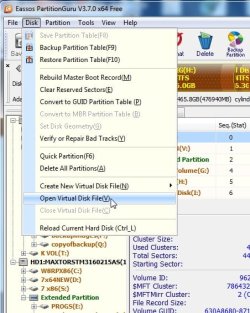
A borwse window will open -
browse to your vhd and it should mount
You can then rt click it and copy anything out - just like any other partition.
You could also make an image of it , like this:
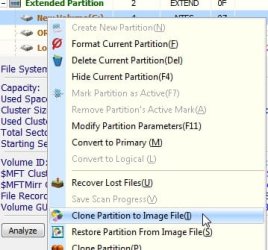
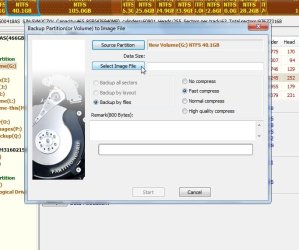
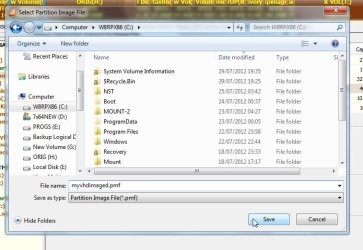
Call it any name you like , but you must use the .pmf extension.
I don't know if there is a size limit on the free version - there might be.
Try it and see - you have nothing to lose.
You want to open an existing one
A borwse window will open -
browse to your vhd and it should mount
You can then rt click it and copy anything out - just like any other partition.
You could also make an image of it , like this:
Call it any name you like , but you must use the .pmf extension.
I don't know if there is a size limit on the free version - there might be.
Try it and see - you have nothing to lose.
My Computers
-
At a glance
7 X64i5 84002x8gb 3200mhz- Computer type
- PC/Desktop
- OS
- 7 X64
- CPU
- i5 8400
- Motherboard
- gigabyte b365m ds3h
- Memory
- 2x8gb 3200mhz
- Hard Drives
- various
- PSU
- pure power 11 400w cm
- Case
- Coolermaster
- Cooling
- cryorig m9i
-
At a glance
7x64g54008gb ddr4 2400- Computer type
- PC/Desktop
- OS
- 7x64
- CPU
- g5400
- Motherboard
- ga b365m ds3h
- Memory
- 8gb ddr4 2400
- PSU
- xfx pro 450w