System Image Not Found on External USB HDD with Image as Root Folder

You don't need to create one.
You want to open an existing one
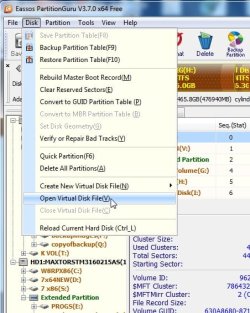
pg1.jpg

A borwse window will open -

browse to your vhd and it should mount


You can then rt click it and copy anything out - just like any other partition.

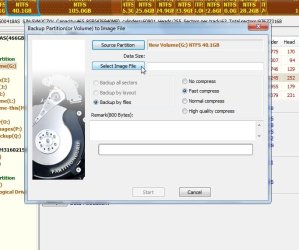
You could also make an image of it , like this:
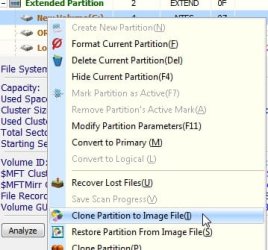

pg2.jpg

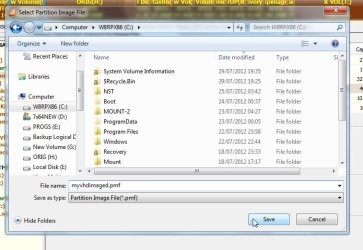
pg3.jpg

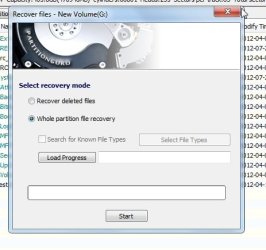
pg4.jpg


Call it any name you like , but you must use the .pmf extension.

I don't know if there is a size limit on the free version - there might be.

Try it and see - you have nothing to lose.
 

My Computers My Computers

  • At a glance

    7 X64i5 84002x8gb 3200mhz
    Computer type
    PC/Desktop
    OS
    7 X64
    CPU
    i5 8400
    Motherboard
    gigabyte b365m ds3h
    Memory
    2x8gb 3200mhz
    Hard Drives
    various
    PSU
    pure power 11 400w cm
    Case
    Coolermaster
    Cooling
    cryorig m9i
  • At a glance

    7x64g54008gb ddr4 2400
    Computer type
    PC/Desktop
    OS
    7x64
    CPU
    g5400
    Motherboard
    ga b365m ds3h
    Memory
    8gb ddr4 2400
    PSU
    xfx pro 450w
Sorry, yes..create. And it did, with the same results as windows now. It mounts, but shows it as ~500GB of free space. No files show up. Bummer. Guess Windows managed to erase something important. Stupid, I should've known better than that, but I just figured since it was virtual it was safe!

This is on a 2TB Western Digital drive in a Sabrent powered enclosure, FYI.
 

My Computer My Computer

At a glance

Windows 7 Ultimate 64bit
OS
Windows 7 Ultimate 64bit
See if it can recover the partition - never tried it mounted vhd - but it might

pg5.jpg
 

My Computers My Computers

  • At a glance

    7 X64i5 84002x8gb 3200mhz
    Computer type
    PC/Desktop
    OS
    7 X64
    CPU
    i5 8400
    Motherboard
    gigabyte b365m ds3h
    Memory
    2x8gb 3200mhz
    Hard Drives
    various
    PSU
    pure power 11 400w cm
    Case
    Coolermaster
    Cooling
    cryorig m9i
  • At a glance

    7x64g54008gb ddr4 2400
    Computer type
    PC/Desktop
    OS
    7x64
    CPU
    g5400
    Motherboard
    ga b365m ds3h
    Memory
    8gb ddr4 2400
    PSU
    xfx pro 450w
Won't do it with this version. They want money $$$ How selfish they are!
Trial only lets you have 64KB recovery.
 

My Computer My Computer

At a glance

Windows 7 Ultimate 64bit
OS
Windows 7 Ultimate 64bit
Ther is one more thing you can try.

It depends if your installed windows has picked up the shadow volumes from your external.

Give shadowexplorer a whirl - you never know ShadowExplorer.com - Downloads

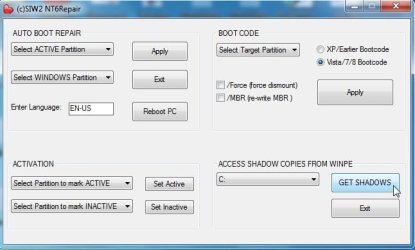
If that doesn't find them - I have written a little program that should hopefully pisk them up - you can copy stuff out if it finds and mounts them.

I made it for PE - but the shadow copy function works fine in Windows as well.

View attachment NT6Repairx86.zip

nt6rep.jpg

Dunno why I am bothering - he seems to have gone.
 

My Computers My Computers

  • At a glance

    7 X64i5 84002x8gb 3200mhz
    Computer type
    PC/Desktop
    OS
    7 X64
    CPU
    i5 8400
    Motherboard
    gigabyte b365m ds3h
    Memory
    2x8gb 3200mhz
    Hard Drives
    various
    PSU
    pure power 11 400w cm
    Case
    Coolermaster
    Cooling
    cryorig m9i
  • At a glance

    7x64g54008gb ddr4 2400
    Computer type
    PC/Desktop
    OS
    7x64
    CPU
    g5400
    Motherboard
    ga b365m ds3h
    Memory
    8gb ddr4 2400
    PSU
    xfx pro 450w
Won't do it with this version. They want money $$$ How selfish they are!
Trial only lets you have 64KB recovery.

You might be able to recover it using the partition recovery features in Partition Wizard. Free Partition Magic alternative, partition manager freeware, partition magic server, partition magic Windows 7 and free Partition Manager software for Windows 7/8/VISTA/XP/2000 and Windows Server 2003/2008/2000.

You would need the Windows version not the bootable disk.
 

My Computer My Computer

At a glance

Microsoft Windows 7 Home Premium 64-bit Servi...Intel(R) Core(TM) i3 CPU M 330 @ 2.13GHz8 GB DDR3Intel(R) HD Graphics
Computer type
Laptop
Computer Manufacturer/Model Number
Hewlett-Packard/G62-107SA Notebook
OS
Microsoft Windows 7 Home Premium 64-bit Service Pack 1
CPU
Intel(R) Core(TM) i3 CPU M 330 @ 2.13GHz
Motherboard
Hewlett-Packard 1425
Memory
8 GB DDR3
Graphics Card(s)
Intel(R) HD Graphics
Sound Card
Realtek High Definition Audio
Monitor(s) Displays
Builtin
Screen Resolution
1366 x 768 x 32 bits (4294967296 colors) @ 60 Hz
Hard Drives
250 GB SATA Hard Disk Drive 7200 rpm
2TB Seagate GoFlex USB 2 Drive
1TB Iomega Prestige USB 2 Drive
1.5TB Iomega Prestige USB 2 Drive (Samsung)
2TB WD MyBook Live NAS.
Mouse
Logitech Anywhere MX
Internet Speed
152 Mbs download 10 Mbs upload
Antivirus
Norton 360
Browser
Chrome
That is also worth a go.
 

My Computers My Computers

  • At a glance

    7 X64i5 84002x8gb 3200mhz
    Computer type
    PC/Desktop
    OS
    7 X64
    CPU
    i5 8400
    Motherboard
    gigabyte b365m ds3h
    Memory
    2x8gb 3200mhz
    Hard Drives
    various
    PSU
    pure power 11 400w cm
    Case
    Coolermaster
    Cooling
    cryorig m9i
  • At a glance

    7x64g54008gb ddr4 2400
    Computer type
    PC/Desktop
    OS
    7x64
    CPU
    g5400
    Motherboard
    ga b365m ds3h
    Memory
    8gb ddr4 2400
    PSU
    xfx pro 450w
Slightly off topic, but while some knowledgeable people are here, this episode made me realize that someone could clone my entire machine should they have access to to my external drive and were able to access the VHS file.

What encryption software, if any, are any of you using for your secure folders.
I equipped my external disk to which I image with a $10 remotely controlled electrical switch from Home Depot. With that I switch the disk(s) off when not in use for imaging or recovery.
 

My Computer My Computer

At a glance

Vista, Windows7, Mint Mate, Zorin, Windows 8from 1.6GHz Duo to i7
Computer Manufacturer/Model Number
HP, Dell, Gateway, Toshiba - 4 laptops and 2 desktops
OS
Vista, Windows7, Mint Mate, Zorin, Windows 8
CPU
from 1.6GHz Duo to i7
Monitor(s) Displays
2x HP w2207
Hard Drives
5x HDD, 7x SSD, 12x Externals
Keyboard
with trackball - no mices
Mouse
Trackball mice
Internet Speed
DSL 6000
I'd sure like to know what windows did to that .vhd file when I selected delet partition rather than detach.
The shadow explorer didn't see anything. the drive letter came up but no information would load from it.did the custom program. NT6 repair didn't see any shadow files either, but thanks for that effort.

Trying the partion wizard Kado recommended. Not sure how it works yet so trying to move through that now. Looking like maybe you have to download recovery plug ins in addition to the main program?
 

My Computer My Computer

At a glance

Windows 7 Ultimate 64bit
OS
Windows 7 Ultimate 64bit
Progress I guess. I had to mount the .vhd through windows again and Partition Wizard saw it but showed it as empty logical drive. Ran through partion recovery and it saw it and I guess it restored it. Drive changed from logical to primary and used space was as it should be. Within the program I can explore the root folders that were in the .vhd file, but I don't know what to do from here. Windows Disk Management still shows it as Unallocated. Also, when I try to explore through Partition Wizard into those root folders, it opens them and says loading, but it doesn't seem to load.

Looking forward to further input. Thanks
 

My Computer My Computer

At a glance

Windows 7 Ultimate 64bit
OS
Windows 7 Ultimate 64bit
Well ladies and gentlemen, I am back up and rocking although my method was certainly the exception and not the rule. I consider myself highly fortunate in the regard that I had my old hard drive, the one from which the original image was captured and then transplanted to my new hard drive.

I retrieved the old hard drive, installed it in an old laptop - hooked up my external and ran a new backup image (Or 2nd copy as it were).

Here's where things get a bit strange:
When I went back to my primary machine and ran the Microsoft Restore application, VIOLA! it immediately recognized not only this latest back-up, but also the old back-up (the one which I was originally attempting to install), and the "trick" back-up I ran yesterday.

The stranger part is that these were in exactly the same root folders which Windows had previously deposited them (F:\WindowsBackUpImage) so again, I cannot understand why Windows was unable to recognize the VHD and continually asked me to install a driver.

Be that as it may, I learned a valuable lesson the last 72 hours and will NEVER trust my back-up to Microsoft's Imagining Software ever again.
 

My Computer My Computer

At a glance

Windows 7 x32Intel Core Duo4GB
Computer Manufacturer/Model Number
Dell D820
OS
Windows 7 x32
CPU
Intel Core Duo
Memory
4GB
Congratulations Heist, but I'm still not so fortunate.

Partion Recovery did work, holy hell.
It recovered the partition, then I detached it in windows Disk Management.
I brought Disk Management back up and re-attached it and it shows used space and everything else.

So I've made progress...I'm back to my original problem I diverted from this morning....Access Denied.

What security settings do you think need changing to start?
 

My Computer My Computer

At a glance

Windows 7 Ultimate 64bit
OS
Windows 7 Ultimate 64bit
I use Windows Imaging as my primary imaging software and Macrium as a backup and to perform things Windows can't do.
Windows imaging has never let me down on 2 PCs with at least 30 image restores to existing and brand new HDDs. I never rely on restore points - I just reimage.

@Heist
If you restore an image from within Windows then your USB 3 drivers are already installed. If you restore from the System Repair Disk then you need to manually load your USB 3 drivers. Was this your problem??
 

My Computer My Computer

At a glance

Windows 7x64 Home Premium SP1Intel i7 2600kG.Skill Ripjaws (DDR3-1600) 2x4GBNvidia GeForce GTS 450; Intel HD Graphics 300...
Computer type
PC/Desktop
Computer Manufacturer/Model Number
Own build
OS
Windows 7x64 Home Premium SP1
CPU
Intel i7 2600k
Motherboard
ASUS P8Z68 Deluxe
Memory
G.Skill Ripjaws (DDR3-1600) 2x4GB
Graphics Card(s)
Nvidia GeForce GTS 450; Intel HD Graphics 3000(GT2+)
Monitor(s) Displays
Dell Ultrasharp IPS panel U2311H, Samsung SyncMaster P2350
Screen Resolution
1920x1080
Hard Drives
Samsung 850 Pro SSD 256GB, Samsung SSD 840 120GB, Seagates 1TB Barracuda ST31000528AS x2
PSU
Seasonic M12II 520W
Case
Lian Li Lancool PC-K60
Cooling
Case: 1x120mm, 3x140mm CPU: Hyper 212+
Keyboard
Logitech MK520 (wireless)
Mouse
Logitech MK520
Internet Speed
6-7 Mbps
Antivirus
Norton Security Premium, Malwarebytes on 2 (MSE on 3rd PC)
Browser
FireFox
Other Info
Audio: Logitech Z523 2.1
@GAR,

well, that is progress.

Rt click the mounted image and see what it tells you about the drive - is it read only - what do the permissions say?
 

My Computers My Computers

  • At a glance

    7 X64i5 84002x8gb 3200mhz
    Computer type
    PC/Desktop
    OS
    7 X64
    CPU
    i5 8400
    Motherboard
    gigabyte b365m ds3h
    Memory
    2x8gb 3200mhz
    Hard Drives
    various
    PSU
    pure power 11 400w cm
    Case
    Coolermaster
    Cooling
    cryorig m9i
  • At a glance

    7x64g54008gb ddr4 2400
    Computer type
    PC/Desktop
    OS
    7x64
    CPU
    g5400
    Motherboard
    ga b365m ds3h
    Memory
    8gb ddr4 2400
    PSU
    xfx pro 450w
@Heist
If you restore an image from within Windows then your USB 3 drivers are already installed. If you restore from the System Repair Disk then you need to manually load your USB 3 drivers. Was this your problem??

MJF -
I attempted both methods, both from within Windows and the System Recovery Disk. Either way I was met with the Recovery environment asking me to install a driver from the same directory and external it was already mapped to.

Very queer and enormously frustrating.
 

My Computer My Computer

At a glance

Windows 7 x32Intel Core Duo4GB
Computer Manufacturer/Model Number
Dell D820
OS
Windows 7 x32
CPU
Intel Core Duo
Memory
4GB
Very queer and enormously frustrating.
I can understand the frustration. I know some people lose confidence in Windows imaging. The good thing is there are alternatives like Macrium.

I mainly use WD USB 3 externals. Another issue is that sometimes these HDDs "go to sleep". I unplug the power and USB then reattach and it's back to life and images recognized.
 

My Computer My Computer

At a glance

Windows 7x64 Home Premium SP1Intel i7 2600kG.Skill Ripjaws (DDR3-1600) 2x4GBNvidia GeForce GTS 450; Intel HD Graphics 300...
Computer type
PC/Desktop
Computer Manufacturer/Model Number
Own build
OS
Windows 7x64 Home Premium SP1
CPU
Intel i7 2600k
Motherboard
ASUS P8Z68 Deluxe
Memory
G.Skill Ripjaws (DDR3-1600) 2x4GB
Graphics Card(s)
Nvidia GeForce GTS 450; Intel HD Graphics 3000(GT2+)
Monitor(s) Displays
Dell Ultrasharp IPS panel U2311H, Samsung SyncMaster P2350
Screen Resolution
1920x1080
Hard Drives
Samsung 850 Pro SSD 256GB, Samsung SSD 840 120GB, Seagates 1TB Barracuda ST31000528AS x2
PSU
Seasonic M12II 520W
Case
Lian Li Lancool PC-K60
Cooling
Case: 1x120mm, 3x140mm CPU: Hyper 212+
Keyboard
Logitech MK520 (wireless)
Mouse
Logitech MK520
Internet Speed
6-7 Mbps
Antivirus
Norton Security Premium, Malwarebytes on 2 (MSE on 3rd PC)
Browser
FireFox
Other Info
Audio: Logitech Z523 2.1
If you are using a USB 3.0 drive, or any other, I suggest you switch it to a 2.0 port when not in Windows. On some boards, the USB 3.0 ports are inoperative if not in Windows. You may get a driver to load, but moving the plug is just so easy.
 

My Computer My Computer

At a glance

Windows 7 x64i7-2600K8 GGTX 480
Computer Manufacturer/Model Number
Homebuilt
OS
Windows 7 x64
CPU
i7-2600K
Motherboard
Asus P8Z77-v Pro
Memory
8 G
Graphics Card(s)
GTX 480
Sound Card
Onboard
Monitor(s) Displays
LG W2753V
Screen Resolution
1920x1080
Hard Drives
Crucial M4 128 G SSD
If you are using a USB 3.0 drive, or any other, I suggest you switch it to a 2.0 port when not in Windows. On some boards, the USB 3.0 ports are inoperative if not in Windows. You may get a driver to load, but moving the plug is just so easy.
You wouldn't want to buy those boards.
If you have a USB 3 ext HDD drive then moving back to USB 2 will be painfully slow. To make and restore an image to a USB 3 takes me ~10minutes using a USB 2 it takes ~30min+.
It is easy to check if you can connect to the USB 3 port and load the drivers. Boot from the system repair disk and
http://www.sevenforums.com/backup-r...p-via-usb-3-0-external-drive.html#post1640570
A similar process for Macrium if you haven't incorporated the USB 3 drivers into the Recovery pe disk.
 

My Computer My Computer

At a glance

Windows 7x64 Home Premium SP1Intel i7 2600kG.Skill Ripjaws (DDR3-1600) 2x4GBNvidia GeForce GTS 450; Intel HD Graphics 300...
Computer type
PC/Desktop
Computer Manufacturer/Model Number
Own build
OS
Windows 7x64 Home Premium SP1
CPU
Intel i7 2600k
Motherboard
ASUS P8Z68 Deluxe
Memory
G.Skill Ripjaws (DDR3-1600) 2x4GB
Graphics Card(s)
Nvidia GeForce GTS 450; Intel HD Graphics 3000(GT2+)
Monitor(s) Displays
Dell Ultrasharp IPS panel U2311H, Samsung SyncMaster P2350
Screen Resolution
1920x1080
Hard Drives
Samsung 850 Pro SSD 256GB, Samsung SSD 840 120GB, Seagates 1TB Barracuda ST31000528AS x2
PSU
Seasonic M12II 520W
Case
Lian Li Lancool PC-K60
Cooling
Case: 1x120mm, 3x140mm CPU: Hyper 212+
Keyboard
Logitech MK520 (wireless)
Mouse
Logitech MK520
Internet Speed
6-7 Mbps
Antivirus
Norton Security Premium, Malwarebytes on 2 (MSE on 3rd PC)
Browser
FireFox
Other Info
Audio: Logitech Z523 2.1
I'm not sure where to start with the security questions.
My error is: J:\ not accessible. Access Denied.
When going through my external drive and start with the Office folder in the root of the drive.
Office: Attributes; read only Security; Everyone full control
WindowsImageBackup: Attributes; read only Security; Administrators/Everyone full control
Office: Attributes; Read only Security; Administrators/Everyone full control
Backup 2012-05-05 030014: Attributes; read only Security; Administrators/Everyone full control
.VHD file: Attributes; nothing checked Security; Everyone; Full control

There is a user in the folders; WindowsImageBackup through Backup 2012-05-05 030014 that is strange also has full control. The user is ; S-1-5-21-4269836154-2317595803-432792064-1001 The icon next to it is a person with a red question mark. Anyone have anything like this at all ever?
 

My Computer My Computer

At a glance

Windows 7 Ultimate 64bit
OS
Windows 7 Ultimate 64bit
It appears the user S-1-5-21 is some kind of security id (SID)from windows. Thought maybe it had something to do with a virus but it appears okay. FYI
 

My Computer My Computer

At a glance

Windows 7 Ultimate 64bit
OS
Windows 7 Ultimate 64bit
Back
Top